Vovsoft Subtitle Translator: Translate SRT, VTT and MKS Files, Timings Intact
Subtitle Translator is a $19 Windows program from Vovsoft that translates SRT, VTT and MKS subtitle files into more than 100 languages, keeping each line's timing, and lets you fix the result by hand. The $19 is a one-time lifetime license, but the translating itself is done by an engine you have to set up: Argos Translate offline or Microsoft Azure online.
When a film or lecture only has subtitles in the wrong language, pasting a file into a web translator usually breaks the numbering and timestamps. This keeps the structure and translates only the words.
Quick facts
- Version: 3.0, released February 25, 2026
- Developer: Vovsoft, the software company of Fatih Ramazan Çıkan in Turkey
- Platform: Windows 11, 10, 8/8.1 and 7, 32-bit and 64-bit. No Mac or Linux version
- Subtitle formats: SRT, VTT and MKS
- Engines: Argos Translate (offline, 30+ languages, needs Python) or Microsoft Azure (online, 100+ languages, your own API key)
- Editions: installer (3.82 MB) and portable (2.73 MB), one license for both
- Price: $19, one-time payment, lifetime license with free updates
- Trial: free to try and it translates on screen, but exporting the result needs a license, and commercial use isn't allowed
- Refunds: no money-back guarantee; refunds are at the vendor's discretion, mainly for accidental orders
- What we checked: installer file version 3.0.0.0 (4,012,008 bytes) with a valid digital signature, downloaded from the vendor and read without running it; checkout price $19.00 with no auto-renewal on the order page on November 9, 2026. We didn't translate a test file or judge translation quality
Download Free TrialBuy Now
Overview
Subtitle Translator shows the original file on the left and the translation on the right, line by line, with the numbers and timecodes in both columns. You choose the From and To languages at the top, a button swaps them, and a toolbar opens the file, saves it, opens Settings and starts the translation.
Vovsoft has kept the engine list current. IBM Watson support was removed in version 2.6 (January 2025) after IBM discontinued that service, offline Argos Translate arrived in 2.3 (October 2024), and version 3.0 updated the recommended Python version for it.
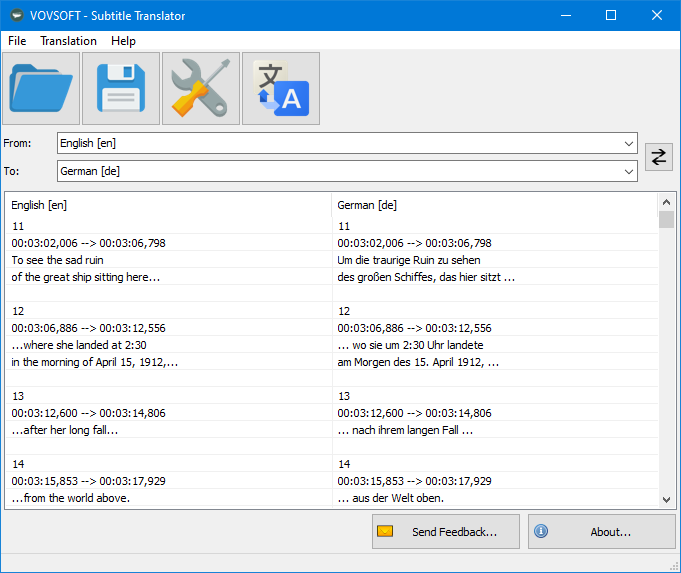
The main window translating an English SRT into German, with the numbering and timecodes kept in both columns.
Features
Translates text and leaves the timecodes alone
Subtitle Translator keeps each entry's number and start and end times and replaces only the dialogue, so the new file still lines up with the video. It reads SRT, the common movie format, VTT, used by YouTube and Zoom transcripts, and MKS Matroska subtitles.
An offline engine for private files
Subtitle Translator can use Argos Translate, which runs on your own computer and covers more than 30 languages. It needs Python installed (Vovsoft recommends 3.12.10), installs a base library of about 1 GB the first time you translate, and downloads language packs as needed. Vovsoft says it is slower than online APIs and its quality is not as good.
Azure for 100+ languages
Subtitle Translator also connects to Microsoft Azure Cognitive Services with your own API key and region. Vovsoft says Azure can translate up to 2,000,000 characters a month free, though Microsoft may ask for a credit card and it isn't available everywhere.
Fix lines by hand, or retranslate some
Subtitle Translator lets you edit any row by double-clicking it or through the right-click menu, and you can select just a few rows and retranslate only those, which is handy when one scene comes out wrong.
Benefits
- One-time cost. $19 once, and Azure's free allowance covers most personal use.
- Side-by-side review. You can read the original against the translation before saving.
- A small download. Under 4 MB for the program itself.
Real-World Uses
- Foreign films. Turn the English SRT you have into your own language.
- Course videos. Translate VTT transcripts from recorded lectures or Zoom calls.
- YouTube creators. Produce translated caption files for a video.
- A pair with speech recognition. Generate a subtitle file with a tool such as Vovsoft's Speech to Subtitle Converter, then translate it here.
Who It's For, and Who Should Skip It
Subtitle Translator suits Windows users who translate subtitle files regularly and are comfortable creating an Azure key or installing Python.
Skip it if you want something that works the moment it's installed: neither engine does. Skip it too if you need polished professional subtitles, since machine translation still needs a human pass, or if you need Mac support.
Usage Guide
- Install Subtitle Translator or unzip the portable edition.
- Pick an engine. For Azure, create a Translator resource in the Azure portal and copy a key and the region into Settings. For Argos, install Python 3.12.10 and restart the program.
- Open or drag in your SRT, VTT or MKS file.
- Choose the From and To languages.
- Click the translate button. With Argos, the first run downloads about 1 GB, so give it time.
- Double-click any line to correct it, then save the file with a licensed copy.
Before you buy
- The trial can't export. You can see the translation on screen, but saving the file needs a license.
- You need an engine. Azure means an account and possibly a credit card, and it may not be available in some countries, such as China. Argos means installing Python.
- No refund if you change your mind. Vovsoft's policy is no refunds in general because a trial is available, with exceptions at its discretion, and PayPro Global has the final say on orders placed there.
- One license, one person. It can go on several of your own PCs. A business with multiple users needs more licenses.
Where it falls short
- No project saving. A buyer pointed out that reopening a file starts from scratch, so finish a job in one sitting or save the output.
- Setup is the hurdle. Vovsoft's how-to page, rated 3.7 out of 5, warns that Azure may require a credit card and may not be available in some countries such as China and Taiwan, and Argos needs Python installed first.
- Machine quality. Neither engine understands jokes or context the way a person does, and Vovsoft itself says Argos is the weaker of the two.
- English interface only. The program's own menus aren't translated.
What Users Say
Vovsoft's product page showed 4.5 out of 5 from 4 reviews, and its separate how-to page showed 3.7 out of 5 from 15 ratings. Across all its products, Vovsoft's Trustpilot profile showed 4.6 out of 5 from 410 reviews on November 9, 2026.
Customer review on the vendor's page
Anonymous User: "The application is simple and easy to use. But no feature to save my project, so every time I reopen my srt file, it back to square one. There’s workaround for this, but it’s quite a hassle on its own. Hopefully the next update will add feature to save projects."
Feedback is limited. The one review on the product page calls it easy to use, and it criticizes the missing project save.
Comparisons
Subtitle Translator vs free online subtitle translators
Web tools need no setup and suit one file, but you upload the text and usually face size limits. Subtitle Translator costs $19, keeps a side-by-side editor and can stay fully offline with Argos.
Subtitle Translator vs Subtitle Edit
Subtitle Edit is a free, full subtitle editor that can also send text to translation services. If you already use it, you may not need this. Subtitle Translator is the narrower, simpler option for someone who only wants translated files.
Subtitle Translator vs Vovsoft Batch Translator
Vovsoft's Batch Translator handles lists of general text rather than subtitle files. Choose Subtitle Translator when timecodes must survive.
Editions and Pricing
| Edition | Price | License | Size |
|---|
| Installer | $19 at checkout | Lifetime, free updates | 3.82 MB |
| Portable | Same license | Lifetime, free updates | 2.73 MB |
FAQs
Does Subtitle Translator work without internet?
Subtitle Translator works offline with Argos Translate once Python, the base library and the language packs are installed. Azure needs a connection.
Do I have to pay Microsoft to use Subtitle Translator?
Subtitle Translator itself is $19, and Vovsoft says Azure's free tier covers up to 2,000,000 characters a month. Past that, Microsoft's own pricing applies.
Can Subtitle Translator save ASS or SUB files?
Subtitle Translator lists SRT, VTT and MKS only. Convert other formats first in a subtitle editor.
Does Subtitle Translator support IBM Watson?
Subtitle Translator dropped IBM Watson in version 2.6 because IBM discontinued the service. Azure and Argos are the current engines.
Can I use Subtitle Translator commercially?
Subtitle Translator's license allows commercial use, while the trial does not.
Is Subtitle Translator a subscription?
Subtitle Translator is a one-time $19 purchase. The license doesn't expire and includes future updates.
System Requirements
- Windows 11, 10, 8/8.1 or 7, 32-bit or 64-bit
- 3.82 MB for the installer or 2.73 MB for the portable edition
- For Argos: Python (3.12.10 recommended) and about 1 GB for the base library
- For Azure: an internet connection and your own API key
Conclusion
Subtitle Translator is worth $19 if you translate subtitle files often and don't mind setting up an engine once. The one reason to buy it is a side-by-side editor that keeps timecodes and lets you stay offline. The main reason not to is that it does nothing until you set up an engine, and the free trial can't save the result. Confirm that an engine works for your languages in the trial before paying.
Download Free TrialBuy Now