Vovsoft Bulk QR Code Generator: Make Hundreds of QR Codes Offline in One Go
Bulk QR Code Generator is a $19 Windows program from Vovsoft that turns a list of text, contacts or Wi-Fi details into a folder of QR code images, entirely offline. The $19 is a one-time lifetime license, with no per-code fee or account.
If you're labeling 2,000 serial numbers or giving every employee a contact card, an online generator that makes one code at a time wastes your afternoon, and it means pasting your data into someone else's website.
Quick facts
- Version: 2.6, released April 14, 2026
- Developer: Vovsoft, the software company of Fatih Ramazan Çıkan in Turkey
- Platform: Windows 11, 10 and 8/8.1, 32-bit and 64-bit. No Mac or Linux version
- Code types: text, multi-line, Wi-Fi, vCard, email, phone, SMS, WhatsApp, geolocation
- Output: PNG, JPEG, GIF or BMP images
- Editions: installer (10.26 MB) and portable (11.42 MB), one license for both
- Price: $19, one-time payment, lifetime license with free updates
- Trial: free to try; creates codes, but unlimited saving, the command line and commercial use need a license, and it shows a nag screen
- Refunds: no money-back guarantee; refunds are at the vendor's discretion, mainly for accidental orders
- What we checked: installer file version 2.6.0.0 (10,759,120 bytes) with a valid digital signature, downloaded from the vendor and read without running it; checkout price $19.00 with no auto-renewal on the order page on November 9, 2026. We didn't generate or scan test codes
Download Free TrialBuy Now
Overview
Bulk QR Code Generator shows your entries in a list on the left and a live preview of the selected code on the right. Below are the image size and output format, with Save single image and Save all to folder buttons. Color, encoding and margin are in the top menus.
Vovsoft keeps adding to it. Logos, vCard import from VCF and CSV, and custom output filenames came in 2.0 (December 2024), and geolocation, email, phone, SMS and WhatsApp codes in 2.4 (December 2025).
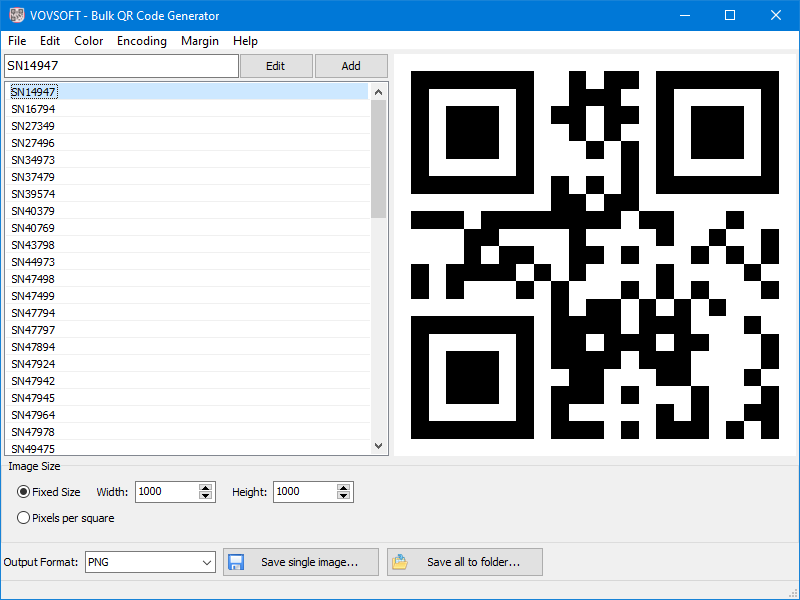
The main window: a list of serial numbers, a preview of the selected code, 1000 x 1000 fixed size, PNG output and Save all to folder.
Features
One code per line, saved in one click
Bulk QR Code Generator reads a text file and makes one code per line. Save all to folder writes the whole batch as separate images, so a list of serial numbers becomes a folder of files ready for a label printer.
Your logo in the middle
Bulk QR Code Generator can place a transparent PNG in the center of every code and lets you change the logo's ratio. Vovsoft recommends staying under 30%, because QR error correction only tolerates so much covered area.
Wi-Fi and contact cards
Bulk QR Code Generator has forms for Wi-Fi networks (SSID, password, encryption) and vCards, so you don't need to know the underlying format. Contacts can be loaded in bulk from a VCF or CSV file.

The Wi-Fi form: SSID, password, hidden-network option and WPA/WPA2 or WEP encryption.
Filenames that mean something
Bulk QR Code Generator's Customize Output Filename option builds names from keywords: a sequence number, the code's text, or a vCard's full, first, middle or last name. A batch can come out as named files rather than an anonymous sequence.
Offline by design
Bulk QR Code Generator makes the codes on your PC, and Vovsoft says no QR code information is sent to the internet. That matters for staff contact details, Wi-Fi passwords or internal asset numbers.
Command line for automation
Bulk QR Code Generator's licensed version takes command line parameters, including width and height, so another script or system can produce codes without anyone opening the window.
Benefits
- Flat cost. $19 once instead of a monthly plan priced by the number of codes.
- Nothing expires. The codes are plain images holding the data itself, and they don't depend on a service staying online.
- Print-ready sizes. You set the exact pixel size for labels or posters.
Real-World Uses
- Product and asset labels. Turn a serial number list into one image per item.
- Staff business cards. Load a CSV of employees and generate one vCard code each, named after the person.
- Guest Wi-Fi signs. Make a code per location so visitors can join without typing a password.
- Event or marketing material. Produce a batch of branded codes with your logo in the center.
Who It's For, and Who Should Skip It
Bulk QR Code Generator suits small businesses, warehouses, schools and anyone else who needs many QR codes at once on a Windows PC and wants the data kept local.
Skip it if you need only a handful of codes, since a free website can do that. Skip it too if you need scan tracking or the ability to change where a printed code points: the codes hold their data directly, so a dynamic QR service is the right kind of tool. There is no Mac version, and designers who need vector output should note that it saves image formats only.
Usage Guide
- Install Bulk QR Code Generator or unzip the portable edition.
- Use File > Load to open a text file, or type an entry and click Add. The dropdown next to Add has the Wi-Fi, vCard and other forms.
- Set color, encoding and margin from the menus, and the image size at the bottom.
- Add a logo if you want one, keeping it below 30%.
- Choose the output format, and set Customize Output Filename if you want named files.
- Click Save all to folder, then test-scan a few codes before you print them all.
Before you buy
- The trial limits saving and doesn't allow commercial use, so plan on a license for real batches.
- No refund if you change your mind. Vovsoft's policy is no refunds in general because a trial is available, with exceptions at its discretion, and PayPro Global has the final say on orders placed there.
- One license, one person. It can go on several of your own PCs. A business with multiple users needs more licenses.
Where it falls short
- Static codes only. There are no scan statistics, and a printed code can't be redirected afterward.
- Image formats only. PNG, JPEG, GIF and BMP, with no SVG or PDF output listed.
- It only generates. Reading codes is a separate Vovsoft program, QR Code And Barcode Reader.
What Users Say
Vovsoft's page for Bulk QR Code Generator showed 4.6 out of 5 from 5 reviews. Across all its products, Vovsoft's Trustpilot profile showed 4.6 out of 5 from 410 reviews.
Customer reviews on the vendor's page
toka.ro: "The QR code generator that i purchased it is very useful, very easy to use. For bulk use it is very good."
Paul Gallina: "Smooth experience, responsive dev. Software works like a charm"
Jimmy Jamz: "Easy Process, the Website was perfect, all together the process was easy and the program is great! Just wish for customization thats a wish though lol"
Comparisons
Bulk QR Code Generator vs online QR generators
Online generators are free for a few codes, and paid services add tracking and editable destinations. Bulk QR Code Generator costs $19 once, works without a connection and handles long lists, but it has no analytics.
Bulk QR Code Generator vs Vovsoft Bulk Barcode Generator
Vovsoft sells a separate Bulk Barcode Generator for traditional linear barcodes. Choose the QR program when you need more data in a code, such as a contact card, or when phones will do the scanning.
Editions and Pricing
| Edition | Price | License | Size |
|---|
| Installer | $19 at checkout | Lifetime, free updates | 10.26 MB |
| Portable | Same license | Lifetime, free updates | 11.42 MB |
FAQs
Do the QR codes from Bulk QR Code Generator expire?
QR codes from Bulk QR Code Generator don't expire on their own, because the data is stored in the code itself rather than on a server.
Can Bulk QR Code Generator make vCard codes from a CSV file?
Bulk QR Code Generator can load vCards from a CSV or VCF file and can name each output file after the contact.
Does Bulk QR Code Generator need an internet connection?
Bulk QR Code Generator creates the codes offline. Vovsoft says no QR code information is sent to the internet.
Can I run Bulk QR Code Generator from the command line?
Bulk QR Code Generator supports command line parameters in the licensed version, including width and height.
Can I use Bulk QR Code Generator codes commercially?
Bulk QR Code Generator's license allows commercial use, while the trial does not.
Is Bulk QR Code Generator a subscription?
Bulk QR Code Generator is a one-time $19 purchase. The license doesn't expire and includes future updates.
System Requirements
- Windows 11, 10 or 8/8.1, 32-bit or 64-bit
- 10.26 MB for the installer or 11.42 MB for the portable edition
Conclusion
Bulk QR Code Generator is worth $19 if you make QR codes in quantity and would rather keep the data on your own PC. The one reason to buy it is turning a long list into a named folder of images with no recurring cost. The main reason not to is that it can't track scans or change a code after printing. Test a small batch with your own scanner in the trial first.
Download Free TrialBuy Now