Vovsoft Batch URL Downloader: Download Thousands of Files From a Pasted List of Links
Batch URL Downloader is a $19 Windows program from Vovsoft that takes a list of URLs and saves every file to a folder in one job. Paste the links, pick a folder and click Download All. The $19 is a one-time lifetime license.
If someone has handed you a spreadsheet of 5,000 PDF links, clicking each one is out of the question and a full download manager can choke on the list. This program does the one thing you need.
Quick facts
- Version: 6.5, released October 28, 2026
- Developer: Vovsoft, the software company of Fatih Ramazan Çıkan in Turkey
- Platform: Windows 11, 10, 8/8.1, 7 and Vista, 32-bit and 64-bit. No Mac or Linux version
- Protocols: HTTP, HTTPS and FTP, with Google Drive and Dropbox links and HTTP or SOCKS proxies
- Editions: installer (5.6 MB) and portable (5.27 MB), one license for both
- Price: $19, one-time payment, lifetime license with free updates
- Trial: free to try; downloads your lists, but has no Scheduler, doesn't allow commercial use and shows a nag screen
- Refunds: no money-back guarantee; refunds are at the vendor's discretion, mainly for accidental orders
- What we checked: installer file version 6.5.0.0 (5,874,096 bytes) with a valid digital signature, downloaded from the vendor and read without running it; checkout price $19.00 with no auto-renewal on the order page on November 9, 2026. We didn't run a test download job
Download Free TrialBuy Now
Overview
Batch URL Downloader is a text box with a toolbar. Each line of the URL List is one link, Save to Folder sets the destination, and one big button starts everything. The status bar counts files downloading, failed, finished and total, and the log tabs record what happened.
It has been updated for years and is still moving. Google Drive links arrived in 5.6 (May 2024), per-line folders through CSV in 5.8, a download speed readout in 6.0, automatic retries for empty files on Cloudflare-protected sites in 6.1, and OpenSSL v3 for TLS 1.3 websites in 6.5.
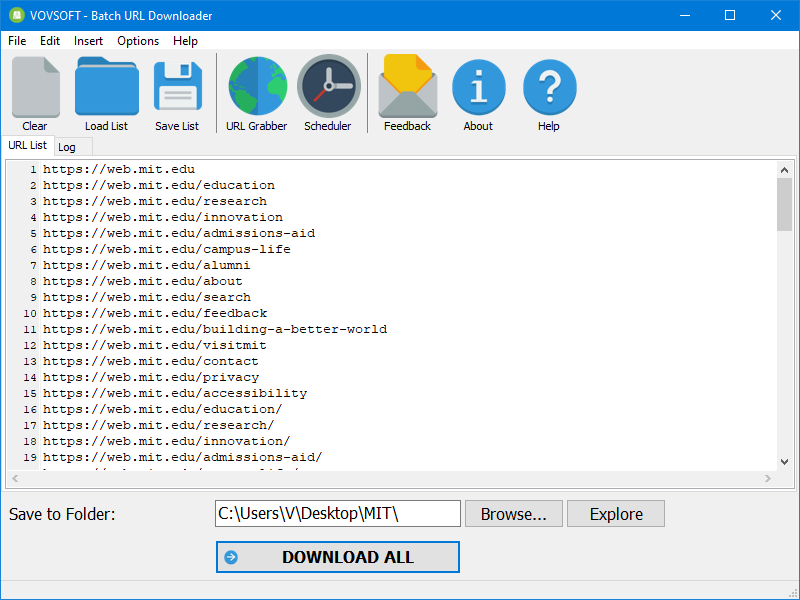
The main window: a numbered URL list, the Save to Folder box and Download All, with URL Grabber and Scheduler on the toolbar.
Features
Very long lists
Batch URL Downloader is built for volume. Vovsoft says current versions handle millions of URLs, and its own screenshot shows a list of 100,000 lines. You can paste the list or load it from a file.

The URL list scrolled to its last line: 100,000 entries in one job.
Single-threaded or multi-threaded
Batch URL Downloader can fetch files strictly one by one or several at a time, and you choose the number of threads. One at a time is kinder to a server that blocks heavy traffic, while multiple threads finish a list of small files much sooner.

A job in progress: the status bar reads Downloading 24, Error 0, Downloaded 13, Total 130.
Stop and resume large files
Batch URL Downloader can stop a very large download and continue it later, fetching only the remaining parts and merging the file automatically instead of starting from scratch.
URL Grabber finds the links for you
Batch URL Downloader's URL Grabber extracts links from any web page into your list. You can keep only links containing a certain text, such as ".pdf", and limit results to the same domain or subdomain.
A folder per link with CSV mode
Batch URL Downloader's Treat URL List as CSV option lets each line name its own output directory, separated from the URL by a comma, so a big job can be sorted into folders as it downloads.
Scheduler for later or repeated runs
Batch URL Downloader's Scheduler starts a list after a delay in seconds, can wait before each URL, and can run the whole list again and again. It is only in the licensed version.
Fine control for awkward servers
Batch URL Downloader lets you edit the user-agent string and the output filename format, go through an HTTP or SOCKS proxy, and read separate Download Log and Error Log tabs, so you can see exactly which links failed.
Benefits
- Less setup than a full download manager. No categories, browser extensions or queues to configure.
- Very light. The installer is under 6 MB, and a portable edition runs without installing.
- Failures are visible. The error log tells you which links to retry instead of leaving silent gaps.
Real-World Uses
- Research data. Fetch thousands of papers or datasets from a list exported by a database.
- Site migration. Download every image on an old site from a list of its URLs, keeping them in one folder.
- Scheduled reports. Re-download a set of published files on a repeating timer with the Scheduler.
- Client handover. Pull a spreadsheet's worth of assets into project folders using CSV mode.
Who It's For, and Who Should Skip It
Batch URL Downloader suits anyone who already has a list of direct file links and wants them on disk with no fuss, from researchers to site administrators.
Skip it if you want a tool that catches downloads from your browser, or if your links are streaming video pages rather than direct files, since it works from URLs of files. If you mainly move a few very large files on a fast connection, a dedicated download manager may serve you better, as one user below found. There is no Mac or Linux version.
Usage Guide
- Install Batch URL Downloader or unzip the portable edition.
- Paste your URLs into the URL List, one per line, or click Load List.
- Set Save to Folder with the Browse button.
- Optional: use URL Grabber to fill the list from a web page.
- Open Options to set threads, a proxy or the user agent if you need them.
- Click Download All, and watch the status bar.
- Check the Error Log afterward and retry any failed links.
Before you buy
- The trial doesn't include the Scheduler or commercial use, so a business can only evaluate it.
- No refund if you change your mind. Vovsoft's policy is no refunds in general because a trial is available, with exceptions at its discretion, and PayPro Global has the final say on orders placed there.
- Check you have permission. Mass downloading can break a site's terms or get your IP blocked, so use threads and delays sensibly.
- One license, one person. It can go on several of your own PCs. A business with multiple users needs more licenses.
Where it falls short
- Large files aren't its strength. One customer found files over 500 MB were no faster than a browser, so don't expect acceleration on big single files.
- It's a list tool, not a site ripper. URL Grabber collects links from a page you name, but it isn't built to mirror a whole site.
- It needs direct links. A page that plays a video isn't a file URL.
What Users Say
Vovsoft's page for Batch URL Downloader showed 4.5 out of 5 from 8 reviews, and MajorGeeks visitors scored it 5 out of 5 from 8 votes. Across all its products, Vovsoft's Trustpilot profile showed 4.6 out of 5 from 410 reviews.
Customer reviews on the vendor's page
Anonymous User: "I had to download 85,000 files from 85,000 different links. Your software were the best when it came to speed and stability."
Barry: "Batch URL Downloader works great! Especially for large batches with file sizes less than 500Mb. File sizes over 500Mb the downloader is not any faster than using a browser." He adds: "I previously used the Free Download Manager which took advantage of my fast internet download speeds (1000Mbps)." And: "I don't see where I can monitor download speeds or if there are adjustments which provide faster downloads". A speed readout has since been added, in version 6.0.
MajorGeeks
"This little utility is extremely simple; you only need to select the save to location, add the URLs to the text field, and then hit the Download All button."
Comparisons
Batch URL Downloader vs a full download manager
Free Download Manager and Internet Download Manager are built around browser capture and acceleration of individual files. Batch URL Downloader is built around the list. One reviewer above preferred it for 85,000 links and another preferred Free Download Manager for files over 500 MB, which sums up the trade-off.
Batch URL Downloader vs command-line tools
wget and curl are free and script well. Batch URL Downloader costs $19 and gives you a window, a status bar, error logs and a link grabber with no commands to learn.
Editions and Pricing
| Edition | Price | License | Size |
|---|
| Installer | $19 at checkout | Lifetime, free updates | 5.6 MB |
| Portable | Same license | Lifetime, free updates | 5.27 MB |
FAQs
How many URLs can Batch URL Downloader handle?
Batch URL Downloader supports millions of URLs in current versions, according to Vovsoft. Versions before 4.0 topped out at several tens of thousands.
Can Batch URL Downloader download from Google Drive and Dropbox?
Batch URL Downloader supports Google Drive and Dropbox links, a feature Vovsoft lists for the current version.
Does Batch URL Downloader work with FTP?
Batch URL Downloader supports FTP as well as HTTP and HTTPS.
Can Batch URL Downloader save files to different folders?
Batch URL Downloader can do that with its Treat URL List as CSV option, where each line holds a URL, a comma and the output directory.
Is Batch URL Downloader a subscription?
Batch URL Downloader is a one-time $19 purchase. The license doesn't expire and includes future updates.
Can I use Batch URL Downloader at work with the trial?
Batch URL Downloader's trial doesn't allow commercial use, so work use needs a license.
System Requirements
- Windows 11, 10, 8/8.1, 7 or Vista, 32-bit or 64-bit
- 5.6 MB for the installer or 5.27 MB for the portable edition
- Enough free disk space for the files you download
Conclusion
Batch URL Downloader is worth $19 if you regularly have long lists of direct links to fetch. The one reason to buy it is that it handles very large lists with almost no setup. The main reason not to is that it won't speed up individual big files or catch downloads from your browser, where a full download manager does better. Try the trial on a real list first, since refunds are not routine.
Download Free TrialBuy Now