Vovsoft Speech to Subtitle Converter: Offline SRT and VTT Subtitles From Audio and Video
Speech to Subtitle Converter is a $19 Windows program from Vovsoft that listens to your audio and video files and writes time-stamped subtitles or a transcript, using OpenAI's Whisper AI running on your own PC. There is no API key, no upload and no per-minute fee. The $19 is a one-time lifetime license.
If you've got a lecture recording, a stack of YouTube videos or a confidential interview that needs captions, typing them by hand takes hours and cloud captioning means handing the file to someone else. This tool does the job on your own machine.
Quick facts
- Version: 2.5, released September 9, 2026
- Developer: Vovsoft, the software company of Fatih Ramazan Çıkan in Turkey
- Platform: Windows 11 and 10, 64-bit only. No Mac or Linux version
- Engine: offline Whisper AI with FFmpeg, on CPU or GPU
- Input: MP3, FLAC, WAV, WMA, M4A, OGG, MP4, WEBM, MKV, AVI, WMV, TS, MOV
- Output: SRT, VTT, JSON or plain text
- Editions: installer (146.83 MB) and portable (166.63 MB), one license for both
- Price: $19, one-time payment, lifetime license with free updates
- Trial: free to try; creates subtitles but leaves out the Premium AI models and commercial use, and shows a nag screen
- Refunds: no money-back guarantee; refunds are at the vendor's discretion, mainly for accidental orders
- What we checked: installer file version 2.5.0.0 (153,968,920 bytes) with a valid digital signature, downloaded from the vendor and read without running it; checkout price $19.00 with no auto-renewal on the order page on November 9, 2026. We didn't transcribe a test file, so accuracy and speed aren't something we measured
Download Free TrialBuy Now
Overview
Speech to Subtitle Converter is one window. You add files or whole folders to a list on the left, and on the right you choose the output type, the maximum line length, the queue length, the AI model, the hardware and the output folder. Press Convert and each file gets its own result in the list.
The important history is the switch in version 2.0, released July 7, 2026. Before it, the program sent audio to the Replicate cloud service and needed a paid API key. Since then it has run offline on your own hardware, with support for the Large Turbo model added in 2.4. Some reviews and download-site descriptions still describe the old cloud design, so don't let them confuse you.
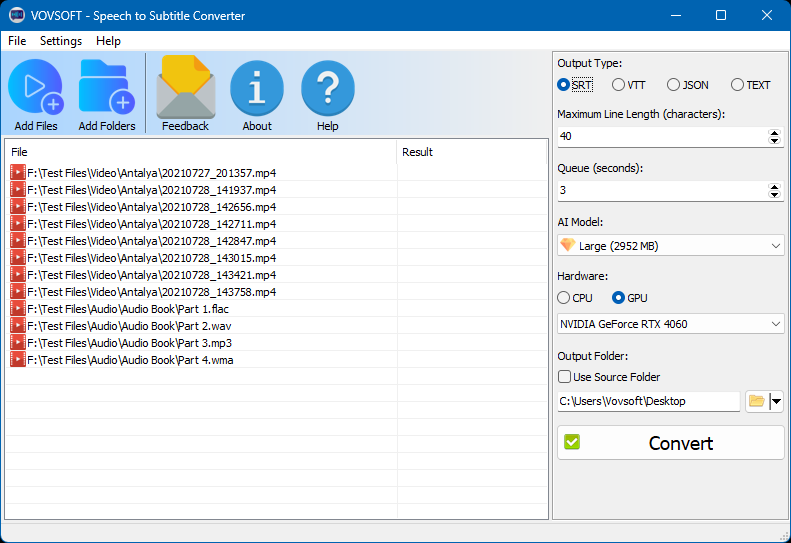
The main window: eight MP4 files and four audio files in one batch, SRT output, 40 characters per line, the Large (2952 MB) model with a gem icon, and an NVIDIA GeForce RTX 4060 selected.
Features
Transcription that stays on your PC
Speech to Subtitle Converter runs the Whisper model locally, so audio and video don't leave your computer and there is no per-minute charge. For anything covered by an NDA, such as legal interviews or medical dictation, that is the main reason to pick a local tool over a web service.
Subtitles straight from video
Speech to Subtitle Converter reads the speech directly out of MP4, WEBM, MKV, AVI, WMV, TS and MOV files, with FFmpeg built in, so you don't need a separate step to extract the audio first.
Four output formats
Speech to Subtitle Converter saves SRT for video players and editors, VTT for web players, JSON with timestamps and segments for developers, and plain text for notes and articles. The text is saved as UTF-8 with a byte order mark by default, and the Encoding setting added in 2.3 lets you change that.
Batch conversion of files and folders
Speech to Subtitle Converter takes a whole list. Vovsoft's own example mixes eight videos and an audiobook in four different audio formats in a single run, each producing its own subtitle file in the output folder or next to the source file.
A choice of Whisper models and hardware
Speech to Subtitle Converter lets you trade speed for accuracy. Tiny and Base are the fastest, Small and Medium are the everyday middle, and Large is the most accurate but needs more memory or VRAM. The Hardware panel switches between CPU and a GPU, and Vovsoft says GPU acceleration speeds up transcription dramatically.
Line length and timing controls
Speech to Subtitle Converter's Maximum Line Length defaults to 40 characters for readable captions. The Queue setting, in seconds, changes how speech is broken up: shorter values give tighter subtitle breaks, and longer ones merge phrases for slower speech. Version 2.5 also filters out known Whisper text artifacts automatically.
Benefits
- A fixed cost. Pay once rather than by the minute, which matters if you caption regularly.
- Privacy by design. Nothing has to be uploaded to get a transcript.
- Subtitles you can edit. SRT and VTT are plain files that a subtitle editor or video editor opens directly.
Real-World Uses
- Caption a YouTube channel. Convert a folder of finished videos to SRT and upload the files with each video.
- Transcribe a lecture course. Run a semester of recordings overnight and search the text afterward.
- Handle confidential interviews. Get a transcript without sending the recording to a third party.
- Feed a translation. Generate SRT in the original language, then hand it to a subtitle translator.
Who It's For, and Who Should Skip It
Speech to Subtitle Converter suits video makers, teachers, journalists and small businesses on a Windows PC who want a simple, local way to get subtitles. A reasonably recent graphics card makes it much more pleasant.
Skip it if you're on a Mac, or on 32-bit Windows or anything older than Windows 10. It isn't a subtitle editor, so if you need to fine-tune timing, plan on a separate editing tool. If you only need a few short clips, a free Whisper front end or your video platform's automatic captions may be enough.
Usage Guide
- Install Speech to Subtitle Converter or unzip the portable edition.
- Click Add Files or Add Folders to load your audio and video.
- Choose the Output Type, such as SRT, and set the Maximum Line Length and Queue length.
- Pick a Whisper model and choose CPU or GPU. Start with a smaller model to judge speed.
- Choose an Output Folder, or tick Use Source Folder to save subtitles beside the originals.
- Click Convert, then proofread the result before you publish it.
Before you buy
- Test on your own PC first. Speed depends on your hardware, and Large models need much more memory. The Large model in Vovsoft's screenshot is listed at 2,952 MB.
- Check the trial's model list. The Premium AI models are only in the licensed version.
- No refund if you change your mind. Vovsoft's policy is no refunds in general because a trial is available, with exceptions at its discretion, and PayPro Global has the final say on orders placed there.
- One license, one person. It can go on several of your own PCs. A business with multiple users needs more licenses.
Where it falls short
- AI subtitles still need proofreading. Vovsoft's own changelog added a filter for known Whisper text artifacts, which tells you those artifacts happen. Names and technical terms are the first things to check.
- It creates subtitles but doesn't edit them. There is no timeline or waveform for correcting timing.
- It only recognizes; it doesn't translate. Translation is a separate job for another tool.
- Windows 10 or 11, 64-bit, only.
What Users Say
The current offline version of Speech to Subtitle Converter is only a few months old, so independent hands-on reviews of it are scarce. The page on Vovsoft's site showed 4.3 out of 5 from 12 ratings, and MajorGeeks visitors scored it 5 out of 5 from 3 votes.
MajorGeeks
The MajorGeeks write-up was written for the older cloud version. It praises the idea of captioning without manual typing, calling the program "a more efficient alternative to manual transcription", and it warned about the design of that time: "It's important to note that the application requires a valid URL for the audio file, as it does not support local media files on your computer, which may be seen as a limitation." Version 2.0 removed that limitation by moving to local processing.
Comparisons
Speech to Subtitle Converter vs Vovsoft Speech to Text Converter
Vovsoft's Speech to Text Converter is a separate $19 program aimed at getting text out of speech. Speech to Subtitle Converter is the one to choose when you need timestamps and subtitle files for video.
Speech to Subtitle Converter vs cloud captioning services
Cloud services need an upload and usually charge by the minute or by subscription. Speech to Subtitle Converter costs $19 once and keeps your files local, but the work happens on your own hardware, so a slow PC means a slow result.
Editions and Pricing
| Edition | Price | License | Build |
|---|
| Installer | $19 at checkout | Lifetime, free updates | 64-bit, 146.83 MB |
| Portable | Same license | Lifetime, free updates | 64-bit, 166.63 MB |
FAQs
Does Speech to Subtitle Converter need an internet connection?
Speech to Subtitle Converter doesn't need one during processing. Vovsoft says no API key, server upload or internet connection is required for the conversion itself.
Does Speech to Subtitle Converter work with an NVIDIA graphics card?
Speech to Subtitle Converter can use a dedicated NVIDIA GeForce card through its GPU option, and it also runs on the CPU on any supported Windows PC. Vovsoft says the GPU makes transcription much faster.
Which languages can Speech to Subtitle Converter transcribe?
Speech to Subtitle Converter recognizes speech in the languages Whisper supports. Vovsoft lists dozens by name, from Afrikaans and Arabic to Vietnamese and Welsh, and claims over 100 overall.
Can Speech to Subtitle Converter burn subtitles into a video?
Speech to Subtitle Converter creates separate subtitle files. It doesn't add them to the video picture, so you load the SRT or VTT in your video editor or player.
Is Speech to Subtitle Converter still a Replicate API program?
Speech to Subtitle Converter stopped depending on Replicate in version 2.0. It now runs the Whisper model on your own computer, and no Replicate account is needed.
What is the difference between the trial and the license for Speech to Subtitle Converter?
Speech to Subtitle Converter's trial creates subtitles but excludes the Premium AI models and commercial use and shows a nag screen. The $19 license removes those limits and includes lifetime updates.
System Requirements
- Windows 11 or 10, 64-bit
- 146.83 MB for the installer or 166.63 MB for the portable edition
- Enough memory or VRAM for the Whisper model you choose (Large needs the most)
- Optional: a dedicated NVIDIA GeForce graphics card for faster conversion
Conclusion
Speech to Subtitle Converter is worth $19 if you caption or transcribe regularly on a Windows PC and want the files to stay private. The one reason to buy it is a one-time price for local, batch Whisper transcription with a plain interface. The main reason not to is that speed and practical accuracy depend on your own hardware, and it won't help you correct the result. Run the trial on a real recording of yours before paying.
Download Free TrialBuy Now