Vovsoft AI Automator: Run AI Prompts on a Timer and Save Every Answer to a File
AI Automator is a $19 Windows program from Vovsoft that sends prompts to an AI model on a schedule or in a batch and writes the replies to a file. It works with local models through Ollama or LM Studio and with OpenAI, Claude and Gemini through your own API keys. The $19 is a one-time lifetime license, and you supply the model yourself.
If you paste the same text into a chatbot every morning, or feed it two hundred product photos one at a time, this is the small tool that takes over the pasting. You write the prompt once, pick a model and an output file, and walk away.
Quick facts
- Version: 1.5, released July 16, 2026 (first release April 16, 2026)
- Developer: Vovsoft, the software company of Fatih Ramazan Çıkan in Turkey
- Platform: Windows 11, 10, 8/8.1 and 7, 64-bit only. No Mac or Linux version
- Local models: Ollama, LM Studio and other OpenAI-compatible servers, with no API charges
- Cloud models: OpenAI, Anthropic Claude and Google Gemini, with your own paid API key
- Editions: installer (24.64 MB) and portable (30.9 MB), one license for both
- Price: $19, one-time payment, lifetime license with free updates
- Trial: free to try; the trial runs scheduled prompts but shows a nag screen and doesn't allow commercial use
- Refunds: no money-back guarantee; refunds are at the vendor's discretion, mainly for accidental orders
- What we checked: installer file version 1.5.0.0 (25,840,984 bytes), digitally signed by Fatih Ramazan Çıkan, downloaded from the vendor and read without running it; checkout price $19.00 with no auto-renewal on the order page on November 9, 2026. We didn't run scheduled tasks against a model
Download Free TrialBuy Now
Overview
AI Automator has four working tabs and a fifth for reading web pages. Home is where you pick a model, type a prompt, add images or audio files, choose an output file and press Run or Schedule. Models stores your connections, each with an API URL, key, model name, temperature, token limit and timeouts. Scheduled Tasks lists the jobs that repeat, and Queue shows every job with its status, elapsed time, model and output file. The Browser tab is an embedded Edge WebView2 window.
The product is young but moving quickly: six releases between April 16 and July 16, 2026. LM Studio support and the switch to a 64-bit program arrived in 1.1, automatic audio conversion through FFmpeg in 1.2, the Browser tab in 1.3, and batch processing of many image or audio files with one prompt in 1.5.
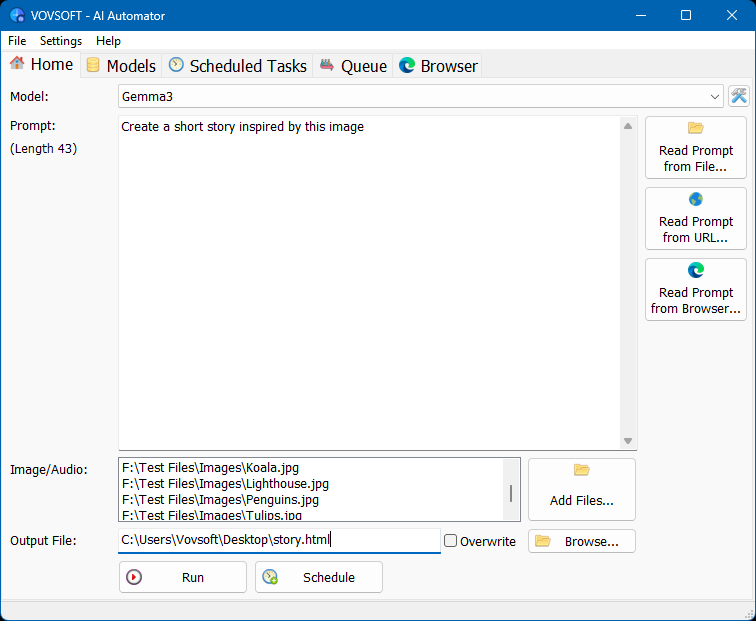
The Home tab: model picker, prompt box, the three "Read Prompt" buttons, four image files queued against one prompt, and the output file.
Features
Prompts that repeat on a timer
AI Automator runs a saved task every set number of minutes. Each task has a name, interval, model, prompt, optional input image and output file, and the list shows when each one last ran. With the options to start with Windows and minimize to the tray, it works in the background without a window open. A task has to be run by hand once before it can start running automatically, a rule Vovsoft added in version 1.2.

Scheduled Tasks: three saved jobs with their last run times, and "Categorize Messages" set to run every 30 minutes on Ollama.
Local models with no API bill
AI Automator connects to Ollama and LM Studio on your own PC, using your CPU or an NVIDIA, AMD or Intel GPU. Vovsoft says any OpenAI-compatible server also works. A job that fires every 30 minutes can cost real money on a metered cloud API, so running it locally changes the math, and your text doesn't leave the machine. Once the models are downloaded, Vovsoft says both programs keep working with the internet disconnected.

The Models tab: Ollama at 127.0.0.1:11434 with the gemma4:26b model, temperature 0.1, a 10,000 token limit and timeouts, alongside OpenAI, Claude and Gemini entries.
One queue for hundreds of jobs
AI Automator's Queue tab runs jobs one after another and shows Finished, Failed, Working or Waiting for each, with elapsed time, and the program displays CPU and RAM use there. A right-click menu stops a job. You can line up text prompts or apply one prompt to a stack of image or audio files, and the answers are saved to the output you set.

The Queue tab mid-run: finished jobs on Ollama, OpenAI and Claude, one failed OpenAI call, one job working and three waiting.
Prompts from a file, a URL or a logged-in page
AI Automator doesn't need you to type the prompt. It can read one from a local file, fetch it from a URL, or take it from a page in the built-in browser, which works with cookie-authenticated sites, so a page behind a login is usable. That is how you point a schedule at text that changes, such as an exported feedback file.
Audio and images sent to the model
AI Automator includes FFmpeg and can convert audio files to 16 kHz mono WAV before sending them. Whether a model can read an image or audio file at all depends on the model you connect.
Editable JSON behind the buttons
AI Automator keeps its setup in tasks.json and models.json, with Edit buttons that open them. If you have forty tasks that differ by one word, editing the file beats clicking through forms.
Benefits
- Predictable costs. It runs what you scheduled and nothing else, so token use is easy to estimate, and local models have no per-token charge.
- No server to maintain. It is a desktop program rather than a workflow platform you have to host.
- Plain output. Answers land in ordinary files that any other program or script can pick up.
Real-World Uses
- Triage a contact form. Export messages to a file and have a task sort them into support, sales and spam every 30 minutes, as in Vovsoft's own sample task.
- Describe a folder of product photos. One prompt and a few hundred images on a vision model, instead of uploading them one at a time.
- Morning summary. Point a task at yesterday's notes or feedback file and read the digest with your coffee.
- Bulk rewrites. Queue product descriptions or short translations overnight on a local model instead of paying per token.
Who It's For, and Who Should Skip It
AI Automator suits people who already have an AI model working, through Ollama or an API key, and run the same prompts repeatedly. It is a good fit for small businesses that want private, unattended text jobs on one PC.
Skip it if you've never set up a local model or an API key and don't want to, because the program does nothing without one. Skip it too if you need branching logic, triggers from other apps, or an agent that takes actions on your PC: a workflow platform such as n8n or Power Automate is the right kind of tool. Mac and Linux users need something else, and so does anyone on 32-bit Windows.
Usage Guide
- Install AI Automator, or unzip the portable edition. Install and start Ollama or LM Studio first if you want local models.
- For LM Studio, turn on the Local Server option in its Developer section.
- On the Models tab, select or create a connection, enter the API URL and key, use the refresh button beside API Model to list models, and save.
- On Home, choose the model, enter a prompt or use a Read Prompt button, add any images or audio files, and pick an output file.
- Press Run to test it. Check the answer before you automate anything.
- Press Schedule, set the interval in minutes, and run the task manually once so it can start running automatically.
- Turn on the options to start with Windows and minimize to the tray if the job should keep going.
Before you buy
- You need a model. A dedicated GPU is optional for Ollama, but Vovsoft strongly recommends something like an RTX 4060 for speed and more capable models.
- Cloud API use is billed by the provider, and a short interval multiplies it. Work out the monthly cost before you schedule a job every few minutes.
- No refund if you change your mind. Vovsoft's policy is no refunds in general because a trial is available, with exceptions at its discretion, and PayPro Global has the final say on orders placed there. Test it during the trial.
- One license, one person. It can go on several of your own PCs. A business with multiple users needs more licenses.
Where it falls short
- It writes text; it doesn't act. Ask it to delete files or move folders and it will most likely produce a file of instructions. It isn't an agent.
- Timers are interval-only. Tasks repeat every N minutes. The task form has no calendar-style "weekdays at 8:00" setting.
- No workflow logic. The task form has no conditions, branches or chaining of one task's output into the next.
- English interface only.
What Users Say
AI Automator is only months old, so there isn't much feedback yet. Vovsoft's own page showed 4.5 out of 5 from 2 reviews, and the MajorGeeks visitor score read 2 out of 5 from 4 votes.
MajorGeeks review
Who it's for: "It is specifically aimed at users who keep running the same prompts for batch jobs, summaries, rewrites, or really any other ai task you are tired of babysitting."
Batch jobs: "The batch processing is one of the more useful parts. You can line up multiple prompts and let them process one after another instead of waiting for each result and manually starting the next one."
Local models: "It also helps avoid surprise API costs, which can happen quickly once scheduled tasks start running over and over."
Interface: "The interface is more practical than pretty. That is not a bad thing. It feels like a small Windows utility rather than some giant web dashboard built by marketing execs."
Criticism: "It should not be confused with Windows Task Scheduler or a scripting tool. If you ask it to delete files, move folders, or run cleanup jobs, it may simply write instructions to an output file instead of doing the job." And: "Advanced users may also want deeper workflow logic, branching, triggers, or more complex automation features. This is not trying to replace n8n, Power Automate, or a full AI agent framework."
SharewareOnSale giveaway discussion, April 2026
STUART: "I understand what this is SUPPOSED to do, but it requires a KEY, and it seems that's the bit you pay for, the key, in order to be ACCEPTED by the API gateway."
TK, replying: "The programs reason to exist is to schedule chat scripts and automate operations via externally provided AI LLMs"
HarFanG: "And btw, I don't even understand what's this Vovsoft thing is made for"
The pattern so far: reviewers like the small footprint and the local-model option, and the confusion comes from people expecting the program to include the AI. It doesn't.
Comparisons
AI Automator vs Vovsoft AI Requester
AI Requester is Vovsoft's separate $19 tool for connecting to AI APIs and experimenting with models by hand. AI Automator is the one to buy if the point is repetition: timers, a queue and output files.
AI Automator vs n8n and Power Automate
n8n and Power Automate are workflow platforms with branching and connectors to other services, and they take more to set up. AI Automator does one job, repeating prompts on one PC, and costs $19 once. If your workflow needs "when an email arrives, do X, then Y", it is the wrong tool.
Editions and Pricing
| Edition | Price | License | Build |
|---|
| Installer | $19 at checkout | Lifetime, free updates | 64-bit, 24.64 MB |
| Portable | Same license | Lifetime, free updates | 64-bit, 30.9 MB |
FAQs
Does AI Automator include an AI model?
AI Automator doesn't include a model. You connect it to Ollama or LM Studio on your PC, which are separate downloads, or to OpenAI, Claude or Gemini with your own API key.
Can AI Automator work without an internet connection?
AI Automator can run offline with a local model. Download the Ollama model first, and Vovsoft says both programs then keep working with the internet disconnected.
Do I need a graphics card to run AI Automator?
AI Automator itself doesn't need one, since the model does the heavy lifting. Vovsoft says a GPU isn't required for Ollama but makes a big difference in speed and in which models you can use.
Is AI Automator a subscription?
AI Automator is a one-time $19 purchase. The license doesn't expire and includes future updates. Any API usage you buy from OpenAI, Anthropic or Google is a separate cost.
Can I use one AI Automator license on two computers?
AI Automator's license lets one person use it on one or more computers. A single workstation shared non-simultaneously is the other allowed setup, and a business with several users should buy more licenses.
Will AI Automator run on 32-bit Windows?
AI Automator has been a 64-bit program since version 1.1, so it needs 64-bit Windows.
System Requirements
- Windows 11, 10, 8/8.1 or 7, 64-bit
- 24.64 MB for the installer or 30.9 MB for the portable edition
- A local model server (Ollama or LM Studio) or your own OpenAI, Claude or Gemini API key
Conclusion
AI Automator is worth $19 if you already run a local model or hold an API key and you keep repeating the same prompts. The one reason to buy it is that scheduling and batching those prompts takes minutes to set up, with private local processing if you want it. The main reason not to is that it only writes answers to files: it doesn't act on them, has no branching, and does nothing until you provide the model. Try the trial with one real job first, since refunds are not routine.
Download Free TrialBuy Now