Coolmuster Mobile Transfer: Copy Your Old Phone's Data to a New Phone From a Windows PC
Coolmuster Mobile Transfer is a $25.95-a-year Windows program that copies contacts, messages, photos and other data straight from one phone to another, between Android and iPhone in any direction. A lifetime license is $35.95. It's for anyone switching phones who wants the copy done locally on a PC over cables instead of through a cloud account. How much moves depends on the direction, and Android to iPhone is the narrow one: contacts and PDF or ePub documents only.
Quick facts
- Version: 5.0.37 for Windows, released November 4, 2026 (a separate Mac version is sold)
- Developer: Coolmuster
- Runs on: Windows 11, 10, 8 and 7
- Phones: Android 6.0 and up (including Android 17), iOS 5 and up (including iOS 27), iPhone, iPad and iPod touch
- Connection: USB cables for both phones, or Wi-Fi for an Android phone
- Price: $25.95 a year for 1 PC (renews automatically), or $35.95 for a lifetime license
- Trial: free download that transfers 10 contacts
- Guarantee: 30 days money back on 1-year and lifetime licenses
- What we checked: we downloaded the 50.9 MB Windows installer from coolmuster.com and matched its date to the vendor's release notes for version 5.0.37, and confirmed the order page charges $25.95 for the 1-year, 1-PC license with a 12-month renewal on November 8, 2026. We didn't run a transfer between two phones.
Before you buy: check your direction
Coolmuster Mobile Transfer copies very different things depending on which way you're going. Android to Android moves nearly everything, including apps and call logs. iPhone to Android moves contacts, texts, photos, videos, music and books. iPhone to iPhone moves only contacts, calendars, bookmarks and books (notes too, on iOS 10 and earlier). Android to iPhone moves only contacts and documents. If you're leaving Android for an iPhone and want your photos and messages, this isn't the tool.
The trial copies 10 contacts, which is enough to prove both phones connect but not to test a big photo library. Since most people need this once, at each phone change, weigh the lifetime license against the yearly one.
Download Free TrialBuy Now
Overview
Mobile Transfer sits between two phones. You connect both to the PC, the program shows one as the Source and the other as the Destination, and you tick what to copy. A Flip button swaps them if they landed on the wrong sides, and Start Copy runs the job with a count for each data type. The list of content you can tick changes with the pair of phones you connected.
The copy happens on your PC, with no cloud account in the middle, so there's no storage cap and nothing to upload. The trade-off is that you need a computer, working cables and both phones unlocked.
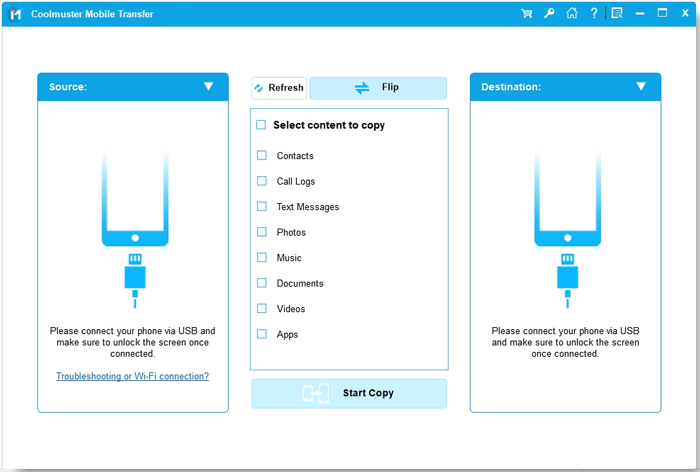
The main window: Source on the left, Destination on the right, and the content types with Flip and Start Copy in the middle.
Features
Android to Android copies nearly everything
Coolmuster Mobile Transfer moves contacts, call logs, text messages, photos, music, documents, videos and apps between two Android phones. This is the direction where it does the most, which makes it a cross-brand alternative to a maker's own switching app, for example from a Samsung to a Xiaomi.
iPhone to Android brings your media and messages
Coolmuster Mobile Transfer copies contacts, text messages, books, music, videos and photos from an iPhone to an Android phone. Apps and call logs stay behind.
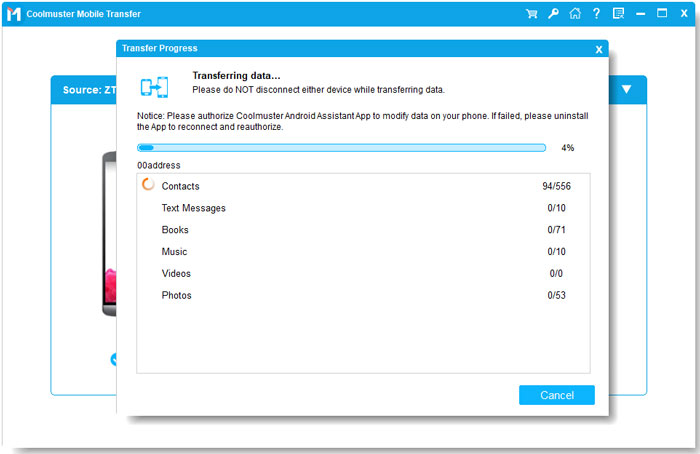
iPhone to Android: contacts copying first, with messages, books, photos, music and videos queued.
iPhone to iPhone covers contacts, calendars and bookmarks
Coolmuster Mobile Transfer copies contacts, calendars, Safari bookmarks and books between iOS devices. Notes appear in the list but only transfer on iOS 10 and earlier. Photos, music, videos and messages aren't included, so it doesn't replace Apple's Quick Start or an iCloud restore.
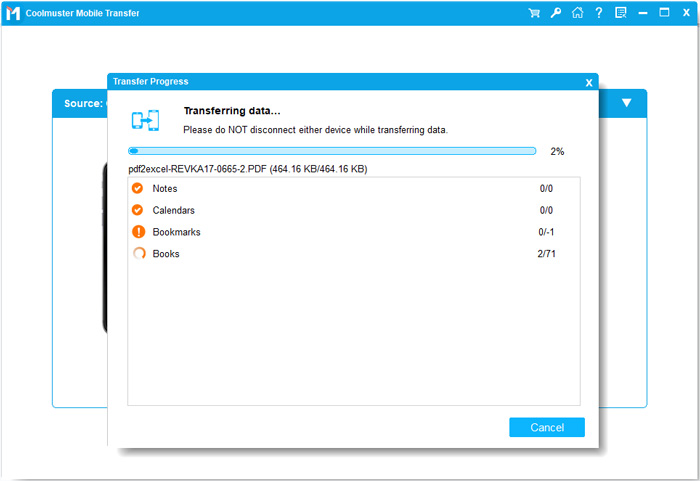
iPhone to iPhone: notes, calendars, bookmarks and books are the whole list. An older version's window.
Android to iPhone is contacts and documents only
Coolmuster Mobile Transfer moves only contacts and PDF or ePub documents from Android to iOS. Photos and messages don't make this trip.
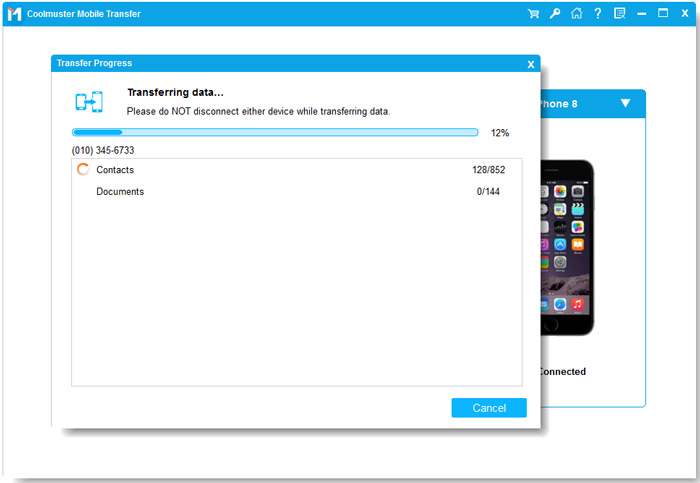
Android to iPhone: contacts and documents only.
USB or Wi-Fi for Android, and an option to clear the target
Coolmuster Mobile Transfer connects iPhones by USB and Android phones by USB with debugging on, or over Wi-Fi with the Coolmuster Android Assistant app on the phone and both devices on the same network. A "Clear data before copying" option empties an Android destination first, so you don't end up with duplicates.
Benefits
- You pick what moves. Everything is ticked by type, so you can leave old photos behind and bring only contacts and messages.
- Works across brands. One tool covers iPhone to Samsung, Pixel to Xiaomi or OPPO to OnePlus, where each maker's own app usually only handles moves to its own phones.
- No cloud account or upload. A big photo library doesn't need room in anyone's cloud, or a fast connection.
Real-World Uses
- A new Android phone from a different maker. Copy contacts, texts, call logs, photos and apps from the old phone with both plugged into your PC.
- Leaving iPhone for Android. Bring your contacts, texts, photos and music across without rebuilding the phone by hand.
- Family hand-me-downs. Move a parent's contacts and photos to a replacement phone in one sitting.
- A slow or capped internet connection, where a cloud backup and restore would take hours.
Who It's For, and Who Should Skip It
It suits Windows users moving between Android phones of different brands, or from iPhone to Android, who want to choose what gets copied.
Skip it if you're going from Android to iPhone with photos and messages to bring: Apple's free Move to iOS app does more on that trip. iPhone-to-iPhone upgraders are better served by Apple's Quick Start or an iCloud restore, and Samsung-to-Samsung moves are free with Samsung Smart Switch. It also can't help with a phone that's broken or won't unlock, since you have to approve the connection on it.
Usage Guide
- Download the installer from the Download Free Trial button, install and launch Coolmuster Mobile Transfer.
- Connect both phones by USB. On Android, turn on USB debugging and allow the connection; the program installs a driver and its companion app. On iPhone, unlock it and tap Trust.
- For an Android phone over Wi-Fi, click "Troubleshooting or Wi-Fi connection?" and choose Connect via WiFi.
- Check that the old phone is the Source and the new one the Destination, and click Flip if not.
- Tick the content types. Tick "Clear data before copying" only if you want an Android destination emptied first.
- Click Start Copy and keep both phones connected, with the Android app in the foreground, until it finishes.
Where it falls short
- Open problems in the FAQ. Coolmuster lists repeated transfers of pictures and contacts, and jobs stuck on loading or transferring, as issues its team is still working on.
- The Android app has to stay authorized. The progress window itself warns that if a copy fails you should uninstall the app, reconnect and authorize it again.
- No WhatsApp or app data. Apps move between Android phones without their data, and chat apps aren't listed in any direction.
- Not every model is tested. The FAQ says some phone models may not be supported and asks you to report them.
- Subscription by default. The $25.95 license renews yearly unless you cancel, and renewal charges are generally non-refundable under Coolmuster's refund FAQ.
What Users Say
There's little independent feedback on Mobile Transfer. We found no magazine or lab test, and its Product Hunt page has no reviews. What exists comes from the vendor's own site and from Trustpilot's reviews of the company.
Coolmuster's website: 4.8 from 169 reviews (vendor's own figure)
These are shown on the vendor's site, so treat them as a friendly sample. The newest ones are short and very alike, so we quote the longer testimonials from the product page:
- "I tried this software to transfer all my contacts from my old Samsung phone to my new iPhone 6. I can do that in an easy way and without any hassle. Worth every penny!" Adam
- "This app saved me a great deal of inconvenience and time when changing family mobiles. Simple to use as it's well thought out." Ian Scurlock
- "The program has a easy to understand interface. It made transferring data to my new phone easy and didn't skip a beat. I had no loss of data too." Jeff
Trustpilot: 4.6 from 222 reviews (all Coolmuster products)
This score covers the whole company, and most reviews praise quick support. One 1-star review speaks directly to this program's trial:
- Marissa Wu, 1 star, October 2023: "Free trial only allows for 10 contact transfers which is not clear on the website."
The pattern: the praise is for the plain interface and how little there is to learn. The complaint worth noting is the small trial, so go in knowing it proves the connection and little else.
Comparisons
Coolmuster Mobile Transfer vs Move to iOS and Smart Switch
Apple's Move to iOS and Samsung's Smart Switch are free, and each is built for one destination: an iPhone or a Samsung. Coolmuster costs money and is weak on Android to iPhone, but it runs from a PC and works across Android brands, such as iPhone to a Xiaomi or OPPO phone.
Coolmuster Mobile Transfer vs Coolmuster Android Assistant
Android Assistant copies between one Android phone and your PC. Mobile Transfer copies directly between two phones. If you're switching phones, Mobile Transfer saves the backup-and-restore round trip.
Windows version vs Mac version
Coolmuster lists the same data types for both. The Windows version is updated more often (5.0.37 in November 2026, against 4.1.19 for the Mac in July 2026), so it's the safer buy if you have a Windows PC.
Editions and Pricing
All plans have the same features and free updates while the license is valid. Prices are for the Windows version and exclude VAT.
| Plan | Price | Term | Computers |
|---|
| 1 Year | $25.95 | Renews yearly | 1 |
| Lifetime | $35.95 | One payment | 1 |
| Business 1 Year | $35.95 | Renews yearly | 2 to 5 |
| Business Lifetime | $45.95 | One payment | 2 to 5 |
| Business Lifetime | $85.95 | One payment | 6 to 10 |
Larger Business licenses go up to 26-30 computers ($185.95 a year or $245.95 lifetime). The Buy Now buttons on this page open the 1-year, 1-PC license. For a tool you'll use at each phone change, the lifetime license for $10 more is usually the better deal.
FAQs
Can Coolmuster Mobile Transfer copy WhatsApp chats between phones?
No. Coolmuster Mobile Transfer doesn't list WhatsApp or any other app's data in any direction.
Can I keep using Coolmuster Mobile Transfer after one phone change?
Coolmuster Mobile Transfer's lifetime license doesn't expire, so you can use it again at the next phone change. The 1-year license renews automatically unless you cancel it before the renewal date.
What's the refund policy on Coolmuster Mobile Transfer?
Coolmuster Mobile Transfer has a 30-day money-back guarantee on 1-year and lifetime licenses, subject to Coolmuster's refund policy. You ask by email to support@coolmuster.com with your order details, and approved refunds typically arrive in 3 to 7 business days.
Can Coolmuster Mobile Transfer read a phone with a broken screen?
Coolmuster Mobile Transfer generally can't, because you have to unlock the phone and approve the connection on it. Coolmuster says there's a small chance on an Android phone that was already unlocked, had USB debugging on and had authorized the PC before it broke.
Do I need internet access to use Coolmuster Mobile Transfer?
Coolmuster Mobile Transfer copies locally on your PC, so the transfer itself needs no internet. The Wi-Fi option for Android needs the phone and PC on the same network.
Does Coolmuster Mobile Transfer delete anything on the new phone?
Only if you tick "Clear data before copying", which works on Android destinations only. Otherwise Coolmuster Mobile Transfer adds the copied data to what's already there.
System Requirements
- Windows 11, 10, 8 or 7
- 1 GHz processor (32 or 64 bit) or faster
- 256 MB RAM or more (1 GB recommended)
- 200 MB free disk space
- Android 6.0 and up, or iOS 5 and up
- USB cables for both phones, or the same Wi-Fi network for Android
Conclusion
Coolmuster Mobile Transfer is worth it for one kind of buyer: a Windows user moving between Android brands or from iPhone to Android who wants control over what gets copied, and the $35.95 lifetime license is the better buy than $25.95 a year. The reason to buy it is that it handles those cross-brand moves in one sitting with no cloud account. The reason not to is its narrow Android-to-iPhone and iPhone-to-iPhone support, plus a few open bugs in the FAQ. Going to an iPhone? Use Apple's free tools. Otherwise, run the free trial with both of your phones first.
Download Free TrialBuy Now