Vovsoft Duplicate File Finder: Find and Remove Duplicate Files on Windows
Duplicate File Finder is a $19 Windows utility from Vovsoft that scans the folders you choose for duplicate files, matching them by name, size, date modified or exact content (SHA-1), and sends the copies you tick to the Recycle Bin. The $19 is a one-time lifetime license with free updates, and the free trial does the actual duplicate search.
If your Downloads folder holds three copies of the same installer, or your photo backups have been copied onto two drives "just in case", this is the small, no-frills tool for finding which files are really the same and clearing out the extras.
Quick facts
- Version: 2.1, released December 21, 2025
- Developer: Vovsoft, the one-person software company of Fatih Ramazan Çıkan in Turkey
- Platform: Windows 11, 10, 8/8.1, 7 and Vista, 32-bit and 64-bit. No Mac or Linux version
- Editions: installer (3.91 MB) and portable (2.89 MB), one license for both
- Compares by: file name, file size, date modified, or content using SHA-1 hashes
- Price: $19, one-time payment, lifetime license with free updates
- Trial: free and not time-limited; finds and removes duplicates, but has a nag screen, no CSV export of the file list and no commercial use
- Refunds: no money-back guarantee; refunds are at the vendor's discretion, mainly for accidental orders
- What we checked: the installer we downloaded from vovsoft.com on November 8, 2026 is version 2.1.0.0, 3.92 MB, digitally signed by Fatih Ramazan Çıkan; the order page showed $19.00 with no auto-renewal on November 8, 2026. We didn't install the program or run a scan.
Overview
Duplicate File Finder has one window and a short workflow. You pick how files should be compared, add the folders to search (each with its own file mask, such as *.jpg), and press Start Search. When the scan finishes, the Duplicates tab shows each set of matching files grouped together with their folder, name, size and SHA-1 value, and you tick the copies you want gone.
It's been on sale since June 2021 and was reworked in December 2025: version 1.6 moved to a newer compiler (dropping Windows XP) and added translations, 2.0 added the Date Modified comparison and a Properties item on the right-click menu, and 2.1 added column headers to the CSV export. It's one of more than 100 small Windows programs Vovsoft sells.
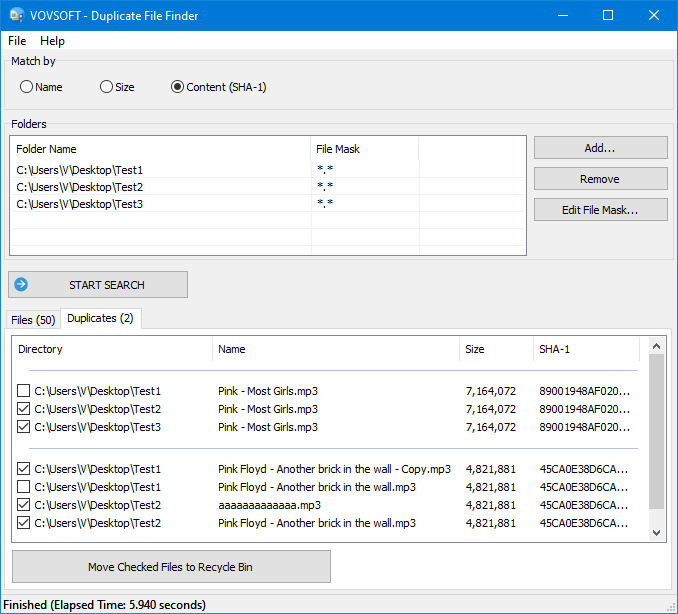
Three test folders scanned by content (SHA-1): the Duplicates tab groups identical MP3 files, some ticked for the Recycle Bin. This screenshot predates the Date Modified option added in version 2.0.
Features
Four ways to decide what counts as a duplicate
Duplicate File Finder's "Match by" setting offers four comparisons. Name treats files with the same filename as duplicates, Size the same byte count, Date Modified the same timestamp, and Content (SHA-1) files whose contents are identical byte for byte. Vovsoft itself says the content check is the slowest but the most accurate, and advises against it for very large files. The first three are quick filters; only the content check proves two files are really the same.
Folder list with file masks
Duplicate File Finder searches any number of folders in one pass, including on different drives, so you can compare a laptop's Pictures folder against a backup drive. Add folders with the Add button or by dragging them in, and give each one a file mask to limit the search to, say, *.mp3 or *.docx. Since version 1.4 it also handles paths and filenames longer than 260 characters, which trip up some older tools.
Bulk selection and removal to the Recycle Bin
Duplicate File Finder's Check option ticks the extra copies in every group for you, Inverse flips the selection if you'd rather keep a different copy, and you can change any tick by hand; and a Find button (since 1.5) helps locate a file in a long list. "Move Checked Files to Recycle Bin" then removes them. Because they go to the Recycle Bin rather than being deleted outright, a wrong choice can still be restored.
CSV export of files and duplicates
Duplicate File Finder can export both the full file list and the duplicate list as CSV files, with directory, name, size and SHA-1 columns, so you can review them in Excel or keep a record before cleaning up. Exporting the file list is one of the features that needs the license.
Benefits
The main benefit is control. Duplicate File Finder doesn't decide anything for you or delete files automatically: it shows the evidence (folder, size, hash) and lets you choose which copy stays. That suits people who have been burned by "one-click cleaner" tools. It's also light: under 4 MB, a portable edition that runs from a USB stick, and no account or internet connection needed to scan.
Real-World Uses
- Merging backups: scan an old backup drive and your current Documents folder by content to see which files you already have before copying anything across.
- Music and video libraries: find the same MP3 saved under different names, as in the vendor's screenshot, where "Another brick in the wall - Copy.mp3" and a randomly named file share one SHA-1 hash.
- Downloads clean-up: a size or name scan of the Downloads folder turns up the installers and PDFs you've downloaded more than once.
- Photo dumps from several phones: a content scan across folders catches identical JPGs copied from different devices.
Who It's For, and Who Should Skip It
A good fit if you want a simple, honest duplicate finder for Windows that compares exact contents, keeps you in charge of deletions, and costs $19 once. It's also handy as a portable tool for cleaning up other people's PCs.
Skip it if your problem is similar photos (resized, edited or re-saved copies): a SHA-1 match only finds files that are identical byte for byte, so you need a dedicated similar-image finder. It also isn't for Mac users, and if you need saved scan profiles, automatic rules for which copy to keep, or scheduled scans, look at a larger duplicate manager.
Usage Guide
- Download the installer or the portable edition from vovsoft.com and run it. If Windows shows "Windows protected your PC", Vovsoft's help page says to click "More info", then "Run anyway".
- Choose a Match by option. Start with Content (SHA-1) unless the folders hold very large files.
- Click Add... (or drag folders in) for each folder to search, and use Edit File Mask... to limit file types.
- Click Start Search and wait for the "Finished" message at the bottom.
- Open the Duplicates tab, click Check (or Inverse), then review every tick.
- Click Move Checked Files to Recycle Bin. Empty the Recycle Bin only once you're sure.
- After buying, enter your key using Vovsoft's "How to Activate using License Key" steps; offline activation is available.
Before you buy
- Use the trial first. The free version runs the same search and removal. Vovsoft generally doesn't refund purchases, because the trial is there to evaluate the program; refunds are at its discretion, mostly for orders placed by accident.
- Pick the right match type. A Name or Size match only says two files look alike. Run a Content (SHA-1) scan before deleting anything important.
- One license per person. Vovsoft's EULA lets one person use a license on all of their own computers, or several people use one shared workstation, but not both.
Download Free TrialBuy Now
Where it falls short
- Exact duplicates only. No similar-image or audio-fingerprint matching, so edited or re-encoded copies won't be found.
- One criterion at a time. "Match by" is a single choice, so you can't require name and size to both match in one scan.
- Slow on big files. The content check reads every byte; the vendor itself advises against it for large files such as video archives.
- Lukewarm rating. The product page's own rating is 3.6 out of 5 from 13 votes, lower than most Vovsoft tools, and there's little independent testing published.
What Users Say
We found little written feedback about Duplicate File Finder specifically, so this section is short. On Vovsoft's own product page it's rated 3.6 out of 5 from 13 votes, with no written comments attached.
Online Computer Tips (hands-on walkthrough)
Cindy Thomas tested it on a Documents folder, a Pictures folder and a whole drive for Online Computer Tips (January 2025, updated March 2026), and made the walkthrough video the vendor now embeds: "This app is easy to use and very effective. It may not have all the advanced features of other duplicate file finding software but for the basics, it works great."
She also points out that the default results are grouped by name, so a Size or Content (SHA-1) scan is the way to catch copies saved under different names, and that file masks such as *.docx narrow a search to one file type.
Download sites
MajorGeeks lists version 2.1 and describes it as a tool that "will help you find and remove all your useless file duplicates freeing up disk space", adding: "You retain full control while looking through the list of duplicates so you can decide which copy to keep. It is simple to use and works fast." That's a listing write-up rather than a hands-on test.
The company on Trustpilot
Vovsoft as a company has a TrustScore of 4.6 from 410 Trustpilot reviews, 78% of them 5-star and 6% 1-star. Those reviews cover all of Vovsoft's programs and its support; none of the reviews shown there mention Duplicate File Finder.
The common thread: reviewers find it easy and effective for basic exact-duplicate clean-ups and say plainly that it lacks the advanced features of bigger tools. Published opinions are few and the vendor-page rating is middling, so the free trial on your own folders is the best test.
Comparisons
Duplicate File Finder vs a full duplicate manager
Larger duplicate managers add similar-photo detection, rules that pick which copy to keep, previews and scheduled scans, and usually cost more or come as subscriptions. Vovsoft's Duplicate File Finder does the core job (exact matches by content, name, size or date, then removal to the Recycle Bin) for $19 once. Choose it if exact duplicates are your problem; choose a bigger tool if near-duplicate photos are.
Editions and Pricing
| Option | Price | License term | What you get |
|---|
| Free trial | $0 | No time limit | Duplicate search and removal, with a nag screen; no file-list export, personal use only |
| Duplicate File Finder license | $19 | One-time payment, lifetime, free updates | All features, CSV export, commercial use, no nag screen; installer and portable |
Vovsoft also sells a $99 Universal License that covers all of its programs, which only pays off if you want several of them.
FAQs
Is Duplicate File Finder a subscription?
No. Duplicate File Finder costs $19 once. Vovsoft licenses never expire and include future updates, and the order page shows no auto-renewal.
Does Duplicate File Finder delete files permanently?
No. Duplicate File Finder moves the checked files to the Windows Recycle Bin, so you can restore them until you empty it.
Can Duplicate File Finder find similar photos that aren't exact copies?
No. Duplicate File Finder's content check uses SHA-1 hashes, which only match files that are identical byte for byte. A resized or edited photo has a different hash.
Can I scan an external drive with Duplicate File Finder?
Yes. Duplicate File Finder scans any folder you can add in Windows, and several folders at once, so a backup drive can be compared against your PC's folders in one search.
Can I use Duplicate File Finder's free version at work?
No. Duplicate File Finder's trial doesn't allow commercial use; the $19 license does.
Can I move my Duplicate File Finder license to a new PC?
Yes. Vovsoft says you can activate the same key on your new computer without deactivating the old one, as long as you're the same user. A lost key can be retrieved from Vovsoft's User Panel with your purchase email.
Does Duplicate File Finder still run on Windows XP?
No. Duplicate File Finder version 1.6 (December 2025) dropped Windows XP; it needs Windows Vista or later.
System Requirements
- Windows 11, 10, 8/8.1, 7 or Vista, 32-bit or 64-bit
- About 4 MB of disk space (3.91 MB installer, 2.89 MB portable)
- Internet connection only for online license activation (offline activation is available)
Conclusion
Duplicate File Finder is worth $19 if you want a plain, trustworthy exact-duplicate finder: four match modes, a content check that proves files are identical, and deletion to the Recycle Bin so mistakes can be undone, with a lifetime license and a portable edition. The reason not to buy is its narrow scope and a middling user rating: it won't find similar photos or apply clever keep-rules. Since the free trial already finds and removes duplicates, run it on your own folders first; pay if you want the CSV export, commercial use and no nag screen.
Download Free TrialBuy Now