Speech to Text Converter: Transcribe Audio and Video on Windows, Offline or in the Cloud
Speech to Text Converter is a $19 Windows program from Vovsoft that turns recordings, video files and your own voice into text. You pick the engine: Whisper and Vosk run offline on your PC, while OpenAI, IBM Cloud and Microsoft Azure upload the audio to their servers using an API key you set up yourself. The $19 is a one-time lifetime license with free updates.
Transcribing an interview or lecture by hand is slow, and most quick fixes upload your recording to someone's server. This program lets you decide engine by engine where your audio goes, which matters if your recordings are confidential.
Quick facts
- Version: 6.0, released October 7, 2026 (added offline Whisper)
- Developer: Vovsoft, the one-person software company of Fatih Ramazan Çıkan in Turkey
- Platform: Windows 11, 10, 8/8.1 and 7, 32-bit and 64-bit; the offline Vosk engine needs 64-bit Windows
- Editions: installer (222.26 MB) and portable (255.13 MB)
- Input: microphone, MP3, M4A, FLAC, WAV, OGG, and video files (MP4, WEBM, MKV, AVI, MPEG, MOV, WMV, FLV, TS)
- Engines: offline Whisper (50+ languages) and Vosk (20+ languages); live microphone dictation through the Microsoft Speech Platform; cloud OpenAI, IBM Cloud and Microsoft Azure
- Price: $19, one-time payment, lifetime license with free updates; cloud engines are billed separately by their providers
- Trial: free, no time limit; a nag screen, no commercial use, and the premium AI models need a license
- Refunds: generally none; refunds are at the vendor's discretion, mainly for accidental orders
- What we checked: the installer we downloaded from vovsoft.com on November 8, 2026 is version 6.0.0.0, 222.26 MB, digitally signed by Fatih Ramazan Çıkan; the order page showed $19.00 with no auto-renewal on November 8, 2026. We didn't install it or test transcription accuracy.
Where Your Audio Goes: Offline vs Cloud Engines
This is the most important thing to understand before you buy. Speech to Text Converter is a front end for several speech engines, and they handle your data very differently.
| Engine | Where it runs | Account needed | Extra cost |
|---|
| Whisper | Your PC, offline | No | None |
| Vosk | Your PC, offline | No | None |
| Continuous Dictation | Your PC (Microsoft Speech Platform) | No | None |
| OpenAI | OpenAI's servers | API key, credit card | About $0.006 per minute |
| IBM Cloud | IBM's servers | API key and URL | 500 free minutes a month |
| Microsoft Azure | Microsoft's servers | API key and region | 300 free minutes a month |
With Whisper or Vosk, nothing leaves your computer; Vovsoft states that with Vosk no file is sent to the internet in any case. With the cloud engines, your recording is uploaded to that provider and handled under its terms, not Vovsoft's. For medical, legal or HR recordings, stick to the offline engines. The trade-off Vovsoft itself points out: offline engines can be less accurate on complex speech or strong accents and use more of your PC's resources.
Features
Transcribe audio and video files
Speech to Text Converter loads common audio formats and also video files, pulling the soundtrack out with the bundled FFmpeg, so you can transcribe a recorded Zoom call, a lecture video or a podcast episode without converting it first. Load the file, choose the engine and language, press Convert, and save the text.
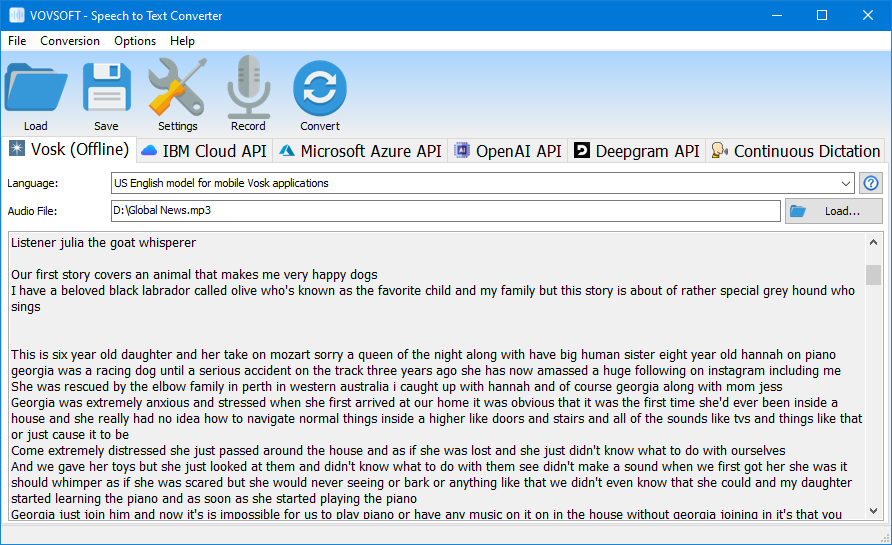
The Vosk (Offline) tab with a transcript of an MP3 news recording, using the US English model. This screenshot is from a version before Whisper was added.
Offline Whisper, new in version 6.0
Speech to Text Converter 6.0 runs the Whisper speech recognition model locally, supporting more than 50 languages with no account, no API key and no per-minute fee. Before October 2026, the only offline file engine was Vosk, which ships with small English and French models; other Vosk languages are free downloads you copy into its models folder.
Cloud engines from one window
Speech to Text Converter can also send audio to OpenAI, IBM Cloud or Microsoft Azure. You get each provider's latest models and broad language lists (Azure alone covers dozens of languages), and you can switch engines on the same file if one gives a poor result. OpenAI's API accepts files up to 25 MB, so long recordings need splitting or an offline engine.

An MP4 video of a one-minute talk transcribed with the Microsoft Azure API, with punctuation and capitals, in an older version of the program.
Live dictation from your microphone
Speech to Text Converter's Continuous Dictation tab types what you say as you speak, using the Microsoft Speech Platform already on most Windows PCs. It supports English, French, German, Japanese, Spanish and Chinese (Simplified and Traditional). You can also record your voice and convert the recording with any engine.

Continuous Dictation with the Windows speech bar listening; the lower list shows the phrase being recognized word by word.
Who It's For, and Who Should Skip It
A good fit if you transcribe interviews, lectures, meetings or videos now and then, want to keep sensitive recordings on your own PC, and prefer a one-time $19 payment to a monthly transcription subscription.
Skip it if you need speaker labels, timestamps or a polished editor for long transcripts: this is a converter that gives you plain text. For subtitles, Vovsoft sells a separate Speech to Subtitle Converter. Mac users need another tool, and anyone who wants cloud accuracy with no API-key setup will find a hosted transcription service simpler.
Usage Guide
- Download the installer or portable edition from vovsoft.com and run it.
- Pick an engine tab. For private, free transcription, choose an offline engine. For a cloud engine, open Settings and paste the API key (and URL or region) from your provider's account.
- Click Load to open an audio or video file, or Record to capture your voice.
- Choose the language or model, then press Convert.
- Check the text, fix names and technical terms, and click Save.
Before you buy
- Test your own recordings first. Vovsoft's refund policy is generally no refunds, because the free version is there to evaluate the program; refunds are at its discretion, mostly for accidental orders.
- The $19 doesn't cover cloud usage. OpenAI, IBM Cloud and Azure bill you directly beyond their free allowances, and they may ask for a credit card when you sign up.
- Check your hardware for offline use. Vosk needs 64-bit Windows and .NET Framework 4.8, and Vovsoft recommends 16 GB of RAM for its full-size models.
Download Free TrialBuy Now
Where it falls short
- Cloud setup is the usual stumbling block. Creating an IBM, Azure or OpenAI account and finding the API key is the most common complaint in user comments, and some people gave up after error messages.
- Plain text only. No speaker identification, no timestamps, no audio-synced editor.
- Language coverage depends on the engine. Vosk covers about 20 languages, dictation only seven; a language one engine lacks may need a different engine.
- Big download. At about 222 MB, it's far larger than Vovsoft's other tools because speech models and FFmpeg are included.
What Users Say
Speech to Text Converter is rated 4.1 out of 5 from 8 reviews on Vovsoft's product page. We found no editorial review. Most comments date from before the offline engines were added, when IBM Cloud was the only file engine, so the setup complaints apply to the cloud engines today.
Praise (vovsoft.com and Trustpilot)
"App does exactly what you expect it to do. In a simple and pleasant way. Could use it immediately. Satisfied" (N. Dings, Trustpilot, 5 stars, August 2025)
"Easy Installation and it works very well." (Doug, Trustpilot, 5 stars, November 2025)
"Software works perfectly IBM cloud is a different story but at the end it worked as well" (Trinity, Trustpilot, 5 stars, October 2022)
"Creating an account took a bit of a challenge, but it's the best speech2text I've ever tried." (Alexandre, vovsoft.com)
"I think that is a very good software. It allows to have a windows interface to run the ibm Watson speech to text. Because without this good software, I could not use the ibm speech to text because I don't understand a interface api with of lines of command to enter to run the function." (Anonymous User, vovsoft.com)
Criticism (SharewareOnSale giveaway comments, 2021)
"This software requires you to get an API Key from IBM. It's not easy but doable. However after getting the key the program failed to execute and gave a gibberish error message." (Ray)
"The IBM thing is quite confusing and took some time, but when I think I finally got it and tried the program I just got a HTTP 1.1 503 service unavailable error" (Frank)
"It requires an API key from IBM, but even if you are able to get it, it won't translate properly & will usually give you an error or some gibberish." (Sean)
On the same page, Philip o staiger defended it: "you don't even see the IBM connection once you have the API key properly configured – it just works," adding of the accuracy, "I have seen better but I have also seen much worse."
Vovsoft as a company has a Trustpilot TrustScore of about 4.6 from roughly 410 reviews across all its programs and support. The pattern: people who got an engine set up like the simple interface and say it works well; those who struggled were stuck on cloud accounts and API keys. The offline Whisper and Vosk engines remove that hurdle, but there are no user reports on Whisper yet.
Comparisons
Speech to Text Converter vs online transcription services
Hosted transcription services offer speaker labels, timestamps and editors, but charge monthly and always upload your audio. Speech to Text Converter costs $19 once, can work fully offline, and gives plain text. If you transcribe a few files a month and care about privacy, it's the cheaper route.
Speech to Text Converter vs Windows voice typing
Windows' built-in voice typing is free for live dictation but can't transcribe an existing audio or video file. That file conversion, offline or through a cloud engine, is what you're paying for here.
Editions and Pricing
| Option | Price | License term | What you get |
|---|
| Free trial | $0 | No time limit | Converts audio to text, with a nag screen; personal use only; no premium AI models |
| Speech to Text Converter license | $19 | One-time payment, lifetime, free updates | Premium AI models, no nag screen, commercial use allowed; installer and portable |
Vovsoft also sells a $99 Universal License covering all of its 115+ programs.
FAQs
Does Speech to Text Converter work without an internet connection?
Yes, with the Whisper or Vosk engines, which run entirely on your PC. The OpenAI, IBM Cloud and Microsoft Azure engines need an internet connection and upload your audio to those providers.
Is Speech to Text Converter a subscription?
No. Speech to Text Converter is a one-time $19 purchase with lifetime free updates, and the order page shows no auto-renewal. Only the optional cloud engines cost extra, billed by their providers.
Do I need an IBM account to use Speech to Text Converter?
Not any more. Early versions relied on IBM Cloud, which is why older reviews talk about IBM API keys. Since version 5.0 (Vosk) and 6.0 (Whisper), Speech to Text Converter can transcribe offline with no account.
Can Speech to Text Converter transcribe a YouTube or Zoom video?
Speech to Text Converter transcribes video files saved on your PC, such as an MP4 Zoom recording. It doesn't download videos from a website; save the file first, then load it.
Can Speech to Text Converter make subtitles?
Speech to Text Converter produces plain text without timestamps. For subtitles, Vovsoft sells a separate program, Speech to Subtitle Converter.
Does Speech to Text Converter run on a Mac?
No. Speech to Text Converter is Windows-only, from Windows 7 to Windows 11.
System Requirements
- Windows 11, 10, 8/8.1 or 7, 32-bit or 64-bit
- For Vosk: 64-bit Windows, .NET Framework 4.8, 16 GB RAM recommended (less with lightweight models)
- For Continuous Dictation: the Microsoft Speech Platform and a microphone
- For cloud engines: an internet connection and an API key from the provider
- About 222 MB for the installer or 255 MB for the portable edition
Conclusion
Speech to Text Converter is worth $19 if you want to turn recordings and videos into text without a subscription, and especially if you want the option to keep them entirely on your own PC with the offline Whisper and Vosk engines. The main reason to hesitate: it gives plain text with no timestamps or speaker labels, and the cloud engines still mean account and API-key setup that has frustrated buyers in the past. Since refunds are rare, run the free version on a few of your own recordings first; if the offline result is good enough, it's an easy buy.
Download Free TrialBuy Now