Text Edit Plus: A Notepad Replacement with Spell Check and Text Tools
Text Edit Plus is a $19 plain text editor for Windows from Vovsoft that replaces Notepad with tabs, a spell checker, syntax highlighting, dark mode and dozens of line and text tools, plus word-frequency statistics. The $19 is a one-time lifetime license with free updates, and there's a free trial with no time limit.
It's aimed at people who spend their day in plain text without being programmers: writers cleaning up drafts, admins reading logs, marketers deduplicating keyword lists. Things that take a macro or a spreadsheet in other tools, like removing duplicate lines or counting how often each word appears, are a menu click here.
Quick facts
- Version: 16.7, released September 25, 2026
- Developer: Vovsoft, the one-person software company of Fatih Ramazan Çıkan in Turkey
- Platform: Windows 11, 10, 8/8.1, 7 and Vista, 32-bit and 64-bit; interface in more than 30 languages
- Editions: installer (5.21 MB) and portable (4.8 MB)
- Price: $19, one-time payment, lifetime license with free updates
- Trial: free and not time-limited, with a nag screen, no CSV export of text statistics and no commercial use
- Refunds: no money-back guarantee; refunds are at the vendor's discretion, mainly for accidental orders
- What we checked: the installer we downloaded from vovsoft.com on November 8, 2026 is version 16.7.0.0, 5.21 MB, digitally signed by Fatih Ramazan Çıkan; the order page showed $19.00 with no auto-renewal on November 8, 2026. We didn't install or run the editor.
Overview
Text Edit Plus looks like a classic Windows editor: a menu bar, a long toolbar, tabs across the top and a status bar with line, column, file size and encoding. Underneath, the menus (Edit, Encoding, Syntax, Insert, Extras, Text, Tools) hold far more than Notepad does. It opens TXT, CSV, HTML and other plain-text files and offers two text engines, a SynEdit-based one with syntax highlighting and a "classic" one.
This is Vovsoft's most actively developed program: 115 releases are listed in its version history, back to version 4.5 in June 2018. In 2026 alone it gained Windows spell-checking integration, colorful emoji support, a Markdown syntax, "Insert Emoji" and "Delete Emojis", and better side-by-side comparison.
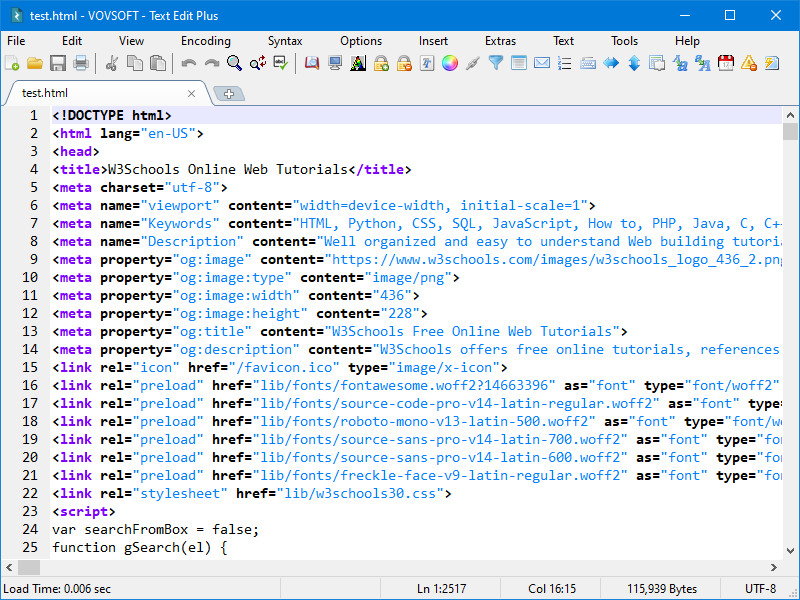
An HTML file with syntax highlighting, line numbers, tabs and the status bar showing line, column, size and UTF-8 encoding.
Features
A spell checker inside a plain text editor
Text Edit Plus underlines misspelled words and offers corrections on the right-click menu, along with "Add Word To Dictionary" and a quick Google search. Since version 16.0 it uses Windows' own spell checking, so it follows the languages installed on your PC. The spell checker is off by default (since 16.2), so turn it on from the menu.

The spell checker's right-click menu with Suggested Corrections and Add Word To Dictionary.
Line and text tools that save real time
Text Edit Plus has a long list of one-click text operations: sort, filter, split, crop, trim, combine, randomize and reverse lines; delete empty or duplicate lines; insert numbers or text at the start or end of every line; change case; encode and decode text; generate e-mail, URL and word lists; and extract text with its own command system. Regular expressions, macros and column selection with the Alt key cover the jobs the menus don't.

Dark mode with a vertical (column) selection of the Population column in a text table.
Text statistics: word, character and phrase frequency
Text Edit Plus's Analyze window counts characters and words and lists word frequency, character frequency, line frequency and two-word phrases with their share of the text, plus a pie chart. Writers use it to spot words they repeat; SEO and data people use it on keyword lists. Exporting the statistics to CSV needs a license.

Analysis Results with tabs for General, Char Frequency, Word Frequency, Line Frequency and 2-Word Phrases, plus Export and Pie Chart buttons.
Compare two texts side by side
Text Edit Plus can compare two open tabs side by side and color the matched, modified, added and deleted lines, with Previous/Next buttons and options to ignore case and whitespace. It's enough to see what changed between two versions of a document or config file without a separate diff tool.

Text Compare between two files, with counts of matches, modifies, adds and deletes in the status bar.
Encoding repair and odd extras
Text Edit Plus reads and writes UTF-8 and UTF-16, can fix broken UTF-8 (the "é" kind of mojibake) and has a Unicode detector that shows which special characters a text contains, including emojis. It also exports to PDF, prints, runs full screen, and has a few playful extras such as turning a picture into ASCII art.
Who It's For, and Who Should Skip It
A good fit if Notepad is your everyday tool and you keep wishing it had tabs, spell check, a dark mode and a "remove duplicate lines" button. Writers, students, support staff and anyone cleaning lists or logs get the most from it, and the portable edition makes it easy to carry.
Skip it if you're a programmer: a free code editor gives you plugins, project folders and language tooling that Text Edit Plus doesn't try to offer. If you write formatted documents, you need a word processor, not a plain text editor. And there's no Mac or Linux version.
Usage Guide
- Download the installer or the portable edition from vovsoft.com and run it.
- Open a file with File > Open or by dragging it onto the window; each file gets its own tab.
- Turn on spell checking and pick the language from the menu (it's off by default), and choose a syntax from the Syntax menu for HTML, Markdown and other formats.
- Use the Text and Tools menus for line operations such as sorting, removing duplicates or trimming, and Analyze for word and character statistics.
- To compare two files, open both and use Compare Side by Side.
- Vovsoft's help pages cover regular expressions, vertical selection and text extraction, and a full feature list is on its site.
Before you buy
- The trial is nearly complete. It does all the editing; the license removes the nag screen, adds CSV export of text statistics and allows commercial use. Try it on your own files.
- Refunds aren't guaranteed. Vovsoft generally doesn't refund, because the trial is there to evaluate the program; it decides case by case, mostly for accidental orders.
- One license per person (on any number of their own PCs) or per shared workstation.
Download Free TrialBuy Now
Where it falls short
- Busy interface. Dozens of toolbar icons and deep menus take a while to learn. One reviewer says 10 minutes is enough; an older AlternativeTo comment says the interface "could be improved".
- Frequent small fixes. The 2026 changelog has several rounds of high-DPI, tab and word-wrap fixes. Bugs get fixed fast, but expect the odd glitch after an update.
- No plugin system and no project or folder view, which limits it for coding.
- Few independent reviews. Most published opinions are on Vovsoft's own site.
What Users Say
Text Edit Plus is rated 4.7 out of 5 from 23 reviews on Vovsoft's product page. We found no editorial review; the opinions below are from buyers on Vovsoft's site and two outside sites.
From users on vovsoft.com
"We are using Text Edit Plus to read and search through very large application log files. As per my current usage, I found that the app is very stable and the UI experience is also very clean." (Aeshwer T.)
"The most beautiful feature I like about Text Edit Plus are : 1- It provides spell check 2- Encode and decode text features which usually is missing in other text editors." (Mashmuma Q.)
"Firstly, it works first time right out of the box. You just install it and it works, with no weird requirements. [...] Secondly, this was the first program that gave me functions I didn't even know I needed. I'm an author and I now use those functions on a daily basis." (Peter Stokes)
"In a saturated market of free text editors, initially I was a little hesitant to pay for one. I gave this software a test and have no regrets at all in purchasing it at a very reasonable price with a lifetime license." (Howard)
"The Text Edit Plus has some really excellent features, and if you will take just a little time (no more than, say, 10 minutes) to learn how they work, you will be very much rewarded. [...] And, too, if you have questions about anything, the folks at the other end get back to you immediately" (Paul n Jean)
"Fantastic! Fast, clean, not bloated, plenty features. I'm using to prepare text to copy/paste into Facebook, Messaging, quick notes, fast lists, - just great. Also, the fastest and simplest install and registration ever! Price is equitable." (HawaiiTex)
Elsewhere
On Trustpilot, Jaffer Dharamsi wrote in September 2026: "After running into a small activation hiccup with Text Edit Plus, Vovosoft's support team absolutely shone." Vovsoft as a company has a TrustScore of about 4.6 from roughly 410 reviews across all its programs.
On AlternativeTo, an anonymous user wrote back in 2017: "I think the interface could be improved a bit, but otherwise good".
The themes: people like that it's light and stable, the spell checker and encode/decode tools, and the one-time price; several mention quick replies from the developer. The criticism, such as it is, concerns the crowded interface.
Comparisons
Text Edit Plus vs Windows Notepad
Notepad is free and built in. Text Edit Plus adds a spell checker, syntax highlighting, macros, side-by-side comparison, text statistics and the long list of line tools, for $19 once. If you only open a text file now and then, Notepad is enough; if you clean or analyze text every day, Text Edit Plus earns its price.
Text Edit Plus vs free code editors such as Notepad++
Free code editors are stronger for programming, with plugins and broad language support. Text Edit Plus leans toward writing and list work instead: the spell checker, word frequency and phrase statistics, emoji tools and one-click line cleanup are where it stands out.
Editions and Pricing
| Option | Price | License term | What you get |
|---|
| Free trial | $0 | No time limit | The editor and tools, with a nag screen; no CSV export of stats; personal use only |
| Text Edit Plus license | $19 | One-time payment, lifetime, free updates | Everything, CSV export of text stats, commercial use, no nag screen; installer and portable |
Vovsoft also sells a $99 Universal License covering all of its 115+ programs.
FAQs
Is Text Edit Plus a subscription?
No. Text Edit Plus costs $19 once, the license doesn't expire, and future versions are free. The order page shows no auto-renewal.
Can Text Edit Plus open large log files?
Text Edit Plus is used for large log files by at least one buyer, who calls it "very stable". Vovsoft doesn't publish a file-size limit, so test your biggest files with the free trial.
Does Text Edit Plus support regular expressions?
Yes. Text Edit Plus supports regular expressions, and Vovsoft has a help page, "Regular Expressions in Text Edit Plus", with examples.
Can Text Edit Plus open more than one window?
Yes. Text Edit Plus opens files in tabs, and since version 15.8 an "Allow Multiple Instances" option lets you run several windows or keep it to a single one.
Can I use the free Text Edit Plus at work?
No. Text Edit Plus's trial is for personal use; commercial use needs the $19 license.
Does Text Edit Plus work with Markdown?
Text Edit Plus added a Markdown syntax in version 16.5 (June 2026), so Markdown files get highlighting. It edits the source text; it isn't a Markdown preview tool.
System Requirements
- Windows 11, 10, 8/8.1, 7 or Vista, 32-bit or 64-bit
- About 5 MB of disk space (5.21 MB installer, 4.8 MB portable)
Conclusion
Text Edit Plus is worth $19 if you work with plain text every day and aren't a programmer: the spell checker, line cleanup tools, word-frequency statistics and side-by-side compare do jobs Notepad can't, the license is yours for good, and the developer updates it constantly. Programmers will be better served by a free code editor with plugins. Because the trial includes almost everything, try it for a week before you pay.
Download Free TrialBuy Now