Leawo Blu-ray Copy for Mac: Clone Blu-rays and DVDs on an Intel or Apple Silicon Mac
Leawo Blu-ray Copy for Mac is a macOS disc copier, priced at $44.95 a year or $99.95 for a lifetime license, that duplicates Blu-ray and DVD movies 1:1 or shrinks them to a smaller disc, writing the result to a blank disc, a folder or an ISO image. It runs on macOS 10.13 High Sierra and later, with a native build for M-series Macs, and it's meant for Mac owners who want a spare of every disc they've bought.
Here's the Mac problem it solves. Your MacBook or Mac mini has no disc slot, the Finder won't let you drag a protected movie off an external Blu-ray drive, and Apple's own disc-burning tools stopped at data discs years ago. Blu-ray Copy reads the disc through any USB Blu-ray drive, gets past the encryption, and gives you an ISO you can park on an external SSD or burn back to a blank BD-R.
Quick facts
- Current Mac build: Leawo Prof. Media for Mac 13.0.8, updated June 2026. Blu-ray Copy is the Copy module inside it.
- Two installers: an Intel DMG (241 MB) and a native Apple silicon DMG for M1 to M4 Macs (316 MB)
- macOS: 10.13 High Sierra up to macOS 26 Tahoe and macOS 27
- Developer: Leawo Software Co., Ltd.
- Reads: Blu-ray and DVD discs, Blu-ray and DVD folders, ISO images
- Writes: a blank Blu-ray or DVD, a disc folder, or an ISO file, at BD50, BD25, DVD-9 or DVD-5 size
- The license switches on four modules: Blu-ray Copy, DVD Copy, Blu-ray Recorder Copy and Blu-ray to DVD Converter, on one Mac
- Price: $44.95 for one year, $99.95 lifetime
- Trial: free, copies the first 5 minutes of content
- What we checked: Leawo's Mac version feed (Prof. Media for Mac 13.0.8, with the native Apple silicon build announced in its release notes), the two Mac installers on Leawo's download server (ltmcu_setup.dmg, 252,961,353 bytes, dated June 10, 2026, and ltmcu_setup_arm64.dmg, 331,793,186 bytes, dated July 7, 2026), the Mac spec sheet and trial limit, and the order page for "Leawo Blu-ray Copy for Mac", which charged $44.95 for one year and $99.95 for lifetime, with automatic renewal unticked and a renewal quoted at $26.97, on November 1, 2026. We didn't copy a disc on a Mac.
Before you buy
- Buy the Mac edition, not the Windows one. They're separate products with separate codes, and Leawo's refund policy refuses refunds for "the wrong software". Check that the order page says "for Mac" before you pay.
- Download the build that matches your chip. Leawo's download page has a "Mac with Apple Chip" and a "Mac with Intel Chip" button. Apple menu > About This Mac tells you which one you have.
- Plan for the drive. Reading a Blu-ray on a Mac needs an external Blu-ray drive. Burning the copy back to a disc needs a Blu-ray burner, but saving to a folder or ISO doesn't.
- Cinavia and 4K UHD are separate purchases. Copies of Cinavia-marked discs can still go silent on Cinavia-aware players, and 4K Ultra HD discs need Leawo UHD Copy.
Download Free TrialBuy Now
Overview
Leawo used to sell Blu-ray Copy for Mac as its own little app with a "Blu-ray Copy" title bar. Today you install Leawo Prof. Media for Mac, one program with Home, Convert, Burn, Copy, Download and Cinavia tabs, and the Blu-ray Copy code switches on the Copy tab. The other tabs stay in trial mode unless you own those licenses too.
The copying screen itself has hardly changed between the old stand-alone app and the current suite: a title list on the left, subtitle and audio choices under it, a preview on the right, and a capacity bar at the bottom that turns your choices into gigabytes. Leawo's own Mac tutorials still show the stand-alone app, so the screenshots on this page do too.

The Activation Center of Leawo Prof. Media for Mac (shown here in version 12), where a registration code is entered. Blu-ray Copy, Blu-ray to DVD, Blu-ray Recorder Copy and DVD Copy each appear as a row with their registration state.
Features
A capacity bar that tells you if the movie fits
Leawo Blu-ray Copy for Mac shows, in a bar along the bottom of the window, how big your selection is against the target you picked in the drop-down (BD50, BD25, DVD-9 or DVD-5). Choose a full-size target and you get a bit-for-bit clone. Choose a smaller one and the program compresses the movie until the bar fits, so a dual-layer Blu-ray can land on a single-layer BD25 or even on a DVD. You see the trade-off before anything is written.
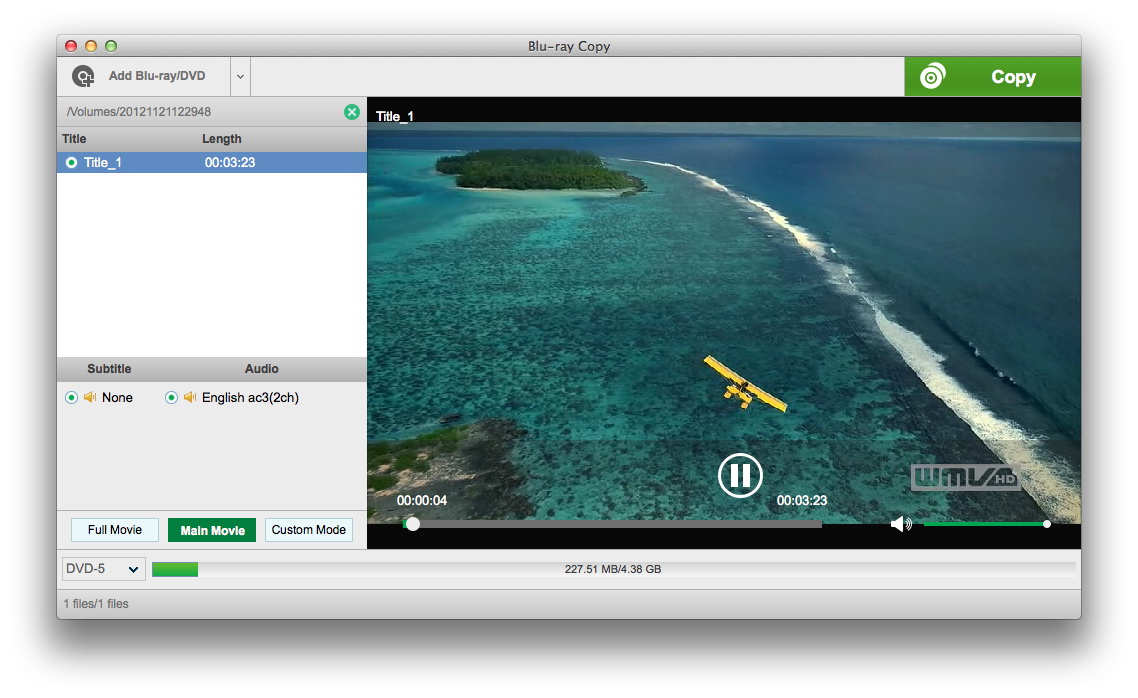
A disc loaded on a Mac: one title (3:23), subtitle set to None, English AC3 2-channel audio, Main Movie selected, and the DVD-5 bar showing 227.51 MB of 4.38 GB used. This is the older stand-alone Mac app. The current version shows the same panel inside Prof. Media's Copy tab.
Whole disc, film only, or hand-picked titles
Leawo Blu-ray Copy for Mac has three buttons under the title list. Full Movie keeps the disc as it is, menus and bonus features included, which is the mode to use for a 3D disc you want to keep in 3D. Main Movie keeps only the feature, the usual pick when you're squeezing a film onto BD25. Custom Mode lets you tick individual titles, handy for a TV box set where you only want some episodes. On top of that, you choose which subtitle and audio tracks travel with the copy and drop the rest.
Folder, ISO and burner from one panel
Leawo Blu-ray Copy for Mac's Copy panel has three tick boxes: Folder, ISO File and your connected burner. You can tick more than one, so a single read of the disc can produce an ISO for your archive drive and a burned BD-R for the living room. The panel also sets the disc label and the save location, and shows the hard disk space the job will use. It can burn an existing ISO image to a blank disc as well.
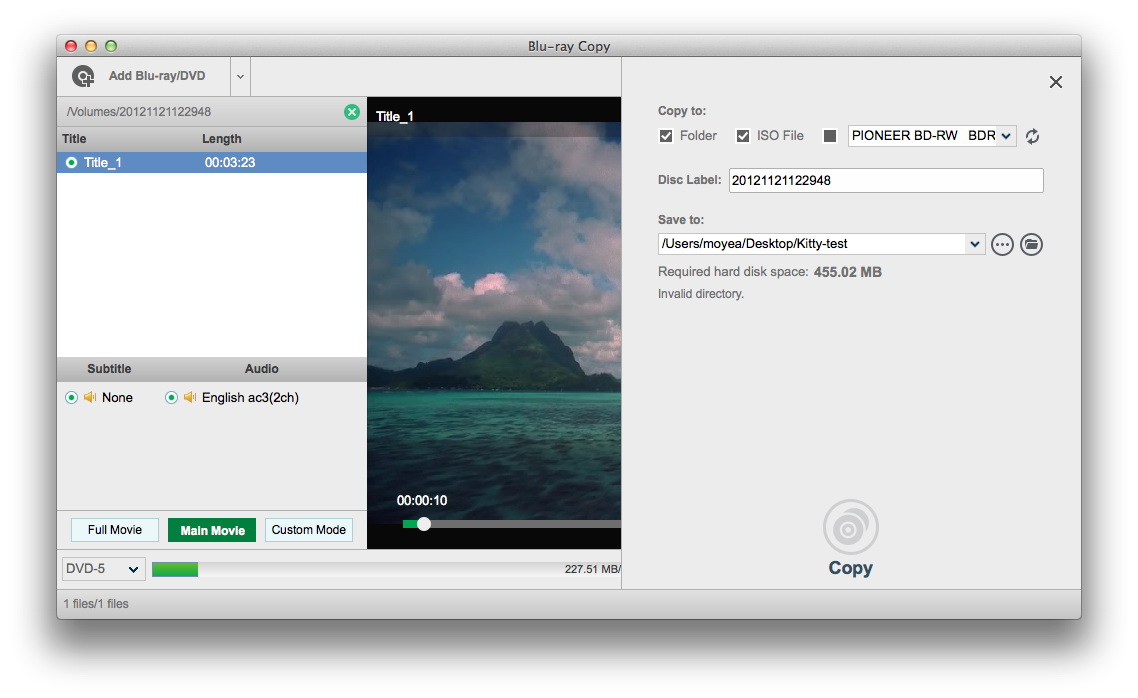
The Copy to panel on a Mac: Folder and ISO File ticked, a Pioneer BD-RW drive listed as the burner, a disc label, a save path under /Users, and "Required hard disk space: 455.02 MB" (older stand-alone Mac app).
Four disc tools for the price of one
Leawo Blu-ray Copy for Mac comes with DVD Copy, Blu-ray Recorder Copy and Blu-ray to DVD Converter switched on in the same license. Recorder Copy handles BDAV discs made on a TV recorder from Panasonic, Sony, Samsung, LG or Sharp. Blu-ray to DVD Converter turns a Blu-ray into a DVD-compatible disc for an older player.
Benefits
- The originals can stay in the case. Play the copy, lend the copy, let the kids scratch the copy.
- An ISO keeps everything. Unlike a ripped MP4, a disc image keeps the menus, chapters and extra audio tracks, and you can burn it again whenever a copy wears out.
- It suits a modern Mac setup. With an external drive and an SSD, a MacBook Air becomes a disc-archiving station without a Windows PC in the house.
Real-World Uses
- Archiving to an external SSD. Save each Blu-ray as an ISO on a USB-C SSD, then put the shelf of discs in storage.
- Making a car or holiday-home copy. Use Main Movie and the BD25 or DVD-9 target to make a cheaper copy for a player you don't fully trust.
- Saving recorder discs. Back up BDAV discs from an old TV recorder before the discs or the recorder fail.
Who It's For, and Who Should Skip It
It fits Mac users with a Blu-ray or DVD collection who want the discs duplicated as discs or ISO images, with menus and extras intact, and who'd rather click Full Movie or Main Movie than learn command-line tools.
Skip it if:
- You want files for an iPhone, iPad, Apple TV or Plex. That's a ripper's job. Leawo Blu-ray Ripper for Mac makes MP4 and MKV files.
- Your collection is 4K Ultra HD. Leawo UHD Copy is the right product.
- Your discs carry Cinavia and you play copies on a Cinavia-aware player. Leawo Blu-ray Cinavia Removal for Mac covers that.
- You only need to burn your own home videos. A disc authoring tool such as Leawo Blu-ray Creator fits better.
Usage Guide
- Check your chip and install. Open Apple menu > About This Mac, then click the matching Apple Chip or Intel Chip button on Leawo's download page. Open the DMG, drag Leawo Prof. Media to Applications and launch it. Plug in the Blu-ray drive and insert the disc.
- Open the Copy tab and click Add Blu-ray/DVD. Load the disc, a disc folder or an ISO, or drag it onto the "Drag File Into Me" box.
- Pick the mode and tracks. Click Full Movie, Main Movie or Custom Mode, then choose subtitles and audio.
- Pick the target size in the bottom-left drop-down and watch the capacity bar.
- Set the output. Click the green Copy button, tick Folder, ISO File and/or the burner, and choose the save location.
- Start. Click Copy at the bottom of the panel and let the progress screen run.
- Register when you've bought a code: Help > Activate in the Mac menu bar opens the Activation Center, where you paste the code.
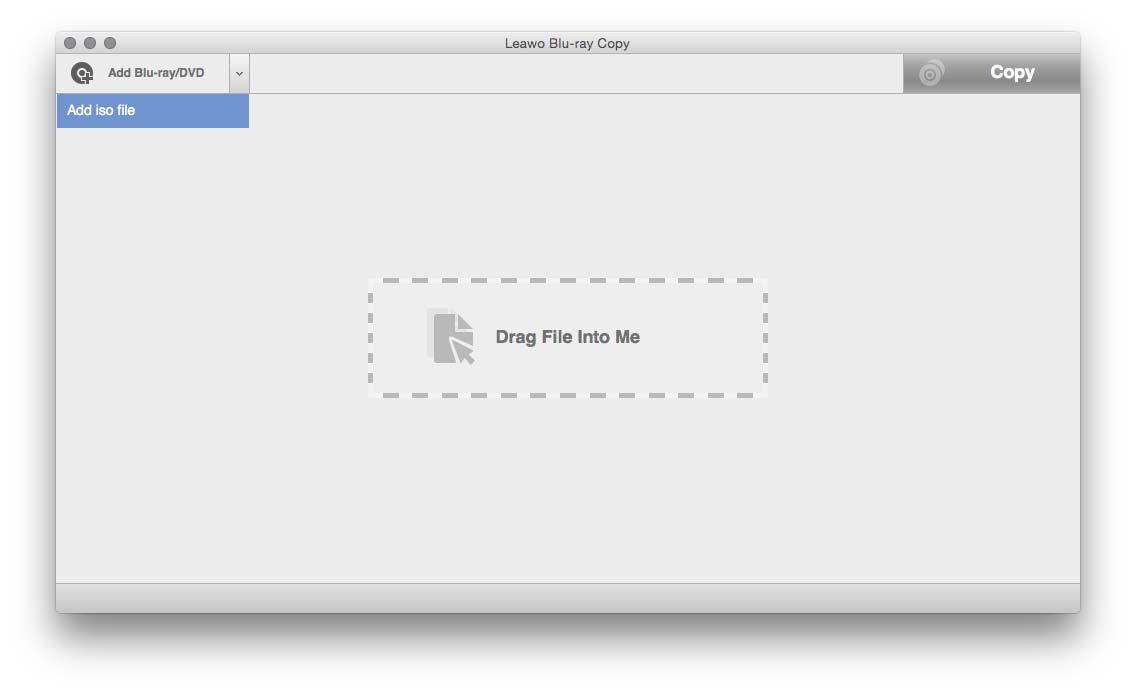
Step 2 on a Mac with no disc in the drive: the Add Blu-ray/DVD menu offers "Add iso file", and the "Drag File Into Me" box accepts a folder or ISO (older stand-alone Mac app).
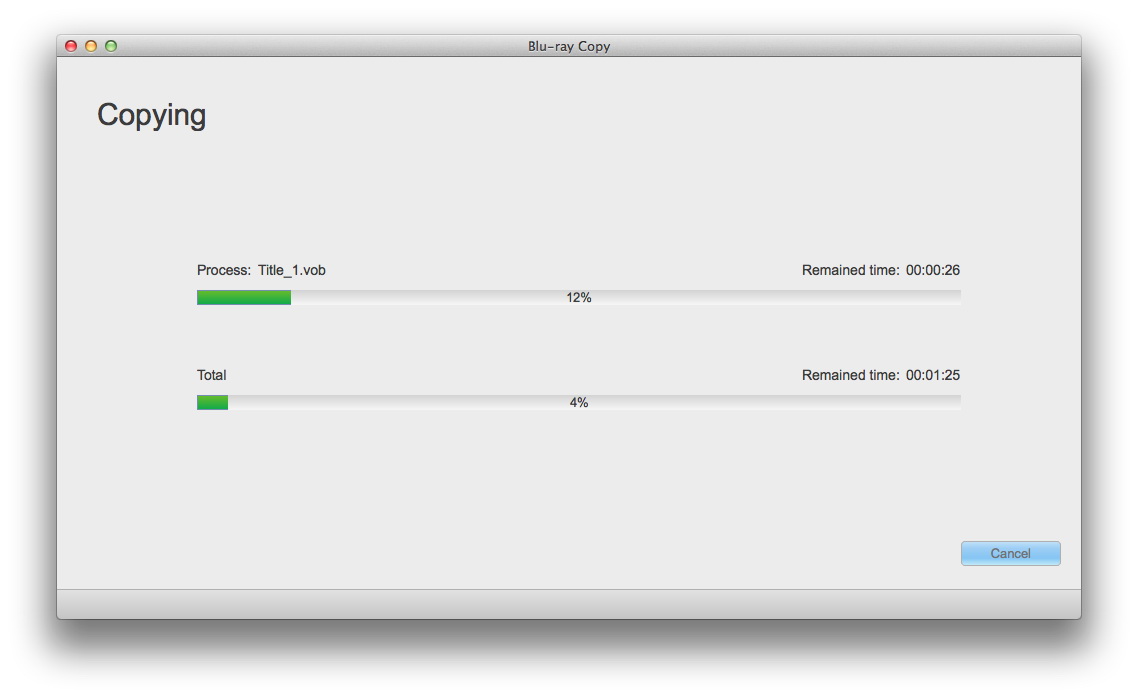
Step 6: the Copying screen, with Title_1.vob at 12% and the whole job at 4%, each with a remaining-time estimate and a Cancel button (older stand-alone Mac app).
Tips for Mac users
- Leave room on the startup disk. Leawo asks for 25 GB free for a Blu-ray job and 5 GB for a DVD, and ticking both Folder and ISO needs twice that. On a 256 GB MacBook, point "Save to" at an external drive.
- Expect the processor to work hard. Leawo's Mac spec sheet lists about 280% CPU while copying (close to three cores busy), so plug a laptop in for a long job.
- One drive is enough. Copy the disc to a folder or ISO first, then insert a blank disc and burn that image.
Where it falls short
- Slower claims on the Mac. Leawo's Mac spec sheet promises "6X higher" copy speed, while the Windows page advertises 50X with NVIDIA, Intel and AMD graphics acceleration. Don't expect Windows speed figures on a Mac.
- One disc at a time. A Mac reviewer wished it could make more than one copy without running the job again.
- Blank media matters. Another Mac user's first dual-layer BD-R burns failed, which he put down to the discs.
- macOS upgrades can break it for a while. Trustpilot reviewers describe Leawo's Mac programs failing after an OS X upgrade (Yosemite, in 2014) until support sent a fix.
- Dated Mac documentation. Leawo's Mac tutorials still show the old stand-alone app, and its Mac "user guide" pages show the Windows window.
- No change-of-mind refunds. Leawo refunds confirmed faults it can't fix within 14 days, not a purchase you no longer want, so the trial is your test.
What Users Say
Written reviews of the Mac edition are few and old. We found no independent magazine test of the current Mac build, and the reviews that do exist are on Leawo's own review page for the Mac version, which publishes reviews only after Leawo checks them, plus a handful of Trustpilot comments about Leawo's Mac software in general.
Leawo's review page for Blu-ray Copy for Mac (4.7 out of 5, 7 reviews)
All seven are positive, five at 5 stars and two at 4, and they date from 2013 to 2020, long before the Apple silicon build. The 4-star ones carry the useful criticism.
"Just bought this software. Works great I’ve been burning Blu-rays as easy as pie, I’ve been looking for several weeks for software and this one jumped out and it works perfect I recommend it strongly." Perry Nestel, 5 stars, March 2020
"Leawo BluRay Copy for Mac works as advertised. Just copied a fairly large number of DVD-single layer, dual layer, and BluRay single and dual layer products... was simple to use and worked reliably every time. However, the first few BluRay-DL disks I tried failed, which was probably due to problems with the blank media." Fusion Head, 5 stars, "Great product", October 2018
"It could be a little more intuitive, but otherwise it makes great copies without difficulty. I'm just happy this product exists." Stephen Myers, 4 stars, "Glad this product exists", April 2017
"Good, but should definitely be able to copy more then 1 disk at a time, without having to copy it again." André Normandin, 4 stars, October 2015
"Hi. i would like to say, that this program works perfect, without trouble. fine job" OCH, 5 stars, February 2015
"Must faster than alternative programs I have used. Clean and easy to use interface." baltimoresbest, 5 stars, June 2013
"I'm looking forward to using this app to replace Handbrake." Charles Clements, 5 stars, June 2013 (written before he'd used it, so it says little about results)
Trustpilot: Leawo's Mac software (4.4 TrustScore, 151 reviews for leawo.org)
Trustpilot reviews are about Leawo as a company and cover every product. A few name the Mac versions.
Oliver (5 stars, "Outstanding support", November 2014) bought Blu-ray Copy together with Blu-ray Creator: "Having experienced some problems with my new Leawo "Blue-Ray Creator" and "Blu-Ray Copy" under Mac OS 10.10". After support helped him, he concluded: "Great products with outstanding support, therefore I can definitely recommend the purchase!"
Alain Claudin (5 stars, "Perfect Service - Fast (and not furious)", December 2014): "My Leawo software installed in 2012, was no longer working after installing Mac OS X Yosemite." He says support fixed it within hours.
Doug Stidham (5 stars, August 2020) called Leawo's Blu-ray software the best of four he'd used on the Mac, though his review is about ripping rather than copying.
The recurring themes
Mac buyers like that it just copies, single- and dual-layer, DVD and Blu-ray, with little setup, and several say support sorts out problems quickly. The complaints are about an interface that could be more intuitive, one copy per run, failed burns on cheap dual-layer blanks, and breakage after a macOS upgrade. Because the Mac reviews are old and few, test the trial on your own Mac and drive before trusting them.
Comparisons
Mac edition vs Windows edition
The two editions copy the same discs to the same targets with the same three modes, and cost the same. The differences are in the details. The Mac build comes as Intel and Apple silicon DMGs, while Windows is a single installer. Leawo lists no graphics-card requirement for the Mac, where the Windows version asks for an NVIDIA GeForce GTX 260 or better and promises up to 50X speed with GPU acceleration, against "6X higher" on the Mac spec sheet. A license works only on the platform you bought it for.
Blu-ray Copy vs Blu-ray Ripper for Mac
Blu-ray Copy keeps a disc as a disc (or disc image). Blu-ray Ripper turns the movie into MP4 or MKV for the Apple TV app, an iPad or Plex. Leawo sells the two as a lifetime bundle for $119.94.
Editions and Pricing
| Mac license |
Price |
Term |
Modules |
Money-back period listed |
| Blu-ray Copy for Mac, 1 Year |
$44.95 |
One year, one Mac, renewal quoted at $26.97 |
Blu-ray Copy, DVD Copy, Blu-ray Recorder Copy, Blu-ray to DVD Converter |
5 days |
| Blu-ray Copy for Mac, Lifetime |
$99.95 |
One-time payment, one Mac |
The same four modules |
14 days |
| Blu-ray Ripper + Blu-ray Copy, Lifetime |
$119.94 |
One-time payment, one computer |
Seven modules: the four copy tools plus Blu-ray, DVD and Blu-ray Recorder Ripper |
14 days |
Both single licenses include unlimited free upgrades. The Buy Now button opens Leawo's product page, where the pricing section has a Windows/Mac switch, so make sure Mac is selected.
FAQs
Does Leawo Blu-ray Copy for Mac run natively on M1, M2, M3 and M4 Macs?
Yes. Leawo Blu-ray Copy for Mac has a native ARM build (ltmcu_setup_arm64.dmg) for Apple silicon, announced with Prof. Media for Mac 13.0.8. The Intel DMG is still offered for older Macs.
Which external drive do I need for Leawo Blu-ray Copy on a MacBook?
Leawo Blu-ray Copy for Mac works with a USB Blu-ray drive. To read Blu-rays you need a Blu-ray reader, and to burn Blu-ray copies you need a Blu-ray writer. Apple's own SuperDrive reads and writes DVDs only.
Can I play the ISO files from Leawo Blu-ray Copy on my Mac?
Leawo Blu-ray Copy for Mac makes standard Blu-ray and DVD ISO images, and macOS has no built-in Blu-ray player, so you need a player app that opens Blu-ray ISOs, such as Leawo's free Blu-ray Player for Mac. DVD ISOs mount in the Finder.
Does the Leawo Blu-ray Copy for Mac license renew automatically?
Leawo Blu-ray Copy for Mac's 1-year license renewed only if you opt in on the order page we saw on November 1, 2026: the auto-renewal box was unticked and the renewal was quoted at $26.97. Leawo's pricing table describes the plan as auto-renewing, so check the box's state when you order. The lifetime license is a single payment.
Can I move my Leawo Blu-ray Copy for Mac license to a new Mac?
Leawo Blu-ray Copy for Mac licenses cover one Mac at a time. Trustpilot reviewers describe Leawo's support helping them activate on a replacement computer, so contact support when you switch Macs.
What languages does Leawo Blu-ray Copy for Mac support?
Leawo Blu-ray Copy for Mac's spec sheet lists 15 interface languages: Chinese, English, Dutch, Finnish, German, French, Hungarian, Italian, Japanese, Portuguese, Brazilian Portuguese, Russian, Spanish, Vietnamese and Polish.
Is it legal to copy my Blu-rays on a Mac?
Leawo Blu-ray Copy for Mac is sold for personal backups of discs you lawfully own. Leawo's fair-use policy rules out piracy, redistribution and copying rental discs, and whether getting past copy protection is allowed depends on the law where you live.
System Requirements
- macOS: 10.13 High Sierra, 10.14 Mojave, 10.15 Catalina, 11 Big Sur, 12 Monterey, 13 Ventura, 14 Sonoma, 15 Sequoia, 26 Tahoe, 27
- Processor: 1 GHz or faster Intel, or Apple M1/M2 (native Apple silicon build available)
- Memory: 512 MB RAM, 1 GB or more recommended
- Free disk space: 5 GB or more for DVD, 25 GB or more for Blu-ray
- Drive: a recordable Blu-ray drive
- Other: Internet connection
- Download: 241 MB (Intel) or 316 MB (Apple silicon)
Conclusion
Leawo Blu-ray Copy for Mac is worth it if you want Blu-ray and DVD duplicates on a Mac and don't want to keep a Windows PC around for the job. It's one of the few Mac tools that handles protected discs, compression to BD25 or DVD, and burning in one window, and it now runs natively on Apple silicon.
The one reason to buy it: it turns an external drive and a Mac into a complete disc-backup setup, ISO or burned copy, with DVD and recorder discs covered by the same code. The main reason not to: the Mac evidence is thin. The user reviews are years old, the tutorials show a decade-old window, there's no Cinavia or 4K UHD support, and a change of mind isn't refunded. Run the 5-minute trial on your own Mac and drive with your hardest disc. If it copies cleanly, $44.95 covers a one-off archiving project, and the $99.95 lifetime license makes sense only if you'll keep copying discs for years.
Download Free TrialBuy Now