Leawo DVD to Blu-ray Converter: Put Several DVDs on One Blu-ray Disc, With a Menu
Leawo DVD to Blu-ray Converter is a Windows module of Leawo Prof. Media 13 that turns DVD discs, folders and ISO files into a BD-25 or BD-50 Blu-ray disc, folder or ISO, and can merge several DVDs onto one Blu-ray with a menu. It costs $44.95 a year or $69.95 for a lifetime license, and it suits people who want to shrink a shelf of DVDs into a few Blu-ray discs that play on a standard Blu-ray player.
A box set of TV seasons can easily fill six or eight DVDs. A single BD-50 holds about 50 GB, so the same set can end up on one or two discs, each with a menu that lists every episode. That's the trade this tool offers: fewer discs, same content.
Quick facts
- Version: 13.0.1.6 (Leawo Prof. Media 13, which holds the module)
- Developer: Leawo Software Co., Ltd.
- Windows: 7, 8, 8.1, 10 and 11; a Mac edition is sold separately
- Input: DVD-5 or DVD-9 disc, DVD folder or ISO, several at once
- Output: BD-25 or BD-50 disc, Blu-ray folder or ISO, up to 10 disc copies per run
- Loading modes: Full Movie, Main Movie and Custom Mode
- Price: $44.95 a year (auto-renews) or $69.95 lifetime, 1 PC
- Trial: converts 5 minutes of content until you activate it
What we checked: the Windows installer Leawo's download page serves (ltmcp_setup.exe, Leawo Prof. Media, file version 13.0.1.6, 209,171,392 bytes, dated October 10, 2026), the trial notice in Leawo's step-by-step screenshots, and the order page prices for this module ($44.95 for 1 year, $69.95 lifetime), on November 1, 2026. We didn't burn a Blu-ray with it ourselves.
Before you buy
- It doesn't make your DVDs HD. Leawo promises the DVD's original quality on the Blu-ray; the product page says nothing about upscaling, so expect DVD picture quality on a Blu-ray disc.
- Burning a disc needs a Blu-ray writer. Without one you can still build a Blu-ray folder or ISO.
- For video files, not DVDs, you want Leawo Blu-ray Creator, the module that burns MP4, MKV and other videos to Blu-ray.
- Refunds are for faults only. The order box shows a 5-day (yearly) or 14-day (lifetime) money-back guarantee, but Leawo's refund policy limits refunds to bugs or hardware problems support can't solve, and duplicate orders. Test with the trial first.
Download Free TrialBuy Now
Overview
DVD to Blu-ray Converter lives in the Burn tab of Leawo Prof. Media, the same workspace Leawo's Blu-ray and DVD creators use. Its part of that tab is the Add DVD button: you add one or more DVDs, choose which titles go in, pick BD-25 or BD-50, add a menu if you want one, and burn. Everything else, from menu templates to the output panel, is shared with Leawo's other burning modules.
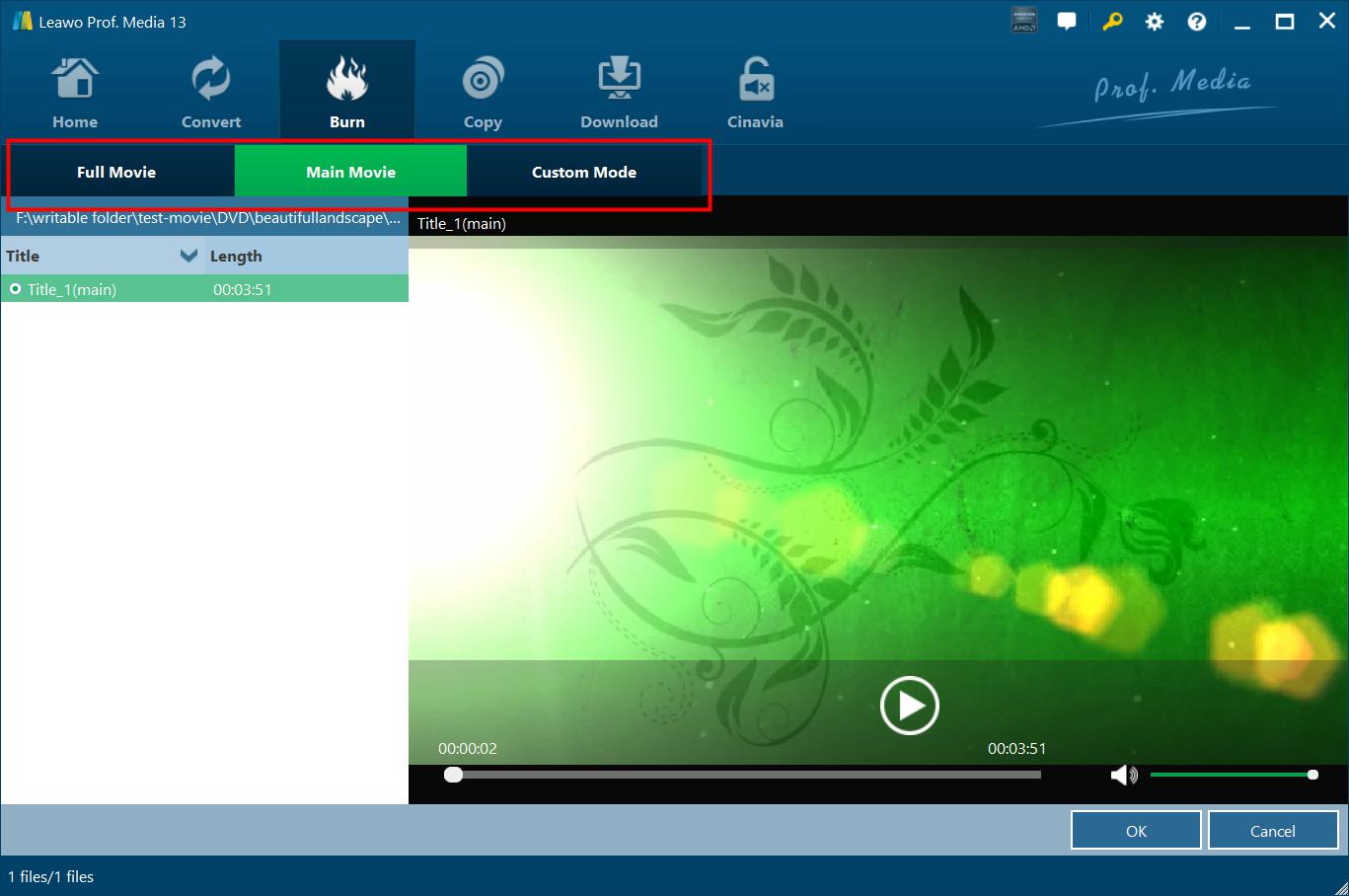
Loading a DVD folder in the Burn tab of Leawo Prof. Media 13: the Full Movie, Main Movie and Custom Mode buttons across the top, the title list on the left and a preview player on the right.
Features
Several DVDs onto one Blu-ray
Leawo DVD to Blu-ray Converter accepts more than one DVD source in a project and writes them all to one Blu-ray disc, folder or ISO. After loading, you can drag titles into the order you want, rename them and play them back. A size bar at the bottom shows how much of the BD-25 or BD-50 you've used.
Three ways to load a DVD
Leawo DVD to Blu-ray Converter loads every title on the disc in Full Movie mode, just the one you pick in Main Movie mode, or a hand-picked set in Custom Mode. Custom is the useful one for TV discs, where you want the episodes and not the trailers. You also choose which audio tracks to keep.
Menu templates you can preview and edit
Leawo DVD to Blu-ray Converter offers built-in menu themes (Standard, Business, Childhood, Education, Holiday, Nature, Sports and Wedding), more under an Online tab, and your own saved designs under Custom. "No Menu" is an option too. Click a theme to preview it with Play and Scene buttons.
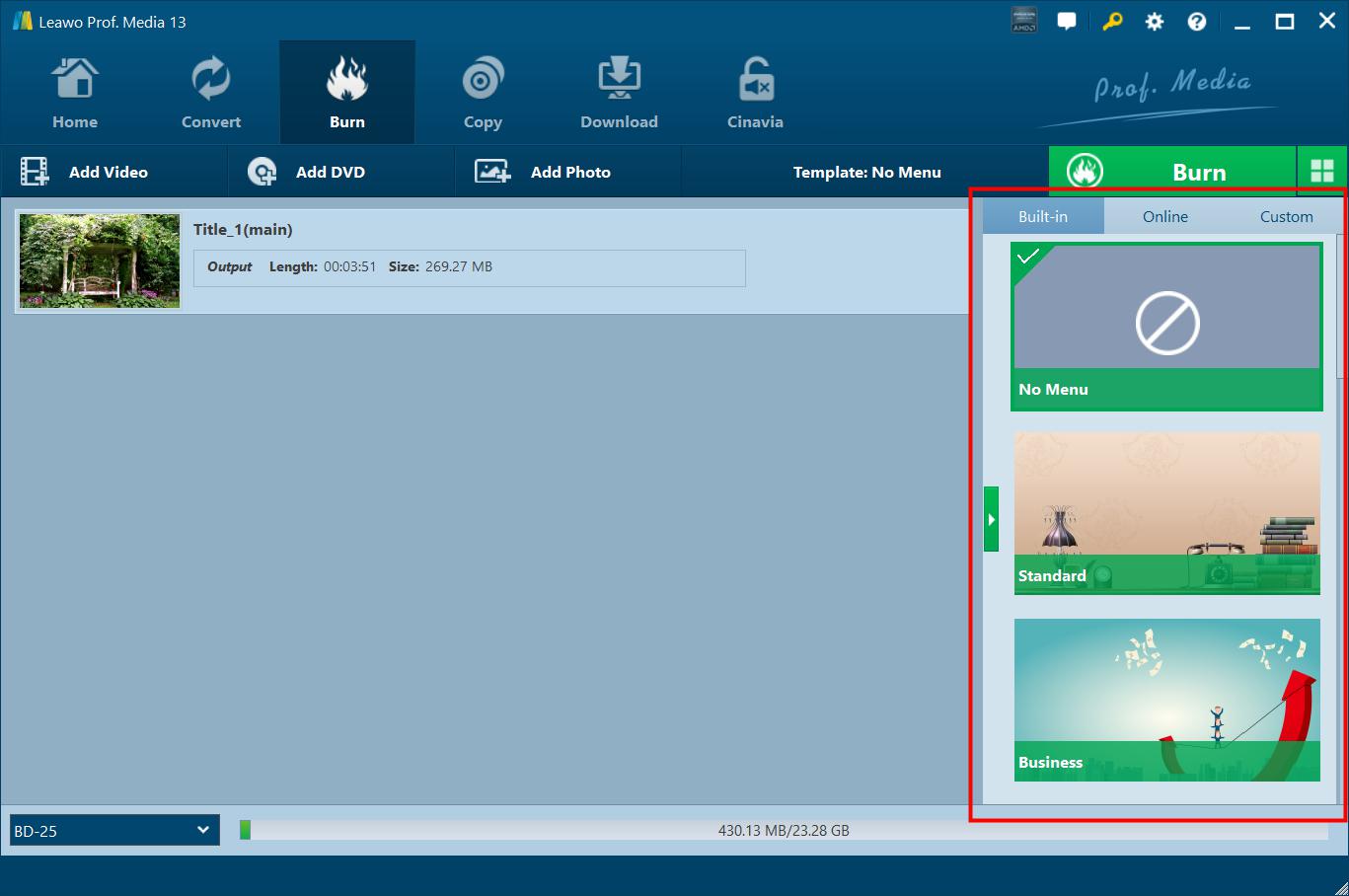
The Burn tab with one DVD title loaded (3:51, 269.27 MB) and the template sidebar highlighted: Built-in, Online and Custom tabs, with No Menu, Standard and Business themes. The bar at the bottom reads 430.13 MB of 23.28 GB on a BD-25.
A menu designer for your own look
Leawo DVD to Blu-ray Converter's pencil icon opens a designer where you change the title and its font, size and color, set a background image or video, add background music, and reorder the chapter list. Save the result as a template and it appears under Custom next time.
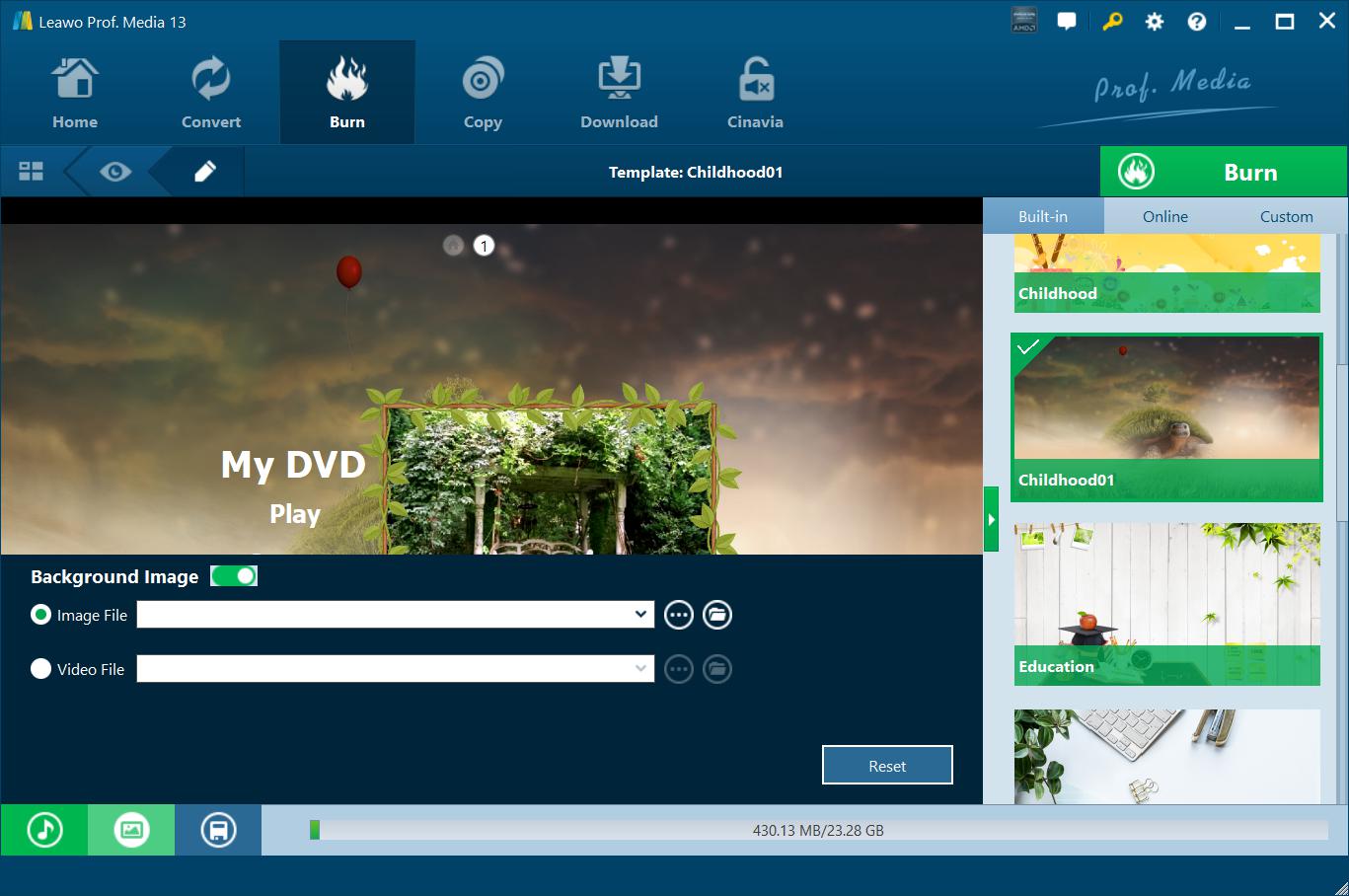
The menu designer with the Childhood01 template: a "My DVD" title, Play button and thumbnail frame, and the Background Image switch with Image File and Video File choices. Music, image and save buttons sit at the bottom left.
Disc, folder and ISO, with multiple copies
Leawo DVD to Blu-ray Converter's output panel lets you tick Folder, ISO File and your Blu-ray burner together, and when a burner is ticked, choose up to 10 disc copies. It shows the hard disk space required next to what's free. Leawo also lists GPU acceleration for faster burning.
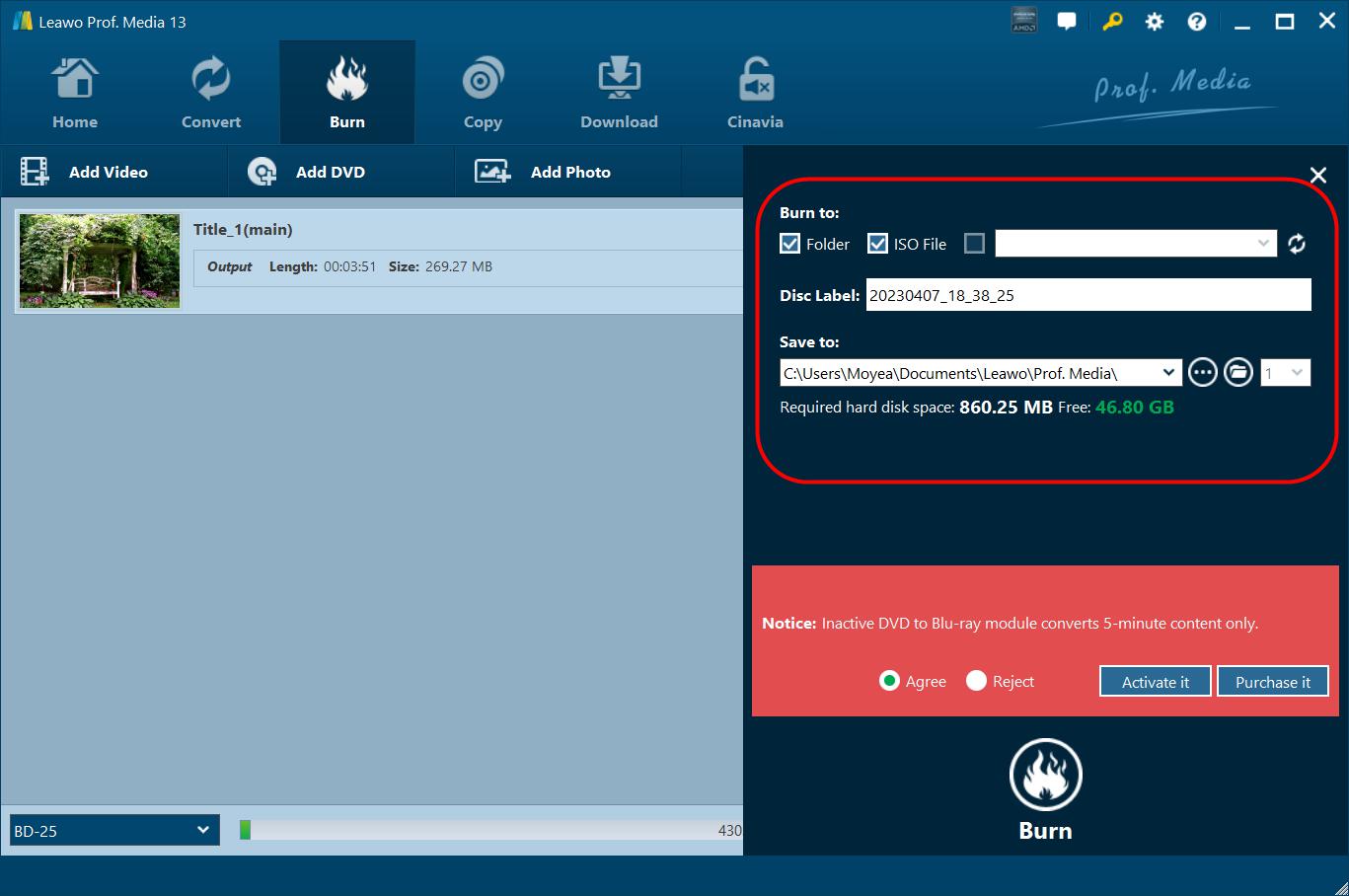
The burn settings: Burn to Folder and ISO File ticked, a disc label, the save folder, 860.25 MB required against 46.80 GB free, and the trial notice "Inactive DVD to Blu-ray module converts 5-minute content only".
Benefits
- Less shelf space. Several DVDs' worth of films or episodes on one disc, with one menu.
- One disc for a whole season. No swapping discs halfway through a binge.
- A fresh copy of ageing discs. Scratched or aging DVDs get a new home on newer media while they still read.
Real-World Uses
- A TV box set: load each season's DVDs in Custom Mode, keep only the episodes, and burn one BD-50 per season.
- Family DVDs from a camcorder era: gather years of home-made DVDs onto one Blu-ray with a Wedding or Childhood menu.
- A film collection as ISO files on a media server, each Blu-ray ISO holding several DVD films.
Who It's For, and Who Should Skip It
Good fit: people with a Blu-ray burner and a stack of DVDs who still watch on a Blu-ray player and want fewer discs.
Skip it if:
- You stream from a media server. A DVD ripper that makes MP4 or MKV files is simpler and needs no blank discs.
- You expect better picture quality. The content is still DVD resolution.
- You have no Blu-ray writer and don't want ISOs. You'd need to buy a drive and blank BD-R discs first.
Usage Guide
- Install Leawo Prof. Media (ltmcp_setup.exe) and open it. Click Burn on the top bar, or the DVD to Blu-ray tile on the home screen.
- Add the DVDs: the "Add DVD" drop-down offers Add from CD-ROM, Add from folder and Add iso file. Repeat for each DVD.
- Pick the content: Full Movie, Main Movie or Custom Mode, then drag titles into order and choose audio tracks.
- Choose BD-25 or BD-50 at the bottom left and watch the size bar.
- Pick a menu, or No Menu. Use the pencil icon to customise it.
- Click the green Burn button, choose Folder, ISO File and/or your Blu-ray burner, label the disc, set the save folder and the number of copies.
- Click Burn at the bottom of the panel and follow the progress on the Burning screen.
Where it falls short
- Disc burning is where Leawo's complaints cluster. Trustpilot reviewers report failed burns with Leawo's creator modules, so a test burn on your drive and media matters.
- No independent review. We found no magazine or forum test of this module; earlier independent reviews cover Leawo's rippers and copiers.
- Pricier than it looks for one job. $69.95 lifetime is a lot for a one-off conversion of a DVD collection; the yearly plan, at $44.95, may make more sense if you'll finish in a few months.
- Spec sheet carried over. The product page still shows a 186 MB download size; the current installer is about 200 MB.
What Users Say
Leawo's review page for this module showed no published reviews when we checked, and we found no independent review. What's available is Leawo's own testimonials and company-wide feedback.
Leawo's product page (chosen by Leawo)
- Michael Stan: "The best DVD tool I have ever used for merging my many DVDs to Blu-ray discs. Greatly saved my time and space. Now my old DVD collections could be much better backed up and saved." (The page shows the same text again under the name Stephen Miles.)
- Milley Forbes: "A very smart tool for backing up DVD contents. The movie-only DVD to Blu-ray conversion mode is especially useful."
Trustpilot (all Leawo products)
Leawo held 4.3 out of 5 from 158 reviews (leawo.com) and 4.4 out of 5 from 151 reviews (leawo.org) on November 1, 2026. Reviews about Leawo's disc tools:
- milomir ilic (5 stars, November 2018), "The best Blu-ray Creator": "Made perfect quality on blu-ray disk."
- Guido (5 stars, September 2026), titled: "Your resource against the fading effects of time in media"
- Ian Bellinger (1 star, March 2019), about Leawo Blu-ray Creator: "The dvd burn fails each time- I have tried several times."
- Kenny75 Photography (4 stars, February 2026), titled: "Problematic software but excellent customer service"
The takeaway: Leawo users like the results when a burn works and praise the support team, while the negative reviews are mostly about burns that fail. Run the 5-minute trial on your own burner before buying.
Comparisons
DVD to Blu-ray Converter vs Blu-ray Creator
Both live in the Burn tab and share the menu templates. Blu-ray Creator burns video files and photos; DVD to Blu-ray Converter takes DVDs as the source. Buy the one that matches what you're starting from.
DVD to Blu-ray Converter vs Blu-ray to DVD Converter
Leawo sells the opposite direction as a separate module. Blu-ray to DVD shrinks a Blu-ray down to a DVD; this one packs DVDs up onto a Blu-ray. Both are in the eight-module bundle below.
Editions and Pricing
| License | Price | Includes | Money-back window |
|---|
| 1 Year (auto-renews) | $44.95 | DVD to Blu-ray Converter, 1 PC | 5 days |
| Lifetime | $69.95 | DVD to Blu-ray Converter, 1 PC | 14 days |
| Blu-ray Ripper + Blu-ray Copy + DVD to Blu-ray Converter (lifetime) | $129.94 (list $269.85) | 8 modules, including DVD Ripper, DVD Copy and Blu-ray to DVD Converter | 14 days |
Prices from the order page on November 1, 2026.
FAQs
How many DVDs fit on one Blu-ray?
By size alone, a BD-25 holds the data of about five single-layer DVDs (4.7 GB each) or two dual-layer DVD-9s, and a BD-50 about twice that. Leawo DVD to Blu-ray Converter's size bar shows exactly how much space your selection takes.
Will the Blu-ray play on my PS4 or standalone player?
Leawo DVD to Blu-ray Converter makes standard BD-25 and BD-50 discs meant for playback on regular Blu-ray players and software. Burned BD-R compatibility still depends on the player, so test one disc first.
Do I need a Blu-ray burner to try it?
No. Leawo DVD to Blu-ray Converter can save a Blu-ray folder or ISO to your hard drive, which you can check in a media player before buying blank discs or a burner.
Does it keep subtitles and alternate audio?
Leawo says DVD to Blu-ray Converter keeps the source DVD's subtitles and audio tracks in the Blu-ray output, and its loading screen lets you choose the audio tracks.
Is the lifetime license really one payment?
Yes. Leawo DVD to Blu-ray Converter's lifetime license is a one-time $69.95 payment with free upgrades; the 1-year license renews automatically each year until you cancel.
Is there a Mac version?
Yes, Leawo DVD to Blu-ray Converter for Mac is sold separately at the same prices, for macOS 10.13 and later on Intel and Apple silicon.
System Requirements
- Windows: 7, 8, 8.1, 10 or 11
- Processor: 1 GHz or faster Intel or AMD
- Memory: 512 MB RAM (1 GB or more recommended)
- Disk: 25 GB or more free for a Blu-ray project
- Graphics: NVIDIA GeForce GTX 260 or better
- Other: a recordable Blu-ray drive for disc output, and an internet connection
Conclusion
Leawo DVD to Blu-ray Converter is worth it if you own a Blu-ray burner, still watch discs on a Blu-ray player, and want to consolidate a DVD collection. Merging several DVDs, picking titles in Custom Mode and adding an editable menu make it a proper consolidation tool rather than a plain copier.
The main reason not to buy it: if you stream rather than spin discs, a ripper does the same job without blank media, and the picture won't be any better on Blu-ray either way. Try a 5-minute burn first, since failed burns are the most common complaint about Leawo's creator tools.
Download Free TrialBuy Now