CleverGet ESPN Plus Downloader: Save ESPN+ Game Replays, UFC Shows and Clips as 720p, 60fps Files
CleverGet ESPN Plus Downloader is a $49.95-a-year module for Leawo's CleverGet (Windows, with a Mac edition at the same price) that saves on-demand ESPN+ videos from espn.com as MP4 or MKV files at up to 720p and 60 frames per second, with the commercial breaks removed. It's for ESPN+ subscribers who want game replays, fight-week shows and clips on a laptop or phone without streaming them.
Sports is where frame rate matters: a fast break or a takedown looks smeared at 30fps. Leawo's pitch for this module is that it keeps ESPN+'s 60fps streams as they are, in a file you can watch on a train, a plane or anywhere mobile data is expensive.
Quick facts
- What it is: the ESPN+ module of CleverGet 27.0.0.1, Leawo's streaming video downloader
- Developer: Leawo Software Co., Ltd.
- Runs on: Windows 7 to 11 (64-bit); a Mac edition is sold separately
- Downloads: on-demand ESPN+ videos and clips played on espn.com, not live games
- Output: MP4 or MKV at up to 720p and 60fps; closed captions inside the video or as SRT or SUP files
- You need: your own ESPN+ subscription, signed in inside CleverGet
- Price: $49.95 for one year or $79.95 lifetime, for one computer, $10 to $20 less than most CleverGet modules
- Free trial: downloads up to 3 videos
What we checked: the CleverGet installer every module shares (cleverget_setup.exe, version 27.0.0.1, 527,919,296 bytes, dated October 30, 2026), the ESPN+ module's prices in Leawo's store data ($49.95 a year, $79.95 lifetime) and the three reviews on Leawo's ESPN+ review page, on November 1, 2026. We didn't download an ESPN+ game ourselves, so the quality claims are Leawo's.
Before you buy
- 720p, not 1080p. Leawo promises up to 720p for ESPN+. In Leawo's own screenshot the top two choices are both 1280 x 720, at different bit rates.
- Replays, not live. The module downloads ESPN+ videos once they're on demand. If you want a game, download its replay after it ends.
- ESPN's player changes often. A CleverGet buyer on Trustpilot had trouble downloading full ESPN games until Leawo updated the software, so expect occasional waits for a fix.
- Personal use only. Leawo's fair-use policy forbids sharing downloads, and downloading outside ESPN's own apps may go against ESPN's terms.
- Refunds are narrow. Leawo refunds only reproducible faults its support can't fix, not a change of mind.
Download Free TrialBuy Now
Overview
CleverGet is one program with a module per streaming service; this module adds ESPN+. ESPN+ videos play on espn.com's watch player, so you open espn.com inside CleverGet's browser, log in with the account that holds your ESPN+ subscription, and start the replay or episode. CleverGet parses the player page and shows every available quality with its bit rate, plus the audio and caption choices.
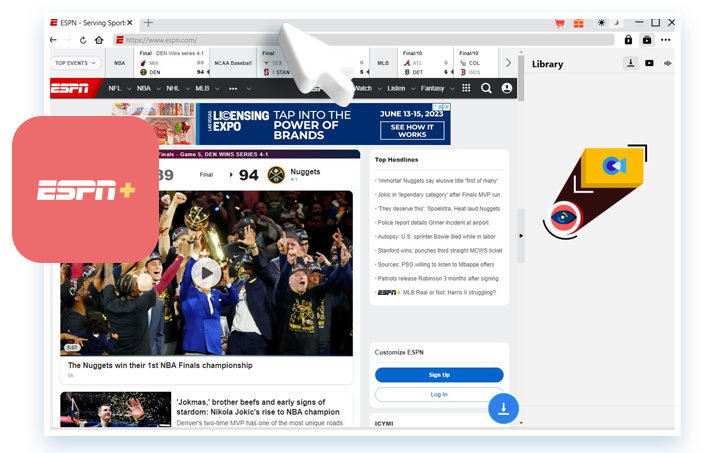
espn.com's home page open in CleverGet's browser, with the Log In button on the right, the download button at the bottom and the Library panel beside it. The headlines (the Nuggets' first NBA title) show this screenshot dates from June 2023; Leawo's image adds the ESPN+ logo and a cursor.
Features
60fps kept for fast action
CleverGet ESPN Plus Downloader saves ESPN+ sports videos at their 60fps frame rate without compressing them again, according to Leawo, so fast play stays smooth in the file. That's this module's main selling point over a screen recorder, which can drop frames.
Pick the quality and file size you want
CleverGet ESPN Plus Downloader lists each stream ESPN+ offers, from 1280 x 720 down to 640 x 360, with the bit rate of each. On a laptop the top 720p stream makes sense; for a phone with little storage, a 540p stream at under half the bit rate saves a lot of space.
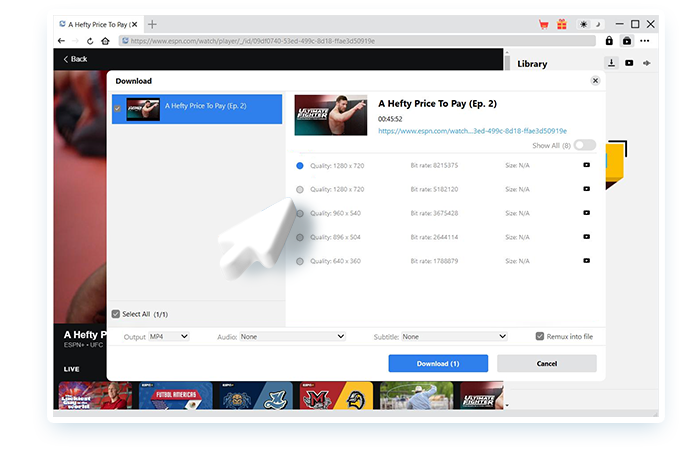
CleverGet's Download window for "A Hefty Price To Pay (Ep. 2)" (45:52), an ESPN+ UFC show: two 1280 x 720 streams (8,215,375 and 5,182,120 bit/s), then 960 x 540, 896 x 504 and 640 x 360, with Output MP4 and "Remux into file" ticked.
Commercial breaks cut out
CleverGet ESPN Plus Downloader removes the commercial ads while it downloads, Leawo says, so a full replay plays straight through. On a three-hour game, that's a real time saver.
Closed captions two ways
CleverGet ESPN Plus Downloader can embed the closed captions in the video or save them as separate SRT or SUP files, in the languages the video offers. CleverGet's shared tools (GPU acceleration, restarting failed downloads, shutdown after the queue) apply here too.
Benefits
- No mobile data on the road. Download replays on Wi-Fi at home and watch them on a phone anywhere.
- Smooth motion. 60fps files look better for sports than a screen recording.
- The cheaper CleverGet module. At $49.95 a year or $79.95 lifetime, it costs less than the Netflix, DAZN or Plex modules.
Real-World Uses
- A commuter or traveling fan: save last night's game replay and watch it on the train.
- UFC fight week: download the ESPN+ shows around the event to watch before the card.
- College sports: keep a replay of a smaller-conference game that only streams on ESPN+.
- Coaching: keep a 60fps file that you can step through frame by frame.
Who It's For, and Who Should Skip It
Good fit: ESPN+ subscribers who watch replays later, travel, or want to keep particular games or shows.
Skip it if:
- You only watch live. Nothing here helps you watch a game while it's on.
- You want 1080p or 4K. The ceiling is 720p.
- You need it to work every single game day. Modules can stop working after an ESPN update until Leawo patches them.
Usage Guide
- Install CleverGet: run the CleverGet installer (about 500 MB on Windows); the ESPN+ module is part of it.
- Sign in: open espn.com in CleverGet and log in with your ESPN+ account.
- Open the replay: play the video so its espn.com/watch/player page is open. CleverGet needs the playback page.
- Parse it: click the download button and wait while CleverGet lists the options.
- Choose: pick a quality, MP4 or MKV, and captions.
- Download: click Download and follow it in the Library panel.
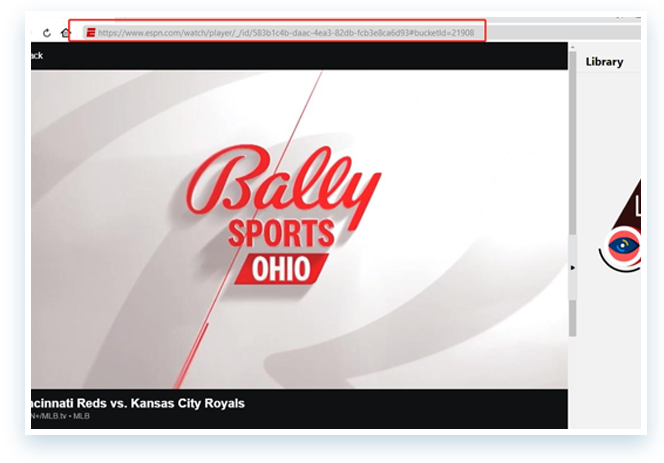
An MLB game (Cincinnati Reds vs. Kansas City Royals) open on the espn.com watch player inside CleverGet, with the player address highlighted to show you must be on the playback page.
Where it falls short
- Old screenshots. Leawo's images of this module are from 2023 and show an older CleverGet download window, so today's screens may look different.
- Leawo's product page has gaps. It lists only Windows specs, though the Mac edition is sold, and a 377 MB download where the installer is about 500 MB.
- Vendor reviews look recycled. One of Leawo's testimonials and one of its "user reviews" tell the same story about an NBA fan who travels to help farmers, under two different names.
- One license, one computer.
What Users Say
Trustpilot: an ESPN download problem, fixed
The most useful review we found is independent: Mark the Bronco (5 stars, August 2026) wrote on CleverGet's Trustpilot page about "downloading complete game videos from ESPN", and that "the fine software engineers at Leawo upgraded my software." It shows both sides: ESPN downloads can break, and Leawo did fix it. CleverGet's Trustpilot score was 4.7 out of 5 from 66 reviews on November 1, 2026.
- Phil Barker (5 stars, September 2026): "This software is excellent. It delivers what it is supposed to and I am very pleased with it."
- Craig (5 stars, December 2024), a "2 1/2 year user": "The issues I've had have been resolved in 24 hours or less."
Leawo's ESPN+ review page
Leawo's review page for this module showed 3 reviews, all 5 stars, on November 1, 2026. Leawo approves reviews before they appear:
- Carlley Moore: "If you want to watch sports videos offline on your smartphone without using your cellula data, you gotta get this downloader."
- Levis Brown: "It downloads various sports videos from the ESPN website. The download is fast and high quality."
The third, from "Mark Railley", repeats the traveling NBA fan story that Leawo's product page credits to "Matt LeBlanc", so we don't give it any weight.
The pattern: people who use it for sports like having replays offline without mobile data; the real-world risk is ESPN changing its player and a wait for Leawo's fix, which Trustpilot reviewers say usually comes quickly.
Comparisons
CleverGet ESPN Plus Downloader vs a screen recorder
A screen recorder captures whatever plays, live games included, but you have to watch in real time, ads and all, and the result can drop frames. CleverGet ESPN Plus Downloader saves an on-demand replay faster than real time, keeps 60fps and leaves out the commercials, but it can't help with a live game.
Editions and Pricing
Leawo's store data showed these prices on November 1, 2026 (per computer, same for Windows and Mac):
| Option | 1 year | Lifetime | Covers |
|---|
| ESPN Plus Downloader | $49.95 | $79.95 | ESPN+ only |
| CleverGet All-in-One | $189.95 | $539.90 | Every CleverGet module |
| Free trial | $0 | - | Up to 3 videos |
The lifetime license pays for itself in under two years against the yearly one. The All-in-One bundle only makes sense if you'd otherwise buy four or more modules.
FAQs
Does CleverGet ESPN Plus Downloader work with free ESPN videos too?
CleverGet ESPN Plus Downloader works on videos played on espn.com inside CleverGet; Leawo's reviewers mention downloading sports clips from the ESPN site. ESPN+ content needs your ESPN+ login.
Can I watch the downloaded ESPN+ games on my phone?
Yes. CleverGet ESPN Plus Downloader saves MP4 or MKV files on your computer, and you can copy them to a phone or tablet; MP4 is the safer choice for phones.
What happens if ESPN changes its website?
CleverGet ESPN Plus Downloader may stop downloading until Leawo releases an update. Report the problem through CleverGet's Bug Report option; Trustpilot reviewers say fixes usually arrive within days.
Is there a Mac version of CleverGet ESPN Plus Downloader?
Yes. Leawo sells a Mac edition of CleverGet ESPN Plus Downloader at the same price; a Windows license doesn't cover a Mac.
Why are there two 720p options in the download list?
ESPN+ streams the same resolution at more than one bit rate. In CleverGet ESPN Plus Downloader, the higher bit rate gives a sharper picture and a bigger file; the lower one saves space.
System Requirements
- Windows: 7, 8, 8.1, 10 or 11 (64-bit)
- Processor: 1 GHz Intel or AMD or faster
- Memory: 512 MB RAM (1 GB or more recommended)
- Disk: 5 GB or more free
- Graphics: NVIDIA GeForce GTX 260 or better
- Internet and account: a connection and an ESPN+ subscription
Conclusion
CleverGet ESPN Plus Downloader is a reasonable $49.95 a year (or $79.95 once) for ESPN+ subscribers who watch replays later, on the move or without mobile data. Ad-free 60fps files and a choice of bit rates are what you pay for, and it's one of the cheaper CleverGet modules.
The catches: it stops at 720p, does nothing for live games, and depends on Leawo keeping up with ESPN's player changes. Use the 3 free downloads on a full game replay before you buy.
Download Free TrialBuy Now