Leawo Prof. DRM: Convert Your iTunes, Audible, Spotify and eBook Purchases to Open Formats
Leawo Prof. DRM (formerly TunesCopy) is a Windows suite of five DRM converters: it turns iTunes movies and TV shows into MP4, iTunes music and audiobooks and Audible books into MP3, Spotify songs into MP3, AAC, WAV, FLAC and other audio files, and Kindle, Kobo and Adobe eBooks into ePub, MOBI, AZW3 or TXT. The full pack costs $79.95 a year or $129.95 for a lifetime license, and each module is also sold on its own.
The use case is personal: you bought an iTunes movie or an Audible book and want to watch or listen on a device Apple or Amazon doesn't support, or keep a copy that doesn't depend on the store's app. Prof. DRM produces plain files you can play anywhere.
Quick facts
- Current version: Leawo Prof. DRM 3.3.0.1 for Windows
- Developer: Leawo Software Co., Ltd.
- Runs on: Windows 7, 8, 8.1, 10 and 11; video, music and audiobook conversion need 64-bit Windows (a separate Mac version is sold)
- Modules: Video Converter, Music Converter, Audiobook Converter, Spotify Converter and eBook Converter
- iTunes needed: the desktop (non-Microsoft Store) iTunes, version 12.9.6.3 to 12.12.2.2, authorized for your Apple account
- Price: full pack $79.95 for 1 year or $129.95 lifetime; Media Pack without eBooks $59.95 / $99.95; single modules $39.95 / $59.95
- Languages: 12, including English, German, French, Spanish, Italian, Japanese and Chinese
What we checked: the Windows installer from Leawo's download page (prof_drm_setup.exe, file version 3.3.0.1, 112,885,600 bytes, last updated August 21, 2026), and the plan prices on Leawo's Prof. DRM order page ($79.95 for 1 year, $129.95 lifetime, Media Pack $59.95 / $99.95, single modules $39.95 / $59.95) on October 31, 2026. We didn't convert any purchased files ourselves.
Before you buy
- Only for content you own. Leawo's fair use policy says its software is "intended only for personal, non-commercial use" on content "you have lawfully obtained", and that users "assume full legal responsibility" for following local copyright law. In some countries, including the United States, removing DRM can be unlawful even from your own purchases. Check your local law.
- The iTunes version matters. The iTunes modules work only with the desktop iTunes from 12.9.6.3 to 12.12.2.2, not the Microsoft Store version or Apple's newer apps.
- Newer Kindle apps aren't supported. Leawo notes that the eBook module doesn't currently support Kindle for PC version 1.25 and later.
- The Mac version is more limited. Leawo says iTunes movies and TV shows won't convert on macOS 10.13 and later, and iTunes audiobooks won't convert on macOS 10.15 and later.
- Buy only the modules you need. If you only use Audible or Spotify, a single $39.95 module is much cheaper than the full pack.
Download Free TrialBuy Now
Overview
DRM (digital rights management) is the copy protection stores put on what you buy, so an iTunes movie only plays in Apple's apps and a Kindle book only opens in Amazon's. Leawo Prof. DRM reads those files from your own authorized library and writes ordinary, unprotected copies: MP4 for video, MP3 and other audio formats for music and audiobooks, and ePub, MOBI, AZW3 or TXT for books. Leawo says it keeps the original quality, subtitles, audio tracks (including Dolby 5.1) and music tags.
Each of the five modules opens in its own window with the same layout: Add Files, a pencil icon to set the output format and quality, an Output folder at the bottom and a Convert button.
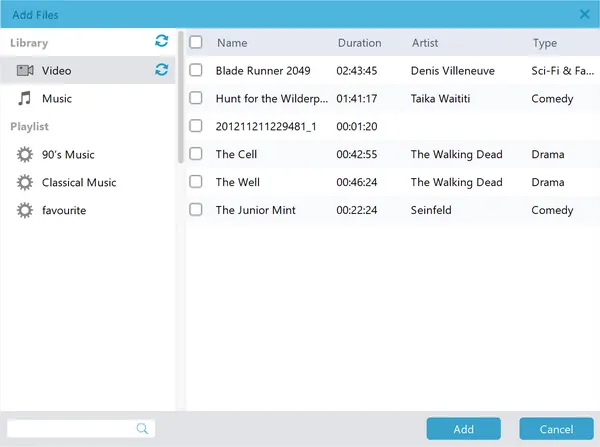
The Add Files window in Prof. DRM's video module: the iTunes Video library with purchased movies and TV episodes listed by name, duration, artist and genre, ready to add for conversion.
Features
Video Converter: iTunes movies and TV shows to MP4
Leawo Prof. DRM's Video Converter removes DRM from iTunes M4V movies and TV episodes and saves them as MP4, keeping the audio tracks and subtitles you choose and Dolby 5.1 surround sound. It needs 64-bit Windows and the supported iTunes version.
Music Converter: iTunes songs to MP3
Leawo Prof. DRM's Music Converter turns DRM-protected iTunes M4P songs and unprotected M4A songs into MP3, with the channels, sample rate and bit rate you pick, so older iTunes purchases play on any player.
Audiobook Converter: iTunes and Audible books to MP3
Leawo Prof. DRM's Audiobook Converter converts iTunes M4B audiobooks and Audible AA and AAX files to MP3. Leawo says the Audible part works without authorizing iTunes.
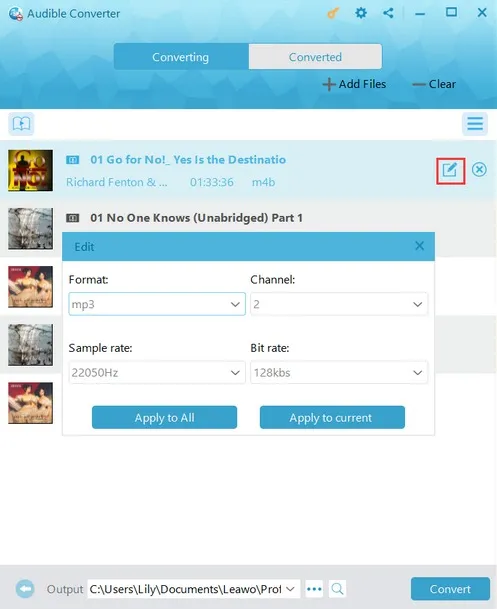
The Audible Converter module: a list of M4B audiobooks with the Edit panel open, set to MP3, 2 channels, 22050 Hz and 128 kbps, and the Convert button at the bottom.
Spotify Converter: songs, albums and playlists to audio files
Leawo Prof. DRM's Spotify Converter takes Spotify track, album or playlist links and saves the songs as MP3, M4B, M4A, AAC, WAV or FLAC in batch, with ID tags kept and the audio settings adjustable.
eBook Converter: Kindle, Kobo and Adobe books
Leawo Prof. DRM's eBook Converter removes DRM from Kindle, Kobo and Adobe eBooks (ePub, MOBI, AZW3, AZW, KFX, PRC and more) and saves them as ePub, MOBI, AZW3 or TXT, so a book bought for one reader opens on another. Kindle for PC 1.25 and later isn't supported for now.
Benefits
- Keep what you paid for playable. Converted files don't depend on a store app staying installed or supported.
- Play on any device. MP4, MP3 and ePub work on Android phones, car stereos, e-readers and media players.
- One tool for five stores. iTunes video, iTunes music, audiobooks, Spotify and eBooks in one program.
Real-World Uses
- Audible books on an old MP3 player: convert your AAX files to MP3 for a device without the Audible app.
- iTunes movies on an Android tablet: save your purchased films as MP4 for a trip.
- Kindle books on a Kobo: convert books you bought to ePub for a different e-reader.
Who It's For, and Who Should Skip It
Good fit: people with large iTunes, Audible or eBook collections who want them on non-Apple or non-Amazon devices, and who still run the supported iTunes version on Windows.
Skip it if:
- You use the Microsoft Store iTunes or Apple's newer apps. The iTunes modules won't work with them.
- Your Kindle app is version 1.25 or later. The eBook module doesn't support it at the moment.
- You're on a Mac and want iTunes movies. That module doesn't work on macOS 10.13 and later.
- You're in a country where removing DRM is illegal. Leawo puts the legal responsibility on the user.
Usage Guide
- Install: install the desktop iTunes (12.9.6.3 to 12.12.2.2) if you'll convert iTunes files, sign in and authorize the computer, then install Prof. DRM.
- Open a module: Video & Music Converter, Audible Converter, Spotify Converter or eBook Converter.
- Add files: click Add Files and pick titles from your library (or paste Spotify links).
- Set output: click the pencil icon to choose the format, subtitles, audio tracks or quality, and click Output to choose a folder.
- Convert: click the blue Convert button.
Where it falls short
- Tied to an old iTunes. The iTunes modules need a specific older desktop iTunes. Leawo's own page also gives two different ranges (12.9 to 12.11 in the description, 12.9.6.3 to 12.12.2.2 in the requirements).
- Store changes break it. The Kindle 1.25 limit and the Mac restrictions show that store updates can switch modules off until Leawo catches up.
- The Mac version lags. A 2-star Trustpilot reviewer (February 2026) said Leawo's DRM software "only works with OS 10.13 or earlier" on their Mac; the review didn't name the product.
- Short refund window on yearly plans. Leawo shows 5 days for the 1-year plan and 14 days for lifetime licenses, for technical problems only.
What Users Say
Independent reviews of Prof. DRM are scarce; most pages about it come from other software vendors' blogs, which we don't quote.
Tech blogs
My Windows Hub (Debaleena, August 30, 2018): "The application is efficient, easy to use for any user." It praised the "Impressive DRM removal speed" and noted the main requirement: "You must have iTunes downloaded on your desktop."
On Leawo's own page
Leawo quotes customers (testimonials chosen by the vendor). Toby J wrote that it "appears to be the only one that works with more current versions of iTunes" and that "Most drm removal apps require itunes 12.9 which apple no longer offers for download." Richard Brown: "Leawo Prof. DRM helps me a lot as it can remove DRM from iTunes videos, and then convert M4V to MP4 for unlimited playback." Leawo's page data shows 4.9 out of 5 from 163 ratings.
Trustpilot
Leawo's Trustpilot page showed 4.4 out of 5 from 151 reviews on October 31, 2026, mostly about its disc software and fast support. The one recent DRM-related review was the 2-star Mac compatibility complaint above.
The pattern: where the store and iTunes versions match Leawo's requirements, users find it fast and simple. The complaints are all about compatibility, which depends on Apple's and Amazon's software as much as Leawo's.
Comparisons
Full pack vs Media Pack vs single modules
The full Prof. DRM pack ($79.95 a year, $129.95 lifetime) includes all five modules. The Media Pack ($59.95 / $99.95) leaves out the eBook Converter. Single modules (Video, Music, Spotify or Audiobook) cost $39.95 a year or $59.95 lifetime each; the eBook Converter is priced separately on Leawo's eBook page. Two modules cost about the same as the Media Pack, so buy single modules only if you need one.
Editions and Pricing
| Edition | 1 Year | Lifetime | Modules |
|---|
| Prof. DRM (full pack) | $79.95 | $129.95 | All five |
| Prof. DRM Media Pack | $59.95 | $99.95 | Video, Music, Spotify, Audiobook |
| Single module | $39.95 | $59.95 | One of Video, Music, Spotify or Audiobook |
Windows and Mac prices are the same, and each license is for one PC. Yearly plans renew automatically until cancelled.
FAQs
Is it legal to remove DRM with Leawo Prof. DRM?
It depends on where you live. Leawo Prof. DRM is meant for personal use of content you bought, and Leawo puts the legal responsibility on the user. Some countries, including the United States, prohibit circumventing DRM even on your own purchases.
Which iTunes version does Leawo Prof. DRM need?
Leawo Prof. DRM needs the desktop (non-Microsoft Store) iTunes, version 12.9.6.3 to 12.12.2.2, with your computer authorized. It doesn't work with the Microsoft Store version.
Does Leawo Prof. DRM work with Kindle books?
Partly. Leawo Prof. DRM's eBook module converts Kindle books, but Leawo says it doesn't currently support Kindle for PC version 1.25 and later.
Can Leawo Prof. DRM convert Audible books without iTunes?
Yes. Leawo says Prof. DRM converts Audible AA and AAX files to MP3 without authorizing iTunes; iTunes M4B audiobooks still need iTunes.
Does Leawo Prof. DRM work on a Mac?
Leawo sells a Mac version, but with limits: according to Leawo, iTunes movies and TV shows won't convert on macOS 10.13 and later, and iTunes audiobooks won't convert on macOS 10.15 and later.
Can I convert rented iTunes movies?
Leawo's Prof. DRM pages describe converting purchased iTunes movies and TV shows; they don't mention rentals. Test a title with the free trial before buying.
System Requirements
- Windows: 7, 8, 8.1, 10 or 11 (64-bit for video, music and audiobook conversion)
- Processor: 1 GHz Intel or AMD or faster
- Memory: 512 MB RAM (1 GB or more recommended)
- Other: desktop iTunes 12.9.6.3 to 12.12.2.2, computer authorization, internet connection; QuickTime on 32-bit PCs without a dedicated graphics card
Conclusion
Leawo Prof. DRM is worth it if you have a large iTunes, Audible, Spotify or eBook collection, run the supported iTunes version on Windows, and live where converting your own purchases is allowed. Five converters in one program, with subtitles, audio tracks and tags kept, cover the main stores that lock files to their apps.
The reasons to hold back are compatibility and law: it depends on an older iTunes and doesn't support newer Kindle apps, and DRM removal is illegal in some countries. Use the free trial on one of your own files, and if you only need one store, buy that single module instead of the full pack.
Download Free TrialBuy Now