Leawo DVD Cinavia Removal: Make DVD Backups That Keep Their Sound on Cinavia-Checking Players
Leawo DVD Cinavia Removal is a Windows module of Leawo Prof. Media 13 that copies a DVD disc, folder or ISO and strips the Cinavia audio watermark from the copy. It costs $29.95 for one year or $39.95 for a lifetime license, and it's meant for people who back up their own DVDs and play the copies on a PS3, PS4, Xbox or other player that listens for Cinavia.
The symptom is easy to recognize: your backup starts fine, then a message pops up and the sound cuts out or playback stops. The original disc plays without trouble. That gap between the disc and the copy is the only thing this tool is built to close.
Quick facts
- Version: 13.0.1.6, installed as a module of Leawo Prof. Media 13
- Developer: Leawo Software Co., Ltd.
- Windows: 7, 8, 8.1, 10 and 11 (the Mac edition is a separate purchase)
- Source: DVD disc, DVD folder (VIDEO_TS) or ISO image
- Output: DVD disc, DVD folder or ISO, DVD-5 or DVD-9, several at once
- Price: $29.95 per year (renews automatically) or $39.95 once for a lifetime license, 1 PC
- Free trial: until you activate it, the module copies only 5 minutes of content
What we checked: the installer behind Leawo's Windows download link (ltmcp_setup.exe, "Leawo Prof. Media Setup", file version 13.0.1.6, 209,171,392 bytes, dated October 10, 2026), the 5-minute trial notice shown in Leawo's own step-by-step screenshots, and the prices on the order page ($29.95 for 1 year, $39.95 lifetime), on November 1, 2026. We didn't run it on a Cinavia-protected DVD ourselves.
Before you buy
- It makes DVDs, not video files. The output is a DVD disc, folder or ISO. For MP4 or MKV files you need a ripper instead.
- DVDs only. Blu-ray discs need Leawo's separate Blu-ray Cinavia Removal, which costs more ($64.95 a year).
- Try it on the problem disc first. The trial copies 5 minutes, which is enough to see whether the copy still mutes on your player.
- Refunds are narrow. The order box promises a 5-day (1-year plan) or 14-day (lifetime) money-back guarantee, but Leawo's refund policy only pays out for a reproducible bug or hardware problem its support can't fix, or a duplicate order. Buying the wrong product isn't covered.
- Your own discs. Leawo's fair use policy limits its tools to personal, non-commercial use of content you lawfully own.
Download Free TrialBuy Now
Overview
There's no stand-alone DVD Cinavia Removal program. You install Leawo Prof. Media, the suite that holds all of Leawo's disc tools, and DVD Cinavia Removal appears as a tile on its home screen and as the Cinavia button on the top bar. Each module is licensed separately, so the tiles you haven't bought show "Trial" and an Activate link.
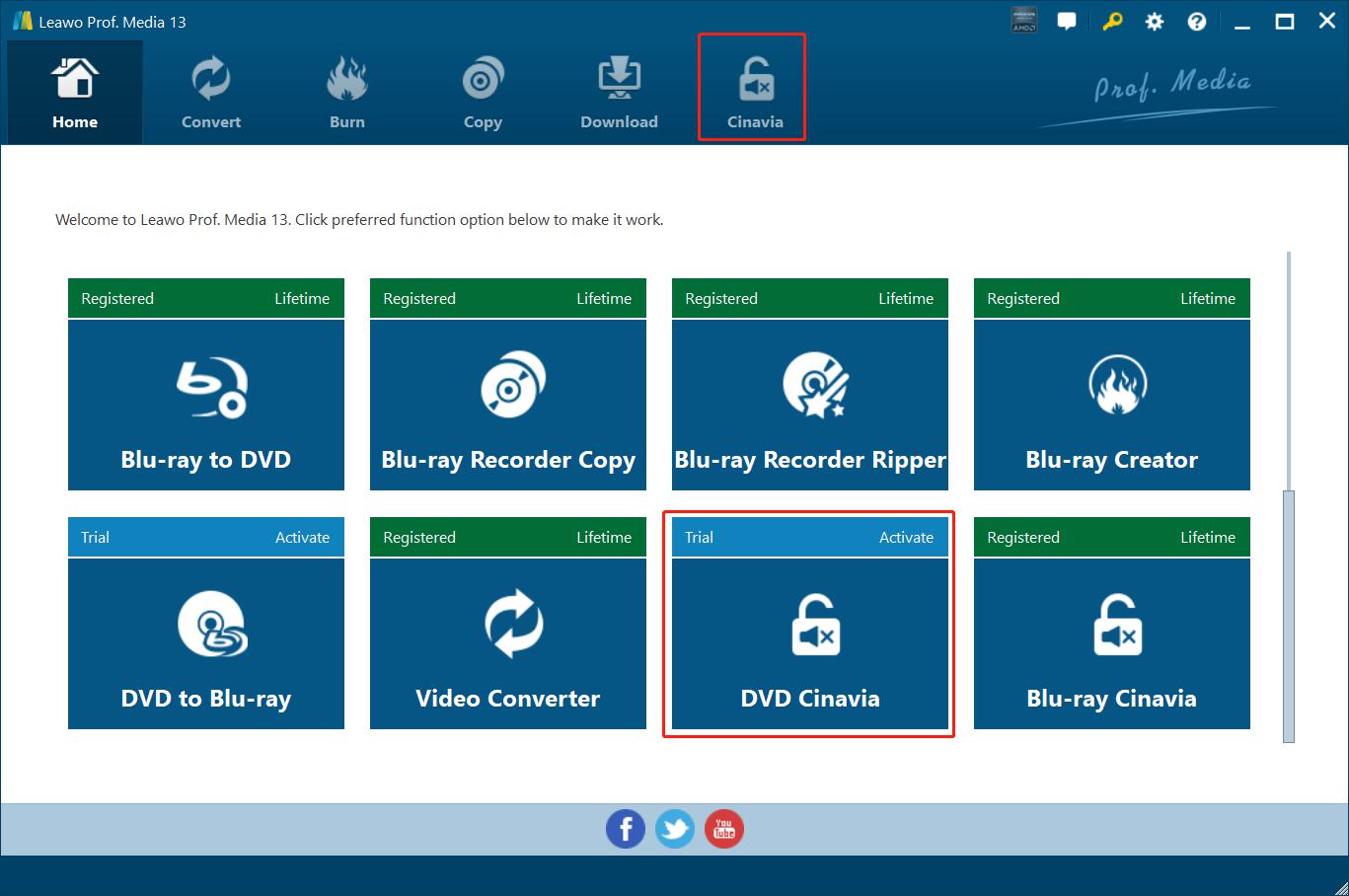
The Leawo Prof. Media 13 home screen on Windows. The DVD Cinavia tile is marked Trial/Activate next to other modules that are registered, and the Cinavia button is highlighted on the top bar.
Inside the module the job is a copy job with one extra switch. You load the DVD, pick the title, subtitle and audio track, choose DVD-5 or DVD-9, then open the output panel, where Remove Cinavia sits between the disc label and the save location.
Features
A copy without the Cinavia watermark
Leawo DVD Cinavia Removal writes a new DVD whose audio no longer carries the Cinavia mark, so a Cinavia-checking player has nothing to react to. Leawo names Nero, CyberLink, PS3, Xbox and PS4 among the players it targets, and says the result plays "with no muted audio".
The other DVD locks in the same pass
Leawo DVD Cinavia Removal also handles the older DVD protections Leawo lists (CSS, APS, ARccOS and region codes), so you don't need a decrypter running first. The copy comes out free of those as well.
Pick the title, subtitle and audio track
Leawo DVD Cinavia Removal lists the disc's titles with their running times, marks the main title, and lets you choose which subtitle and audio track to keep. A size bar at the bottom shows how much of the chosen DVD-5 or DVD-9 the copy will fill, with a preview player on the right.
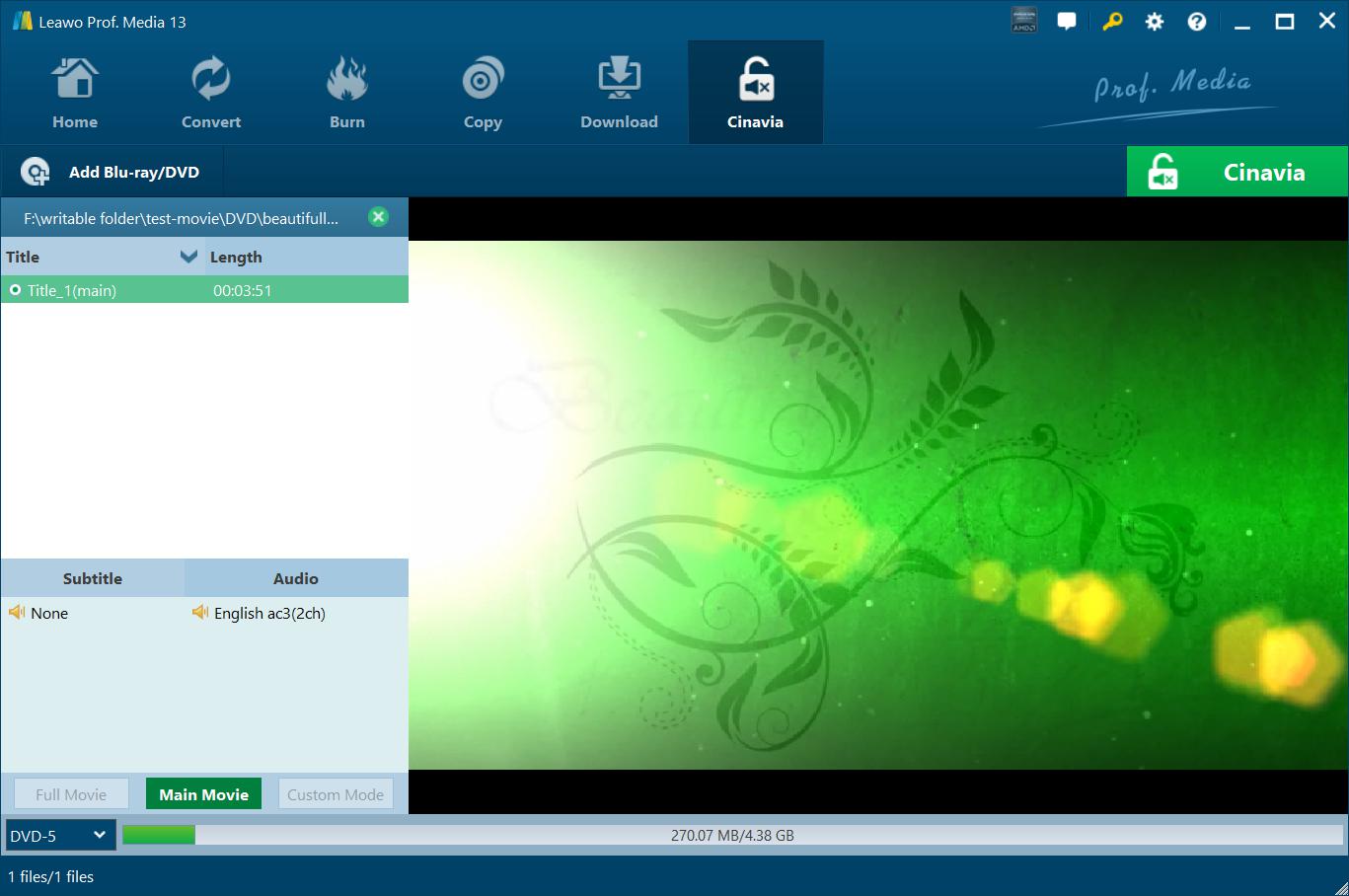
The Cinavia tab with a DVD folder loaded: one main title of 3:51, no subtitle, English AC3 2-channel audio, Main Movie selected (Full Movie and Custom Mode greyed out), and the DVD-5 size bar showing 270.07 MB of 4.38 GB.
Disc, folder and ISO in one run
Leawo DVD Cinavia Removal lets you tick Folder, ISO File and a disc burner together under "Copy to", and when you burn a disc you can set how many copies to make. The panel shows the hard disk space the job needs next to the space you have free.
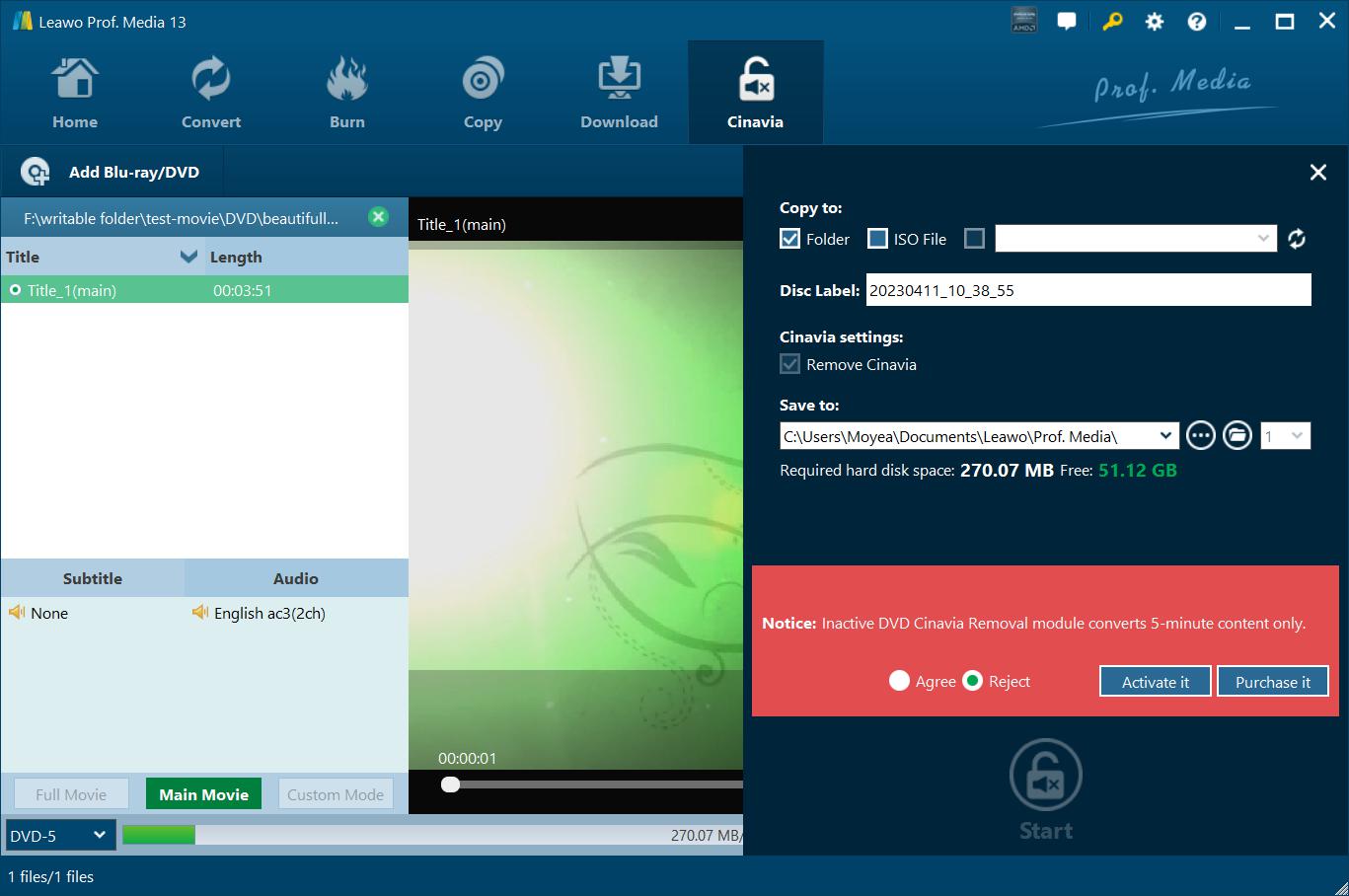
The output panel: Copy to Folder, a disc label, Remove Cinavia ticked, the save folder, 270.07 MB needed against 51.12 GB free, and the red trial notice "Inactive DVD Cinavia Removal module converts 5-minute content only" with Agree, Reject, Activate it and Purchase it.
GPU acceleration
Leawo DVD Cinavia Removal uses graphics-card acceleration such as Intel Quick Sync, and the GPU and CPU-core options live in Prof. Media's Performance settings. Leawo's own speed claims don't agree with each other (the product page and the user guide give different multipliers), so judge speed on your own PC during the trial.
Benefits
- The backup behaves like the disc. A copy that goes silent at the 20-minute mark is useless; one that plays through is the whole point of backing up.
- You keep using the player you have. No need to hunt for a player without Cinavia detection just for your copies.
- Cheap compared with the Blu-ray version. At $39.95 for a lifetime license it costs less than a year of Leawo's Blu-ray Cinavia tool.
Real-World Uses
- A PS3 or PS4 used as the family DVD player: make a watermark-free copy so the kids can handle the copy while the original stays on the shelf.
- Re-doing a backup that already mutes: load the old DVD folder or ISO as the source and write a new copy with Remove Cinavia ticked.
- An ISO archive on a home server that you burn back to disc whenever a copy wears out.
- Two or three discs at once for different rooms, using the copy-count setting.
Who It's For, and Who Should Skip It
Good fit: DVD owners who make 1:1 disc or ISO backups and play them on a console or player that checks for Cinavia.
Skip it if:
- Your copies already play to the end. Then plain Leawo DVD Copy (or any DVD copier) is all you need.
- You watch on a phone, tablet or TV app. A ripper that turns the DVD into MP4 suits that better than a disc copy.
- Your collection is Blu-ray. This module doesn't take Blu-rays; that's Blu-ray Cinavia Removal.
- You want the whole disc with menus and extras. In Leawo's screenshots a DVD loads in Main Movie mode only (see below).
Usage Guide
- Install Leawo Prof. Media from the download link (ltmcp_setup.exe, about 200 MB) and start it.
- Open the module: click Cinavia on the top bar or the DVD Cinavia tile on the home screen.
- Add the source: use the "Add Blu-ray/DVD" drop-down and choose Add from CD-ROM, Add from folder or Add iso file.
- Choose what to keep: the title, subtitle and audio track, then DVD-5 or DVD-9 at the bottom left.
- Set the output: click the green Cinavia button, tick Folder, ISO File and/or your burner, type a disc label, make sure Remove Cinavia is ticked, and pick a save folder with enough space.
- Start: click Start. The "Copying watermark-free disc" screen shows progress and lets you choose what the PC does when all tasks end.
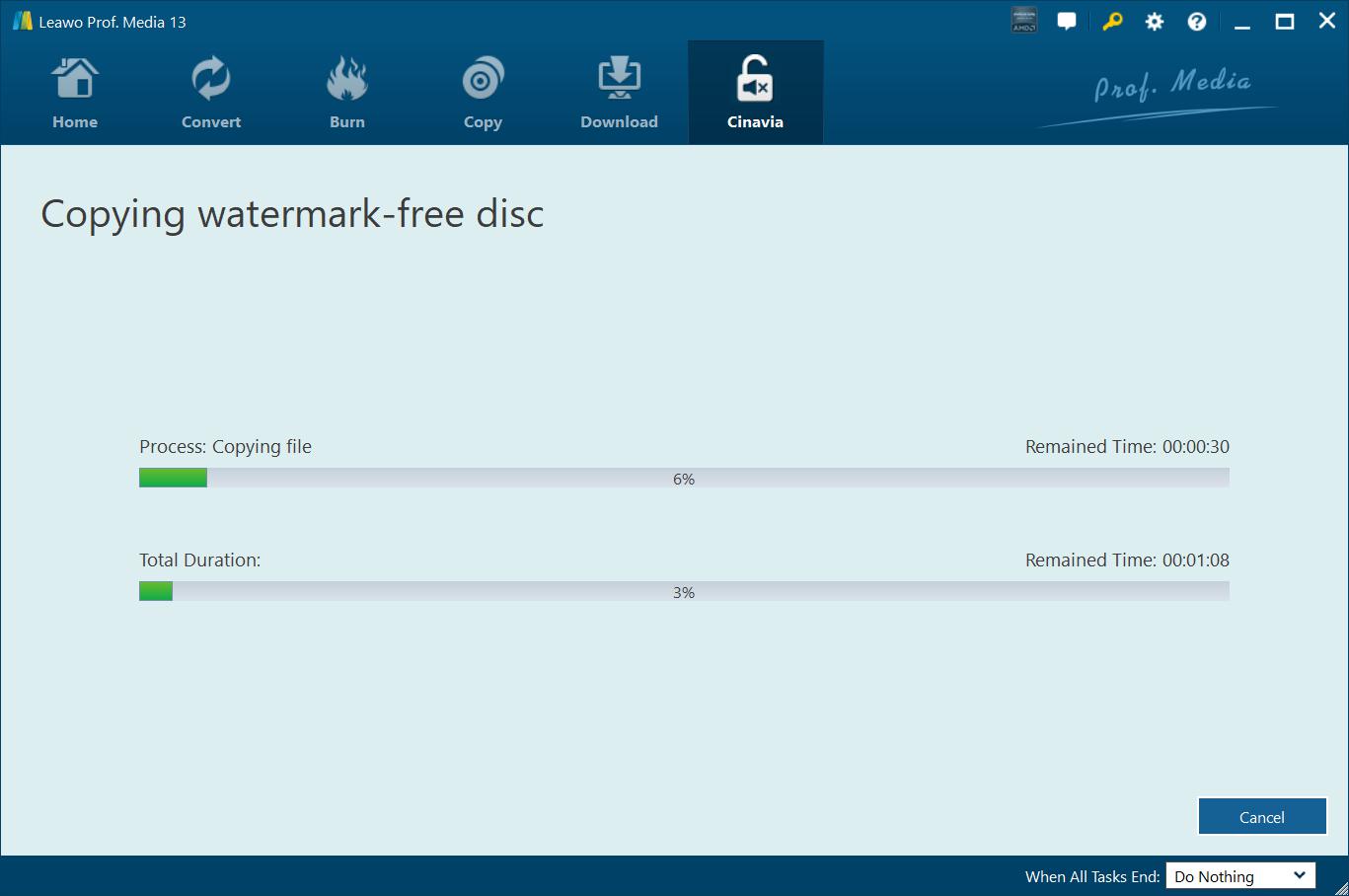
The "Copying watermark-free disc" screen: a progress bar for the current file and one for the total job, each with time remaining, a Cancel button and a "When All Tasks End" option.
Where it falls short
- Main movie only, in practice. Leawo's Windows guide talks about Full Movie and Main Movie modes, but in its own screenshots Full Movie is greyed out once a DVD is loaded, and its Mac guide states that DVDs can only be copied in Main Movie mode. Expect the film, not the menus and bonus features.
- No independent testing. We found no review, forum report or lab test of this particular module. Everything about how well it works comes from Leawo.
- Some specs look copied from other products. The product page lists a 25 GB Blu-ray disk-space figure and an older 186 MB download size; the installer is now about 200 MB.
- The 1-year plan auto-renews. If you only need it for one batch of discs, the lifetime license costs just $10 more.
What Users Say
There isn't much to go on. Leawo's own review page for this module had no published reviews when we checked, and no magazine or forum has reviewed it. Here's what does exist.
On Leawo's product page
Leawo shows testimonials it picked itself, so read them as marketing:
- Memphis: "Quite useful and practical. It removes the mute protection well without reducing any quality of image and audio. That's wonderful."
- Michelle Myles: "This did do what it claimed to be. No matter it's commercial or homemade DVD disc, this software works on it well." (The same quote appears twice on the page.)
Trustpilot (Leawo as a company)
Leawo's two Trustpilot profiles showed 4.4 out of 5 from 151 reviews (leawo.org) and 4.3 out of 5 from 158 reviews (leawo.com) on November 1, 2026. They cover every Leawo product, and none of the reviews we read mention Cinavia. The ones about DVD and disc work:
- Fred Rogers (5 stars, June 2026), titled: "Blu-ray/dvd ripper works great"
- Satori Agape-Economo (5 stars, August 2026): "It works great with doing the DVD and BluRay ripping."
- Maxx Omega (5 stars, December 2025), titled: "Best Software of it's type."
- Peter Madden (2 stars, November 2025), titled: "Will not copy TV mini series ."
- Leviticus Stroud (1 star, July 2025), titled: "Absolutely less than useless", describing crashes and slow disc loading.
The pattern: long-time Prof. Media users praise the disc tools and, even more, Leawo's support. The complaints are about crashes and discs that won't copy. Nobody has publicly tested the Cinavia removal itself, which is why the 5-minute trial on your own problem disc matters more here than usual.
Comparisons
DVD Cinavia Removal vs Leawo DVD Copy
Both make DVD-to-DVD, folder or ISO copies. DVD Cinavia Removal is the one that also removes the watermark. If your copies play to the end, DVD Copy is enough. If they mute, this is the module you need. The lifetime bundle below includes both.
DVD vs Blu-ray Cinavia Removal
Leawo splits Cinavia removal by disc type. The Blu-ray module costs $64.95 a year or $99.95 lifetime and works on Blu-ray discs, folders and ISOs. This DVD module costs $29.95 a year or $39.95 lifetime. Owners of both kinds of disc need both.
Editions and Pricing
| License | Price | What you get | Money-back window |
|---|
| 1 Year (auto-renews) | $29.95 | DVD Cinavia Removal on 1 PC, upgrades for the year | 5 days |
| Lifetime | $39.95 | DVD Cinavia Removal on 1 PC, one payment | 14 days |
| DVD Ripper + DVD Copy + DVD Cinavia Removal (lifetime) | $47.94 at checkout (the order box shows $71.91, list $119.85) | Three DVD modules on 1 PC | 14 days |
Prices from the order page and checkout on November 1, 2026. The money-back windows are subject to Leawo's refund policy described above.
FAQs
Why does my DVD copy lose its sound on my PS3 but the original plays fine?
That's the Cinavia watermark in the audio. A Cinavia-checking player like the PS3 accepts it on the original disc but mutes or stops a copy. Leawo DVD Cinavia Removal makes a copy without the mark.
Does Leawo DVD Cinavia Removal need a DVD burner?
Only to write a disc. Leawo DVD Cinavia Removal can save the copy as a DVD folder or ISO on your hard drive, and a DVD drive is needed only to read a physical source disc or burn the result.
Can I turn the result into an MP4 for Plex?
Not with this module. Leawo DVD Cinavia Removal outputs DVD discs, folders and ISO files only. Converting to MP4 is the job of Leawo DVD Ripper, which is part of the three-module bundle.
What happens when the 1-year license ends?
The 1-year license of Leawo DVD Cinavia Removal renews automatically unless you cancel it. Leawo's purchase guide says a renewal code bought inside the program's Activation Center costs less than a new license.
Does the Windows license also work on a Mac?
No. Leawo DVD Cinavia Removal for Mac is a separate product with its own license, at the same $29.95 yearly and $39.95 lifetime prices.
System Requirements
- Windows: 7, 8, 8.1, 10 or 11
- Processor: 1 GHz or faster Intel or AMD
- Memory: 512 MB RAM (1 GB or more recommended)
- Disk: 5 GB or more free for a DVD job
- Graphics: NVIDIA GeForce GTX 260 or better
- Other: a recordable DVD drive and an internet connection
Conclusion
Leawo DVD Cinavia Removal is worth $39.95 if, and only if, your DVD backups mute or stop on a Cinavia-checking player. It's a focused copier: load the disc, keep the main movie with the tracks you want, tick Remove Cinavia, and get a disc, folder or ISO that should play through.
The reasons to hesitate are real. Nobody outside Leawo has tested it, DVDs come out as main movie only, and Leawo's refunds don't cover a change of mind. So run the 5-minute trial on the exact disc that's giving you trouble, play the result on the player that complained, and buy the lifetime license only once that works.
Download Free TrialBuy Now