Leawo Prof. DRM eBook Converter for Mac: Free Your Kobo and Adobe Books on macOS, with an Old-Kindle Catch
Leawo Prof. DRM eBook Converter for Mac is a $24.99-a-year (or $49.99 lifetime) macOS app that removes DRM from Kobo, Adobe Digital Editions and older Kindle for Mac books and saves them as ePub, MOBI, AZW3 or TXT. It suits Mac owners moving books between e-readers. Two things to know up front: it's the eBook module of the Leawo Prof. DRM for Mac app, and that app is built for Intel Macs, so on an M-series Mac it runs through Apple's Rosetta 2.
On a Mac, store-locked books hide in Library folders most people never open. This app looks in those folders for you, lists the books by store, and writes copies Apple Books, Calibre or another e-reader can open.
Quick facts
- App: Leawo Prof. DRM for Mac 3.2.1, eBook Converter module (the Windows edition is at 3.3.0.1)
- Developer: Leawo Software Co., Ltd.
- Chip: Intel (x86_64) build only; Apple silicon Macs run it through Rosetta 2
- macOS: Leawo lists High Sierra 10.13 through macOS 27
- Kindle for Mac: only versions below 1.24 (Leawo recommends 1.23.1)
- Converts to: ePub, MOBI, AZW3 or TXT
- Price: $24.99 a year or $49.99 lifetime for one Mac, the same as on Windows
- Refunds: within 5 days (yearly) or 14 days (lifetime), for faults support can't fix
What we checked: the Mac disk image from Leawo's download page (macprof_drm_setup.dmg, 127,837,094 bytes, dated August 21, 2026); inside it, the app's Info.plist reads version 3.2.1 and the main executable and its libraries are Intel-only x86_64 code; the Mac order page prices ($24.99 for 1 year, $49.99 lifetime) on November 1, 2026. We didn't install it on a Mac or convert any books.
Before you buy
- Rosetta has an end date. Apple says Rosetta is available on Apple silicon Macs running macOS 27 or earlier, and from macOS 28 only for certain older games. Unless Leawo ships an Apple silicon build, this app won't open on an M-series Mac once you move to macOS 28.
- Kindle needs a years-old app. Leawo's Mac guide says Kindle for Mac 1.24.0 and later aren't supported and asks you to downgrade, re-download your books and switch off Kindle's automatic updates. Leawo's tech-spec page adds that "Amazon kindle 6, kindle 7 are currently not supported".
- Kobo and Adobe have no such version limits on Leawo's pages, so they're the realistic use on a current Mac.
- Legal responsibility is yours. Leawo's terms cover only "personal, non-commercial use" of content "you have lawfully obtained", and laws such as the US DMCA can make removing DRM unlawful even on purchased books.
Download Free TrialBuy Now
Overview
The Mac download is a disk image with a standard macOS installer package that puts Leawo Prof. DRM.app in your Applications folder. Opening it shows four large tiles, and the blue eBook Converter tile is the part this license pays for. The other modules stay in trial mode unless you buy them too.

Leawo Prof. DRM's start window on macOS: Video & Music, eBook, Audible and Spotify Converter tiles, with eBook Converter highlighted in blue.
Features
Finds books in the Mac's hidden library folders
Leawo Prof. DRM eBook Converter for Mac reads the content folders the store apps keep under your user Library: Kindle's "My Kindle Content" folder, Adobe Digital Editions' library, and Kobo's ~/Library/Application Support/Kobo/Kepub. In the Add Files window you pick a store on the left, click refresh, and tick books on the right. E-Device covers an e-reader mounted on the desktop over USB, and Custom covers any other folder.

The macOS Add Files window with Kindle selected: four AZW books listed, author and publish date shown as "unknow", and Cancel and Add buttons.
Batch conversion with per-book progress
Leawo Prof. DRM eBook Converter for Mac converts every book in the list in one run, with a progress bar on each title. The output folder defaults to a com.leawo.profdrm folder inside Documents, and you can change it with the button next to the path.

Converting tab on a Mac: one Kindle book at 95.0% and the next one queued, with the Documents output path and a cancel button at the bottom.
Formats for every kind of reader
Leawo Prof. DRM eBook Converter for Mac writes ePub for Apple Books and Kobo, MOBI or AZW3 for Kindle devices, and TXT for anything else. Finished books land in the Converted tab with a folder icon that reveals them in Finder.
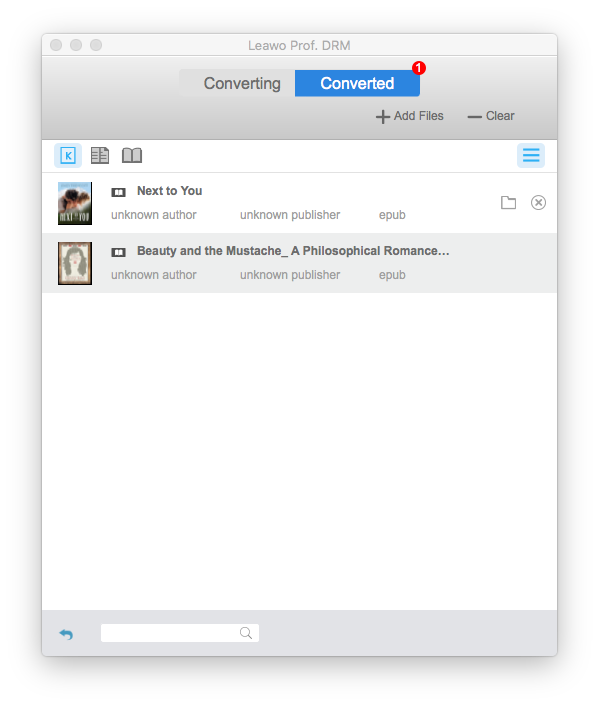
The Converted tab: two former Kindle books now saved as epub, listed with "unknown author" and "unknown publisher", plus folder and remove icons.
Who It's For, and Who Should Skip It
Good fit: Mac users with Kobo or Adobe Digital Editions purchases who want them in Apple Books or on a Kindle, on a Mac that's on macOS 27 or earlier.
Skip it if:
- You plan to move an Apple silicon Mac to macOS 28. An Intel-only app loses Rosetta there.
- Your Kindle for Mac is current and you don't want to downgrade it. The converter won't see those books.
- You buy books in Apple Books. Leawo doesn't list Apple's store as a source on either platform.
- You're comfortable with a little setup. Calibre is free on macOS and, with DRM plugins, covers the same stores.
How to Use It on a Mac
- Install: open the downloaded DMG, run the installer package, and on an Apple silicon Mac accept the prompt to install Rosetta 2 if it appears.
- Prepare Kindle (only if you'll convert Kindle books): install Kindle for Mac 1.23.1 or another version below 1.24, then in Kindle > Preferences > Updates untick automatic updates, and re-download your books.
- Download your books in Kindle, Kobo or Adobe Digital Editions so the files are on the Mac.
- Register: start Leawo Prof. DRM, click the key icon and enter your eBook code.
- Add and convert: click eBook Converter, then Add Files, choose a store, refresh, tick books and click Add. Pick a format with the edit icon, set the output folder and click Convert.

Kindle for Mac's Updates preferences (Amazon's window, not Leawo's) with "Automatically install updates when they are available without asking me" unticked, as Leawo's Mac guide asks.
Where it falls short on a Mac
- Behind the Windows edition. The Mac app is 3.2.1 while Windows is at 3.3.0.1, and its Kindle cutoff is older (below 1.24 on Mac, below 1.25 on Windows).
- Mixed signals on macOS support. Leawo's product page starts at High Sierra 10.13, its tech-spec page at Yosemite 10.10, and its Mac guides still say "macOS 10.10/10.11.../15".
- Kindle metadata can go missing. Leawo says metadata is kept, yet its own Mac screenshots show converted Kindle books with "unknown author" and "unknown publisher".
- The trial shows little. Leawo's guide says unregistered modules convert only the first 20% of a file.
What Users Say
We found no independent hands-on review of the Mac eBook module. Here's the feedback that exists.
Mac users of Leawo's DRM software
On Leawo's moderated Prof. DRM review page, Steven Michael (5 stars, January 2020) wrote: "I've used Leawo DRM removel on my MAC for a few years and it is the best product for creating MP3s from my streaming service, that I can then use off-line while camping, etc. Great products." His review is about audio, not books.
On Trustpilot, A. Gaudette (2 stars, February 22, 2026) wrote: "i have tried to use the DRM software and it sas it only works with OS 10.13 or earlier". The review doesn't say which module or which macOS version was used, but it's the one recent Mac complaint we found. Leawo's Trustpilot page as a whole showed 4.4 out of 5 from 151 reviews on November 1, 2026.
Leawo's quote for the eBook module
The one customer quote Leawo shows that's about books, from Hint Smith, isn't tied to a platform: "Now I can read eBooks from my old fashion Kindle on my new eReader." MakeUseOf's DRM-removal roundup (updated February 2023) lists Prof. DRM as available on Windows and Mac and judges its speed claim as mattering only "if you are working with thousands of books".
Windows vs Mac
| | Mac edition | Windows edition |
|---|
| App version | 3.2.1 | 3.3.0.1 |
| Download | 122 MB DMG | 108 MB EXE |
| Kindle app supported | Below 1.24 | Below 1.25 |
| Processor | Intel build, Rosetta 2 on Apple silicon | 1 GHz Intel or AMD |
| Price | $24.99 / year, $49.99 lifetime | $24.99 / year, $49.99 lifetime |
Licenses don't cross over: a Mac code doesn't activate the Windows app. If you'd also convert iTunes, Audible or Spotify files, the full Prof. DRM for Mac pack ($79.95 a year) includes the eBook module, though Leawo notes several of the iTunes functions are limited on recent macOS versions.
FAQs
Does Leawo Prof. DRM eBook Converter run natively on M1, M2 or M3 Macs?
No. Leawo Prof. DRM eBook Converter for Mac is an Intel (x86_64) app that runs on Apple silicon through Rosetta 2. Leawo's requirements list M1, M2 and M3 chips, which works only because of that translation layer.
Will Leawo Prof. DRM eBook Converter work on macOS 28?
Not on an Apple silicon Mac, as things stand. Apple says Rosetta is available through macOS 27 and, from macOS 28, only for some older games, so an Intel-only app like this one needs a native update from Leawo first.
Do I have to downgrade Kindle for Mac to use Leawo Prof. DRM eBook Converter?
Yes, for Kindle books. Leawo Prof. DRM eBook Converter for Mac doesn't support Kindle for Mac 1.24.0 or later, so Leawo's guide tells you to install an older version, turn off automatic updates and download your books again. Kobo and Adobe books don't need this.
Can I read the converted books in Apple Books?
Yes. Choose ePub as the output in Leawo Prof. DRM eBook Converter for Mac, and the DRM-free file opens in Apple Books like any other ePub.
Can I move my Leawo Prof. DRM eBook Converter license from a Mac to a Windows PC?
No. Leawo sells the Mac and Windows editions as separate products, each licensed for one computer, so a Mac code works only in the Mac app.
Is Leawo Prof. DRM eBook Converter for Mac still updated?
Leawo's Mac disk image was dated August 21, 2026, but the app inside is version 3.2.1, behind the Windows 3.3.0.1, and it's still Intel-only. Treat the Mac edition as maintained, but not first in line.
System Requirements
- macOS: High Sierra 10.13, Mojave, Catalina, Big Sur, Monterey, Ventura, Sonoma, Sequoia, Tahoe 26 or macOS 27
- Processor: 2.0 GHz Intel Core 2 Duo or better, or Apple M1/M2/M3 with Rosetta 2
- Memory: 2 GB RAM or more recommended
- Other: internet connection, the source app authorized with your account (Kindle for Mac below 1.24, Kobo or Adobe Digital Editions)
Conclusion
Leawo Prof. DRM eBook Converter for Mac is a reasonable $24.99 buy for converting Kobo and Adobe books on a Mac running macOS 27 or earlier, but not one to commit to for years. Its strength is that it finds books in the Mac's hidden library folders and converts them in a batch without any setup.
The reasons to hesitate are Mac-specific: an Intel-only app that depends on Rosetta, which Apple is phasing out after macOS 27, and Kindle support that means downgrading to a years-old Kindle app. Choose the yearly plan over lifetime unless Leawo releases an Apple silicon version, and try the trial on your own books first.
Download Free TrialBuy Now