CleverGet Twitch Downloader: Keep Twitch Streams and Clips After the VOD Expires
CleverGet Twitch Downloader is Leawo's $49.95-a-year Twitch module for CleverGet on Windows and Mac. It saves Twitch clips and live streams as MP4 or MKV files at up to 1080p and 60 frames per second, several at once. It's aimed at viewers who want a permanent copy of a stream they watched, and at players and coaches who study gameplay frame by frame.
Twitch is built for watching live. Past broadcasts disappear after a set period (a week on most channels), there's no download button for viewers, and a streamer can delete a VOD at any time. CleverGet records the stream's video directly from Twitch's player, so the file stays on your drive.
Quick facts
- Module of: CleverGet 27.0.0.1 from Leawo Software
- Covers: twitch.tv clips and live streams
- Quality: up to 1080p60, depending on what the channel broadcasts
- Formats: MP4 or MKV
- Systems: Windows 7 to 11 (64-bit), or the Mac edition (macOS 11 to macOS 27)
- Pricing: $49.95 for 1 year, $79.95 lifetime, per computer
- Trial: 3 downloads free
What we checked: the shared CleverGet Windows installer we downloaded from Leawo (file version 27.0.0.1, 527,919,296 bytes, dated October 30, 2026, signed by ShenZhen Moyea Software), the Twitch module's prices in Leawo's purchase-page data ($49.95 a year, $79.95 lifetime), and Leawo's note that its general Video Downloader can't download from Twitch.tv, on November 1, 2026. We didn't record a Twitch stream ourselves.
Before you buy
- Live downloads happen in real time. A stream can only be saved as it's broadcast, so a four-hour stream takes four hours and your PC has to stay on.
- Streamers own their content. Leawo's fair-use policy allows personal use only. Re-uploading a streamer's broadcast or clips to YouTube, even edited, needs their permission.
- Your own streams are already downloadable. Twitch lets streamers download their own past broadcasts from the Video Producer page, so you don't need this to back up your own channel.
- Refunds are limited to faults. Leawo refunds a reproducible bug its support can't fix, not a change of mind; use the 3 free downloads first.
Download Free TrialBuy Now
Overview
CleverGet opens twitch.tv in its own browser tab. You go to a channel or a clip and let it play; CleverGet then parses the page and shows the stream's renditions, typically "best", 720p60 and 720p and lower, in a list where you can tick more than one. For a live channel the download keeps running, and the Library shows the file size growing until you press stop or the broadcast ends.
Twitch needs its own module because CleverGet's general Video Downloader explicitly can't handle twitch.tv. Leawo lists Twitch alongside Netflix and Disney+ as sites that need a dedicated module.
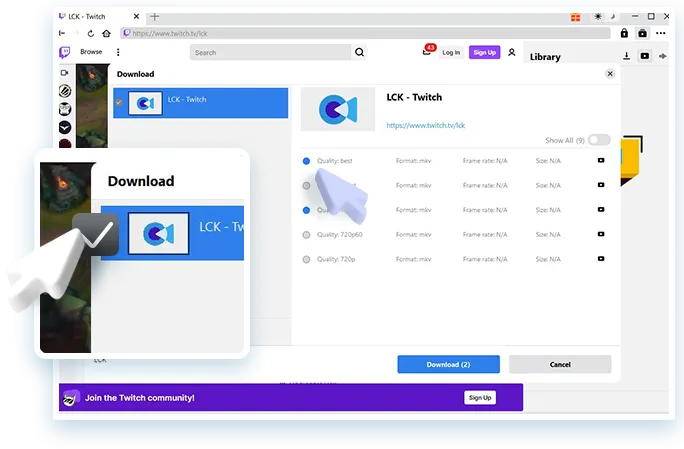
The Download dialog on twitch.tv/lck: quality options "best", 720p60 and 720p in MKV, "Show All (9)", two options ticked and a "Download (2)" button. Leawo's image adds a zoomed callout and pointer on the left.
Features
Live stream capture you can stop any time
CleverGet Twitch Downloader saves a live broadcast while it airs, showing the size of the file as it grows. You can stop the capture whenever you like and keep what's been saved so far, or cancel and restart it, which is handy when you only want the tournament final and not the six hours before it.
60 fps preserved for fast games
CleverGet Twitch Downloader keeps 1080p60 and 720p60 renditions at their full frame rate when a channel broadcasts them. For shooters, fighting games and esports, 60 fps is the difference between being able to step through a play frame by frame and a blurry mess.
Clips without the pre-roll ad
Some Twitch clips play an ad first. CleverGet Twitch Downloader drops it automatically, so a saved clip starts with the moment itself, ready for a compilation of your own highlights or a playlist on your phone.
Several downloads in parallel
CleverGet Twitch Downloader queues several clips or renditions at once and can use NVIDIA, AMD or Intel GPU acceleration. A failed or interrupted task can be restarted from the Library, and CleverGet can power the computer off when everything is done, useful after an overnight stream.
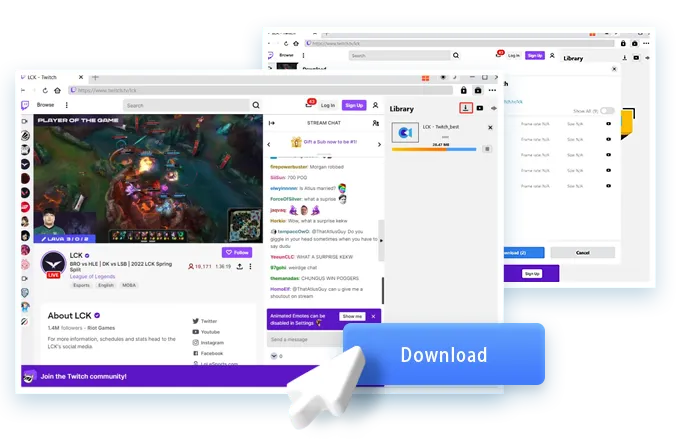
A live LCK League of Legends match (BRO vs HLE) playing with stream chat, while the Library panel shows the capture at 26.47 MB. Leawo layered the earlier Download dialog and a large "Download" button over the screenshot.
Benefits
- A stream doesn't vanish after a week. The broadcast you saved is yours to rewatch for personal use long after Twitch deletes the VOD.
- Watch later without catching it live. Leave the capture running while you work and watch the stream in the evening, no buffering.
- Material for analysis. A 60 fps local file can be scrubbed, slowed down and paused far more precisely than Twitch's web player allows.
Real-World Uses
- Esports review: a team saves an opponent's tournament matches to study their strategies.
- Speedrun study: a runner downloads a record attempt in 60 fps to step through tricks frame by frame.
- Time zones: a viewer in Europe captures an American streamer's late-night broadcast and watches it the next morning.
- Clip collections: a fan saves a channel's best clips to watch on a flight.
Who It's For, and Who Should Skip It
Good fit: Twitch viewers, coaches and competitive players who want local copies of other channels' streams and clips, especially live content that won't stay up as a VOD.
Skip it if:
- You only want your own broadcasts. Twitch's Video Producer already lets you download them, and OBS can record locally while you stream.
- You're comfortable with free tools. Free, open-source Twitch downloaders exist for clips and VODs; they're less polished but cost nothing.
- You plan to repost streams. That breaks Leawo's fair-use terms and usually the streamer's rights.
Usage Guide
- Install CleverGet: one installer of about 504 MB holds every module, Twitch included.
- Open twitch.tv in CleverGet and go to the live channel or clip you want. Sign in only if the content needs an account, such as subscriber-only VODs.
- Let it play, then click the download button. Leawo notes that you have to be on the video's playback page for CleverGet to parse it.
- Tick the rendition (best, 1080p60, 720p60 and so on) and MP4 or MKV, then start the download.
- For a live stream, stop it from the Library when you have what you want, or leave it until the broadcast ends.
Where it falls short
- Past broadcasts aren't the headline. Leawo's page is about clips and live streams; it says little about saving full VODs and highlights. Test a VOD in the trial if that's your main use.
- Confusing quality claims. The page promises 1080p60 in one place and "up to 4K" in another. Twitch channels broadcast at 1080p or lower in almost every case, so expect 1080p at best.
- A long live capture is large. Hours of 1080p60 video take gigabytes; keep plenty of free disk space.
- It depends on Leawo keeping up with Twitch. When Twitch changes its player, downloads can fail until an update arrives. Trustpilot reviewers say support fixes these quickly, but you'll wait for the fix.
What Users Say
On Leawo's review page for the Twitch module
The module's review center had three reviews, all five stars, on November 1, 2026, all posted within a minute of each other on March 24, 2022. Leawo approves what appears there.
- Pasindu: "CleverGet Twitch Downloader is definitely built for gamers. All details are well kept when you save Twitch clip to MP4."
- Hendro Pra: "CleverGet Twitch Downloader is a wonderful tool to download Twitch clips. It is all I need to enjoy watching Twitch videos offline."
CleverGet on Trustpilot
CleverGet's Trustpilot score was 4.7 out of 5 from 66 reviews on November 1, 2026. None that we found mention Twitch, so these reflect the program and support generally.
- Mark the Bronco (5 stars, August 2026), on live sports: "Fantastic software with great customer service." He had an issue "downloading complete game videos from ESPN" that Leawo's engineers resolved.
- Anders Granberg (5 stars, "Solid products with (real) lifetime updates", August 2025): "Solid products."
- bill schuneman (4 stars, March 2024) titled his review "software still not 100% but still great."
- Victor (5 stars, March 2025) reported a subtitle that wasn't remuxed into the video; support sent a new XDOWNLOAD.DLL the next day, and in the end he played the file in VLC.
The pattern: CleverGet works most of the time, breaks now and then when a site changes, and has a support team that reviewers consistently praise for fixing it. No independent reviewer has written about the Twitch module in detail.
Comparisons
CleverGet Twitch Downloader vs screen recording with OBS
OBS is free and records anything on screen, including Twitch, but it captures your display at whatever size the player window is, includes overlays and notifications, and re-encodes the video. CleverGet saves Twitch's own stream at its original resolution and frame rate without a window in the way, and handles clips in batches.
vs CleverGet Video Downloader
The general CleverGet Video Downloader ($49.95 a year) handles YouTube, Facebook, Vimeo and more, but Leawo lists twitch.tv as a site it can't download from. For Twitch you need this module, or the All-in-One bundle.
Editions and Pricing
Leawo's purchase-page data, November 1, 2026 (Windows and Mac priced the same, licensed separately):
| License | 1 year | Lifetime |
|---|
| Twitch Downloader (1 PC or Mac) | $49.95 | $79.95 |
| CleverGet All-in-One, all modules | $189.95 | $539.90 |
The free trial covers 3 downloads. A lifetime license is cheaper than two years of renewals.
FAQs
Can CleverGet Twitch Downloader save subscriber-only streams?
Only if your own Twitch account can watch them. CleverGet Twitch Downloader uses the account you sign in with inside its browser, so a sub-only VOD needs an active subscription to that channel.
Does CleverGet Twitch Downloader save the chat?
No. CleverGet Twitch Downloader saves the video and audio of the stream; Twitch chat appears beside the player and isn't part of the file.
Can I start a live download partway through a stream?
Yes, but CleverGet Twitch Downloader captures from the point you start. Anything broadcast before that is only available if the channel saves a VOD.
Is the Twitch module cheaper than other CleverGet modules?
Yes. CleverGet Twitch Downloader is in Leawo's lower price tier at $49.95 a year, $10 less than modules such as Netflix, Tubi or Instagram at $59.95.
Does the Windows license work on my Mac?
No. CleverGet Twitch Downloader is licensed per computer, and the Mac edition is a separate purchase at the same price.
Can I edit the downloaded streams?
Yes. CleverGet Twitch Downloader writes ordinary MP4 or MKV files that any video editor opens. If you own Leawo Prof. Media, CleverGet can also send them there to cut, convert or burn to disc.
System Requirements
- Windows: 7, 8, 8.1, 10, 11 (64-bit); 1 GHz Intel/AMD; 512 MB RAM (1 GB+ recommended); 5 GB+ free space; NVIDIA GeForce GTX 260 or above
- Mac: macOS 11 through macOS 27; Intel or Apple silicon
- Disk for live captures: a few GB per hour of 1080p60 video
Conclusion
CleverGet Twitch Downloader is worth $49.95 a year for viewers and competitive players who want other channels' streams and clips at 60 fps, and who'd otherwise lose them when the VOD expires. Live capture you can stop at will and multi-rendition batches are the strengths, and it fills a gap CleverGet's own Video Downloader leaves open.
The weak spots are the vague VOD support and the fact that streamers don't need it for their own content. Run your 3 trial downloads on a clip, a past broadcast and ten minutes of a live stream before you decide.
Download Free TrialBuy Now