Leawo Blu-ray Cinavia Removal: Blu-ray Copies That Don't Go Silent
Leawo Blu-ray Cinavia Removal is a Windows program that copies a Blu-ray disc, folder or ISO 1:1 and removes the Cinavia audio watermark, so the copy plays on Blu-ray players and game consoles that check for Cinavia. It costs $64.95 for one year or $99.95 for a lifetime license. It's for people who back up the Blu-rays they own and found their copies muted or stopped after a few minutes.
If a backup of a Blu-ray you own plays for a while and then loses its sound or stops on your player, you've probably met Cinavia. That's the one problem this tool exists to fix.
Quick facts
- Current version: 13.0.1.6, part of the Leawo Prof. Media 13 suite (installer dated October 10, 2026)
- Developer: Leawo Software Co., Ltd.
- Runs on: Windows 7, 8, 8.1, 10 and 11. A Mac version is sold separately.
- Input and output: Blu-ray disc, Blu-ray folder or ISO file in; a Cinavia-free 1:1 copy out, to disc, folder or ISO
- Copy modes: Full Movie or Main Movie
- Price: $64.95 for 1 year (auto-renews, 5-day money-back guarantee) or $99.95 lifetime (14-day money-back guarantee), 1 PC
- For DVDs: Leawo sells a separate DVD Cinavia Removal
What we checked: the Windows installer Leawo's download page serves (ltmcp_setup.exe, Leawo Prof. Media, file version 13.0.1.6, 209,171,392 bytes, dated October 10, 2026) and the prices in the product page's order box ($64.95 for 1 year, $99.95 lifetime), on October 31, 2026. We didn't run it on a Cinavia-protected disc ourselves.
What Cinavia is, in plain words
Cinavia is a watermark hidden in a movie's audio track, not a lock on the disc. Leawo describes it as a protection that "works on the audio tracks to prevent unauthorized copy or playback via Cinavia compliant players", and when a compliant player hears the watermark on a copy, "playback ... may be stopped or audio may be muted." Ordinary copy tools pass the watermark straight into the copy, because it's part of the sound. Leawo's own FAQ confirms its regular Blu-ray Copy doesn't remove Cinavia and points to this product instead.
Before you buy
- It's a Blu-ray copier, not a ripper. The result is a Blu-ray disc, folder or ISO. If you want MP4 or MKV files, that's a different Leawo product.
- Blu-ray only. Leawo's page covers Blu-ray discs, folders and ISO files. DVDs need DVD Cinavia Removal, and Leawo doesn't list 4K UHD discs for this tool.
- Discs you own. Leawo's fair use policy limits its software to personal, non-commercial use of content you've lawfully obtained.
- The 1-year plan renews automatically and has a 5-day money-back window; the lifetime license has 14 days.
Download Free TrialBuy Now
Overview
The tool has its own Cinavia tab in Leawo Prof. Media. You add the Blu-ray, choose Full Movie or Main Movie and the titles, subtitles and audio tracks to keep, then open the output panel, where a Remove Cinavia setting sits next to the usual disc, folder and ISO choices.
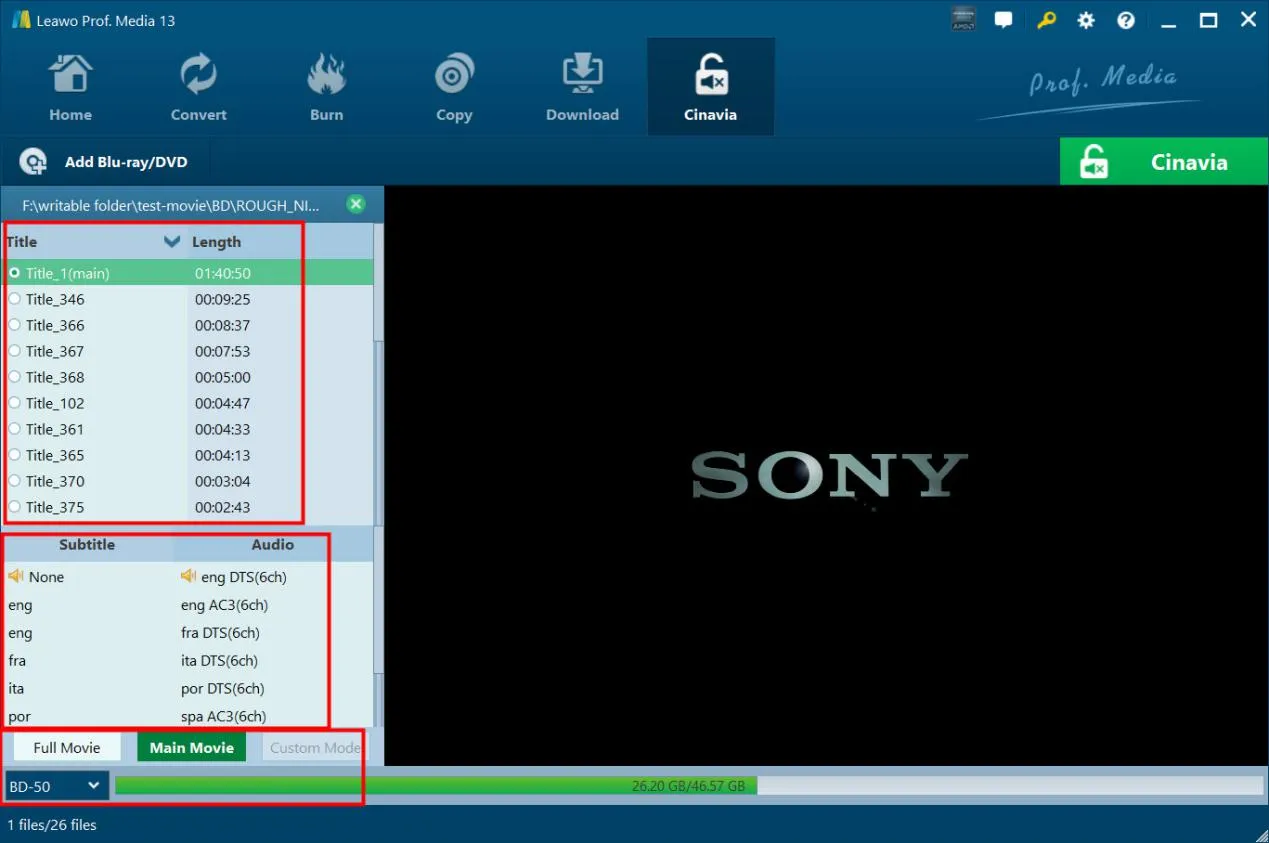
The Cinavia tab in Leawo Prof. Media 13 with a Blu-ray folder loaded: the title list, subtitle and audio track choices, the Full Movie and Main Movie buttons and BD-50 output size at the bottom.
Features
Removes the watermark for good
Leawo Blu-ray Cinavia Removal strips the Cinavia watermark from the copy itself, so Leawo says it plays on any Cinavia-compliant device and won't be affected by future updates to Cinavia detection in players.
1:1 Blu-ray copies with chapters and tracks
Leawo Blu-ray Cinavia Removal copies the disc 1:1, keeping chapters, titles and audio tracks. Full Movie copies the whole disc; Main Movie copies only the film, which is quicker and smaller.
Handles the other Blu-ray protections too
Leawo Blu-ray Cinavia Removal deals with the disc's other copy and playback restrictions (Leawo mentions AACS, BD+ and MKB alongside Cinavia) in the same pass, so you don't need a separate decrypter.
A Remove Cinavia switch in the output settings
Leawo Blu-ray Cinavia Removal's output sidebar has the Cinavia setting next to Copy to, Disc Label and Save to, and it shows the space the copy needs. Leawo says Intel Quick Sync GPU acceleration speeds up the job.
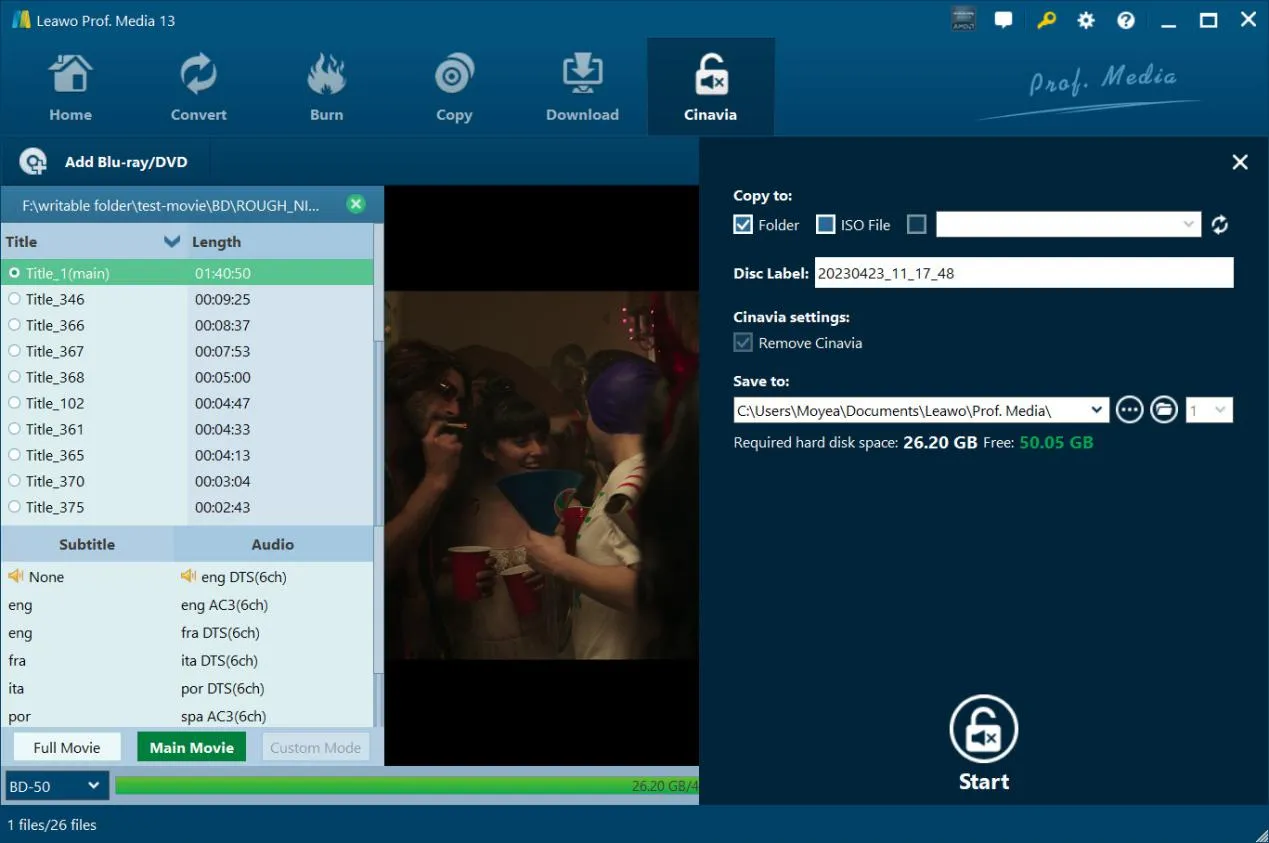
The output sidebar: Copy to Folder (ISO File unticked), Disc Label, Cinavia settings with Remove Cinavia ticked, Save to, and 26.20 GB required against 50.05 GB free, with the Start button below.
Benefits
- Backups that keep their sound. A copy that mutes halfway through isn't a backup; removing Cinavia fixes exactly that.
- Works on Cinavia-compliant players. Leawo says the Cinavia-free copy plays on all Cinavia-compliant devices, so you don't have to keep a special player just for backups.
- One tool instead of two. It decrypts and removes Cinavia together, so there's no chaining of programs.
Real-World Uses
- A backup that kept muting: re-copy the disc with Remove Cinavia ticked and burn it again.
- Keeping a collection as ISO files on a media server, without the watermark that compliant players react to.
- A spare disc for the car or the kids' room that plays on any Blu-ray player.
Who It's For, and Who Should Skip It
Good fit: Blu-ray owners who make 1:1 backups and play them on Cinavia-checking players or consoles.
Skip it if:
- Your copies already play fine on the devices you use; Leawo Blu-ray Copy alone costs less.
- You want MP4 or MKV files rather than Blu-ray copies.
- Your discs are DVDs (DVD Cinavia Removal) or 4K UHD discs (Leawo doesn't list them for this tool).
Usage Guide
- Install Leawo Prof. Media and register the Cinavia Removal module with your code.
- Add the source: open the Cinavia tab and use "Add Blu-ray/DVD" to add the disc, folder or ISO.
- Copy settings: choose Full Movie or Main Movie, the subtitles and audio tracks, and the output disc type.
- Output settings: click the green Cinavia button and set Copy to, Disc Label, Remove Cinavia and Save to.
- Start: click Start to remove Cinavia and copy the Blu-ray.
Where it falls short
- No independent proof. We found no independent test of how well the watermark removal works across discs and players; the reviews online are vendor material or coupon sites.
- Pricier than a plain copier. At $64.95 a year it costs more than Leawo's Blu-ray Copy, for one extra job.
- Narrow scope. Blu-ray copies only: no ripping to files, no DVDs, no 4K discs.
What Users Say
We couldn't find an independent review or forum thread about Leawo Blu-ray Cinavia Removal. Here's what exists:
On Leawo's own page
Leawo's product page shows testimonials it chose, including this one attributed to David Cooper: "Currently there are quite few Blu-ray Cinavia watermark removal tools. Leawo's Blu-ray Cinavia Removal is a top choice." Read them as the vendor's marketing, not independent reviews.
Trustpilot (Leawo as a company)
Leawo's Trustpilot pages showed 4.4 out of 5 from 151 reviews (leawo.org) and 4.3 out of 5 from 158 reviews (leawo.com) on October 31, 2026, covering all of its products. None of the reviews we could read mention Cinavia.
- Denis Desormeaux (5 stars, August 2026): "Leawo Prof media is such a marvellous I recommand it."
- Peter Madden (2 stars, November 2025), titled: "Will not copy TV mini series ."
- Leviticus Stroud (1 star, July 2025): "Crashed every time I tried to run it normally, seemed it had to run in admin mode."
The pattern: Leawo's suite has plenty of satisfied long-time users, but this particular module has no independent track record. Try it on the disc that's giving you trouble before you buy, and keep the 5- or 14-day money-back window in mind.
Comparisons
Blu-ray Cinavia Removal vs Blu-ray Copy
Both make 1:1 Blu-ray copies. Only Cinavia Removal strips the Cinavia watermark; Leawo's FAQ says Blu-ray Copy doesn't. If your copies play fine, Blu-ray Copy is enough.
Blu-ray vs DVD Cinavia Removal
Leawo sells two Cinavia tools: this one for Blu-rays, and DVD Cinavia Removal ($29.95 a year) for DVDs. Buy the one that matches your discs.
Editions and Pricing
| License | Price | Includes | Money-back |
|---|
| 1 Year (auto-renews) | $64.95 | Blu-ray Cinavia Removal, 1 PC | 5 days |
| Lifetime | $99.95 | Blu-ray Cinavia Removal, 1 PC | 14 days |
| Blu-ray Ripper + Blu-ray Copy + Cinavia Removal (lifetime) | $149.91 | 8 modules, including the DVD and Blu-ray Recorder tools | 14 days |
Prices from Leawo's order box on October 31, 2026.
FAQs
Why does my Blu-ray copy lose its sound after a few minutes?
That's Cinavia. The watermark is in the audio, and a Cinavia-compliant player that detects it on a copy mutes the sound or stops playback. Leawo Blu-ray Cinavia Removal makes a copy without the watermark.
Does Leawo Blu-ray Copy remove Cinavia?
No. Leawo's support FAQ says Blu-ray Copy doesn't remove Cinavia and that Leawo Blu-ray Cinavia Removal is the product you need.
Can Leawo Blu-ray Cinavia Removal fix a copy I already made?
Yes, if it's a Blu-ray folder or ISO. Leawo Blu-ray Cinavia Removal accepts Blu-ray discs, folders and ISO files as the source, so you can load the existing copy and make a new Cinavia-free one.
Do I need a Blu-ray burner?
Only to write a disc. Leawo Blu-ray Cinavia Removal can save the Cinavia-free copy as a Blu-ray folder or ISO file on your hard drive instead.
Is there a Mac version of Leawo Blu-ray Cinavia Removal?
Yes. Leawo sells a Mac edition separately, for macOS 10.13 or later on Intel or Apple M1/M2 Macs.
System Requirements
- Windows: 7, 8, 8.1, 10 or 11
- Processor: 1 GHz Intel or AMD
- Memory: 512 MB RAM (1 GB or more recommended)
- Disk: 25 GB free for a Blu-ray copy
- Graphics: NVIDIA GeForce GTX 260 or better
- Other: a Blu-ray drive and an internet connection
Conclusion
Leawo Blu-ray Cinavia Removal is worth it if Cinavia is the specific problem you have: backups of your own Blu-rays that mute or stop on your player or console. It handles decryption and watermark removal in one pass and outputs a 1:1 disc, folder or ISO.
If your copies already play fine, a plain Blu-ray copier is cheaper, and there's no independent testing of this module yet. Run the free trial on the disc that's causing trouble, and choose the lifetime license if you plan to keep using it, since its money-back window is longer.
Download Free TrialBuy Now