Leawo Photo Enhancer for Mac: Automatic Photo Fixes in Bulk, Including RAW
Leawo Photo Enhancer for Mac is a macOS app that applies AI corrections to whole folders of photos: light, color, haze and sharpness, plus optional skin smoothing, eye enlarging and RAW lens correction. It's $29.95 for a year or $39.95 for life, and it runs on Intel Macs and, through Rosetta, on M1 and M2 Macs.
Mac owners who miss the old Picasa "I'm feeling lucky" button are exactly who this is aimed at; one reviewer on Leawo's site says so in as many words. It's a one-button improvement for many photos at once, not an editor.
Quick facts
- Developer: Leawo Software Co., Ltd.
- Download: the Leawo PhotoIns for Mac disk image (macphotoins_setup.dmg, 444 MB, dated June 13, 2022), shared by all three photo modules
- Chips: Intel, or Apple M1/M2 under Rosetta; no Apple silicon build
- macOS: Leawo's page for this module lists 10.10 Yosemite through 27; its sister modules, on the same installer, start at 10.13
- Photos in: RAW, JPEG, TIFF, PNG, minimum 800 x 600; out: JPEG, PNG or TIFF (up to 16-bit)
- Price: $29.95 a year or $39.95 lifetime, one Mac per license
- Trial: previews everything, exports one watermarked photo at a time
What we checked: the Mac download page for Photo Enhancer, which delivers the PhotoIns for Mac installer (macphotoins_setup.dmg, 466,021,864 bytes, dated June 13, 2022), the Mac requirements on Leawo's product pages, the trial and expired-license rules in Leawo's registration guide, and the order page, which billed "Photoins Photo Enhancer for Mac" at $29.95 for 1 year and $39.95 lifetime on November 1, 2026. We didn't run it on a Mac ourselves.
Before you buy
- Older Macs: check the macOS version. Leawo's Enhancer page says Yosemite (10.10), but the BG Remover and Enlarger pages, which share this download, say High Sierra (10.13). On a Mac older than 10.13, test the trial before paying.
- Apple silicon runs it through Rosetta. Leawo names M1 and M2; on newer chips it should run the same way, but check speed during the trial.
- Screen space. Leawo wants at least 1440 x 900, with 1920 x 1080 recommended.
- A 2022 Mac build. The Mac installer hasn't changed since June 2022.
Download Free TrialBuy Now
Overview
On the Mac, Photo Enhancer lives inside the Leawo PhotoIns app; the download page for it even says "Thank you for downloading Leawo PhotoIns for Mac". After installing you see the PhotoIns home screen with a tile per module, and your Photo Enhancer key activates just that tile. Leawo's guide and screenshots are shared with Windows and show the Windows window.

An earlier PhotoIns home screen from Leawo's guide (Windows build), with Photo Enhancer and Photo BG Remover tiles; the current version adds a third tile for Photo Enlarger.
Features
Automatic corrections you don't have to choose
Leawo Photo Enhancer for Mac runs an AI pass on every photo that's always on: it rebalances bright and dark areas, corrects white balance and tint, sharpens edges, clears haze, and makes skies and greenery more vivid. Compressed JPGs get noise and block reduction too. In the editor you can only weaken or strengthen the result with one slider.
RAW files with automatic lens correction
Leawo Photo Enhancer for Mac accepts camera RAW files alongside JPEG, TIFF and PNG, and for RAW photos only it can correct distortion, chromatic aberration and vignetting automatically. Photos smaller than 800 x 600 pixels aren't accepted.

The empty Photo Enhancer window ("RAW, JPEG, TIFF or PNG, at least 800*600px", with Open Example and Add Photo) and the settings menu at the top right with Automatic Lens Correction, Face enhance and Enlarge eyes (Windows build).
Portrait touch-ups for a batch
Leawo Photo Enhancer for Mac's Face enhance smooths skin, fades freckles, brightens eyes and evens out light on faces; Enlarge eyes makes eyes a little bigger. Tick them once for a whole batch, or switch them per photo in the editor, where a sliding Before/After divider shows the change.
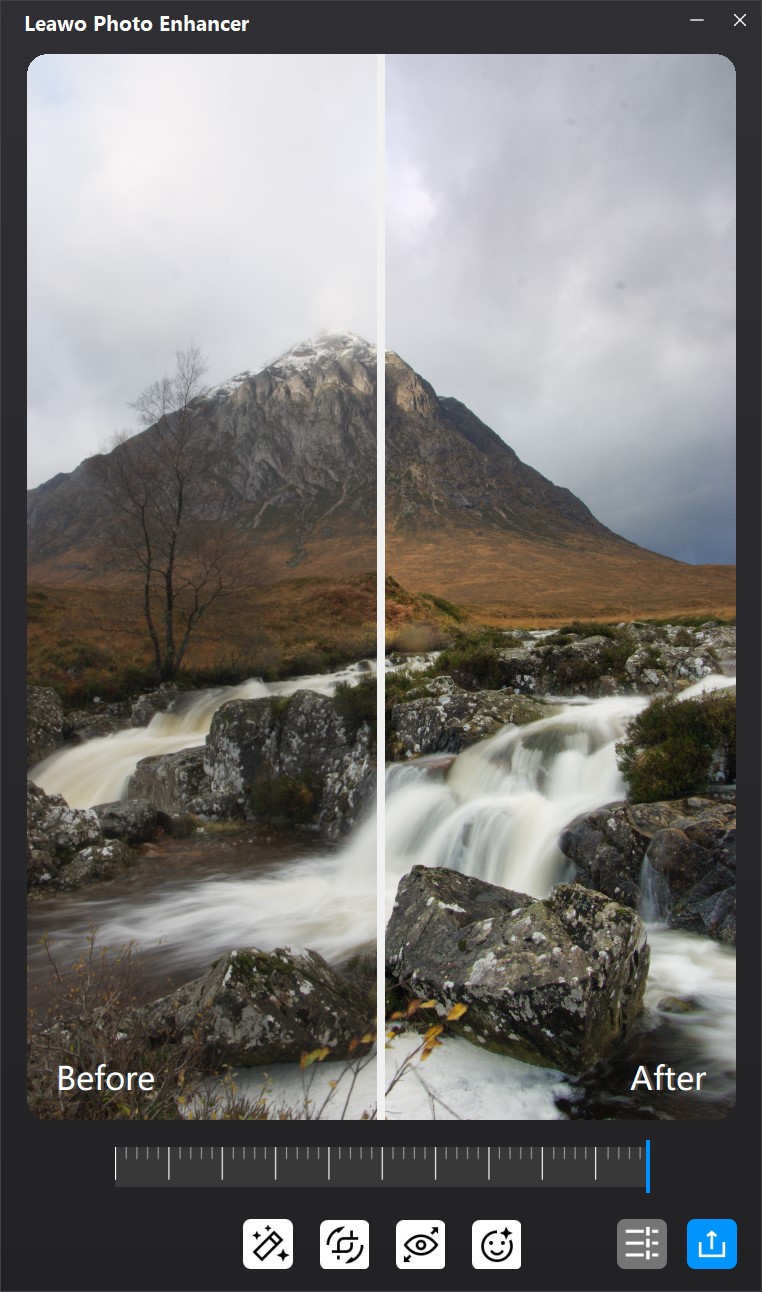
The single-photo editor on a tall waterfall shot: Before on the left of the divider, After on the right, with the strength slider and effect buttons underneath (Windows build).
Export with naming and resizing
Leawo Photo Enhancer for Mac exports to JPEG (high, medium or low), PNG or TIFF (uncompressed, LZW or PackBits, 8 or 16 bits). It can rename files with a prefix, suffix, counter or date stamp and resize them to set pixel dimensions, which saves a trip through Preview or Automator afterwards.
Benefits
- Fills a gap in macOS. Apple Photos has an Auto Enhance button, but applying it to hundreds of photos and exporting them renamed and resized takes many steps; here it's one export.
- Works with RAW straight from the camera. No need to convert to JPEG first.
- A lifetime option. $39.95 once, and an expired 1-year license still keeps working.
Real-World Uses
- A trip's worth of photos: brighten and de-haze them all before sharing an album.
- RAW shooters in a hurry: get a decent, lens-corrected JPEG set from a shoot without opening a RAW editor.
- Online sellers: lift dim product photos taken indoors, renamed with a counter for the listing.
Who It's For, and Who Should Skip It
Good fit: Mac users who want a one-click fix across many photos and are happy with the AI's judgment.
Skip it if:
- Apple Photos already does enough. Its Auto Enhance (the magic-wand button) is free, if one photo at a time.
- You edit carefully. Lightroom, Pixelmator Pro or darktable give you real control; this gives you one slider.
- You want a current, native Apple silicon app. This one is a 2022 Intel build running under Rosetta.
Usage Guide
- Install: download the PhotoIns for Mac DMG (444 MB), open it and install. On an M-series Mac, let macOS install Rosetta if asked.
- Open Photo Enhancer: start Leawo PhotoIns and click the Photo Enhancer tile.
- Add photos: drag them from Finder or click Add Photo. Open Example loads Leawo's samples if you just want to see it work.
- Set the switches: gear icon, then Settings: Automatic Lens Correction (RAW), Face enhance, Enlarge eyes.
- Review: double-click a photo to compare before and after and adjust the strength.
- Export: click Output, pick folder, format, naming and size, and run it.
- Activate: click the key icon, paste your code and click the paper-plane button.

The Activation Center: a field for the registration code and a table of modules with their state (Photo Enhancer on Trial, Photo BG Remover on Pro with 282 days left), Renew and Buy buttons, and a renewal discount banner (Windows build).
Where it falls short
- Taste you can't adjust. Users of the Windows version found the AI too strong on selfies and too subtle on others, and there's nothing but the strength slider to change it.
- No list of RAW cameras. Leawo says it handles RAW from "any camera" but publishes no list, and the Mac build predates cameras released after mid-2022.
- Rosetta dependency. As an Intel-only app, it runs on Apple silicon only as long as macOS keeps Rosetta available.
What Users Say
Leawo's review page for PhotoIns for Mac has no reviews yet, so Mac-specific opinions are rare. The Windows and Mac editions share the same engine, and most published comments come from Windows users.
From a Mac user (Leawo's moderated review page)
Richard Easton (July 2021), titled "Great support and product now runs great": "I use google picasa frequently but it isn't available for mac. This Photo app has provided the functionality I really liked. (I'm feeling lucky filter)". Leawo also uses this quote as a testimonial on its product page.
Windows users on Giveaway of the Day
- Darren C. (version 4.0.0.2, June 2023): "I went from a real selfie photo that has a little bit too much lighting to HRD Photo Filter and your AI overdoing it with a photo face filter to the point I look fake or designed by an AI photo generator."
- Dennis W Comito (June 2023): "Fix those two issues have you have a winner." His two issues were choosing the output folder and side-by-side comparison.
- Jim C (PhotoIns Pro 1.0, February 2021): "Using this app, you would have to start off with decent photo and then the improvements wouldn't be huge."
- Peter Burton (February 2021): "Sharpness is gone, Contrast is gone, Brightness is gone, Resize is not there, Rotate is not there. Crop is not there."
Leawo's product-page testimonial
Josef, chosen by Leawo: "Photolns is perfect for photography, there are a wide variety of options for the quality of photos and the ability to customize my photos. Collecting photos and making small edits to photos is simple and fun."
The pattern: it pleases people who want effortless improvement (the Picasa crowd) and frustrates anyone who expects editing tools. Some of the missing-feature complaints date from version 1.0; resizing and output-folder choice have since been added, but there's still no crop, rotate or per-setting control.
Comparisons
Mac vs Windows edition
- Same: features, price ($29.95 / $39.95), trial limits and license rules.
- Installer: Mac gets a full 444 MB DMG from June 2022; Windows gets a 3.5 MB downloader or a 1 GB offline setup (version 4.0.0.2, January 2024).
- System: Mac lists macOS 10.10 or 10.13 and later depending on the page, Intel or M1/M2 via Rosetta, and a 1440 x 900 screen; Windows lists 64-bit Windows 7, 8 and 10 and a 1024 x 768 screen.
- Licenses are per platform; a Windows key won't activate the Mac app.
Photo Enhancer vs the rest of PhotoIns for Mac
Photo Enhancer for Mac fixes how a photo looks at its current size. Photo Enlarger for Mac ($39.95 a year, $59.95 lifetime) makes small photos bigger, and Photo BG Remover for Mac ($29.95 / $39.95) cuts out backgrounds. PhotoIns for Mac activates all three for $79.95 a year or $109.95 lifetime, and Leawo's order page halves the price of a second module bought together.
Editions and Pricing
| Option | Price | What you get |
|---|
| Trial | Free | All effects, one watermarked photo per export, ads |
| 1 year | $29.95 | Batch export, no watermark, updates and support for the year; auto-renews |
| Lifetime | $39.95 | Same, with no renewal |
FAQs
Does Leawo Photo Enhancer run on an M1, M2 or M3 Mac?
Leawo Photo Enhancer for Mac supports M1 and M2 Macs through Rosetta, according to Leawo. Newer Apple chips aren't named, but they run Intel apps through the same Rosetta layer; confirm with the trial.
Is Leawo Photo Enhancer better than Auto Enhance in Apple Photos?
Leawo Photo Enhancer for Mac adds batch export with renaming and resizing, RAW lens correction and face retouching. For the occasional photo, Apple Photos' free Auto Enhance is enough; the Leawo app earns its price on large batches.
What happens when my 1-year Mac license ends?
Leawo Photo Enhancer for Mac keeps its full features after the 1-year license expires, but without updates or support, according to Leawo's registration guide. Installing a later major upgrade on an expired license returns it to trial mode.
Does the Mac download include the other PhotoIns modules?
Yes. The Leawo Photo Enhancer for Mac download is the full PhotoIns for Mac app; Photo BG Remover and Photo Enlarger are there in trial mode until you buy them.
Can I get a refund if I don't like the results?
Leawo refunds Photo Enhancer for Mac within 14 days only for faults its support can't fix, hardware incompatibility or duplicate orders, not for disliking the output. Judge the results in the trial first.
System Requirements
- macOS: 10.10 Yosemite through 15 Sequoia, 26 Tahoe and 27 on Leawo's Enhancer page (10.13 or later on its other module pages)
- Processor: 1 GHz or faster Intel, or Apple M1/M2 with Rosetta
- Memory: 4 GB RAM (8 GB recommended)
- Disk: 4 GB free, SSD for best performance
- Display: 1440 x 900 (1920 x 1080 or better recommended)
- Other: internet connection and registration for activation and subscription checks
Conclusion
Leawo Photo Enhancer for Mac is a reasonable $39.95 for Mac users who want Picasa-style one-click fixes on large batches, including RAW files, with renamed and resized exports.
Don't buy it as a photo editor: it has one slider, users find its face retouching overdone, and it's a 2022 Intel build that needs Rosetta on Apple silicon. Try the trial on a typical folder and compare with Apple Photos' Auto Enhance; buy only if Leawo's results are clearly better for your photos.
Download Free TrialBuy Now