Leawo Blu-ray Recorder Ripper: Turn Recorded Blu-ray Discs into MP4 and MKV Files
Leawo Blu-ray Recorder Ripper is a Windows program that converts BDAV discs, the Blu-rays written by TV and camcorder Blu-ray recorders, into MP4, MKV, AVI and other video or audio files. It costs $44.95 for one year or $99.95 for a lifetime license on one PC and comes as a module of Leawo Prof. Media 13.
The problem it solves: a recording made on a Panasonic DIGA or Sony recorder plays fine in that recorder and almost nowhere else. Ripped to MP4, the same football final or family christening plays on a laptop, a phone, a smart TV or a Plex server, and the disc can go back in the drawer.
Quick facts
- Version: 13.0.1.6, part of Leawo Prof. Media 13 (installer dated October 10, 2026)
- Developer: Leawo Software Co., Ltd.
- Runs on: Windows 11, 10, 8.1, 8 and 7. The Mac edition is sold separately.
- Input: BDAV discs, folders and ISO images, encrypted or not
- Output: 180+ video and audio formats, including MP4, MKV, H.265, AVI, WMV, FLV, MP3 and AAC, device presets, and lossless multi-track MKV or MP4
- Editing: trim, crop, merge, watermark, brightness and contrast, speed, rotation, noise removal, 2D to 3D
- Price: $44.95 a year or $99.95 lifetime, one PC
- Trial: 30 days, converting only the first 5 minutes of each title. After the 30 days, encrypted BDAV sources no longer load.
- Money-back period listed: 5 days (1 year), 14 days (lifetime)
What we checked: Leawo's Windows installer (ltmcp_setup.exe, 209,171,392 bytes, file version 13.0.1.6, "Leawo Prof. Media", signed by ShenZhen Moyea Software Co., Ltd.) and the order page for "Leawo Blu-ray Recorder Ripper" ($44.95 for one year, lifetime $55.00 more at $99.95, renewal quoted at $26.97), both on November 1, 2026. We didn't rip a recorder disc ourselves.
Before you buy
- Leawo Blu-ray Ripper includes this module at the same price. A $44.95 Blu-ray Ripper license lists three modules: Blu-ray Ripper, DVD Ripper and Blu-ray Recorder Ripper. Unless you'll only ever rip recorder discs, buy Blu-ray Ripper instead.
- Use the trial while it lasts. It converts 5 minutes per title for 30 days, then refuses encrypted recorder discs. That's enough to confirm your recorder's discs load and the output plays where you need it.
- Refunds are for faults only. Leawo refunds a reproducible bug it can't fix or a hardware incompatibility within 14 days, not a change of mind.
- Personal use. Leawo's fair-use terms limit its tools to content you've lawfully obtained, and rules on copy-protected TV recordings vary by country.
Download Free TrialBuy Now
Overview
You work in the Convert tab of Leawo Prof. Media 13. Load a recorder disc, a BDAV folder or an ISO, and each title appears as a row with its thumbnail, length, subtitle and audio pickers, and the output format and size. An Output Profile menu above the list sets the format for everything, an edit button on each row opens the editor, and the green Convert button sends the batch off.
Under the hood it's the same conversion engine as Leawo's movie rippers, pointed at BDAV discs, the format recorders write. Leawo says it removes recorder disc protection and region restrictions, and the trial notice tells you plainly what an unregistered copy will do.
Features
180+ output formats and device presets
Leawo Blu-ray Recorder Ripper converts recordings to common formats (MP4, MKV, AVI, WMV, FLV), H.265 MP4 and MKV, HD and 4K profiles, audio-only files (MP3, AAC, OGG), and presets for iPhones, iPads, Android phones and tablets. The Profile window groups them into Format, Device, Favorite and Custom tabs, with a search box.
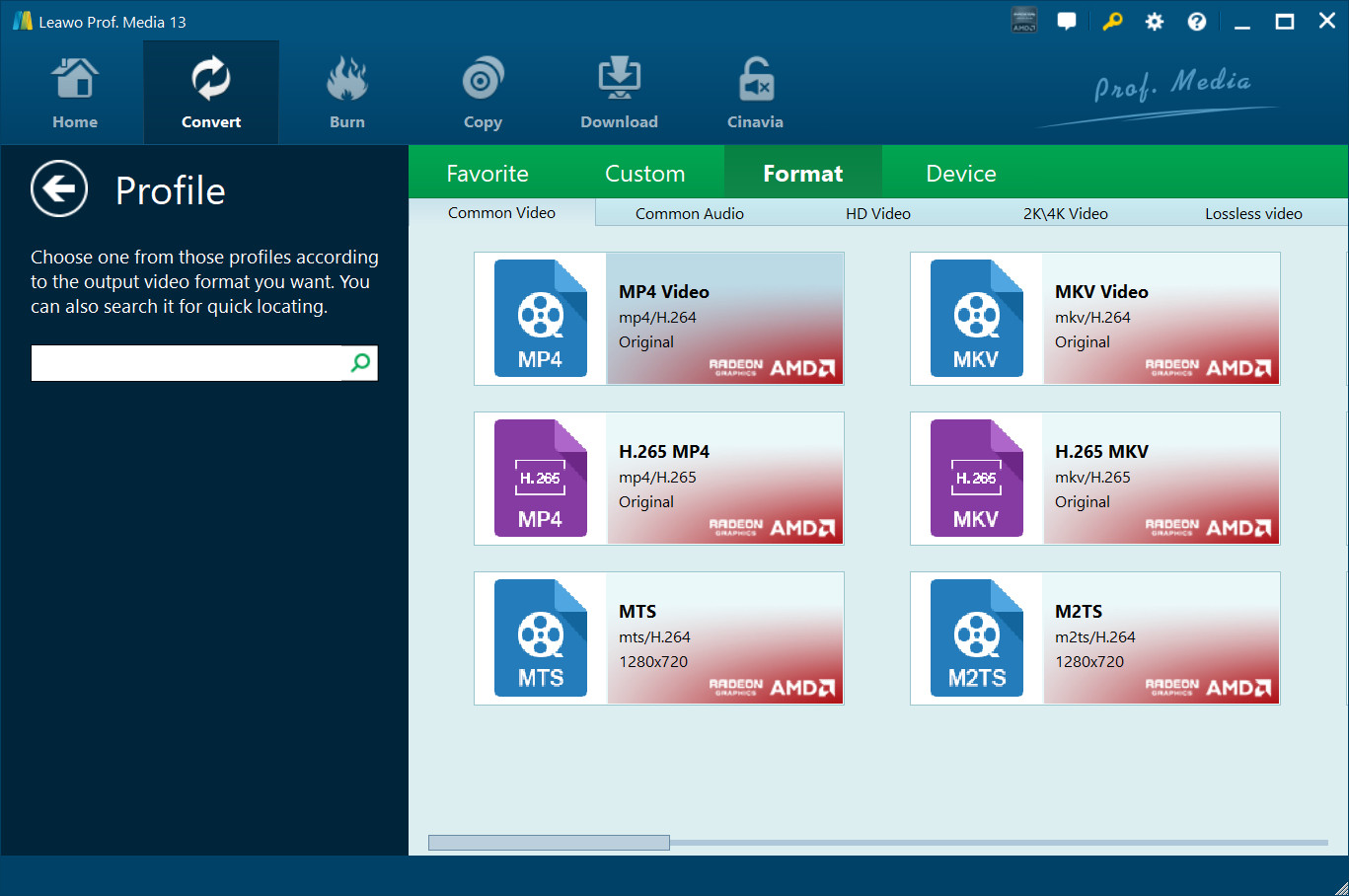
The Profile window on the Format tab: MP4, MKV, H.265 MP4, H.265 MKV, MTS and M2TS, with sub-tabs for common video, common audio, HD, 2K/4K and lossless video. Vendor screenshot.
Lossless MKV or MP4 with every track
Leawo Blu-ray Recorder Ripper can also output lossless MKV or MP4 files that keep several audio tracks and subtitles, the closest thing to the disc itself in a single file. For anything else, the Profile Settings panel lets you set the video codec, bit rate, resolution, frame rate and aspect ratio, plus the audio codec, bit rate, sample rate and channels, and save the result as a custom profile.
Pick the titles, subtitles and audio
Leawo Blu-ray Recorder Ripper loads a disc three ways: Full Movie (everything), Main Movie (the longest title, changeable) or Custom Mode (the titles you tick). That matters for recorder discs, which often hold dozens of separate recordings. Each title then gets its own subtitle and audio choice, and a "Merge all files to one" button joins them into a single output file.
A built-in editor for recordings
Leawo Blu-ray Recorder Ripper's editor trims the start and end (handy for cutting the minutes recorded before and after a programme), crops black bars, adds a text or image watermark, adjusts brightness, contrast and saturation, changes playback speed from 1/4x to 4x, rotates the picture and reduces noise. A 3D tab converts 2D footage to Red/Cyan, Red/Green, Red/Blue, Blue/Yellow, interleaved or side-by-side 3D.
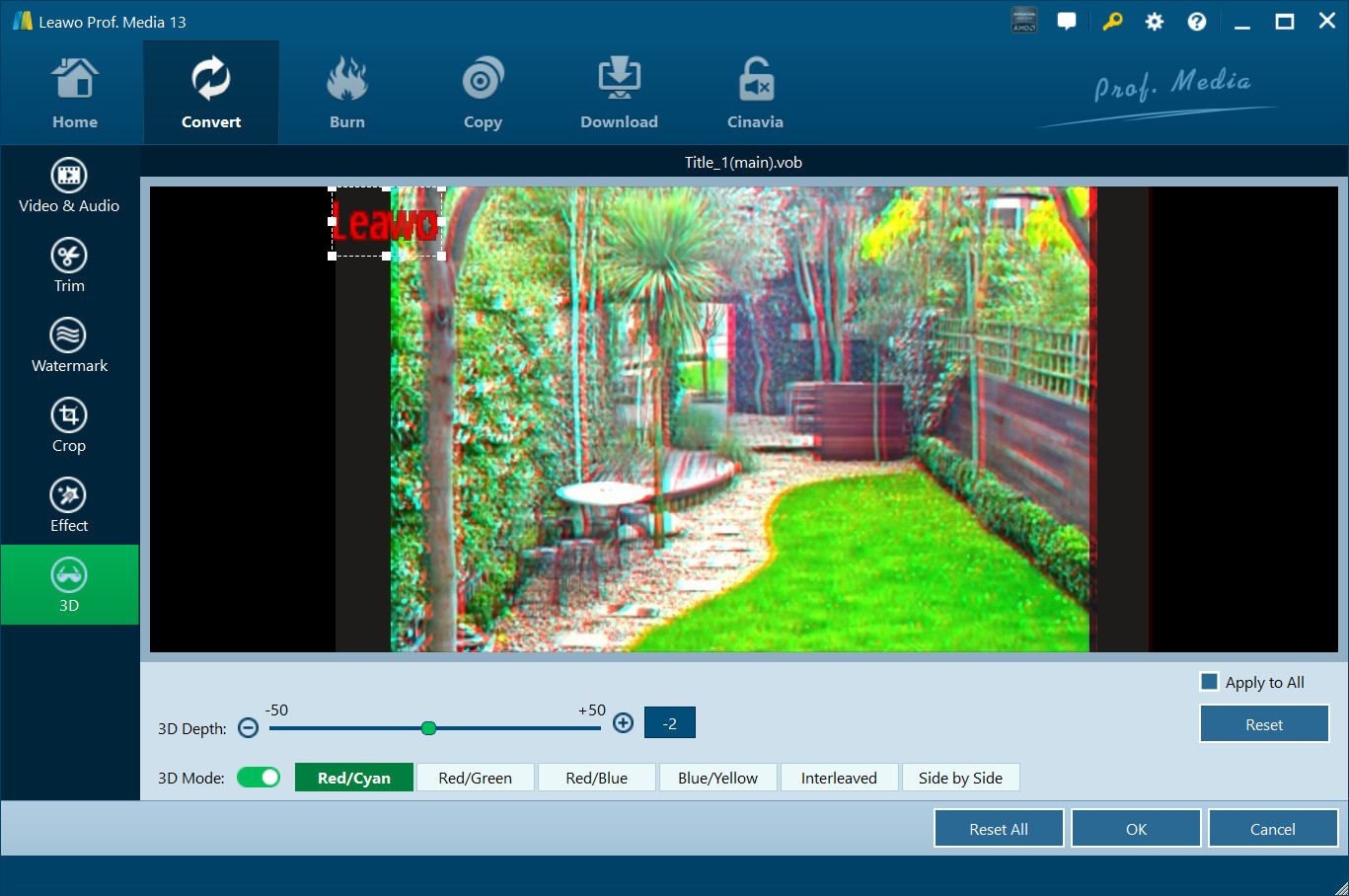
The editor's 3D tab with 3D Mode on and a Red/Cyan preview, the 3D Depth slider, the six 3D styles and a red "Leawo" text watermark in the corner. The side bar holds the Video & Audio, Trim, Watermark, Crop and Effect tabs. Vendor screenshot.
Batch conversion with GPU acceleration
Leawo Blu-ray Recorder Ripper converts many titles or discs in one batch and uses NVIDIA CUDA, AMD APP and Intel Quick Sync graphics acceleration. Leawo's own product page gives two figures for the speed-up, "50X" in a heading and "6X" in the text below it, so expect real gains from a decent GPU rather than either number.
Benefits
- Recordings that play everywhere. An MP4 plays on almost any phone, TV, tablet or media server. A BDAV disc doesn't.
- Space back on the shelf and the drive. A compressed H.264 or H.265 file takes a fraction of a disc's 25 or 50 GB.
- Cleaner files than the recorder made. Trimming the padding and merging episodes leaves you with tidy, watchable files.
Real-World Uses
- A Plex or Jellyfin library of recorded TV: rip each recorded series to H.265 MKV and let the server organise it.
- Family videos for relatives: turn a camcorder Blu-ray of a wedding into an MP4 you can share by link.
- Sports archives: trim the pre-match recording and keep the match itself as a single file.
- Audio from a concert recording: extract the soundtrack as MP3 or AAC.
Who It's For, and Who Should Skip It
It's for Windows users with a collection of recorder or camcorder Blu-rays who want them as ordinary video files, with control over format, size and which titles to keep.
Skip it if you also rip shop-bought Blu-rays or DVDs, since Leawo Blu-ray Ripper costs the same and includes this module. Skip it too if you want an exact disc-for-disc backup rather than files (that's Leawo Blu-ray Recorder Copy), or if you're on a Mac, where the Mac edition is a separate purchase.
Usage Guide
- Install and open Prof. Media 13. Use the Download Free Trial button, run the installer and click the Blu-ray Recorder Ripper tile or the Convert tab.
- Load the recordings. Click Add UHD/Blu-ray/DVD and choose Add from CD-ROM, Add from folder or Add iso file. Pick Full Movie, Main Movie or Custom Mode and tick the titles you want.
- Choose tracks and edits. Set subtitles and audio for each title, merge titles if you like, and click the edit icon to trim, crop or adjust.
- Pick the format. Open Output Profile, click Change and choose a format or device. Click Edit for codec, bit rate and resolution.
- Set the folder and convert. Click the green Convert button, set Save to, then click Convert in the sidebar. Without a license, click Agree on the trial notice.
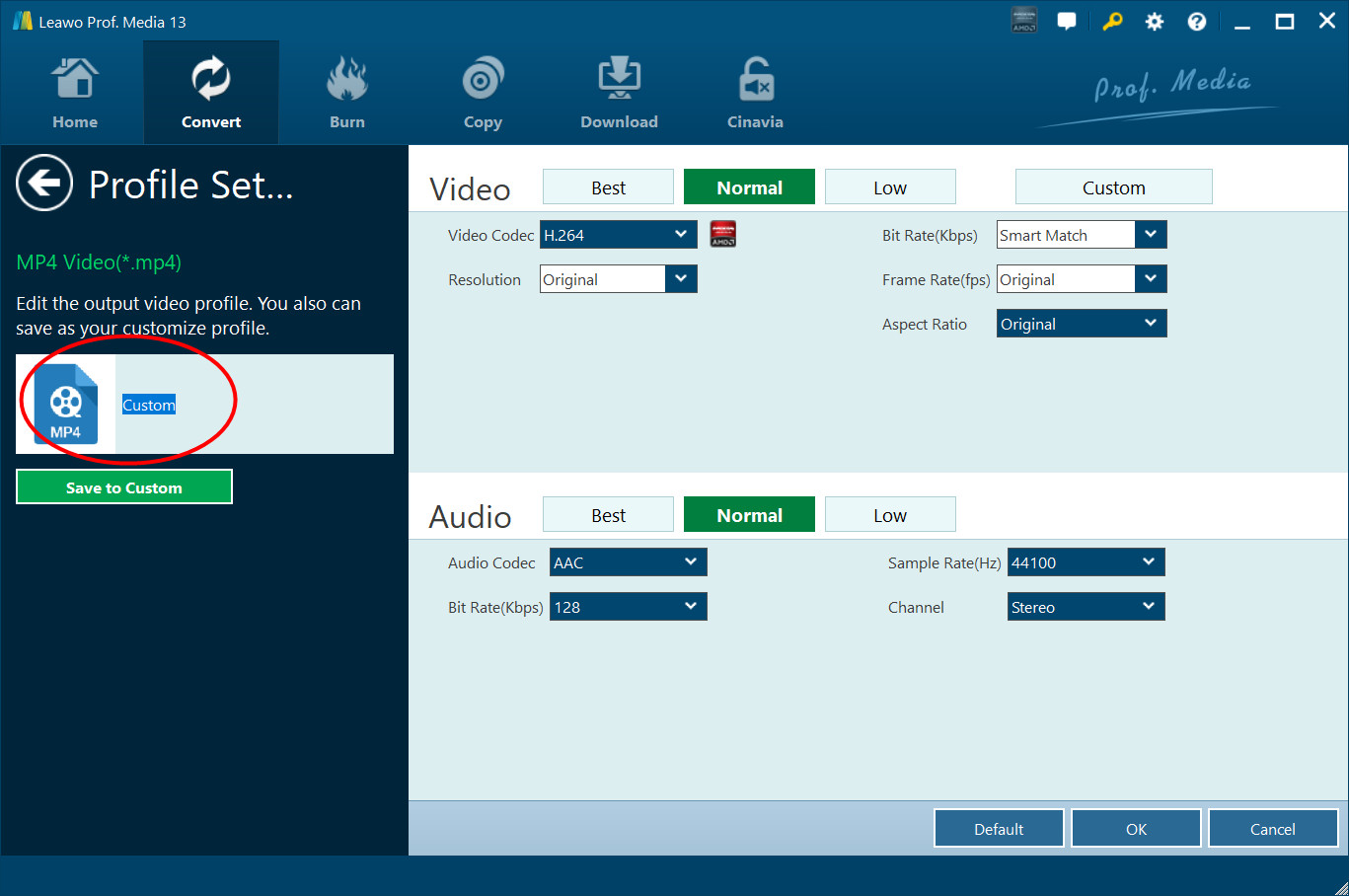
Step 4: Profile Settings for MP4 output, with Best, Normal, Low and Custom presets, H.264 video at original resolution and frame rate, "Smart Match" bit rate, and AAC stereo audio at 44100 Hz, plus a Save to Custom button. Vendor screenshot.
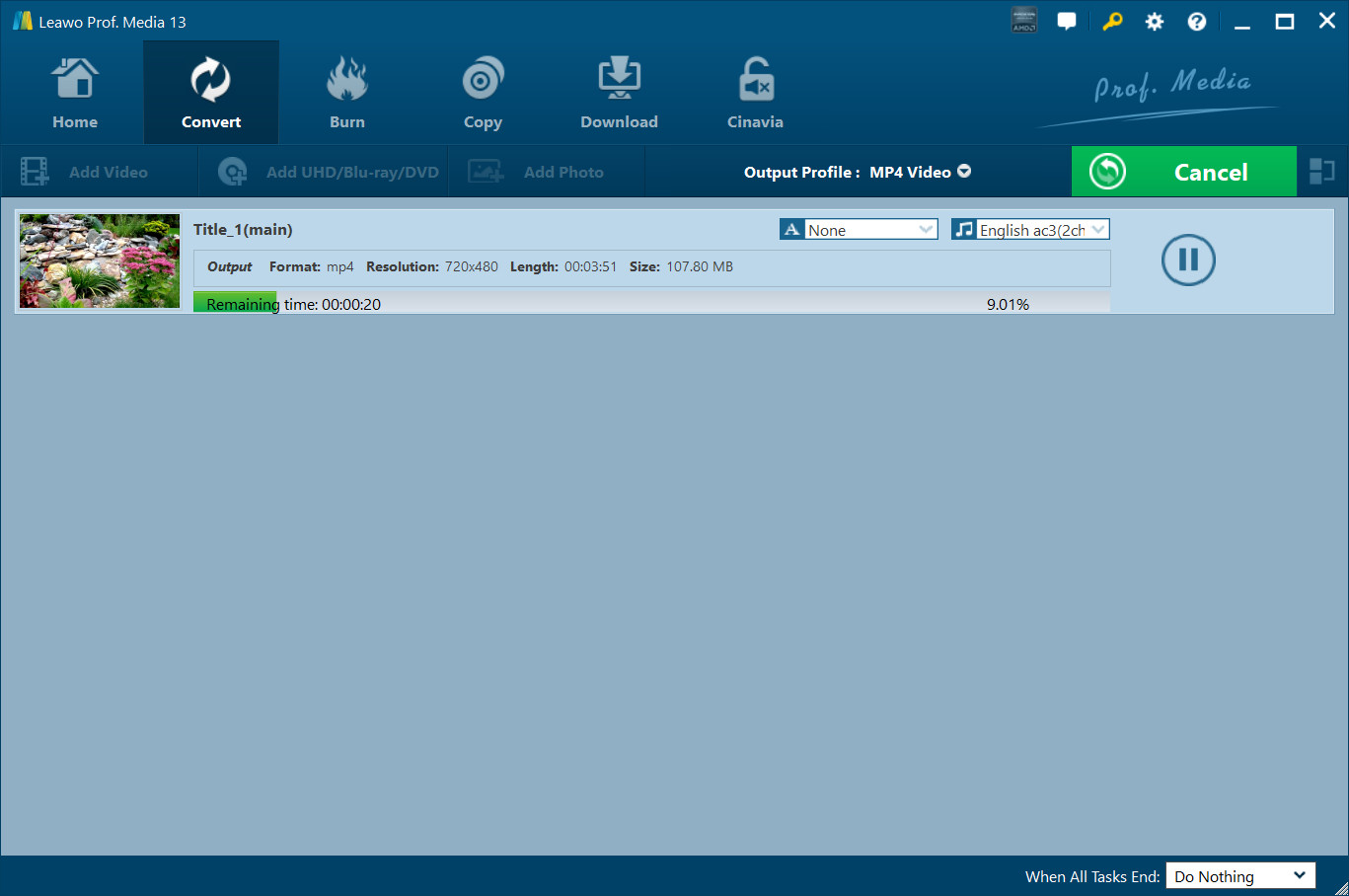
Step 5: a title converting to MP4 (9.01%, 20 seconds remaining) with a pause button and the "When All Tasks End" option. Leawo's guide uses a short 720x480 sample, not a full recorder disc. Vendor screenshot.
Tips
- Use Custom Mode on recorder discs. A disc with 20 recordings on it is easier to handle when you tick just the ones you want.
- H.265 for archives, H.264 for sharing. H.265 makes smaller files, while H.264 MP4 plays on more devices.
- Lifetime only pays off in year three. At the $26.97 renewal quoted on the order page, three yearly payments total $98.89, against $99.95 for lifetime.
Where it falls short
- Worse value than Blu-ray Ripper. Bought alone it does one third of what the same money buys in Blu-ray Ripper.
- Contradictory speed claims. One product page says both "50X" and "6X" faster, which doesn't inspire confidence in the marketing.
- Hardly any reviews. Leawo's review page for this module has no published reviews, and we found no independent test.
- Re-encoding takes time. Unlike a 1:1 copy, converting HD recordings to H.264 or H.265 keeps the CPU or GPU busy, especially in a long batch.
What Users Say
Real user evidence is thin. Leawo's review page for Blu-ray Recorder Ripper has no published reviews, although the product page's structured data claims 4.9 from 88 ratings. Here's what can be shown:
Testimonials on Leawo's product page
These are chosen by Leawo, undated and unverifiable.
Mike Piet: "Very helpful tool. Now I could turn some of my recorded Blu-ray discs to MKV files. The quality is good, and the conversion is fast.Worth tring."
Micky Minnai: "Recommended by my friend and took a try of this tool before buying it. Quite satisfied with the overall performance, speed, stability, quality, and all are wonderful. Nice tool."
Leawo's rippers and the company
Leawo's review page for Blu-ray Ripper, which includes this module, averages 4.7 out of 5 from 104 ratings. On Trustpilot, Leawo has a TrustScore of 4.3 from 158 reviews (63% five-star, 25% one-star). Recent reviewers there describe years of ripping DVDs and Blu-rays with Prof. Media 13 and quick help from support with activation and with discs that wouldn't rip, which in one October 2025 case ended in a software update.
On the negative side, one-star reviewers complain about price and failed jobs, and none of the reviews we could see mention recorder discs specifically.
Comparisons
Blu-ray Recorder Ripper vs Leawo Blu-ray Ripper
Same price, $44.95 a year or $99.95 lifetime. Blu-ray Ripper's license includes Blu-ray Recorder Ripper plus Blu-ray Ripper and DVD Ripper, so it also handles commercial Blu-rays and DVDs. Buy Recorder Ripper alone only if recorder discs are all you have.
Recorder Ripper vs Recorder Copy
Recorder Ripper makes video files you can play anywhere. Leawo Blu-ray Recorder Copy makes exact disc or ISO copies that keep the BDAV structure. Leawo's Blu-ray Ripper + Blu-ray Copy lifetime bundle ($119.94) contains both recorder modules.
Windows vs Mac edition
The Mac edition is part of Prof. Media for Mac 13.0.8 for macOS 10.13 and later, with Intel and Apple silicon downloads. It's a separate product at the same price.
Editions and Pricing
| License |
Price |
Term |
Money-back period listed |
Includes |
| 1 Year |
$44.95 |
One PC, auto-renewing (renewal quoted at $26.97) |
5 days |
Blu-ray Recorder Ripper |
| Lifetime |
$99.95 |
One PC, one-time payment |
14 days |
Blu-ray Recorder Ripper |
| Blu-ray Ripper + Blu-ray Copy (Lifetime) |
$119.94 (list $199.90) |
One PC, one-time payment |
14 days |
Seven rip and copy modules, both recorder modules included |
| Prof. Media BD/DVD Pack + CleverGet Video Downloader (Lifetime) |
$169.94 |
One PC, one-time payment |
14 days |
Ten disc modules plus a video downloader |
Buy Now on this page opens Leawo's Blu-ray Recorder Ripper page, where these licenses and bundles are listed.
FAQs
Can Leawo Blu-ray Recorder Ripper rip shop-bought Blu-ray movies?
Leawo Blu-ray Recorder Ripper is built for BDAV discs from recorders and camcorders. Commercial movie discs use the BDMV format and are the job of Leawo Blu-ray Ripper, whose license also includes Recorder Ripper at the same price.
Will Leawo Blu-ray Recorder Ripper work with my Panasonic DIGA discs?
Leawo Blu-ray Recorder Ripper lists discs recorded on Panasonic, Sony, Samsung, LG and Sharp Blu-ray recorders, including encrypted ones. Leawo doesn't publish a list of tested recorder models, so check your own discs during the 30-day trial.
What resolution does Leawo Blu-ray Recorder Ripper output?
Leawo Blu-ray Recorder Ripper's guide says it converts BDAV to video up to 1080p, which matches the HD recordings these discs hold. You can keep the original resolution or scale down for a phone in Profile Settings.
Does the Leawo Blu-ray Recorder Ripper license renew automatically?
Leawo Blu-ray Recorder Ripper's 1-year plan auto-renews, and the order page quoted the renewal at $26.97 a year on November 1, 2026. You can cancel from your account or through support, but cancelling doesn't refund the current year. Lifetime is a one-off $99.95.
Can I get my money back if Leawo Blu-ray Recorder Ripper won't read my discs?
Leawo Blu-ray Recorder Ripper refunds are possible within 14 days for hardware incompatibility or a reproducible bug Leawo's support can't fix, once you've sent them the details. "It doesn't work" with no details, or not needing it any more, isn't accepted, and nothing is refunded after a month.
System Requirements
- Operating system: Windows 11, 10, 8.1, 8 or 7
- Processor: 1 GHz Intel or AMD CPU
- Memory: 512 MB RAM (1 GB or more recommended)
- Free disk space: 25 GB or more for Blu-ray work
- Graphics: NVIDIA GeForce GTX 260 or better
- Other: a Blu-ray drive and an Internet connection
Conclusion
Leawo Blu-ray Recorder Ripper does what most rippers don't advertise: it takes the BDAV discs your Blu-ray recorder made and turns them into MP4 or MKV files that play anywhere, with trimming and merging to tidy them up. If that's your problem, it solves it.
The catch is value. Leawo Blu-ray Ripper costs exactly the same and includes this module along with commercial Blu-ray and DVD ripping, so for most people that's the license to buy. Either way, there's almost no independent feedback on BDAV ripping, so run the 30-day trial on a few of your own recorder discs before paying.
Download Free TrialBuy Now