Leawo Photo Enhancer: One-Click AI Fixes for Batches of Photos on Windows
Leawo Photo Enhancer is a Windows program that automatically corrects exposure, color, white balance, haze and sharpness in a batch of photos, with optional face retouching and eye enlarging for portraits and lens correction for RAW files. It costs $29.95 a year or $39.95 for a lifetime license. The free trial shows the full effect but exports one watermarked photo at a time.
It's for the folder of dull, slightly hazy holiday pictures you'll never get round to editing one by one. You load them, the AI decides what each one needs, and you export. What you give up is control: there's no curves, no hue slider, no crop, just the AI's version of your photo and a slider for how strong it is.
Quick facts
- Developer: Leawo Software Co., Ltd.
- Installs as: Leawo PhotoIns; the license activates the Photo Enhancer module only
- Version: 4.0.0.2 (full offline installer, January 2024); the online installer is 4.0.0.1
- Runs on: 64-bit Windows 7, 8 and 10, as Leawo lists it
- Opens: RAW, JPEG, TIFF and PNG photos of at least 800 x 600 pixels
- Saves: JPEG (high, medium or low quality), PNG, or TIFF in 8 or 16 bits
- Price: $29.95 for 1 year or $39.95 lifetime, one computer
- Trial: one photo per export, with a watermark and in-app ads
What we checked: the two Windows installers the Photo Enhancer download page offers (online_photoins_setup.exe, file version 4.0.0.1, 3.5 MB, dated June 17, 2022, and the offline photoins_setup.exe, file version 4.0.0.2, about 1 GB, dated January 10, 2024), the free, registered and expired license differences in Leawo's registration guide, and the order page, which charged $29.95 for one year and $39.95 lifetime on November 1, 2026. We didn't enhance photos with it ourselves; the results described below come from Leawo's guide and from users.
Before you buy
- Windows 11 isn't on Leawo's list for this module (the sister BG Remover page does list it, and it's the same installer). Try the trial on your PC first.
- The AI enhance can't be turned off. It's applied to every photo; you can only lower its strength per photo. If you dislike its look on your pictures, there's not much else to adjust.
- Not updated since early 2024. The newest build dates from January 2024.
- Refunds are for faults only. Leawo refunds within 14 days for bugs or incompatibilities it can't fix, not because you prefer your originals.
Download Free TrialBuy Now
Overview
Photo Enhancer is the oldest of Leawo's three photo tools. It started as "Leawo PhotoIns Pro 1.0", given away on Giveaway of the Day in February 2021, before PhotoIns became a three-module suite. Today you open PhotoIns, pick Photo Enhancer, drop photos in, and every one gets Leawo's AI Enhance automatically. Three optional switches in the settings menu add Automatic Lens Correction (RAW files only), Face enhance and Enlarge eyes.

The single-photo editor: a draggable Before/After divider over a portrait, the strength slider underneath, and the face, eye and lens buttons at the bottom.
Features
AI Enhance for exposure, color, sky, haze and foliage
Leawo Photo Enhancer's main AI pass looks at each photo and adjusts what it decides is wrong: over- or under-exposed areas, white balance and color tint, contrast and edge sharpness, haze and fog, and saturation in skies and foliage. It also cleans up noise and blockiness in compressed JPGs. You don't pick these individually; the AI applies whatever it judges each picture needs.
Portrait retouching and eye enlarging
Leawo Photo Enhancer's Face enhance smooths skin, removes freckles, brightens eyes and evens the lighting on faces, and Enlarge eyes makes eyes slightly bigger. Both can be switched on for a whole batch from the settings menu, or toggled per photo in the editor.
Batch processing with one set of switches
Leawo Photo Enhancer applies the same settings to every loaded photo, so a whole folder is one Output click. Double-click any photo to fine-tune it on its own first; the program remembers those per-photo choices for the batch export.
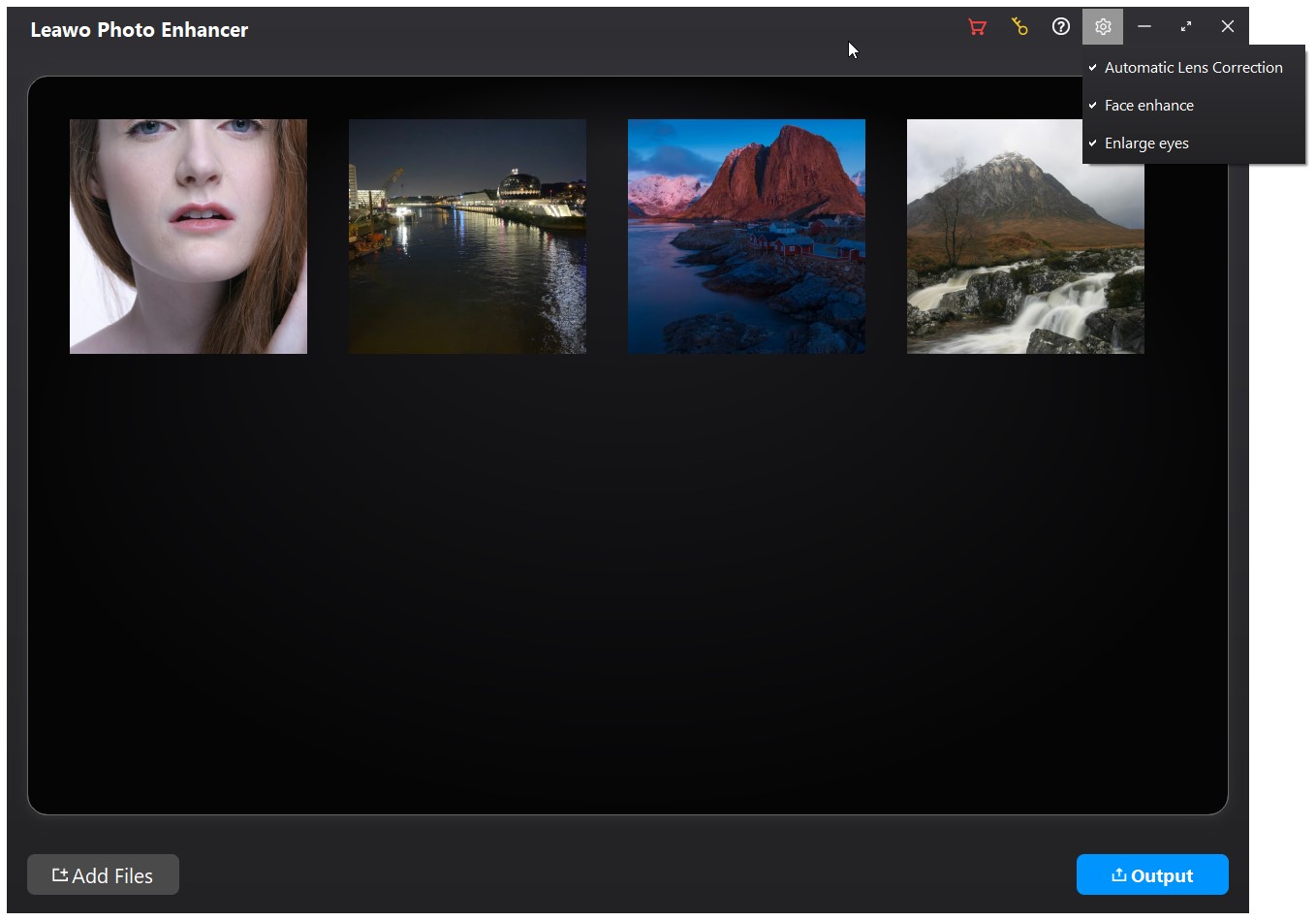
Four photos loaded for a batch (a portrait, a harbor at night, a red mountain, a waterfall), with the settings menu open showing Automatic Lens Correction, Face enhance and Enlarge eyes.
Export options for photographers
Leawo Photo Enhancer exports JPEG at three quality levels, PNG, or TIFF with a choice of compression (none, LZW, PackBits) and 8- or 16-bit depth. Advanced settings rename files with a prefix, suffix, counter or timestamp and resize them to exact pixel dimensions or a compressed size.
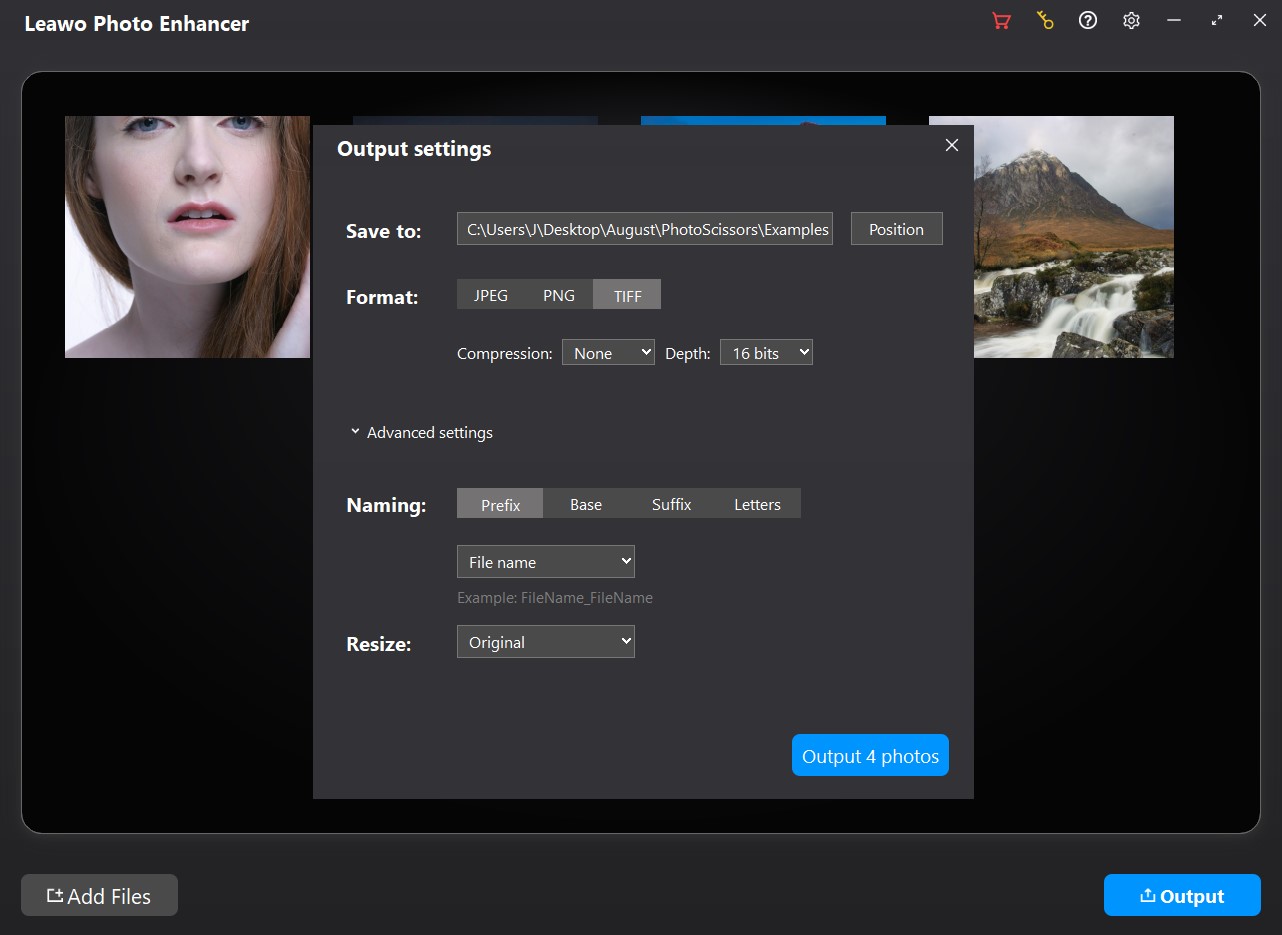
Output settings: save folder, JPEG/PNG/TIFF buttons with TIFF compression and 16-bit depth, the naming options and the Resize menu, ending in "Output 4 photos".
Benefits
- No learning curve. There are no tools to learn; the only decisions are which switches to turn on and how strong the effect should be.
- A lot of photos for little effort. Batch mode is where it beats editing by hand in a free editor.
- Handles RAW files. Camera RAW input with automatic lens correction is unusual at this price.
Real-World Uses
- Holiday folders: lift a few hundred phone and camera shots that came out flat or hazy.
- Marketplace listings: brighten product photos taken under poor indoor light before uploading.
- Quick portrait touch-ups: softer skin and brighter eyes on a batch of event or family photos.
- Scanned or compressed JPGs: reduce the blocky look of heavily compressed pictures.
Who It's For, and Who Should Skip It
Good fit: casual photographers who want better-looking photos in bulk with no editing work, and who are happy to accept the AI's taste.
Skip it if:
- You edit by eye. Lightroom, darktable or even the free Windows Photos app let you set exposure, color and crop yourself; this doesn't.
- You need Windows 11 certainty before paying; it isn't on Leawo's list for this module.
- You want natural-looking portraits. Users say the face retouching can look artificial (see below).
Usage Guide
- Install: run the online installer (it downloads the full PhotoIns setup) or the offline installer from the same download page.
- Open the module: start Leawo PhotoIns and click Photo Enhancer.
- Add photos: click Add Photo or drag them in; each must be at least 800 x 600 pixels.
- Pick the extras: click the gear icon, then Settings, and tick Automatic Lens Correction, Face enhance and/or Enlarge eyes.
- Check individual photos (optional): double-click a photo, drag the Before/After divider, and move the strength slider.
- Export: click Output, choose the folder, format, naming and size, then click the blue Output button.
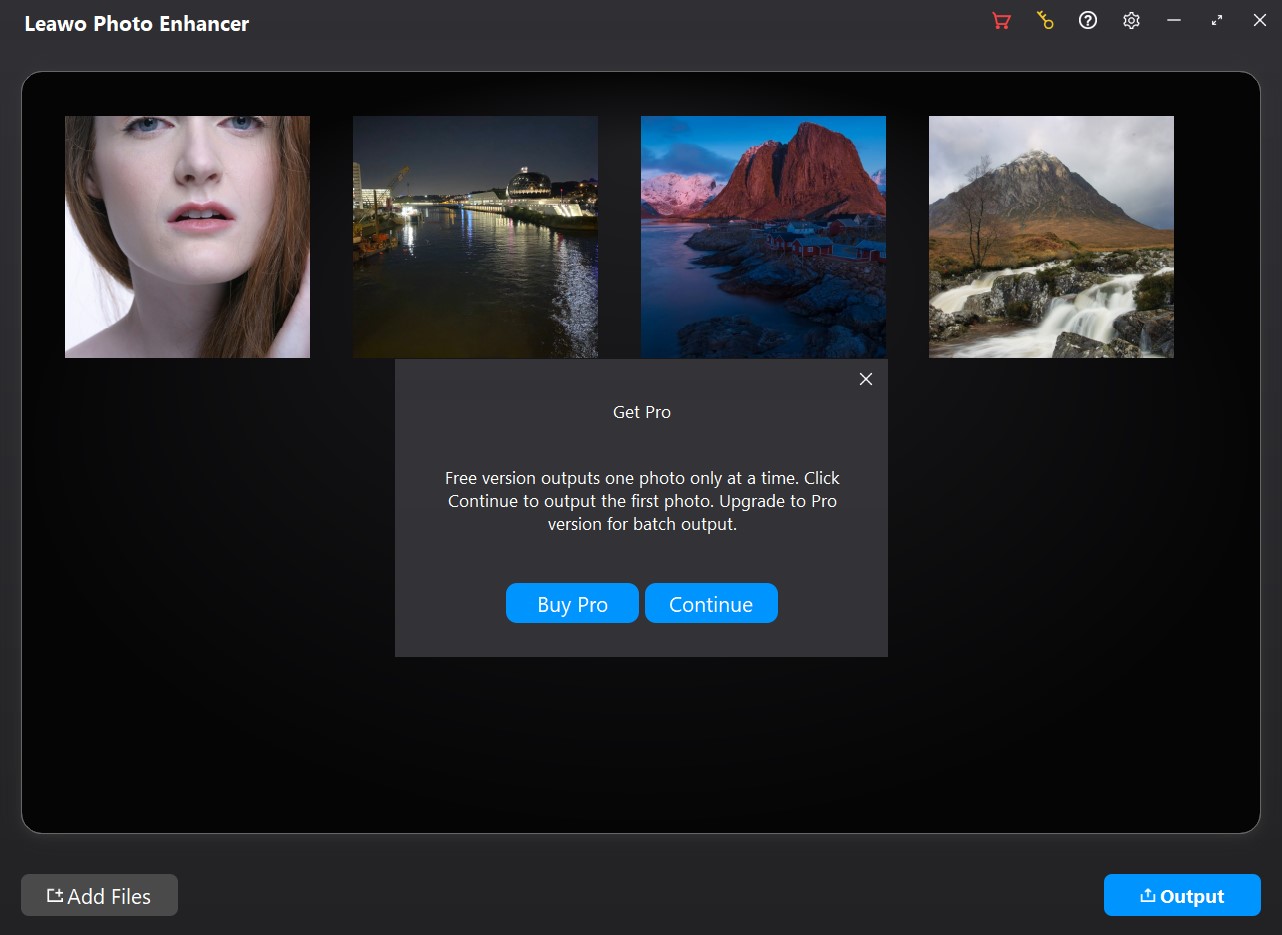
What the trial does at export: a Get Pro notice that the free version outputs one photo at a time, with Buy Pro and Continue buttons.
Where it falls short
- Heavy-handed on faces. A Photoshop user testing version 4.0.0.2 found the face filter made his selfies look artificial.
- One slider, no separate controls. The editor has a single strength slider for the AI effect; there's no way to keep the color fix but tone down the skin smoothing on its own.
- No basic edits. There's no crop, rotate, hue or manual exposure control, so you'll still need another editor for those.
- Disk use. The online installer downloads a setup file of about 1 GB; one user found it left behind in a Downloads\Leawo folder after installing.
What Users Say
Photo Enhancer has more user feedback than Leawo's other photo tools, mostly from two Giveaway of the Day promotions: the current version 4.0.0.2 in June 2023 and its predecessor, PhotoIns Pro 1.0, in February 2021.
Giveaway of the Day, version 4.0.0.2 (June 2023)
- Dennis W Comito: "I did a batch of 71 recent photos and the software did a good job providing color enhancement and clarity." He also asked for a choice of output folder and a side-by-side comparison.
- Simon: "This program can significantly improve your photos." He warned that the stub installer downloads "a very large installer file, which downloads to your Downloads/Leawo folder".
- Darren C., who describes himself as a Photoshop professional: "It works pretty well. Your AI is doing what's its purpose. But, Your AI is overdoing it with its enhancements."
Giveaway of the Day, PhotoIns Pro 1.0 (February 2021, the earlier version)
- Jim C: "It's very basic software, with little to no input by the user. You can't change the hue, saturation or contrast."
- TB: "Way toooo basic. Unable to control any of the parameters." And: "The program does very little automatically and what it does is not necessarily better than the original ."
- Alex Red: "This software is a pure gem"
- Simon: "It's a fairly simplistic tool, with three settings which can be set to on or off."
Leawo's review page (5 reviews, all 5 stars, moderated)
- Pritesh (June 2026): "Coming from Adobe Photoshop, never knew that enhancing and sharpening images would be so much easier, thanks to Leawo Photo Enhancer, which made it easier and accessible for everyone"
- Nicole (February 2021): "I am positively stunned by the quality of the output. A nice picture of an Item I put on Ebay was enhanced to professional quality."
- Adictec (March 2021): "it made my photos look amazingly better, and it's soooo much faster than Lightroom."
The pattern: people who wanted a quick, hands-off improvement are happy, especially with batches and product shots. Experienced editors find it too basic and sometimes too strong, above all on faces. Leawo's own page shows only positive reviews, which it moderates.
Comparisons
Photo Enhancer vs Photo Enlarger
These two are easy to confuse. Photo Enhancer keeps the image size and improves the look (light, color, haze, faces). Leawo Photo Enlarger makes the image bigger, up to 40X, and reduces noise and blur while doing so; it costs $39.95 a year or $59.95 lifetime. For small, low-resolution pictures you want to print, the Enlarger is the right tool.
Photo Enhancer vs Leawo PhotoIns
Leawo PhotoIns activates the Enhancer, Photo BG Remover and Photo Enlarger together for $79.95 a year or $109.95 lifetime. The order page also gives 50% off a second module bought in the same order. If enhancing is all you need, this module alone is the cheaper choice.
Editions and Pricing
| License | Price | Batch export | Watermark / ads |
|---|
| Free trial | $0 | No, 1 photo at a time | Yes |
| 1 year | $29.95 | Yes | No |
| Lifetime | $39.95 | Yes | No |
Licenses cover one computer. The 1-year plan includes free updates and support while it's active and renews automatically until you cancel. The Mac version is sold separately at the same prices.
FAQs
What happens to Leawo Photo Enhancer when the 1-year license expires?
Leawo Photo Enhancer keeps every registered feature after the 1-year license expires, according to Leawo's registration guide, but you no longer get updates or technical support. Leawo warns that installing a later major upgrade on an expired license turns it back into the trial.
Which RAW formats does Leawo Photo Enhancer open?
Leawo says Photo Enhancer processes RAW images "taken with any camera" but doesn't publish a list of supported cameras or file types. Load a few of your own RAW files in the trial before buying, especially from a recent camera.
Does Leawo Photo Enhancer make photos larger?
No. Leawo Photo Enhancer keeps the original dimensions unless you resize on export; upscaling is the job of Leawo Photo Enlarger.
Can I turn off the AI enhancement and use only face retouching?
No. In Leawo Photo Enhancer, AI Enhance is always on; Lens Correction, Face enhance and Enlarge eyes are the switches you can turn off. You can lower the overall strength with the slider in the single-photo editor.
Can I try Leawo Photo Enhancer on a whole folder before buying?
You can load a whole folder in the Leawo Photo Enhancer trial and preview every result, but it exports only one photo per run, with a watermark.
System Requirements
- Windows: 7, 8 or 10, 64-bit
- Processor: Intel Core i3 or AMD Athlon 64, 2 GHz or faster
- Memory: 4 GB RAM (8 GB recommended)
- Graphics: OpenGL 3.3 compatible card, DirectX 10-capable adapter
- Disk: 4 GB free, SSD for best performance
- Display: 1024 x 768 (1280 x 800 recommended)
- Other: internet connection and registration for activation and subscription validation
Conclusion
Leawo Photo Enhancer is worth $39.95 lifetime for people who want hands-off improvements across many photos and don't mind letting the AI decide. Batch processing, RAW input and 16-bit TIFF output are more than you'd expect at the price.
It's the wrong buy if you like to control your edits: there's one strength slider and nothing else, users find the face retouching can overdo it, and Windows 11 isn't on Leawo's list. Load a batch of your own photos in the trial, compare before and after with the divider, and decide whether you like Leawo's taste.
Download Free TrialBuy Now