Leawo UHD Creator for Mac: 4K Ultra HD Blu-ray Burning for Recent Intel and Apple Silicon Macs
Leawo UHD Creator for Mac is a module of Leawo Prof. Media 13 for macOS that burns 4K video files and photo slideshows to Ultra HD Blu-ray discs, folders or ISO images (BD-25 to BD-100) with menus. It needs a 2016-or-later MacBook Pro or a similarly recent Mac running macOS 10.13 or later, and costs $44.95 a year or $89.95 for a lifetime license.
Mac users with 4K footage from an iPhone, a mirrorless camera or a drone have few ways to get it onto a disc at full resolution since Apple dropped its iDVD disc-authoring app long ago. This module brings 4K disc authoring to the Mac, as long as you add an external Blu-ray writer.
On a Mac: the essentials
- App: Leawo Prof. Media 13 for Mac (UHD Creator is one of its modules, under the Burn tab)
- Installers: Intel (ltmcu_setup.dmg, about 241 MB) and Apple chip (ltmcu_setup_arm64.dmg, about 316 MB)
- Macs listed: MacBook Pro 2016+, MacBook Air 2017+, iMac 2017+, Mac mini 2018+, Mac Pro 2019+
- macOS: 10.13 High Sierra to macOS 27
- Burns: 4K video files, JPG/PNG/BMP photo slideshows and 4K Blu-ray ISO files
- Outputs: 4K Blu-ray disc, folder or ISO on BD-25, BD-50, BD-66 or BD-100
- Price: $44.95 per year (auto-renews) or $89.95 once, 1 Mac
- Trial: only the first 5 minutes of content are converted
What we checked: the Intel and Apple chip disk images behind Leawo's Mac download page (ltmcu_setup.dmg, 252,961,353 bytes, dated June 10, 2026; ltmcu_setup_arm64.dmg, 331,793,186 bytes, dated July 7, 2026) and the Mac SKU's order page prices ($44.95 for 1 year, $89.95 lifetime), on November 1, 2026. We didn't burn a 4K disc on a Mac or play one back.
Check these before buying for your Mac
- Your Mac's age. Leawo's product page names the oldest supported models; a 2015 MacBook Pro or a 2014 Mac mini isn't on the list.
- A USB Blu-ray writer. No Mac has a built-in Blu-ray drive. For BD-66 and BD-100 the writer must handle BDXL discs.
- Free space. The product page asks for 66 GB or more free; a full BD-100 project needs more than that.
- Refunds aren't for second thoughts. Leawo's refund policy covers faults support can't fix and duplicate orders. Use the 5-minute trial to decide.
Download Free TrialBuy Now
Overview
After installing the right disk image, Prof. Media opens to a home screen of module tiles; UHD Creator sits among UHD Ripper, UHD Copy and the Blu-ray tools. Clicking it, or the Burn button in the toolbar, opens the burning workspace that Leawo's Blu-ray Creator and DVD Creator also use. What UHD Creator adds is the set of 3840x2160 disc types.
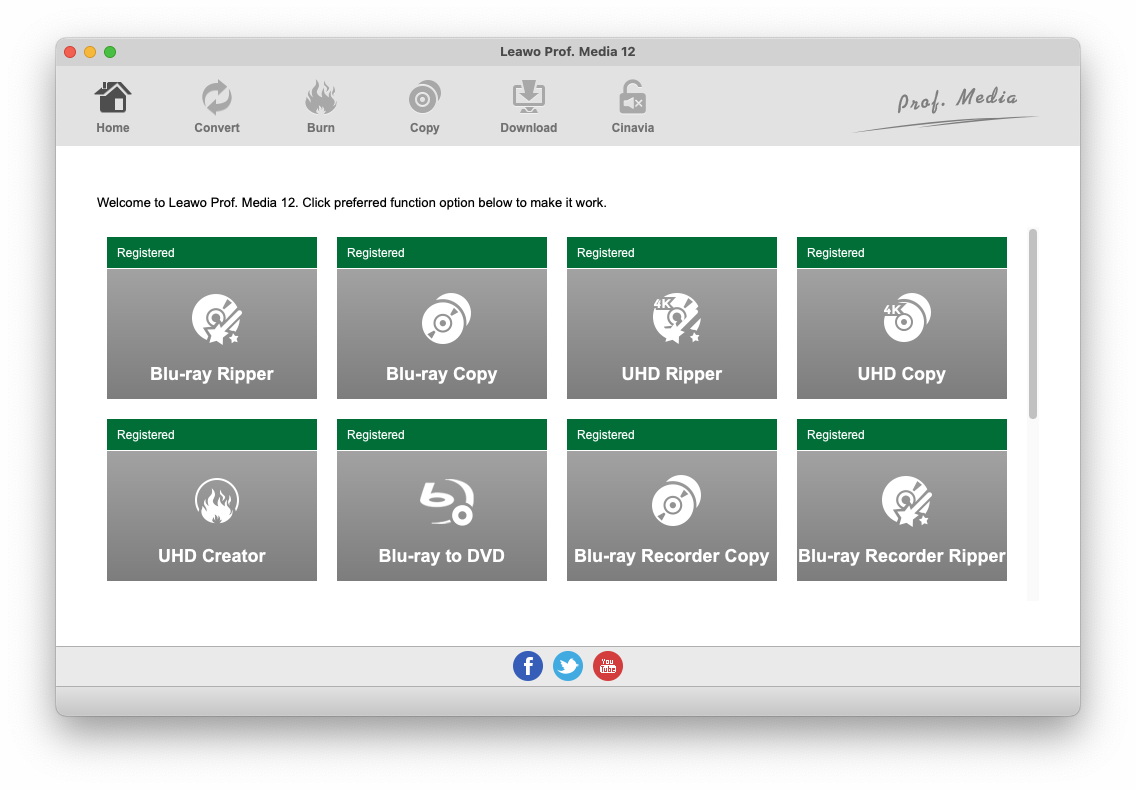
The Mac home screen from Leawo's Mac guide (the earlier Prof. Media 12 for Mac): registered tiles for Blu-ray Ripper, Blu-ray Copy, UHD Ripper, UHD Copy, UHD Creator, Blu-ray to DVD, Blu-ray Recorder Copy and Blu-ray Recorder Ripper.
What It Does on macOS
Takes the files your Mac already has
Leawo UHD Creator for Mac's Add Video menu offers Add Video File, Add Video Folder and Add iso file, and it reads MOV and M4V alongside MP4, MKV, AVI, WEBM, TS/M2TS and about two dozen more formats, so footage from Photos exports or a camera card goes straight in. Drag files onto the "Drag File Into Me" area if you prefer.
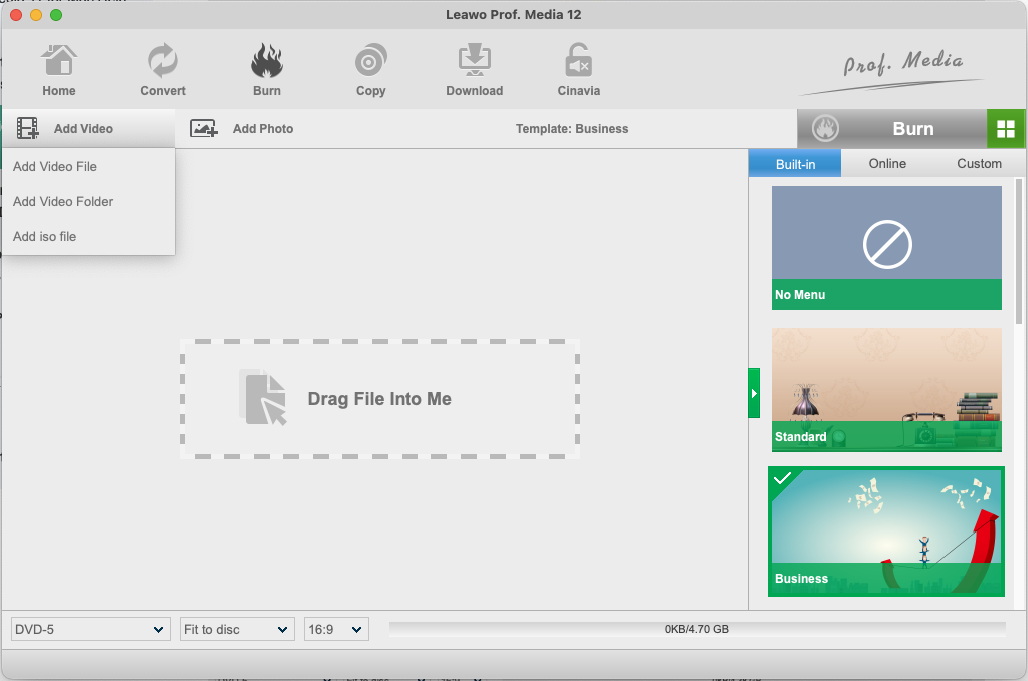
The Burn tab on macOS (Prof. Media 12 for Mac) with the Add Video menu open: Add Video File, Add Video Folder and Add iso file, the template column on the right, and the disc type, Fit to disc and 16:9 menus at the bottom.
Writes all four 4K disc sizes
Leawo UHD Creator for Mac outputs 4K Blu-ray on BD-25, BD-50, BD-66 and BD-100, as a disc, a Blu-ray folder or an ISO, per Leawo's spec sheet for both platforms. Pick the 3840x2160 entry for your blank disc at the bottom left, alongside the "Fit to disc" and aspect-ratio settings.
Menus with your own music
Leawo UHD Creator for Mac's menus come from built-in, online or your own saved templates. In the editor you can drag every button and thumbnail, double-click "Play" to retype it, use an image or a video as the background, and add music from your library with Fade in, Fade out or Loop Play.
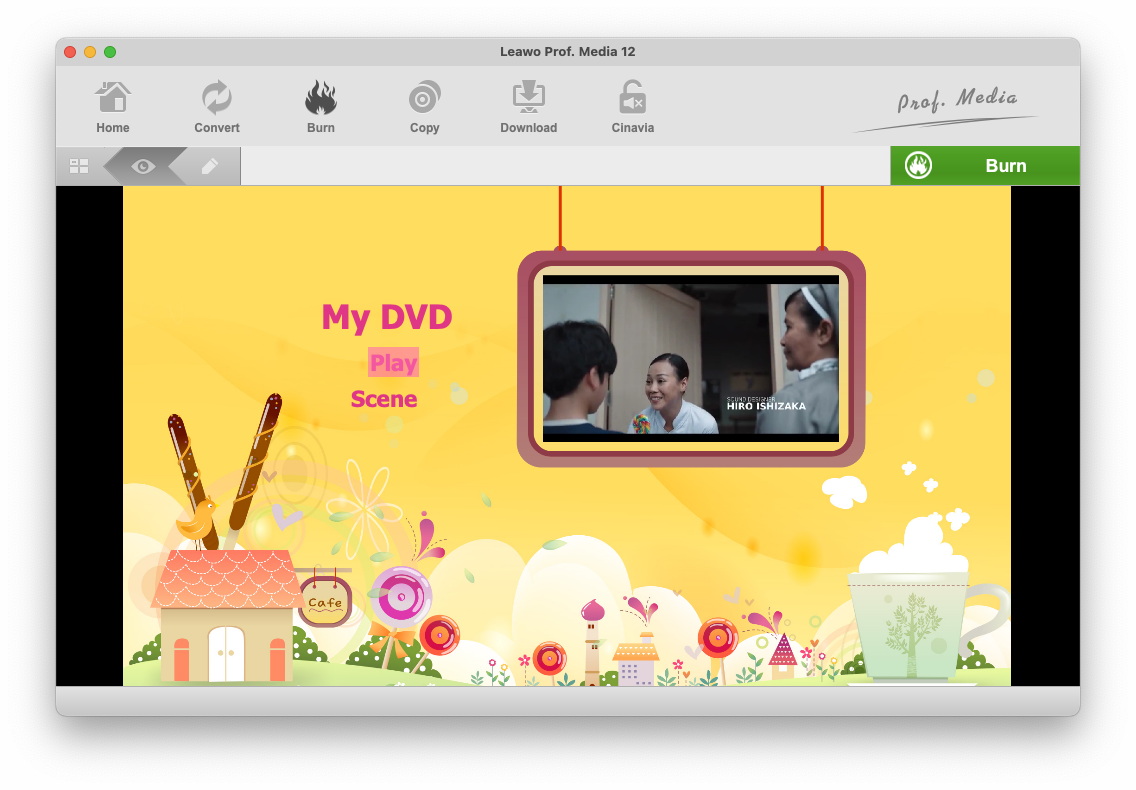
A menu preview in the Mac Burn workspace (Prof. Media 12 for Mac): the Childhood template with "My DVD", Play and Scene, and a video thumbnail in the hanging frame. The view, edit and Burn buttons run along the top.
Chapters, trims and slideshows
Leawo UHD Creator for Mac includes the same editing as the Windows edition according to Leawo's feature summary: trim each video, create chapters automatically or by hand, and turn a photo folder into a 4K slideshow with transitions and background music.
Why Mac Owners Use It
- 4K stays 4K. iPhone and camera footage reaches the disc at 3840x2160 instead of being squeezed into a 1080p Blu-ray.
- Native on Apple silicon, through its own arm64 build.
- ISO output for drive-less Macs. Build the disc image now and burn it later on any machine with a writer.
Real-World Uses
- A family year in 4K: iPhone clips exported from Photos, trimmed, chaptered by month and burned to a BD-50 for grandparents with a 4K player.
- A filmmaker's festival or client disc cut in Final Cut Pro, exported as a 4K file and authored with a menu on a MacBook Pro.
- A 4K slideshow from a photographer's portfolio folder, set to music.
Who It's For, and Who Should Skip It
Good fit: owners of a recent Mac with 4K footage, an external Blu-ray writer and a 4K Blu-ray player in the living room.
Skip it if:
- Your Mac predates the listed models (for example a 2015 MacBook Pro).
- Your footage is 1080p. Leawo Blu-ray Creator for Mac costs less and fits that job.
- Everyone you share with uses Apple TV or streaming. A 4K file in a shared album is simpler than a disc.
- You want to copy retail 4K Blu-rays. That's UHD Copy for Mac, a different module.
Burning a 4K Disc on a Mac
- Check About This Mac for Chip (Apple silicon) or Processor (Intel), download that installer and install Prof. Media.
- Plug in your USB Blu-ray writer and insert a blank disc, or plan to make a folder or ISO only.
- Open Prof. Media, click Burn or the UHD Creator tile, and add videos with Add Video or photos with Add Photo.
- Choose the 4K disc type, Fit to disc and the aspect ratio at the bottom left.
- Pick and edit a menu in the right-hand column.
- Click the green Burn button, tick Folder, ISO File and/or the burner, set the label and the Save to folder (by default under Movies, in com.leawo.tmcu).
- Click Burn and keep the Mac awake until the Burning screen finishes.
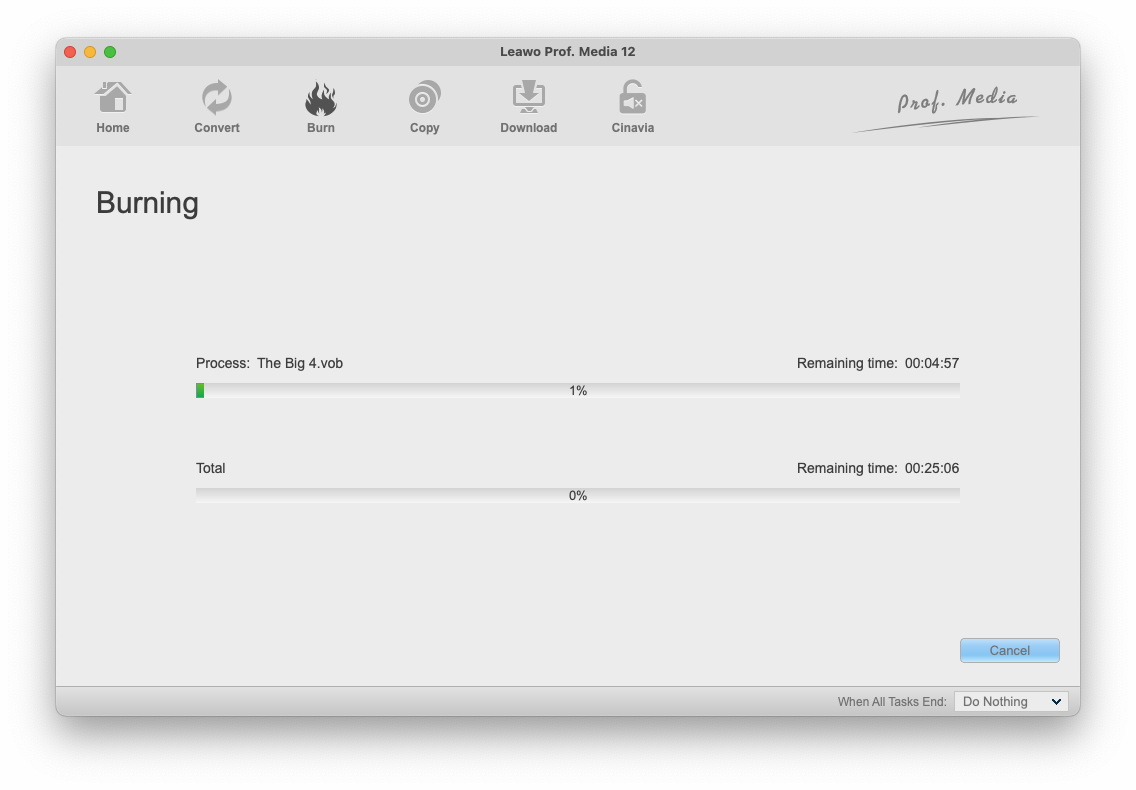
The Mac Burning screen (Prof. Media 12 for Mac, burning a VOB-based project): per-file and total progress bars with remaining times, a Cancel button and a "When All Tasks End" menu.
Where it falls short on a Mac
- No Mac guide for UHD Creator. Leawo's Mac user guide covers burning in general, with Prof. Media 12 screenshots, and its list of disc types stops at 1080p Blu-ray. The 4K steps come from the Windows guide.
- Two sets of Mac requirements. The product page lists specific Mac models and 66 GB free; the tech-spec page lists any 1 GHz Intel or M1/M2 Mac and 25 GB. Go by the stricter one.
- Mac burning has a mixed record. Older Trustpilot reviews describe Leawo's Mac Blu-ray Creator not working at first and burns failing on Macs.
- Nothing on HDR. Leawo's UHD Creator pages never mention HDR10 or Dolby Vision, which matters if your iPhone shoots in Dolby Vision HDR.
What Users Say
We found no independent review of UHD Creator on either platform, and Leawo's review page for it had no published reviews when we looked. Leawo shows its own testimonials on the product page, such as Miles Marrock: "The ever best 4K Blu-ray burning software I've ever used. Quite clean interface, simple operation and fast 4K Blu-ray burning. All works smoothly. Really nice tool." Independent feedback is about Leawo as a whole.
Trustpilot: Mac and burning experiences
Leawo's overall Trustpilot scores were 4.3 out of 5 (158 reviews, leawo.com) and 4.4 out of 5 (151 reviews, leawo.org) on November 1, 2026.
- Pierre (4 stars, January 2018): "The mudule, Blu-ray Creator for Mac didn't work at first."
- milomir ilic (5 stars, November 2018), titled "The best Blu-ray Creator": "Made perfect quality on blu-ray disk."
- Tabonga (5 stars, May 2026), titled "No Notes!!", reported a different Leawo product running on a Mac with no problems and quick support answers.
- Hans G. (5 stars, October 2026), titled: "Excellent Product and Customer Service!"
- A. Gaudette (2 stars, February 2026) said a different Leawo program only worked on older macOS versions and that this should have been made clear before buying.
Summing up: Leawo's support is the most praised part of the experience, and Mac-specific complaints are about compatibility, either with macOS versions or with burning hardware. Both are things the free trial will show you on your own Mac.
Mac vs Windows
| | Mac | Windows |
|---|
| Hardware floor | Named Mac models from 2016 to 2019 onward | Ryzen 1000 or Kaby Lake CPU, GTX 1050 or Radeon 5000 |
| Free disk (product page) | 66 GB+ | 200 GB |
| Installer | Separate Intel and Apple chip .dmg | One .exe, version 13.0.1.6 |
| Documentation | General burning chapter only | Dedicated video and photo guides |
| Price | $44.95 / year, $89.95 lifetime | Same |
Mac Pricing
| Option | Price | Covers | Money-back window |
|---|
| UHD Creator for Mac, 1 Year | $44.95 | 1 Mac, renews automatically | 5 days |
| UHD Creator for Mac, Lifetime | $89.95 | 1 Mac, one payment | 14 days |
| UHD Creator + UHD Ripper + UHD Copy for Mac (lifetime) | $144.91 (list $289.85) | All three UHD modules, 1 Mac | 14 days |
Mac prices on the order page on November 1, 2026.
FAQs
Will Leawo UHD Creator for Mac run on an M3 or M4 Mac?
Leawo UHD Creator for Mac has a native Apple chip build, but Leawo's requirements only name M1 and M2. Install the trial on your Mac and run a short test burn before paying.
Can I burn iPhone 4K videos with it?
Leawo UHD Creator for Mac accepts MOV and M4V files along with MP4 and MKV, which covers what iPhones export. Leawo doesn't mention HDR or Dolby Vision, so expect the result to be treated as a regular 4K video.
Does my Mac need a special drive for BD-100 discs?
Yes. BD-66 and BD-100 are BDXL discs, so Leawo UHD Creator for Mac can only burn them with an external writer that supports BDXL. BD-25 and BD-50 work on any Blu-ray writer.
Can I make the disc image on my MacBook and burn it elsewhere?
Yes. Leawo UHD Creator for Mac can save a 4K Blu-ray folder or ISO, and its tech spec lists burning a 4K Blu-ray ISO to disc as a separate feature.
Does a Mac license also cover Windows?
No. Leawo UHD Creator for Mac is licensed per Mac; the Windows edition is a separate purchase at the same prices.
Mac System Requirements
- Mac: MacBook Pro 2016 or later, MacBook Air 2017 or later, iMac 2017 or later, Mac mini 2018 or later, Mac Pro 2019 or later
- macOS: 10.13 High Sierra to macOS 27
- Processor (tech-spec page): Intel, or Apple M1/M2
- Disk: 66 GB or more free
- Other: a recordable (4K) Blu-ray drive and an internet connection
Conclusion
Leawo UHD Creator for Mac is worth a look if you own a recent Mac, shoot in 4K and want discs for a 4K Blu-ray player, because native 4K disc authoring on macOS is hard to find and this module covers all four disc sizes with menus and chapters.
The main reason to hesitate is how little Leawo documents it on the Mac: no dedicated guide, conflicting requirements and no word on HDR. Run a 5-minute test burn with your own writer and player first, and only then decide between $44.95 for a year and $89.95 for good.
Download Free TrialBuy Now