Leawo Blu-ray Recorder Copy: Back Up Discs Made on a Blu-ray Recorder
Leawo Blu-ray Recorder Copy is a Windows program that makes 1:1 backups of BDAV discs, the Blu-rays recorded on Panasonic, Sony, Samsung, LG and Sharp Blu-ray recorders, onto a blank Blu-ray, a folder or an ISO image. It costs $44.95 for a year or $99.95 for a lifetime license on one PC, and it runs as one module of Leawo Prof. Media 13.
If you've spent years recording TV shows, sports finals or family videos onto BD-RE discs in a Panasonic DIGA or a Sony recorder, those discs are BDAV, not the BDMV format of shop-bought movies, and many Blu-ray copiers don't handle them. This one exists for exactly that pile of discs.
Quick facts
- Version: 13.0.1.6 (Leawo Prof. Media 13), installer dated October 10, 2026
- Developer: Leawo Software Co., Ltd.
- Runs on: Windows 11, 10, 8.1, 8 and 7. Leawo Blu-ray Recorder Copy for Mac is a separate purchase.
- Copies from: BDAV discs, BDAV folders and ISO images, protected or not
- Copies to: a blank BD-50 or BD-25, a folder, or an ISO file
- Disc sizes: BD-50 to BD-50 and BD-25 to BD-25 only, with no compression to a smaller disc
- Price: $44.95 for one PC for one year, or $99.95 for lifetime use on one PC
- Free trial: 30 days, copying only the first 5 minutes of each source. After 30 days the trial stops loading encrypted BDAV discs.
- Money-back period listed: 5 days (1-year license), 14 days (lifetime)
- Installer: 199.5 MB
What we checked: the Windows installer from Leawo's download page (ltmcp_setup.exe, 209,171,392 bytes, file version 13.0.1.6, product name "Leawo Prof. Media", digitally signed by ShenZhen Moyea Software Co., Ltd.) and the order page for "Leawo Blu-ray Recorder Copy" ($44.95 for one year, $55.00 more for lifetime, renewal quoted at $26.97), both on November 1, 2026. We didn't copy a recorder disc with it ourselves.
Before you buy
- Leawo Blu-ray Copy costs the same and includes this. A $44.95 Blu-ray Copy license covers four modules: Blu-ray Copy, DVD Copy, Blu-ray to DVD Converter and Blu-ray Recorder Copy. Buy Recorder Copy on its own only if you'll never copy a shop-bought Blu-ray or a DVD.
- You need a blank disc the same size as the source. A full BD-50 recording can only go to another BD-50, never a cheaper BD-25. Folder and ISO output have no such limit.
- Test inside the 30 days. The trial copies just 5 minutes, and once the 30 days are up it won't even load encrypted discs. Leawo refunds only faults it can't fix, not a change of mind.
- Broadcast recordings may be copy-restricted. Leawo limits its software to personal backups of content you've lawfully obtained. Copy-protection rules on recorded TV differ by country, so check yours.
Download Free TrialBuy Now
Overview
The download is the whole Leawo Prof. Media 13 suite. Its home screen shows a tile for each module, each marked Trial or Registered, and Blu-ray Recorder Copy is one of them. Clicking it (or the Copy tab at the top) opens the copy workspace that Leawo's other copiers share: the disc's titles on the left, subtitle and audio tracks below, a preview player, and a disc-size selector at the bottom.
What makes this module different is the source it accepts. Recorder discs are written in the BDAV format, often with the recorder's own protection, and Leawo built this module to read them, copy every title with its subtitles and audio channels, and write the result back out as a disc, a folder or an ISO.
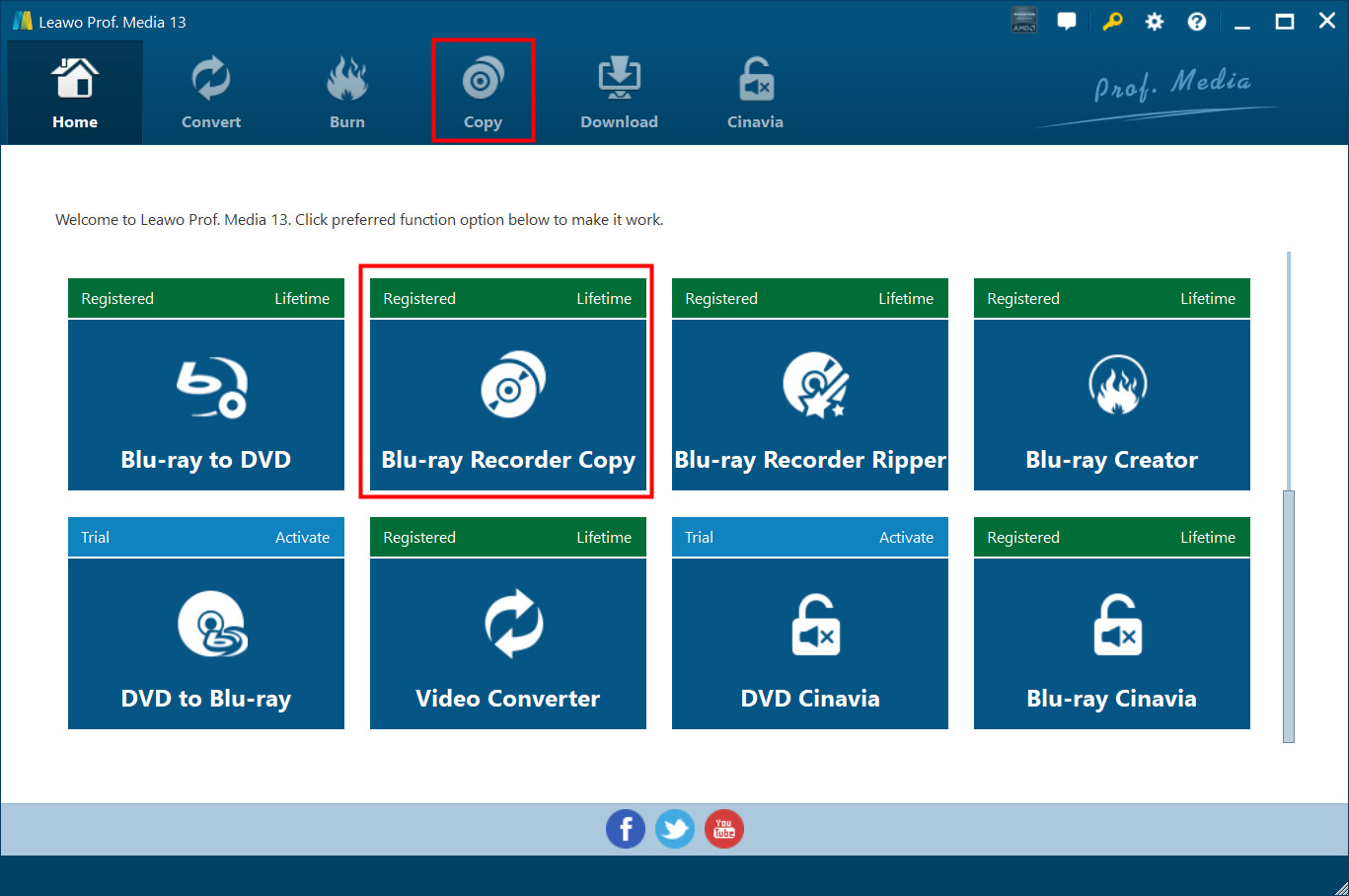
The Prof. Media 13 home screen. The Blu-ray Recorder Copy tile (outlined in red) sits next to Blu-ray to DVD, Blu-ray Recorder Ripper and Blu-ray Creator, each marked Registered or Trial. Vendor screenshot.
Features
Reads discs from Blu-ray recorders
Leawo Blu-ray Recorder Copy is built for BDAV, the format Blu-ray recorders from Panasonic, Sony, Samsung, LG and Sharp write when they record TV or camcorder footage. It accepts the disc itself, a BDAV folder already on your hard drive, or an ISO image, and Leawo says it removes the disc protection on both BD-50 and BD-25 recordings.
1:1 copies with every track kept
Leawo Blu-ray Recorder Copy copies BDAV content without re-encoding, so picture and sound match the source, and it keeps the subtitles and audio channels. You can preview titles and choose Full Movie, Main Movie or Custom Mode, and Full Movie keeps every element of the source. Because the copy is 1:1, the output disc must be the same type as the source: BD-50 to BD-50 or BD-25 to BD-25.
Disc, folder or ISO, even with one drive
Leawo Blu-ray Recorder Copy can write a folder, an ISO file and a blank disc in one pass, each a checkbox in the Copy sidebar, which also shows the space the job needs against what's free. With two drives it copies disc to disc directly, and with a burner you can choose how many disc copies to make. With only one drive, it reads the source first and then asks you to swap in a blank disc.
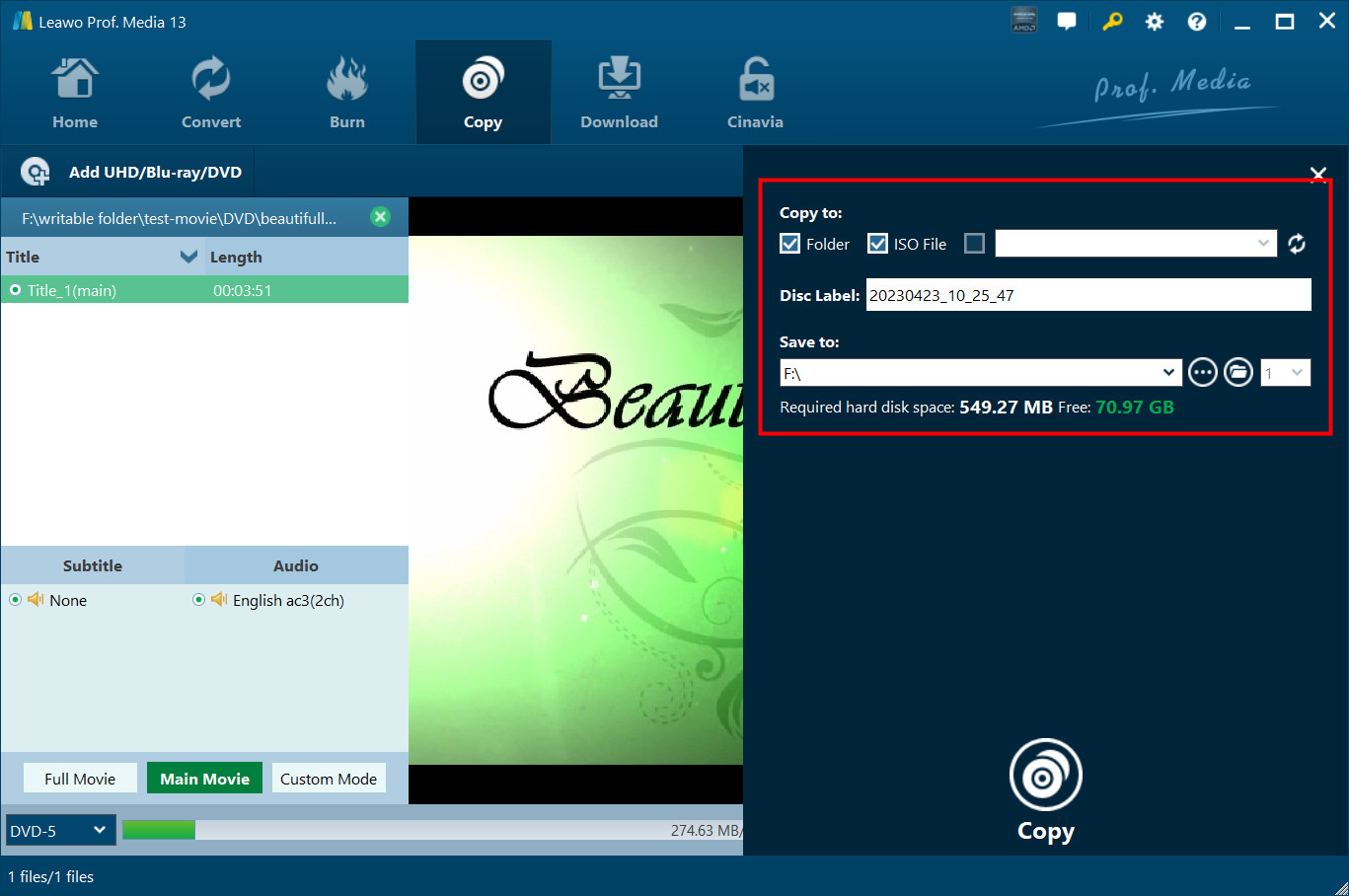
The Copy sidebar with Folder and ISO File ticked, a disc label, the save location and "Required hard disk space: 549.27 MB, Free: 70.97 GB". Leawo's guide demonstrates it with a short DVD-5 sample rather than a recorder disc. Vendor screenshot.
GPU acceleration
Leawo Blu-ray Recorder Copy uses NVIDIA CUDA, AMD APP and Intel Quick Sync graphics acceleration. Leawo's product page claims "50X higher" speed while its own user guide says "6X higher", so treat both as marketing. A straight 1:1 copy is limited mostly by how fast your drive reads and writes.
Benefits
- Your recordings outlive the recorder. Recorders fail and get thrown out, and BD-RE discs age. A copy in an ISO on a NAS doesn't depend on either.
- The copy behaves like the original. Leawo says copied BDAV discs play on the original recorder, in BDAV-capable software players and in BDAV-capable standalone players.
- No conversion choices to get wrong. There are no codecs or bitrates to pick. You choose the titles and where the copy goes.
Real-World Uses
- A shelf of recorded TV: copy each BD-RE full of series episodes to an ISO before the discs start failing.
- A dying recorder: make backups of everything on disc while you still have hardware that plays them, then keep the ISOs.
- Family events: burn spare copies of a wedding or school-concert disc recorded on a Blu-ray recorder for relatives.
- Freeing a scratched disc: copy a worn recording onto a fresh blank disc of the same size.
Who It's For, and Who Should Skip It
It's for Windows users who own a Blu-ray recorder, or inherited its discs, and want exact copies kept as discs or disc images, with every title, subtitle and audio track.
Skip it if you also have shop-bought Blu-rays or DVDs to back up: Leawo Blu-ray Copy costs the same and includes this module. Skip it too if you want the recordings as MP4 or MKV files for a phone or Plex, which is Leawo Blu-ray Recorder Ripper's job, or if you want to shrink a BD-50 recording onto a BD-25, which this module doesn't do. Mac users need Leawo Blu-ray Recorder Copy for Mac.
Usage Guide
- Install and launch. Run the Prof. Media 13 installer from the Download Free Trial button and open it. Click the Blu-ray Recorder Copy tile or the Copy tab.
- Add the recording. Click Add UHD/Blu-ray/DVD and choose Add from CD-ROM, Add from folder or Add iso file.
- Set the disc type. At the bottom left, pick BD-50 or BD-25 to match the source. Choose Full Movie, Main Movie or Custom Mode and the subtitle and audio tracks.
- Set the output. Click the green Copy button, tick Folder, ISO File and/or your burner, name the disc label and choose where to save.
- Accept or activate. Without a license, a Notice shows the trial limits, and you click Agree to try it. With a license, paste the code in the Activation Center (the key icon at top right) first.
- Copy. Click Copy at the bottom of the sidebar and watch the progress screen. With one drive, swap in a blank disc when asked.
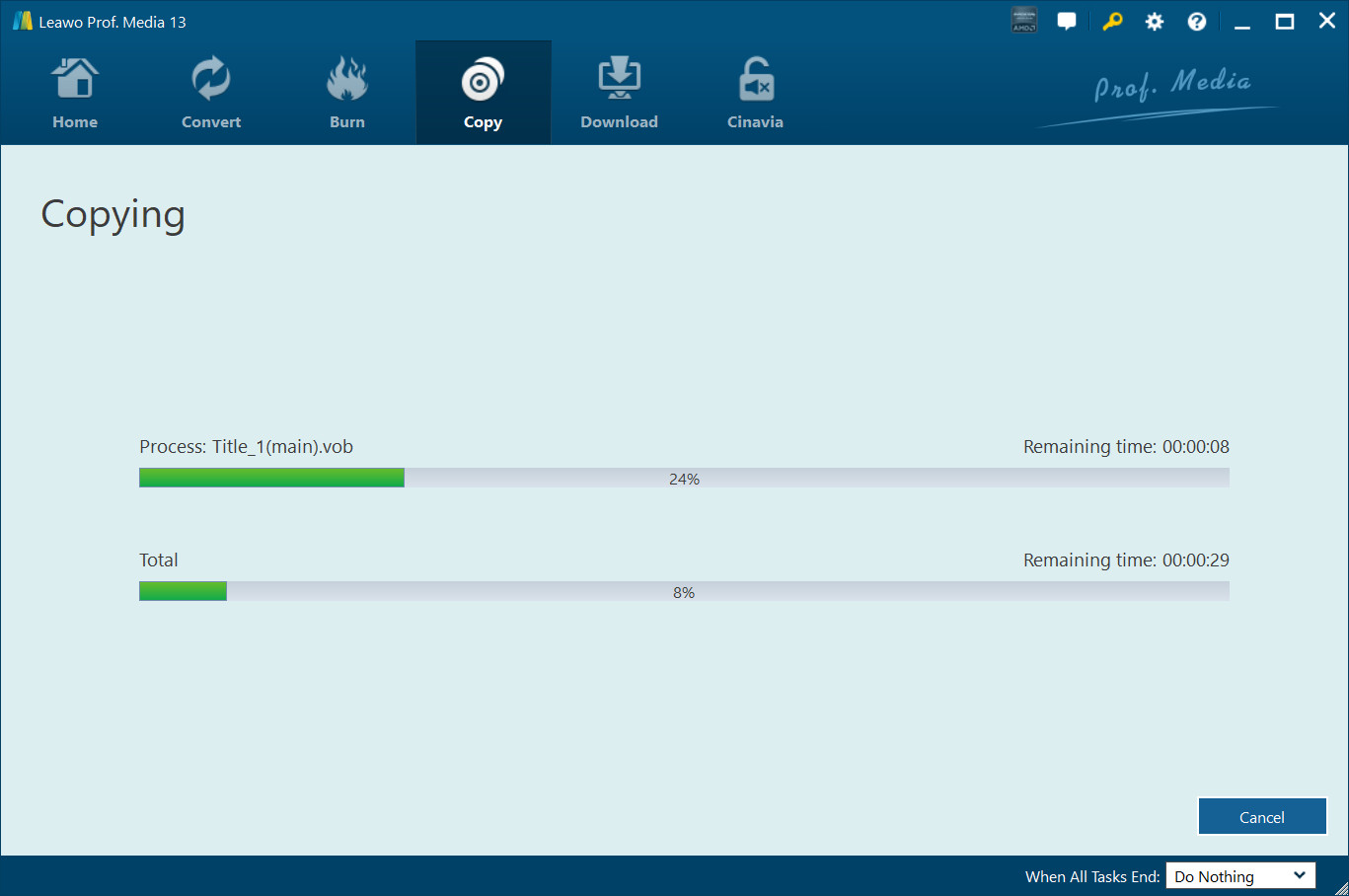
Step 6: the Copying screen, with progress for the current file (24%) and the whole job (8%), remaining times, a Cancel button and the "When All Tasks End" option. Vendor screenshot.
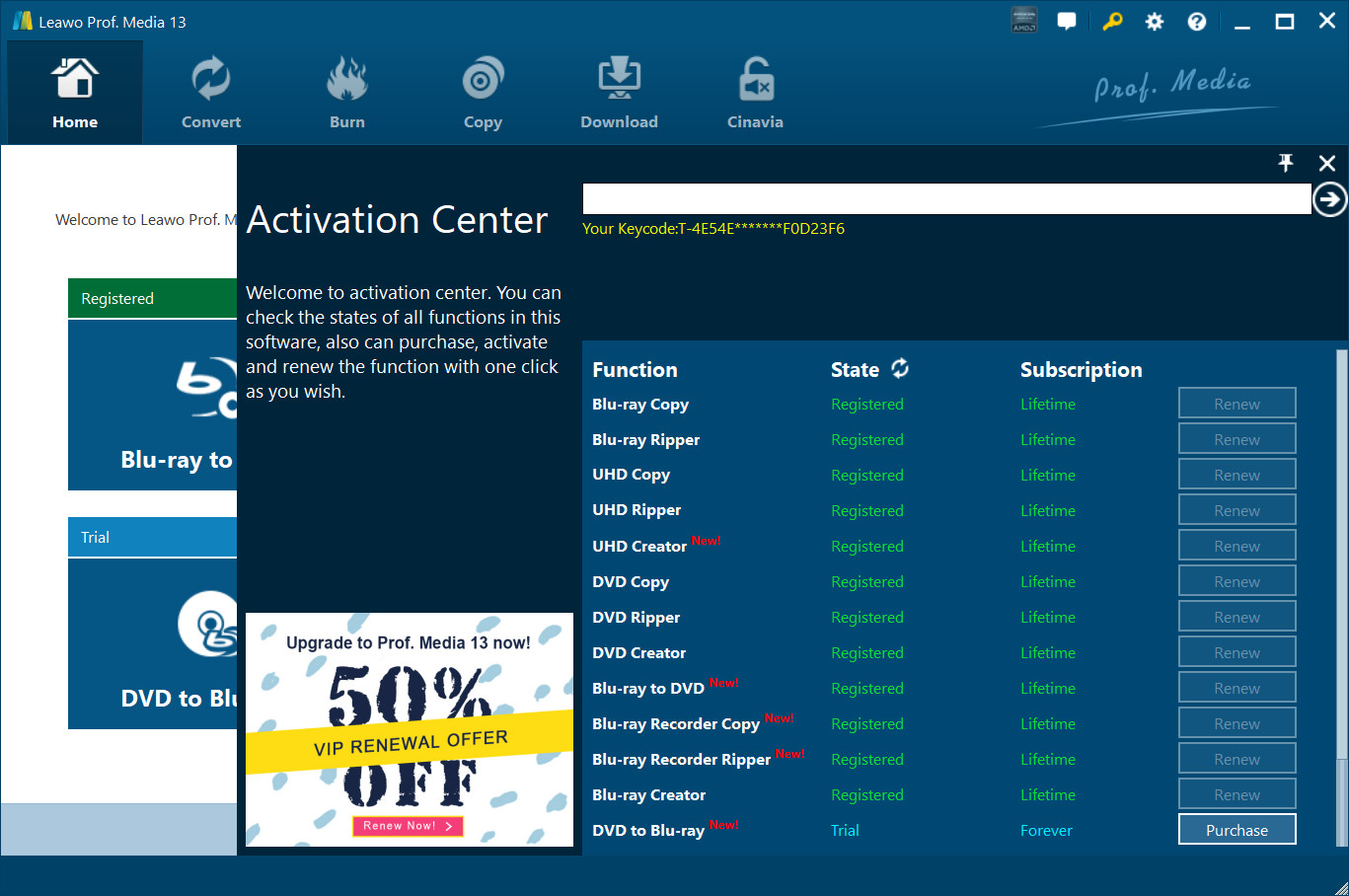
Step 5: the Activation Center, where you paste the license code. Each module, including Blu-ray Recorder Copy, is listed with its state and subscription, and a renewal offer sits in the corner. Vendor screenshot.
Tips
- Keep 25 GB free per BD-25 job, more for BD-50. Leawo lists 25 GB or more of free space for Blu-ray work, and ticking both Folder and ISO doubles what you need.
- Copy to ISO first. An ISO on your hard drive can be burned later, as many times as you like, and you don't risk a blank disc on a source that turns out to be unreadable.
- Do the license math. At the $26.97 renewal quoted on the order page, three years of the 1-year license cost $98.89, about the same as the $99.95 lifetime license.
Where it falls short
- No compression. It can't fit a dual-layer recording onto a single-layer disc, because it only copies BD-50 to BD-50 and BD-25 to BD-25.
- A big download for one job. You install the 200 MB Prof. Media suite with a dozen other module tiles you haven't paid for, and renewal offers appear in the Activation Center.
- Hardly any public reviews. Leawo's review page for this module has no published reviews, so there's little outside evidence of how it handles recorders from each brand.
- Your player may not read the copy. BDAV discs don't play in every Blu-ray player, so a copy is only as playable as the original format allows.
What Users Say
Independent reviews of Blu-ray Recorder Copy are close to non-existent. Leawo's dedicated review page for it shows no published reviews, even though the product page's structured data claims 4.9 from 33 ratings. What we can report:
Testimonials on Leawo's product page
Leawo picks these itself, gives no dates, and they can't be checked, so read them as marketing.
Miky Miller: "What a wonderful Blu-ray copy software tool. I was able to transfer my recorded Blu-ray discs to an old and scratched disc to a new blank Blu-ray disc. No quality loss. That's awesome."
Jon Tone: "This tool is easy to use. Only a few clicks could complete the BDAV file backup issue. No loss in image and audio quality. The whole backup procedure is quite fast. An effecient but simple tool."
Leawo as a company (Trustpilot)
Leawo has a TrustScore of 4.3 from 158 reviews on Trustpilot, with 63% five-star and 25% one-star ratings. None of the reviews we could see mention recorder discs. The recurring themes are fast, helpful support (especially for moving a license to a new PC) and reliable DVD and Blu-ray backups with Prof. Media 13.
The criticism is about price and failures: one 1-star reviewer in January 2026 called Prof. Media not worth $229, and a 2-star reviewer in November 2025 wrote only that it "Will not copy TV mini series", to which Leawo replied offering a remote session.
The honest picture: the module does a narrow job that few competitors advertise, but there's almost no public evidence from real users about it. The 30-day trial on your own recorder discs is the only real test.
Comparisons
Blu-ray Recorder Copy vs Leawo Blu-ray Copy
Both cost $44.95 a year or $99.95 for life. Blu-ray Copy's license includes Blu-ray Recorder Copy plus Blu-ray Copy, DVD Copy and Blu-ray to DVD Converter, so it's the better buy for almost everyone. Recorder Copy on its own makes sense only if recorder discs are all you'll ever copy.
Blu-ray Recorder Copy vs Blu-ray Recorder Ripper
Recorder Copy keeps a recording as a disc or disc image, 1:1. Leawo Blu-ray Recorder Ripper converts it to video files such as MP4 or MKV for phones, tablets and media servers. Leawo's lifetime bundle of Blu-ray Ripper and Blu-ray Copy ($119.94) includes both recorder modules.
Windows vs Mac edition
Leawo Blu-ray Recorder Copy for Mac is part of Prof. Media for Mac 13.0.8 and runs on macOS 10.13 High Sierra and later, with separate Intel and Apple silicon downloads. It's a separate product with the same price, so a Windows license doesn't cover a Mac.
Editions and Pricing
| License |
Price |
Term |
Money-back period listed |
What you get |
| 1 Year |
$44.95 |
One year, one PC, auto-renewing (renewal quoted at $26.97) |
5 days |
Blu-ray Recorder Copy, free upgrades |
| Lifetime |
$99.95 |
One-time payment, one PC |
14 days |
Blu-ray Recorder Copy, free upgrades |
| Blu-ray Ripper + Blu-ray Copy (Lifetime) |
$119.94 (list $199.90) |
One-time payment, one PC |
14 days |
Seven modules, including Blu-ray Recorder Copy and Blu-ray Recorder Ripper |
| Prof. Media BD/DVD Pack + CleverGet Video Downloader (Lifetime) |
$169.94 |
One-time payment, one PC |
14 days |
Ten disc modules plus CleverGet Video Downloader |
The Buy Now buttons on this page open Leawo's Blu-ray Recorder Copy page, where the 1-year and lifetime licenses and both bundles are on offer.
FAQs
What is a BDAV disc, and is mine one?
A BDAV disc is a Blu-ray written by a Blu-ray recorder or camcorder, while shop-bought movies use the BDMV format. If the disc came out of a Panasonic, Sony, Samsung, LG or Sharp recorder, it's almost certainly BDAV, and Leawo Blu-ray Recorder Copy is meant for it. Opening the disc on a PC usually shows a BDAV folder at the top level.
Will a disc copied with Leawo Blu-ray Recorder Copy play in my recorder?
Leawo Blu-ray Recorder Copy is meant to produce discs that play on the original recorder and in BDAV-capable software and standalone players, according to Leawo. Many ordinary Blu-ray movie players don't read BDAV discs at all, copy or original, so test one burned disc in the player you plan to use.
Can I put a full BD-50 recording onto a BD-25 disc?
No. Leawo Blu-ray Recorder Copy supports BD-50 to BD-50 and BD-25 to BD-25 only. To save space, copy to an ISO or folder instead, or convert the recording to a smaller video file with Leawo Blu-ray Recorder Ripper.
Does the Leawo Blu-ray Recorder Copy license renew automatically?
Leawo Blu-ray Recorder Copy's 1-year plan is sold as auto-renewing, with the renewal quoted at $26.97 a year on November 1, 2026. You can cancel the renewal from your account or through Leawo's support, but cancelling doesn't refund the current year. The $99.95 lifetime license is a single payment.
Can I get a refund if Leawo Blu-ray Recorder Copy won't read my discs?
Leawo Blu-ray Recorder Copy can be refunded within 14 days for a reproducible bug that Leawo's support can't fix or a hardware incompatibility, after you've worked with support and sent the details. A request that only says it doesn't work or isn't needed is refused, and nothing over a month old is refunded.
Do I need to install anything besides Leawo Prof. Media?
No. Leawo Blu-ray Recorder Copy is built into the Prof. Media 13 download, and buying a license only activates its tile. You need a Blu-ray drive that reads the recorder disc, a Blu-ray burner if you want disc copies, and an Internet connection.
System Requirements
- Operating system: Windows 11, 10, 8.1, 8 or 7
- Processor: 1 GHz Intel or AMD CPU
- Memory: 512 MB RAM (1 GB or more recommended)
- Free disk space: 25 GB or more for Blu-ray work
- Graphics: NVIDIA GeForce GTX 260 or better
- Other: a Blu-ray drive and an Internet connection
Conclusion
Leawo Blu-ray Recorder Copy does a useful, narrow job well within reach: it turns a stack of aging recorder discs into exact copies or ISO files, protection and all, without asking you to understand formats. If BDAV discs from a Panasonic or Sony recorder are what you need to save, it's worth trying.
The main reason not to buy it on its own is Leawo Blu-ray Copy, which costs the same $44.95 and includes this module plus three more. The other reasons to hesitate are the lack of compression to a smaller disc and the near-total absence of public reviews. Run the 30-day trial on your oldest, most important disc. If its first 5 minutes copy cleanly, pick the license that fits how long you'll be copying.
Download Free TrialBuy Now