CleverGet TikTok Downloader: TikTok Videos Without the Watermark, as MP4 or MP3
CleverGet TikTok Downloader is a $49.95-a-year Windows and Mac module of Leawo's CleverGet that saves TikTok videos at up to 1080 x 1920 without the TikTok watermark, as MP4 or MKV video, or as MP3 or M4A audio. It suits people who collect TikToks for their own offline viewing, keep backups of their own uploads, or want a sound from a clip as an audio file.
TikTok's own "Save video" option stamps the TikTok logo and the creator's handle over the clip, and it disappears entirely when a creator turns downloads off. CleverGet works around both by reading the original video stream in its built-in browser.
Quick facts
- Part of: CleverGet 27.0.0.1 by Leawo Software; the TikTok module needs its own license
- Platforms: Windows 7 to 11 (64-bit); macOS 11 to macOS 27 on Intel or Apple silicon
- Video: up to 1080 x 1920, MP4 or MKV, TikTok watermark removed
- Audio only: MP3 or M4A
- Login: not needed for public videos; optional for your own feed and follows
- Price: $49.95 for a year or $79.95 lifetime, per computer
- Trial: 3 free downloads
What we checked: CleverGet's Windows installer, downloaded from Leawo (file version 27.0.0.1, 527,919,296 bytes, dated October 30, 2026, signed by ShenZhen Moyea Software); the TikTok module's yearly and lifetime prices ($49.95 and $79.95) in Leawo's purchase-page data; and that tiktok.com isn't on the general CleverGet Video Downloader's supported-site list, all on November 1, 2026. We didn't run a TikTok download ourselves.
Before you buy
- A creator's "no downloads" setting is a request. Leawo markets the module as working whether or not the creator allowed downloads. Technically true, but Leawo's own fair-use policy still limits you to personal, non-commercial use, and re-uploading someone's video without the watermark strips their credit.
- Free tools cover the basics. Many websites remove the TikTok watermark from a single pasted link at no cost. The $49.95 a year buys convenience and batches, not something you can't get elsewhere.
- Refunds are for faults only. Leawo refunds a reproducible bug or hardware incompatibility its support can't fix, not a change of mind. Use the 3 trial downloads first.
Download Free TrialBuy Now
Overview
Inside CleverGet, tiktok.com runs in a normal browser tab. You scroll, search or paste a video link exactly as you would in Chrome, and when a clip is playing, a round download button in the bottom corner sends it to the TikTok module. The module lists the copies TikTok holds for that clip, usually several 1080 x 1920 and 720 x 1280 encodes plus smaller ones, and saves the one you tick.
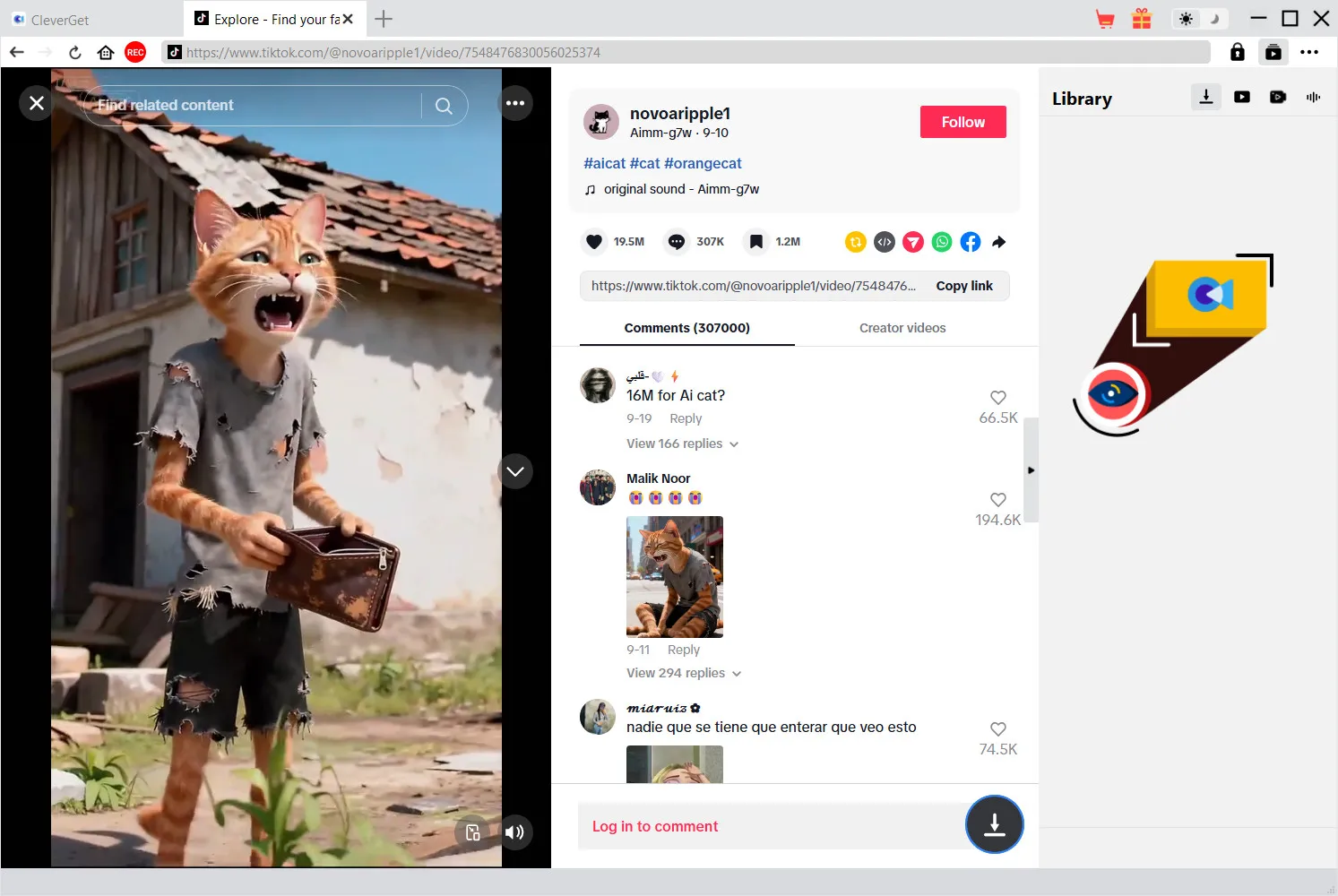
A TikTok clip playing in CleverGet's browser tab with its comments, the empty Library panel on the right and the download button at the bottom right. "Log in to comment" shows the page is open without a TikTok account.
Features
Clean copies without the TikTok logo
CleverGet TikTok Downloader detects and removes the bouncing TikTok logo and username overlay that TikTok adds to its own downloads, so you get the clip as it was uploaded. Text and stickers the creator added are part of the video and stay.
A choice of encodes, shown by size
CleverGet TikTok Downloader lists each version TikTok stores for a video. For a one-minute clip in Leawo's example that meant two 1080 x 1920 MP4s at 11.05 MB, two 720 x 1280 versions at 7.17 MB and a 576 x 1024 one, with a "Show All (10)" switch for the rest. Clips from the same page appear in a list on the left with "Select All", so you can queue several at once.
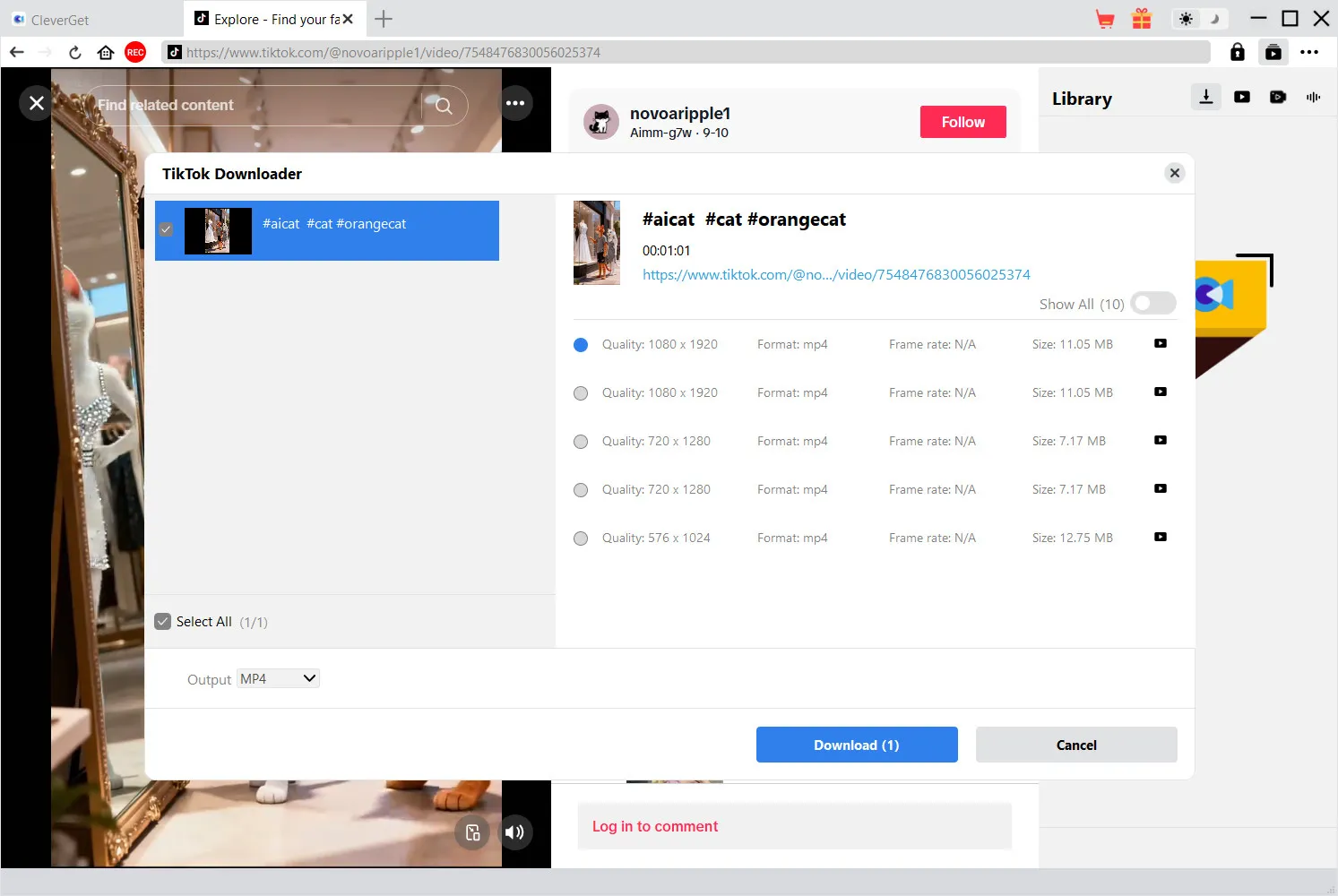
The TikTok Downloader dialog: a 1:01 clip with five MP4 versions from 1080 x 1920 (11.05 MB) down to 576 x 1024, "Show All (10)", the clip ticked in the list on the left, Output set to MP4 and a "Download (1)" button.
Sounds as MP3 or M4A
CleverGet TikTok Downloader can save just the audio of a TikTok as MP3 or M4A, which is handy for a voice-over, a recipe narration or background music you want on a phone or in a playlist. Leawo describes the audio as AAC stereo, which is what TikTok streams.
After the download
CleverGet keeps tags such as title, length and format on each file, can use NVIDIA, AMD or Intel GPU acceleration, restarts failed jobs in one click and can shut the computer down when a long queue finishes. Finished clips can go straight to Leawo's Free Blu-ray Player or, if you own it, Leawo Prof. Media for converting or burning.
Benefits
- Your uploads, minus the branding. Creators can pull clean copies of their own TikToks to post on Instagram Reels or YouTube Shorts without TikTok's logo on them.
- Batches instead of one link at a time. Web watermark removers handle a single URL per visit; CleverGet queues several clips from one page.
- The cheaper end of CleverGet. At $49.95 a year it's $10 less than the Instagram or Netflix modules.
Real-World Uses
- A creator's archive: keep watermark-free masters of every clip you've posted, in case the account is banned or a video is removed.
- Cross-posting your own work: reuse your TikTok on Reels or Shorts without TikTok's logo on it.
- Recipes and workouts offline: save a run of cooking or exercise TikToks to a laptop for the kitchen or gym, where there's no Wi-Fi.
- A sound as a file: grab the audio of a clip as MP3 to listen to later.
Who It's For, and Who Should Skip It
Good fit: TikTok creators and heavy viewers on a PC or Mac who download clips often, want them without the logo, and like having a queue, file tags and audio export in one tool.
Skip it if:
- You download a TikTok a month. A free watermark-remover site will do that.
- You only use your phone. CleverGet is desktop software for Windows and Mac.
- You want to repost other people's clips as your own. That's outside Leawo's fair-use policy, and removing the watermark removes the creator's credit.
Usage Guide
- Install CleverGet: the Windows installer is about 504 MB and includes every module.
- Choose a download folder: in Settings, set where videos and audio go.
- Open TikTok: go to tiktok.com in CleverGet's address bar or paste a video link there. Log in only if you want your own feed.
- Play the clip and click the download button: the TikTok Downloader dialog lists the available versions.
- Pick a version and format: tick a resolution, choose MP4, MKV or an audio format, and click Download. The Library panel shows progress.
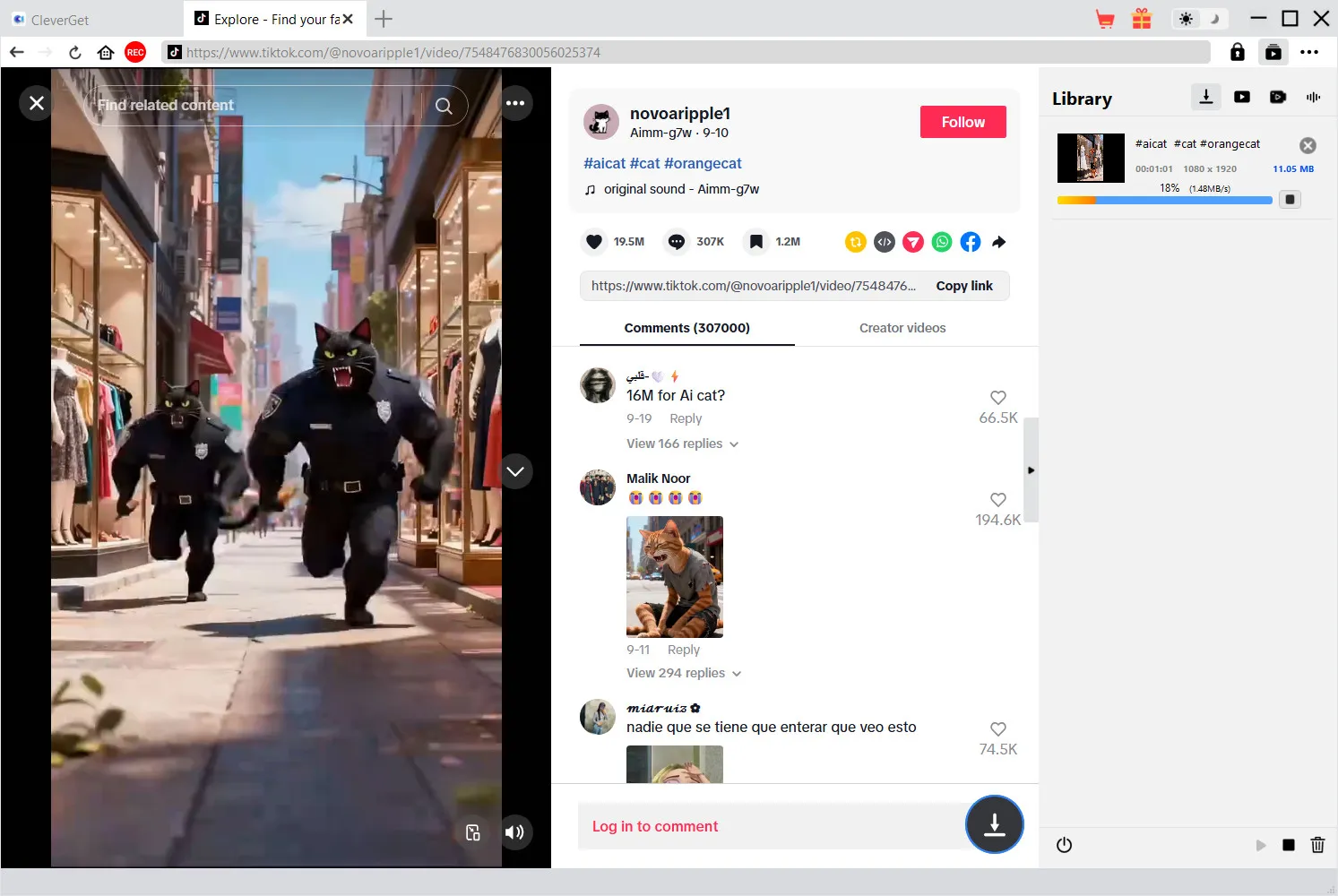
The same clip at 18% in the Library panel (1080 x 1920, 11.05 MB, 1.48 MB/s) while the next TikTok plays in the browser.
Where it falls short
- No whole-profile grab is advertised. Leawo's page talks about downloading videos you play and the clips the dialog lists, not about saving every video on an account in one go.
- The audio formats need checking. Leawo's features list MP3 and M4A, while the product page's spec box lists only MP4 and MKV, and the dialog in Leawo's screenshot shows only an MP4/MKV Output menu. Try an audio download during the trial if that's why you're buying.
- Half a gigabyte for one site. You install the whole CleverGet suite even if TikTok is the only module you'll use.
- It needs updates to keep working. TikTok changes its site often, and downloaders stop working until the developer catches up.
What Users Say
Leawo's TikTok Downloader review page
Leawo's review center for this module listed six reviews, all five stars, on November 1, 2026. All six were posted within two minutes of each other on December 24, 2025, and Leawo approves reviews before they appear, so treat them as the vendor's selection.
- Jacob Hayes: "I tried a few online TikTok downloaders, but they were slow and full of ads. CleverGet TikTok Downloader is smooth, fast, and doesn't require a browser extension."
- Lily Adams: "I like the wide support of output formats. It enables me to freely choose to download TikTok video to MP4, MKV, MP3 or M4A files according to my own needs."
- Olivia Carter: "The downloads are fast, and the quality remains exactly the same as the original. What's more, it removes all the watermarks."
CleverGet on Trustpilot
CleverGet's Trustpilot page averaged 4.7 out of 5 across 66 reviews on November 1, 2026. We found no Trustpilot review about the TikTok module itself; these speak to CleverGet as a whole.
- Robert (4 stars, "Great tool", March 2024): "Great tool, reasonable pricing."
- Andy (5 stars, June 2025): "Really useful software that generally works very smoothly."
- Matthew Bucknor (5 stars, November 2023): "It is able to download videos from numerous different websites."
- Ed Bulchis (1 star, January 2024), on the Netflix module: "But now I keep getting a M7121-3078 error code, and I can't get ride of it."
The pattern: people like that CleverGet keeps working and that support answers quickly; the low ratings come from errors after a site changes. For TikTok specifically, the only reviews so far are on Leawo's own page.
Comparisons
CleverGet TikTok Downloader vs TikTok's own "Save video"
TikTok's button is free and built in, but the saved file carries the TikTok logo and the creator's handle, it only works when the creator allows downloads, and it saves to your phone. CleverGet gives you a clean, full-resolution file on a computer, for $49.95 a year.
vs CleverGet Video Downloader
CleverGet Video Downloader costs the same $49.95 a year and covers YouTube, Facebook, Vimeo and many other sites, but tiktok.com isn't on its supported-site list, so TikTok needs this module. If you want both, the two licenses together cost $99.90 a year.
Editions and Pricing
Prices from Leawo's purchase-page data on November 1, 2026, one computer each:
| License | Price | Sites |
|---|
| TikTok Downloader, 1 year | $49.95 | tiktok.com |
| TikTok Downloader, lifetime | $79.95 | tiktok.com |
| CleverGet All-in-One, 1 year / lifetime | $189.95 / $539.90 | All CleverGet modules |
The lifetime license pays for itself in the second year. The All-in-One bundle only makes sense if you'd otherwise buy four or more modules.
FAQs
Can CleverGet TikTok Downloader save a video when the creator turned off downloads?
Yes. CleverGet TikTok Downloader reads the video from the page rather than using TikTok's download button, so the creator's setting doesn't block it. Leawo's fair-use terms still restrict you to personal viewing.
Do I need a TikTok account?
No. CleverGet TikTok Downloader parses public videos without signing in. Logging in inside CleverGet only matters for your own feed, follows and anything that needs an account to view.
Can it download TikTok LIVE broadcasts?
Leawo doesn't list TikTok LIVE for CleverGet TikTok Downloader, so treat live broadcasts as unsupported. CleverGet's toolbar does have a separate REC button for screen recording.
Can I download TikTok slideshows (photo posts)?
Leawo describes CleverGet TikTok Downloader as a video and audio downloader and says nothing about photo carousels, so don't count on saving slideshow images with it.
Is a Mac license included?
No. CleverGet TikTok Downloader is sold per computer, with separate Windows and Mac licenses at the same price.
What happens to my downloads when the license expires?
They stay. CleverGet TikTok Downloader saves ordinary MP4, MKV, MP3 or M4A files, which keep playing after the license ends; you just can't download new ones until you renew.
System Requirements
- Windows: 7, 8, 8.1, 10 or 11 (64-bit); 1 GHz Intel or AMD; 512 MB RAM, 1 GB recommended; 5 GB free disk; NVIDIA GeForce GTX 260 or better
- Mac: macOS 11, 12, 13, 14, 15, 26 or 27; 1 GHz Intel or Apple silicon; 512 MB RAM, 1 GB recommended; 1 GB free disk
Conclusion
CleverGet TikTok Downloader is a sensible buy for creators and heavy TikTok users on a computer who download clips every week. Watermark-free 1080p files, batches from one page and audio export in a single tool are worth $49.95 a year, or $79.95 once, if they save you a daily trip to ad-heavy web converters.
If you save the odd clip, free sites do the same job, and nothing here changes the fact that other people's TikToks are theirs. Try the 3 free downloads, including one audio file, before you pay.
Download Free TrialBuy Now