Leawo UHD Creator: Burn Your Own 4K Videos and Photos to Ultra HD Blu-ray on Windows
Leawo UHD Creator is a Windows module of Leawo Prof. Media 13 that burns 4K video files and photos to a 3840x2160 Blu-ray disc, folder or ISO (BD-25, BD-50, BD-66 or BD-100), with menus, chapters and trimming. It costs $44.95 a year or $89.95 for a lifetime license, and it's aimed at people who shoot or own 4K footage and want it on a disc for a 4K Blu-ray player.
Plenty of programs burn 1080p Blu-rays. Far fewer write a disc at full 4K resolution, which is what you want when the source is a 4K drone flight, a 4K wedding video or a 4K film file you own. That's the gap UHD Creator fills.
Quick facts
- Version: 13.0.1.6, as a module of Leawo Prof. Media 13
- Developer: Leawo Software Co., Ltd.
- Windows: 7, 8, 8.1, 10 and 11 (Mac edition sold separately)
- Input: video files (MP4, MKV, MOV, AVI, WEBM, TS/M2TS, VOB and more), photo folders (JPG, PNG, BMP) and 4K Blu-ray ISO files
- Output: 4K Blu-ray disc, folder or ISO at 3840x2160 on BD-25, BD-50, BD-66 or BD-100
- Editing: trim, chapters (automatic or manual), external subtitles, menu designer, photo slideshows with music
- Price: $44.95 a year (auto-renews) or $89.95 lifetime, 1 PC
- Trial: converts only the first 5 minutes of content
What we checked: the installer served by Leawo's Windows download link (ltmcp_setup.exe, Leawo Prof. Media, file version 13.0.1.6, 209,171,392 bytes, dated October 10, 2026) and the order page prices for this module ($44.95 for 1 year, $89.95 lifetime), on November 1, 2026. We didn't burn a 4K disc with it or test the result on a UHD player.
Before you buy
- It burns your videos, not commercial discs. UHD Creator makes discs from files. Copying a retail 4K Blu-ray is Leawo UHD Copy's job.
- BD-66 and BD-100 need a BDXL writer. Those are triple- and quad-layer discs; plain Blu-ray burners only handle BD-25 and BD-50.
- Check player playback with one disc. Leawo says its 4K discs play on standalone UHD Blu-ray players, but we found no independent test of that, so burn one test disc and try it on your player.
- The hardware bar is high. The product page asks for an AMD Ryzen 1000 or Intel Kaby Lake CPU, a GTX 1050 or Radeon 5000 graphics card, 4 GB of RAM and up to 200 GB of free disk space.
- Refunds are for faults. Leawo's refund policy covers problems its support can't fix and duplicate orders, not a change of mind.
Download Free TrialBuy Now
Overview
UHD Creator is a tile on the Leawo Prof. Media home screen and works inside the Burn tab. You add videos with Add Video (files, a folder or an ISO) or photos with Add Photo, then pick a 3840x2160 disc type at the bottom left. The same disc menu also lists DVD and 1080p/720p Blu-ray sizes used by Leawo's other burning modules, so the 4K entries are the ones to pick for a UHD disc.
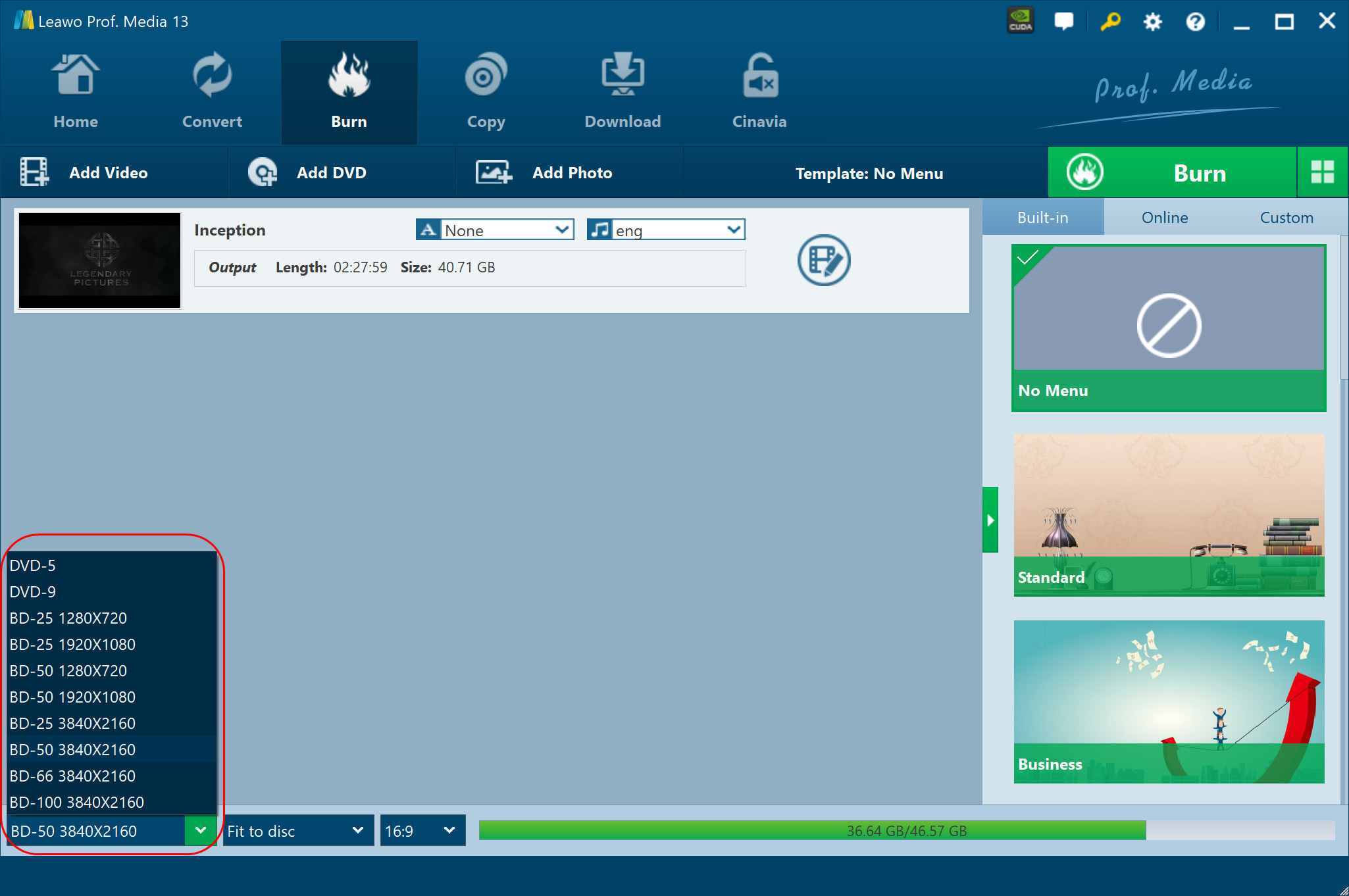
The Burn tab with a film loaded (2:27:59, 40.71 GB as output) and the disc type list open: DVD-5, DVD-9, BD-25 and BD-50 at 1280x720 and 1920x1080, then BD-25, BD-50, BD-66 and BD-100 at 3840x2160, with BD-50 3840x2160 selected, "Fit to disc" and 16:9 next to it.
Features
Four 4K disc sizes
Leawo UHD Creator writes 3840x2160 Blu-ray to BD-25, BD-50, BD-66 or BD-100, as a disc, a Blu-ray folder or an ISO. A "Fit to disc" setting and an aspect-ratio choice sit next to the disc type, and a size bar shows how full the disc will be.
Burns from almost any video format
Leawo UHD Creator reads MP4, MKV, MOV, AVI, WEBM, FLV, TS/M2TS camcorder files, VOB and around two dozen other formats without a separate converter. Several files can go on one disc; each one gets its own subtitle and audio track choice and an edit button.
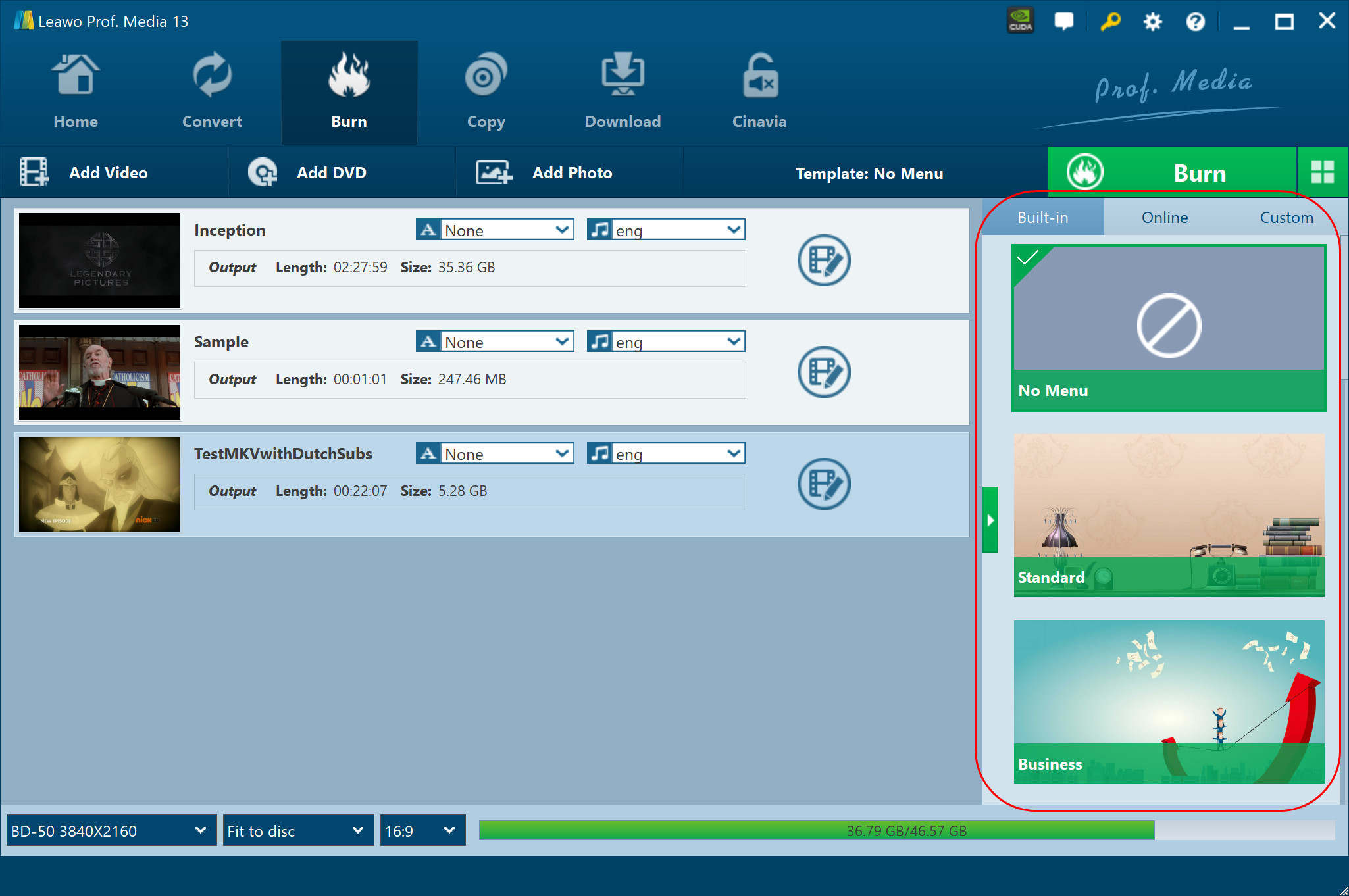
Three videos queued for one BD-50 3840x2160 disc (a 2:27:59 film, a 1-minute sample and a 22-minute MKV), each with subtitle and audio drop-downs and an edit button, and the template column outlined on the right. The bar shows 36.79 GB of 46.57 GB.
Trim clips and add chapters
Leawo UHD Creator's edit panel trims each video by start and end time or by dragging markers, and creates chapters either automatically (a set number, or one every so many minutes) or by clicking Insert chapter during playback.
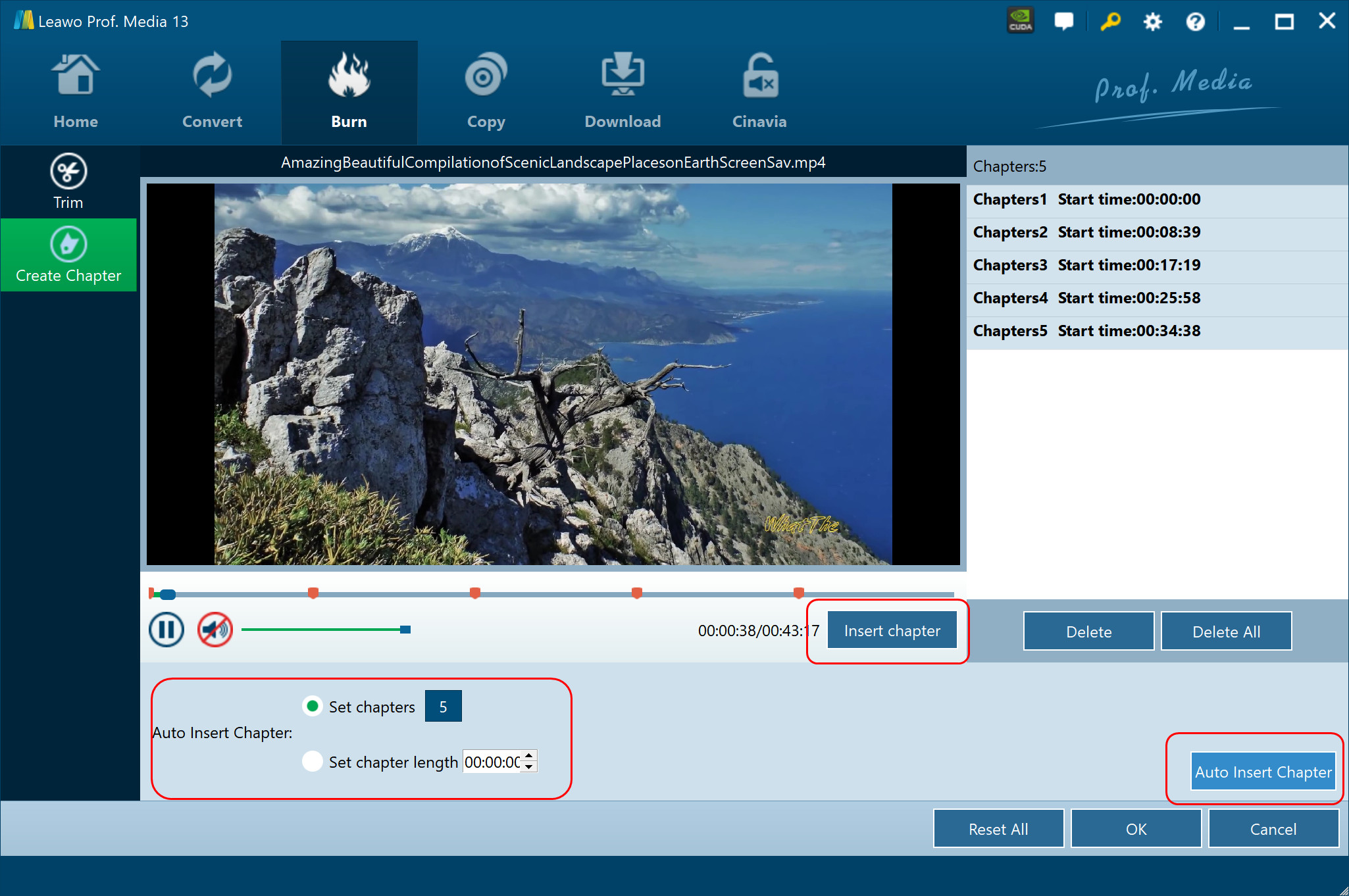
The Create Chapter tab on a 43-minute clip: five chapters listed with start times, the Insert chapter button, and the Auto Insert Chapter section set to 5 chapters.
Menus you design yourself
Leawo UHD Creator offers built-in menu themes (Standard, Business, Childhood, Education, Holiday, Nature, Sports, Wedding), downloadable ones, and a designer where you change the title text, font, size and colour, set a background image or video, add music and reorder chapters. Designs save as your own templates.
4K photo slideshows
Leawo UHD Creator turns a folder of JPG, PNG or BMP photos into a slideshow automatically. You can then reorder or remove photos, set photo and transition durations and effects, and add background music with fade in, fade out and loop.
Folder, ISO and disc together, plus GPU help
Leawo UHD Creator's Burn panel lets you tick Folder, ISO File and a burner at once and set the number of disc copies. Leawo lists NVIDIA CUDA, Intel Quick Sync and AMD APP acceleration for the encoding.
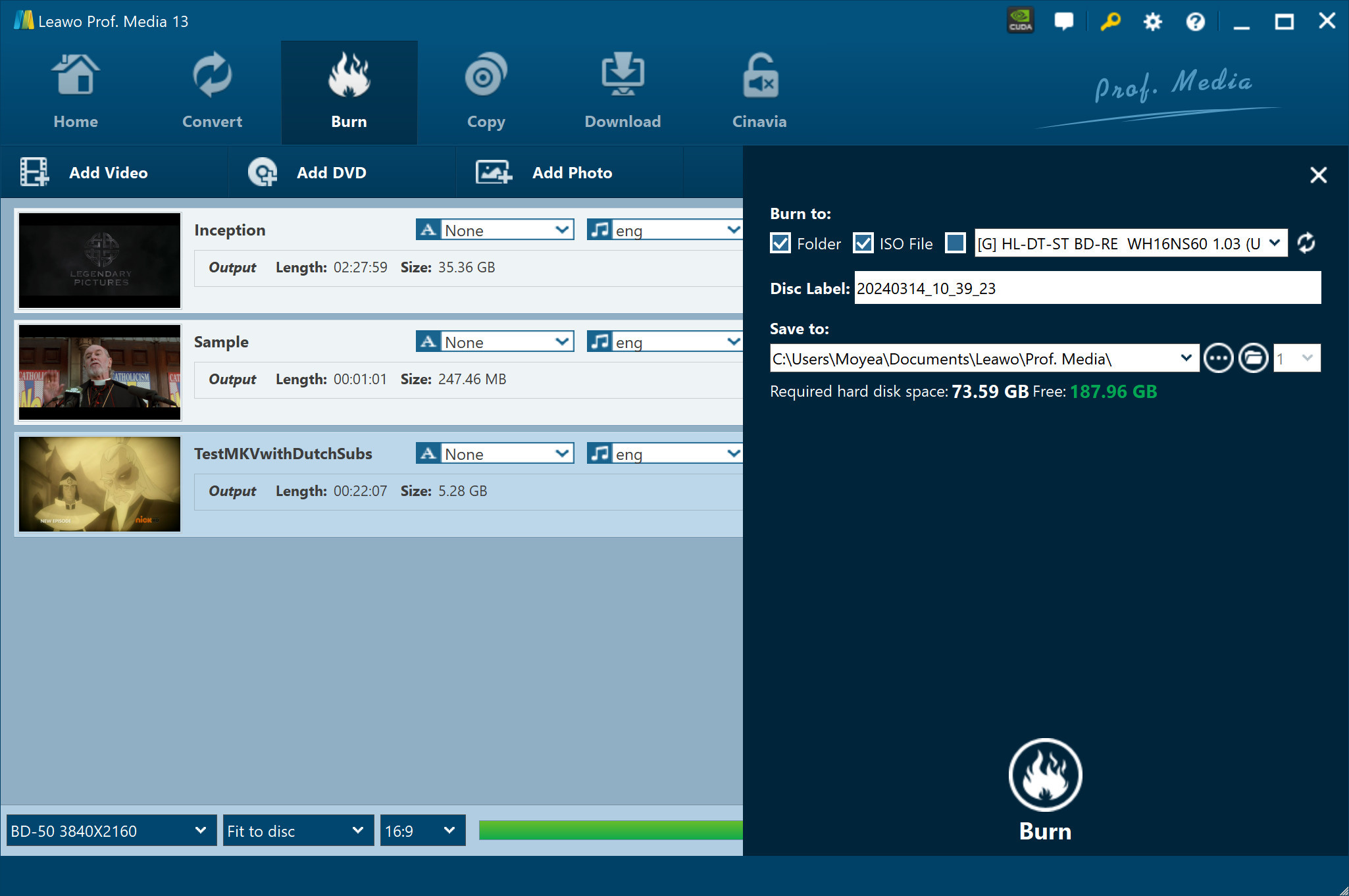
The Burn panel: Folder and ISO File ticked, an HL-DT-ST BD-RE WH16NS60 drive in the burner list, a disc label, the save folder, and 73.59 GB of disk space required against 187.96 GB free.
Benefits
- Your 4K footage stays 4K on disc. No down-conversion to 1080p just to get a playable Blu-ray.
- A physical copy you can hand over. A wedding film or family event on a disc with a menu is a better gift than a download link.
- One tool from file to finished disc. Trimming, chapters, menu and burning happen in the same window.
Real-World Uses
- A videographer's client delivery: a 4K wedding edit on BD-50 with a Wedding menu and chapters for each part of the day.
- Drone and travel footage from a season of trips, trimmed and put on one BD-66 with a chapter per location.
- A 4K photo slideshow for a big birthday or anniversary, with music, for the living-room TV.
- A 4K Blu-ray ISO archive of your own videos, burned to disc later or kept on a NAS.
Who It's For, and Who Should Skip It
Good fit: people with 4K video or photos, a capable PC, a Blu-ray writer and a 4K Blu-ray player, who want a menu-driven disc.
Skip it if:
- Your videos are 1080p. Leawo Blu-ray Creator burns standard Blu-rays for less.
- You want to back up retail 4K discs. That's UHD Copy, not this.
- Your PC is older than about 2017. The listed CPU and graphics minimums rule out a lot of older machines.
- Your TV setup streams from a server. A 4K MP4 or MKV on a NAS plays without any burning.
Usage Guide
- Install Leawo Prof. Media (ltmcp_setup.exe) and open it; click Burn or the UHD Creator tile.
- Add your sources: Add Video (file, folder or ISO) or Add Photo. Drag to reorder.
- Pick the disc type: BD-25, BD-50, BD-66 or BD-100 at 3840X2160, then Fit to disc and the aspect ratio.
- Choose a menu or No Menu; click the pencil to design one.
- Edit if needed: the edit button on each title opens Trim and Create Chapter.
- Click the green Burn button, tick Folder, ISO File and/or your burner, label the disc and set Save to.
- Click Burn and follow the progress; choose what the PC does when all tasks end.
Where it falls short
- Conflicting requirements. The product page asks for 4 GB RAM, a GTX 1050 or Radeon 5000 and 200 GB free; Leawo's tech-spec page lists 512 MB RAM, Intel UHD 630 graphics as an option and 25 GB free. Plan for the higher numbers.
- No independent testing. We found no review that burned a 4K disc with UHD Creator and played it on a UHD player. All playback claims are Leawo's.
- Speed claims vary. Leawo advertises "20X higher speed" with GPU help; 4K encoding is still heavy, and the 73.59 GB job in Leawo's own screenshot gives a sense of the disk space involved.
- Lifetime costs double the yearly price. $89.95 lifetime versus $44.95 a year; for a single project, one year may be enough.
What Users Say
Leawo's review page for UHD Creator had no published reviews when we checked, and no independent hands-on review exists that we could find. Here's what's out there.
On Leawo's product page
These testimonials were chosen by Leawo:
- Elmore Dagwood: "Used this UHD Creator to burn some of my birthday party clips to 4K Blu-ray disc. The burning is fluent. The inner menu designer impressed me a lot. Complete complicated task in simple clicks."
- Allen Mark: "This 4K UHD Blu-ray burner meets all my requirements in burning 4K Blu-ray discs. I have burned quite a few 4K Blu-ray discs from my movie collections and all went smoothly. The entire burning process is satisfactory."
Trustpilot (Leawo overall)
Leawo's profiles showed 4.4 out of 5 from 151 reviews (leawo.org) and 4.3 out of 5 from 158 reviews (leawo.com) on November 1, 2026. None mention UHD Creator by name; these are about Leawo's disc tools:
- Alexander Robinson (5 stars, September 2026), titled "Works", on Leawo's Blu-ray and UHD rippers working well.
- josuemendez (5 stars, October 2025): "This software was easy to use ..with the right bluray writer unlocked ..also with a bluray decrypter software"
- Ian Bellinger (1 star, March 2019), on Leawo Blu-ray Creator: "The dvd burn fails each time- I have tried several times."
- Alix Mccartney (1 star, January 2026), titled "SCAM! DO NOT BUY": "Awful software."
The pattern: people who get Leawo's disc tools working with the right drive are happy, and the 1-star reviews describe burns or software that never worked for them. With no independent UHD Creator tests, the trial is your test lab.
Comparisons
UHD Creator vs Leawo Blu-ray Creator
Both burn video files and photos with menus in the same Burn tab. Blu-ray Creator makes 1080p and 720p Blu-rays and DVDs; UHD Creator adds the 3840x2160 disc types and BD-66/BD-100. If none of your footage is 4K, Blu-ray Creator is enough.
UHD Creator vs UHD Copy and UHD Ripper
The three UHD modules do different jobs: Creator burns your files to 4K disc, Copy backs up a 4K disc to another disc or ISO, and Ripper turns a 4K disc into video files. Leawo sells all three together as a lifetime bundle.
Editions and Pricing
| License | Price | Includes | Money-back window |
|---|
| 1 Year (auto-renews) | $44.95 | UHD Creator, 1 PC | 5 days |
| Lifetime | $89.95 | UHD Creator, 1 PC | 14 days |
| UHD Creator + UHD Ripper + UHD Copy (lifetime) | $144.91 (list $289.85) | All three UHD modules, 1 PC | 14 days |
Prices from the order page on November 1, 2026.
FAQs
What burner do I need for Leawo UHD Creator?
Leawo UHD Creator needs a Blu-ray writer for BD-25 and BD-50 discs, and a BDXL-capable writer for BD-66 and BD-100. To make only a folder or ISO, you don't need a burner at all.
Can Leawo UHD Creator burn HDR video?
Leawo doesn't mention HDR, HDR10 or Dolby Vision anywhere on UHD Creator's pages. It lists only the 3840x2160 resolution, so don't count on HDR being kept; test a short clip in the trial.
Can I add my own subtitles?
Yes. Leawo UHD Creator lets you pick a subtitle and audio track for each video and add an external subtitle file before burning.
Can it burn an existing 4K Blu-ray ISO to disc?
Yes. Leawo UHD Creator's tech spec lists burning a 4K Blu-ray ISO image file to a 4K Blu-ray disc, through the Add Video menu's iso option.
What does the trial let me do?
The Leawo UHD Creator trial converts only the first 5 minutes of content, enough to burn a short test disc or ISO and check it on your player.
Is there a Mac version?
Yes. Leawo UHD Creator for Mac is a separate purchase at the same prices.
System Requirements
- Windows: 7, 8, 8.1, 10 or 11
- Processor: AMD Ryzen 1000 series or Intel Kaby Lake or newer
- Graphics: NVIDIA GeForce GTX 1050 or AMD Radeon 5000 series or newer (the tech-spec page also lists Intel UHD 630)
- Memory: 4 GB RAM
- Disk: 200 GB free per the product page (25 GB per the tech-spec page)
- Other: a recordable 4K Blu-ray drive for discs, and an internet connection
Conclusion
Leawo UHD Creator is worth it if you have real 4K footage, a modern PC and a 4K Blu-ray player, and want a finished disc with a menu and chapters. It covers all four 4K disc sizes, reads nearly any video format, and puts trimming, chapters, menus and slideshows in one place.
The reasons to hold back: no one outside Leawo has published a test of its 4K discs on real UHD players, the hardware requirements are steep and contradictory, and HDR isn't mentioned at all. Burn a 5-minute test disc, play it on your player, and only then pay the $89.95 lifetime price.
Download Free TrialBuy Now