Leawo UHD Copy for Mac: Back Up 4K Ultra HD Blu-rays on a Mac With an External UHD Drive
Leawo UHD Copy for Mac is a $44.95-a-year (or $99.95 lifetime) macOS module that makes 1:1 backups of 4K Ultra HD Blu-ray discs to an ISO file, a folder or a blank disc, keeping HDR10, HDR10+ and Dolby Vision. It's for Mac owners with a 4K disc collection and a compatible external UHD drive, and it runs on macOS 10.13 High Sierra through macOS 27 with separate builds for Intel and Apple silicon.
No Mac has a disc drive any more, and Apple never supported 4K Blu-ray at all, so the Mac route to a UHD backup goes through a USB drive and third-party software. That makes the drive, not the Mac, the part to get right first.
Quick facts
- What you install: Leawo Prof. Media 13 for Mac, a suite in which UHD Copy is one module. Mac UHD Copy first appeared as version 1.0.0 in May 2021.
- Mac downloads: ltmcu_setup.dmg for Intel Macs (241 MB, dated June 10, 2026) and ltmcu_setup_arm64.dmg for Apple chip Macs (316 MB, dated July 7, 2026)
- Runs on: macOS 10.13 High Sierra to macOS 27, on a MacBook Pro 2016, MacBook Air 2017, iMac 2017, Mac mini 2018, Mac Pro 2019 or newer
- Copies: 4K UHD Blu-ray discs, folders and ISO files, BD100 to BD100 and BD66 to BD66, 3D UHD discs, any region (with a compatible drive)
- Modes: Full Movie (the whole disc) or Main Movie (the feature with the tracks you pick)
- Price: $44.95 for 1 year (auto-renews, 5-day money-back guarantee) or $99.95 lifetime (14 days), one Mac
- What we checked: both Mac installers on Leawo's UHD Copy for Mac download page (Intel 241 MB and Apple chip 316 MB, sizes and dates read from the download server), Leawo's Mac requirements and supported 4K drive list, and the order page, which charged $44.95 for one year of "Leawo UHD Copy for Mac" on November 1, 2026. We didn't copy a 4K disc on a Mac.
Before you buy: the drive decides everything
- You need a "friendly" 4K drive, and on a Mac that means a USB one. Leawo's supported list includes external models such as the LG BP50NB40 and BP60NB10, the ASUS BW-16D1H-U, the Buffalo BRUHD-PU3-BK and the Archgon MD-8107S-U3-UHD, plus internal LG, ASUS and Pioneer drives that would need a USB enclosure. A regular Blu-ray drive can't read UHD discs.
- Firmware matters as much as the model. Leawo says listed LG and ASUS drives can stop loading UHD discs once their firmware is updated to the latest version. Its fix is Leawo UHD Drive Tool, sold separately, to downgrade the firmware.
- Download the right build. The download page offers "Mac with Apple Chip" and "Mac with Intel Chip". Check About This Mac first.
- Plan for disk space. Leawo asks for 66 GB free on a Mac, but a full BD100 copy can need close to 100 GB on its own, so an external SSD helps on a 256 GB MacBook.
- Personal backups only. Leawo limits its software to discs you lawfully own. Whether removing copy protection is legal depends on where you live.
Download Free TrialBuy Now
Overview
On a Mac, Leawo Prof. Media is a normal macOS window with a toolbar (Home, Convert, Burn, Copy, Download, Cinavia) and a home screen of module tiles. Each tile shows whether that module is registered. A UHD Copy license switches on the UHD Copy tile and the Copy tab for 4K discs; the other tiles stay in trial mode until you buy them.

The Mac home screen (Prof. Media 12 for Mac in Leawo's guide) with module tiles, including UHD Copy at top right, each marked Registered.
Features
A true 1:1 copy with Full Movie mode
Leawo UHD Copy for Mac's Full Movie mode keeps everything on the disc, menus and extras included, and copies BD100 to BD100, BD66 to BD66 and 3D UHD discs with the 3D intact. Nothing is re-encoded, so the HDR10, HDR10+ or Dolby Vision picture and the original audio stay exactly as they were. Leawo says UHD Copy removes the AACS 2.0 protection used on 4K discs, as long as the drive can read them.
Main Movie mode for a smaller backup
Leawo UHD Copy for Mac's Main Movie mode picks the longest title, the film itself, and one subtitle and audio track, which you can change in the lists on the left. Trailers, menus and extra languages are left out, so the copy is smaller and quicker to make. A built-in player on the right lets you check a title before you copy it, and a bar at the bottom shows how full the target disc type will be.
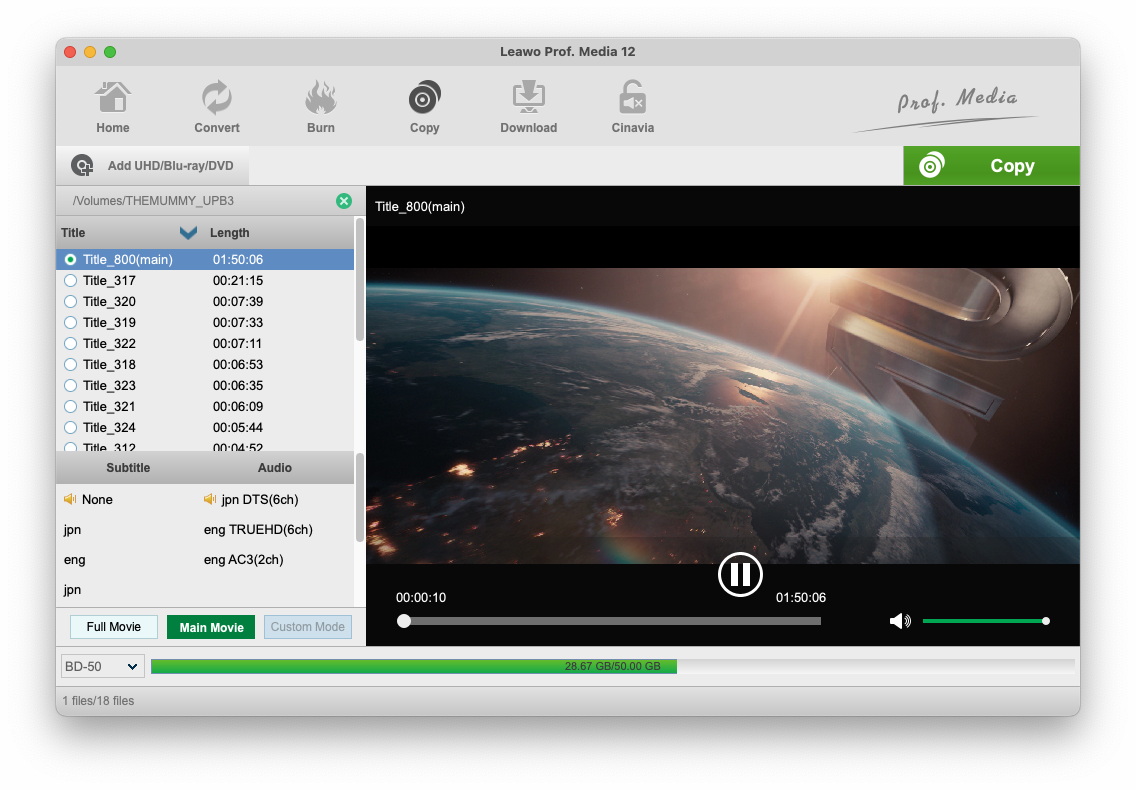
The Copy tab on a Mac with a disc loaded from /Volumes: the main title (1:50:06) selected, Japanese and English audio tracks including TrueHD, Main Movie mode on, a preview playing, and a BD-50 capacity bar (28.67 GB of 50 GB). Leawo's Mac guide shows a regular Blu-ray here, not a 4K disc.
ISO, folder and disc output in one job
Leawo UHD Copy for Mac's Copy sidebar lets you tick any mix of Folder, ISO File and a connected Blu-ray writer, set the disc label and the save location, and shows the space the copy needs next to the space free on that drive. An ISO is the easiest backup on a Mac: it sits on a NAS or external disk and can be burned later if you get a writer.
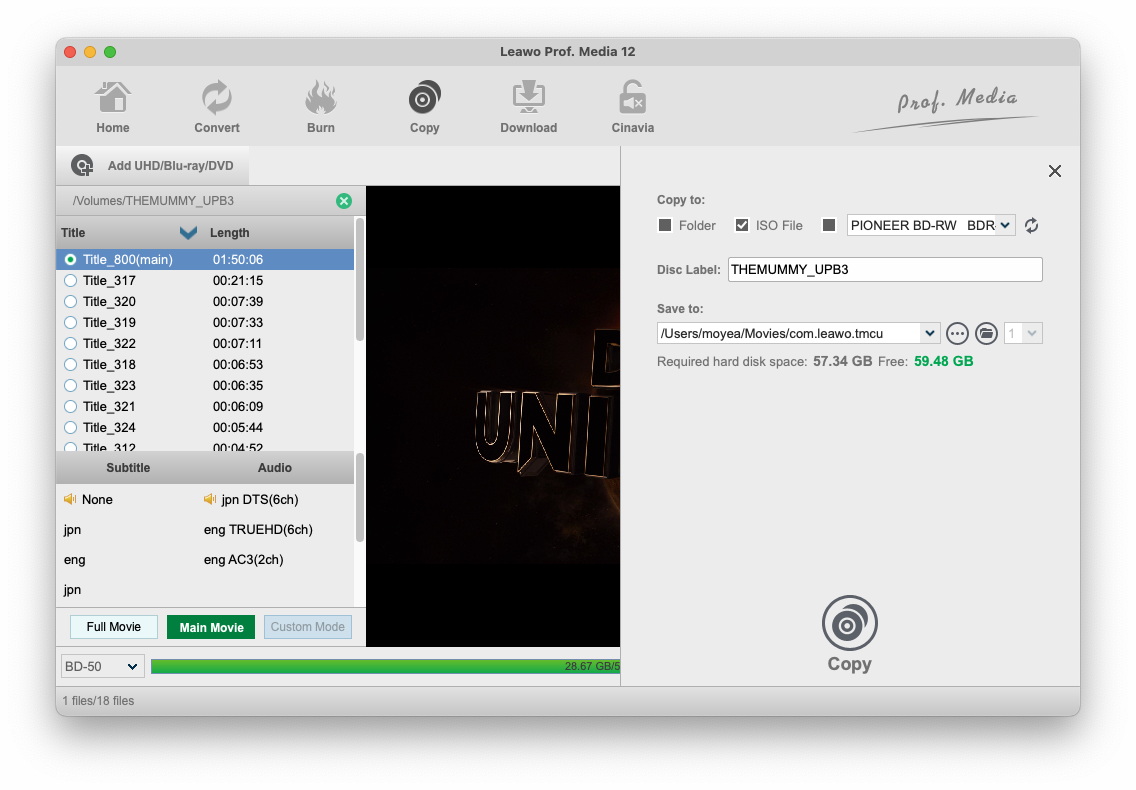
The Mac Copy sidebar: ISO File ticked, a Pioneer BD-RW drive in the burner list, the disc label, a save folder in the user's Movies folder, and "Required hard disk space: 57.34 GB Free: 59.48 GB".
Discs from any country
Leawo UHD Copy for Mac copies 4K discs from any region, provided the drive is compatible. 4K UHD discs are mostly region-free anyway, but Leawo's Mac settings also let you set the Blu-ray source region (Americas and East Asia; Europe, Africa and Oceania; or the rest of the world) or have it ask every time you open a disc.
Benefits
- A spare for discs you can't replace. Limited steelbook editions and out-of-print 4K titles get a working copy.
- Nothing lost. Unlike a rip to MP4, a 1:1 copy keeps the original HDR, Dolby Vision and lossless audio untouched.
- A Mac-native workflow. The ISO lands in a normal folder, so Time Machine or a NAS backup picks it up like any other file.
Real-World Uses
- Archiving a collection to a NAS. Copy each 4K disc to an ISO on a Synology or QNAP from a Mac mini with a USB UHD drive attached.
- Protecting a steelbook. Make a Main Movie disc for everyday playing and keep the collector's edition on the shelf.
- Saving a disc that's starting to skip. Copy it while it still reads, then burn a fresh BD-66 or BD-100.
Who It's For, and Who Should Skip It
It's a good fit if you collect 4K Blu-rays, work on a Mac, and already own (or will buy) a USB drive from Leawo's supported list, and you want exact backups rather than compressed files.
Skip it if:
- Your Mac is older than the 2016/2017 cut-off. Leawo lists only those models and newer.
- You want files to stream. A 1:1 ISO won't play in the Apple TV app or on an iPhone. Leawo UHD Ripper for Mac converts 4K discs to MKV or MP4 instead.
- Your discs are regular HD Blu-rays. Leawo Blu-ray Copy for Mac handles those for less.
- You don't want to touch drive firmware. If your drive isn't friendly as shipped, the fix is a firmware downgrade, which Leawo itself says carries some risk.
Usage Guide
- Check the drive. Find your exact drive model on Leawo's supported 4K drive list, then plug it into the Mac's USB port.
- Install. Download the Apple Chip or Intel DMG from the UHD Copy for Mac download page, drag Leawo Prof. Media to Applications and open it.
- Open the Copy tab. Click the UHD Copy tile on the home screen, or Copy in the toolbar.
- Add the source. Click Add UHD/Blu-ray/DVD and choose Add from CD-ROM (the disc in the drive), Add from folder or Add iso file.
- Pick the mode. Choose Full Movie or Main Movie and, for Main Movie, the subtitle and audio tracks.
- Set the output. Click the green Copy button, tick Folder, ISO File and/or your burner, set the disc label and the Save to folder.
- Copy. Click Copy at the bottom of the sidebar. A full UHD copy is large, so keep the Mac awake and plugged in.
Where it falls short
- No 4K disc without the right drive. Even an "official" UHD drive may not work, and Leawo warns that flashing firmware can damage a drive or void its warranty.
- Mac screenshots are out of date. Leawo's Mac guide still shows Prof. Media 12 and a regular Blu-ray, so you won't see a 4K disc on a Mac until you try it yourself.
- Burning on a Mac takes extra hardware. A BD-66 or BD-100 copy needs a USB writer that handles those discs. Without one, you're making ISO and folder backups only.
- No independent testing. We found no independent review of UHD Copy's speed or reliability on a Mac.
What Users Say
Leawo's review page for UHD Copy has no written reviews yet, and we found no independent review of the Mac version. Here is what's available.
Trustpilot (Leawo as a company: 4.4 TrustScore from 151 reviews for leawo.org, 4.3 from 158 for leawo.com)
None of Leawo's Trustpilot reviews names UHD Copy. A few come from Mac users of Prof. Media, the suite UHD Copy runs in:
"I'm extremely pleased (I'm using a Mac, if that helps)." Tabonga, 5 stars, "No Notes!!", May 2026
"I recently updated to the full version of LeawoProf.Media for Mac" Frans Vandenburg, 5 stars, October 2023
Most of the rest praise Leawo's support for sorting out activation quickly. On the critical side, Kenny75 Photography titled a February 2026 review "Problematic software but excellent customer service" after problems with an external Blu-ray drive (on a PC) ended in a refund.
Testimonials on Leawo's UHD Copy page
Leawo's page shows 4.9 out of 5 from 223 ratings on its own site, and quotes these (chosen by the vendor):
"What a surprising tool! Leawo UHD Copy is able to retain the high-quality of my 4K UHD discs, it helps me to back up my fave movies easily!" Jacorb
"If you're wondering how to back up your collection of UHD disc, you might as well try Leawo UHD Copy, it works fine literally." Mark
The pattern
Feedback on Leawo's 4K tools is positive when the drive cooperates, and the company's support gets steady praise. What's missing is a real report of UHD Copy on a Mac, so the free download with your own drive and one of your discs is the test that counts.
Comparisons
Mac version vs Windows version
The copying features and prices are the same, but each license covers one platform. The Mac version comes as two builds (Intel and Apple chip) where Windows has one installer, it asks for 66 GB free against 200 GB on Windows, and Leawo sets a minimum Mac model (2016 to 2019 depending on the line) rather than the CPU and graphics card generations it lists for Windows.
UHD Copy vs UHD Ripper
UHD Copy keeps the disc as it is (ISO, folder or disc). UHD Ripper converts it to MKV or MP4 files for Plex, Infuse or an iPad. Leawo sells the two together for $119.94 lifetime.
Editions and Pricing
| License (Mac) |
Price |
Includes |
Money-back |
| 1 year (auto-renews) |
$44.95 |
UHD Copy, 1 Mac |
5 days |
| Lifetime |
$99.95 |
UHD Copy, 1 Mac |
14 days |
| UHD Ripper + UHD Copy (lifetime) |
$119.94 |
Adds UHD Ripper |
14 days |
| Prof. Media 13 for Mac + CleverGet Video Downloader for Mac (lifetime) |
$229.95 |
All 17 modules |
14 days |
Refunds cover technical problems Leawo can't fix, not a change of mind. Leawo UHD Drive Tool, for downgrading drive firmware, is a separate purchase.
FAQs
Which external 4K drives work with Leawo UHD Copy for Mac?
Leawo UHD Copy for Mac works with the drives on Leawo's supported 4K list. USB models on it include the LG BP50NB40, LG BP60NB10, ASUS BW-16D1H-U, Buffalo BRUHD-PU3-BK and Archgon MD-8107S-U3-UHD. Internal drives on the list, such as the LG WH16NS60, can be used in a USB enclosure.
Does Leawo UHD Copy run natively on M1, M2, M3 or M4 Macs?
Leawo UHD Copy for Mac has a separate download labeled "Mac with Apple Chip" (ltmcu_setup_arm64.dmg) next to the Intel build, so Apple silicon Macs get their own build rather than the Intel one.
Can I play the ISO that Leawo UHD Copy makes on my Mac?
Not with Apple's own apps. macOS has no 4K Blu-ray playback, so a UHD ISO needs a third-party player (Leawo offers a free Blu-ray Player for Mac) or a media server that reads ISO files. To get a file the Apple TV app can play, rip the disc instead.
What does the Leawo UHD Copy for Mac trial do?
When Leawo launched UHD Copy for Mac in May 2021, its announcement said the free trial copies only 5 minutes of content. That's enough to confirm your drive reads your discs before you pay.
Will my Windows license of Leawo UHD Copy activate the Mac version?
No. Leawo UHD Copy for Mac is a separate product with its own license at the same prices. Each license covers one computer.
Why does Leawo UHD Copy for Mac install as Leawo Prof. Media?
Leawo UHD Copy is a module of Leawo Prof. Media 13 for Mac. The download installs the whole suite, and your UHD Copy code registers that one module.
System Requirements
- macOS: 10.13 High Sierra, 10.14 Mojave, 10.15 Catalina, 11 Big Sur, 12 Monterey, 13 Ventura, 14 Sonoma, 15 Sequoia, 26 Tahoe or 27 Golden Gate
- Mac: MacBook Pro 2016 or later, MacBook Air 2017 or later, iMac 2017 or later, Mac mini 2018 or later, Mac Pro 2019 or later
- Disk: 66 GB or more free
- Drive: a compatible 4K UHD drive, and a recordable Blu-ray drive to burn copies
- Other: an internet connection
Conclusion
Leawo UHD Copy for Mac is worth buying if you have a 4K collection, a Mac from 2016 or later, and a USB drive on Leawo's supported list. It's one of the few ways to make exact 4K disc backups on macOS, with a native Apple silicon build and ISO output that fits neatly into a Mac backup routine.
The reason to wait is the drive. Without a friendly one, UHD Copy can't read a 4K disc at all, and nobody independent has published how it performs on a Mac. Plug in your drive, install the free trial, and copy a few minutes of one of your own discs before paying. If you'd rather stream the movies than keep discs, UHD Ripper is the better buy.
Download Free TrialBuy Now