Leawo PhotoIns for Mac: Batch AI Photo Enhancing, Background Removal and Upscaling on macOS
Leawo PhotoIns for Mac is a $79.95-a-year (or $109.95 lifetime) macOS app with three automatic photo tools: an AI enhancer for blur, haze, exposure, color and portraits, a background remover, and an upscaler that enlarges images up to 40X. It's for Mac users who want a folder of photos fixed in a few clicks, such as shop product shots or holiday pictures, and it runs on Intel Macs and, through Rosetta, on Apple silicon.
The appeal is speed over control. You drop in a batch, let the AI decide, and export. Mac photographers who live in Lightroom or Photoshop will find it thin; someone with 300 dull phone photos and no editing experience is the person it was built for.
Quick facts
- Developer: Leawo Software Co., Ltd. (first Mac release, PhotoIns for Mac 1.0.0, announced March 23, 2021)
- Mac installer: macphotoins_setup.dmg, a full 444 MB disk image dated June 13, 2022. Leawo prints no version number for the Mac build, and its checkout names the product "Photoins 3 for Mac".
- Runs on: macOS 10.10 Yosemite to macOS 27, Intel Macs, and Apple M1/M2 Macs with Rosetta
- Tools: Photo Enhancer, Photo BG Remover and Photo Enlarger, each with batch and one-photo modes
- Files: RAW, JPEG, TIFF and PNG in (at least 800 x 600 for the enhancer), JPEG, PNG and TIFF out
- Price: $79.95 for 1 year or $109.95 lifetime for one Mac. Each tool is also sold alone.
- Trial: free download that exports one photo at a time (batch export needs a license)
- What we checked: the Mac installer on Leawo's download page (macphotoins_setup.dmg, 444 MB, last modified June 13, 2022), the Mac requirements on the PhotoIns page, and the order page, which charged $79.95 for one year of PhotoIns for Mac on November 1, 2026. We didn't process photos on a Mac.
Before you buy
- It isn't native on Apple silicon. Leawo's requirements say "Apple M1/M2 chip (Rosetta required)". macOS installs Rosetta 2 the first time you open an Intel-only app, and Apple has said macOS 27 is the last version with full Rosetta support. That matters most if you're thinking of the lifetime license.
- The Mac download is from June 2022. The app may well work on a newer macOS, but it hasn't been rebuilt in over four years, so test the trial on your own Mac first.
- The yearly plan stops working when it lapses. Leawo's order page says that when a 1-year license becomes invalid you need to renew it or buy another license to keep using the software.
- Buy one tool if you only need one. If all you do is cut out backgrounds, Photo BG Remover alone is $29.95 a year.
- Refunds are for faults only. Leawo shows a 14-day money-back guarantee, but it applies to technical problems its support can't solve, not to a change of mind.
Download Free TrialBuy Now
Overview
PhotoIns for Mac started in March 2021 as a single AI enhancer and later grew into a three-module suite. You open the module you need, add photos with the Add Photo button or by dragging them onto the window, and then either let it run on the whole batch or double-click one photo to adjust it by hand. An Output button at the bottom right opens the export settings. The dark, minimal window looks the same on Mac and Windows; Leawo's screenshots below come from the Windows build, since it publishes none from a Mac.
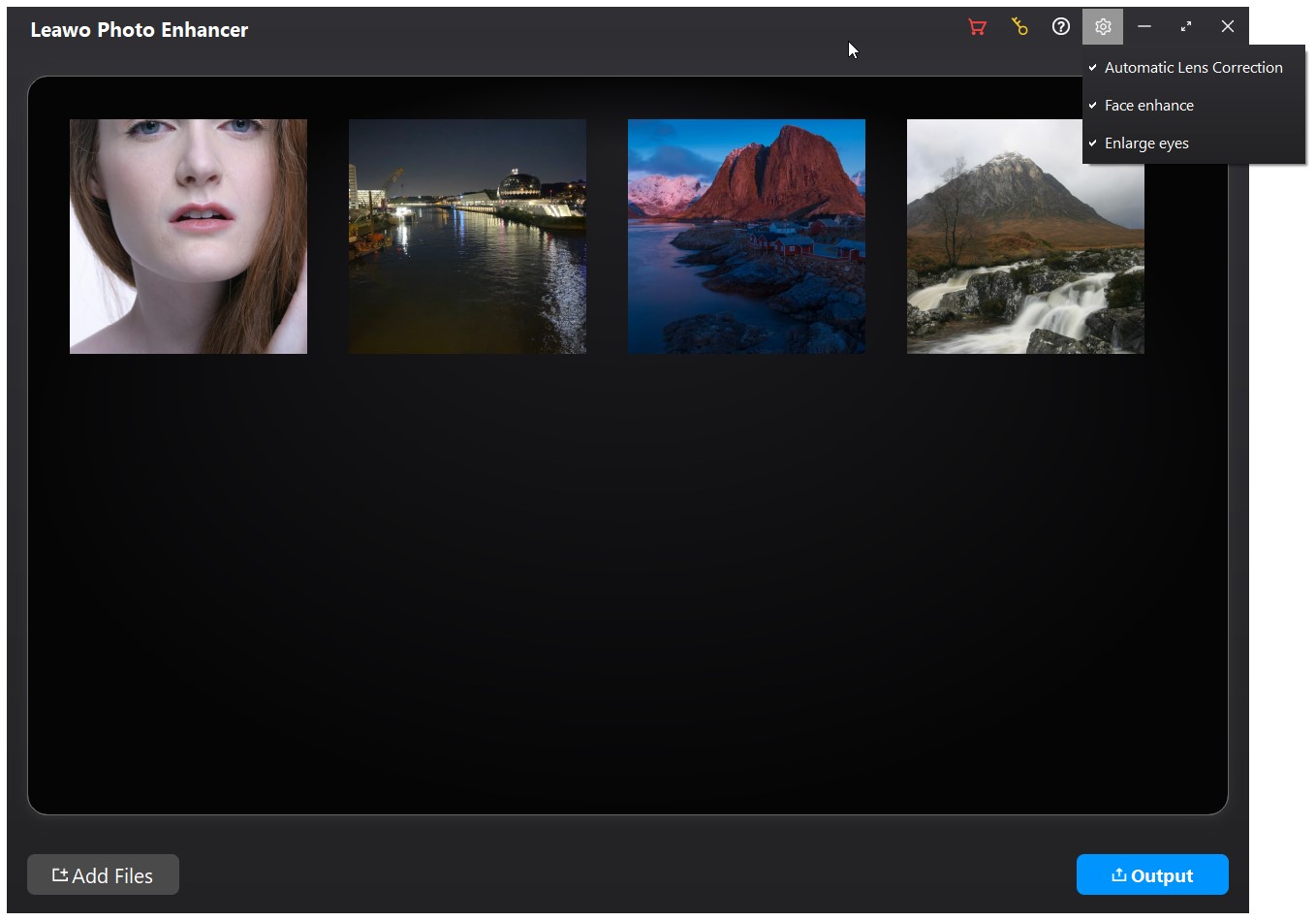
The Photo Enhancer module with four photos loaded. The gear menu switches on Automatic Lens Correction, Face enhance and Enlarge eyes for the whole batch (Windows build).
Features
Photo Enhancer applies one AI correction to a whole batch
Leawo PhotoIns for Mac's Photo Enhancer runs AI Enhance on every photo you load: sharper detail, haze removal, white balance, color and exposure fixes, and a stronger sky. AI Enhance is always on and can't be switched off. Three extras sit in the settings menu: Lens Correct (RAW files only, for distortion, aberration and vignetting), Face Enhance (skin smoothing, freckle removal, lighting) and Eyes Enlarge. In one-photo mode, a slider under the preview sets how strong the effect is, with a before/after divider you can drag across the picture.
Photo BG Remover cuts the subject out automatically
Leawo PhotoIns for Mac's Photo BG Remover finds the main subject and removes everything behind it, leaving a transparent background, a solid color or another picture. In manual mode you mark areas to keep or remove with a brush and the edge is recalculated, which is how you fix a stray strand of hair or a missed corner.
Photo Enlarger upscales from 0.5X to 40X
Leawo PhotoIns for Mac's Photo Enlarger resizes photos with preset scales or a custom value up to 40X, and has sliders for noise, blur, brightness, saturation and contrast. A split view shows the source and the result side by side, with their pixel sizes underneath, and an output panel sets the folder, a filename suffix, the format (JPEG, PNG or TIFF) and the quality.
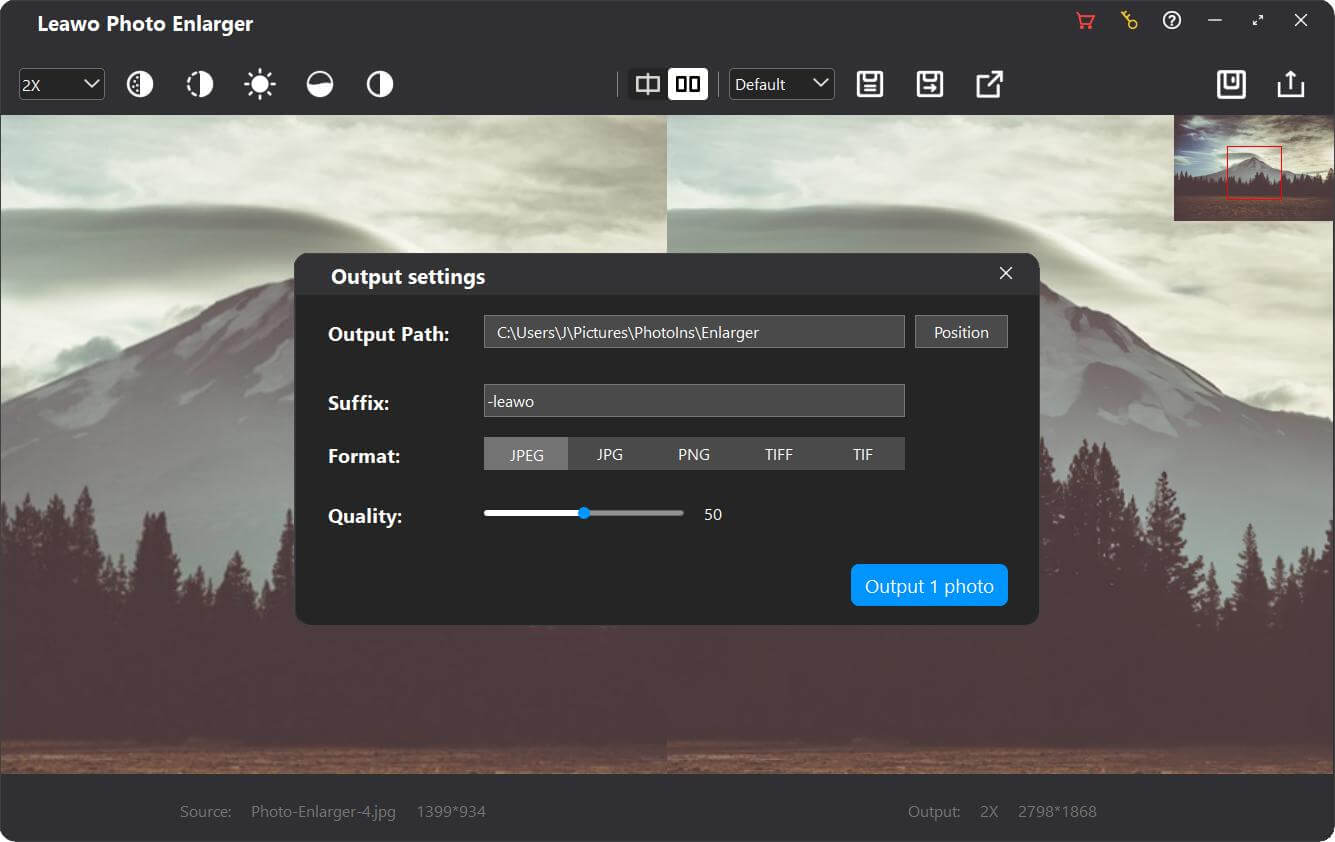
Photo Enlarger at 2X (1399 x 934 in, 2798 x 1868 out) with the Output settings panel: path, "-leawo" suffix, JPEG/JPG/PNG/TIFF/TIF formats and a quality slider (Windows build).
Batch renaming and resizing on export
Leawo PhotoIns for Mac can rename and resize every exported photo in one go. The advanced output settings build file names from a prefix, base and suffix (the original name, custom text, a counter or a timestamp, in upper or lower case) and resize output to the original size, an automatic compression level or exact pixel dimensions. TIFF output offers LZW or PackBits compression and 8- or 16-bit depth; JPEG has High, Medium and Low quality.
Benefits
- No editing knowledge needed. The AI picks the corrections, so the only decision is how strong you want them.
- Whole folders at once. Batch mode turns a day of one-by-one edits into a single export.
- Files ready to use. Renaming and resizing on export mean the results can go straight onto a web shop or into a print order.
Real-World Uses
- Etsy or eBay listings. Remove the backgrounds from a batch of product photos and export them as PNGs named by counter.
- Scanned family prints. Enlarge small scans 4X for printing, with noise reduction on.
- Grey holiday photos. Run the enhancer over a trip's worth of hazy landscape shots in one pass.
- Headshots for a team page. Apply Face Enhance to a set of portraits so they match.
Who It's For, and Who Should Skip It
It's a good fit if you're a Mac user with lots of photos, little editing experience, and a need for quick, consistent results, and you need at least two of the three tools.
Skip it if:
- You want native Apple silicon software. PhotoIns runs on M-series Macs only through Rosetta, and Leawo names only M1 and M2.
- You want fine control. Lightroom, Photoshop or Pixelmator Pro give you every adjustment; PhotoIns mostly gives you the AI's choice and a strength slider.
- You only need background removal now and then. Preview's Remove Background and Photos' Copy Subject, built into recent macOS versions, may be enough for a few images.
Usage Guide
- Install. Download macphotoins_setup.dmg (444 MB) from Leawo's Mac download page, open it and drag Leawo PhotoIns to Applications. On an Apple silicon Mac, allow macOS to install Rosetta when it asks.
- Pick a module. Open Photo Enhancer, Photo BG Remover or Photo Enlarger.
- Add photos. Click Add Photo, or drag pictures onto the window. Right-click a photo to delete it or export it alone.
- Batch or one by one. For a batch, switch on the options you want in the settings menu. For one photo, double-click it, adjust it, and close the editor; your changes are kept for export.
- Export. Click Output, set the folder, format, quality and naming, then click the blue Output button on the panel.
- Register. Enter the code Leawo emails you to lift the one-photo export limit. Activation needs an internet connection.
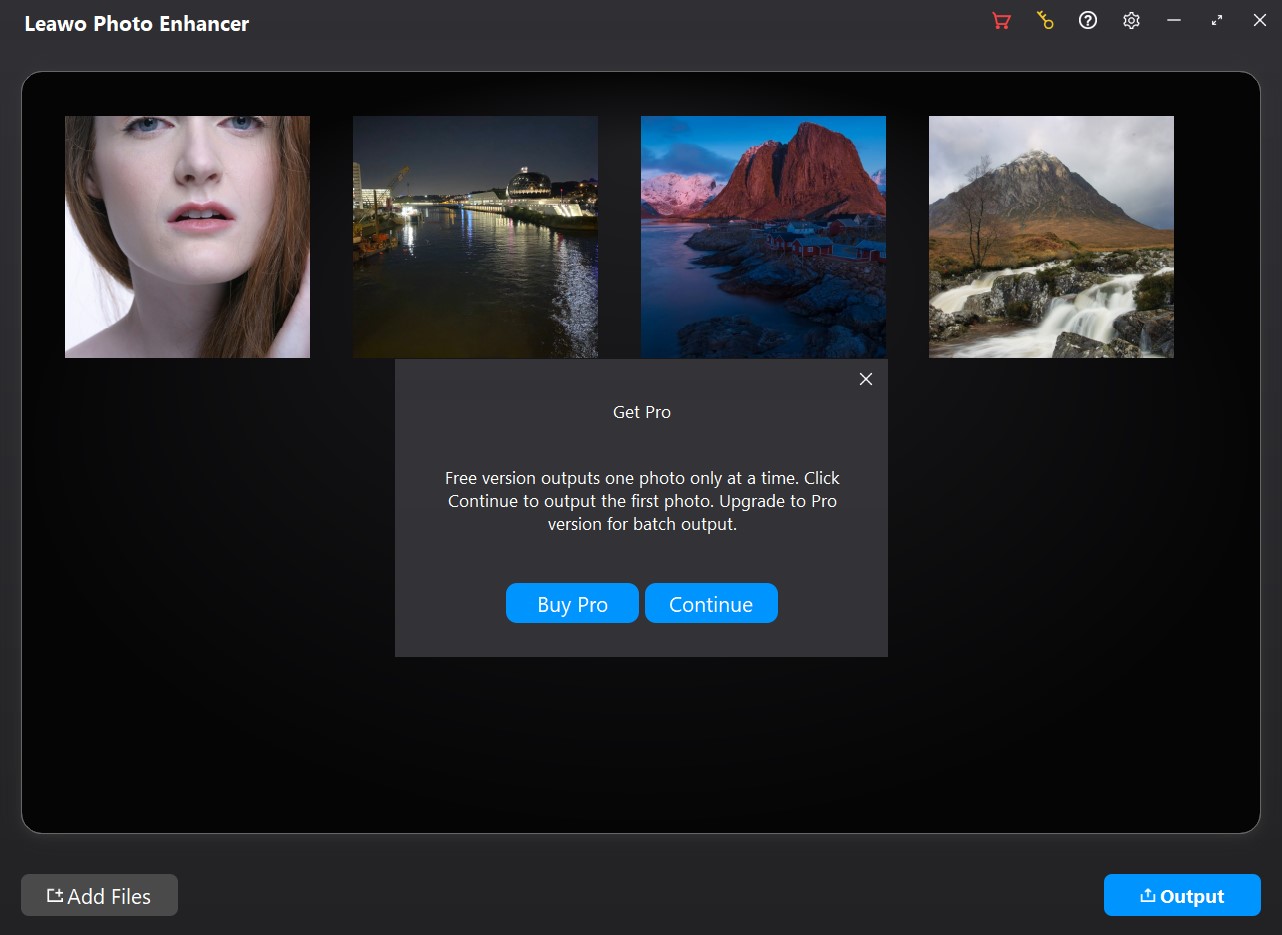
What the trial shows when you export a batch: "Free version outputs one photo only at a time," with Buy Pro and Continue buttons (Windows build).
Where it falls short
- The AI can overdo it. AI Enhance can't be turned off, and the strength slider is the main control. A Windows user on Giveaway of the Day told Leawo, "Your AI is overdoing it with its enhancements."
- Signs of neglect on the Mac side. The download dates from June 2022, Apple silicon is supported only through Rosetta, and the Mac requirements even list a "DirectX 10-capable video adapter", a Windows-only term copied from the Windows list.
- A big download for the job. The Mac installer is a 444 MB disk image, and Leawo asks for 4 GB of free space and a 1440 x 900 display at minimum.
- No Mac guides. Leawo's user guides and screenshots show the Windows build only.
What Users Say
We couldn't find an independent review of the Mac version, and Leawo's own review page for PhotoIns for Mac has no reviews yet. What exists is about the program in general.
Leawo's own pages
The PhotoIns product page shows 4.9 out of 5 from 232 ratings collected by Leawo. The one written review on the main PhotoIns review page, from November 2021, reads in full: "it is ok" (Chuc, 5 stars). Among the testimonials Leawo picked for the page:
"It's not a miracle. I put my photos to Photo Enhancer and let it work automatically. And just in a heartbeat, those photos look like they were made with the most expensive equipment of the world-class photographers." W.C
Giveaway of the Day (Windows Photo Enhancer, June 2023)
When Leawo gave away the Windows Photo Enhancer, readers were split. Simon wrote, "This program can significantly improve your photos," while Darren C. answered, "Your AI is overdoing it with its enhancements," and Dennis W Comito listed "Two major issues they need to resolve." The engine is the same on Mac, so the over-processing complaint is worth testing in the trial.
The pattern
There's very little real feedback, and almost none from Mac users. The few comments agree that the automatic results come quickly and can look good, and that the AI sometimes pushes too hard with too few controls to pull it back.
Comparisons
Mac version vs Windows version
Both offer the same three modules at the same prices, with separate licenses per platform. On Windows, Leawo ships a 3.4 MB online installer that fetches the program; on Mac it's a full 444 MB disk image. The Mac build needs Rosetta on Apple silicon and a 1440 x 900 display, while the Windows build lists an OpenGL 3.3 graphics card and a 1024 x 768 display.
PhotoIns vs the tools built into macOS
Recent versions of macOS can lift a subject off its background in Preview and Photos, and Photos has auto-enhance. They're free and fine for a handful of pictures. PhotoIns adds batch processing across a whole folder, AI upscaling to 40X, RAW lens correction and portrait retouching, plus batch renaming on export.
Editions and Pricing
| Product (Mac) |
1 year |
Lifetime |
What you get |
| PhotoIns |
$79.95 |
$109.95 |
All three modules |
| Photo Enhancer |
$29.95 |
$39.95 |
AI enhancing only |
| Photo BG Remover |
$29.95 |
$39.95 |
Background removal only |
| Photo Enlarger |
$39.95 |
$59.95 |
Upscaling only |
Two tools bought separately already cost $59.95 to $69.95 a year, so PhotoIns makes sense once you need two. Each license covers one Mac, upgrades are free while it's valid, and the yearly plans renew until you cancel.
FAQs
Does Leawo PhotoIns run natively on an M3 or M4 Mac?
No. Leawo PhotoIns for Mac lists Apple M1/M2 support with Rosetta required, so on any Apple silicon Mac it runs as an Intel app through Rosetta 2. M3 and M4 aren't named in its requirements, so try the trial first.
What does the Leawo PhotoIns for Mac trial let me do?
The Leawo PhotoIns trial processes your photos but exports only one at a time; batch output needs a license. When the Mac version launched in 2021, Leawo also said the trial added a "PhotoIns" watermark and ads, so check your exported test photo.
Can Leawo PhotoIns for Mac edit RAW photos?
Yes. Leawo PhotoIns for Mac opens RAW files along with JPEG, TIFF and PNG, and its Lens Correct option works on RAW files only. Output is JPEG, PNG or TIFF, so the RAW stays untouched.
Does Leawo PhotoIns for Mac need an internet connection?
Yes, for activation. Leawo lists an internet connection and registration as necessary for activation, subscription checks and online services.
Can I use my Windows PhotoIns license on a Mac?
No. Leawo sells PhotoIns for Windows and PhotoIns for Mac separately, at the same prices, and each license activates one computer on its own platform.
What happens when the 1-year PhotoIns license runs out?
Leawo PhotoIns stops working as a licensed copy. Leawo's order page says you then need to renew or buy another license to keep using it, so the $109.95 lifetime license is cheaper from the second year on.
System Requirements
- macOS: 10.10 Yosemite through 15 Sequoia, 26 Tahoe and 27 Golden Gate
- Processor: 1 GHz or faster Intel, or Apple M1/M2 with Rosetta
- Memory: 4 GB RAM (8 GB recommended)
- Disk: 4 GB free, SSD for best performance
- Display: 1440 x 900 (1920 x 1080 or better recommended)
- Other: internet connection for activation
Conclusion
Leawo PhotoIns for Mac is a fair buy for a Mac user who needs batch background removal and enhancement or upscaling, wants it automatic, and is happy to run an Intel app through Rosetta. The three tools together cost less than two of them bought separately.
The reason to hold back is its age on the Mac: a June 2022 build with no native Apple silicon support, at a time when Apple is winding Rosetta down. If you buy, the trial on your own photos comes first, and the yearly plan is the safer choice over lifetime until Leawo ships a native build.
Download Free TrialBuy Now