CleverGet Crunchyroll Downloader: Save Crunchyroll Anime at Up to 1080p as MP4 or MKV
CleverGet Crunchyroll Downloader is a $49.95-a-year Windows module for Leawo's CleverGet (a Mac edition is sold too) that downloads anime episodes, movies and music videos from your Crunchyroll account as MP4 or MKV files at up to 1080p, with one subtitle language and one audio track of your choice. It's for anime fans who want episodes saved on a laptop or TV for offline viewing.
Leawo points out that Crunchyroll limits downloading anime to a PC for offline viewing. CleverGet plays the episode in a built-in browser and saves it as a normal video file on your PC.
Quick facts
- What it is: the Crunchyroll module of CleverGet (version 27.0.0.1), Leawo's streaming video downloader
- Developer: Leawo Software Co., Ltd.
- Runs on: Windows 7, 8, 8.1, 10 and 11 (64-bit); a Mac edition is sold separately
- Output: MP4 or MKV at up to 1080p; subtitle embedded or saved as an SRT file
- Limit: one subtitle and one audio track per download
- You need: a Crunchyroll account signed in inside CleverGet
- Price: $49.95 for one year or $79.95 lifetime, one computer
- Free trial: downloads up to 3 videos
What we checked: the shared CleverGet installer (cleverget_setup.exe, file version 27.0.0.1, 527,919,296 bytes, dated October 30, 2026) and the Crunchyroll module's prices in Leawo's purchase-page data ($49.95 a year, $79.95 lifetime) on October 31, 2026. We didn't download an episode ourselves.
Before you buy
- One subtitle and one audio track only. Leawo's page says "currently only one subtitle and one audio track can be selected for download", unlike its Paramount+ and Apple TV+ modules. If you want Japanese audio with both English and Spanish subtitles, you'd need two downloads.
- Subtitles come out as SRT, not ASS. A Trustpilot reviewer found subtitles "only download in .SRT format and not .ASS", so anime styling (fonts, positioning, song lyrics) is lost.
- Crunchyroll's terms still apply. Leawo's fair-use policy limits CleverGet to personal use of content you can legally watch, and forbids sharing the files.
- Refunds are narrow. Leawo refunds within one month only for a reproducible bug or hardware incompatibility its support can't fix.
Download Free TrialBuy Now
Overview
CleverGet is one program with a module for each streaming site, and this module covers crunchyroll.com. You log in to Crunchyroll inside CleverGet, open an episode, and CleverGet parses it and lists the available resolutions, from 428 x 240 up to 1920 x 1080. You pick one, choose the audio track and subtitle, and download. You can keep watching in the built-in browser while it downloads.
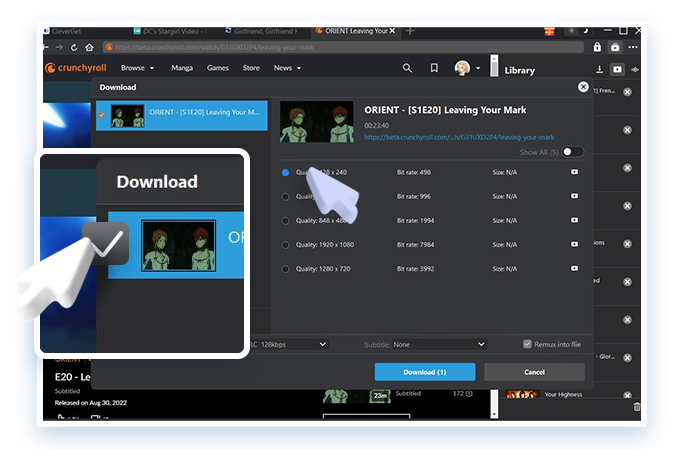
CleverGet's Download window for a Crunchyroll episode (ORIENT S1E20): five resolutions including 1920 x 1080 at 7,984 kbps and 1280 x 720, a 128 kbps audio track, the Subtitle drop-down and "Remux into file". Leawo's image adds a zoomed callout and cursor.
Features
Whole series across seasons
CleverGet Crunchyroll Downloader finds every season and episode related to the show you're watching, so you can download a full cour or an entire series in one batch instead of episode by episode.
Up to 1080p without re-encoding
CleverGet Crunchyroll Downloader saves at up to 1080p (the top resolution in its stream list) without converting the video, and writes MP4 or MKV files that play on PCs, phones and smart TVs.
Sub or dub, your choice
When an episode has several audio tracks (Japanese plus an English dub, for example) and several subtitle languages, CleverGet Crunchyroll Downloader lists them all, and you pick one audio track and one subtitle per download. The subtitle can be packed into the video file or saved as a separate SRT file.
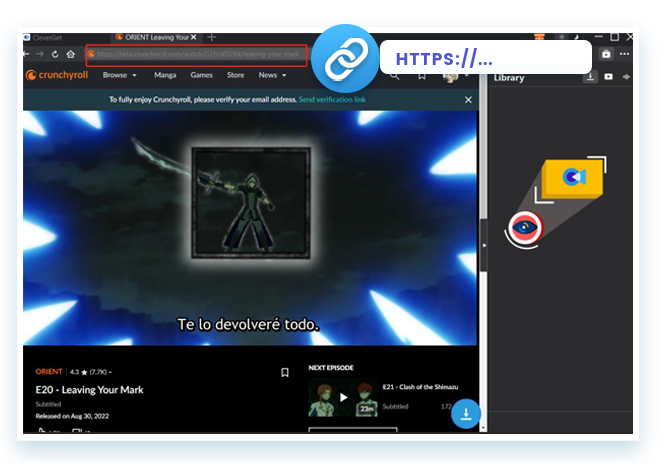
A Crunchyroll episode (ORIENT E20, "Leaving Your Mark") playing with Spanish subtitles in CleverGet's built-in browser, with the address bar and the download button at the bottom right. Leawo's image adds a callout.
No ads from free-trial accounts
Leawo says CleverGet Crunchyroll Downloader filters out the ads that play on Crunchyroll's ad-supported free-trial viewing, so the saved episodes play without interruptions.
Resume, metadata and auto shutdown
CleverGet resumes downloads interrupted by a network drop, keeps episode metadata for your library, offers optional GPU acceleration and can power the PC off when the batch is done.
Benefits
- Episodes that survive licensing changes. Shows leave Crunchyroll when licenses end; files you saved for personal use stay on your drive.
- Watch on a laptop or TV offline. The files play in any media player, with no app or connection needed.
- Cheaper than most CleverGet modules. At $49.95 a year it costs $10 less than the Paramount+ or Apple TV+ modules.
Real-World Uses
- A weekend binge on the road: download a full season in 1080p to a laptop before a trip.
- Dub for the family, sub for you: download an episode once with the English dub and once with Japanese audio and English subtitles.
- A media-server library: save MKV files with SRT subtitles for a home media player.
Who It's For, and Who Should Skip It
Good fit: Crunchyroll subscribers on Windows who watch offline on a laptop or TV and are happy with one language combination per file.
Skip it if:
- You care about styled anime subtitles. SRT output drops the fonts and positioning of Crunchyroll's ASS subtitles.
- You want several languages in one file. Only one audio track and one subtitle per download.
- You only watch on your phone. A PC download tool adds steps you may not need.
Usage Guide
- Install: download and run the CleverGet installer (about 500 MB).
- Log in: open crunchyroll.com inside CleverGet and sign in.
- Open the episode: go to the playback page of the episode you want.
- Parse: start parsing; CleverGet lists the resolutions, audio tracks, subtitles and other episodes.
- Download: choose 1080p, one audio track and one subtitle, then click Download.
Where it falls short
- Subtitles can break after updates. A Trustpilot reviewer reported in March 2026 that "The Crunchyroll module stopped downloading subtitles after the last update."
- SRT only for subtitles. Typesetting and song subtitles in ASS format aren't kept.
- One language combination per download. Multi-audio or multi-subtitle files need separate downloads.
- One license, one PC. Leawo's CleverGet FAQs say a license activates on one device only.
What Users Say
About the Crunchyroll module (Trustpilot)
Alberto (4 stars, March 2026), "Problems with CleverGet Crunchyroll Downloader": "The Crunchyroll module stopped downloading subtitles after the last update." He also notes that subtitles "only download in .SRT format and not .ASS." He still gave four stars.
About CleverGet in general
CleverGet's Trustpilot page (cleverget.com) showed 4.7 out of 5 from 66 reviews on October 31, 2026.
- David Latham (5 stars, May 2025): "CleverGet is practically "magical" in it's ability to download videos."
- Florian (5 stars, May 2026): "I did encounter a problem, but the technical team was very responsive and resolved it."
- Ed Bulchis (1 star, January 2024): "But now I keep getting a M7121-3078 error code, and I can't get ride of it."
- MobileAppDaily (Arpit Dubey, 4.1 out of 5): "CleverGet works well when it works."
Testimonials on Leawo's page
Leawo's Crunchyroll page quotes John Smith: "I can download episodes from crunchyroll and save them forever without worrying about them being removed due to licensing issues." These are picked by the vendor.
The pattern: CleverGet users like the download quality and support's responsiveness; for Crunchyroll in particular, subtitles are the weak spot (SRT only, and they broke after one update).
Comparisons
CleverGet Crunchyroll Downloader vs watching in Crunchyroll's apps
Watching in Crunchyroll's own apps keeps the original styled subtitles and carries no risk to your account, but you need the app and the service. CleverGet gives you 1080p files on a Windows PC that play anywhere and don't expire, with one audio track and an SRT subtitle per file.
Editions and Pricing
Leawo's purchase-page data showed these prices on October 31, 2026 (per computer):
| Option | 1 year | Lifetime | Covers |
|---|
| Crunchyroll Downloader | $49.95 | $79.95 | Crunchyroll only |
| CleverGet All-in-One | $189.95 | $539.90 | Every CleverGet module |
| Free trial | $0 | - | Up to 3 videos |
If Crunchyroll is the only service you'd download from, the single module is far cheaper; the All-in-One bundle only pays off once you'd buy four or so modules.
FAQs
Can CleverGet Crunchyroll Downloader save both the dub and the subtitles?
One of each per download. CleverGet Crunchyroll Downloader lets you pick one audio track and one subtitle, so for a second language combination you download the episode again.
Does it keep Crunchyroll's styled ASS subtitles?
No. CleverGet Crunchyroll Downloader saves subtitles as SRT, either embedded or as a separate file, so styling and positioning are lost.
What's the best quality it downloads?
1080p. CleverGet Crunchyroll Downloader lists the stream resolutions Crunchyroll offers, up to 1920 x 1080.
Can I download music videos and movies too?
Yes. Leawo says CleverGet Crunchyroll Downloader handles series, movies, music videos and other on-demand videos on crunchyroll.com.
Is there a Mac version?
Yes. Leawo sells a Mac edition of CleverGet Crunchyroll Downloader at the same price; a Windows license doesn't cover a Mac.
How many episodes does the trial download?
Three videos. That's enough to check the resolution and subtitles on your own account before you buy.
System Requirements
- Windows: 7, 8, 8.1, 10 or 11 (64-bit)
- Processor: 1 GHz Intel or AMD or faster
- Memory: 512 MB RAM (1 GB or more recommended)
- Disk: 5 GB or more free
- Graphics: NVIDIA GeForce GTX 260 or better
Conclusion
CleverGet Crunchyroll Downloader is a reasonable $49.95-a-year buy for Windows anime fans who want 1080p episodes offline on a laptop or TV. Whole-season batches, a sub-or-dub choice and permanent files give you files you control on your own PC.
Its weak spot is subtitles: SRT only, one language per file, and a reported break after one update. Use the 3 free downloads to check subtitles on the shows you watch before you pay.
Download Free TrialBuy Now