Leawo UHD Copy: 1:1 Backups of 4K Ultra HD Blu-ray Discs, If Your Drive Allows It
Leawo UHD Copy is a Windows program that makes 1:1 backups of 4K Ultra HD Blu-ray discs to a blank disc, a folder or an ISO file, keeping HDR10, HDR10+ and Dolby Vision. It costs $44.95 for one year or $99.95 for a lifetime license. It's for collectors who own 4K discs and want a backup copy, and it only works with a compatible 4K drive.
4K discs scratch and crack like any other, and replacing a boxed edition isn't always possible. UHD Copy is Leawo's answer, with one catch you need to know about up front: the drive.
Quick facts
- Current version: 13.0.1.6, part of the Leawo Prof. Media 13 suite (installer dated October 10, 2026)
- Developer: Leawo Software Co., Ltd.
- Runs on: Windows 7, 8, 8.1, 10 and 11. A Mac version is sold separately.
- Input and output: 4K Ultra HD Blu-ray disc, folder or ISO file, including BD100 to BD100, BD66 to BD66 and 3D UHD discs
- Copy modes: Full Movie (everything on the disc) or Main Movie (the film only)
- Price: $44.95 for 1 year (auto-renews, 5-day money-back guarantee) or $99.95 lifetime (14-day money-back guarantee), 1 PC
- You'll need: a "friendly" 4K UHD drive from Leawo's supported list, 4 GB RAM, a recent CPU and GPU, and 200 GB of free disk space
What we checked: the Windows installer Leawo's download page serves (ltmcp_setup.exe, Leawo Prof. Media, file version 13.0.1.6, 209,171,392 bytes, dated October 10, 2026), the prices in the product page's order box ($44.95 for 1 year, $99.95 lifetime) and Leawo's list of supported 4K drives, on October 31, 2026. We didn't copy a 4K disc ourselves.
Before you buy: check your drive
- Most 4K drives won't work out of the box. Leawo explains that "unfriendly" UHD drives enforce AACS 2.0 and block third-party tools, while "friendly" drives (mostly certain LG, ASUS and Pioneer models with the right firmware) can be read. Check your exact model on Leawo's supported-drive list before paying.
- A firmware update can break it. Leawo notes that listed LG and ASUS drives can stop loading after their firmware is upgraded to the latest version; the fix is to downgrade the firmware with Leawo UHD Drive Tool, which is sold separately.
- A regular Blu-ray drive isn't enough to read 4K discs, and burning a BD100 or BD66 copy needs a drive that can write those discs.
- Personal backups only. Leawo's fair use policy says its software is for personal, non-commercial use with content you've lawfully obtained.
Download Free TrialBuy Now
Overview
UHD Copy runs in the Copy tab of Leawo Prof. Media. You add a disc, folder or ISO with "Add UHD/Blu-ray/DVD", pick the copy mode and which titles, audio tracks and subtitles to keep, then click the green Copy button to choose where the copy goes: a blank disc, a folder, an ISO file, or several at once.
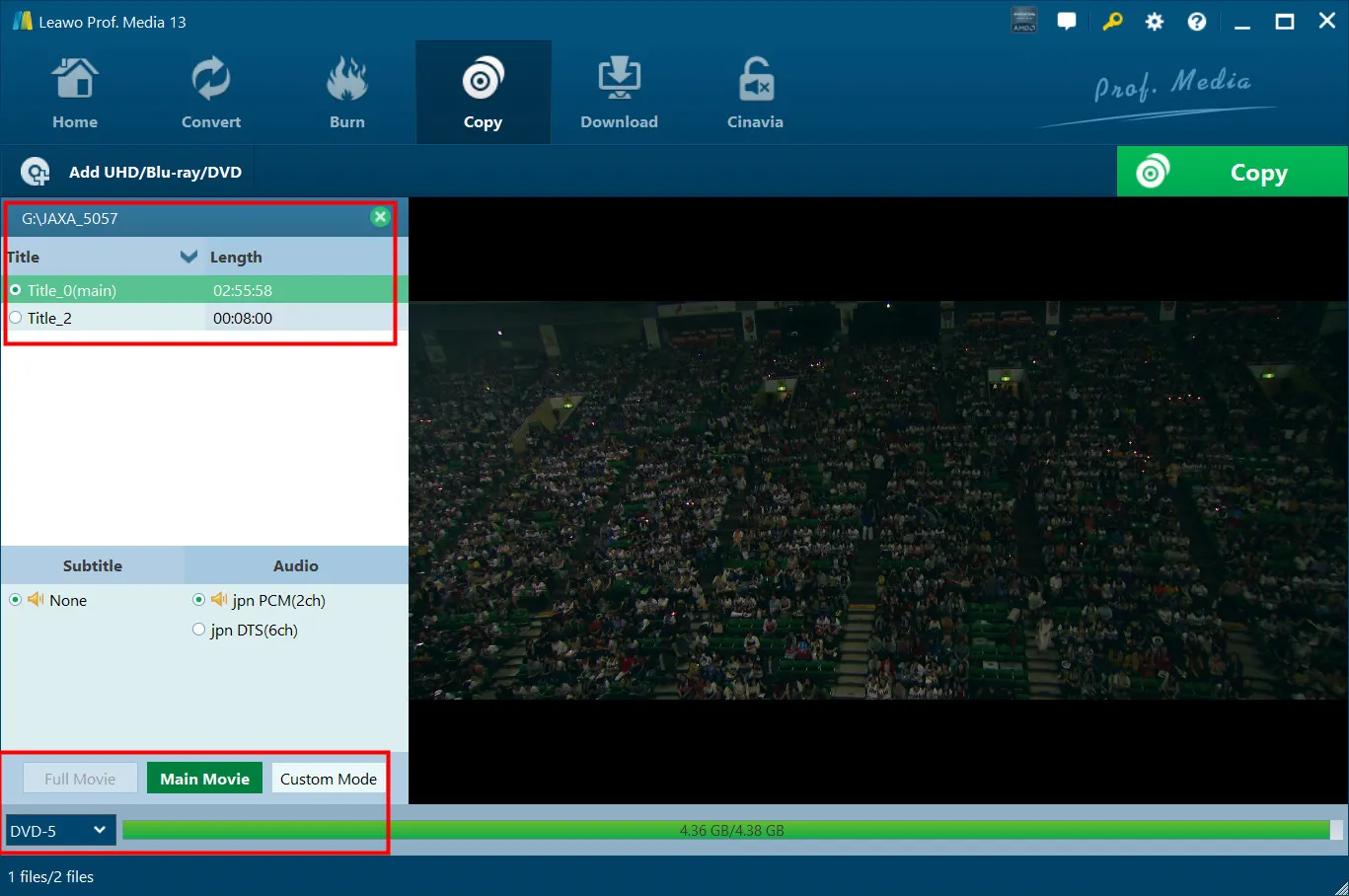
The Copy tab in Leawo Prof. Media 13 with a disc loaded: the title list (main title selected), audio track choices, the Full Movie, Main Movie and Custom Mode buttons, and a preview. Leawo's guide uses a DVD-5 example here, not a 4K disc.
Features
1:1 Full Movie copies, BD100 and BD66 included
Leawo UHD Copy's Full Movie mode copies everything on the disc, menus and extras included: BD100 to BD100, BD66 to BD66, and 3D UHD discs. Leawo says the HDR10, HDR10+ and Dolby Vision picture is kept exactly as on the original.
Main Movie mode to save space and time
Leawo UHD Copy's Main Movie mode copies just the feature, with the audio tracks and subtitles you pick, so the copy is smaller and quicker to make. You choose titles, audio and subtitles in the same panel.
Discs from any region
Leawo UHD Copy copies 4K discs from any country, provided the drive is compatible, and handles the AACS 2.0 protection on 4K discs.
Copy to disc, folder and ISO at once
Leawo UHD Copy's output panel writes to a disc, a folder and an ISO in one job, labels the disc and shows how much free space the copy needs.
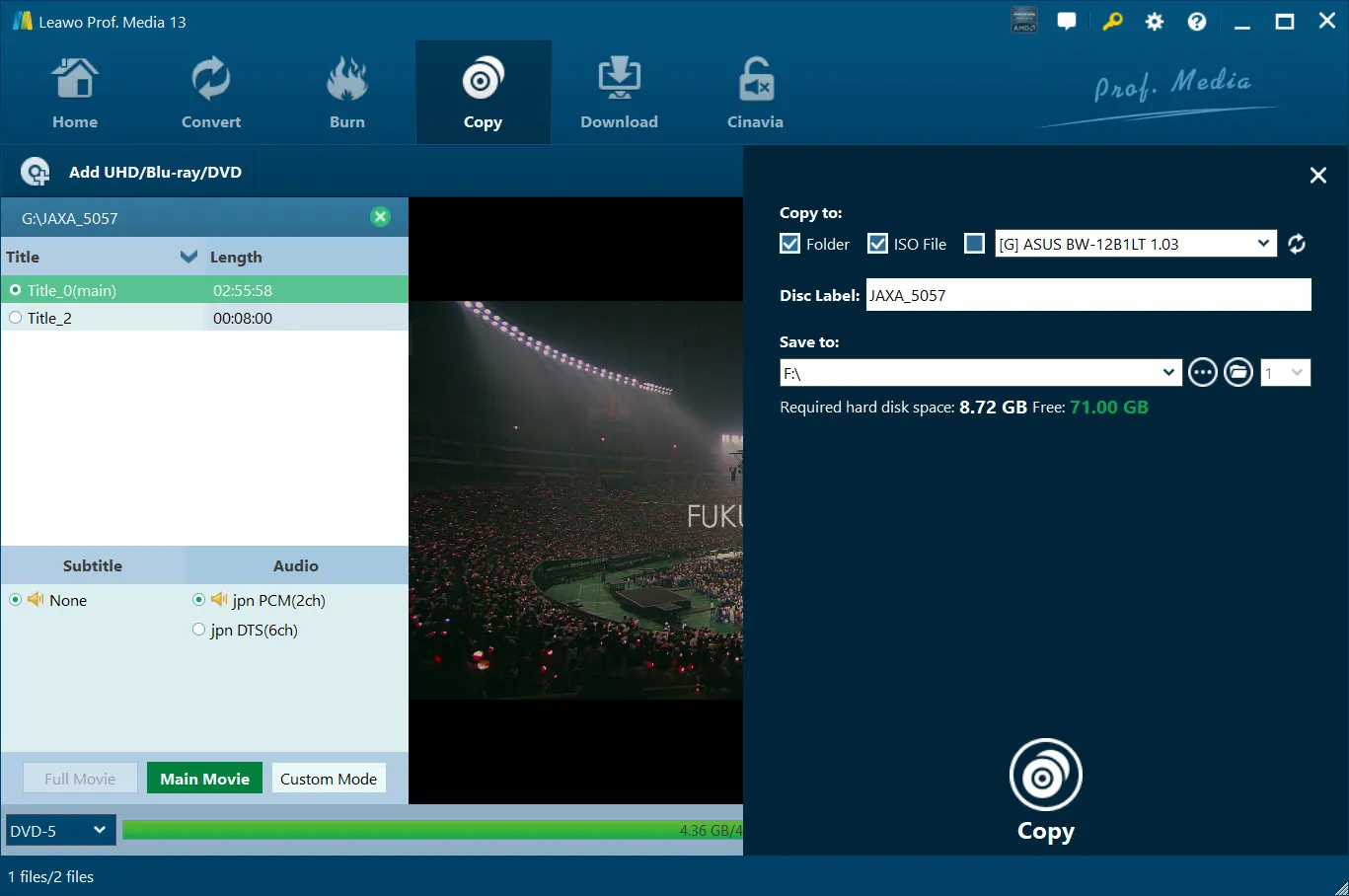
The output sidebar: Copy to Folder and ISO File, an ASUS BW-12B1LT drive in the disc list, Disc Label, Save to, and the required versus free disk space.
Benefits
- A spare for the discs you can't replace. Limited editions and out-of-print titles get a working backup.
- Full quality kept. Unlike a rip to MP4, a 1:1 copy keeps the original video, HDR and audio untouched.
- Disc-free archive. An ISO or folder copy on a NAS keeps the collection safe even without spare blank discs.
Real-World Uses
- Protecting a collection: copy each 4K disc to an ISO on a home server and keep the originals in storage.
- A disc for the kids' room: burn a Main Movie copy and keep the original out of harm's way.
- Replacing a scratched copy of a disc you own before it becomes unreadable.
Who It's For, and Who Should Skip It
Good fit: 4K Blu-ray collectors with (or willing to buy) a drive on Leawo's supported list, who want exact backups rather than compressed files.
Skip it if:
- Your drive isn't on Leawo's list and you don't want to downgrade its firmware.
- You want files to stream on a TV, phone or Plex. Leawo UHD Ripper converts 4K discs to MP4 or MKV instead.
- You only have regular HD Blu-rays. Leawo Blu-ray Copy is cheaper for those.
Usage Guide
- Check the drive against Leawo's supported 4K drive list, and install Leawo Prof. Media.
- Add the source: open the Copy tab and use "Add UHD/Blu-ray/DVD" to add the disc, folder or ISO.
- Choose mode and contents: Full Movie or Main Movie, then the titles, audio tracks and subtitles.
- Output settings: click the green Copy button and set Copy to, Disc Label and Save to.
- Start: click Copy at the bottom of the sidebar.
Tips
- Don't flash firmware you don't need to. Leawo's FAQ says that if your drive already works with Prof. Media, there's no need to re-flash it.
- Leave plenty of disk space. Leawo asks for 200 GB free on Windows; a BD100 copy alone can approach 100 GB.
Where it falls short
- Drive dependence. Without a friendly drive it can't read 4K discs at all, and Leawo's own FAQ notes that not every "official" UHD drive is supported.
- Firmware risk. Leawo itself warns that firmware updates to make a drive friendly can damage the drive or void its warranty.
- No independent tests. We found no independent review of UHD Copy's output, speed or stability; Leawo's guide screenshots even use a DVD example.
What Users Say
We couldn't find an independent review of Leawo UHD Copy. Here's what we did find:
Trustpilot (Leawo as a company)
Leawo's Trustpilot pages showed 4.4 out of 5 from 151 reviews (leawo.org) and 4.3 out of 5 from 158 reviews (leawo.com) on October 31, 2026, across all Leawo products. Reviews mentioning the 4K tools:
- Alexander Robinson (5 stars, September 2026), about Leawo's ripping tools: "Blu-ray Ripper and UHD Ripper Work Great."
- Aurélie BN (5 stars, August 2026): "Leawo Prof Media 13 was a very very good application"
- josuemendez (5 stars, October 2025): "This software was easy to use ..with the right bluray writer unlocked"
- Maite Matar (1 star, December 2025), about support: "there's no helpline or customer support. Completely unreliable and not as advertised."
On Leawo's own page
Leawo's UHD Copy page shows testimonials it selected, such as Elizabeth Lusk's: "It copies 4K Blu-ray disc without any quality loss and the entire 4K UHD Blu-ray copy process is fast." Treat these as the vendor's marketing.
The pattern: Leawo's 4K tools get good marks from people whose drive works with them, and josuemendez's remark about having "the right bluray writer unlocked" is the key. Confirm your drive first, and try the free download before paying.
Comparisons
UHD Copy vs UHD Ripper
Leawo UHD Copy makes an exact disc, folder or ISO copy. Leawo UHD Ripper converts 4K discs into video files such as MP4 or MKV for streaming and other devices. Leawo sells both together for $119.94 lifetime.
UHD Copy vs Blu-ray Copy
Leawo Blu-ray Copy handles regular Blu-rays and DVDs; UHD Copy is the one for 4K Ultra HD discs.
Editions and Pricing
| License | Price | Includes | Money-back |
|---|
| 1 Year (auto-renews) | $44.95 | UHD Copy, 1 PC | 5 days |
| Lifetime | $99.95 | UHD Copy, 1 PC | 14 days |
| UHD Ripper + UHD Copy (lifetime) | $119.94 | Adds UHD Ripper | 14 days |
| Prof. Media 13 + CleverGet Video Downloader (lifetime) | $229.95 | All 17 Prof. Media modules | 14 days |
Prices from Leawo's order box on October 31, 2026. Leawo UHD Drive Tool, for downgrading drive firmware, is a separate purchase.
FAQs
Which drives work with Leawo UHD Copy?
Leawo UHD Copy needs a "friendly" 4K drive. Leawo's supported list includes models such as the LG WH16NS60, LG BU40N, ASUS BW-16D1HT and many Pioneer BDR drives, but the firmware matters as much as the model.
My drive is on the list but Leawo UHD Copy won't load the disc. Why?
Leawo UHD Copy usually fails on a listed LG or ASUS drive because its firmware was updated to the latest version. Leawo's fix is to downgrade the firmware with Leawo UHD Drive Tool.
Does Leawo UHD Copy keep Dolby Vision and HDR10+?
Yes, according to Leawo. Leawo UHD Copy makes 1:1 copies and says HDR10, HDR10+ and Dolby Vision picture quality is preserved.
Why is the download called Leawo Prof. Media?
Leawo UHD Copy is a module of Leawo Prof. Media. After you buy, open the Activation Center from the key icon and enter your code to activate it.
Is a Mac version of Leawo UHD Copy available?
Yes. Leawo sells a Mac edition separately; it runs on macOS 10.13 or later on 2016-or-newer Macs and needs 66 GB of free space.
System Requirements
- Windows: 7, 8, 8.1, 10 or 11
- Processor: AMD Ryzen 1000 series or Intel Kaby Lake or newer
- Graphics: NVIDIA GeForce GTX 1050 or AMD Radeon 5000 series or newer
- Memory: 4 GB RAM or more
- Disk: 200 GB free
- Other: a compatible 4K UHD drive and an internet connection
Conclusion
Leawo UHD Copy is worth buying only once you've confirmed your 4K drive is on Leawo's supported list. With the right drive, it's a straightforward way to make exact 1:1 backups of the 4K discs you own, HDR and Dolby Vision included, to a disc, a folder or an ISO.
The main reasons to hold back are the drive and firmware dependence and the lack of any independent testing. Download the free trial and check that it reads one of your discs before you pay. If you'd rather have files to stream, UHD Ripper is the better buy.
Download Free TrialBuy Now