Leawo PhotoIns: AI Photo Enhancing, Background Removal and Upscaling in One Batch Tool
Leawo PhotoIns is a Windows photo toolkit that bundles three AI tools: Photo Enhancer (fixes blur, haze, exposure and color, and retouches skin), Photo BG Remover (cuts out or replaces backgrounds, including hair and fur) and Photo Enlarger (upscales images up to 40X). Each works on one photo or a whole batch. It costs $79.95 a year or $109.95 for a lifetime license, and each tool is also sold on its own.
It's aimed at people with a folder of photos to fix quickly, such as product shots for an online shop or a batch of hazy holiday pictures, rather than at photographers who want to adjust every slider by hand.
Quick facts
- Current installer: Leawo PhotoIns 4.0.0.1 for Windows, dated June 17, 2022
- Developer: Leawo Software Co., Ltd.
- Runs on: 64-bit Windows 7, 8 and 10 as listed by Leawo (a separate Mac version is sold)
- Modules: Photo Enhancer, Photo BG Remover, Photo Enlarger, each in automatic batch mode or manual mode
- Price: $79.95 for 1 year or $109.95 lifetime; the tools separately cost $29.95, $29.95 and $39.95 a year
- Needs: 4 GB RAM (8 GB recommended), an OpenGL 3.3 graphics card, 4 GB of disk space and internet for activation
What we checked: the Windows installer that every Leawo photo tool's download page links (online_photoins_setup.exe, file version 4.0.0.1, last changed June 17, 2022, a 3.5 MB online installer), and the plan prices on Leawo's PhotoIns order page ($79.95 for 1 year, $109.95 lifetime, Photo Enhancer and Photo BG Remover $29.95 a year each, Photo Enlarger $39.95 a year) on October 31, 2026. We didn't process photos with it ourselves.
Before you buy
- It hasn't been updated in years. The installer Leawo links today dates from June 2022, and Leawo's requirements list Windows 10 but not Windows 11. Try the trial on your PC first.
- Buy only what you need. All three tools come in PhotoIns, but each is also sold separately. If you only cut out backgrounds, Photo BG Remover alone costs $29.95 a year instead of $79.95.
- Little manual control. Reviewers say the enhancer's main adjustment is the strength of the AI effect, which can overdo it on some photos.
- Refunds are narrow. Leawo refunds within 14 days only for reproducible bugs it can't fix, hardware incompatibility or duplicate orders.
Download Free TrialBuy Now
Overview
Leawo PhotoIns opens to a home screen with its three modules. Each module has the same workflow: click Add Photo, choose batch or one-by-one processing, set the output options and click Output. Batch mode applies the AI automatically to every photo, while manual mode shows a before/after preview so you can adjust one photo at a time.
Features
Photo Enhancer fixes blur, haze, exposure and color
Leawo PhotoIns' Photo Enhancer sharpens blurry and hazy pictures and raises their resolution, corrects white balance, color and exposure, and has portrait touch-ups: smoothing skin, removing freckles and enlarging eyes. A slider in the middle of the preview shows the before and after on the same photo.
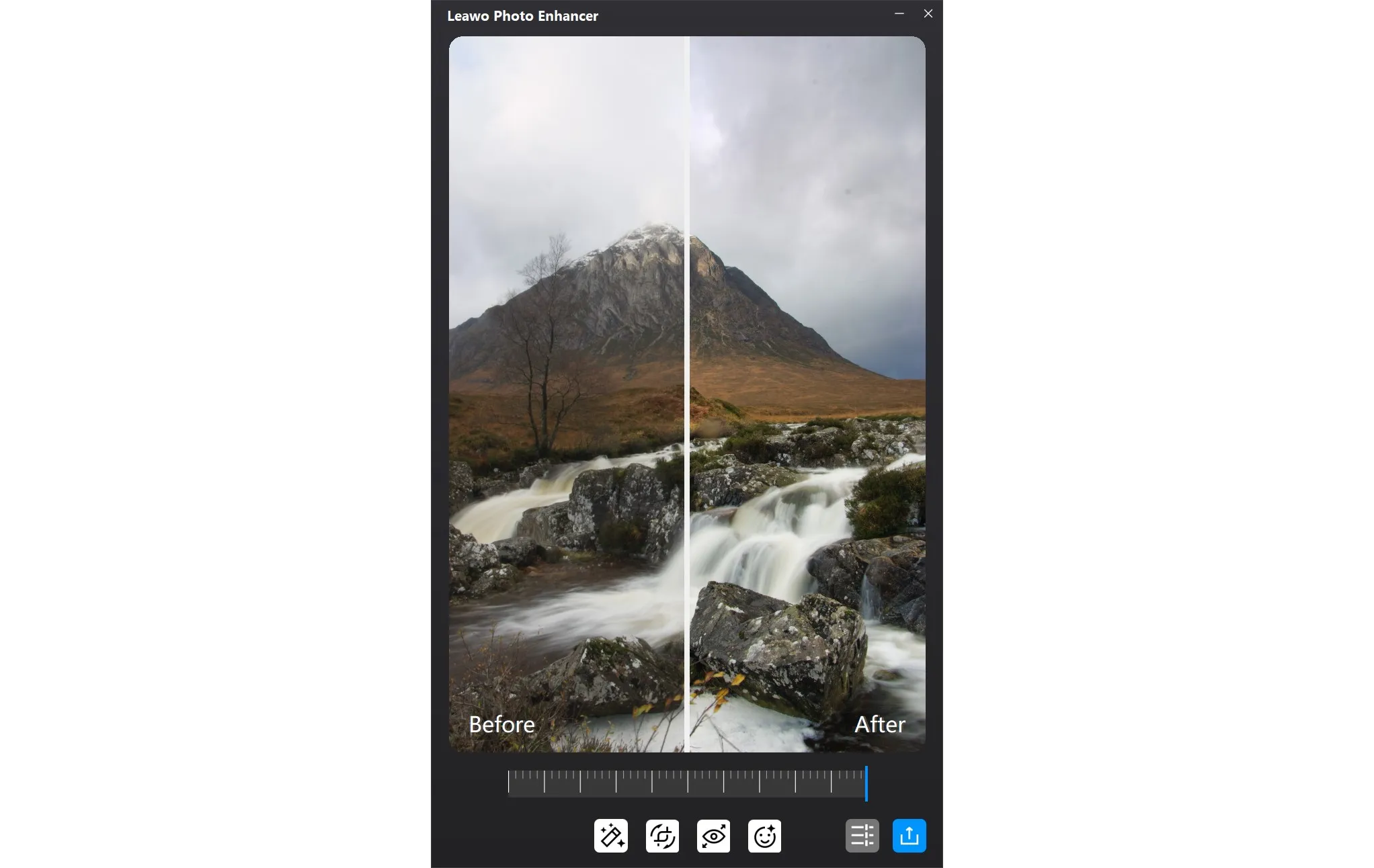
The Photo Enhancer window in manual mode: a split before/after view of a mountain and waterfall photo, with the enhancement tools along the bottom.
Photo BG Remover cuts out subjects, hair included
Leawo PhotoIns' Photo BG Remover finds the subject automatically and removes the background, leaving it transparent or replacing it with a color or another picture. Brush tools let you add or erase parts of the selection by hand when the automatic cut misses an edge.
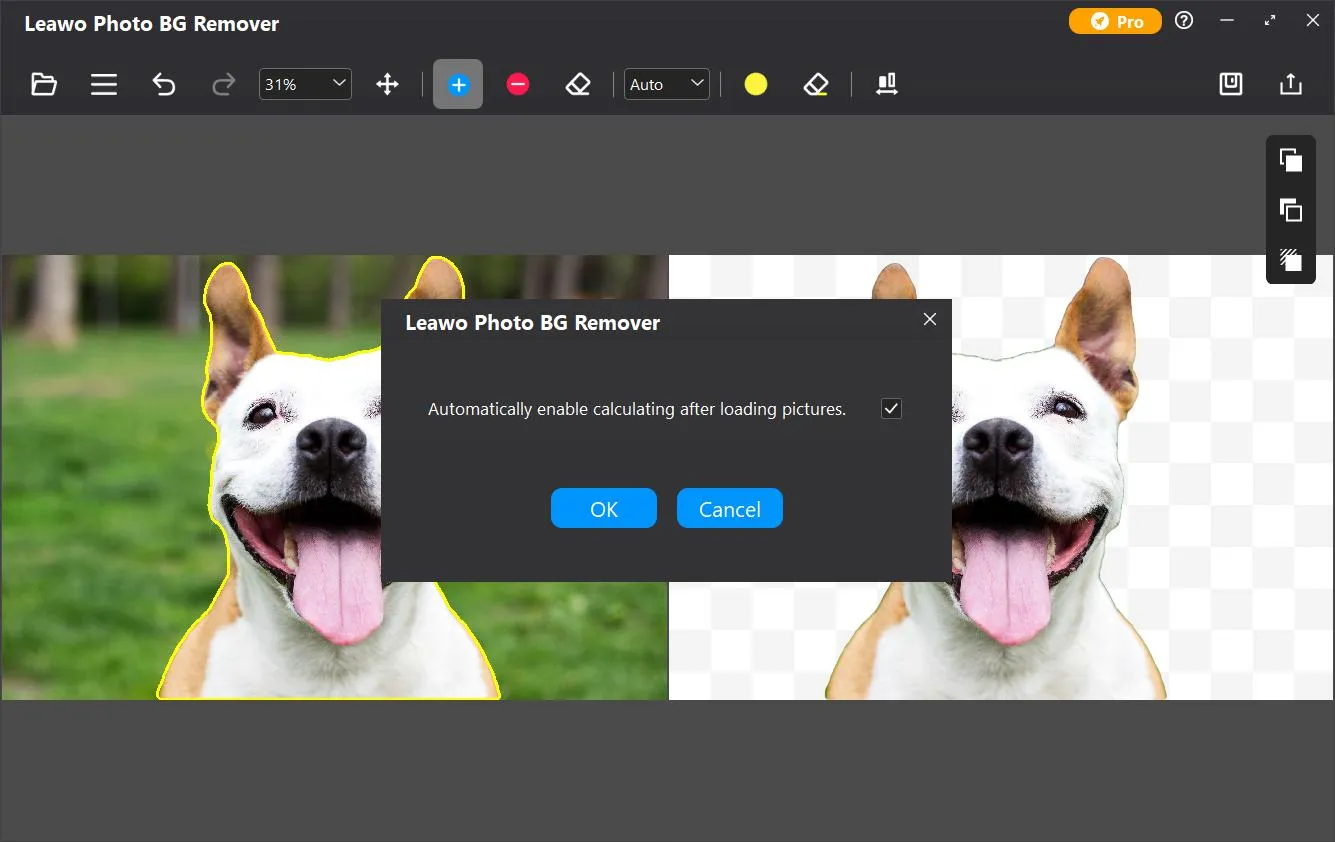
Photo BG Remover: the original dog photo with its outline selected on the left, the cut-out on a transparent background on the right, and a prompt to calculate automatically after loading pictures.
Photo Enlarger upscales up to 40X
Leawo PhotoIns' Photo Enlarger enlarges images by 2X up to 40X, rebuilding detail rather than just stretching pixels, and can reduce noise and blur and adjust saturation, contrast and brightness on the way.
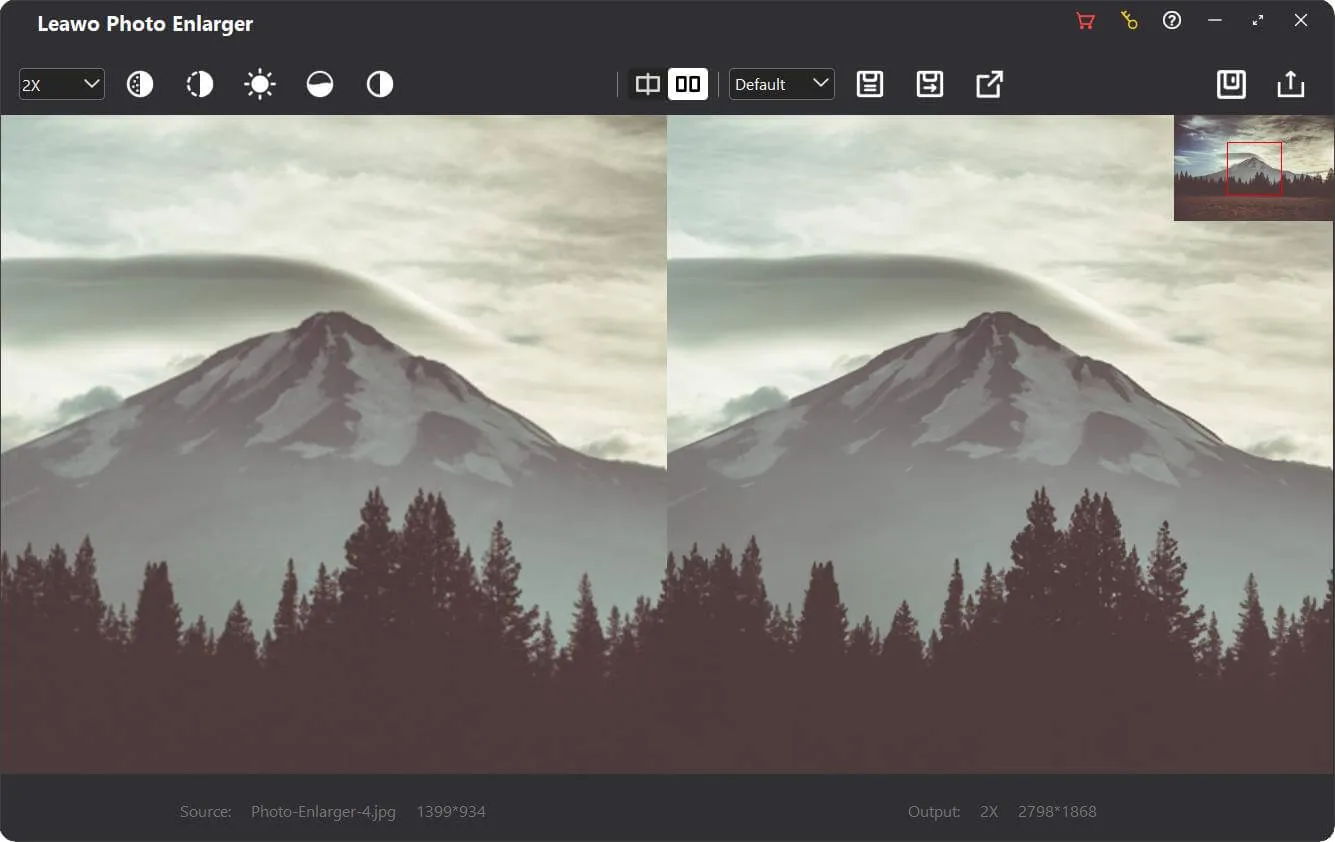
Photo Enlarger at 2X: a 1399 x 934 source photo of a mountain next to its 2798 x 1868 output, with scale, adjustment and save buttons in the toolbar.
Batch processing for whole folders
Leawo PhotoIns runs each module on a batch of photos in automatic mode, which is where it saves the most time: load a folder, let the AI work and export the results to one output folder.
Benefits
- Fast fixes without photo-editing skills. Each job is a few clicks.
- Three tools for less than buying them separately. The three yearly plans add up to $99.85; PhotoIns is $79.95.
- Before and after on screen. Manual mode shows the original and the result side by side, so you can see what the AI changed before you save.
Real-World Uses
- Product photos for an online shop: remove backgrounds in batch and place items on plain white.
- Old or small photos: enlarge a low-resolution scan for printing.
- Holiday pictures: brighten and de-haze a folder of landscape shots in one pass.
Who It's For, and Who Should Skip It
Good fit: small sellers, bloggers and families who want quick, automatic fixes on many photos.
Skip it if:
- You need precise control. Lightroom or Photoshop give you every slider; PhotoIns mostly gives you the AI's result.
- You only need one of the three tools. Buy that tool alone.
- You want software that's actively updated. The current installer is from 2022.
Usage Guide
- Install: run the small online installer, which downloads the program; activation needs an internet connection.
- Choose a module: Photo Enhancer, Photo BG Remover or Photo Enlarger.
- Add photos: click Add Photo and pick one image or many.
- Process: choose batch mode to let the AI work on everything, or manual mode to adjust one photo at a time.
- Export: click Output, set the folder and format, and click Output again on the settings panel.
Where it falls short
- The AI can overdo it. A photographer on Giveaway of the Day wrote that the enhancer's AI goes too far and that its only adjustment is the strength of the effect.
- No recent updates. The installer is from June 2022 and Windows 11 isn't in the published requirements.
- On Mac it needs Rosetta. Leawo lists Apple M1/M2 support with Rosetta required, so it doesn't run natively on Apple silicon.
What Users Say
Independent reviews of PhotoIns are scarce; most pages about it are giveaway or sales listings.
Giveaway of the Day (Photo Enhancer 4.0.0.2, June 2023)
- Simon: "This program can significantly improve your photos."
- Darren C.: "Your AI is overdoing it with its enhancements."
- Dennis W Comito: "Two major issues they need to resolve."
On Leawo's own page
Leawo quotes customers (testimonials chosen by the vendor). John: "PhotoIns is one of the easiest photo enhancers I've ever gotten and is a perfect complement to other more professional photo-editing software." Jacob.W on Photo BG Remover: "It can accurately cut out the edges of the object, even hair and feather, without making the photo looks jagged." Leawo's page data shows 4.9 out of 5 from 232 ratings.
The pattern: users like how quickly the automatic modes produce a usable result; the criticism is that the AI can be heavy-handed with few controls to rein it in.
Comparisons
Leawo PhotoIns vs buying the tools separately
Leawo PhotoIns includes all three modules for $79.95 a year or $109.95 lifetime. Separately, Photo Enhancer and Photo BG Remover are $29.95 a year ($39.95 lifetime) each and Photo Enlarger is $39.95 a year ($59.95 lifetime). If you need two or more tools, PhotoIns is cheaper; for one tool, buy that tool.
Editions and Pricing
| Product | 1 Year | Lifetime | Includes |
|---|
| PhotoIns | $79.95 | $109.95 | All three tools |
| Photo Enhancer | $29.95 | $39.95 | Enhancing only |
| Photo BG Remover | $29.95 | $39.95 | Background removal only |
| Photo Enlarger | $39.95 | $59.95 | Upscaling only |
Prices are the same for Windows and Mac; each license covers one platform. Yearly plans renew automatically until cancelled.
FAQs
Does Leawo PhotoIns run on Windows 11?
Leawo lists only 64-bit Windows 7, 8 and 10 for PhotoIns, and the installer dates from 2022. Install the free trial on your Windows 11 PC to check it before buying.
Can I buy only the background remover?
Yes. Leawo sells Photo BG Remover separately for $29.95 a year or $39.95 lifetime; PhotoIns is the three-tool bundle.
Does Leawo PhotoIns need an internet connection?
Yes. Leawo PhotoIns needs an internet connection and registration for activation, subscription validation and online services, according to Leawo's requirements.
What graphics card does Leawo PhotoIns need?
Leawo PhotoIns needs an OpenGL 3.3-compatible graphics card and a DirectX 10-capable video adapter, with 4 GB of RAM at minimum and 8 GB recommended.
Does the Mac version run on Apple silicon?
Leawo PhotoIns for Mac supports Apple M1 and M2 Macs only through Rosetta, according to Leawo's requirements.
System Requirements
- Windows: 7, 8 or 10 (64-bit)
- Processor: Intel Core i3 or AMD Athlon 64, 2 GHz or faster
- Memory: 4 GB RAM (8 GB recommended)
- Graphics: OpenGL 3.3 compatible card, DirectX 10-capable adapter
- Display: 1024 x 768 (1280 x 800 recommended)
- Disk: 4 GB free, SSD for best performance
- Other: internet connection for activation
Conclusion
Leawo PhotoIns is a reasonable buy if you need at least two of its tools and want fast, automatic batch fixes rather than fine control. Background removal, enhancement and 40X upscaling in one package cost less than buying the tools separately, and each job takes a few clicks.
The main reason to hesitate is age: the installer is from June 2022 and Windows 11 isn't listed. Run the trial on your own PC and a few typical photos. If the results look right, the lifetime license avoids paying again every year.
Download Free TrialBuy Now