Leawo UHD Ripper for Mac: Turn 4K Ultra HD Blu-rays Into HDR10 MKV and MP4 Files on a Mac
Leawo UHD Ripper for Mac is a $44.95-a-year (or $99.95 lifetime) macOS module that removes the AACS 2.0 protection from 4K Ultra HD Blu-ray discs and converts them to HEVC 10-bit HDR10 MKV or MP4, lossless MKV or ordinary video files, keeping 7.1 audio. It's for Mac owners who want their 4K discs in Plex, Infuse or the Apple TV app, and it needs a 2016-or-newer Mac, macOS 10.13 or later, and a compatible external UHD drive.
A 4K disc only plays in a 4K player, and no Mac can play one natively. Ripping it gives you a file that keeps the HDR picture and plays on the Apple TV 4K, an iPad or any 4K TV on your network, with the disc safe on the shelf.
Quick facts
- What you install: Leawo Prof. Media 13 for Mac, with UHD Ripper as one of its modules
- Mac downloads: separate builds for "Mac with Apple Chip" (ltmcu_setup_arm64.dmg, 316 MB, dated July 7, 2026) and "Mac with Intel Chip" (ltmcu_setup.dmg, 241 MB, dated June 10, 2026)
- Runs on: macOS 10.13 High Sierra to macOS 27, on a MacBook Pro 2016, MacBook Air 2017, iMac 2017, Mac mini 2018, Mac Pro 2019 or newer
- Reads: 4K UHD Blu-ray discs (multi-angle included), folders and ISO files
- Writes: HEVC 10-bit HDR10 MP4/MKV, lossless MKV/MP4, multi-track MKV/MP4, 4K and HD MP4/MKV, MOV, AVI and 180+ other profiles, plus audio
- Price: $44.95 for 1 year (auto-renews, 5-day money-back guarantee) or $99.95 lifetime (14 days), one Mac
- What we checked: both Mac installers on Leawo's UHD Ripper for Mac download page (Apple chip 316 MB, Intel 241 MB, sizes and dates from the download server), the Mac requirements on the UHD Ripper page, and the order page, which charged $44.95 for one year of "Leawo UHD Ripper for Mac" on November 1, 2026. We didn't rip a 4K disc on a Mac.
Before you buy
- The drive comes first. Leawo says UHD Ripper handles nearly all 4K discs "if your PC is equiped with UHD-compatible drive". On a Mac that means a USB drive from Leawo's supported list, such as the LG BP50NB40 or BP60NB10, or a listed internal drive in a USB enclosure. Many drives need older firmware first, which Leawo's separate UHD Drive Tool can install.
- Older Macs are out. Leawo lists only the MacBook Pro 2016, MacBook Air 2017, iMac 2017, Mac mini 2018, Mac Pro 2019 and later.
- Pick the right build. The download page has separate Apple chip and Intel buttons. Use About This Mac to check which you have.
- Leave room on the disk. Leawo asks for 66 GB free; a lossless 4K rip is roughly the size of the film on the disc, often 50 GB or more.
- Personal use only. Leawo limits its software to discs you've lawfully obtained. Whether removing copy protection is legal depends on where you live.
Download Free TrialBuy Now
Overview
Leawo UHD Ripper lives in the Convert tab of Prof. Media for Mac, which uses one interface for its Blu-ray, DVD and UHD rippers and its video converter. You load a disc from /Volumes (or a folder or ISO), choose which titles to rip, pick an output profile, and convert. Leawo's Mac guide still shows Prof. Media 12 and a regular Blu-ray, but the steps for a 4K disc are the same.
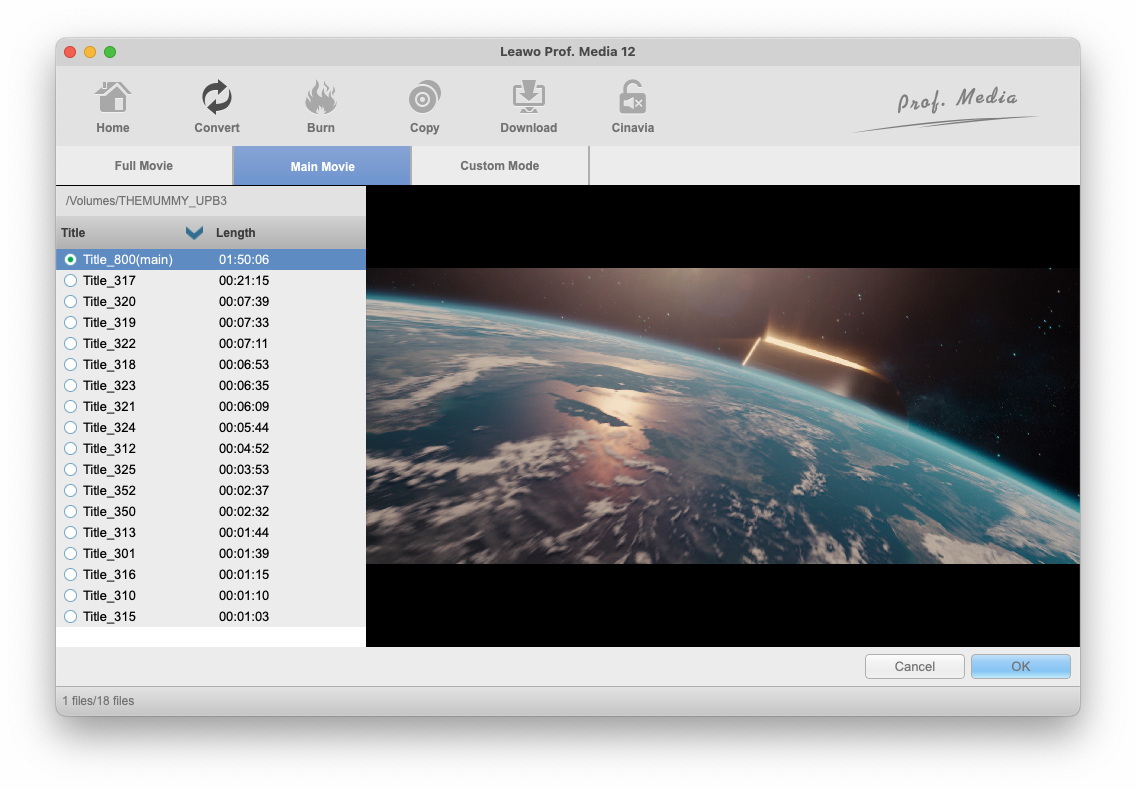
Choosing titles on a Mac: Full Movie, Main Movie and Custom Mode tabs, the disc's 18 titles with the main one (1:50:06) selected, and a preview playing (Prof. Media 12 for Mac in Leawo's guide).
Features
HDR10 HEVC output that Apple devices can play
Leawo UHD Ripper for Mac converts 4K discs to HEVC 10-bit HDR10 MP4 or MKV, added for both Windows and Mac in the Prof. Media 13.0.3 update in 2024. HEVC with HDR10 is what the Apple TV 4K, recent iPads and Macs decode in hardware, so a rip in that format keeps the high dynamic range and plays smoothly instead of being tone-mapped down to SDR.
Lossless and multi-track MKV for a home server
Leawo UHD Ripper for Mac's lossless MKV and MP4 profiles copy the video and audio streams without decoding or re-encoding, so the file matches the disc. The multi-track MKV keeps every audio track, subtitle and camera angle in one file, which Plex, Jellyfin or Infuse can then offer you at playback. All of these sit under Format > Lossless video in the profile panel, next to Common Video, HD Video and 2K\4K Video.
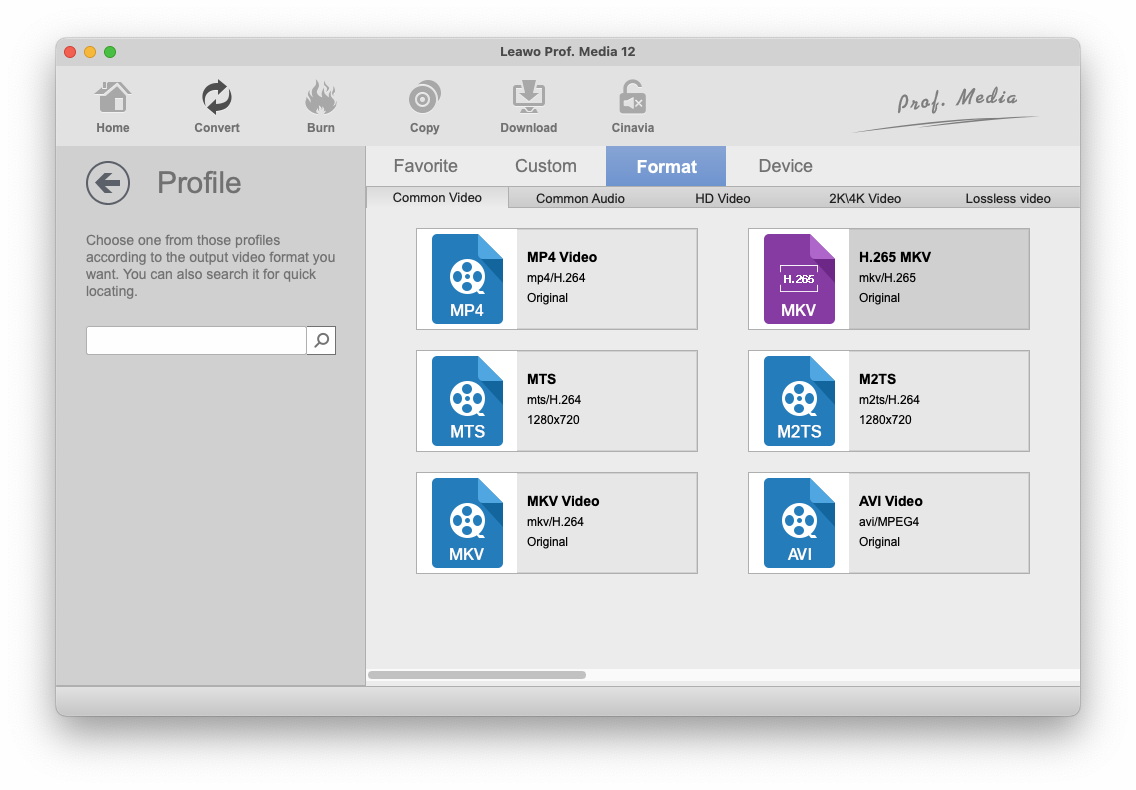
The Mac Profile panel: Favorite, Custom, Format and Device tabs, with Common Video (MP4, H.265 MKV, MKV, MTS, M2TS, AVI) showing and the 2K\4K Video and Lossless video tabs alongside.
Apple VideoToolbox acceleration
Leawo UHD Ripper for Mac speeds up conversion with Apple's VideoToolbox framework rather than the NVIDIA and AMD acceleration the Windows version lists. The Performance tab has separate switches for hardware decode and hardware encode. In Leawo's Mac guide, hardware decode is greyed out with the note "Apple Silicon Mac doesn't support VideoToolbox Hardware Decode right now", while hardware encode is on.

The Mac Performance settings: Enable VideoToolbox Hardware Decode (greyed out on an Apple silicon Mac) and Enable VideoToolbox Hardware Encode (ticked), from Leawo's Prof. Media 12 for Mac guide.
Edit, preview and fine-tune before ripping
Leawo UHD Ripper for Mac includes an editor for trimming, cropping, text or image watermarks, video effects, merging titles and 3D effects, and a profile editor for codec, bit rate, resolution, frame rate, aspect ratio, sample rate and channels. You can pick chapters and angles on multi-chapter or multi-angle discs, and the built-in 4K player previews titles and grabs screenshots.
Benefits
- 4K HDR on Apple hardware. An HDR10 HEVC file plays on an Apple TV 4K or iPad, which can't read a disc at all.
- A library instead of a shelf. Rip once, and the film is a click away in Plex or Infuse on every screen in the house.
- Native on Apple silicon. The separate Apple chip build means an M-series Mac doesn't have to run it through Rosetta.
Real-World Uses
- A Mac mini media server. Rip each 4K disc to multi-track MKV on an external drive and serve it with Plex to an Apple TV 4K.
- Movies for a flight. Convert the same disc to a 1080p MP4 that fits on an iPad.
- Keeping the HDR in a smaller file. Use the HEVC 10-bit HDR10 MP4 profile instead of lossless to save space but keep the HDR picture.
Who It's For, and Who Should Skip It
It's a good fit if you own 4K discs, use a 2016-or-newer Mac, and have (or will set up) a UHD-friendly USB drive, and you want files to stream rather than discs to swap.
Skip it if:
- Your discs are regular Blu-rays and DVDs. Leawo Blu-ray Ripper for Mac costs the same, includes DVD Ripper, and works with any Blu-ray drive.
- You want an exact disc backup. That's Leawo UHD Copy for Mac. Leawo sells both together for $119.94 lifetime.
- Your drive isn't friendly and you don't want to touch its firmware. Without a compatible drive, the ripper can't open a 4K disc.
- Your Mac is older than Leawo's model list. It isn't supported.
Usage Guide
- Prepare the drive. Check your USB drive against Leawo's supported 4K drive list and plug it into the Mac.
- Install. On the UHD Ripper for Mac download page, click Mac with Apple Chip or Mac with Intel Chip, open the DMG and drag Leawo Prof. Media to Applications.
- Load the disc. Open the Convert tab (or the UHD Ripper tile), click Add UHD/Blu-ray/DVD and choose Add from CD-ROM, Add from folder or Add iso file.
- Choose titles. Pick Full Movie, Main Movie or Custom Mode, set the subtitle and audio tracks, chapters and angle, then click OK.
- Choose the format. Click the format button (MP4 Video by default), then Change, and pick HDR10 MP4/MKV, a lossless or multi-track MKV, or a device profile. Edit adjusts the codec and bit rate.
- Convert. Click the green Convert button, set the output folder in the sidebar (an external drive with room to spare), and click Convert at the bottom. Pause and Cancel buttons stay available while it runs.
Where it falls short
- The drive is the hard part. Most of the setup effort is finding a friendly USB drive or downgrading one, and UHD Drive Tool costs extra ($109.95 lifetime).
- Hardware decoding on Apple silicon. Leawo's Mac guide says VideoToolbox hardware decode isn't supported on Apple silicon Macs, so expect the decode side of a 4K rip to lean on the CPU. Leawo doesn't publish Mac speed figures.
- No Dolby Vision output. Leawo advertises HDR10 for its converted files and doesn't mention Dolby Vision, so don't count on keeping it.
- Old Mac screenshots. Leawo's Mac guide still shows Prof. Media 12 and a regular Blu-ray, so you won't see a 4K workflow on a Mac until you try it.
- Trial limit not stated. The UHD Ripper page doesn't say what the trial allows. Leawo's other rippers convert the first 5 minutes of each title.
What Users Say
Leawo's own review page for UHD Ripper has no written reviews yet, and we found no independent review of the Mac version; most "reviews" online come from companies selling a rival ripper. Here's what customers say elsewhere.
Trustpilot (Leawo as a company: 4.4 TrustScore from 151 reviews for leawo.org, 4.3 from 158 for leawo.com)
One review names UHD Ripper directly, and several are about Prof. Media, the suite it belongs to:
"Blu-ray Ripper and UHD Ripper Work Great." Alexander Robinson, 5 stars, "Works", September 2026
"Leawo Prof Media 13 was a very very good application" Aurélie BN, 5 stars, August 2026
"Leawo Prof media is such a marvellous I recommand it." Denis Desormeaux, 5 stars, "Technical service is fast and friendly.", August 2026
Leon Andrews (5 stars, February 2026) wrote that he had used the Prof Media 13 Blu-ray ripper "for many years" and that support helped him reactivate it quickly after a computer crash. The critical reviews are mostly about cost: one January 2026 reviewer who paid $229 for the full suite plus $40 for a drive felt it wasn't worth the money.
Testimonials on Leawo's UHD Ripper page
Leawo's page shows 4.9 out of 5 from 353 ratings on its own site, with testimonials it selected:
"Leawo UHD Ripper is one of the best 4K Ultra Blu-ray Ripper out there. I highly recommend this ripper to convert 4k uhd blu ray without output quality loss." Mark
"My friend shared with me this powerful 4K UHD Ripper to convert any 4K Ultra Blu-ray to mp4 video, it is really quite easy to use and indeed meets my needs. I am impressed. Thanks!" Jaden
The pattern
People with a working drive report good rips and fast, friendly support. The complaints are about the total cost of software plus hardware. Nobody has published a Mac-specific test of rip speed or HDR output, so the trial with your own drive and disc is the real check.
Comparisons
Mac version vs Windows version
The formats and prices are the same, with separate licenses per platform. The Mac version has its own Apple chip and Intel builds, uses Apple's VideoToolbox for acceleration instead of NVIDIA or AMD, and sets a minimum Mac model rather than the Windows list of CPU and graphics card generations. It asks for 66 GB free against 200 GB on Windows.
UHD Ripper vs MakeMKV
MakeMKV, a long-running Mac and Windows tool, also rips UHD discs on friendly drives, but only to lossless MKV. Leawo UHD Ripper adds HDR10 HEVC MP4, device profiles, an editor and a 4K player in one app. If all you want is a lossless MKV, MakeMKV is the common alternative; if you want smaller HDR files ready for Apple devices, Leawo does that in one step.
Editions and Pricing
| License (Mac) |
Price |
Includes |
Money-back |
| 1 year (auto-renews) |
$44.95 |
UHD Ripper, 1 Mac |
5 days |
| Lifetime |
$99.95 |
UHD Ripper, 1 Mac |
14 days |
| UHD Ripper + UHD Copy (lifetime) |
$119.94 |
Adds 1:1 4K disc backup |
14 days |
Refunds are for technical problems Leawo can't fix, not for a change of mind. The lifetime license pays for itself in a little over two years.
FAQs
Will Leawo UHD Ripper's HDR10 files play in the Apple TV app?
Leawo UHD Ripper's HEVC 10-bit HDR10 MP4 profile produces the kind of file Apple's players handle, since Apple devices decode HEVC HDR10 natively. MKV files need a player such as Infuse or VLC, or a Plex server, because Apple's own apps don't open MKV.
Is Leawo UHD Ripper native on Apple silicon?
Leawo UHD Ripper for Mac has a separate "Mac with Apple Chip" download (ltmcu_setup_arm64.dmg) next to the Intel one, so M-series Macs get their own build. Leawo's Mac guide notes that VideoToolbox hardware decoding isn't available on Apple silicon, while hardware encoding is.
Which USB drives work with Leawo UHD Ripper on a Mac?
Leawo UHD Ripper works with the drives on Leawo's supported 4K list. USB models on it include the LG BP50NB40, LG BP60NB10, ASUS BW-16D1H-U, Buffalo BRUHD-PU3-BK and Archgon MD-8107S-U3-UHD. If a listed LG or ASUS drive won't load 4K discs after a firmware update, Leawo's fix is a downgrade with UHD Drive Tool.
Can Leawo UHD Ripper for Mac rip regular Blu-rays too?
Not with a UHD Ripper license alone. Leawo UHD Ripper covers 4K UHD discs; regular Blu-rays and DVDs need Leawo Blu-ray Ripper, another module of the same Prof. Media app, sold separately.
Does my Windows UHD Ripper license work on a Mac?
No. Leawo UHD Ripper for Mac is a separate product with its own license at the same prices, and each license covers one computer.
System Requirements
- macOS: 10.13 High Sierra, 10.14 Mojave, 10.15 Catalina, 11 Big Sur, 12 Monterey, 13 Ventura, 14 Sonoma, 15 Sequoia, 26 Tahoe or 27 Golden Gate
- Mac: MacBook Pro 2016 or later, MacBook Air 2017 or later, iMac 2017 or later, Mac mini 2018 or later, Mac Pro 2019 or later
- Disk: 66 GB or more free
- Drive: a compatible 4K UHD Blu-ray drive
- Other: an internet connection
Conclusion
Leawo UHD Ripper for Mac is worth buying if you have a 4K disc collection, a Mac from 2016 or later, and a USB drive that reads UHD discs (or that you're willing to downgrade). It's one of the few Mac apps that turns a 4K disc straight into an HDR10 HEVC file Apple devices can play, with a native Apple silicon build, and the lifetime license is the better value.
The reason to hesitate is the setup around it, not the software: the right drive, possibly a firmware downgrade, and lots of disk space. Nobody independent has tested it on a Mac yet, so plug in your drive, install the free trial, and rip a few minutes of one of your own discs first. If you only want lossless MKVs, compare it with MakeMKV before you pay.
Download Free TrialBuy Now