CleverGet Netflix Downloader: Netflix Shows as Files You Can Watch Anywhere
You're boarding a long flight and you'd planned to finish a series on the way. Then you find out half the episodes have no download button, the ones you did download only play inside the Netflix app, and they expire after a few days. On a Mac there's no Netflix app at all, so no downloads.
CleverGet Netflix Downloader takes a different approach. You sign in to Netflix inside CleverGet, play the title, and it saves the movie or episode as an ordinary MP4 or MKV file, in up to 1080p, with the audio track and subtitles you choose. The file plays in any media player, on any device, for as long as you keep it.
Quick facts
- Developer: Leawo (part of CleverGet, version 25)
- Runs on: Windows 7, 8, 8.1, 10 and 11 (64-bit). A Mac version is available
- Saves as: MP4 or MKV video, with subtitles built in or as separate SRT/SUP files
- Quality: up to 1080p
- Price: $59.95 USD for a 1-year license (1 PC)
- Trial: free, downloads up to 3 videos
- You need: your own Netflix account
Before you buy
Netflix's terms of use only allow viewing through Netflix's own apps, so saving titles as files with a third-party tool goes against them. Copyright rules for personal copies also differ from country to country. Leawo's own fair-use policy says to use CleverGet only for content you're legally entitled to and for personal viewing, never for sharing or business use. Check what applies where you live before you rely on it.
Overview
CleverGet is Leawo's all-in-one video downloader. It's one program with a module for each streaming service, and the Netflix Downloader is the module for netflix.com. Inside CleverGet you get a full web browser with a Library panel on the right. You browse Netflix normally, start playing what you want, and a download button appears.
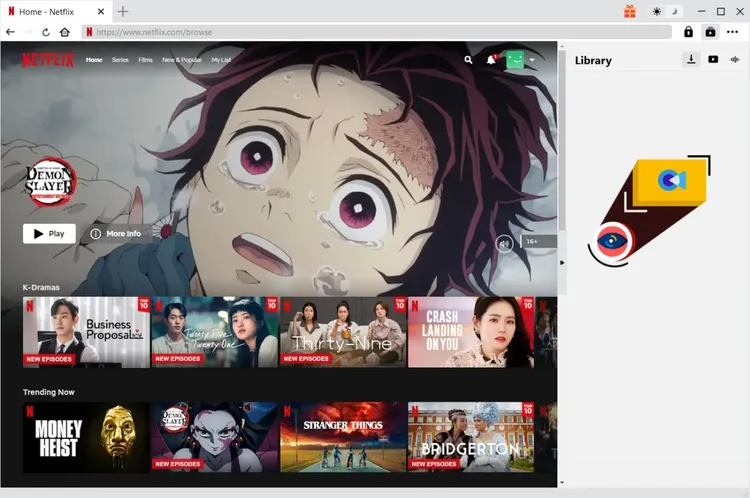
Netflix open in CleverGet's built-in browser, with the Library panel for downloads on the right.
Features
Pick the quality, audio and subtitles before you download
When you click download, CleverGet analyzes the title and lists every available version: resolution, frame rate and file size, up to 1080p (H.264 by default). Choose MP4 or MKV, pick an audio language, and pick the subtitles you want.
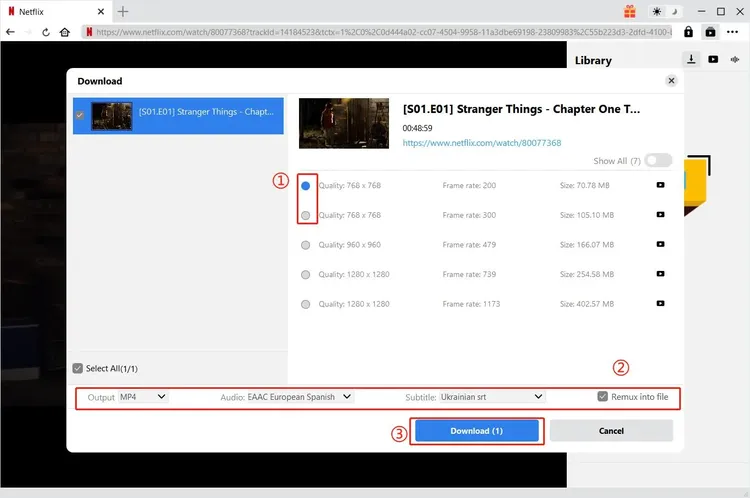
The Download dialog: choose a quality, then the output format, audio track and subtitles, and whether to remux subtitles into the file.
Download a whole season, or every season, at once
Point CleverGet at one episode and it lists every episode in the season, or in all seasons. Tick the ones you want and they download one after another. No more clicking a download icon on each episode.
Subtitles in your language, your way
Netflix titles often come with many subtitle and audio languages. CleverGet lists them so you can choose. Subtitles can be built into the video, or saved as separate SRT or SUP files that you can switch on and off in your player.
No ads on the ad-supported plan
If you're on Netflix's Standard with Ads plan, CleverGet downloads titles with the ads removed, automatically, in the background.
Ready for your media server
Downloads can include metadata: episode and season titles, summary, release year, length and format. That makes them easy to organize in a media server or a local library.
Watch progress in the Library, burn to disc when done
Every download shows in the Library panel with its size and progress, so you can keep browsing while it works. If you also own Leawo Blu-ray Creator, CleverGet can hand finished videos straight to it to burn a DVD or Blu-ray.
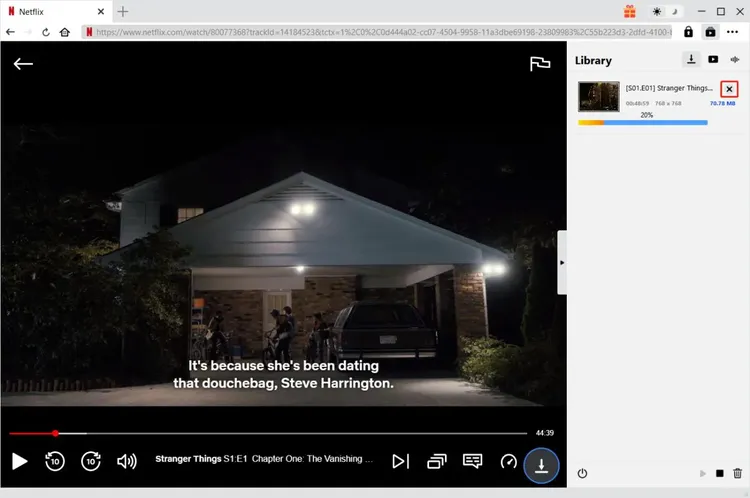
An episode downloading in the Library panel while the title keeps playing.
Who It's For
- Travelers and commuters who watch offline and are tired of downloads expiring
- Mac users, who have no Netflix app and so no offline downloads at all
- People with a home media server who want everything in one library with proper metadata
- Language learners who want specific audio and subtitle combinations
Usage Guide
- Install and launch CleverGet on your Windows PC. The installer is about 420 MB and includes all CleverGet modules.
- Set your output folder. In Settings, choose where videos are saved, then click Save.
- Sign in to Netflix in CleverGet's built-in browser.
- Find and play the title you want. Downloading only works from the title's playback page.
- Click the download button. CleverGet analyzes the title and lists all download options.
- Choose quality, format, audio and subtitles in the Download dialog, then click Download.
- Follow progress in the Library on the right, and find the finished files in your output folder.
- To keep using it after the trial, enter your registration code in CleverGet's Activation Center.
Tip: use the trial on a full episode
The trial allows 3 downloads. Use them on titles you actually want, in the quality and languages you'd normally choose, to see real file sizes and how they play on your devices.
What Users Say
"After trying several so-called Netflix video downloader, CleverGet Netflix Downloader is the choice for me. It's easy to use, practical in functions, fast in download, and with good quality. It has done a better job with a lower cost."
Lily Walter (review on CleverGet's site)
"Used to record and download Netflix movies with recording tools, which consumes much of my time and the quality is bad. This CleverGet Netflix movie download tool helps me out. Download Netflix HD movies in simple clicks with good image quality. That's awesome."
Miller Young (review on CleverGet's site)
On Trustpilot, CleverGet as a whole has an average rating of 4.6 out of 5 from 65 reviews.
Comparisons
vs. Netflix's own downloads
Netflix's downloads are free with your plan, but only some titles have a download button. They play only in the Netflix app, expire after a while, and are limited in number: Leawo notes 100 active downloads per device on ad-free plans and 15 per month on the ad-supported plan. There's no app for Mac. CleverGet saves standard files without those limits, for a separate license fee.
vs. screen recording
Recording a show means playing it all the way through while the recorder runs, and the result often looks worse than the original. CleverGet downloads the video itself, so it keeps the original quality and the separate audio and subtitle tracks.
1-year vs. lifetime license
The 1-year license ($59.95) covers one PC for a year of use. CleverGet also sells a lifetime license, which costs more up front but never needs renewing. Streaming services change their sites often, and downloaders need regular updates to keep working, so how long you plan to use it matters.
FAQs
Do I need a Netflix subscription?
Yes. You sign in with your own account inside CleverGet, and it can only download what your account can play.
Does it work on a Mac?
Yes, CleverGet has a Mac version too. This listing is for the Windows version, so check with Leawo before buying which one your license covers.
How many computers does the license cover?
One PC.
What happens when the 1-year license ends?
You'd need to renew to keep downloading. The files you've already downloaded stay on your computer.
Does it need a powerful PC?
Not especially: Windows 7 or later (64-bit), a 1 GHz processor and 512 MB of RAM (1 GB recommended). Downloads take a lot of space, though, so keep at least 5 GB free, and much more for whole seasons in HD.
Can I download 4K?
Leawo lists downloads at up to 1080p.
Does buying it give me other CleverGet modules?
No. The installer includes all modules, but this license activates the Netflix Downloader. Other services, such as Amazon or Disney+, are separate modules.
System Requirements
- Operating system: Windows 7, 8, 8.1, 10 or 11 (64-bit)
- Processor: 1 GHz Intel or AMD or faster
- Memory: 512 MB RAM (1 GB or more recommended)
- Disk space: 5 GB or more free
- Download size: about 420 MB
- Account: a Netflix subscription
Conclusion
CleverGet Netflix Downloader does one job and makes it simple: sign in, play, choose your languages and quality, and get a normal video file. Batch season downloads, flexible subtitles and media-server metadata make it especially handy for people who watch a lot offline or keep a home media library. Read the "Before you buy" note first, then use the 3 free trial downloads to see if it fits the way you watch.