Leawo Hulu Downloader: Keep Hulu Shows and Movies as Ad-Free Files on Your PC
Leawo Hulu Downloader, sold as CleverGet Hulu Downloader, is a Windows program that downloads the movies, episodes and originals you can play in your own Hulu account to MP4 or MKV files at up to 1080p, with your choice of subtitles and audio tracks, for watching offline in any player. It runs on 64-bit Windows 7 to 11, costs $59.95 for one year or $99.95 for lifetime, and the free trial downloads 3 videos.
Hulu's own downloads only work in the Hulu mobile app on supported devices, not every title can be downloaded, and the downloads expire. Leawo Hulu Downloader saves what you play on your PC as ordinary video files that stay until you delete them, and Leawo says it leaves out the ads that Hulu's cheaper plan plays.
Quick facts
- Developer: Leawo Software Co., Ltd., as a module of its CleverGet video downloader
- Version: CleverGet 27.0.0.0 for Windows
- Platform: Windows 7, 8, 8.1, 10 and 11, 64-bit only (the Mac version is a separate license)
- Supported site: hulu.com, with your own Hulu subscription (ad-supported or ad-free)
- Output: MP4 or MKV video, subtitles inside the video or as SRT/SUP files
- Quality: up to 1080p, depending on the title
- Price: $59.95 for one year or $99.95 for lifetime, one PC each
- Free trial: 3 Hulu video downloads
- Refunds: 14-day money-back guarantee, on Leawo's conditions
What we checked: the CleverGet Windows installer from Leawo's download link on October 24, 2026 (510 MB, file version 27.0.0.0, rebuilt on October 23, 2026), and the one-year license at $59.95 on the order page on October 24, 2026, with the lifetime option at $40 more and a renewal price of $35.97 after the first year. Leawo's product status page listed Hulu as "Working" at 1080p and 720p (H.264 and H.265) the same day. We didn't download a Hulu video ourselves, so the ad removal is Leawo's claim, not something we saw.
Before you buy
- You need your own Hulu subscription. Leawo Hulu Downloader signs in to Hulu with your account and only saves what that account can play. It doesn't work without logging in.
- Hulu has to play where you are. Leawo says it works with Hulu in the United States, Puerto Rico and on US military bases. If hulu.com won't stream on your PC, there's nothing to download.
- 64-bit Windows only. There's no 32-bit build, and a Mac needs the separate Mac license.
- The one-year plan renews. The order page sets the one-year license to renew after 12 months, at $35.97 when we checked. Lifetime is a one-time payment.
- Personal use only. Leawo's fair use policy allows downloads of videos you legally own, for your own needs. Sharing or redistributing downloads is forbidden and may break Hulu's terms and copyright law.
Download Free TrialBuy Now
Overview
Leawo Hulu Downloader is a module of CleverGet, Leawo's video downloader. You install CleverGet once, and the Hulu module is already inside it, next to modules for Netflix, Disney+, HBO Max, Amazon and dozens of other sites, each sold separately. CleverGet works like a web browser: you open hulu.com in a tab, sign in, and start playing an episode or movie. A blue download button at the bottom right then has CleverGet read the stream and open a Download window that lists every version Hulu offers, with its resolution, frame rate and size, plus menus for format, audio and subtitles.
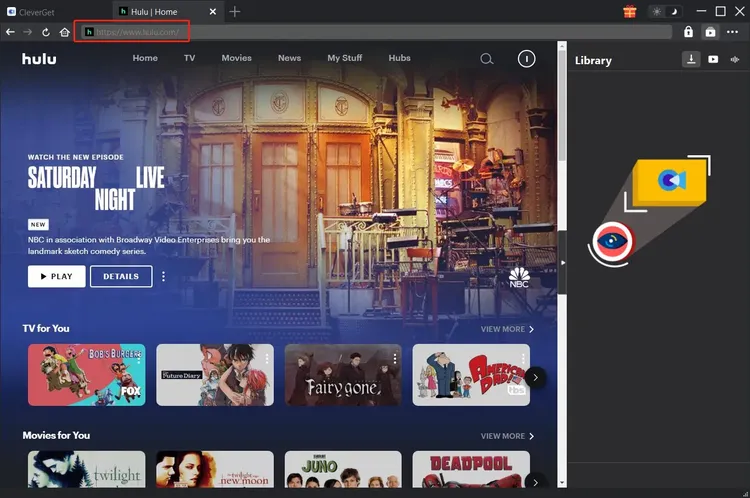
The Hulu home page open in a CleverGet tab, with the hulu.com address highlighted and the empty Library panel on the right (Leawo's user guide, Windows).
Features
Movies, shows and originals at up to 1080p
Leawo Hulu Downloader saves anything that plays in CleverGet's browser from your Hulu account, including movies, TV shows, Hulu originals and news, at up to 1080p. You pick the stream before downloading, so you can trade sharpness for size. In Leawo's own example, one 22-minute sitcom episode at 1280 x 720 came to 472 MB, or 367 MB with a lower frame rate.
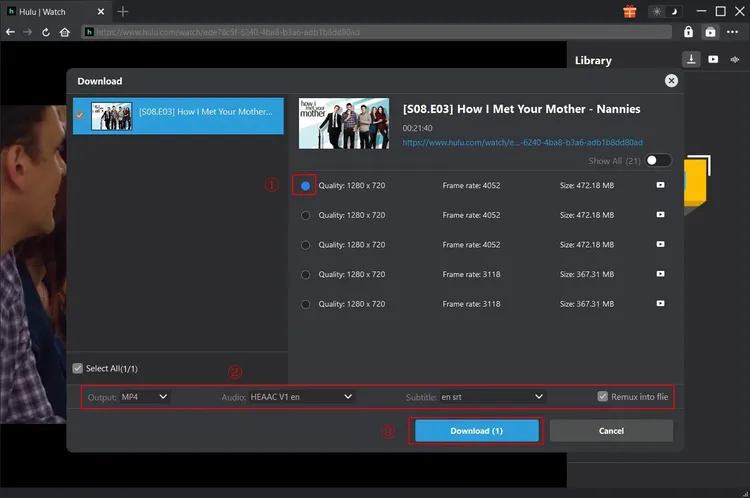
The Download window for a How I Met Your Mother episode: five 1280 x 720 streams of 472 MB or 367 MB, then Output MP4, Audio "HEAAC V1 en", Subtitle "en srt" and "Remux into file" ticked above the Download button.
A season or a whole series at once
Leawo Hulu Downloader detects the other episodes when you parse one, and lists the current season or every season, so you can tick what you want and queue it in one step instead of opening each episode yourself.
Subtitles, audio tracks and audio description
Leawo Hulu Downloader keeps multilingual subtitles and audio tracks, including Hulu's audio description tracks for viewers with visual impairments. Subtitles can be packed into the video with Remux into file, or saved as separate SRT or SUP files.
Downloads without the ads
Leawo Hulu Downloader works with Hulu's ad-supported plan as well as the ad-free one, and Leawo says it removes the ads from the files it saves. That makes the cheaper Hulu plan play like the ad-free one once the episode is on your PC. One Trustpilot reviewer praises exactly this about CleverGet (see What Users Say).
GPU acceleration and housekeeping
Leawo Hulu Downloader uses NVIDIA CUDA, AMD APP or Intel Quick Sync acceleration where the PC has it, resumes interrupted downloads in one click, keeps the title, length, genre and release year as metadata for media servers, and can turn the PC off when the queue is finished. The interface comes in English, French, German, Korean, Italian and Chinese.

A finished episode of The Future Diary in the Library's video tab, with an Open Folder link, while the Hulu player stays open on the left (Leawo's user guide).
Benefits
- No expiry. Hulu's app downloads time out. A saved MP4 or MKV keeps playing after a title leaves Hulu or you cancel your plan.
- Not tied to the Hulu app. The files play in VLC, Plex, Kodi or on a TV from a USB stick, and copy to any phone or tablet that reads MP4.
- The ad-supported plan without the ad breaks. If Leawo's ad removal works for your titles, you keep the cheaper plan and still watch offline without ads.
- Accessibility kept. Audio description tracks come along, which most downloaders drop.
Real-World Uses
- Long flights and road trips: download a season on the PC the night before, copy it to a laptop or tablet, and skip in-flight Wi-Fi.
- Cabins and weak connections: keep a few films on a USB stick for places where Hulu buffers.
- A household media server: add downloaded series with their metadata to Plex or Jellyfin so the family can watch on any TV.
- Before a show leaves Hulu: licensed series rotate out, and a saved copy stays.
Who It's For, and Who Should Skip It
Leawo Hulu Downloader is for Hulu subscribers in the US who watch on a Windows PC and want permanent, ad-free copies of what they watch, for travel, a media server or a household with patchy internet.
Skip it if Hulu's own app downloads on your phone are enough for a commute, since those cost nothing extra. Skip it if you're outside Hulu's markets, if you're on a Mac (buy the Mac version), or if you only want two or three titles, which the free trial covers. And if you subscribe to several services, compare the price of individual modules with Leawo's CleverGet bundles before buying this one alone.
Usage Guide
- Install: download the CleverGet installer (about 510 MB), run it and launch CleverGet. The Hulu module is part of the program.
- Set the output folder: click the three-dot icon, open Settings, set "Save Video To" under General, and click Save.
- Sign in to Hulu: open hulu.com in a CleverGet tab and log in with your account, or paste a Hulu video URL into the address bar.
- Play the title: start playback. CleverGet only parses a video whose playback page is open.
- Download: click the blue download icon at the bottom right, pick the stream, MP4 or MKV, the audio track and subtitles, and click Download. Progress shows in the right sidebar, and finished files appear in the Library.
- Activate when you buy: click Activate at the top right and paste the registration code from your order email.
Where it falls short
- One Hulu video at a time. Leawo's user guide notes that the Hulu module downloads one video at a time, so a selected season runs episode after episode.
- Big files. At about 470 MB per 22-minute 720p episode in Leawo's example, a full season of a sitcom needs 10 GB or more.
- A heavy install. The installer is about 510 MB because it carries every CleverGet module, and Leawo asks for 5 GB of free disk space. The product page's "377 MB" figure is out of date.
- Breaks when Hulu changes. CleverGet customers on Trustpilot describe modules that stopped working after a streaming site or CleverGet update until Leawo shipped a fix.
- The refund guarantee has conditions. Leawo refunds within 14 days only when a problem is confirmed by both sides after working with support, so use the free downloads first.
What Users Say
We found no independent hands-on review of the Hulu module itself, so this section gathers Leawo's own testimonials, Trustpilot reviews of CleverGet as a whole, and one independent review of CleverGet.
Testimonials on Leawo's Hulu Downloader page
Leawo's product page shows three testimonials about the Hulu module. They're the vendor's selection, with no dates or sources, so read them as marketing:
"I often forgot to watch these Hulu downloads and then they became expired. But this Hulu video downloader helps me keep downloaded Hulu videos permanently." Weed Smith
"Currently there are very few Hulu video downloaders that could download Hulu videos due to the DRM issue. This one does what it claims to." Rio Omigo
"I would like to recommend this Hulu downloader for its good quality, smooth and fast download, easy-to-use interface, and in-time customer service." Rank Robinson
Trustpilot: CleverGet, 4.7 from 66 reviews
CleverGet has a TrustScore of 4.7 from 66 reviews on Trustpilot (79% five-star, 6% one-star). One long-time reviewer names Hulu among the modules they use:
"I've used the Video, Amazon, Netflix, Disney+, Hulu, AppleTV...I have quite a few others.." Satori Agape-Economo, 5 stars, August 2026
"I cannot stand watching TV with ads, so the fact that this software strips them out is brilliant." Mr Jim Craddock, 5 stars, October 2026, in a review titled "Great downloader, well supported software"
"This is the best video downloader I have encountered so far. It downloads videos from almost all streaming sites." Kamlesh Bhatt, 5 stars, August 2026
"They are extremely knowledgeable, responsive, and timely." Pops, 5 stars, July 2026, about the support team
The critical side on Trustpilot
The praise for support comes from people who needed it. Farsite KG notes "there have been only a few disruptions which were promptly fixed by the company". Alberto gave 4 stars after "The Crunchyroll module stopped downloading subtitles after the last update." Mike reported an HBO problem where the "downloaded video was systematically quite shorter than the original" until a fix arrived.
David Faries gave 4 stars and wrote: "The only thing I did not enjoy was having to sign up for a 3rd party paid service as a trial to transfer a file."
MobileAppDaily: 4.1 out of 5
Arpit Dubey's review of CleverGet as a whole on MobileAppDaily scores it 4.1 out of 5 (4.5 for performance), finding that "The subtitle management features work well in practice," and lists Hulu among the supported services. It also warns that "some users report output quality occasionally being lower than the advertised original quality." Its prices are for the all-in-one CleverGet package, not this module.
The pattern
Reviewers like CleverGet's coverage of the big streaming services, the ad-free downloads and, above all, a support team that answers fast and ships fixes. The recurring complaint is a module that stops working for a few days after a site changes. The 3 free downloads are the best test of the Hulu module on the shows you actually watch.
Comparisons
Leawo Hulu Downloader vs Hulu's own downloads
Hulu's mobile app downloads many titles at no extra cost, but only on supported phones and tablets, only for titles marked downloadable, and only until the download expires. Leawo Hulu Downloader costs extra and runs on a Windows PC, but gives you standard files from anything that plays, with no expiry. If you watch offline on your phone now and then, Hulu's app is enough.
Windows version vs Mac version
The Windows and Mac versions cost the same and download the same Hulu streams. The Windows version needs 64-bit Windows 7 to 11, the Mac version macOS 11 or later. A license works on one computer of its own platform only.
Editions and Pricing
| License | Price | Term | After that |
|---|
| Free trial | $0 | 3 Hulu video downloads | Buy a license |
| One year (Windows) | $59.95 | 1 PC, 12 months | Renews at $35.97 a year |
| Lifetime (Windows) | $99.95 | 1 PC, one-time payment | Nothing more to pay |
Prices are from the order page on October 24, 2026. The registration code arrives by email right after payment.
FAQs
Does Leawo Hulu Downloader work with Hulu's ad-supported plan?
Yes. Leawo Hulu Downloader works with both ad-supported and ad-free Hulu plans, and Leawo says the ads are removed from the downloaded file.
Is my Hulu password safe in Leawo Hulu Downloader?
Leawo Hulu Downloader signs in through CleverGet's built-in browser, and Leawo's FAQ says your account data isn't stored or sent anywhere else.
Do I still get updates after my Leawo Hulu Downloader license expires?
Yes, according to Leawo's FAQ: Leawo Hulu Downloader updates, minor or major, stay free even after the license has expired. An expired one-year license stops new downloads, though, so updates alone don't keep it useful.
Can I use one Leawo Hulu Downloader license on two PCs?
No. A Leawo Hulu Downloader license is limited to one computer, so a second PC needs a second license. The Windows license doesn't work on a Mac.
Can I move Hulu videos downloaded with Leawo to my phone?
Yes. Leawo Hulu Downloader saves MP4 or MKV files on your PC, which you can copy to a phone, tablet or external drive that plays those formats. MP4 is the safer choice for phones and TVs.
Is the lifetime license of Leawo Hulu Downloader worth it?
Leawo Hulu Downloader's lifetime license costs $40 more than one year. With renewals at $35.97 a year, it pays for itself early in the second year.
What if Leawo Hulu Downloader stops working after a Hulu update?
Leawo Hulu Downloader can be checked against Leawo's product status page, which shows whether each site currently works. You can report a problem from the program's Bug Report option or by email to Leawo support, and Trustpilot reviewers describe fixes arriving within a day or two.
System Requirements
- Windows 7, 8, 8.1, 10 or 11, 64-bit
- 1 GHz or faster Intel or AMD processor
- 512 MB RAM (1024 MB or more recommended)
- 5 GB or more of free disk space, plus room for your videos
- NVIDIA GeForce GTX 260 or better graphics card
- Internet connection and a Hulu subscription
Conclusion
Leawo Hulu Downloader is worth it for US Hulu subscribers who watch on a Windows PC and want to keep what they watch: it turns episodes into permanent 1080p or 720p files with your choice of subtitles and audio description, and Leawo says it strips the ads from the cheaper plan. The one reason to buy it is files that outlive Hulu's own download limits. The main reason to hesitate is reliability over time, because a Hulu site change can stop it until Leawo patches it, and big files at one download at a time make whole-series backups slow. Try the 3 free downloads, and if you'll use it beyond a year, the $99.95 lifetime license is the better deal.
Download Free TrialBuy Now