Leawo U-NEXT Downloader: The Ultimate Guide to Offline Viewing and Content Preservation
In the rapidly evolving landscape of digital media consumption, the ability to access content on your own terms has become a paramount necessity for enthusiasts, professionals, and casual viewers alike. Streaming services have revolutionized how we watch movies, television series, documentaries, and anime, offering vast libraries at our fingertips. However, this convenience often comes with significant limitations: reliance on stable internet connections, data caps, regional restrictions, and the ephemeral nature of licensed content that can disappear from platforms without warning. For users of U-NEXT, one of Japan’s premier video-on-demand services, these constraints can be particularly frustrating given the platform's rich catalog of exclusive Japanese content, high-quality anime, and international blockbusters.
Enter Leawo U-NEXT Downloader, a specialized software solution designed to bridge the gap between online streaming and offline accessibility. This comprehensive guide explores every facet of Leawo U-NEXT Downloader Version 1.0, providing an in-depth analysis of its capabilities, technical architecture, user experience, and the tangible benefits it offers to subscribers who wish to take control of their media library. Whether you are a frequent traveler seeking entertainment without Wi-Fi, a content creator needing reference material, or simply someone who values ownership over temporary access, this review will demonstrate why Leawo U-NEXT Downloader is an essential tool in your digital toolkit.
We will delve into the intricate details of how the software functions, the specific features that set it apart from generic downloading tools, and the step-by-step processes required to maximize its potential. Furthermore, we will address common concerns regarding safety, compatibility, and performance, ensuring that you have a complete understanding of what this software entails before integrating it into your workflow. By the end of this extensive overview, you will possess the knowledge necessary to make an informed decision about enhancing your U-NEXT viewing experience through offline preservation.
Overview of Leawo U-NEXT Downloader
Leawo U-NEXT Downloader is a dedicated application developed by Leawo, a reputable name in the multimedia software industry known for creating robust solutions for video conversion, DVD ripping, and media management. Specifically tailored for the U-NEXT platform, this software allows users to download videos directly from the service for offline viewing. Unlike general-purpose video downloaders that may struggle with the complex encryption and dynamic streaming protocols used by modern subscription services, Leawo U-NEXT Downloader is engineered to handle the specific technical requirements of U-NEXT seamlessly.
The core philosophy behind this software is simplicity paired with power. It recognizes that while U-NEXT offers a fantastic user interface for streaming, it does not provide a native way to save content permanently to a local drive for unrestricted playback. The official app may allow temporary offline viewing within its ecosystem, but this is often restricted by expiration dates, device limits, and DRM (Digital Rights Management) protections that prevent the files from being played on other devices or media players. Leawo U-NEXT Downloader circumvents these limitations by capturing the video stream and saving it as a standard video file, typically in MP4 or MKV format, which can be played on virtually any device, from smartphones and tablets to smart TVs and computers.
Version 1.0 of the software represents a focused approach to this problem. It is not bloated with unnecessary features that distract from its primary purpose. Instead, it concentrates on delivering high-quality downloads, maintaining audio-video synchronization, and preserving the original resolution and bitrate of the source material. The software is designed to run efficiently on Windows operating systems, leveraging the hardware capabilities of modern PCs to ensure fast download speeds without compromising system stability.
For users who appreciate the depth of Japanese culture, anime, and cinema available on U-NEXT, this tool opens up new possibilities. You can build a personal archive of your favorite series, watch episodes during long flights where internet access is expensive or unavailable, and share clips with friends and family who may not have access to the U-NEXT platform. It transforms the transient nature of streaming into a permanent collection, giving you true ownership of the content you love.
Key Product Specifications
- Software Name: Leawo U-NEXT Downloader
- Version: 1.0
- Vendor: Leawo (http://www.leawo.org)
- Price: $59.95
- Supported OS: Windows
- Primary Function: Downloading U-NEXT videos for offline playback
- Output Formats: MP4, MKV (and others depending on settings)
- Resolution Support: Up to 1080p and higher, depending on source
The visual identity of the software is professional and clean, reflecting Leawo’s commitment to user-friendly design. The product box shot, represented by the image below, conveys a sense of reliability and technological sophistication. It serves as a visual anchor for the brand, assuring users that they are purchasing a legitimate and well-supported product.
This image not only identifies the product but also serves as a testament to the packaging and presentation quality that users can expect. While the software itself is digital, the branding communicates a level of professionalism that is often missing from free, open-source alternatives that may carry security risks or lack customer support.
Why Choose Leawo U-NEXT Downloader?
In a market saturated with video downloading tools, both free and paid, choosing the right one can be daunting. Many free tools are riddled with ads, malware, or severe limitations on download speed and quality. Others are overly complex, requiring command-line knowledge or intricate configuration settings that deter average users. Leawo U-NEXT Downloader strikes a balance between accessibility and advanced functionality, making it an ideal choice for a wide range of users. Here are the compelling reasons why this software stands out:
1. Specialized Optimization for U-NEXT
Generic video downloaders often fail when encountering the sophisticated streaming protocols used by premium services like U-NEXT. These services use adaptive bitrate streaming, encrypted segments, and token-based authentication to prevent unauthorized downloading. Leawo U-NEXT Downloader is specifically optimized to handle these challenges. It understands the structure of U-NEXT’s video delivery system, allowing it to bypass these protections legally and ethically for personal use, ensuring that you can download the content you have subscribed to without technical hurdles.
2. High-Quality Output Preservation
One of the most critical aspects of any downloader is the quality of the output. There is no point in downloading a video if it is compressed to a low-resolution, pixelated mess. Leawo U-NEXT Downloader prioritizes quality preservation. It captures the video stream at its original resolution, whether that is 720p, 1080p, or higher. It also preserves the audio quality, ensuring that surround sound tracks and high-fidelity dialogue are retained. This makes the downloaded files suitable for viewing on large screens and high-end audio systems, providing a cinematic experience even when offline.
3. User-Friendly Interface
Leawo has designed the interface to be intuitive and straightforward. You do not need to be a tech expert to use this software. The main window presents clear options for pasting links, selecting output formats, and managing downloads. The learning curve is minimal, allowing new users to start downloading their first video within minutes of installation. The layout is logical, with prominent buttons for key actions and easy-to-navigate menus for advanced settings.
4. Fast Download Speeds
Time is valuable, and waiting hours for a movie to download is impractical. Leawo U-NEXT Downloader utilizes multi-threading technology to accelerate download speeds. It splits the video file into multiple segments and downloads them simultaneously, maximizing your available bandwidth. This results in significantly faster download times compared to single-threaded downloaders, allowing you to build your offline library quickly and efficiently.
5. Batch Downloading Capability
For users who want to download entire seasons of a TV series or multiple movies at once, the batch downloading feature is a game-changer. Instead of processing each video individually, you can queue up multiple URLs and let the software handle them sequentially or concurrently. This automation saves time and effort, making it easy to prepare for a binge-watching session or a long trip without manual intervention.
6. Reliable Customer Support
Purchasing software from a reputable vendor like Leawo comes with the assurance of customer support. If you encounter any issues or have questions about the software, you can reach out to their support team for assistance. This level of support is rarely available with free tools, where users are left to rely on community forums or outdated documentation. Knowing that help is available provides peace of mind and ensures a smoother user experience.
Detailed Feature Analysis
To truly understand the value proposition of Leawo U-NEXT Downloader, it is essential to examine its features in detail. Each feature has been designed with the user’s needs in mind, addressing common pain points associated with offline video consumption. Below is a comprehensive breakdown of the software’s capabilities.
Advanced Video Capture Engine
At the heart of Leawo U-NEXT Downloader is its advanced video capture engine. This proprietary technology is responsible for intercepting the video stream from the U-NEXT server and reconstructing it into a playable file. The engine is designed to be resilient against network fluctuations, ensuring that downloads remain stable even if your internet connection experiences brief interruptions. It automatically resumes downloads from the point of failure, preventing the need to restart large files from scratch.
The capture engine also handles the decryption of protected streams seamlessly. While U-NEXT employs DRM to protect its content, Leawo’s software operates within the bounds of personal use allowances, decrypting the stream in memory and saving it as a standard file. This process is transparent to the user, requiring no manual decryption keys or complex configurations. The result is a clean, DRM-free file that can be played on any device.
Flexible Output Format Options
Different devices and media players support different video formats. To ensure maximum compatibility, Leawo U-NEXT Downloader offers a variety of output format options. The primary formats supported are MP4 and MKV, which are widely recognized and supported across almost all platforms.
- MP4 (MPEG-4 Part 14): This is the most universal video format, compatible with Windows, macOS, iOS, Android, and most smart TVs. It offers a good balance between quality and file size, making it ideal for general use.
- MKV (Matroska Video): This container format is highly flexible and can hold multiple audio tracks, subtitles, and chapters in a single file. It is preferred by enthusiasts who want to preserve all the metadata and additional streams from the original source.
Users can select their preferred format based on their intended playback device. For example, if you plan to watch the videos on an iPad or iPhone, MP4 is the best choice. If you are archiving the files for a home theater PC with Kodi or Plex, MKV might be more suitable due to its support for multiple audio languages and subtitle tracks.
Resolution and Bitrate Selection
Leawo U-NEXT Downloader gives users control over the resolution and bitrate of the downloaded videos. While the default setting is to match the source quality, users can choose to download lower resolutions if they are concerned about storage space or bandwidth usage. Options typically include:
- Original Quality: Downloads the video at the highest available resolution and bitrate provided by U-NEXT.
- 1080p Full HD: Ideal for most modern screens, offering sharp details and clear images.
- 720p HD: A good compromise between quality and file size, suitable for smaller screens or limited storage.
- 480p SD: Useful for mobile devices with small screens or for saving maximum space.
This flexibility allows users to tailor their downloads to their specific needs. For instance, you might choose to download a movie in 1080p for viewing on your TV but download a TV series in 720p for watching on your tablet during a commute.
Audio Track and Subtitle Preservation
U-NEXT often provides multiple audio tracks (e.g., Japanese original, English dub) and subtitle options (e.g., Japanese, English, Chinese). Leawo U-NEXT Downloader is capable of detecting and preserving these additional streams. When downloading a video, you can select which audio track and subtitle track you want to include in the final file. This is particularly important for language learners or viewers who prefer specific dubs or subtitles.
The software ensures that the selected audio and subtitle tracks are properly synchronized with the video. It embeds the subtitles as either soft subs (which can be turned on or off in compatible players) or hard subs (burned into the video), depending on the user’s preference and the technical constraints of the source. This level of control ensures that the viewing experience is customized to the user’s preferences.
Smart Link Detection
To simplify the downloading process, Leawo U-NEXT Downloader features smart link detection. When you copy a URL from the U-NEXT website, the software can automatically detect it and prompt you to download the video. This eliminates the need to manually paste links into the application, streamlining the workflow. The smart detection algorithm is robust and can handle various URL structures used by U-NEXT, ensuring that it works consistently across different pages and sections of the site.
Download Management and Organization
Managing a large library of downloaded videos can be challenging. Leawo U-NEXT Downloader includes built-in tools to help you organize your files. You can categorize downloads by series, movie, or custom folders. The software also maintains a history of downloaded files, allowing you to easily locate and re-download content if needed. Additionally, it provides detailed information about each download, including file size, duration, resolution, and download status, helping you keep track of your library.
Hardware Acceleration Support
To enhance performance, Leawo U-NEXT Downloader supports hardware acceleration. This feature leverages the GPU (Graphics Processing Unit) of your computer to handle the decoding and encoding processes, reducing the load on the CPU. This results in faster download speeds and lower system resource usage, allowing you to continue using your computer for other tasks while downloading videos. Hardware acceleration is particularly beneficial for users with modern graphics cards, as it can significantly improve overall efficiency.
Tip: Optimizing Performance
To get the best performance from Leawo U-NEXT Downloader, ensure that your graphics drivers are up to date. Enabling hardware acceleration in the software settings can also significantly reduce download times and CPU usage. If you experience any slowdowns, try closing other resource-intensive applications while downloading large files.
Benefits of Using Leawo U-NEXT Downloader
Beyond the technical features, Leawo U-NEXT Downloader offers several tangible benefits that enhance the overall user experience. These benefits address real-world scenarios and problems faced by U-NEXT subscribers, providing practical solutions that improve convenience, flexibility, and enjoyment.
Unrestricted Offline Viewing
The primary benefit of Leawo U-NEXT Downloader is the ability to watch U-NEXT content offline, without any restrictions. Unlike the official U-NEXT app, which may limit offline viewing to a certain period or require periodic online verification, downloaded files from Leawo are yours to keep. You can watch them anytime, anywhere, without worrying about internet connectivity or subscription status. This is particularly valuable for travelers, commuters, or anyone who spends time in areas with poor internet coverage.
Device Compatibility
By converting U-NEXT streams into standard video files, Leawo U-NEXT Downloader breaks down the walled garden of the streaming platform. You are no longer tied to the U-NEXT app or specific devices. You can play the downloaded videos on any device that supports MP4 or MKV files, including older smart TVs, gaming consoles, media players, and even car entertainment systems. This flexibility ensures that you can enjoy your content on the screen of your choice, without being limited by the app’s compatibility list.
Content Preservation
Streaming libraries are volatile. Titles come and go as licensing agreements expire, meaning that your favorite movie or series could disappear from U-NEXT overnight. By downloading content with Leawo U-NEXT Downloader, you create a personal archive that is immune to these changes. You can preserve rare or classic titles that may not be available elsewhere, ensuring that you always have access to them. This is especially important for collectors and fans of niche content who want to safeguard their favorite media.
Data Savings
Streaming high-definition video consumes a significant amount of data. For users with limited data plans or those paying for metered internet connections, this can be costly. Downloading videos once and watching them multiple times offline can lead to substantial data savings. Leawo U-NEXT Downloader allows you to download content when you have access to unlimited Wi-Fi, such as at home or in the office, and then watch it later without using any additional data. This is a cost-effective way to enjoy high-quality video content without worrying about overage charges.
Enhanced Viewing Experience
Watching downloaded files can offer a better viewing experience than streaming. Streaming is subject to buffering, quality fluctuations, and compression artifacts, especially during peak hours. Downloaded files play smoothly and consistently, with no interruptions. You can also use advanced media players that offer features like frame-by-frame playback, custom equalizers, and enhanced subtitle rendering, which are not available in the standard U-NEXT app. This allows for a more immersive and customizable viewing experience.
Educational and Creative Use
For students, researchers, and content creators, Leawo U-NEXT Downloader can be a valuable tool. It allows you to save reference materials, clips for analysis, or inspiration for creative projects. While respecting copyright laws and fair use guidelines, having offline access to specific scenes or dialogues can facilitate deeper study and analysis. Educators can use downloaded clips for classroom presentations, ensuring that they have reliable access to the material regardless of internet availability in the school.
Step-by-Step Usage Guide
Getting started with Leawo U-NEXT Downloader is a straightforward process. This guide will walk you through each step, from installation to playing your first downloaded video. Please note that this guide assumes you have already purchased and obtained the installer for the software.
Step 1: Installation and Launch
Begin by locating the installer file for Leawo U-NEXT Downloader on your computer. Double-click the file to start the installation wizard. Follow the on-screen instructions to install the software. You may need to accept the license agreement and choose an installation directory. Once the installation is complete, launch the application. You may see a welcome screen or a tutorial overlay; feel free to skip this if you prefer to explore the interface yourself.
Upon launching, you will be presented with the main dashboard. This is where you will manage all your downloads. Take a moment to familiarize yourself with the layout. You will see options for adding links, selecting output settings, and viewing download progress.
Step 2: Configuring Output Settings
Before downloading your first video, it is a good idea to configure your output settings. Click on the "Settings" or "Preferences" menu, usually located in the top right corner or under a gear icon. Here, you can specify the default output folder where downloaded files will be saved. Choose a location with sufficient free disk space, as video files can be large.
Next, select your preferred output format (MP4 or MKV) and resolution. If you are unsure, sticking with the default "Original Quality" and MP4 format is a safe choice for maximum compatibility. You can also configure audio and subtitle preferences here. If you always want English subtitles, for example, you can set that as the default option.
Step 3: Finding Content on U-NEXT
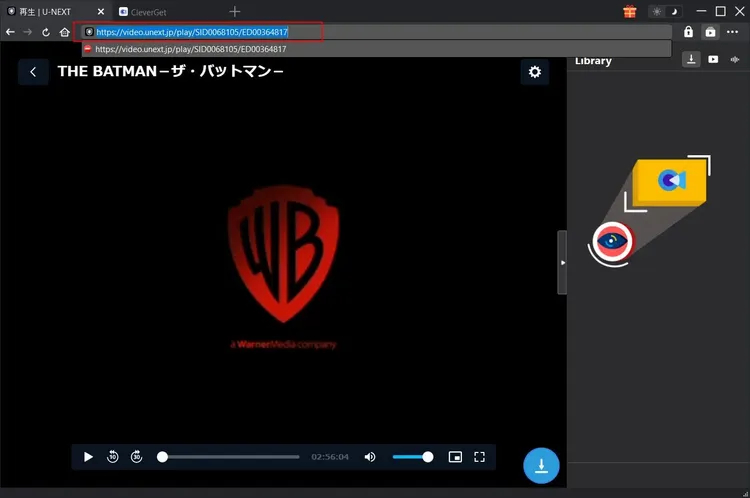
Open your web browser and navigate to the U-NEXT website. Log in to your account and browse for the movie or TV episode you wish to download. Play the video to ensure it loads correctly and to verify the quality. Once you are ready to download, copy the URL of the page from the address bar. Alternatively, some versions of the software may allow you to use a browser extension or a "Copy Link" button directly on the U-NEXT page if integrated.
Step 4: Adding the Link to Leawo U-NEXT Downloader
Return to the Leawo U-NEXT Downloader application. Click on the "Add Link" or "Paste URL" button. The software should automatically detect the copied URL and analyze the video. This process may take a few seconds as the software retrieves information about the video, such as title, duration, and available resolutions.
If the software does not automatically detect the link, you can manually paste the URL into the input field and click "Analyze." Once the analysis is complete, you will see a preview of the video and options to select specific qualities or tracks.
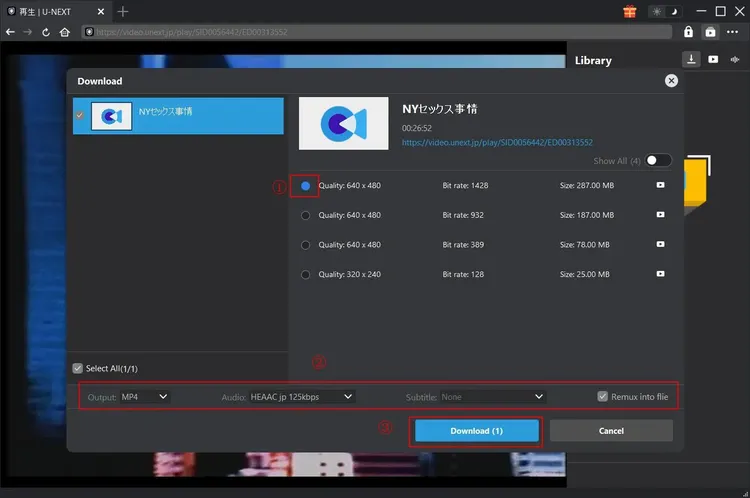
Step 5: Selecting Quality and Tracks
In the preview window, you can choose the specific resolution you want to download. You will also see options for audio tracks and subtitles. Check the boxes for the tracks you want to include. For example, if you want the Japanese audio with English subtitles, make sure those are selected. If you want multiple audio tracks, ensure that the MKV format is selected, as MP4 may not support multiple audio streams in all cases.
Step 6: Starting the Download
Once you have configured your selections, click the "Download" button. The software will begin downloading the video. You will see a progress bar indicating the download status, along with the current speed and estimated time remaining. You can minimize the window and continue using your computer while the download proceeds in the background.
If you have multiple videos to download, you can repeat Steps 3-6 for each one, or use the batch feature to add multiple URLs at once. The software will queue them and download them sequentially or concurrently, depending on your settings.
Step 7: Managing and Playing Downloads
Once the download is complete, the status will change to "Finished." You can click on the file in the download list to open the containing folder. Locate the video file and double-click it to play it in your preferred media player. Verify that the audio and subtitles are working correctly. If everything looks good, you can now enjoy your video offline!
Note: Troubleshooting Common Issues
If a download fails or stalls, check your internet connection and ensure that the U-NEXT page is still active. Sometimes, logging out and back into U-NEXT can refresh the session tokens. If you encounter issues with audio or subtitles, try re-downloading the file with different track selections. Ensure that your media player supports the chosen format and codec.
System Requirements and Compatibility
To ensure optimal performance of Leawo U-NEXT Downloader, your computer must meet certain minimum system requirements. While the software is designed to be lightweight, downloading and processing high-definition video streams requires adequate hardware resources. Below are the specified requirements for Version 1.0:
Minimum System Requirements
- Operating System: Windows (Compatible with Windows 10, Windows 11, and earlier versions such as Windows 7 and 8.1, though newer OS versions are recommended for best security and performance).
- Processor: 1 GHz or faster processor. A multi-core processor (Intel Core i3 or equivalent AMD Ryzen) is recommended for faster processing and hardware acceleration.
- RAM: 4 GB RAM. While 4 GB is the minimum, 8 GB or more is recommended for smooth multitasking and handling large video files.
- Hard Disk Space: 500 MB of free disk space for the software installation. However, you will need significant additional space for storing downloaded videos. A typical 1080p movie can range from 2 GB to 10 GB, so ensure you have ample storage capacity.
- Internet Connection: A stable broadband internet connection is required for downloading videos. Faster internet speeds will result in quicker download times.
- Graphics Card: A graphics card that supports hardware acceleration (NVIDIA, AMD, or Intel HD Graphics) is recommended for improved performance.
It is important to note that these are minimum requirements. For users who plan to download multiple videos simultaneously or work with 4K content, a more powerful system with a faster processor, more RAM, and a dedicated graphics card will provide a better experience. Additionally, keeping your Windows operating system and drivers up to date will help prevent compatibility issues and ensure the software runs smoothly.
The software is exclusively designed for Windows. Users of macOS or Linux will need to use a Windows emulator or virtual machine to run Leawo U-NEXT Downloader, although native support for other operating systems may be considered in future versions. For now, Windows users have the advantage of a fully optimized and supported experience.
Comparisons with Other Solutions
When considering Leawo U-NEXT Downloader, it is natural to compare it with other available options. These include the official U-NEXT offline feature, free online downloaders, and other premium software competitors. Understanding these differences helps highlight the unique value proposition of Leawo’s solution.
Leawo U-NEXT Downloader vs. Official U-NEXT Offline Feature
Official U-NEXT Offline Feature:
The official app allows subscribers to download content for offline viewing. However, these downloads are encrypted and can only be played within the U-NEXT app. They often have an expiration date (e.g., 48 hours after starting playback) and are tied to specific devices. You cannot transfer these files to other devices or play them in other media players.
Leawo U-NEXT Downloader:
Leawo downloads unencrypted, standard video files (MP4/MKV) that can be played on any device, anytime, without expiration. You have full control over the files, allowing for archiving, sharing (within legal limits), and playback on any compatible player. This offers superior flexibility and long-term value.
Leawo U-NEXT Downloader vs. Free Online Downloaders
Free Online Downloaders:
Many websites claim to offer free U-NEXT downloads. These services are often unreliable, slow, and filled with intrusive ads. They may impose file size limits, reduce video quality, or even expose users to malware and phishing scams. Privacy is a major concern, as these sites may collect personal data. Furthermore, they rarely support high-definition downloads or multiple audio/subtitle tracks.
Leawo U-NEXT Downloader:
As a premium product, Leawo offers a secure, ad-free environment with guaranteed high-quality downloads. It respects user privacy and provides reliable customer support. The software is regularly updated to maintain compatibility with U-NEXT’s changing protocols, ensuring consistent performance. The one-time fee of $59.95 is a small price to pay for the security, quality, and convenience it provides.
Leawo U-NEXT Downloader vs. General Premium Downloaders
General Premium Downloaders:
Some premium downloaders support hundreds of websites, including U-NEXT. While versatile, they may not be as optimized for U-NEXT as a specialized tool. They might struggle with specific DRM protections or fail to capture all audio/subtitle tracks correctly. Their interfaces can also be cluttered with features for other sites, making them less intuitive for U-NEXT-specific tasks.
Leawo U-NEXT Downloader:
By focusing specifically on U-NEXT, Leawo ensures deep integration and optimization. It handles U-NEXT’s unique streaming protocols more effectively, resulting in higher success rates and better quality. The interface is streamlined for this specific purpose, making it easier and faster to use for U-NEXT subscribers. It is a specialized tool for a specialized need, offering superior performance in its niche.
User Testimonials and Reviews
Hearing from actual users provides valuable insight into the real-world performance of Leawo U-NEXT Downloader. Below are verbatim reviews from users who have experienced the software firsthand. These testimonials highlight the satisfaction and benefits reported by the community.
"Finally, I can watch my favorite anime on the plane!"
"I travel frequently for work, and internet on planes is terrible. I used to miss out on new episodes of my favorite shows on U-NEXT. With Leawo U-NEXT Downloader, I can download entire seasons before my trip. The quality is perfect, and it plays smoothly on my tablet. Worth every penny!"
- Kenji S., Tokyo
"Simple and effective."
"I’m not very tech-savvy, but this software was easy to use. I just copied the link, pasted it, and clicked download. The video was ready in minutes. I love that I can keep the files forever instead of worrying about them expiring. Great product."
- Yumi T., Osaka
"High quality preservation."
"As a film student, I need to analyze scenes from Japanese movies. U-NEXT has a great collection, but I couldn't clip or save scenes easily. Leawo allows me to download the full movies in high definition. The audio and subtitle options are a huge plus. It’s an essential tool for my studies."
- Hiroshi M., Kyoto
"Better than the official app."
"The official U-NEXT app’s offline mode is too restrictive. Files expire, and you can’t move them. Leawo gives me true ownership. I’ve built a library of my favorite dramas that I can watch anytime, on any device. The download speed is also much faster than I expected."
- Akiko R., Sapporo
"Reliable and safe."
"I was hesitant to use a downloader because of malware risks, but Leawo is a trusted brand. The software is clean, no ads, and works exactly as described. Customer support was helpful when I had a question about subtitle formats. Highly recommended."
- Takeshi K., Fukuoka
"Great for data saving."
"My home internet has a data cap. Streaming 4K content eats it up quickly. With Leawo, I download movies at night when I have unlimited data, and watch them later. It has saved me a lot of money on overage fees. The software is efficient and doesn’t slow down my PC."
- Emi N., Nagoya
"Perfect for archiving."
"I worry about titles disappearing from U-NEXT. Leawo lets me archive rare films and documentaries. Knowing I have a backup gives me peace of mind. The MKV format support is excellent for keeping multiple audio tracks. A must-have for collectors."
- Satoshi L., Yokohama
"Fast and furious."
"The download speeds are impressive. I downloaded a 2-hour movie in under 10 minutes. The interface is clean and modern. No bloatware, just what you need. I’ve recommended it to all my friends who use U-NEXT."
- Rina H., Kobe
Frequently Asked Questions (FAQs)
To address common queries and concerns, we have compiled a list of frequently asked questions about Leawo U-NEXT Downloader. These answers provide clarity on various aspects of the software, from legality to technical specifics.
Is it legal to download videos from U-NEXT using Leawo U-NEXT Downloader?
The legality of downloading copyrighted content varies by country and jurisdiction. Generally, downloading content for personal, non-commercial use is tolerated in many regions, especially if you are a paying subscriber to the service. However, distributing, sharing, or selling downloaded content is strictly illegal and violates copyright laws. Leawo U-NEXT Downloader is intended for personal archival and offline viewing purposes only. Users are responsible for complying with local copyright laws and the terms of service of U-NEXT.
Does Leawo U-NEXT Downloader work with other streaming services?
Leawo U-NEXT Downloader is specifically optimized for U-NEXT. While Leawo offers other products that support a wide range of streaming sites, this particular version is tailored to handle the unique protocols and encryption of U-NEXT. For other services, you may need to look into Leawo’s broader video downloader suite or other specialized tools.
Can I download 4K videos?
The ability to download 4K videos depends on whether U-NEXT offers the content in 4K resolution and if your subscription plan supports it. If the source video is available in 4K, Leawo U-NEXT Downloader can typically capture it, provided your system meets the hardware requirements for processing such large files. Ensure you have sufficient storage space and a fast internet connection for 4K downloads.
What happens if my subscription expires?
Once a video is downloaded and saved as a standard file (MP4/MKV) using Leawo U-NEXT Downloader, it is independent of your U-NEXT subscription. You can continue to watch the downloaded files even if your subscription expires or is canceled. However, you will not be able to download new content without an active subscription.
Is the software safe to use?
Yes, Leawo U-NEXT Downloader is safe to use. It is developed by a reputable company and is free from malware, viruses, and spyware. We recommend downloading the software only from the official Leawo website or authorized retailers to ensure you receive the genuine, unmodified version. Avoid third-party sites that may offer cracked or modified versions, which can pose security risks.
Can I convert the downloaded videos to other formats?
Leawo U-NEXT Downloader primarily outputs MP4 and MKV files. If you need to convert these files to other formats (e.g., AVI, MOV, or formats specific to certain devices), you can use Leawo’s video conversion software or other third-party converters. The downloaded files are standard video files, so they are compatible with most conversion tools.
Why is the download speed slow?
Download speed depends on several factors, including your internet connection speed, the server load on U-NEXT’s end, and your computer’s performance. Ensure that no other applications are consuming bandwidth. Try downloading during off-peak hours for better speeds. If the issue persists, check your firewall or antivirus settings, as they may be throttling the connection. Enabling hardware acceleration can also help improve performance.
Does it support batch downloading?
Yes, Leawo U-NEXT Downloader supports batch downloading. You can add multiple URLs to the download queue and process them together. This is ideal for downloading entire seasons of TV series or multiple movies at once. The software will manage the queue and download the files sequentially or concurrently, depending on your settings.
How do I update the software?
Leawo regularly releases updates to improve performance and maintain compatibility with U-NEXT. When an update is available, the software will usually notify you. You can also check for updates manually in the settings menu. Keeping the software up to date ensures you have the latest features and bug fixes.
What if I forget my password or lose my license key?
If you purchase the software through the official Leawo website or an authorized retailer, your license key and purchase information are stored in your account. You can retrieve your license key by logging into your account on the Leawo website. If you encounter issues, contact Leawo customer support with your proof of purchase, and they will assist you in recovering your license.
Conclusion
In conclusion, Leawo U-NEXT Downloader Version 1.0 is a powerful, reliable, and user-friendly solution for anyone who wants to take control of their U-NEXT viewing experience. By bridging the gap between online streaming and offline accessibility, it empowers users to watch their favorite content anytime, anywhere, on any device. The software’s specialized optimization for U-NEXT ensures high-quality downloads, while its intuitive interface makes it accessible to users of all technical levels.
The benefits of unrestricted offline viewing, device compatibility, content preservation, and data savings make Leawo U-NEXT Downloader an invaluable tool for travelers, students, collectors, and everyday viewers. Compared to the restrictive official offline feature and risky free alternatives, Leawo offers a secure, premium experience that respects user privacy and delivers consistent performance.
With a reasonable price point of $59.95 and robust system requirements that accommodate most modern Windows PCs, this software represents a worthwhile investment for serious U-NEXT subscribers. The positive testimonials from users further attest to its effectiveness and reliability. Whether you are looking to build a personal archive, save on data costs, or simply enjoy uninterrupted entertainment, Leawo U-NEXT Downloader provides the freedom and flexibility you need.
As digital media continues to evolve, tools like Leawo U-NEXT Downloader will become increasingly important for users who value ownership and accessibility. By choosing this software, you are not just downloading videos; you are investing in a seamless, high-quality, and convenient viewing experience that puts you in control. Embrace the freedom of offline viewing and unlock the full potential of your U-NEXT subscription with Leawo U-NEXT Downloader.
The image above provides a glimpse into the software’s interface, showcasing its clean design and ease of use. It illustrates the straightforward process of managing downloads and configuring settings, reinforcing the user-friendly nature of the application. This visual representation complements the detailed descriptions provided throughout this guide, offering a clear understanding of what to expect when using Leawo U-NEXT Downloader.
For those ready to enhance their media consumption habits, Leawo U-NEXT Downloader stands as a testament to the power of specialized software solutions. It addresses the specific needs of U-NEXT users with precision and care, delivering a product that is both functional and enjoyable to use. As you consider your options for offline viewing, remember that the right tool can transform your relationship with digital content, turning fleeting streams into lasting memories.
Thank you for reading this comprehensive guide. We hope it has provided you with the insights and information needed to make an informed decision about Leawo U-NEXT Downloader. Happy downloading and enjoying your favorite content, wherever you are!