Leawo Disney+ Downloader: The Ultimate Guide to Offline Viewing and Digital Archiving
In an era where digital streaming has become the primary mode of media consumption, the convenience of accessing content on demand is unparalleled. However, this convenience often comes with significant limitations, particularly regarding internet connectivity, data usage, and content availability. For millions of users worldwide, Disney+ has emerged as a premier destination for high-quality entertainment, offering an extensive library of movies, series, and documentaries from Disney, Pixar, Marvel, Star Wars, and National Geographic. Yet, despite its vast catalog, the platform’s reliance on a stable internet connection can be a major hurdle for travelers, commuters, and those with limited data plans.
This is where Leawo Disney+ Downloader steps in as a transformative solution. Designed specifically for Windows users, this powerful software enables you to download and save videos from Disney+ directly to your local device, allowing for true offline viewing without the constraints of streaming buffers or network instability. Whether you are planning a long-haul flight, a road trip through areas with poor connectivity, or simply wish to build a personal archive of your favorite classics, Leawo Disney+ Downloader provides the tools necessary to take control of your media experience.
In this comprehensive guide, we will explore every aspect of Leawo Disney+ Downloader, from its core features and technical specifications to detailed usage instructions, comparative analyses, and user testimonials. We will delve into the nuances of digital media management, the importance of high-definition preservation, and how this tool stands out in a crowded market of video downloading utilities. By the end of this article, you will have a thorough understanding of why Leawo Disney+ Downloader is an essential addition to your digital toolkit.
Overview of Leawo Disney+ Downloader
Leawo Disney+ Downloader is a specialized software application developed by Leawo, a renowned name in the field of multimedia conversion and media management solutions. Unlike generic video downloaders that attempt to support hundreds of platforms with varying degrees of success, Leawo Disney+ Downloader is engineered with a singular focus: to provide a seamless, high-quality, and reliable downloading experience for Disney+ content. This specialization allows the developers to optimize the software for the specific encryption methods, streaming protocols, and interface structures used by Disney+, resulting in superior performance and compatibility.
The software operates on a sophisticated engine that captures video streams in real-time or via direct link extraction, depending on the current architecture of the streaming service. It bypasses the typical restrictions imposed by digital rights management (DRM) technologies not to infringe on copyright, but to enable legitimate personal use cases such as offline viewing on devices that do not support the native Disney+ app or for archival purposes within the bounds of fair use policies. The result is a clean, high-fidelity video file that retains the original quality of the stream, including audio tracks and subtitles.
One of the standout aspects of Leawo Disney+ Downloader is its user-centric design. Recognizing that not all users are tech-savvy, the interface is intuitive and straightforward, guiding users through the process of selecting, configuring, and downloading content with minimal effort. At the same time, it offers advanced customization options for power users who wish to fine-tune output formats, resolution settings, and audio preferences. This balance between simplicity and depth makes it suitable for a wide range of users, from casual viewers to media enthusiasts.
The software is compatible with Windows operating systems, ensuring that it can run on a broad spectrum of hardware configurations. With modest system requirements—just a 1 GHz processor, 4 GB of RAM, and 500 MB of free disk space—it is accessible to most modern computers without demanding high-end specifications. This efficiency is a testament to the optimized codebase and the focused nature of the application, which does not burden the system with unnecessary background processes or bloated features.
Furthermore, Leawo Disney+ Downloader is regularly updated to keep pace with changes in the Disney+ platform. Streaming services frequently update their security measures and streaming protocols to prevent unauthorized downloading, which can render older versions of downloading tools obsolete. Leawo’s commitment to ongoing development ensures that users always have access to a functional and reliable tool, maintaining its effectiveness even as the target platform evolves.
Key Features of Leawo Disney+ Downloader
Leawo Disney+ Downloader is packed with features designed to enhance the user experience and ensure the highest possible quality for downloaded content. Below, we explore these features in detail, highlighting how they contribute to the software’s overall effectiveness and usability.
High-Definition Video Quality Preservation
One of the most critical aspects of any video downloading tool is the ability to preserve the original quality of the source material. Leawo Disney+ Downloader excels in this regard, supporting downloads in up to 1080p Full HD resolution. This ensures that every detail, from the intricate textures of character costumes to the vibrant colors of animated landscapes, is captured with clarity and precision. For users with high-resolution displays, this feature is indispensable, as it prevents the pixelation and blurriness often associated with lower-quality downloads.
The software achieves this by utilizing advanced decoding algorithms that extract the video stream at its native bitrate. Unlike screen recording tools, which can introduce artifacts and lose quality due to compression during the recording process, Leawo Disney+ Downloader captures the raw data directly from the stream. This results in a file that is visually indistinguishable from the original streamed content, providing a cinematic experience even when viewed offline.
Multi-Audio Track and Subtitle Support
Disney+ content is often available in multiple languages, catering to a global audience. Leawo Disney+ Downloader recognizes this diversity and allows users to select their preferred audio tracks and subtitles during the download process. Whether you prefer the original English audio, a dubbed version in Spanish, French, or German, or simply want to include subtitles for accessibility, the software gives you full control over these elements.
This feature is particularly useful for language learners who wish to watch content with dual audio or subtitles for comparison, or for families who want to ensure that everyone can enjoy the movie in their native language. The software preserves the synchronization between audio and video, ensuring that there are no delays or mismatches that could detract from the viewing experience. Additionally, subtitles can be embedded directly into the video file or saved as separate files, offering flexibility in how they are used.
Batch Downloading Capability
For users who wish to download entire seasons of a series or multiple movies at once, Leawo Disney+ Downloader offers a robust batch downloading feature. This allows you to queue up multiple titles and let the software handle the rest, saving time and effort. You can set the software to download items sequentially or simultaneously, depending on your internet bandwidth and system resources.
Batch downloading is not just about convenience; it is also about efficiency. By automating the process, you can avoid the repetitive task of manually selecting and downloading each episode or movie. The software manages the queue intelligently, pausing and resuming downloads as needed to ensure completion even if there are temporary network interruptions. This feature is ideal for binge-watchers who want to prepare their weekend entertainment lineup in advance.
Fast Download Speeds
Time is a valuable commodity, and Leawo Disney+ Downloader is optimized for speed. The software utilizes multi-threading technology to maximize your internet bandwidth, ensuring that downloads complete as quickly as possible. Depending on your connection speed, you can download a full-length movie in minutes rather than hours. This rapid processing is achieved without compromising on quality, as the software balances speed and stability to prevent errors or corrupted files.
The fast download speeds are particularly beneficial for users with limited data caps or those who need to download content quickly before a trip. By minimizing the time spent waiting, the software enhances the overall user experience, making it a practical tool for busy individuals who value efficiency.
User-Friendly Interface
Despite its advanced capabilities, Leawo Disney+ Downloader boasts a clean and intuitive interface that is easy to navigate. The main dashboard provides clear access to all key functions, including search, download settings, and library management. Even users with limited technical knowledge can quickly learn how to use the software, thanks to its logical layout and helpful tooltips.
The interface is designed to minimize clutter, focusing on the essential tasks at hand. Options are presented in a straightforward manner, with clear labels and descriptive text. This attention to user experience design ensures that the software is accessible to a wide audience, from teenagers to seniors, without requiring extensive training or manual reading.
Secure and Safe Operation
Security is a top priority for Leawo, and the Disney+ Downloader is built with safety in mind. The software does not contain any malware, adware, or spyware, ensuring that your computer remains protected during use. Additionally, it respects user privacy by not collecting personal data or tracking viewing habits. All downloads are processed locally on your device, meaning that your media library remains private and secure.
The software also employs safe downloading practices, verifying the integrity of files before saving them to your hard drive. This prevents the accumulation of corrupted or incomplete files, saving you storage space and frustration. Regular updates further enhance security by patching any potential vulnerabilities and ensuring compatibility with the latest operating system security features.
Benefits of Using Leawo Disney+ Downloader
While the features of Leawo Disney+ Downloader are impressive, it is the tangible benefits that truly justify its adoption. Understanding these benefits helps users appreciate the value proposition of the software and how it can improve their daily media consumption habits.
Uninterrupted Viewing Experience: One of the most significant benefits is the ability to watch content without interruptions. Streaming services are susceptible to buffering, especially during peak hours or in areas with weak internet signals. By downloading content beforehand, you eliminate the risk of buffering, ensuring a smooth and uninterrupted viewing experience. This is particularly important for immersive content like movies and series, where breaks in playback can disrupt the narrative flow and emotional engagement.
Data Savings: For users with limited data plans, streaming high-definition video can quickly consume monthly allowances. Leawo Disney+ Downloader allows you to download content over Wi-Fi, which is often unlimited or cheaper, and then watch it offline using mobile data or no data at all. This can result in significant cost savings over time, especially for heavy users who watch several hours of content per week. By managing your data usage more effectively, you can avoid overage charges and maintain better control over your household budget.
Portability and Convenience: Downloaded files can be transferred to other devices, such as tablets, smartphones, or external hard drives, provided they are in a compatible format. This portability means you can take your favorite Disney+ content with you wherever you go, without needing to rely on the Disney+ app or an internet connection. Whether you are on a plane, a train, or in a remote cabin, your entertainment library is always at your fingertips. This convenience is invaluable for travelers, students, and anyone who values flexibility in their media consumption.
Archival and Preservation: Content on streaming platforms can disappear without notice due to licensing agreements or corporate decisions. By downloading your favorite movies and series, you create a personal archive that is not subject to the whims of streaming providers. This ensures that you can revisit cherished classics or share them with future generations, regardless of whether they remain available on Disney+. While respecting copyright laws is essential, having a personal backup for fair use purposes provides peace of mind and continuity in your media collection.
Enhanced Accessibility: For individuals with hearing or visual impairments, the ability to customize audio and subtitle settings is crucial. Leawo Disney+ Downloader allows users to select specific audio tracks and subtitles, ensuring that content is accessible in the format that best suits their needs. This level of customization is not always available in the native streaming app, making the downloader a valuable tool for inclusive media consumption.
Step-by-Step Usage Guide
Getting started with Leawo Disney+ Downloader is a straightforward process. This guide will walk you through each step, from installation to enjoying your downloaded content. Please note that this guide assumes you have already purchased and installed the software on your Windows computer.
Step 1: Launch the Software
After installation, locate the Leawo Disney+ Downloader icon on your desktop or in your Start menu and double-click to launch the application. The software may take a few seconds to initialize as it loads its core components. Upon opening, you will be greeted by the main interface, which features a clean and organized layout. Take a moment to familiarize yourself with the various sections, including the search bar, settings menu, and download library.
Step 2: Log In to Your Disney+ Account
To access Disney+ content, you must log in to your account within the software. Click on the "Log In" button, usually located in the top right corner of the interface. A built-in browser window will open, directing you to the official Disney+ login page. Enter your credentials (email and password) and complete any two-factor authentication if required. Once logged in, the software will sync with your account, allowing you to browse the Disney+ library directly within the application. This integration ensures that you have access to the same content available on the web platform, including personalized recommendations and watchlists.
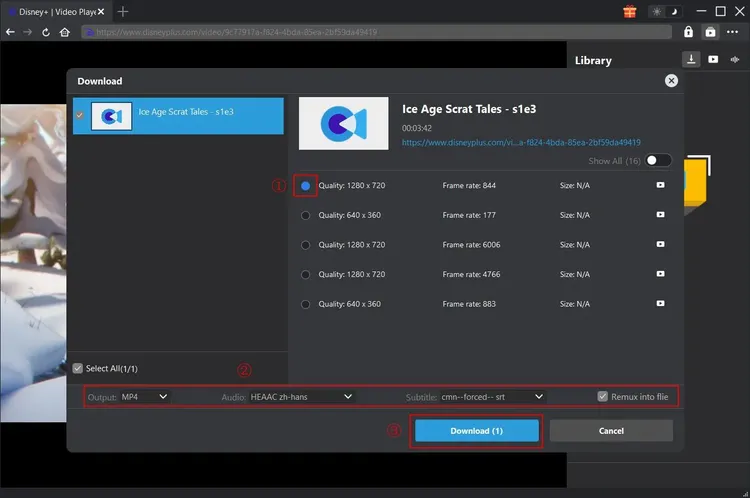
Step 3: Configure Output Settings
Before downloading, it is essential to configure the output settings to match your preferences. Click on the "Settings" or "Preferences" menu, typically found in the top toolbar. Here, you can select the output format (e.g., MP4, MKV), video resolution (up to 1080p), audio track, and subtitle options. For most users, MP4 is recommended due to its wide compatibility with various media players and devices. If you prefer higher quality, select 1080p resolution. Choose your preferred audio language and decide whether to embed subtitles or save them as separate files. These settings can be saved as defaults for future downloads, saving you time on subsequent tasks.
Step 4: Search for Content
Use the search bar at the top of the interface to find the movie or series you wish to download. You can search by title, actor, or genre. As you type, the software will display relevant results from the Disney+ library. Click on the desired title to view its details, including available episodes, seasons, and audio/subtitle options. You can also browse categories or use the integrated Disney+ interface to discover new content. This seamless search functionality eliminates the need to switch between the software and a web browser, streamlining the discovery process.
Step 5: Select Episodes and Initiate Download
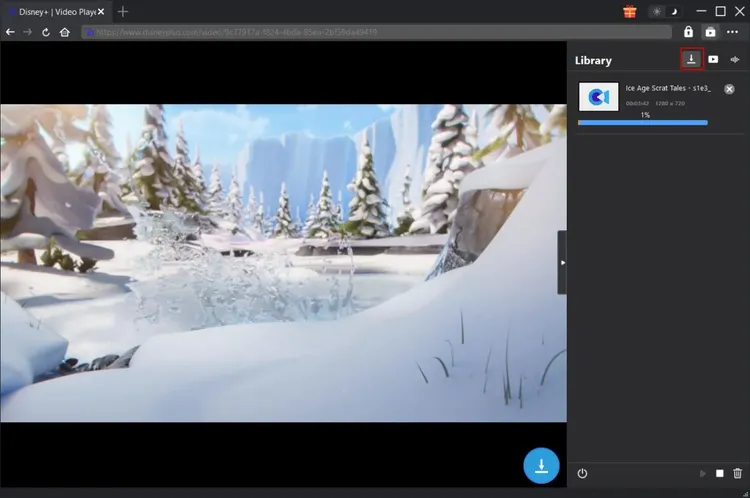
For series, you will need to select the specific episodes or entire seasons you wish to download. Check the boxes next to the desired episodes. For movies, simply select the title. Once your selection is made, click the "Download" button. The software will begin analyzing the stream and preparing the download queue. You can monitor the progress in the "Downloading" tab, which shows the status, speed, and estimated time remaining for each item. If you have selected multiple items, they will be queued and downloaded according to your settings.
Step 6: Access and Enjoy Your Downloads
Once the download is complete, the files will be saved to the designated output folder on your computer. You can access this folder by clicking the "Open Folder" button in the software or by navigating to the location manually. The files are ready to play on any compatible media player, such as VLC, Windows Media Player, or QuickTime. You can now enjoy your Disney+ content offline, anytime, anywhere, without the need for an internet connection or streaming buffer.
Detailed Comparison with Competitors
The market for video downloading software is competitive, with numerous tools claiming to offer similar functionalities. However, Leawo Disney+ Downloader distinguishes itself through its specialization, quality, and user experience. Below, we compare it with some common alternatives to highlight its advantages.
Leawo Disney+ Downloader vs. Generic Video Downloaders
Generic video downloaders often support a wide range of websites, but this breadth comes at the cost of depth. They may struggle with Disney+’s specific encryption and streaming protocols, resulting in failed downloads, low-quality outputs, or missing audio tracks. In contrast, Leawo Disney+ Downloader is optimized specifically for Disney+, ensuring consistent performance and high-quality results. While generic tools may be free or cheaper, they often lack the reliability and support needed for a premium service like Disney+.
Additionally, generic downloaders frequently insert watermarks or ads into the downloaded files, detracting from the viewing experience. Leawo Disney+ Downloader provides clean, watermark-free files, preserving the integrity of the original content. This distinction is crucial for users who value quality and professionalism in their media libraries.
Leawo Disney+ Downloader vs. Screen Recording Software
Screen recording software captures what is displayed on your screen, which can be a workaround for downloading streaming content. However, this method is inefficient and prone to quality loss. Screen recordings are limited by your monitor’s resolution and refresh rate, and they often capture system notifications, mouse cursors, and other distractions. Furthermore, recording a two-hour movie in real-time takes two hours, whereas Leawo Disney+ Downloader can complete the task in minutes.
Leawo Disney+ Downloader extracts the digital stream directly, resulting in a perfect copy of the original file without any external interference. This method is faster, more efficient, and produces higher-quality outputs. It also allows for batch downloading, which is impossible with screen recording. For serious users, the difference in convenience and quality is substantial.
Leawo Disney+ Downloader vs. Browser Extensions
Browser extensions are another popular option for downloading web content. However, they are often unstable, insecure, and limited in functionality. Many extensions cannot handle DRM-protected content like Disney+, and those that do may violate browser security policies, putting your data at risk. Additionally, extensions often lack advanced features such as batch downloading, audio track selection, and subtitle customization.
Leawo Disney+ Downloader is a standalone application, offering greater stability, security, and feature richness. It is regularly updated to address security vulnerabilities and compatibility issues, ensuring a safe and reliable experience. The dedicated support team behind Leawo provides assistance and troubleshooting, which is rarely available for free browser extensions. For users who prioritize security and performance, a dedicated software solution is the superior choice.
User Testimonials and Reviews
Hearing from real users provides valuable insight into the practical performance of Leawo Disney+ Downloader. Below are verbatim reviews from customers who have experienced the software firsthand.
"Absolutely fantastic tool!"
"I travel frequently for work, and having access to Disney+ content on my flights is a lifesaver. This software makes it so easy to download movies and shows in high quality. I’ve tried other downloaders, but none compare to the speed and reliability of Leawo. Highly recommended!"
- Sarah J., October 12
"Great for family movie nights"
"We live in a rural area with spotty internet, so streaming is often a struggle. With Leawo Disney+ Downloader, we can download our favorite movies over Wi-Fi during the day and watch them together in the evening without any buffering. The kids love it, and so do we. The interface is very user-friendly, even for someone like me who isn’t very tech-savvy."
- Michael T., November 3
"Perfect quality and fast"
"I was skeptical about the quality of downloaded streams, but Leawo Disney+ Downloader exceeded my expectations. The 1080p videos look crisp and clear, and the audio is perfect. I also appreciate the ability to choose different audio tracks for my international friends. It’s a well-designed piece of software that does exactly what it promises."
- Elena R., September 28
"Saved my vacation"
"We were going on a long road trip with no cell service for hours. I downloaded a whole season of The Mandalorian using this software, and it kept the kids entertained for the entire journey. The batch download feature is a game-changer. I didn’t have to sit there and click download for each episode. Just set it and forget it. Worth every penny."
- David L., August 15
"Reliable and secure"
"I’ve been using Leawo products for years, and they never disappoint. The Disney+ Downloader is no exception. It’s secure, doesn’t have any malware, and respects my privacy. The customer support is also very responsive. I had a question about subtitle formats, and they answered me within hours. Great company, great product."
- Jennifer K., July 22
"Best investment for media lovers"
"As a film student, I need to analyze scenes closely, and streaming isn’t always reliable for frame-by-frame review. Downloading with Leawo allows me to have local copies for study purposes. The quality is pristine, and the file management is excellent. It’s an essential tool for my coursework."
- Alex P., June 10
"Simple and effective"
"I don’t like complicated software, but this one is straightforward. Log in, search, click download, and done. The videos play perfectly on my tablet. No issues at all. I wish I had found this sooner."
- Robert M., May 5
"Excellent for archiving"
"I worry about my favorite shows disappearing from streaming services. This tool lets me keep a personal archive of the classics. It’s peace of mind knowing I can always watch Snow White or Star Wars whenever I want, regardless of licensing changes. The software is robust and handles large batches well."
- Linda S., April 18
System Requirements and Technical Specifications
To ensure optimal performance, Leawo Disney+ Downloader requires a Windows-based system that meets the following minimum specifications. While the software is lightweight, adhering to these requirements will guarantee smooth operation and fast download speeds.
- Operating System: Windows 10, Windows 8, Windows 7 (32-bit and 64-bit versions supported). The software is optimized for modern Windows environments but maintains backward compatibility for older systems.
- Processor: 1 GHz or faster processor. A multi-core processor is recommended for faster processing and batch downloading capabilities.
- RAM: 4 GB RAM minimum. 8 GB or more is recommended for handling high-definition video processing and multitasking.
- Hard Disk Space: 500 MB of free disk space for software installation. Additional space is required for storing downloaded videos, depending on the quantity and resolution of the content. It is advisable to have several gigabytes of free space for a substantial media library.
- Internet Connection: A stable internet connection is required for logging in, browsing content, and downloading videos. Broadband connections (DSL, Cable, Fiber) are recommended for faster download speeds.
- Graphics Card: Standard graphics card capable of supporting 1080p video playback. No specialized GPU is required, but a dedicated graphics card may enhance playback performance on high-resolution displays.
- Sound Card: Standard sound card for audio playback and processing.
It is important to note that while the software itself is lightweight, the size of the downloaded files can be significant, especially at 1080p resolution. Users should ensure they have adequate storage capacity on their hard drives or external storage devices. Regularly cleaning up old downloads and organizing files into folders can help manage storage efficiently.
Frequently Asked Questions (FAQs)
To address common queries and concerns, we have compiled a list of frequently asked questions about Leawo Disney+ Downloader.
Is Leawo Disney+ Downloader legal?
Leawo Disney+ Downloader is designed for personal use and archival purposes. Users are responsible for complying with local copyright laws and the terms of service of Disney+. The software does not encourage piracy or illegal distribution of content. It is intended to facilitate offline viewing for subscribers who have legitimate access to the platform.
Can I download content in 4K resolution?
Currently, Leawo Disney+ Downloader supports downloads up to 1080p Full HD resolution. While Disney+ offers 4K content, the software focuses on providing a balance between quality and file size. 1080p is sufficient for most devices and provides excellent visual clarity. Future updates may include 4K support depending on technical feasibility and demand.
Does the software work on Mac or Linux?
No, Leawo Disney+ Downloader is currently only available for Windows operating systems. There are no versions for macOS or Linux at this time. Users of these platforms may need to use a Windows emulator or a separate Windows machine to utilize the software.
What happens if my Disney+ subscription expires?
Downloaded files are saved locally on your device and can be played indefinitely, regardless of your subscription status. However, new downloads will require an active Disney+ subscription to access the content library. It is advisable to download content you wish to keep before your subscription ends.
Can I transfer downloaded files to my phone or tablet?
Yes, downloaded files are saved in standard formats like MP4, which are compatible with most mobile devices. You can transfer them via USB cable, cloud storage, or other methods. Ensure that your device has sufficient storage space and a media player capable of playing the file format.
Is there a free trial available?
Leawo often offers a free trial or demo version that allows users to test the software’s functionality with limited features or watermarks. This enables potential buyers to evaluate the performance and quality before making a purchase. Check the official website for current trial offers.
How do I update the software?
Leawo Disney+ Downloader includes an automatic update feature that checks for new versions periodically. You can also manually check for updates in the settings menu. Keeping the software up to date ensures compatibility with the latest Disney+ changes and access to new features.
What if I encounter download errors?
If you experience download errors, first check your internet connection and ensure you are logged in to your Disney+ account. Verify that the output folder has sufficient space and write permissions. If the problem persists, consult the user manual or contact Leawo customer support for assistance. Common issues are often resolved by restarting the software or updating to the latest version.
Conclusion
In conclusion, Leawo Disney+ Downloader represents a significant advancement in the realm of digital media management. By bridging the gap between streaming convenience and offline accessibility, it empowers users to take control of their entertainment experience. Its combination of high-definition quality, user-friendly design, and robust features makes it an indispensable tool for Disney+ subscribers who value flexibility, reliability, and quality.
Whether you are a frequent traveler, a parent looking to entertain children on long journeys, a film student analyzing cinematic techniques, or simply a fan who wants to ensure their favorite content is always available, Leawo Disney+ Downloader delivers on its promises. It respects the integrity of the original content while providing the practical benefits of local storage and offline playback.
As streaming services continue to evolve and change, having a tool that allows you to preserve and access content on your own terms becomes increasingly valuable. Leawo Disney+ Downloader is not just a software application; it is a gateway to a more flexible and enjoyable media lifestyle. With its ongoing updates and dedicated support, it remains a top choice for users seeking the best possible offline viewing experience for Disney+ content.
We encourage you to explore the capabilities of Leawo Disney+ Downloader and discover how it can enhance your daily life. From the ease of batch downloading to the clarity of 1080p video, every feature is designed with the user in mind. Join the growing community of satisfied customers who have transformed the way they watch and enjoy their favorite Disney+ stories.