Leawo U-NEXT Downloader for Mac: Keep U-NEXT Movies and Anime on Your Mac
Leawo U-NEXT Downloader for Mac, sold as CleverGet U-NEXT Downloader for Mac, is a macOS app that downloads the movies, dramas and anime you can play in your own U-NEXT account (video.unext.jp) to MP4 or MKV files at up to 1080p, for watching offline. It runs on macOS 11 and later on Intel and Apple Silicon Macs, costs $59.95 for one year or $99.95 for lifetime, and the free trial downloads 3 videos.
U-NEXT has one of Japan's biggest catalogs, but its titles only play inside U-NEXT's player while you're connected, and only from a Japanese connection. Leave the country with a MacBook, lose your signal on the Shinkansen, or see a show drop out of the catalog, and you lose access. Leawo U-NEXT Downloader for Mac saves those videos as ordinary files that play in QuickTime, IINA or VLC.
Quick facts
- Developer: Leawo Software Co., Ltd., as a module of its CleverGet video downloader
- Version: CleverGet for Mac 26.0.5
- Platform: macOS 11 Big Sur through macOS 27, Intel or Apple Silicon (the Windows version is a separate license)
- Supported site: video.unext.jp, with your own U-NEXT account and a Japanese IP address
- Output: MP4 or MKV video, subtitles inside the video or as SRT/SUP files
- Quality: up to 1080p, depending on what U-NEXT streams for each title
- Price: $59.95 for one year or $99.95 for lifetime, one Mac each
- Free trial: 3 U-NEXT video downloads
- Refunds: 14-day money-back guarantee, on Leawo's conditions
What we checked: the CleverGet for Mac disk image (808 MB, installer package version 26.0.5 for Apple Silicon and Intel) from Leawo's Mac download link on October 22, 2026, and the one-year Mac license at $59.95 on the order page on October 23, 2026, with the lifetime option at $40 more and a renewal price of $35.97 after the first year. Leawo's product status page listed U-NEXT as "Working" at 1080p and 720p on October 23, 2026. We didn't download a U-NEXT video ourselves, since that needs a U-NEXT account and a Japanese connection.
Before you buy
- You need a Japanese IP address. Leawo's user guide says U-NEXT only lets you log in, play and download from a Japanese IP. Outside Japan, U-NEXT itself won't play, so the downloader can't work either.
- You need your own U-NEXT account. Leawo U-NEXT Downloader for Mac only saves videos you can already play. Paid titles have to be rented or bought first.
- Mac and Windows are licensed separately. This is the Mac license. A Windows PC needs its own Leawo U-NEXT Downloader purchase.
- The one-year plan renews. The order page sets the one-year license to renew after 12 months, at $35.97 when we checked. Lifetime is a one-time payment.
- Personal use only. Leawo's fair use policy allows downloads of videos you legally own, for your own needs. Sharing downloads or using them for business is forbidden.
Download Free TrialBuy Now
Overview
Leawo U-NEXT Downloader for Mac runs inside CleverGet for Mac, Leawo's all-in-one video downloader. CleverGet has its own web browser: you open U-NEXT in it, sign in with your U-NEXT login ID and password, and start playing a title. While it plays, you click the blue download button, and CleverGet reads the stream and opens a Download window listing every quality U-NEXT offers for that title, with choices for format, audio track and subtitles.
U-NEXT is one of several dozen CleverGet modules, next to Netflix and Hulu and other Japanese services such as ABEMA, DMM TV and NHK ONE. You install one app, activate the modules you pay for, and each module comes with 3 free downloads.
Features
Movies, dramas and anime at up to 1080p
Leawo U-NEXT Downloader for Mac saves any on-demand video you can play on video.unext.jp: films, Japanese and foreign series, anime, news and more, at up to 1080p. The Download window lists each stream with its resolution, bit rate and file size, so you can take the sharpest one for a TV or a smaller file to save room on your MacBook's SSD.
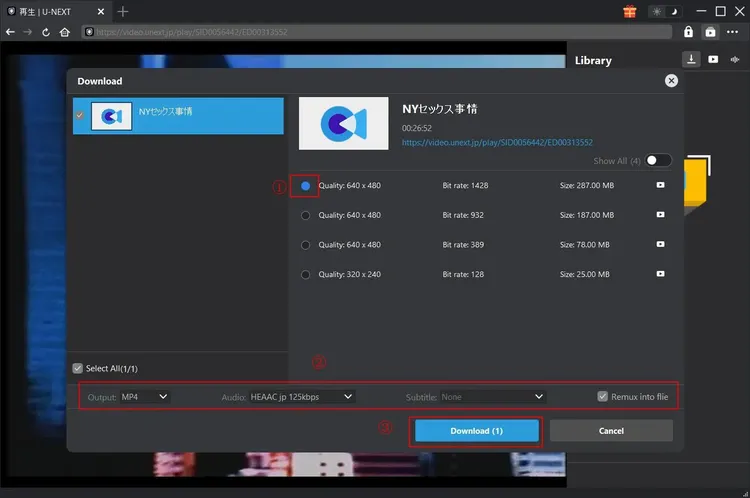
The Download window over a U-NEXT episode, shown in Leawo's guide on Windows: three 640 x 480 streams (287 MB, 187 MB and 78 MB) and one 320 x 240 stream, then Output MP4, Audio "HEAAC jp 125kbps" and "Remux into file" above the Download button.
A season or a whole series in one batch
Leawo U-NEXT Downloader for Mac lists the other episodes of the series you're playing, so you can tick several episodes, the current season or every season and queue them together instead of parsing each episode by hand.
Audio tracks and subtitles your way
Leawo U-NEXT Downloader for Mac keeps the original audio tracks and subtitles, or just the ones you pick, which matters for foreign films that U-NEXT offers both dubbed and subtitled. Subtitles can be packed into the video or saved as separate SRT or SUP files. MP4 suits QuickTime, an iPhone or iPad and most TVs, while MKV keeps several tracks in one file for VLC or IINA.
Downloads that pick up where they stopped
Leawo U-NEXT Downloader for Mac resumes an interrupted download, keeps the title, length and track details in the file's metadata, and can shut the Mac down once the queue is finished. Progress shows in a sidebar while you keep browsing.
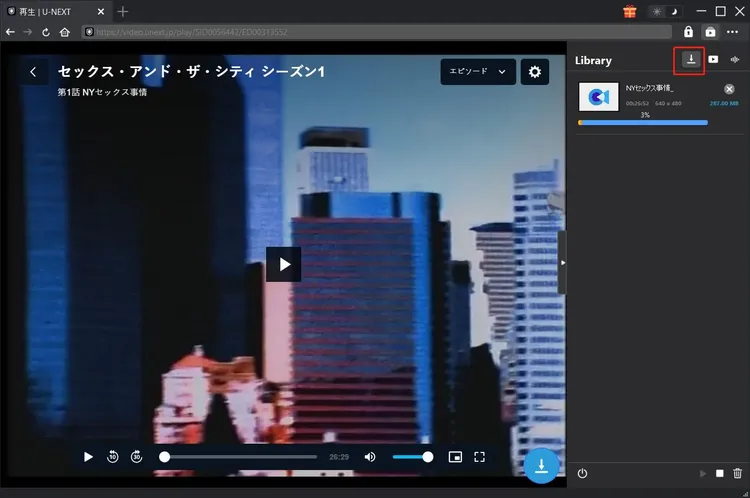
A U-NEXT episode playing in CleverGet's browser while its 287 MB download runs at 3% in the Library sidebar on the right (Leawo's guide, Windows version).
Benefits
- Your Mac becomes a travel library. Episodes saved in Japan play anywhere afterwards, on a plane or abroad, with no stream or VPN involved.
- Titles stay after they leave the catalog. A file on your drive stays until you delete it.
- Not tied to U-NEXT's player. MP4 files play in QuickTime and copy straight to an iPad through the Finder.
- Native on Apple Silicon and Intel. One app covers an older Intel iMac and a new M-series MacBook.
Real-World Uses
- Before a trip abroad: download the dramas you're following while still in Japan, then watch them in a hotel where U-NEXT won't load.
- Anime marathons offline: queue a full season overnight and let the Mac switch itself off when it's done.
- Japanese study: keep the subtitles as an SRT file to read, pause and replay lines.
- Family viewing on an iPad: save a few films on the Mac, copy them to the kids' iPad, and skip the streaming data on the road.
Who It's For, and Who Should Skip It
Leawo U-NEXT Downloader for Mac is for U-NEXT subscribers in Japan who watch on a Mac and want offline copies of what they already pay for, especially people who travel or commute.
Skip it if you live outside Japan: without a Japanese connection U-NEXT won't play, and the downloader needs it to. Skip it too if you watch on a Windows PC, which needs the Windows license. And if you want only two or three titles, the free trial may be enough.
Usage Guide
- Install: download the CleverGet for Mac disk image (about 808 MB), open it and run the installer package, which puts CleverGet in Applications. The U-NEXT module is built in.
- Choose where videos go: click the three-dot icon, open Settings, and under General set the "Save Video To" folder and how many downloads can run at once.
- Log in to U-NEXT: open U-NEXT inside CleverGet and sign in, ticking the option to stay logged in, which Leawo's guide says helps parsing.
- Play the title: paste its URL into the address bar or search for it, and start playing. CleverGet only parses a video whose playback page is open.
- Parse and download: click the blue download icon at the bottom right, choose the quality, MP4 or MKV, audio and subtitles, and click Download. Finished videos appear in the Library and your output folder.
Where it falls short
- 1080p only where U-NEXT offers it. The episode in Leawo's own guide tops out at 640 x 480, so older titles may be far below 1080p.
- One download at a time. Leawo's guide notes that the U-NEXT module downloads one video at a time, so a batch of episodes runs one after another.
- A very large install. The Mac disk image is about 808 MB and the installed app takes about 1.8 GB, because it holds every CleverGet module. Leawo's "1 GB free disk space" understates that.
- Breaks when U-NEXT changes its site. CleverGet customers on Trustpilot report that a streaming site's update can stop a module until Leawo releases a fix.
What Users Say
Testimonials on Leawo's U-NEXT Downloader page
Leawo's product page carries three testimonials about the U-NEXT module. They're the vendor's own selection, so read them as such:
"I was looking for an easy and reliable way to download videos from U-NEXT, and I'm glad I came across CleverGet U-NEXT Downloader. The download speed is impressive and the user interface is simple and intuitive." Mason Jones
"It allows me to easily download my favorite TV series in batch from U-NEXT with just a few clicks." Atlas Clark
"The integration with Leawo Blu-ray Player and Leawo Prof. Media is a fantastic addition. It allows me to access these powerful tools to enhance my video playback experience and give me the option to burn downloaded videos to Blu-ray or DVD discs effortlessly." Zayne Perry
Trustpilot reviews of CleverGet
We found no independent reviews of the U-NEXT module itself. CleverGet as a whole has a TrustScore of 4.7 from 66 reviews on Trustpilot (79% five-star, 6% one-star). None of the reviews mention U-NEXT. The ones that describe real use:
"I have been using Cleverget for quite sometime. Probably near or at the time it was brought out. [...] I was using a few other tools at the time and found Cleverget to be quite reliable and successful in getting the videos I wanted." Satori Agape-Economo, 5 stars
"I have had this product for years. It is a great product! What makes it even better is the tech support team. They are extremely knowledgeable, responsive, and timely." Pops, 5 stars
"I've been using the app for a few months now, and it works very well for my needs. I did encounter a problem, but the technical team was very responsive and resolved it." Florian, 5 stars
The critical side
The same reviewers are frank about breakage. Satori Agape-Economo adds: "sometimes updates of the software or the update from the streaming platform can wreak havoc when trying to get to the videos you want to get." Alberto gave 4 stars after "The Crunchyroll module stopped downloading subtitles after the last update," which support fixed two days later, and noted subtitles "only download in .SRT format and not .ASS."
Mike reported an HBO problem where the "downloaded video was systematically quite shorter than the original," fixed by a patch within 24 hours.
The pattern
People like CleverGet's download quality and, above all, a support team that answers within a day and ships fixes. The recurring complaint is that a module stops working for a while after a streaming site changes. Use the 3 free downloads on the U-NEXT titles you actually watch before paying.
Comparisons
Mac version vs Windows version
The Mac and Windows versions cost the same and download the same U-NEXT streams. The Mac app needs macOS 11 or later, the Windows version 64-bit Windows 7 to 11. Licenses don't transfer between the two.
Editions and Pricing
| License | Price | Term | After that |
|---|
| Free trial | $0 | 3 video downloads | Buy a license |
| One year (Mac) | $59.95 | 1 Mac, 12 months | Renews at $35.97 a year |
| Lifetime (Mac) | $99.95 | 1 Mac, one-time payment | Nothing more to pay |
Prices are from the order page on October 23, 2026. The license code arrives by email right after purchase.
FAQs
Can I use Leawo U-NEXT Downloader for Mac outside Japan?
Only with a Japanese IP address. U-NEXT blocks logins and playback from other countries, and Leawo U-NEXT Downloader for Mac can only download what U-NEXT will play in its browser.
Does Leawo U-NEXT Downloader for Mac run on M1, M2 and later Macs?
Yes. Leawo U-NEXT Downloader for Mac's installer supports Apple Silicon and Intel Macs on macOS 11 or later.
Do U-NEXT videos downloaded with Leawo expire?
No. Leawo U-NEXT Downloader for Mac saves ordinary MP4 or MKV files, which keep playing until you delete them, even after your license or U-NEXT subscription ends. An expired license only stops new downloads.
Is the lifetime license of Leawo U-NEXT Downloader for Mac worth it?
Leawo U-NEXT Downloader for Mac's lifetime license costs $40 more than the first year. With renewals at $35.97 a year, it pays for itself early in the second year.
Can I use my Leawo U-NEXT Downloader for Mac license on Windows?
No. The Mac license is for macOS only, and each license covers one computer. The Windows version is sold separately.
Can I get a refund on Leawo U-NEXT Downloader for Mac?
Leawo offers a 14-day money-back guarantee, but its refund policy only grants a refund when a problem is confirmed by both sides after working with support, and you pay the processing fee. Use the free downloads first.
System Requirements
- macOS 11, 12, 13, 14, 15, 26 or 27
- 1 GHz or faster Intel processor, or Apple Silicon
- 512 MB RAM (1024 MB or more recommended)
- 1 GB or more of free disk space by Leawo's figure (the installed app takes about 1.8 GB), plus room for your videos
- Internet connection with a Japanese IP address, and a U-NEXT account
Conclusion
Leawo U-NEXT Downloader for Mac is worth it for U-NEXT subscribers in Japan who watch on a Mac and want to keep what they watch: it saves the best stream U-NEXT offers as a normal file, handles whole seasons, and runs natively on Apple Silicon. The main reason not to buy is geography. It's useless without a Japanese connection, and many older titles stream well below 1080p. Use the 3 free downloads on your own titles first, and if you'll keep it beyond a year, the $99.95 lifetime license is the better deal.
Download Free TrialBuy Now