Leawo Hulu Downloader for Mac: The Ultimate Guide to Offline Hulu Viewing on macOS
In the rapidly evolving landscape of digital entertainment, streaming services have become the primary source of video content for millions of users worldwide. Among these giants, Hulu stands out as a premier destination for current TV shows, classic series, movies, and exclusive original content. However, despite the convenience of on-demand streaming, one significant limitation remains: the inability to watch content offline without an internet connection. For Mac users who value flexibility, mobility, and high-quality media consumption, this restriction can be a major hurdle. Whether you are a frequent traveler, a commuter with spotty connectivity, or simply someone who prefers to curate a personal library of favorite episodes, the need for a reliable solution to download Hulu videos is undeniable.
Enter Leawo Hulu Downloader for Mac. This specialized software tool is designed to bridge the gap between online streaming and offline accessibility, offering Mac users a seamless way to save their favorite Hulu content directly to their hard drives. By leveraging advanced decryption and recording technologies, Leawo Hulu Downloader ensures that you can enjoy your preferred shows and movies anytime, anywhere, without the constraints of buffering, data caps, or subscription-based offline modes that may limit device compatibility.
This comprehensive guide will delve deep into every aspect of Leawo Hulu Downloader for Mac. From its core features and technical specifications to step-by-step usage instructions, comparative analyses, and real-world user testimonials, we aim to provide you with all the information needed to make an informed decision. Whether you are a tech-savvy professional looking to optimize your media workflow or a casual viewer seeking greater control over your entertainment experience, this review will serve as your definitive resource.
Overview: Why Leawo Hulu Downloader for Mac?
The concept of downloading streaming content is not new, but the methods available have often been fraught with complications. Many free tools offer low-quality outputs, embed watermarks, or pose security risks through malware. Others are overly complex, requiring technical knowledge of command-line interfaces or video encoding parameters. Leawo Hulu Downloader for Mac distinguishes itself by offering a balanced approach: it is powerful enough to handle high-definition content with ease, yet intuitive enough for beginners to navigate without a steep learning curve.
At its core, Leawo Hulu Downloader is a dedicated application built specifically for the macOS environment. It integrates seamlessly with the operating system’s architecture, ensuring stability and performance. Unlike generic video downloaders that attempt to support hundreds of sites with varying degrees of success, Leawo focuses on delivering a premium experience for Hulu content. This specialization allows the developers to optimize the software for Hulu’s specific streaming protocols, resulting in faster download speeds, higher quality outputs, and better preservation of audio and subtitle tracks.
The software operates on a simple premise: it captures the video stream from Hulu and saves it as a standard video file on your Mac. This process bypasses the need for a continuous internet connection during playback, giving you true ownership of the media files you download. Once saved, these files can be transferred to other devices, edited in video editing software, or archived for future viewing. This level of flexibility is particularly valuable for content creators, educators, and archivists who need to reference specific clips or episodes without relying on the availability of the streaming platform.
Furthermore, Leawo Hulu Downloader addresses common pain points associated with offline viewing. For instance, many streaming apps only allow offline downloads on mobile devices, excluding desktop and laptop computers. With Leawo, Mac users can download content directly to their laptops, making it ideal for long flights, train rides, or areas with poor Wi-Fi coverage. Additionally, the software supports batch downloading, allowing users to queue multiple episodes or movies for simultaneous processing, saving time and effort.
Another critical aspect of Leawo Hulu Downloader is its commitment to quality. In an era where 4K and HD content are becoming the norm, settling for low-resolution downloads is no longer acceptable. Leawo ensures that downloaded videos retain their original resolution, bitrate, and frame rate, providing a viewing experience that matches or exceeds what is available through the streaming app. This attention to detail extends to audio quality as well, with support for multi-channel audio tracks and various language options.
In summary, Leawo Hulu Downloader for Mac is not just another video downloader; it is a comprehensive solution for anyone who wants to take control of their Hulu viewing experience. By combining ease of use, high-quality output, and robust features, it sets a new standard for offline streaming tools on macOS.
Key Features of Leawo Hulu Downloader for Mac
To truly understand the value proposition of Leawo Hulu Downloader, it is essential to explore its feature set in detail. Each feature has been carefully designed to address specific user needs and enhance the overall downloading experience. Below, we break down the most significant capabilities of the software.
1. High-Definition Video Downloading
One of the standout features of Leawo Hulu Downloader is its ability to download videos in high definition. Depending on the source content and your subscription level, the software can capture videos in resolutions up to 1080p or even 4K. This ensures that every detail, from intricate visual effects to subtle facial expressions, is preserved in the downloaded file. The software automatically detects the highest available quality for each video, eliminating the need for manual configuration. For users with large monitors or high-resolution displays, this feature is indispensable, as it prevents the pixelation and blurriness often associated with lower-quality downloads.
2. Batch Downloading Capability
Time is a precious commodity, and waiting for individual videos to download one by one can be frustrating. Leawo Hulu Downloader solves this problem with its batch downloading feature. Users can select multiple episodes from a series, several movies, or a mix of different content types and add them to the download queue. The software then processes these items sequentially or simultaneously, depending on your system resources and network speed. This feature is particularly useful for binge-watchers who want to download an entire season of a show before starting their marathon session. It also benefits travelers who wish to prepare a diverse library of content for long trips.
3. Preservation of Audio Tracks and Subtitles
Video content is not just about visuals; audio and subtitles play a crucial role in the viewing experience. Leawo Hulu Downloader recognizes this and ensures that all available audio tracks and subtitle options are preserved during the download process. Whether you prefer watching content in its original language with subtitles or dubbed in another language, the software allows you to select your preferred audio and subtitle tracks before downloading. This flexibility is essential for multilingual households, language learners, or individuals with hearing impairments who rely on closed captions. The downloaded files retain these elements as separate tracks or embedded streams, ensuring compatibility with various media players.
4. User-Friendly Interface
Complexity should not be a barrier to accessing powerful tools. Leawo Hulu Downloader boasts a clean, intuitive interface that makes it easy for users of all skill levels to navigate. The main dashboard provides clear access to key functions, such as adding new downloads, managing the queue, and adjusting settings. Visual cues and straightforward labels guide users through each step of the process, reducing the likelihood of errors. Even those with minimal technical expertise can start downloading videos within minutes of installing the software. The design philosophy prioritizes efficiency and clarity, ensuring that the focus remains on the content rather than the tool.
5. Fast Download Speeds
Slow download speeds can ruin the convenience of offline viewing. Leawo Hulu Downloader employs advanced acceleration technologies to maximize download speeds. By optimizing the connection to Hulu’s servers and utilizing multi-threaded downloading techniques, the software ensures that videos are saved to your Mac as quickly as possible. This is particularly beneficial for users with limited bandwidth or those who need to download large files in a short amount of time. The software also includes pause and resume functionality, allowing users to manage their network usage effectively and continue downloads if interrupted.
6. Format Compatibility
Not all media players support the same file formats. To ensure broad compatibility, Leawo Hulu Downloader allows users to choose from various output formats, including MP4, MKV, and others. MP4 is widely supported across devices and platforms, making it an ideal choice for most users. MKV, on the other hand, offers greater flexibility for storing multiple audio and subtitle tracks. By providing format options, the software empowers users to select the best format for their specific needs, whether they plan to watch the videos on their Mac, transfer them to a tablet, or edit them in professional software.
7. Metadata Preservation
Organizing a large library of downloaded videos can be challenging without proper metadata. Leawo Hulu Downloader automatically extracts and preserves metadata from the original Hulu content, including titles, episode numbers, descriptions, and cover art. This information is embedded in the downloaded files, making it easier to identify and sort videos in your media library. Compatible media players can display this metadata, providing a polished and organized viewing experience similar to that of a digital video store.
8. Regular Updates and Support
Streaming platforms frequently update their algorithms and security measures to prevent unauthorized downloading. Leawo stays ahead of these changes by regularly updating its software to maintain compatibility with Hulu’s latest versions. These updates often include performance improvements, bug fixes, and new features based on user feedback. Additionally, Leawo provides responsive customer support to assist users with any issues or questions they may encounter, ensuring a smooth and hassle-free experience.
Benefits of Using Leawo Hulu Downloader for Mac
While features describe what a product does, benefits explain why it matters to the user. Understanding the tangible advantages of Leawo Hulu Downloader helps illustrate its value in everyday scenarios. Here are some of the key benefits you can expect.
Unmatched Freedom and Flexibility
The primary benefit of using Leawo Hulu Downloader is the freedom it provides. No longer are you tethered to an internet connection or restricted by the limitations of streaming apps. You can watch your favorite shows on a plane, in a remote cabin, or during a power outage. This flexibility transforms your Mac into a portable entertainment hub, allowing you to enjoy content on your terms. For professionals who travel frequently, this means staying connected to their favorite series without worrying about hotel Wi-Fi reliability. For students, it means studying or relaxing with educational content regardless of campus network congestion.
Cost-Effective Entertainment
Streaming services often charge extra for offline viewing capabilities or limit the number of devices that can download content. With Leawo Hulu Downloader, you pay once for the software and gain unlimited downloading potential. There are no recurring fees for offline access, and no restrictions on how many devices you can transfer files to. This makes it a cost-effective solution for families or individuals who want to maximize the value of their Hulu subscription. Over time, the savings from avoiding additional service tiers or data overages can significantly offset the initial cost of the software.
Enhanced Viewing Quality
Streaming quality can fluctuate based on network conditions, leading to buffering, pixelation, or reduced resolution. Downloaded videos, however, remain consistent in quality. With Leawo Hulu Downloader, you ensure that every viewing session delivers the highest possible quality, free from interruptions. This is particularly important for cinematic experiences, where visual fidelity enhances immersion. Additionally, having a local copy allows you to use advanced media players that offer superior playback controls, equalizers, and visualization options, further enhancing the viewing experience.
Content Archiving and Preservation
Streaming libraries are dynamic; shows and movies are added and removed regularly. If a favorite title is removed from Hulu, it may become inaccessible unless you have a local copy. Leawo Hulu Downloader allows you to archive content before it disappears, preserving it for future enjoyment. This is invaluable for fans of niche series, documentaries, or limited-run events that may not be available indefinitely. By building a personal archive, you create a curated collection of media that reflects your tastes and interests, independent of platform licensing agreements.
Improved Productivity and Focus
For educators, trainers, and content creators, having offline access to video materials can boost productivity. You can reference specific clips during presentations without worrying about internet connectivity or loading times. Editors can import downloaded videos directly into their projects, streamlining the workflow. By removing the dependency on live streaming, Leawo Hulu Downloader enables a more focused and efficient work environment, whether you are preparing a lecture, creating a video essay, or analyzing media trends.
Step-by-Step Usage Guide
Getting started with Leawo Hulu Downloader for Mac is a straightforward process. This guide will walk you through each step, from installation to enjoying your first downloaded video. Please note that this guide assumes you have already purchased and obtained the installer for the software.
Step 1: Install and Launch the Software
Begin by locating the installer file you downloaded from the vendor website. Double-click the file to open the installation wizard. Follow the on-screen instructions to install Leawo Hulu Downloader on your Mac. You may need to enter your administrator password to authorize the installation. Once installed, navigate to your Applications folder and click on the Leawo Hulu Downloader icon to launch the program. Upon first launch, you may be prompted to grant necessary permissions, such as access to your downloads folder or network connections. Accept these permissions to ensure the software functions correctly.
Step 2: Log In to Your Hulu Account
Inside the Leawo Hulu Downloader interface, you will see an option to log in to your Hulu account. Click on this option and enter your Hulu credentials (email and password). This step is crucial because the software needs to verify your subscription status to access the content you are entitled to view. If you have two-factor authentication enabled, follow the prompts to complete the login process. Once logged in, the software will sync with your Hulu library, allowing you to browse available content directly within the application or paste links from the Hulu website.
Step 3: Select Content to Download
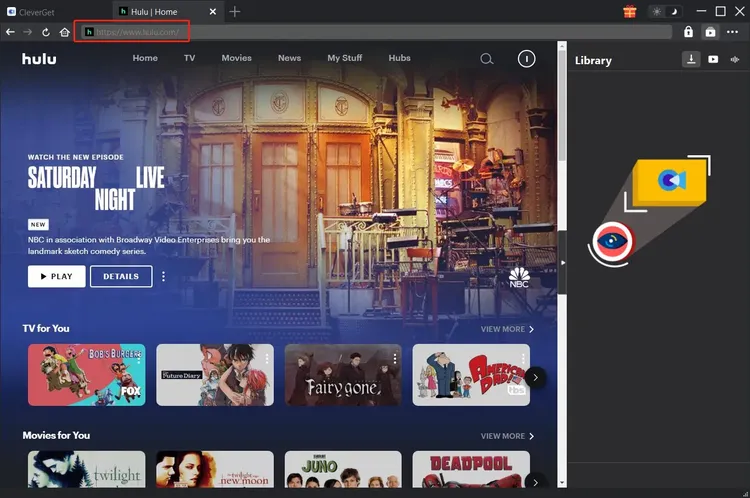
You can find content to download in two ways. First, you can use the built-in browser within Leawo Hulu Downloader to search for shows and movies. Simply type the title in the search bar, browse the results, and click on the desired item. Alternatively, you can go to the Hulu website in your regular web browser, copy the URL of the video you want to download, and paste it into the Leawo Hulu Downloader interface. The software will analyze the link and display available quality options and audio tracks.
Step 4: Customize Download Settings
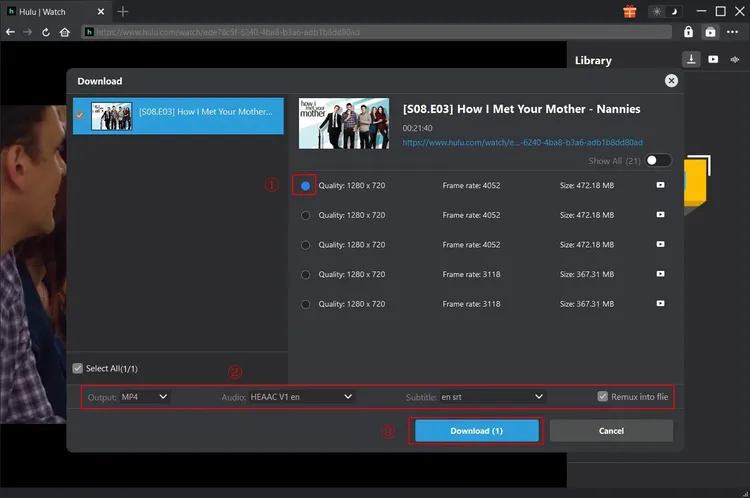
Before starting the download, you can customize various settings. Choose the output format (e.g., MP4 or MKV) based on your preference. Select the video quality (e.g., 1080p, 720p) and the audio track you wish to include. If subtitles are available, you can also choose to embed them or save them as a separate file. Additionally, you can specify the destination folder on your Mac where the downloaded files will be saved. These settings can be saved as defaults for future downloads to streamline the process.
Step 5: Start the Download
Once you have configured your settings, click the "Download" button. The software will begin processing the video. You will see a progress bar indicating the download status, including speed, time remaining, and file size. If you are downloading multiple items, they will appear in the queue. You can pause, resume, or cancel downloads at any time. The software runs efficiently in the background, allowing you to continue using your Mac for other tasks without significant performance impact.
Step 6: Access and Enjoy Your Downloads
When the download is complete, you will receive a notification. Navigate to the destination folder you selected earlier to find your video file. You can now open the file with any compatible media player, such as VLC, QuickTime, or IINA. Transfer the file to other devices if needed, or add it to your media library for easy access. Enjoy your Hulu content offline, anytime and anywhere!
Comparisons: Leawo vs. Alternatives
To help you understand where Leawo Hulu Downloader stands in the market, let’s compare it with other common methods and tools for downloading streaming content.
Leawo Hulu Downloader vs. Screen Recording Software
Some users resort to screen recording software to capture Hulu content. While this method is free, it has significant drawbacks. Screen recording captures the video in real-time, meaning a one-hour episode takes one hour to record. It also records system sounds and mouse movements if not configured correctly, leading to poor quality. Leawo Hulu Downloader, on the other hand, downloads the video directly from the source, resulting in much faster speeds and pristine quality without any artifacts or interruptions. Additionally, Leawo preserves metadata and subtitle tracks, which screen recording cannot do.
Leawo Hulu Downloader vs. Free Online Downloaders
Free online downloaders are tempting due to their zero cost, but they often come with hidden risks. Many of these sites are filled with ads, pop-ups, and potential malware. They also typically limit download quality to 480p or lower and may impose daily limits on the number of downloads. Leawo Hulu Downloader is a paid, professional tool that offers high-definition quality, unlimited downloads, and a secure, ad-free environment. The investment in Leawo pays off in terms of reliability, safety, and superior output quality.
Leawo Hulu Downloader vs. Hulu’s Native Offline Feature
Hulu does offer an offline download feature, but it is limited to mobile devices (iOS and Android) and requires the ad-free subscription tier. Furthermore, downloaded content on mobile devices expires after a certain period and must be reconnected to the internet to renew. Leawo Hulu Downloader works on Mac, allowing for larger screen viewing and better file management. The files downloaded via Leawo do not expire and can be kept indefinitely, providing true ownership and flexibility that Hulu’s native feature lacks.
User Testimonials
Don’t just take our word for it. Here is what real users have to say about their experience with Leawo Hulu Downloader for Mac.
"Finally, a downloader that works!"
"I’ve tried so many different tools to download Hulu shows, and most of them either didn’t work or produced terrible quality. Leawo Hulu Downloader is the first one that actually delivers on its promises. The 1080p quality is stunning, and the batch download feature saved me hours. Highly recommended for any Mac user."
— Sarah J., Graphic Designer
"Perfect for Travel"
"I travel frequently for work, and hotel Wi-Fi is always a gamble. With Leawo, I download my favorite series before I leave home. The interface is super easy to use, and I love that I can keep the files forever. No more worrying about expiring downloads!"
— Michael T., Sales Executive
"Great Customer Support"
"I had a small issue with the initial setup, but the customer support team was incredibly helpful. They responded quickly and guided me through the process. The software itself is robust and fast. Worth every penny."
— Emily R., Student
"High Quality and Fast"
"The download speeds are impressive. I can download an entire season in a few hours. The video quality is identical to what I see on the streaming site. It’s like having my own personal DVR on my Mac."
— David L., Tech Enthusiast
"Simple and Effective"
"I’m not very tech-savvy, but I found Leawo very easy to use. The instructions were clear, and the software did all the heavy lifting. Now I can watch my shows on my iPad during my commute without using any data."
— Linda K., Retired Teacher
"Best Investment for Media Lovers"
"As a film student, I need to analyze scenes repeatedly. Streaming buffers and lags, but downloaded files play smoothly. Leawo allows me to build a library of reference materials. The metadata preservation is a nice touch too."
— James P., Film Student
"Reliable and Consistent"
"I’ve been using Leawo for six months now, and it hasn’t failed me once. Updates are regular, and the software keeps up with Hulu’s changes. It’s a reliable tool that I depend on weekly."
— Rachel M., Marketing Manager
"No More Buffering"
"Living in a rural area, internet connectivity is inconsistent. Leawo has changed how I consume media. I download everything on weekends when the connection is better, and watch throughout the week without interruption. Life saver!"
— Tom B., Freelancer
System Requirements
To ensure optimal performance of Leawo Hulu Downloader for Mac, your system should meet the following minimum requirements. While the software is optimized for efficiency, meeting or exceeding these specifications will provide the best experience, particularly when downloading high-definition content.
- Operating System: Mac OS (Compatible with recent versions of macOS)
- Processor: 1 GHz or faster processor. A multi-core Intel or Apple Silicon (M1/M2/M3) processor is recommended for faster processing and decoding.
- RAM: 4 GB RAM minimum. 8 GB or more is recommended for smooth multitasking and handling large batch downloads.
- Hard Disk Space: 500 MB free disk space for installation. Additional space is required for storing downloaded videos. Ensure you have sufficient storage capacity for your media library, as HD and 4K files can be large.
- Internet Connection: A stable broadband internet connection is required for downloading content. Faster internet speeds will result in quicker download times.
- Display: Standard Mac display resolution. Higher resolution displays will benefit from the HD/4K download capabilities.
It is also advisable to keep your macOS updated to the latest version to ensure compatibility with the latest security patches and system frameworks used by Leawo Hulu Downloader.
Frequently Asked Questions (FAQs)
Here are answers to some of the most common questions users have about Leawo Hulu Downloader for Mac.
Is Leawo Hulu Downloader legal?
Leawo Hulu Downloader is a tool that allows users to download content for personal use. The legality of downloading streaming content varies by country and jurisdiction. Generally, downloading content for personal, non-commercial use is considered fair use in many regions, but redistributing or selling downloaded content is illegal. Users should always respect copyright laws and the terms of service of the streaming platform. Leawo encourages responsible use of its software.
Do I need a Hulu subscription to use this software?
Yes, you need an active Hulu subscription to download content. Leawo Hulu Downloader acts as a bridge to access the content you are already paying for. It verifies your subscription status during the login process. Without a valid subscription, you will not be able to access or download premium content.
Can I download live TV from Hulu?
Leawo Hulu Downloader is primarily designed for on-demand content, such as TV shows and movies. Live TV streaming involves different protocols and may not be supported for direct downloading. However, you may be able to use the screen recording features if available, but this is not the primary function of the downloader. Check the latest version notes for any updates regarding live TV support.
What happens if Hulu updates its platform?
Hulu frequently updates its platform, which can sometimes affect third-party tools. Leawo is committed to maintaining compatibility and releases regular updates to address any changes made by Hulu. If you encounter issues after a Hulu update, check for a software update for Leawo Hulu Downloader. The support team is also available to assist with any compatibility issues.
Can I transfer downloaded videos to other devices?
Yes, once the videos are downloaded to your Mac, they are standard video files (e.g., MP4 or MKV). You can transfer these files to any device that supports the file format, such as iPads, iPhones, Android tablets, or smart TVs. You may need to use a media server or USB transfer method depending on the device.
Does the software support 4K downloads?
Yes, Leawo Hulu Downloader supports 4K downloads if the source content on Hulu is available in 4K resolution and your subscription plan allows it. Ensure that your Mac and display support 4K playback to fully appreciate the quality.
Is there a trial version available?
Leawo often offers a trial version or a money-back guarantee policy. Check the official website for current offers. A trial allows you to test the software’s features and compatibility with your system before making a full purchase.
How do I update the software?
Leawo Hulu Downloader usually checks for updates automatically when you launch the program. If an update is available, you will be prompted to download and install it. You can also manually check for updates in the settings menu. Keeping the software updated ensures you have the latest features and compatibility fixes.
Conclusion
In a world where digital content is increasingly transient and dependent on constant connectivity, Leawo Hulu Downloader for Mac offers a refreshing sense of permanence and control. It empowers Mac users to curate their own media libraries, enjoy high-quality content without buffering, and access their favorite shows regardless of their internet situation. The combination of high-definition support, batch downloading, and user-friendly design makes it a standout tool in the crowded market of video downloaders.
Whether you are a frequent traveler, a content creator, or simply a fan of Hulu’s extensive library, Leawo Hulu Downloader provides the flexibility and reliability you need. By investing in this software, you are not just buying a tool; you are investing in a better, more convenient viewing experience. With regular updates, strong customer support, and a commitment to quality, Leawo continues to set the standard for offline streaming solutions on macOS.
Take control of your entertainment today. Explore the possibilities of offline viewing with Leawo Hulu Downloader for Mac and discover a new level of freedom in how you watch your favorite content.