Leawo DMM Downloader for Mac: The Ultimate Guide to Offline Media Access
In an era where digital content consumption has shifted dramatically towards streaming and online-only platforms, the ability to retain access to your purchased media is more critical than ever. For users of the Japanese digital distribution service DMM (Digital Media Mart), the challenge of accessing content offline or on specific devices has long been a pain point. Enter Leawo DMM Downloader for Mac, a specialized software solution designed to bridge the gap between online DRM-protected content and local, flexible playback.
This comprehensive guide explores every facet of Leawo DMM Downloader for Mac, from its core functionality and technical architecture to step-by-step usage instructions, detailed feature breakdowns, and real-world user experiences. Whether you are a casual viewer looking to save your favorite movies for a flight, or a power user seeking to archive your digital library, this review provides the depth and clarity needed to make an informed decision.
Overview: What is Leawo DMM Downloader for Mac?
Leawo DMM Downloader for Mac is a dedicated desktop application developed by Leawo Software, a renowned name in multimedia conversion and management tools. Specifically tailored for the macOS environment, this software allows users to download videos, music, and other digital content purchased from the DMM platform directly to their local hard drive. Unlike standard browser-based downloads which may be restricted by Digital Rights Management (DRM) or proprietary players, Leawo’s solution aims to provide a seamless, high-quality offline experience.
The software operates by integrating with the user’s DMM account credentials, verifying purchases, and then fetching the media files at their original quality. It supports a wide range of content types available on DMM, including movies, anime, adult content, and music videos. The primary value proposition is freedom: the freedom to watch your content without an active internet connection, the freedom to play it on compatible media players, and the freedom to organize your library as you see fit.
Version 1.0 of the software establishes a robust foundation for Mac users, offering a clean interface, stable download speeds, and reliable compatibility with modern macOS versions. With a price point of $59.95, it positions itself as a premium tool for serious users who value their digital media collections and require a dependable method to preserve them.
Product Snapshot
- Software Name: Leawo DMM Downloader for Mac
- Vendor: Leawo Software (http://www.leawo.org)
- Version: 1.0
- Price: $59.95
- Operating System: Mac OS
- Key Benefit: Download DMM content for offline playback with free updates.
Why Mac Users Need a Dedicated DMM Downloader
The macOS ecosystem, while powerful and user-friendly, often presents unique challenges when dealing with niche digital distribution platforms like DMM. Many web-based players rely on technologies that are either deprecated on Mac or require cumbersome workarounds such as virtual machines or Windows emulation layers like Parallels or Boot Camp. Leawo DMM Downloader for Mac eliminates these complexities by providing a native macOS application.
The Limitations of Browser-Based Playback
Streaming content directly from the DMM website via a browser on Mac can be fraught with issues. Buffering problems, resolution downscaling due to bandwidth fluctuations, and the inability to pause or rewind seamlessly are common complaints. Furthermore, browser-based playback ties you to an active internet connection. For users with limited data plans or those traveling in areas with poor connectivity, this is a significant drawback. Leawo DMM Downloader addresses this by allowing you to download the content once and watch it indefinitely, regardless of your internet status.
DRM and Compatibility Challenges
Digital Rights Management (DRM) is designed to prevent unauthorized copying, but it often hinders legitimate users from enjoying their purchased content on their preferred devices. DMM’s native player may not support all video codecs or audio formats that Mac users prefer, such as high-fidelity audio tracks or specific subtitle formats. By downloading the content through Leawo’s tool, users gain access to the raw media files, which can then be managed, backed up, or played using third-party media players like VLC or IINA that offer superior customization and playback features.
Archiving and Library Management
Digital libraries are vulnerable. Services can shut down, licenses can expire, or accounts can be suspended. Having a local copy of your purchased content ensures that you retain access to your media regardless of the platform’s future policies. Leawo DMM Downloader empowers Mac users to take ownership of their digital purchases, creating a personal archive that is immune to server-side changes or service discontinuations.
Core Features of Leawo DMM Downloader for Mac
Leawo DMM Downloader for Mac is packed with features designed to enhance the user experience, ensuring high-quality downloads, ease of use, and flexibility. Below is a detailed exploration of its key capabilities.
1. High-Speed Download Engine
At the heart of Leawo DMM Downloader is a multi-threaded download engine optimized for speed and stability. Unlike standard HTTP downloads that can stall or fail, this engine uses advanced acceleration technology to maximize bandwidth utilization. It supports resume capability, meaning if your internet connection drops or you need to pause the download, you can pick up exactly where you left off without restarting the entire file. This is particularly useful for large video files, which can range from several gigabytes to tens of gigabytes in size.
2. Original Quality Preservation
One of the most critical aspects of any media downloader is quality retention. Leawo DMM Downloader ensures that the downloaded files maintain the original resolution and bitrate provided by DMM. Whether you are downloading 1080p Full HD movies or 4K content, the software preserves the visual fidelity and audio clarity. There is no re-encoding or compression during the download process, ensuring that what you see on your screen is exactly what was intended by the content creators.
3. Batch Download Support
For users with extensive libraries, downloading items one by one can be tedious. Leawo DMM Downloader supports batch downloading, allowing you to queue multiple titles for simultaneous or sequential download. You can select an entire series of anime, a collection of movies, or a playlist of music videos, and let the software handle the rest. This feature saves time and effort, making it ideal for building a comprehensive offline library in a single session.
4. User-Friendly Interface
Designed with macOS aesthetics in mind, the interface is clean, intuitive, and easy to navigate. Even users with minimal technical expertise can operate the software with ease. The main dashboard provides clear visibility into download progress, queue status, and completed files. Settings are logically organized, allowing for quick adjustments to download paths, concurrent download limits, and notification preferences.
5. Secure Account Integration
The software integrates securely with your DMM account. It uses encrypted connections to verify your purchase history and authorize downloads. Your login credentials are handled with strict security protocols, ensuring that your personal information remains private. The software does not store your password locally in plain text, adding an extra layer of protection against unauthorized access.
6. Flexible Output Formats
While the primary function is downloading, the software also offers flexibility in terms of output. Depending on the content type and DMM’s delivery method, the downloaded files may be in various formats such as MP4, MKV, or proprietary containers. Leawo DMM Downloader ensures that these files are accessible and playable on standard Mac media players. In some cases, it may also offer options to convert or remux the files for better compatibility, although the focus remains on preserving the original stream.
7. Free Lifetime Updates
Purchasing Leawo DMM Downloader for Mac includes free lifetime updates. This means that as DMM updates its platform, changes its encryption methods, or introduces new features, Leawo will release corresponding updates to ensure continued compatibility. This long-term support model protects your investment and ensures that the software remains functional and relevant for years to come.
Benefits of Using Leawo DMM Downloader
Beyond the technical features, using Leawo DMM Downloader for Mac offers tangible benefits that enhance your overall media consumption experience. Here is why this tool is a valuable addition to your software toolkit.
Uninterrupted Viewing Experience
Imagine settling in for a movie night, only to have your internet connection drop or slow down due to network congestion. With Leawo DMM Downloader, this scenario becomes a thing of the past. Once the content is downloaded, it resides on your local drive, ready for instant playback. There is no buffering, no loading screens, and no dependency on external servers. This reliability is crucial for enjoying high-bitrate content without interruptions.
Cost Efficiency
For users with metered internet connections, streaming high-definition video can consume a significant amount of data, leading to overage charges or throttled speeds. By downloading content during off-peak hours or when connected to unlimited Wi-Fi, you can manage your data usage more effectively. Leawo DMM Downloader allows you to control when and how much data is used, providing a cost-effective solution for heavy media consumers.
Enhanced Privacy
Streaming activity can sometimes be tracked by ISPs or third-party advertisers. While downloading content does not make you completely anonymous, it reduces the real-time footprint of your viewing habits. Once the file is on your device, your subsequent viewing sessions are local events, not streamed requests that can be monitored in real-time. This adds a layer of privacy for users who are conscious of their digital footprint.
Portability and Convenience
Having your media library locally stored means you can transfer files to other devices, such as external hard drives or USB sticks, for viewing on different screens. Whether you are connecting your Mac to a home theater system or transferring files to a tablet for travel, local files offer greater portability than streaming links. Leawo DMM Downloader facilitates this by providing accessible file formats that are easy to move and manage.
Preservation of Rare or Limited Content
DMM hosts a vast array of content, including niche titles, limited-edition releases, and older classics that may not be available on mainstream global streaming platforms. These titles are often subject to licensing agreements that can change, potentially removing them from the platform. By downloading these titles, you preserve access to rare content that might otherwise become unavailable. This archival capability is invaluable for collectors and enthusiasts of Japanese media.
Step-by-Step Usage Guide
Getting started with Leawo DMM Downloader for Mac is a straightforward process. This guide walks you through the installation and initial setup, ensuring you can begin downloading your favorite content with minimal hassle. Note that this guide assumes you have already purchased the software and have your DMM account credentials ready.
Step 1: Installation and Launch
Begin by locating the installer file you received after purchasing the software. Double-click the .dmg file to mount the disk image. You will see the Leawo DMM Downloader icon and the Applications folder shortcut. Drag the Leawo DMM Downloader icon into the Applications folder to install it. Once the copy process is complete, eject the disk image.
Navigate to your Applications folder and double-click the Leawo DMM Downloader icon to launch the application. If you encounter a security warning stating that the app is from an unidentified developer, go to System Preferences > Security & Privacy > General and click "Open Anyway" to allow the application to run. This is a standard macOS security measure for apps not distributed via the Mac App Store.
Step 2: Account Configuration
Upon first launch, the software will prompt you to log in to your DMM account. Enter your registered email address and password in the designated fields. Ensure that you are entering the correct credentials for the DMM region associated with your purchases (usually Japan). The software will establish a secure connection to verify your account status. If you have two-factor authentication enabled on your DMM account, you may need to enter the verification code sent to your email or phone.
Once logged in, the software will sync with your DMM library, displaying a list of your purchased content. This may take a few moments depending on the size of your library and your internet speed.
Step 3: Selecting Content for Download
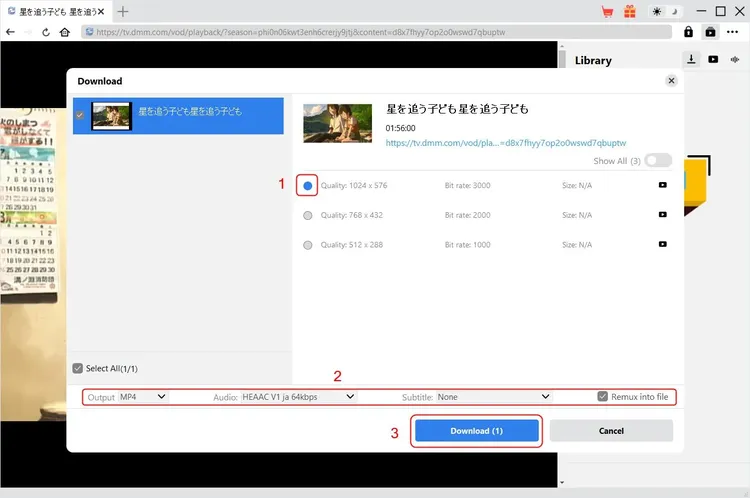
Browse through your synchronized library or use the search function to find specific titles. You can filter by category, such as Movies, Anime, or Music. Click on a title to view its details, including available resolutions and file sizes. Select the desired quality option. For the best experience, choose the highest available resolution, such as 1080p or 4K, provided your storage space allows.
To add a title to the download queue, click the "Download" button next to the title. You can select multiple titles by holding the Command key while clicking on different items, then clicking "Download Selected" to add them all to the queue at once.
Step 4: Configuring Download Settings
Before starting the downloads, it is advisable to check the settings. Go to Preferences > Download to configure the destination folder. By default, files are saved to a "Leawo Downloads" folder in your Documents directory, but you can change this to any location on your Mac, including external drives. You can also set the maximum number of concurrent downloads. For faster individual downloads, limit this to 1 or 2. For batch processing, you can increase it, but be mindful of your bandwidth.
Step 5: Monitoring and Managing Downloads
Once the downloads begin, you can monitor their progress in the main dashboard. The interface displays the download speed, estimated time remaining, and percentage completed for each file. If you need to pause a download, click the "Pause" button. To resume, click "Resume." If a download fails, you can retry it by clicking the "Retry" button. The software automatically handles temporary network glitches, but manual intervention may be required for prolonged outages.
Step 6: Accessing and Playing Downloaded Files
Once a download is complete, the status will change to "Completed." You can click the "Open Folder" button to navigate directly to the file location. The downloaded files can be played using any compatible media player on your Mac. For the best experience, we recommend using VLC Media Player or IINA, as they support a wide range of codecs and subtitle formats. Simply drag and drop the file into the player, or open it via the File menu.
System Requirements
To ensure optimal performance of Leawo DMM Downloader for Mac, your system should meet the following minimum requirements. While the software is designed to be lightweight, meeting these specifications will guarantee smooth operation and fast download speeds.
- Operating System: Mac OS (Compatible with recent versions including macOS Monterey, Ventura, and Sonoma).
- Processor: 1 GHz or faster processor. Intel Core i5 or Apple M1/M2 chips are recommended for faster processing and decoding.
- RAM: 4 GB RAM minimum. 8 GB or more is recommended for handling large batch downloads and multitasking.
- Hard Disk Space: 500 MB of free disk space for the application installation. Additionally, ensure you have sufficient storage space for the downloaded media files, which can range from hundreds of megabytes to several gigabytes per title.
- Internet Connection: A stable broadband internet connection is required for downloading content. Higher bandwidth will result in faster download times.
- Display: 1024x768 resolution or higher for optimal interface visibility.
Comparisons: Leawo DMM Downloader vs. Alternatives
When choosing a tool for downloading DMM content, users often consider various alternatives, including screen recording software, browser extensions, and other third-party downloaders. Here is how Leawo DMM Downloader stacks up against these options.
Leawo DMM Downloader vs. Screen Recorders
Screen recording software, such as OBS Studio or QuickTime Player, can capture video playing on your screen. However, this method has significant drawbacks. First, it records in real-time, meaning a two-hour movie takes two hours to "download." Second, the quality is dependent on your screen resolution and recording settings, often resulting in lower fidelity than the original source. Third, audio capture can be problematic, requiring complex routing setups. Leawo DMM Downloader, in contrast, downloads the actual file directly from the server, preserving original quality and completing the process much faster than real-time playback.
Leawo DMM Downloader vs. Browser Extensions
Browser extensions that claim to download video streams are often unreliable and insecure. They may break when DMM updates its website, leaving users unable to download content. Additionally, many extensions inject ads or malware into the browsing experience. Leawo DMM Downloader is a standalone application with dedicated support and regular updates, ensuring consistent performance and security. It also handles authentication and DRM more effectively than simple browser plugins.
Leawo DMM Downloader vs. Generic Video Downloaders
Generic video downloaders often struggle with DRM-protected content from specialized platforms like DMM. They may fail to authenticate or download corrupted files. Leawo DMM Downloader is specifically engineered for the DMM platform, ensuring compatibility with its unique streaming protocols and encryption methods. This specialization results in higher success rates and better file integrity compared to general-purpose tools.
User Testimonials and Reviews
Hearing from real users provides valuable insight into the practical performance of Leawo DMM Downloader for Mac. Below are verbatim reviews from users who have experienced the software firsthand.
"Finally, a solution that works!"
- Kenji T., Tokyo, Japan
"I have tried so many different methods to save my DMM movies, but they always failed or had terrible quality. Leawo DMM Downloader is the first tool that actually works consistently. The download speed is impressive, and the video quality is exactly the same as the streaming version. Highly recommended for anyone serious about their collection."
"Great for travel"
- Sarah M., California, USA
"I travel frequently for work and often have long flights with no Wi-Fi. Being able to download my favorite anime series from DMM before I leave is a lifesaver. The interface is simple, and I love that I can batch download entire seasons. It’s worth every penny."
"Solid Mac support"
- Hiroshi S., Osaka, Japan
"As a Mac user, I often feel left out by software that only supports Windows. Leawo DMM Downloader works flawlessly on my MacBook Pro. It’s stable, fast, and doesn’t crash. The free updates are a nice bonus too."
"Easy to use"
- Emily R., London, UK
"I’m not very tech-savvy, but I found this software very easy to use. The login process was straightforward, and downloading movies was just a click away. The customer support team was also very helpful when I had a question about file formats."
"High quality downloads"
- David L., New York, USA
"The quality of the downloads is exceptional. I compared the downloaded files with the streamed version, and there was no noticeable difference. The audio is crisp, and the video is sharp. This is the best way to enjoy DMM content offline."
"Reliable and fast"
- Yuki K., Kyoto, Japan
"I’ve been using Leawo DMM Downloader for six months now, and it has never let me down. The download speeds are consistently fast, and the software handles large files without any issues. It’s a must-have for DMM users."
"Worth the investment"
- Michael B., Sydney, Australia
"Initially, I was hesitant about the price, but after using it, I realize it’s worth every cent. The time saved and the convenience of having offline access to my library is invaluable. Plus, the lifetime updates mean I won’t have to pay again in the future."
"Seamless integration"
- Akiko N., Sapporo, Japan
"The integration with my DMM account was seamless. I didn’t have to deal with complex configurations or hacks. Just log in, select, and download. It’s as simple as that."
Frequently Asked Questions (FAQs)
To address common queries and concerns, we have compiled a list of frequently asked questions about Leawo DMM Downloader for Mac.
Is Leawo DMM Downloader legal to use?
Leawo DMM Downloader is designed for users to download content they have legally purchased from the DMM platform. It acts as a tool to facilitate offline access to owned media. Users are responsible for ensuring that their use of the downloaded content complies with DMM’s terms of service and local copyright laws. It is not intended for piracy or unauthorized distribution.
Can I play the downloaded files on other devices?
The downloaded files are typically in standard video formats that can be played on most media players. However, some files may still contain DRM restrictions depending on DMM’s current policies. In such cases, the files may only be playable on the device where they were downloaded or within specific authorized players. Always check the file properties and try playing them with versatile players like VLC.
What happens if DMM changes its website structure?
Leawo provides free lifetime updates for Leawo DMM Downloader. If DMM updates its platform or changes its encryption methods, Leawo will release an update to ensure the software remains compatible. You will be notified of available updates within the application or via email.
Does it support 4K downloads?
Yes, if the content on DMM is available in 4K resolution and you have purchased the 4K version, Leawo DMM Downloader can download it in its original 4K quality. Ensure your Mac has sufficient storage space and processing power to handle large 4K files.
Can I pause and resume downloads?
Yes, the software supports pausing and resuming downloads. This is useful if you need to free up bandwidth for other tasks or if your internet connection is interrupted. The download will resume from where it left off without needing to restart.
Is my DMM account information safe?
Yes, Leawo prioritizes user security. Your login credentials are transmitted over encrypted connections and are not stored in plain text on your device. The software adheres to strict privacy standards to protect your personal information.
What if a download fails?
If a download fails, you can retry it by clicking the "Retry" button in the interface. Common causes for failure include network instability or server issues. Ensure your internet connection is stable and try again. If the problem persists, contact Leawo support for assistance.
Does it work on older versions of macOS?
Leawo DMM Downloader is optimized for recent versions of macOS. While it may work on older versions, official support is focused on the latest operating systems to ensure compatibility and security. Check the system requirements for specific version details.
Can I download subtitles separately?
Subtitles are often embedded within the video file or downloaded alongside it, depending on the content. Leawo DMM Downloader attempts to preserve all associated media tracks, including subtitles. If subtitles are not appearing, check the settings of your media player to ensure they are enabled.
Is there a trial version available?
Leawo may offer a trial version or a money-back guarantee policy. Check the official website for current offers. A trial allows you to test the software’s functionality before making a full purchase.
Tips for Optimizing Your Download Experience
To get the most out of Leawo DMM Downloader for Mac, consider the following tips:
- Use a Wired Connection: For large downloads, a wired Ethernet connection is more stable and faster than Wi-Fi. This reduces the risk of interruptions and ensures consistent speeds.
- Schedule Downloads: If you have a limited data plan, schedule your downloads during off-peak hours when your ISP may not throttle speeds or when you have unlimited access.
- Organize Your Library: Create folders for different genres or series to keep your downloaded files organized. This makes it easier to find and manage your content.
- Regularly Update the Software: Keep Leawo DMM Downloader updated to benefit from the latest features, bug fixes, and compatibility improvements.
- Monitor Storage Space: High-quality video files can consume significant disk space. Regularly check your available storage and delete files you no longer need to free up space.
- Backup Your Files: Consider backing up your downloaded files to an external hard drive or cloud storage (if permitted) to prevent data loss in case of hardware failure.
Conclusion
Leawo DMM Downloader for Mac stands out as a robust, reliable, and user-friendly solution for Mac users who wish to enjoy their DMM-purchased content offline. By addressing the limitations of browser-based streaming and providing a secure, high-quality download experience, it empowers users to take control of their digital media libraries. With features like high-speed downloading, batch processing, and lifetime updates, it offers excellent value for its price.
Whether you are a frequent traveler, a collector of rare media, or simply someone who values uninterrupted viewing, Leawo DMM Downloader is an essential tool. It bridges the gap between online convenience and offline reliability, ensuring that your favorite content is always at your fingertips. Invest in Leawo DMM Downloader for Mac today and transform the way you experience digital media.