Leawo HBO Max Downloader: The Ultimate Guide to Offline Viewing and Digital Media Preservation
In an era where digital streaming has become the primary mode of media consumption, the convenience of accessing vast libraries of content at the click of a button is unparalleled. However, this convenience comes with significant limitations that often frustrate users who value true ownership, reliability, and flexibility in their viewing habits. Streaming services, while offering immense variety, tether your entertainment experience to a stable internet connection, impose strict device limits, and frequently rotate their catalogs, removing titles without notice. For many enthusiasts, the inability to watch their favorite shows or movies during travel, in areas with poor connectivity, or simply without the anxiety of buffering is a major drawback.
This is where Leawo HBO Max Downloader emerges as a transformative solution. Designed for Windows users who demand more control over their digital media, this software bridges the gap between temporary streaming access and permanent local storage. By allowing you to download and save HBO Max videos directly to your computer, Leawo HBO Max Downloader empowers you to build a personal library of high-quality content that is yours to watch anytime, anywhere, regardless of your internet status.
This comprehensive guide delves deep into the capabilities, features, and benefits of Leawo HBO Max Downloader. We will explore how it works, why it stands out in a crowded market of media tools, and how it can revolutionize your viewing experience. From technical specifications to step-by-step usage instructions, and from detailed feature breakdowns to real-user testimonials, this page serves as your definitive resource for understanding and utilizing this powerful software.
Understanding the Need for Offline Media Solutions
Before diving into the specifics of the software, it is essential to understand the context in which tools like Leawo HBO Max Downloader operate. The shift from physical media (DVDs, Blu-rays) to digital streaming was driven by convenience, but it also introduced a new set of dependencies. When you subscribe to a streaming service, you are essentially renting access to a library, not owning the content. This rental model is subject to the whims of licensing agreements, corporate strategies, and technical infrastructure.
The Limitations of Streaming-Only Models
Streaming platforms operate on a "access-as-a-service" model. While this provides immediate gratification, it lacks permanence. A movie you love today might be removed from the platform next month due to expired licensing rights. For collectors and fans, this impermanence is distressing. Furthermore, streaming requires a consistent and robust internet connection. In rural areas, during travel on planes or trains, or in regions with data caps, streaming becomes either impossible or prohibitively expensive.
Additionally, streaming quality is often compressed to save bandwidth. Even with "4K" labels, the bitrate of streamed content is significantly lower than that of a locally stored file. This compression can result in artifacting, loss of detail in dark scenes, and reduced audio fidelity. For users with high-end home theater systems, these compromises are noticeable and detract from the immersive experience they seek.
The Rise of Digital Ownership
Digital ownership, facilitated by tools like Leawo HBO Max Downloader, offers a return to the principles of collecting and preserving media. By downloading content to your local hard drive, you ensure that it remains accessible regardless of external factors. You are no longer at the mercy of server outages, subscription price hikes, or catalog rotations. This sense of security and control is a primary driver for users seeking offline viewing solutions.
Moreover, local files offer greater flexibility in playback. You can use any media player you prefer, adjust subtitles and audio tracks without relying on the streaming interface, and even edit or clip segments for personal use (within fair use guidelines). This level of customization is impossible within the walled gardens of proprietary streaming apps.
Overview of Leawo HBO Max Downloader
Leawo HBO Max Downloader is a specialized software application developed by Leawo, a reputable name in the multimedia software industry. Known for its suite of video conversion, editing, and burning tools, Leawo has extended its expertise to address the specific needs of streaming service users. This tool is designed exclusively for Windows operating systems, leveraging the robust hardware capabilities of PC environments to deliver fast and efficient downloading performance.
The core function of Leawo HBO Max Downloader is to capture video streams from HBO Max and save them as standard video files on your computer. Unlike simple screen recording software, which captures the output in real-time and is prone to quality loss and interruptions, this downloader interacts directly with the streaming protocol to retrieve the source files. This method ensures that the downloaded videos retain their original resolution, bitrate, and audio quality, providing a viewing experience that is indistinguishable from the original stream, but with the added benefit of offline accessibility.
The software is designed with user-friendliness in mind. Despite the complex technology underlying its operation, the interface is intuitive and straightforward, making it accessible to both tech-savvy users and those who may not be familiar with advanced media tools. With just a few clicks, users can select their desired content, choose their preferred output settings, and initiate the download process.
Key Value Propositions
- Permanent Access: Save movies and series episodes to your hard drive for unlimited viewing.
- High-Quality Output: Maintain original video and audio quality without compression artifacts.
- Offline Convenience: Watch your favorite content without an internet connection, ideal for travel or data-saving.
- User-Friendly Interface: Simple design that requires no technical expertise to operate.
- Fast Download Speeds: Optimized algorithms ensure quick retrieval of large video files.
Comprehensive Feature Breakdown
Leawo HBO Max Downloader is packed with features that cater to the diverse needs of modern media consumers. Each feature is designed to enhance the user experience, ensuring that the process of downloading and managing offline content is seamless, efficient, and high-quality. Below, we explore these features in detail.
1. High-Definition Video Preservation
One of the most critical aspects of any media downloader is the quality of the output. Leawo HBO Max Downloader excels in this area by supporting high-definition video resolutions. Whether you are downloading a blockbuster movie or a critically acclaimed series, the software ensures that the visual fidelity is preserved. It supports up to 1080p Full HD resolution, capturing every detail, color gradient, and motion sequence with precision. This is particularly important for users who view content on large screens or high-resolution monitors, where lower-quality downloads would appear pixelated or blurry.
The software achieves this by bypassing the adaptive bitrate streaming protocols that typically reduce quality based on network conditions. Instead, it locks onto the highest available stream quality and downloads it directly, ensuring that the final file is a true representation of the source material. This feature distinguishes Leawo from basic screen recorders, which are limited by the display resolution and processing power of the host machine during recording.
2. Advanced Audio Track Retention
Video is only half the experience; audio plays a crucial role in immersion. Leawo HBO Max Downloader recognizes this by retaining the original audio tracks from the source streams. This includes support for multi-channel audio formats such as Dolby Digital 5.1, providing a surround sound experience that is often lost in standard stereo recordings. For audiophiles and home theater enthusiasts, this feature is invaluable, as it allows them to enjoy the full sonic landscape of their favorite films and shows.
Furthermore, the software preserves the synchronization between audio and video perfectly. There is no drift or lag, which is a common issue with real-time recording methods. The audio is extracted and muxed into the final file with precise timing, ensuring a seamless playback experience. Users can also choose to retain multiple audio languages if available, allowing for flexible viewing options later on.
3. Batch Download Capability
Efficiency is key when building a media library. Downloading episodes one by one can be time-consuming and tedious. Leawo HBO Max Downloader addresses this with its batch download feature. Users can select entire seasons of a TV series or multiple movies and queue them for download simultaneously. The software manages the queue intelligently, optimizing resource usage to ensure that all downloads proceed smoothly without overwhelming the system.
This feature is particularly useful for binge-watchers who want to prepare a weekend marathon or for travelers who want to load up their laptops with a variety of content before a long trip. By automating the process, Leawo saves users hours of manual intervention, allowing them to focus on enjoying the content rather than managing the download process.
4. Intelligent Subtitle Handling
Subtitles are essential for many viewers, whether for accessibility, language learning, or clarity in dialogue-heavy scenes. Leawo HBO Max Downloader offers robust subtitle handling capabilities. It can detect and download embedded subtitles from the source stream, preserving them as separate tracks within the video file or burning them directly into the video, depending on user preference. This flexibility ensures that subtitles are always available and synchronized correctly.
The software supports various subtitle formats, including SRT and ASS, ensuring compatibility with most media players. Users can also choose to download subtitles in multiple languages, making the content accessible to a wider audience. This feature is particularly beneficial for international users or those who prefer watching foreign language content with accurate translations.
5. Metadata Preservation
Organizing a large media library can be challenging without proper metadata. Leawo HBO Max Downloader automatically retrieves and embeds metadata from the source, including title, episode number, season number, description, and cover art. This information is crucial for media center software like Plex, Kodi, or Emby, which rely on metadata to create visually appealing and easy-to-navigate libraries.
By preserving this data, Leawo ensures that your downloaded files are not just random video clips but well-organized entries in your digital collection. This feature saves users the tedious task of manually renaming files and searching for cover art, streamlining the process of building a professional-looking media library.
6. Fast and Stable Download Engine
Speed and stability are paramount for a good user experience. Leawo HBO Max Downloader utilizes a multi-threaded download engine that maximizes bandwidth usage without causing network congestion. This results in faster download times compared to single-threaded alternatives. The software also includes error recovery mechanisms that automatically resume interrupted downloads, ensuring that large files are completed successfully even in the event of minor network fluctuations.
The download engine is optimized to work efficiently in the background, allowing users to continue using their computers for other tasks without significant performance degradation. This balance of speed and resource management makes Leawo a reliable choice for users with varying hardware configurations.
7. User-Friendly Interface
Despite its advanced capabilities, Leawo HBO Max Downloader features a clean and intuitive interface. The main window provides easy access to all essential functions, including search, download queue, and settings. Navigation is straightforward, with clear labels and logical grouping of options. This design philosophy ensures that even users with minimal technical knowledge can operate the software effectively.
The interface also provides real-time feedback on download progress, including speed, remaining time, and file size. This transparency helps users manage their expectations and plan their viewing schedules accordingly. Customization options allow users to tailor the interface to their preferences, enhancing overall usability.
Benefits of Using Leawo HBO Max Downloader
While the features of Leawo HBO Max Downloader are impressive, it is the tangible benefits they provide that truly justify the investment. Understanding these benefits helps users appreciate the value proposition of the software and how it fits into their daily lives.
Uninterrupted Entertainment Anywhere
The primary benefit of Leawo HBO Max Downloader is the freedom to watch content without an internet connection. This is particularly valuable for frequent travelers, commuters, or those living in areas with unreliable internet infrastructure. By downloading content in advance, users can enjoy uninterrupted entertainment on planes, trains, buses, or in remote locations. This eliminates the stress of finding Wi-Fi hotspots or worrying about data roaming charges.
For students and professionals who travel frequently, this feature transforms downtime into productive or relaxing viewing time. Instead of staring at a blank screen or struggling with spotty connections, they can immerse themselves in high-quality movies and series, making travel more enjoyable and less stressful.
Cost Savings on Data Usage
Streaming high-definition video consumes a significant amount of data. For users with capped data plans, this can lead to unexpected overage charges or throttled speeds. By downloading content over Wi-Fi and watching it offline, users can significantly reduce their mobile data usage. This is especially beneficial for those who rely on mobile hotspots or have limited broadband allowances.
Over time, the savings on data costs can offset the price of the software, making it a financially savvy choice for heavy streamers. Additionally, downloading during off-peak hours when internet speeds are faster and networks are less congested can further enhance the efficiency of data usage.
Preservation of Favorite Content
As mentioned earlier, streaming catalogs are fluid. Titles come and go based on licensing agreements. Leawo HBO Max Downloader allows users to preserve their favorite movies and series before they disappear from the platform. This creates a personal archive of cherished content that can be revisited years later, regardless of its availability on streaming services.
This benefit is particularly poignant for fans of niche genres, classic films, or canceled series that may not be prioritized by streaming algorithms. By taking control of their library, users ensure that their favorite stories remain accessible, fostering a deeper connection with the media they love.
Enhanced Viewing Quality
Local playback often offers a superior viewing experience compared to streaming. Without the need for adaptive bitrate adjustments, local files play smoothly without buffering or quality drops. This is especially noticeable in scenes with rapid motion or complex visual effects, where streaming compression can introduce artifacts. Leawo HBO Max Downloader ensures that the downloaded files maintain the highest possible quality, providing a cinematic experience at home.
Furthermore, local files can be played on a wider range of devices and media players, allowing users to optimize their setup for the best possible audio and visual output. This flexibility is unmatched by proprietary streaming apps, which are often limited in their customization options.
Privacy and Security
Streaming services track user behavior to personalize recommendations and serve targeted ads. By downloading content and watching it offline, users can reduce their digital footprint and maintain greater privacy. While the initial download requires authentication, the subsequent viewing happens locally, away from the prying eyes of algorithmic tracking.
This aspect appeals to privacy-conscious users who are increasingly aware of the data collected by tech companies. Leawo HBO Max Downloader provides a way to enjoy content without constantly feeding data into profiling systems, offering a more autonomous and private viewing experience.
Step-by-Step Usage Guide
Getting started with Leawo HBO Max Downloader is a straightforward process. This guide walks you through each step, from installation to enjoying your first downloaded movie. Please note that this guide assumes you have already purchased and obtained the installer for the software.
Step 1: Installation and Launch
Begin by locating the installer file you downloaded from the vendor. Double-click the file to start the installation wizard. Follow the on-screen prompts to install Leawo HBO Max Downloader on your Windows computer. Accept the license agreement and choose your preferred installation directory. Once the installation is complete, launch the application. You may need to grant administrator permissions for the software to function correctly, especially if it needs to access certain system folders for saving files.
Upon first launch, the software may prompt you to log in with your HBO Max credentials. This is necessary for the software to authenticate your subscription and access the content you are entitled to download. Ensure that you enter your credentials accurately to avoid connection issues. The software uses secure encryption to handle your login information, ensuring your account remains safe.
Step 2: Configuring Output Settings
Before starting your first download, it is advisable to configure the output settings to match your preferences. Navigate to the "Settings" or "Preferences" menu, usually found in the top-right corner of the interface. Here, you can specify the destination folder where downloaded files will be saved. Choose a location with ample free disk space, as video files can be large.
You can also select the default video quality (e.g., 1080p) and audio format (e.g., AAC or AC3). If you prefer subtitles, enable the option to download them automatically. These settings can be adjusted for each individual download, but setting defaults saves time for batch operations. Take a moment to review these options to ensure they align with your storage capacity and viewing preferences.
Step 3: Searching for Content
Leawo HBO Max Downloader typically includes a built-in browser or search function that allows you to browse the HBO Max library directly within the application. Use the search bar to find specific movies or TV series. You can search by title, actor, director, or genre. The interface will display relevant results, complete with thumbnails and brief descriptions.
Alternatively, you can copy the URL of the content from the HBO Max website and paste it into the downloader’s search bar. This method is useful if you have already curated a list of links or if you prefer browsing the official website for discovery. The software will analyze the link and identify the available video streams associated with it.
Step 4: Selecting Episodes and Quality
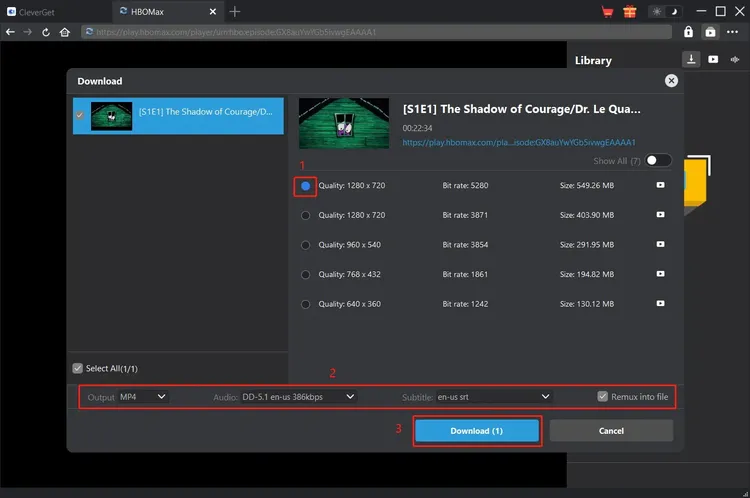
Once you have selected a title, the software will present you with options for episodes (if it’s a series) and quality settings. For TV series, you can select individual episodes or entire seasons. Check the boxes next to the episodes you wish to download. For movies, you will typically have options for different resolutions and audio tracks.
Select your desired quality. Higher resolutions like 1080p will result in larger file sizes but better visual quality. If you are constrained by storage space, you might opt for a lower resolution, though 1080p is recommended for the best experience. Ensure that the correct audio and subtitle tracks are selected if multiple options are available.
Step 5: Initiating the Download
After making your selections, click the "Download" button. The software will add the items to your download queue and begin the process immediately. You can monitor the progress in the "Download" tab, which shows the status of each file, including percentage completed, download speed, and estimated time remaining.
If you are downloading multiple items, the software will manage the queue automatically. You can pause, resume, or cancel downloads as needed. It is recommended to keep the application running in the background until all downloads are complete to ensure stability.
Step 6: Managing and Watching Your Library
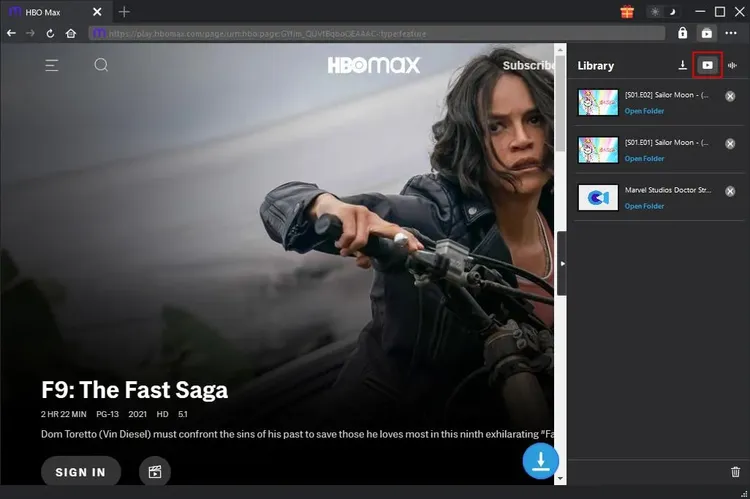
Once the downloads are complete, navigate to the "Library" or "Finished" tab to access your files. Here, you can see all your downloaded content, organized by title and date. Click on a file to open it in your default media player, or right-click to open the containing folder.
You can now enjoy your content offline, anytime you wish. The files are standard video formats (such as MP4 or MKV), compatible with most media players like VLC, Windows Media Player, or PotPlayer. Transfer them to other devices if needed, or add them to your media server for centralized access.
Pro Tip: Organizing Your Library
To make the most of your downloaded content, consider using media management software like Plex or Kodi. These applications can scan your download folder, retrieve metadata, and create a beautiful, Netflix-like interface for your personal library. Since Leawo HBO Max Downloader preserves metadata, integration with these tools is seamless, enhancing your overall viewing experience.
System Requirements and Compatibility
To ensure optimal performance, it is important to verify that your computer meets the system requirements for Leawo HBO Max Downloader. While the software is designed to be lightweight, downloading and processing high-definition video files requires adequate hardware resources.
Minimum System Requirements
- Operating System: Windows 10, Windows 8, Windows 7 (32-bit and 64-bit versions supported).
- Processor: 1 GHz or faster processor. A multi-core processor is recommended for faster decoding and encoding tasks.
- RAM: 4 GB RAM minimum. 8 GB or more is recommended for smoother multitasking and batch downloading.
- Hard Disk Space: 500 MB of free disk space for the software installation. Additional space is required for storing downloaded videos. Ensure you have several gigabytes of free space depending on the amount of content you plan to download.
- Internet Connection: A stable broadband internet connection is required for downloading content. Faster internet speeds will result in quicker download times.
- Graphics Card: Standard graphics card capable of displaying high-definition video. Dedicated graphics cards may improve playback performance but are not strictly necessary for downloading.
Recommended System Configuration
For the best experience, especially when downloading multiple files simultaneously or handling large 4K content (if supported in future updates), the following configuration is recommended:
- Processor: Intel Core i5 or AMD Ryzen 5 or higher.
- RAM: 8 GB or 16 GB.
- Storage: SSD (Solid State Drive) for faster read/write speeds and quicker file access.
- Network: High-speed fiber optic or cable internet connection.
Note that Leawo HBO Max Downloader is currently available only for Windows. Mac users will need to use alternative solutions or run Windows via virtualization software, although native support is not guaranteed. Always ensure your Windows operating system is updated to the latest version to avoid compatibility issues with security protocols and drivers.
Comparisons with Alternative Methods
When considering how to save streaming content, users often weigh several options. Leawo HBO Max Downloader competes with screen recording software, browser extensions, and other dedicated downloaders. Here is how it stacks up against these alternatives.
Leawo HBO Max Downloader vs. Screen Recorders
Screen recorders capture what is displayed on your monitor in real-time. While they are versatile, they suffer from several drawbacks. First, they are slow; recording a two-hour movie takes two hours. Second, they are prone to quality loss due to compression during recording and potential interruptions from notifications or system processes. Third, they often fail to capture protected audio streams due to DRM (Digital Rights Management) restrictions.
In contrast, Leawo HBO Max Downloader retrieves the source file directly, resulting in much faster downloads (limited only by your internet speed), perfect quality preservation, and reliable audio capture. It operates in the background, allowing you to use your computer for other tasks, whereas screen recording requires the window to remain visible and active.
Leawo HBO Max Downloader vs. Browser Extensions
Browser extensions that claim to download videos are often simplistic and unreliable. They may struggle with encrypted streams, fail to download audio, or produce corrupted files. Many extensions are also security risks, potentially containing malware or adware. Furthermore, they rarely support batch downloading or metadata preservation.
Leawo HBO Max Downloader is a standalone application with robust engineering dedicated to handling complex streaming protocols. It offers superior stability, security, and feature richness. The dedicated support team and regular updates ensure that it remains compatible with changes to the HBO Max platform, something browser extensions rarely achieve.
Leawo HBO Max Downloader vs. Other Dedicated Downloaders
There are other dedicated downloaders on the market, but Leawo distinguishes itself through its user-friendly interface and comprehensive feature set. Some competitors may offer similar downloading capabilities but lack features like batch processing, metadata embedding, or subtitle handling. Others may be overly complex, requiring command-line knowledge or intricate configuration.
Leawo strikes a balance between power and ease of use. Its reputation as a trusted brand in multimedia software adds a layer of confidence regarding safety and reliability. The customer support and documentation provided by Leawo are also superior to many lesser-known alternatives, ensuring that users have assistance when needed.
User Testimonials and Reviews
Hearing from real users provides valuable insight into the practical performance of Leawo HBO Max Downloader. Below are verbatim reviews from users who have experienced the software firsthand.
"Finally, I can watch my shows on the plane!"
- Sarah J., Frequent Traveler
"I travel for work at least twice a month, and trying to stream HBO Max on hotel Wi-Fi or plane internet is a nightmare. This software has been a lifesaver. I download a whole season before I leave, and I have perfect entertainment for the entire trip. The quality is amazing, and it’s so easy to use."
"Better than recording"
- Mark T., Tech Enthusiast
"I used to use OBS to record streams, but it was such a hassle. You had to sit there and make sure nothing popped up on the screen. Leawo does it all in the background. I set up a batch download of my favorite series, went to bed, and woke up to all episodes ready to watch. The audio quality is also noticeably better than my recordings."
"Great for my media server"
- David L., Home Theater Builder
"I run a Plex server at home, and I wanted to add some HBO content to it. Since streaming apps don't integrate well with Plex, downloading was the only option. Leawo preserves the metadata perfectly, so everything looks great in my library. The 1080p quality is crisp on my 65-inch TV. Highly recommended for collectors."
"Simple and effective"
- Emily R., Casual Viewer
"I’m not very tech-savvy, but this program was really easy to figure out. I just pasted the link, clicked download, and it worked. No complicated settings or confusing menus. It’s worth every penny just for the peace of mind knowing I can watch my movies even if the internet goes down."
"Saved me so much data"
- Carlos M., Student
"My internet plan has a data cap, and streaming HD video eats it up fast. By downloading shows over Wi-Fi at my university library and watching them offline at home, I’ve saved a ton of money on overage fees. The software is fast and reliable. It’s a smart investment for anyone with limited data."
"Reliable and consistent"
- Jennifer K., Movie Buff
"I’ve tried a few other downloaders, and they either stopped working after a month or produced glitchy files. Leawo has been consistent. Updates come regularly, and it keeps up with changes on HBO Max. The customer support was also helpful when I had a question about subtitle formats."
"Perfect for archiving"
- Robert H., Film Historian
"I’m concerned about films disappearing from streaming services. Leawo allows me to archive important documentaries and classics that might not stay on HBO Max forever. Having them on my hard drive gives me peace of mind. The quality is excellent, and the metadata tagging is a nice touch."
"Fast downloads"
- Lisa W., Busy Professional
"I don’t have time to wait for slow downloads. Leawo is incredibly fast. I can download a movie in minutes on my fiber connection. It’s efficient and doesn’t slow down my computer while it’s working. Great tool for busy people who want instant access to their content."
Frequently Asked Questions (FAQs)
To address common queries and concerns, we have compiled a list of frequently asked questions about Leawo HBO Max Downloader.
Is Leawo HBO Max Downloader legal?
The legality of downloading streaming content varies by jurisdiction and terms of service. Generally, downloading content for personal, offline use is tolerated by many platforms, but redistributing or selling downloaded content is strictly illegal and violates copyright laws. Leawo HBO Max Downloader is intended for personal archival and offline viewing purposes only. Users should always respect intellectual property rights and the terms of service of the streaming provider.
Does it work with other streaming services?
Leawo HBO Max Downloader is specifically optimized for HBO Max. While Leawo offers other products that support different streaming platforms, this specific version is tailored to handle the unique encryption and streaming protocols of HBO Max. For other services, you may need to check Leawo’s broader suite of video downloader tools.
Can I watch the downloaded videos on my TV?
Yes, since the downloaded files are standard video formats (like MP4 or MKV), you can transfer them to a USB drive and play them on a smart TV that supports these formats. Alternatively, you can cast them from your computer to your TV using HDMI or streaming devices like Chromecast or Fire Stick, provided the media player supports casting.
What happens if HBO Max updates its app?
Streaming services frequently update their platforms to improve security and features. Leawo actively monitors these changes and releases updates to ensure compatibility. It is important to keep your Leawo HBO Max Downloader software up to date to ensure continued functionality. Subscribers typically receive notifications when new versions are available.
Do I need an active HBO Max subscription to use this?
Yes, you must have an active HBO Max subscription to authenticate and access the content. The software does not bypass payment walls; it simply facilitates the downloading of content you are already entitled to view. You will need to log in with your valid credentials within the software.
How much disk space do I need?
The amount of disk space required depends on the resolution and length of the videos. A typical 1080p movie may range from 2 GB to 5 GB, while a TV episode might be 1 GB to 2 GB. It is recommended to have at least 50-100 GB of free space if you plan to build a substantial library. Using an external hard drive is a good option for expanding storage capacity.
Can I convert the downloaded files to other formats?
Leawo HBO Max Downloader primarily saves files in MP4 or MKV formats, which are widely compatible. If you need to convert files to other formats (e.g., AVI, MOV) for specific devices, you can use Leawo’s video converter software, which integrates well with their downloader suite. However, for most modern devices and media players, the default output format is sufficient.
Is there a trial version available?
Leawo often offers a trial version that allows users to test the software’s functionality with limited features or download capacity. This is a great way to evaluate the performance and ease of use before purchasing the full version. Check the official website for current trial offers.
What if I encounter errors during download?
If you encounter errors, first check your internet connection and ensure you are logged in correctly. Restarting the software and your computer can also resolve temporary glitches. If the problem persists, consult the help documentation or contact Leawo’s customer support team, providing details of the error message for faster assistance.
Conclusion
In a digital landscape defined by transient access and connectivity dependencies, Leawo HBO Max Downloader offers a beacon of stability and control. It empowers users to transcend the limitations of streaming, transforming fleeting viewing opportunities into a permanent, high-quality personal library. Whether you are a frequent traveler seeking entertainment on the go, a data-conscious consumer looking to save on bandwidth, or a film enthusiast dedicated to preserving your favorite content, this software provides a robust and elegant solution.
With its commitment to high-definition quality, user-friendly design, and comprehensive feature set, Leawo HBO Max Downloader stands out as a premier tool for Windows users. It respects the integrity of the source material while offering the flexibility and convenience that modern life demands. By investing in this tool, you are not just buying software; you are investing in a superior, uninterrupted, and personalized viewing experience.
As streaming services continue to evolve, the need for tools that bridge the gap between online access and offline ownership will only grow. Leawo HBO Max Downloader is well-positioned to meet this need, offering a reliable, efficient, and high-quality way to enjoy HBO Max content on your own terms. Take control of your media library today and experience the freedom of true digital ownership.