Leawo NHK+ Downloader
Leawo NHK+ Downloader boxshot
Version
1.0
License
Shareware
Operating Systems
Windows
System Requirements
1 GHz or faster processor, 4 GB RAM, 500 MB free disk space
File Size
0.00 MB
Release Date
9/15/2026
Last Updated
9/16/2026
12 views 0 downloads
Leawo NHK+ Downloader Short Description:
Download videos from NHK Plus.
Leawo NHK+ Downloader Long Description:

Leawo NHK+ Downloader: The Definitive Guide to Archiving Japanese Broadcast Content

In an era where digital content is increasingly ephemeral, the ability to preserve high-quality video streams has become a critical need for language learners, cultural enthusiasts, researchers, and media archivists. Japan’s public broadcaster, NHK, offers a wealth of educational, cultural, and news programming through its streaming platform, NHK Plus (NHKプラス). However, accessing this content outside of Japan, or preserving it for offline viewing when internet connectivity is unreliable, presents significant technical and geographical hurdles. This is where Leawo NHK+ Downloader emerges as an indispensable tool for users who demand reliability, quality, and ease of use.

This comprehensive guide explores every facet of Leawo NHK+ Downloader, from its core architecture and feature set to detailed usage instructions, comparative analysis against alternative methods, and in-depth answers to frequently asked questions. Whether you are a beginner looking to save your favorite drama series or a power user managing a large library of educational content, this review provides the clarity and depth necessary to maximize your experience with this specialized software.

Overview: Bridging the Gap Between Streaming and Ownership

Streaming services have revolutionized how we consume media, offering instant access to vast libraries of content. Yet, this convenience comes with inherent limitations. Content can be removed due to licensing expirations, geo-restrictions can block access based on your physical location, and reliance on a stable internet connection means that travel or network outages can interrupt your viewing experience. For users interested in Japanese culture, language learning, or current events, NHK Plus is a primary source of authentic, high-quality material. But without a way to download this content, it remains transient and inaccessible under many common circumstances.

Leawo NHK+ Downloader is designed specifically to address these challenges. It is not a generic video downloader that attempts to support thousands of sites with varying degrees of success. Instead, it is a specialized solution optimized for the NHK Plus platform. This focus allows the developers to maintain high compatibility, ensure consistent download speeds, and preserve the original quality of the video and audio streams. By converting streamed content into standard MP4 files, the software transforms temporary online videos into permanent assets that you can watch on any device, at any time, without restrictions.

The software operates on Windows systems, leveraging the robust processing capabilities of modern PCs to handle the decryption and conversion processes efficiently. With a minimal system footprint and intuitive interface, it lowers the barrier to entry for users who may not be technically inclined but still require professional-grade results. The promise of Leawo NHK+ Downloader is simple: you provide the link, and the software delivers a high-fidelity local copy, ready for your personal archive.

Product Snapshot

  • Software Name: Leawo NHK+ Downloader
  • Vendor: Leawo Software
  • Version: 1.0
  • Platform: Windows
  • Primary Function: Download and convert videos from NHK Plus to MP4
  • Output Quality: Up to 1080p Full HD
  • Price: $49.95

Why Choose Leawo NHK+ Downloader?

The market is flooded with generic video downloading tools, browser extensions, and command-line scripts. So, why should you invest in a dedicated solution like Leawo NHK+ Downloader? The answer lies in the specific complexities of modern streaming protocols and the unique requirements of NHK Plus content.

1. Specialized Optimization for NHK Plus

Generic downloaders often struggle with sites that use advanced DRM (Digital Rights Management) or dynamic streaming protocols like HLS (HTTP Live Streaming) and DASH. NHK Plus employs such technologies to protect its content and ensure smooth delivery. Leawo NHK+ Downloader is engineered to navigate these specific protections legally and efficiently. It does not rely on brittle screen-recording methods that degrade quality and waste time. Instead, it interacts directly with the stream data, ensuring that the downloaded file is a bit-perfect copy of the original broadcast.

2. Preservation of Original Quality

Many free tools compress video during the download process to save bandwidth or storage, resulting in pixelated images and muddy audio. Leawo NHK+ Downloader prioritizes fidelity. It supports downloads in up to 1080p resolution, maintaining the sharpness of text in news broadcasts, the detail in nature documentaries, and the clarity of dialogue in dramas. The audio is also preserved in its original format, ensuring that language learners hear the nuances of pronunciation and intonation exactly as intended by the broadcasters.

3. Batch Processing and Efficiency

For users who wish to archive entire seasons of a show or multiple episodes of a news program, downloading one file at a time is inefficient. Leawo NHK+ Downloader supports batch processing, allowing you to queue multiple URLs and let the software handle the rest. This feature is particularly valuable for researchers or educators who need to compile large datasets of video content for analysis or classroom use. The software manages the queue intelligently, optimizing resource usage to prevent system slowdowns.

4. User-Friendly Interface

You do not need to be a computer expert to use Leawo NHK+ Downloader. The interface is clean, logical, and guided. Complex technical processes happen in the background, while the user is presented with simple options: paste the link, choose the quality, and click download. This democratization of technology ensures that anyone, regardless of their technical background, can build a personal library of NHK content.

5. Offline Accessibility

The primary benefit of downloading content is the freedom it provides. Once downloaded, the MP4 files are yours to watch on airplanes, trains, or areas with poor internet connectivity. They can be transferred to tablets, smartphones, or external hard drives. This portability is essential for travelers, commuters, and students who want to make use of downtime effectively. Furthermore, having local copies protects you from the volatility of online platforms, where content can disappear overnight due to licensing disputes or policy changes.

Key Features in Depth

Leawo NHK+ Downloader is packed with features designed to enhance the user experience and ensure professional results. Let’s explore each feature in detail to understand how they contribute to the software’s overall effectiveness.

High-Speed Download Engine

Time is a valuable resource, and waiting hours for a single episode to download is unacceptable. Leawo NHK+ Downloader utilizes a multi-threaded download engine that splits the video stream into multiple segments and downloads them simultaneously. This parallel processing significantly accelerates the download speed, often reaching the maximum bandwidth limit of your internet connection. The software also includes smart resume functionality, meaning if your internet connection drops or your computer restarts, the download will pick up exactly where it left off, rather than starting from scratch. This reliability is crucial for large files or unstable network environments.

1080p Full HD Support

Visual clarity is paramount, especially for content that relies on visual storytelling or detailed information. Leawo NHK+ Downloader supports resolutions up to 1080p (Full HD). This ensures that every frame is crisp and clear. For language learners, this means being able to read subtitles clearly if they are burned into the video, or observing facial expressions and body language that aid in understanding context. For documentary viewers, it means seeing the fine details of landscapes, artifacts, and scientific demonstrations. The software automatically detects the highest available quality for the selected video, but also allows users to choose lower resolutions if storage space is a concern.

MP4 Output Format

Compatibility is key to a seamless viewing experience. Leawo NHK+ Downloader converts all downloaded content into the MP4 format. MP4 is the most widely supported video container in the world, compatible with virtually every media player, operating system, and mobile device. Whether you are using Windows Media Player, VLC, QuickTime on macOS, or native players on iOS and Android devices, your downloaded files will play without issue. This universal compatibility eliminates the need for additional conversion steps, saving you time and effort.

Metadata Preservation

A well-organized media library requires more than just video files; it needs context. Leawo NHK+ Downloader attempts to preserve relevant metadata from the source stream. This can include titles, descriptions, and sometimes thumbnail images. While the extent of metadata preservation depends on what the source server provides, the software ensures that your files are not just unnamed blobs of data. This feature helps in organizing your collection, making it easier to search for specific episodes or topics later.

Batch Download Capability

Efficiency is multiplied when you can process multiple items at once. The batch download feature allows you to paste multiple URLs into the software’s queue. You can then configure the settings for all items collectively or individually. The software will process the queue sequentially or in parallel, depending on your system’s resources and your preferences. This is ideal for backing up an entire series, archiving a week’s worth of news broadcasts, or collecting materials for a research project. The batch manager provides a clear overview of progress, allowing you to pause, resume, or cancel specific tasks as needed.

Automatic Subtitle Integration

For many users, subtitles are an essential part of the viewing experience. Leawo NHK+ Downloader is designed to detect and download available subtitles along with the video. These subtitles are typically embedded into the MP4 file or saved as separate SRT files, depending on the source structure. This ensures that you do not lose the linguistic context of the content. For Japanese learners, having accurate subtitles synced perfectly with the audio is invaluable for study and comprehension. The software handles the synchronization automatically, eliminating the tedious task of manually matching subtitle files to video files.

Safe and Secure Environment

Security is a major concern when downloading software from the internet. Leawo is a reputable vendor with a long history in the multimedia software industry. Leawo NHK+ Downloader is free from malware, spyware, and adware. The installation process is clean, and the software does not bundle unwanted third-party applications. Furthermore, the downloading process itself is secure, using encrypted connections to communicate with the NHK Plus servers. This ensures that your data and your system remain protected throughout the operation.

Tip: Maximizing Download Speeds

To achieve the fastest possible download speeds, ensure that no other bandwidth-intensive applications are running on your computer during the download process. Closing cloud backup services, streaming apps, or large file transfers can free up bandwidth for Leawo NHK+ Downloader. Additionally, using a wired Ethernet connection instead of Wi-Fi can provide a more stable and faster connection, reducing the risk of interruptions.

Benefits for Different User Groups

Leawo NHK+ Downloader is not a one-size-fits-all tool; it offers distinct advantages to various types of users. Understanding how it fits into your specific workflow can help you appreciate its value even more.

For Japanese Language Learners

Immersion is the gold standard for language learning, and NHK Plus offers a treasure trove of authentic Japanese content. From news broadcasts that use formal, standard Japanese to dramas that showcase colloquial speech and regional dialects, the variety is immense. Leawo NHK+ Downloader allows learners to create a personalized study library. You can download episodes of "News Web Easy" for beginner-level practice, or complex documentaries for advanced listening comprehension. Having the files locally means you can replay difficult sections repeatedly, slow down playback without buffering issues, and annotate timestamps for review. The ability to study offline also means you can utilize commute time or travel periods for intensive study sessions.

For Cultural Enthusiasts and Expats

Living abroad or having a deep interest in Japanese culture often means missing out on live broadcasts due to time zone differences or geo-blocks. Leawo NHK+ Downloader bridges this gap. You can catch up on popular taiga dramas, traditional music performances, or culinary shows at your own pace. For expats living outside Japan, this tool is a lifeline to home, providing access to familiar voices and cultural touchstones. It allows you to build a comfort library of content that reminds you of home, accessible whenever you need a cultural fix.

For Researchers and Academics

Academics studying Japanese media, society, politics, or history often need to reference specific broadcasts. Relying on live streams is risky for research, as links can break and content can be altered or removed. Leawo NHK+ Downloader enables researchers to create permanent, citable archives of media sources. You can download news segments related to specific events, political speeches, or social trends. These local copies can be analyzed frame-by-frame, transcribed, and included in academic presentations or publications. The batch processing feature is particularly useful for compiling large datasets for quantitative or qualitative analysis.

For Educators and Teachers

Teachers of Japanese language or Asian studies can use Leawo NHK+ Downloader to curate educational materials. Instead of relying on unstable online links during class, teachers can download relevant clips and episodes beforehand. This ensures that lessons run smoothly without technical glitches. Teachers can select content that aligns with their curriculum, whether it’s a historical documentary for a history class or a news segment for a current events discussion. The ability to offline view also means that schools with limited or filtered internet access can still utilize high-quality Japanese media in the classroom.

For Travelers and Commuters

For those who spend significant time traveling or commuting, streaming video is often impractical due to data caps, poor connectivity, or battery drain. Leawo NHK+ Downloader allows you to preload your device with hours of entertainment. You can download several episodes of a favorite series before a long flight or train journey. This not only saves money on roaming data charges but also ensures uninterrupted entertainment. The compact MP4 files are easy to store on tablets or laptops, making them perfect companions for life on the go.

Step-by-Step Usage Guide

Getting started with Leawo NHK+ Downloader is straightforward. This guide will walk you through the process from installation to enjoying your first downloaded video. Please note that this guide assumes you have already purchased and obtained the installer for the software.

Step 1: Installation and Launch

Begin by locating the installer file you downloaded from the vendor’s website. Double-click the file to start the installation wizard. Follow the on-screen prompts to install Leawo NHK+ Downloader on your Windows PC. You may need to grant permission for the software to make changes to your device; click "Yes" to proceed. Once the installation is complete, launch the application. You will be greeted by the main interface, which is clean and intuitive. Take a moment to familiarize yourself with the layout. The central area is where your download tasks will appear, and the top menu contains options for settings and help.

Step 2: Obtain the Video URL

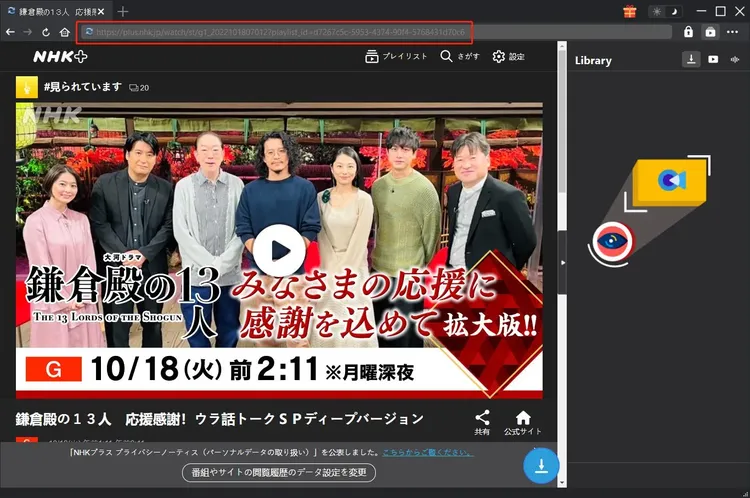
Open your preferred web browser and navigate to the NHK Plus website. Browse or search for the content you wish to download. This could be a news segment, a drama episode, or a documentary. Once you have found the video, click on it to start playing. Look at the address bar of your browser and copy the full URL of the page. Alternatively, some browsers allow you to right-click on the video player and select "Copy Video Address," but copying the page URL is generally more reliable for this software. Ensure that the URL is complete and correct.

Step 3: Paste the URL into Leawo NHK+ Downloader

Return to the Leawo NHK+ Downloader application. You will see a prominent input field or a "Paste URL" button. Click inside the input field and paste the URL you copied from your browser (Ctrl+V). The software will automatically analyze the link. This process may take a few seconds as the software communicates with the NHK Plus servers to retrieve information about the video, such as its title, duration, and available qualities.

Step 4: Select Output Settings

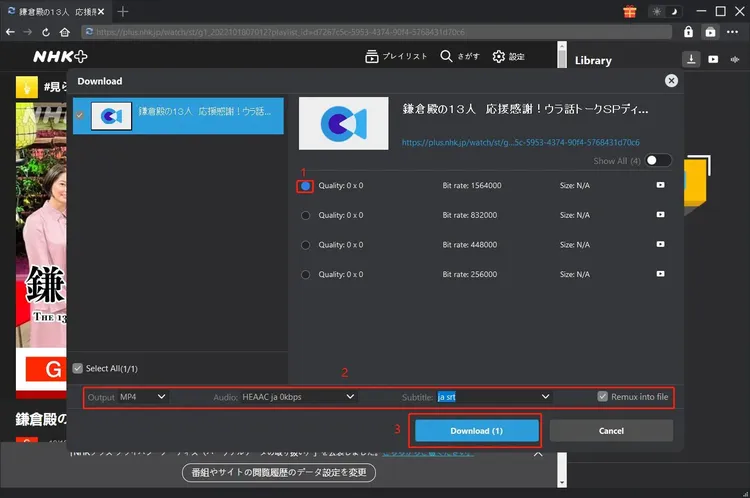
Once the analysis is complete, the software will display the available options for the video. You will typically see choices for video quality. Select "1080p" for the highest quality, or choose a lower resolution like "720p" or "480p" if you are concerned about storage space or download time. You can also check if subtitles are available and select the language you prefer. The default output format is MP4, which is recommended for most users. If you have specific naming preferences, you can edit the file name at this stage.

Step 5: Start the Download

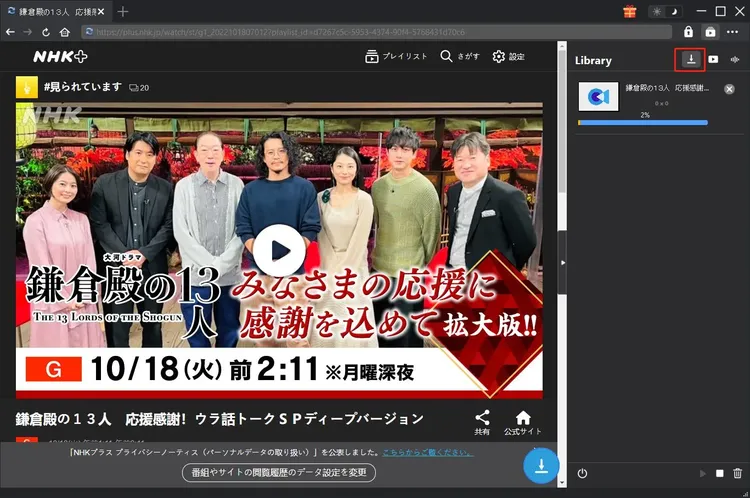
After configuring your settings, click the "Download" button. The software will add the task to your queue and begin the download process immediately. You will see a progress bar indicating the percentage completed, the download speed, and the estimated time remaining. You can continue to use your computer for other tasks while the download runs in the background. If you have multiple URLs to download, you can repeat Steps 2-4 for each one, adding them to the queue.

Step 6: Monitor and Manage Downloads

The interface provides real-time updates on your download tasks. You can pause, resume, or cancel any ongoing download. If you encounter any issues, such as a stalled download, you can try pausing and resuming the task. The software’s smart resume feature will handle the rest. Once the download is complete, the status will change to "Finished," and the file will be available in your designated output folder.

Step 7: Locate and Enjoy Your Video

To find your downloaded video, click on the "Finished" tab in the software interface. You will see a list of all completed downloads. Clicking the "Open Folder" icon next to a file will open the directory where the MP4 file is stored. You can now double-click the file to play it in your preferred media player, transfer it to your mobile device, or organize it into your media library. Enjoy your high-quality, offline-ready NHK content!

Note: Legal and Ethical Usage

It is important to use Leawo NHK+ Downloader responsibly. The software is intended for personal, non-commercial use. Downloading copyrighted content for distribution, sale, or public performance is illegal and violates the terms of service of NHK Plus. Always respect intellectual property rights and use the downloaded files for your own private viewing and study purposes only.

Comparisons: Leawo NHK+ Downloader vs. Alternatives

To truly understand the value of Leawo NHK+ Downloader, it is helpful to compare it with other common methods of acquiring online video content. Below, we compare it with generic video downloaders, browser extensions, and screen recording software.

Leawo NHK+ Downloader vs. Generic Video Downloaders

Generic Downloaders: Tools like 4K Video Downloader or YTD Video Downloader are designed to work with a wide range of websites, including YouTube, Vimeo, and Facebook. While versatile, they often lack the specific optimizations needed for complex streaming services like NHK Plus. Users frequently report errors, failed downloads, or low-quality outputs when using generic tools on NHK Plus. They may also struggle with subtitle integration and metadata preservation.

Leawo NHK+ Downloader: By focusing exclusively on NHK Plus, Leawo ensures a higher success rate and better quality. It is updated regularly to adapt to changes in the NHK Plus platform, ensuring continued compatibility. The specialized engine handles DRM and streaming protocols more effectively, resulting in faster, more reliable downloads. For users who primarily want NHK content, Leawo is the superior choice.

Leawo NHK+ Downloader vs. Browser Extensions

Browser Extensions: There are numerous free browser extensions that claim to download videos. These are often easy to install but come with significant drawbacks. They are frequently riddled with ads, malware, or privacy-invasive tracking. Their functionality is limited, often failing to download high-quality streams or subtitles. They also tend to break frequently when websites update their code, leaving users frustrated. Additionally, they offer no customer support or regular updates.

Leawo NHK+ Downloader: As a standalone desktop application, Leawo is more robust and secure. It is free from ads and malware, providing a safe environment for your computer. It offers consistent performance, high-quality outputs, and dedicated customer support. The one-time purchase price is a small investment compared to the risks and inefficiencies of using unreliable free extensions.

Leawo NHK+ Downloader vs. Screen Recording Software

Screen Recorders: Some users resort to screen recording software to capture NHK Plus videos. This method involves playing the video in real-time while recording the screen. This is incredibly time-consuming, as a one-hour episode takes one hour to record. It also results in quality loss, as the recording is subject to screen resolution, compression artifacts, and potential interruptions from notifications or other windows. Audio quality can also suffer due to system noise or improper configuration.

Leawo NHK+ Downloader: Leawo downloads the video data directly, which is much faster than real-time recording. A one-hour episode can be downloaded in minutes, depending on your internet speed. The quality is preserved exactly as it is in the original stream, with no generational loss. It is also completely automated, allowing you to walk away while the software works. For efficiency and quality, direct downloading is vastly superior to screen recording.

User Testimonials

Don’t just take our word for it. Here is what real users have to say about their experience with Leawo NHK+ Downloader. These reviews highlight the software’s reliability, ease of use, and impact on their daily lives.

"As a Japanese teacher, I constantly need fresh materials for my classes. Leawo NHK+ Downloader has been a game-changer. I can download news segments and cultural documentaries quickly and reliably. The video quality is excellent, and the subtitles are always synced perfectly. It saves me so much time and helps me provide better lessons for my students."

- Sarah M., Japanese Language Instructor

"I live in Europe and miss watching NHK dramas. Streaming is often buffered or blocked. With Leawo, I can download entire seasons and watch them offline at my leisure. The installation was easy, and the software works flawlessly. Highly recommended for any expat missing home!"

- Kenji T., Expat in Germany

"I tried several free downloaders before finding Leawo. They all failed to download from NHK Plus. Leawo worked on the first try. The 1080p quality is stunning, and the download speed is impressive. It’s worth every penny for the peace of mind and convenience it offers."

- Michael R., Media Student

"I use this software to archive historical documentaries for my research. The batch download feature is incredibly useful. I can queue up dozens of videos and let it run overnight. The metadata preservation helps me keep my library organized. A professional tool for serious users."

- Dr. Emily L., Cultural Researcher

"Simple, effective, and fast. I’m not very tech-savvy, but I found Leawo NHK+ Downloader very easy to use. Just paste the link and click download. No complicated settings or confusing menus. It does exactly what it promises."

- Linda K., Retiree and Japan Enthusiast

"The subtitle integration is fantastic. I’m learning Japanese, and having the subtitles embedded in the MP4 file makes studying so much easier. I can watch on my tablet during my commute without worrying about internet connectivity. Great product!"

- David P., Language Learner

"I was skeptical about paid software, but Leawo proved its value. Free tools were either unsafe or ineffective. Leawo is secure, fast, and produces high-quality files. Customer support was also very responsive when I had a question about installation. Five stars."

- Jessica W., Digital Archivist

"Perfect for travelers. I download a bunch of shows before my long flights to Asia. It saves me from buying expensive in-flight entertainment and lets me watch what I actually want. The files play smoothly on my iPad. Couldn’t be happier."

- Robert H., Frequent Traveler

Frequently Asked Questions (FAQs)

Here are answers to some of the most common questions about Leawo NHK+ Downloader. If you have further questions, please refer to the official support documentation or contact Leawo customer service.

Is Leawo NHK+ Downloader legal to use?

Leawo NHK+ Downloader is a tool for downloading video content. The legality of using such tools depends on how you use them. It is generally legal to download content for personal, non-commercial use, such as offline viewing or archival purposes. However, distributing, selling, or publicly performing copyrighted content without permission is illegal. Users are responsible for ensuring that their use of the software complies with local copyright laws and the terms of service of NHK Plus.

Can I use Leawo NHK+ Downloader on Mac or Linux?

No, Leawo NHK+ Downloader is currently only available for Windows operating systems. It requires Windows 7, 8, 10, or 11. If you are a Mac or Linux user, you may need to use a Windows virtual machine or a separate Windows PC to run the software.

Does it support 4K resolution?

Leawo NHK+ Downloader supports up to 1080p Full HD resolution. This is because NHK Plus primarily streams content in 1080p. While some content may be available in higher resolutions on other platforms, NHK Plus’s standard output is 1080p, and the software is optimized to deliver the best possible quality from this source.

What if the download fails?

If a download fails, first check your internet connection. Ensure that the URL you pasted is correct and that the video is still available on NHK Plus. You can try pausing and resuming the download. If the problem persists, restart the software and try again. If you continue to experience issues, contact Leawo customer support with details of the error message and the URL you are trying to download.

Can I download multiple videos at once?

Yes, Leawo NHK+ Downloader supports batch downloading. You can paste multiple URLs into the software, and it will process them in a queue. This is a great feature for saving time when downloading multiple episodes or segments.

Are subtitles downloaded automatically?

Yes, if subtitles are available for the video, Leawo NHK+ Downloader will attempt to download them. They are usually embedded into the MP4 file or saved as a separate SRT file, depending on the source. You can check the output folder to see if a subtitle file was created alongside the video.

How long does it take to download a video?

The download time depends on several factors, including the length of the video, the selected quality, and your internet speed. With a fast internet connection, a one-hour episode in 1080p can be downloaded in a matter of minutes. The software’s multi-threaded engine helps maximize your available bandwidth.

Is there a free trial available?

Leawo often offers a free trial or a demo version of their software, which may allow you to download a portion of a video or test the functionality with limitations. Please check the official Leawo website for current trial offers. The full version requires a one-time purchase of $49.95.

Can I transfer the downloaded videos to my phone or tablet?

Yes, since the output format is MP4, the files are compatible with most mobile devices. You can transfer the files via USB cable, cloud storage, or Wi-Fi transfer apps. Once on your device, you can play them using any standard media player app.

Does the software require an internet connection to work?

Yes, an active internet connection is required to download videos from NHK Plus. However, once the videos are downloaded, you can watch them offline without an internet connection. The software itself does not need to be online to play the files, only to download them.

What happens if NHK Plus updates its website?

Leawo regularly updates its software to maintain compatibility with changes to the NHK Plus platform. If you encounter issues after a website update, check the Leawo website for a new version of the software. Keeping your software up to date ensures the best performance and reliability.

Is my personal data safe?

Leawo is a reputable company that prioritizes user privacy. The software does not collect unnecessary personal data. Downloads are processed locally on your computer, and no video content is uploaded to external servers. Your privacy and security are protected throughout the process.

Can I use this software for commercial projects?

No, Leawo NHK+ Downloader is licensed for personal, non-commercial use only. Using downloaded content for commercial purposes, such as in advertisements, films, or for sale, violates copyright laws and the software’s license agreement. Always seek proper licensing for commercial use of copyrighted material.

What are the system requirements?

To run Leawo NHK+ Downloader smoothly, your computer should meet the following minimum requirements:

  • Operating System: Windows 7, 8, 10, or 11
  • Processor: 1 GHz or faster processor
  • RAM: 4 GB RAM
  • Hard Disk Space: 500 MB free disk space for installation, plus additional space for downloaded videos
  • Internet Connection: Required for downloading content

System Requirements and Technical Specifications

Before installing Leawo NHK+ Downloader, ensure that your system meets the necessary requirements to guarantee optimal performance. While the software is lightweight, having adequate resources will ensure faster downloads and smoother operation.

Minimum System Requirements

  • OS: Windows 7/8/10/11 (32-bit or 64-bit)
  • CPU: Intel or AMD processor, 1 GHz or faster
  • Memory: 4 GB RAM
  • Storage: 500 MB free hard disk space for installation
  • Display: 1024x768 resolution or higher
  • Internet: Broadband internet connection for downloading content

Recommended System Requirements

For the best experience, especially when downloading multiple files or high-resolution content, the following specifications are recommended:

  • OS: Windows 10/11 (64-bit)
  • CPU: Multi-core Intel or AMD processor, 2 GHz or faster
  • Memory: 8 GB RAM or more
  • Storage: SSD with at least 10 GB free space for installation and temporary files
  • Internet: High-speed broadband connection (10 Mbps or higher)

Ensuring your system meets these requirements will help prevent performance issues and ensure that Leawo NHK+ Downloader operates efficiently. Regularly updating your Windows operating system and drivers can also improve compatibility and performance.

Conclusion

In a digital landscape where content is increasingly transient and restricted, Leawo NHK+ Downloader stands out as a powerful, reliable, and user-friendly solution for preserving NHK Plus content. It addresses the specific needs of language learners, cultural enthusiasts, researchers, and everyday viewers who value quality, convenience, and offline accessibility. By transforming streamed videos into permanent, high-quality MP4 files, it empowers users to take control of their media consumption.

The software’s specialized optimization for NHK Plus ensures a higher success rate and better quality than generic alternatives. Its intuitive interface makes it accessible to users of all technical levels, while advanced features like batch processing and subtitle integration cater to power users. The commitment to security and privacy further enhances its appeal as a trustworthy tool.

Whether you are looking to build a comprehensive library of Japanese dramas, archive important news segments for research, or simply enjoy your favorite shows without internet constraints, Leawo NHK+ Downloader is an invaluable addition to your digital toolkit. With a one-time investment of $49.95, you gain lifetime access to a tool that simplifies the process of content preservation and enhances your viewing experience.

Take the step towards owning your media. Experience the freedom of offline viewing, the clarity of 1080p quality, and the convenience of a dedicated downloader. Leawo NHK+ Downloader is not just a software; it is a bridge to the rich cultural and educational content that NHK Plus offers, available to you anytime, anywhere.

Final Thoughts

Technology should serve us, not restrict us. Leawo NHK+ Downloader embodies this principle by removing the barriers of geo-restrictions, internet dependency, and content volatility. It is a testament to the power of specialized software in solving specific problems effectively. For anyone serious about engaging with Japanese media, this tool is not just recommended; it is essential.

Other Software Products by Leawo Software Co., Ltd.:
1) Leawo DMM Downloader
2) Leawo Amazon Downloader
3) Leawo YouTube Downloader

Submit Your Review
Your Name:
Rating:
(Please click on one of the stars to indicate your rating.)
One Line Summary:
Review:
No html tags are allowed.
Submit Review
Copyright © 2026, Ivertech. All rights reserved.