AnyMP4 Audio Converter: Pull the Sound Out of Any File, in the Format You Need
AnyMP4 Audio Converter is a Windows program, $43.70 for a one-PC lifetime license, that converts audio between formats (FLAC, WAV, WMA, APE, OGG, M4A and more to MP3, AAC, ALAC or FLAC) and extracts the soundtrack from video files such as MP4, MKV, MOV and AVI.
It's for the moments when the music is in the wrong box: a FLAC album your car stereo won't read, a lecture you only have as a video, or a WMA collection from an old PC that your iPhone ignores.
Quick facts
- Developer: AnyMP4 Studio
- Version: 7.2.32 (installer dated January 24, 2024)
- Platform: Windows 11, 10, 8 and 7. A separate Audio Converter for Mac exists
- Reads: FLAC, WAV, WMA, MP3, MP2, AAC, AC3, AIFF, APE, CAF, MPC, OGG, M4A, M4B, MKA, RA, AU and CUE, plus nearly any video file
- Writes: MP3, FLAC, WAV, WMA, AAC, ALAC, AC3, AIFF, AMR, AU, MP2, M4A, MKA, OGG, plus device presets
- Price at checkout: $43.70 one-time for 1 PC, free lifetime updates
- Trial: converts the first 5 minutes of each file
- What we checked: the installer, version 7.2.32 (43 MB), downloaded from AnyMP4, and AnyMP4's own store, which listed the lifetime license at $34.96 with its current offer, both on November 4, 2026, and the order page on November 4, 2026, which listed "AnyMP4 Audio Converter" at $43.70 as a lifetime license with no renewal. We didn't run conversions or compare output quality.
Before you buy
- Free tools do this too. Audio conversion is a crowded field with capable free programs (fre:ac, foobar2000, VLC's converter). You'd pay for AnyMP4's simpler window, video input and device presets.
- The price differs by store. Our order page charges the $43.70 list price; AnyMP4's own store showed $34.96 on November 4, 2026.
- Converting lossy to lossless doesn't add quality. Turning an MP3 into FLAC or WAV makes a bigger file with the same sound. Go the other way, or between lossless formats.
Download Free TrialBuy Now
Overview
AnyMP4 Audio Converter starts with an empty list that says "Drag video and audio files here to convert." Each file you add gets a row with its length and an audio-track menu, and a preview player on the right lets you listen before converting. The Profile menu sets the output format, Settings opens the encoder options, and Convert runs the batch.
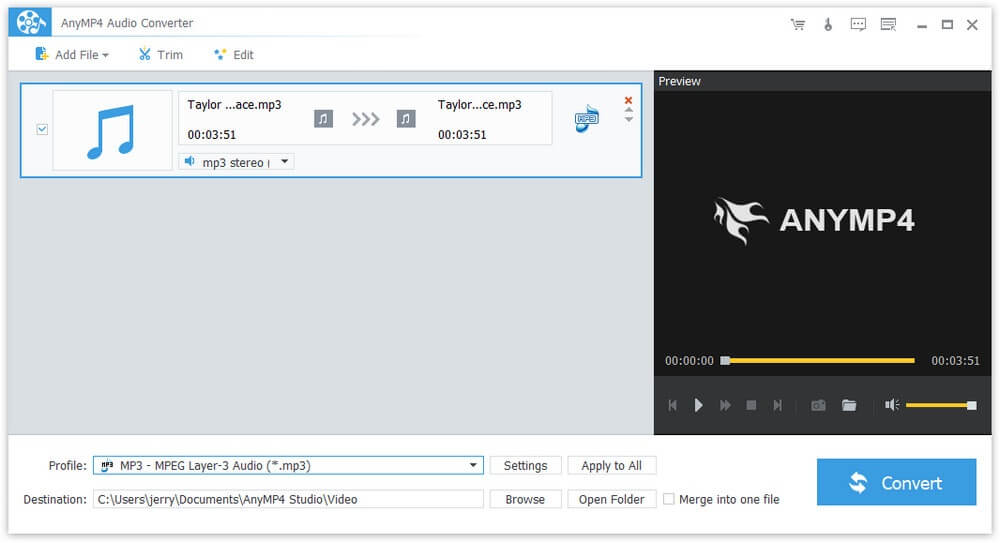
The main window with an MP3 file queued, the MP3 profile selected, and the preview player on the right.
Features
Audio from video, in a couple of clicks
AnyMP4 Audio Converter opens MP4, MKV, MOV, AVI, WMV, FLV, MTS, VOB and other video files and saves only the sound. If a video has several audio tracks, such as two languages or a commentary, you choose which one to keep in the file's row.
Lossless and lossy formats, both ways
AnyMP4 Audio Converter writes MP3, AAC, M4A, OGG and WMA for small files, and FLAC, ALAC, WAV and AIFF when you want to keep every bit. It also has AC3 and DTS surround profiles, M4R for iPhone ringtones and M4B for audiobooks.

The General Audio profile list: AC3, AIFF, AMR, AU, FLAC, MP2, MP3, DTS, M4A, ALAC, M4R and M4B.
Control over encoder, sample rate and bitrate
AnyMP4 Audio Converter's Profile Settings window sets the encoder, sample rate (such as 44,100 Hz), channels (mono or stereo) and audio bitrate (such as 192 kbps), and lets you save your choice as a new profile with Save as.

Profile Settings for MP3: MP3 encoder, 44,100 Hz sample rate, 2-channel stereo and 192 kbps bitrate.
Cut, join and level
AnyMP4 Audio Converter's Trim window keeps only the part you want, by dragging handles or typing start and end times, and can split a file into segments. Merge into one file joins several tracks or segments, for example a podcast recorded in parts. The Edit window sets the volume from 0 to 199 percent.

The Trim window: start, end and duration fields for a segment, and the "Merge into one file" checkbox.
Batches of up to 8 at a time
AnyMP4 Audio Converter converts a whole folder in one queue, and its Preferences set how many files convert at the same time, up to 8, and what the PC should do when the batch finishes.
Benefits
Most people need an audio converter a few times a year, and each time it's urgent: the car, the phone, the editing program or the transcription service wants one particular format. Having a converter that also opens video files saves a second tool, and a one-time license means you don't pay again for something you use occasionally.
Real-World Uses
- Car and old MP3 players. Convert FLAC or APE albums to 320 kbps MP3 for a stereo that only reads MP3.
- Lectures and webinars. Save the audio of a recorded MP4 class as MP3 to listen to on a walk.
- iPhone ringtones. Trim the chorus of a song and save it as M4R.
- Audiobooks. Merge a folder of chapter MP3s into one M4B file.
- Old WMA collections. Convert a Windows Media library to AAC or MP3 for a phone.
Who It's For, and Who Should Skip It
A good fit for Windows users who want a plain, menu-driven converter that also pulls audio from videos, and who prefer to pay once rather than learn a free tool's options.
Skip it if you're comfortable with free software (fre:ac and foobar2000 convert audio well and also handle tags and CD ripping), if you need to rip audio CDs or edit ID3 tags, or if you need waveform editing (an audio editor like Audacity is the tool). On a Mac, buy the Mac edition.
Usage Guide
- Install AnyMP4 Audio Converter from the trial download and start it.
- Drag audio or video files into the window, or click Add File.
- Pick a format in Profile, then click Settings for bitrate, sample rate and channels.
- Use Trim to cut a section, Edit for volume, and tick Merge into one file to join everything.
- Choose a Destination folder and click Convert.
- To register, choose Register from the Help menu and enter your email address and registration code.
Where it falls short
- No CD ripping and no tag editor. It converts files only, and doesn't let you edit artist, album or cover art.
- No waveform editing. Trimming is by time markers in a video-style player, which is fine for cutting a section but not for precise edits.
- An older program. The installer is from January 2024, and the interface is the same as AnyMP4's video converters of the same period.
- Price. $43.70 at checkout is a lot next to free alternatives for a job this common.
What Users Say
We found no independent written review of AnyMP4 Audio Converter, and AnyMP4 has no separate review page for it.
Testimonials on AnyMP4's product page
AnyMP4 picks these itself and shows them without dates or ratings.
Oliver: "I used this audio converter to convert WMA/WAV/FLAC to MP3 on my Windows 11 computer, and it worked really well. The output audio quality is also amazing."
Monica: "This audio converter really helps me a lot when I want to listen to some music files on my iPhone. And I can cut and merge my audio files at ease."
Dan: "This Audio Converter is very easy to use. With only a few clicks, I can convert audio file to other popular audio formats without quality loss."
Trustpilot, AnyMP4 as a company (4.2 out of 5, 237 reviews)
The company-wide reviews are mostly about support. Karmenu Vella titled his October 2026 review "AnyMP4 is a great app with superb support." after help moving to a new MacBook. Louis Venter rated it 4 stars, calling the product excellent and the service just as good. The weakest recent review, 3 stars from Tom Schoute, was about a registration code blocked after he changed laptops, which AnyMP4 later reset. Trustpilot blocks automated reading, so we read these through a summarizing tool.
The pattern: owners describe it as simple and quick for everyday format changes; we found no complaints about the conversions themselves, but also very few reviews of this specific program.
Comparisons
AnyMP4 Audio Converter vs fre:ac
fre:ac is free, open source, rips CDs and edits tags, and converts between all the common audio formats. It doesn't open video files the way AnyMP4 does, and its options take longer to learn. If you only convert audio files, start with fre:ac.
AnyMP4 Audio Converter vs AnyMP4 Video Converter
AnyMP4 Video Converter ($49.95 at checkout) can also save audio-only files from videos and audio files, along with video conversion. If you'll ever need to convert video too, that's the better value than buying this program first.
Editions and Pricing
| License | Where | Price on November 4, 2026 | Term | PCs |
|---|
| Lifetime | Order page (Buy Now) | $43.70 | One-time, free updates | 1 |
| Lifetime | AnyMP4 store, with its offer | $34.96 | One-time, free updates | 1 |
| 1 Month | AnyMP4 store | $12.50 | Renews monthly | 1 |
| 5-User | AnyMP4 store | $69.96 | One-time, free updates | 5 |
System Requirements
- Windows 11, 10, 8 or 7
- Intel Core 2 Duo or AMD Athlon processor at 2 GHz or faster
- 2 GB of RAM or more
- About 43 MB for the installer
FAQs
Can AnyMP4 Audio Converter convert Apple Music or Spotify songs?
No. AnyMP4 Audio Converter converts unprotected files. Streaming downloads from Apple Music, Spotify and similar services are encrypted and won't load.
Does AnyMP4 Audio Converter keep song tags like artist and album?
AnyMP4 Audio Converter has no tag editor, so check the result in your music player. If tags matter, a tool with tag editing such as fre:ac or foobar2000 is the safer choice.
Can AnyMP4 Audio Converter rip an audio CD?
No. AnyMP4 Audio Converter works on files already on your computer. Rip the CD with Windows Media Player or a CD ripper first, then convert the files.
Is there a Mac version of AnyMP4 Audio Converter?
Yes, AnyMP4 sells Audio Converter for Mac separately with its own license. The Windows license doesn't activate it.
Is AnyMP4 Audio Converter a subscription?
No. The license sold at checkout is a lifetime license for one PC with free updates. AnyMP4's own store also sells a 1-month license, which renews monthly until you cancel.
Can I get my money back if AnyMP4 Audio Converter doesn't suit me?
AnyMP4's 30-day money-back guarantee covers specific cases, such as a technical problem support can't fix within 30 days or a duplicate purchase, not a change of mind. AnyMP4 may also keep 20% on a refund it grants, so test your files in the trial.
Conclusion
AnyMP4 Audio Converter is a tidy, easy converter that's worth buying only if you want a simple paid tool that handles both audio files and the soundtracks of videos, in batches, on Windows.
For most people the reason not to buy is that free converters do the audio part as well, with CD ripping and tags on top, and that AnyMP4's own Video Converter does audio extraction plus video for $6.25 more.
Download Free TrialBuy Now