AnyMP4 Video Converter: Batch-Convert Video and Audio on Windows
AnyMP4 Video Converter is a Windows program that converts batches of video and audio files between formats (MP4, MKV, MOV, AVI, WMV, WebM, 4K HEVC, MP3, FLAC and many more) or into ready-made presets for phones, tablets and consoles, with simple editing and an "Enhance" upscaler built in. The Buy Now button here sells a lifetime license for one PC at $49.95.
The typical job: a folder of old AVI and WMV files that your TV, phone or editor won't open, or a stack of iPhone HEVC clips a colleague's PC can't play. You drop them in, pick MP4, and click Convert.
Quick facts
- Developer: AnyMP4 Studio
- Version: 7.2.58 (installer dated January 24, 2024)
- Platform: Windows 11, 10, 8.1, 8 and 7. A separate Mac edition exists.
- Output: 4K and HD video (H.265/HEVC, H.264, VP9 WebM, ProRes), common video formats, 3D video, audio (MP3, AAC, M4A, FLAC, ALAC, WAV, OGG and others), device presets
- Editing: rotate, crop, effects, deinterlace, watermark, 2D to 3D, trim and merge, Enhance (upscale, denoise, deshake)
- Price via Buy Now: $49.95 one-time, 1 PC, free lifetime updates
- Trial: converts only 5 minutes of each video
- What we checked: the installer, version 7.2.58 (40 MB), downloaded from AnyMP4 on November 4, 2026, and the order page on November 4, 2026, which listed "AnyMP4 Video Converter" at $49.95 as a lifetime license with no renewal. We didn't run conversions with it.
Before you buy
- It won't touch copy-protected files. Movies bought on iTunes or other stores with DRM can't be converted, and AnyMP4 refuses refunds over this.
- No DVD input. For discs you need AnyMP4 DVD Converter or Video Converter Ultimate.
- Refunds are narrow. AnyMP4's 30-day guarantee doesn't cover a change of mind, and a granted refund may lose a 20% fee. The 5-minute trial is enough to test your own files first.
- Last installer: January 2024. It handles today's common formats, but don't expect new features.
Download Free TrialBuy Now
Overview
AnyMP4 Video Converter is a classic list-style converter. Each file gets a row with its name, resolution and length on the left, the output name and size on the right, and audio-track and subtitle menus below. One Profile menu at the bottom sets the output for every file (or each row can have its own), a preview pane plays the selected file, and the GPU buttons at the top right switch on NVIDIA, Intel or AMD acceleration.
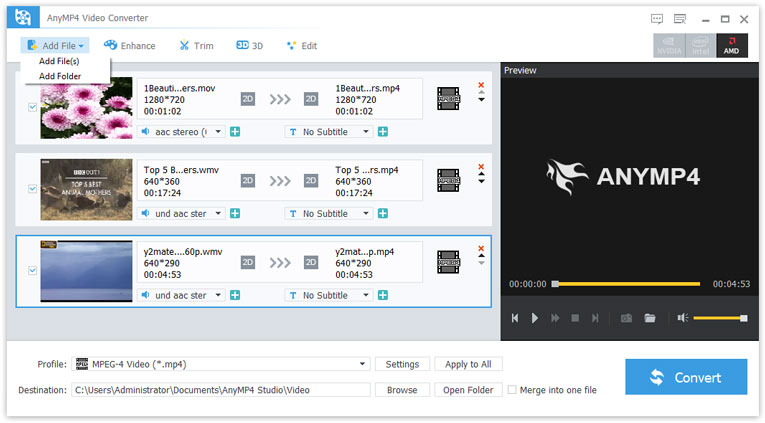
AnyMP4 Video Converter with a MOV and two WMV files queued for MPEG-4 output: the Add File menu, Enhance, Trim, 3D and Edit buttons, the preview pane and the NVIDIA, Intel and AMD acceleration buttons.
Features
Hundreds of output profiles, and full control over them
AnyMP4 Video Converter's profiles range from 4K H.265 MP4 down to 3GP, and include Apple ProRes (Proxy, LT, Standard, HQ) for editors, WebM for the web and presets for iPhone, iPad, Samsung and other phones, Xbox and PlayStation. The Settings dialog changes the encoder, resolution, frame rate, aspect ratio and bitrate, and you can save the result as your own profile.
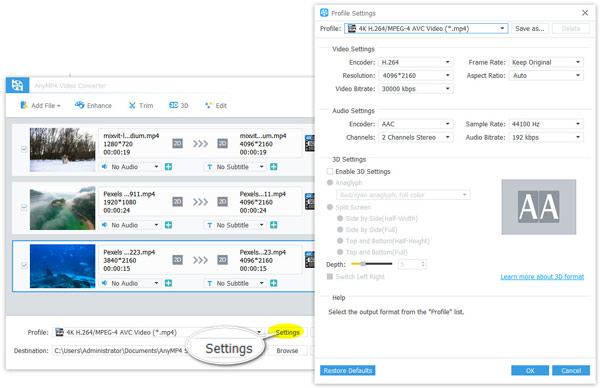
Profile Settings for 4K H.264/MPEG-4 AVC output: encoder, 4096 x 2160 resolution, 30,000 kbps bitrate, AAC audio at 192 kbps, and the 3D settings.
Pull the soundtrack out of a video
AnyMP4 Video Converter also writes audio-only files: pick MP3, AAC, M4A, FLAC, ALAC, WAV, WMA or OGG as the profile and it saves just the sound of a concert clip, lecture or music video.
Enhance: upscale, brighten, denoise, steady
AnyMP4 Video Converter's Enhance tab has four checkboxes: upscale resolution when you convert a small video to a larger size, optimize brightness and contrast, remove video noise, and reduce shaking in footage where the whole frame moves.
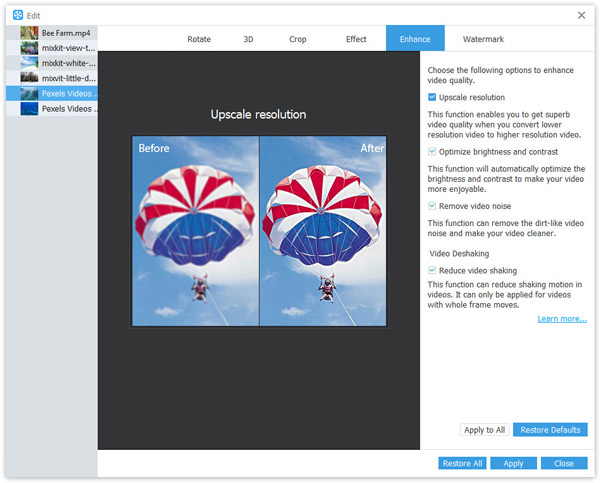
The Enhance tab of the Edit window with a before-and-after preview of "Upscale resolution", and the brightness, noise and deshaking options.
Basic edits before you convert
AnyMP4 Video Converter's Edit window rotates or flips a clip, crops with Letterbox, Medium, Pan & Scan or Full zoom modes, adjusts brightness, contrast, saturation and hue, deinterlaces, and adds a text or image watermark with position and transparency. Trim splits and cuts clips, "Merge into one file" joins the queue into a single video, and 3D turns 2D video into anaglyph or side-by-side 3D.
Benefits
The point is one tool for the whole pile. Instead of a free online converter that takes one small file at a time, you queue a folder, set the profile once, and let hardware acceleration work through it. The editing tools are just enough to fix the usual faults on the way: a phone clip filmed sideways, black bars, a dark scene, an ad at the start.
Real-World Uses
- Clearing out an old video archive. Convert a decade of AVI, WMV and FLV files to H.264 MP4 so every device in the house plays them.
- Sharing iPhone video with Windows users. Turn HEVC clips into plain H.264 MP4 that older PCs and TVs open.
- Feeding an editor. Convert awkward formats to ProRes or high-bitrate MP4 before importing them into an editing program.
- Making audio files. Save a recorded talk or a music video as MP3 for a phone or car stereo.
Who It's For, and Who Should Skip It
Good fit: Windows users who convert files now and then, want a point-and-click batch tool with presets, and prefer a one-time price.
Skip it if: you only convert to MP4 occasionally and don't mind a learning curve (the free HandBrake does that well); you need to rip DVDs or Blu-rays (look at AnyMP4's DVD Converter or Video Converter Ultimate); or you want to convert DRM-protected purchases, which no legitimate converter does.
Usage Guide
- Download and install the trial, then launch AnyMP4 Video Converter. The registration window opens on the first run; close it to keep trying.
- Click Add File to choose files or a whole folder, or drag them into the window.
- Open the Profile list and pick a format or device. Use Settings to change resolution, bitrate or codec, and Apply to All for the whole queue.
- Optional: select a file and click Edit, Enhance, Trim or 3D.
- Set the output folder under Destination, and tick Merge into one file if you want one video.
- Click Convert. In Preferences you can enable GPU acceleration and set how many files convert at once.
- After buying, click the lock icon at the top right and enter your email address and registration code.
Where it falls short
- Dated look and fewer extras. The interface is AnyMP4's older design, and AnyMP4's own comparison shows the toolbox (compressor, metadata editor, GIF maker), collages, template videos and DVD ripping only in Video Converter Ultimate.
- Re-encoding is slow on weak PCs. 4K HEVC output without a supported GPU takes a long time; one Trustpilot reviewer of AnyMP4 software wrote it was "quicker watching paint dry".
- Activation after a reinstall. Several AnyMP4 customers on Trustpilot needed support to reset a license after a new PC or a Windows reinstall. Keep your order email.
What Users Say
Trustpilot (AnyMP4 as a company: 4.2 out of 5, 237 reviews)
pripol (5 stars, June 2026) on Video Converter: "fast, easy and simple, has saved me too many times." and "I mostly use it to convert and trim videos from my iPhone." George (5 stars, May 2026), who uses Video Converter and Screen Recorder: "I am very happy with how well they work."
On the other side, John Lee (1 star, August 2025), who owns several AnyMP4 tools on a Mac including the converter: "They crash once in a while even though I have the latest versions of them and Mac OS." Mart (1 star, April 2025), about speed: "Quicker watching paint dry and that's with all the turbo mode(s) turned on."
Support and billing, from the same Trustpilot page
Most five-star reviews praise support speed. Glenn Orama: "They were prompt, and with my log and error descriptions, within a day updated their software." The one-star reviews are mostly about billing and refunds. Harry: "Tricked me into a subscription I didn't want or need." Tee Parekh said AnyMP4 "refused to give refund despite the product not doing what is says on the label."
AnyMP4's product page (4.8 out of 5, 1,572 ratings)
The vendor's own testimonials, so read them with that in mind. Klaus: "I bought this software because I want to extract M4 ringtones from my downloaded videos. It worked smoothly and fast." Joudrey: "Tried many tools to convert AVI to MKV converter and they are not able to play on my devices. I found this software and tried it again. It did successfully."
The recurring themes: easy, quick conversions and fast support on one side; occasional crashes, slow 4K encoding on modest hardware and unwanted subscriptions on the other. The lifetime license sold here has no renewal.
Comparisons
AnyMP4 Video Converter vs AnyMP4 Video Converter Ultimate
AnyMP4's comparison table gives both the conversions, editing, enhancement and 2D-to-3D. Only Ultimate adds DVD ripping, a toolbox of over 20 tools (compressor, metadata editor, GIF maker), video collages and template-based music videos. On November 4, 2026 Ultimate's lifetime license was $59.96 on the order page, about $10 more. If you have discs to rip, Ultimate is the better buy; if you only convert files, this one is enough.
AnyMP4 Video Converter vs HandBrake
HandBrake is free and open source, encodes MP4, MKV and WebM very well, and has batch queues. It doesn't write AVI, WMV, MOV or audio-only files, and its options take longer to learn. AnyMP4 Video Converter covers far more output formats and device presets with simpler controls, for a one-time fee.
Editions and Pricing
| License | Price | Term | PCs |
|---|
| Lifetime (Buy Now button) | $49.95 at checkout | One payment, free updates | 1 |
| 1 Month (AnyMP4 store) | $25.00 list, $12.50 with the store's offer | Renews monthly | 1 |
| 5-User (AnyMP4 store) | $249.75 list, $79.96 with the store's offer | Lifetime | 5 |
On November 4, 2026 AnyMP4's own store page offered the lifetime license at $39.96, below the $49.95 on our order page. Its promotions change often, so it's worth comparing.
FAQs
What does the AnyMP4 Video Converter trial leave out?
AnyMP4 Video Converter's trial converts only 5 minutes of each video; everything else works, so you can check quality and speed on your own files before buying.
Does the AnyMP4 Video Converter license expire?
No. The AnyMP4 Video Converter license sold through the Buy Now button is a lifetime license for one PC with free updates. AnyMP4 also sells a monthly plan that renews automatically, so check the license name at checkout.
Can AnyMP4 Video Converter use my graphics card?
Yes. AnyMP4 Video Converter supports NVIDIA, Intel and AMD hardware acceleration, switched on in Preferences, which speeds up H.264 and HEVC encoding considerably on supported cards.
Can AnyMP4 Video Converter convert several files at once?
Yes. AnyMP4 Video Converter converts a whole queue in one go, and its Preferences set how many files run simultaneously and what the program does when the batch finishes, so you can leave a large folder converting overnight.
Is there a Mac version of AnyMP4 Video Converter?
Yes, AnyMP4 sells Video Converter for Mac separately (macOS 10.7 or later). The Windows license on this page doesn't activate the Mac version.
Can AnyMP4 Video Converter convert a DVD?
No. AnyMP4 Video Converter only reads video and audio files. For DVDs, AnyMP4 sells DVD Converter, DVD Ripper and Video Converter Ultimate.
System Requirements
- Windows 11, 10, 8.1, 8 or 7
- 1 GHz Intel or AMD processor or faster
- 1 GB RAM or more (more for 4K work)
- Optional NVIDIA, Intel or AMD graphics for hardware acceleration
- About 40 MB for the installer
Conclusion
AnyMP4 Video Converter is a fair buy at $49.95 for Windows users who regularly need to turn odd formats into something that plays, and who want presets and batch conversion without learning HandBrake. The reason to buy it is breadth: almost any common format in, almost any format or device preset out, with light editing on the way. The reason to hesitate is the price gap to Video Converter Ultimate: if you might ever rip a DVD or want the toolbox, spend the extra $10. Test your own files in the 5-minute trial first, because AnyMP4 won't refund a change of mind.
Download Free TrialBuy Now