AnyMP4 Mac Blu-ray Player: Watch Blu-ray Discs on a Mac, Menus Included
AnyMP4 Mac Blu-ray Player is a macOS app, $45.96 for a one-Mac lifetime license, that plays Blu-ray discs, Blu-ray folders and ISO files (and DVDs) on a Mac with an external Blu-ray drive, with disc menus, chapters and 5.1 surround sound. It also plays 4K and HD video files and lossless audio.
Apple has never supported Blu-ray, and macOS has no app that plays a Blu-ray movie. If you've bought a USB Blu-ray drive for your MacBook or Mac mini, or have ripped discs to ISO files, this is the missing piece.
Quick facts
- Developer: AnyMP4 Studio
- Version: 6.3.92, released August 20, 2026
- Platform: macOS 10.9 or later, including Tahoe 26, on Intel and Apple M-series Macs. A separate Windows Blu-ray Player is sold
- Plays: Blu-ray discs, folders and ISO files; DVD discs, folders and ISO files; MP4, MOV, MKV, MTS, M2TS, AVI and other video up to 4K; MP3, FLAC, ALAC, WAV, AIFF and other audio
- Regions: Blu-ray A, B and C and DVD 1 to 6, according to AnyMP4
- Price at checkout: $45.96 one-time for 1 Mac ($57.45 less 20%), free lifetime updates
- Trial: plays Blu-ray with a watermark
- What we checked: the installer (3.9 MB disk image, dated June 16, 2026) and AnyMP4's program information file for version 6.3.92, both on November 4, 2026, and the order page on November 4, 2026, which listed "AnyMP4 Mac Blu-ray Player" at $57.45 with a 20% discount to $45.96 as a lifetime license with no renewal, the same as AnyMP4's own store that day. We didn't play a disc with it.
Before you buy
- Bring a Blu-ray drive. Macs have no Blu-ray drive. You need an external USB Blu-ray drive to play discs; a DVD drive won't read them. Without a drive you can still play Blu-ray folders and ISO files.
- Ultra HD discs are a special case. AnyMP4 lists 4K Ultra HD Blu-ray playback, but UHD discs also depend on the drive. Test your drive and a UHD disc in the trial before relying on it.
- Test with your own discs. The watermarked trial shows whether your newest discs open and play smoothly. AnyMP4's refunds don't cover a change of mind.
Download Free TrialBuy Now
Overview
AnyMP4 Mac Blu-ray Player opens to a dark window with two orange buttons, Open File and Open Disc, and a playback bar along the bottom. Once a disc is loaded it shows the disc's own menu, or goes straight to the movie. The Mac menu bar holds everything else: File, Controls, Audio, Video, Tools and Help.
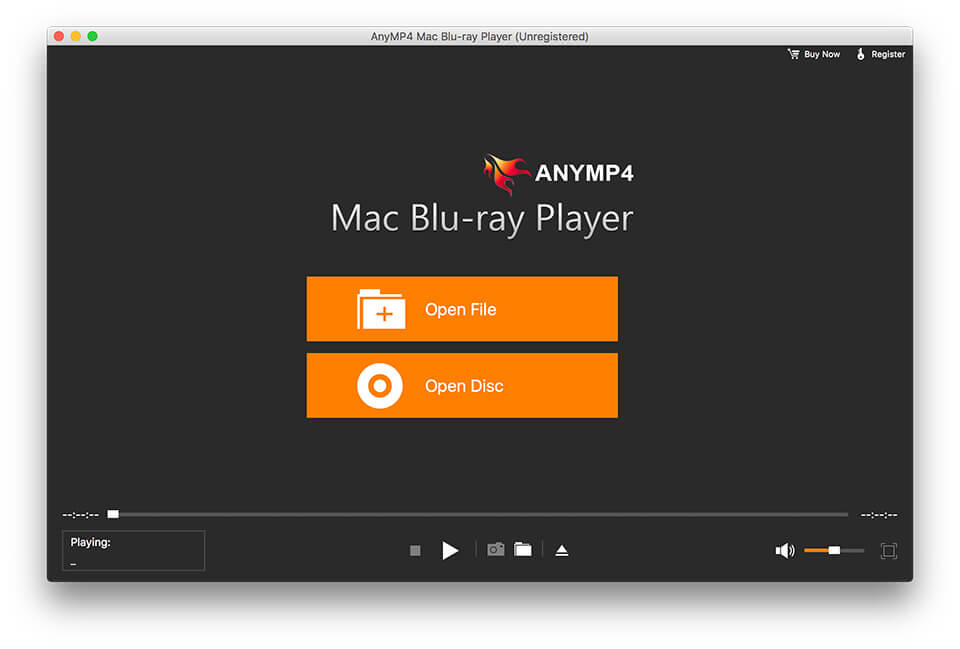
The start window: Open File and Open Disc, with the playback controls and volume slider at the bottom.
Features
Blu-ray discs, folders and ISO files
AnyMP4 Mac Blu-ray Player plays a disc in an external Blu-ray drive, or a Blu-ray folder (BDMV) or ISO image from your Mac's disk, with full title and chapter information. AnyMP4 says it handles discs from regions A, B and C, which matters if you buy imports.
Real disc menus
AnyMP4 Mac Blu-ray Player shows the disc's interactive menu, so you can pick scenes, extras and languages the way you would on a living-room player, then jump between chapters with the controls.
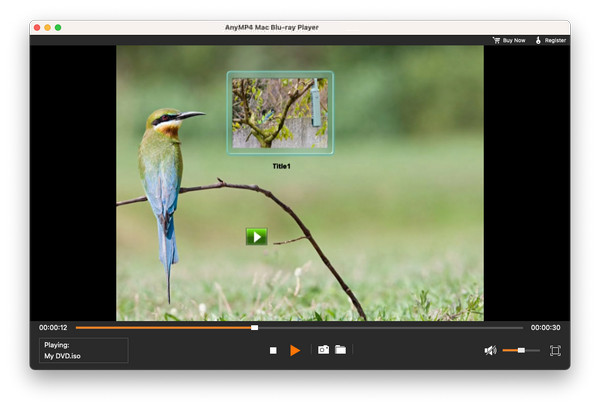
A DVD menu playing in AnyMP4 Mac Blu-ray Player, with the menu button in the control bar.
Surround sound and track choice
AnyMP4 Mac Blu-ray Player passes 5.1 Dolby Digital and DTS audio, and its Audio menu switches between the disc's tracks (for example English DTS-HD Master or a French AC3 dub), the channel layout and the output device, such as an AV receiver connected over HDMI.
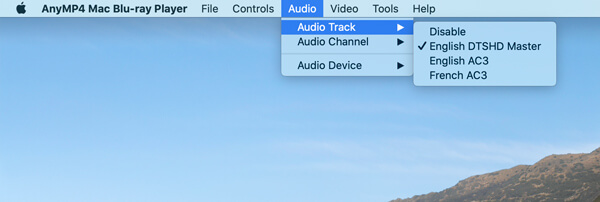
The Audio menu: Audio Track, Audio Channel and Audio Device, with English DTS-HD Master, English AC3 and French AC3 tracks listed.
Picture options
AnyMP4 Mac Blu-ray Player's Video menu picks the video and subtitle track, switches to full screen, sets half, normal, double or fit-to-screen size, and turns on deinterlacing for interlaced discs. The snapshot button saves the current frame as an image.
A general media player too
AnyMP4 Mac Blu-ray Player also opens MP4, MOV, MKV, MTS, M2TS, TS, MXF, AVI, WMV and FLV files in HD or 4K with H.265 and H.264, and lossless audio like FLAC and ALAC, so it can replace QuickTime for files QuickTime won't open.
Benefits
A Blu-ray drive is cheap; playing commercial discs on a Mac is the hard part. With this player, a MacBook becomes a Blu-ray player for a hotel TV, a dorm room or a home office, and your ISO backups play like the discs they came from, menus and all.
Real-World Uses
- Movie night on a MacBook. Plug a USB Blu-ray drive and an HDMI cable into a MacBook and play discs on the TV.
- Imported discs. Watch a region B disc bought in the UK on a US Mac.
- Your backup library. Play Blu-ray ISO files from a NAS without the original discs.
- Concert discs with surround. Send a DTS soundtrack to a receiver through the Mac.
Who It's For, and Who Should Skip It
A good fit for Mac owners with a collection of Blu-ray discs or Blu-ray ISO files who want menus and surround sound on their Mac.
Skip it if you only play DVDs and video files (Apple's DVD Player and the free VLC cover those), if you don't want to buy an external drive and have no ISO files, or if you want a disc on the big TV and already own a standalone Blu-ray player. On Windows, AnyMP4 sells a separate Blu-ray Player.
Usage Guide
- Download the disk image, open it and install AnyMP4 Mac Blu-ray Player in Applications.
- Connect an external Blu-ray drive and insert a disc.
- Start the app and click Open Disc, then choose the disc (or Open Folder for a BDMV folder). Use Open File for an ISO or video file.
- Use the disc menu or the controls to start the movie, and the Audio and Video menus to change tracks, subtitles and screen size.
- To register, choose Register from the Help menu and enter your email address and registration code.
Where it falls short
- Hardware first. It's useless for discs without a Blu-ray drive, and UHD playback depends on the drive too.
- Startup speed. One Trustpilot reviewer of AnyMP4's Blu-ray player noted it opens more slowly than VLC.
- Capture limits. Another reviewer found the capture tools don't work in full-screen playback.
- New discs. New releases change their protection, so a new disc may need an app update before it plays.
What Users Say
We found no independent review of the Mac app. Here is what we could verify, from AnyMP4's page and from owners of AnyMP4's Blu-ray players on Trustpilot.
AnyMP4's product page (1,352 reviews counted)
AnyMP4 picks these testimonials and shows them without dates.
Jessica: "I like this Blu-ray player very much. It lets you play 4K Blu-ray movies smoothly. More importantly, it is better than QuickTime, because it supports more formats video not only MOV."
Lenavo: "Honestly, this Blu-ray Player is very easy for me to use. I just need to open the Blu-ray movie, and get the play button, then I can stay on my sofa to watch the movies with my snacks."
Lanval: "This Blu-ray player software supports any media format like AVCHD, MTS, M2TS, TS, MXF, MP4, MKV, AVI, MOV, WMV, RMVB, and FLV, etc. I love it very much."
Trustpilot, AnyMP4 as a company (4.2 out of 5, 237 reviews)
Trustpilot rates the company; these reviewers mention AnyMP4's Blu-ray player without saying whether it was the Mac or Windows version. pete overton (5 stars, July 2026): "The software plays bluray discs whch is the reason I bought it so satisfied here", adding that it opens more slowly than VLC. Kain H.R. Abel (4 stars, March 2026): "I like the AnyMP4 a lot and I use it to play my Blu-Ray discs." He wrote that the capture tools don't work in full-screen playback. S. Ali Mohammed (5 stars, October 2026): "They helped me recover my lifetime key for AnyMP4 Blu-ray Player and use it with my new PC." Trustpilot blocks automated reading, so we read these through a summarizing tool.
The pattern: owners say it does the main job, playing Blu-ray discs, and praise support for recovering lifetime keys. The complaints are minor: slower startup than VLC and limits on capturing in full screen.
Comparisons
AnyMP4 Mac Blu-ray Player vs VLC
VLC is free and plays almost any video file, and it can open unprotected Blu-ray folders. It doesn't play most commercial Blu-ray discs without extra decryption files, and its Blu-ray menu support is limited. AnyMP4's player is the simpler route for store-bought discs.
AnyMP4 Mac Blu-ray Player vs a standalone Blu-ray player
A living-room Blu-ray player plays discs on the TV with no software at all. AnyMP4 makes sense when the Mac is the screen you watch on, when you travel with a laptop, or when your library is ISO files on a drive.
Editions and Pricing
| License | Where | Price on November 4, 2026 | Term | Macs |
|---|
| Lifetime | Order page (Buy Now) | $45.96 | One-time, free updates | 1 |
| Lifetime | AnyMP4 store | $45.96 | One-time, free updates | 1 |
| 1 Month | AnyMP4 store | $15.60 | Renews monthly | 1 |
| 5-User | AnyMP4 store | $69.96 | One-time, free updates | 5 |
System Requirements
- macOS 10.9 or later, including macOS Tahoe 26
- Intel processor or Apple M-series chip, 1 GHz or faster
- 1 GB of RAM or more
- An external Blu-ray drive for Blu-ray discs
FAQs
Which Blu-ray drive works with AnyMP4 Mac Blu-ray Player?
AnyMP4 Mac Blu-ray Player works with an external Blu-ray drive that macOS recognizes, usually over USB. AnyMP4 doesn't publish a list of tested drives, so check your drive in the trial.
Can AnyMP4 Mac Blu-ray Player play 4K Ultra HD Blu-ray discs?
AnyMP4 says AnyMP4 Mac Blu-ray Player plays Ultra HD Blu-ray discs. UHD playback also depends on the drive, so confirm it with the watermarked trial before buying for that purpose.
Does AnyMP4 Mac Blu-ray Player work on Apple Silicon Macs?
Yes. AnyMP4 lists Apple M-series chips and macOS Tahoe 26 among the supported systems for AnyMP4 Mac Blu-ray Player.
Can I use my AnyMP4 Mac Blu-ray Player license on Windows?
No. AnyMP4 Mac Blu-ray Player and the Windows Blu-ray Player are licensed separately.
What happens when the trial of AnyMP4 Mac Blu-ray Player ends?
The trial of AnyMP4 Mac Blu-ray Player plays Blu-ray with a watermark. Registering with the email address and code from your order removes it.
Is the AnyMP4 Mac Blu-ray Player license permanent?
Yes. The license sold at checkout is a one-time lifetime license for one Mac. AnyMP4's 1-month plan, sold on its own store, renews monthly.
Conclusion
AnyMP4 Mac Blu-ray Player is worth $45.96 if you want to play Blu-ray discs or Blu-ray ISO files on a Mac, since macOS can't do it at all. It brings disc menus, region support and surround sound, and the price at checkout matches AnyMP4's own store.
The reason to wait is hardware: without an external Blu-ray drive it's just a media player, and VLC does that for free. Get the drive, play one of your own discs in the trial, and buy if it plays cleanly.
Download Free TrialBuy Now