AnyMP4 Video Editor: Template Videos and Photo Slideshows on Windows
AnyMP4 Video Editor (sold as "Video Editor and Maker") is a Windows program for turning photos, clips and music into short videos and slideshows, using ready-made themes plus simple trim, crop, speed and color tools. The Buy Now button here sells a one-PC lifetime license for $62.45, paid once.
It's built for the person who has a folder of holiday photos and a few phone clips and wants a finished birthday video or travel montage in an evening, not for someone who wants to learn a full editing suite.
Quick facts
- Developer: AnyMP4 Studio
- Version: 1.0.50 (program package dated March 21, 2025)
- Platform: Windows 11, 10, 8 and 7, 32- and 64-bit. There's no Mac version.
- Workflow: themes, text, transitions, filters and "elements" (animated stickers) applied to a strip of photos and clips
- Export: MP4, MOV, MKV, AVI, WMV, WebM, M4V, FLV, TS and more, up to 4K (3840 x 2160) with HEVC, or device presets
- Price via Buy Now: $62.45 one-time, 1 PC, free updates. AnyMP4's own store page also sells a 1-month plan.
- Refunds: 30-day money-back guarantee for purchase errors and unsolved technical faults, not for a change of mind
- What we checked: the web installer (2.4 MB) and the 128 MB program package it fetches, version 1.0.50, downloaded from AnyMP4 on November 4, 2026, and the order page on November 4, 2026, which listed "AnyMP4 Video Editor" at $62.45 as a lifetime license with no renewal. We didn't edit a project with it.
Before you buy
- Use the trial first. AnyMP4's refund policy excludes "change of mind" and buying a product that turns out not to fit your needs, and even an approved refund can carry a 20% fee. Make your test video in the trial before paying.
- Most themes download on demand. In the main window only the "Simple" theme is built in; the others (Happy, Romantic, Travel, Wedding and so on) carry a download badge, so you need an internet connection to use them.
- The program changes slowly. The current package is from March 2025. That's fine for a slideshow maker, but don't expect new AI features.
Download Free TrialBuy Now
Overview
AnyMP4 Video Editor opens to one window: a preview player on the left, a panel of Themes, Text, Transitions, Filters and Elements on the right, and a large drop zone at the bottom that says "Add photo(s) and video(s) here". You drop in your media, pick a theme, add background music from the bar at the bottom, and press Export. Per-clip changes happen in a separate Edit window.
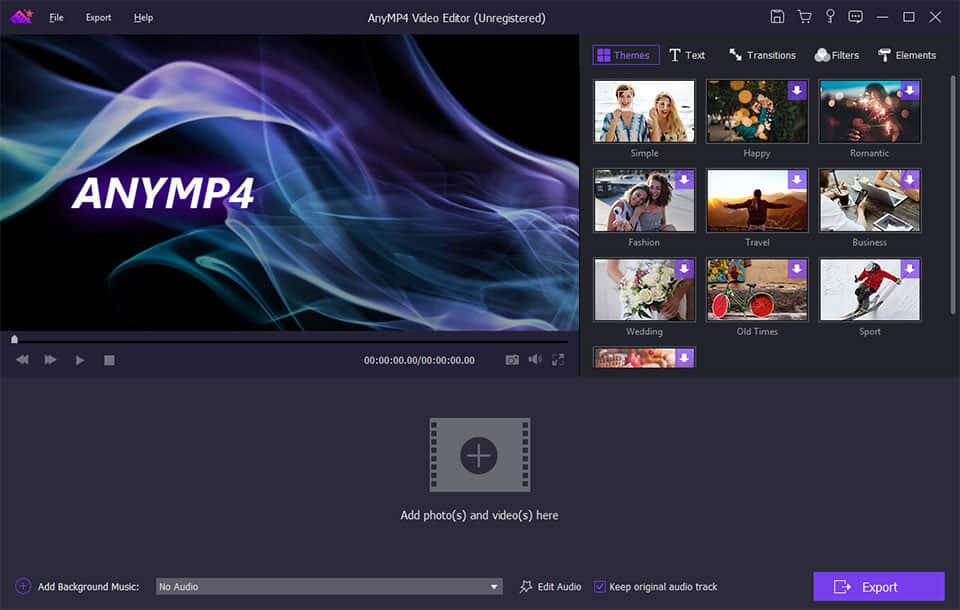
The main window of AnyMP4 Video Editor (unregistered): the preview, the Themes tab with Simple, Happy, Romantic, Fashion, Travel, Business, Wedding, Old Times and Sport, and the Add Background Music bar above the Export button.
Features
Themes that build the video for you
AnyMP4 Video Editor's themes are complete looks, with their own transitions, filters and background music, for occasions such as weddings, travel, sports, Christmas, business and fashion. Apply one to your photos and clips and you have a finished slideshow; you can also start from a theme and change its parts, or build your own.
Text, transitions, filters and stickers
AnyMP4 Video Editor adds animated titles with your own font, size, color, position, duration and motion; transitions such as mosaic, fade, pentagram, squares and windmill with a set duration; filters such as purple, sketch, pixelate, gray and romantic; and "elements", stickers like hearts, emojis, snowflakes, stars and rockets that you can resize, rotate and animate.
An Edit window for each clip
AnyMP4 Video Editor's Edit window shows the original and the output side by side. The Basic tab rotates or flips the clip and sets contrast, saturation, brightness, hue, speed and volume with sliders; Advanced adds temperature, tint, exposure, mosaic and a 3D effect. Crop takes a 16:9 or 4:3 ratio or exact width and height, and Clip trims by dragging the ends or typing start and end times.

The Edit window: original and output previews of a coastal clip, the Basic and Advance tabs, rotate buttons and sliders for contrast, saturation, brightness, hue, speed and volume, plus the Crop and Clip tabs at the top.
Export up to 4K, or for a device
AnyMP4 Video Editor's Export dialog lists formats on the left and quality presets on the right: 4K with the HEVC encoder at 3840 x 2160, HD and 720p with H.264, and SD. A Device tab picks a preset for an iPhone, iPad or Android phone, so the file plays there without tweaking.

The Convert (export) dialog: MP4 selected, with 4K (HEVC, 3840 x 2160), HD, 720P and SD presets, a file name and an output folder.
Benefits
The time saver is that a theme does the decisions for you. Instead of choosing a transition for every cut and hunting for royalty-free music, you pick "Travel" or "Wedding" and adjust what you don't like. The per-clip tools cover the fixes phone footage usually needs: a sideways clip, a dark scene, a boring middle section, a vertical video that needs a 16:9 crop.
Real-World Uses
- A birthday or anniversary video. Drop 60 photos and a few clips into a "Happy" or "Romantic" theme, add a title with names and a date, and export an MP4 for the party screen.
- A holiday montage for family. Trim the best moments from phone clips, straighten the ones filmed sideways, and export a device preset for a relative's iPad.
- A quick product or event promo. A small shop can turn product photos into a short clip with text overlays for Facebook or Instagram.
- A class slideshow. A teacher can turn a year of class photos into an end-of-term video with music in one sitting.
Who It's For, and Who Should Skip It
Good fit: Windows users who make an occasional slideshow or family video and want templates to do most of the work, and who'd rather pay once than subscribe.
Skip it if: you're on a Mac; you need a multi-track timeline, keyframes, color grading or audio mixing (a full editor such as DaVinci Resolve, which has a free version, fits better); or you only trim the odd clip, which the Windows Photos and Clipchamp apps already do for free.
Usage Guide
- Download the trial and run it. The 2.4 MB installer downloads the full program (about 128 MB) during setup.
- Click Add photo(s) and video(s) here and pick your files, or drag them in.
- Choose a theme on the right, or add text, transitions, filters and elements yourself.
- Select a clip and click Edit to rotate, crop, trim, change speed or adjust its color.
- Pick background music with Add Background Music, or keep each clip's own sound.
- Click Export, choose a format, resolution or device, name the file and click Convert.
- After buying, open Help > Register and enter your email address and the registration code AnyMP4 emails you.
Where it falls short
- It's a slideshow maker first. There's no multi-track timeline for layering clips, picture-in-picture or separate voice-over tracks; one reviewer on G2 noted that "some useful controls are missing".
- Speed control is coarse. The guide lists 0.5x, 1.5x and 2x, enough for a slow-motion moment but not for a true time-lapse.
- Support and refunds draw complaints. AnyMP4's Trustpilot reviews mix praise for quick support with complaints about refused refunds and lost activations after reinstalling Windows. Keep your registration email.
What Users Say
There are few independent reviews of AnyMP4 Video Editor itself, so here is what we found, with each source named.
G2 (3.5 out of 5, 2 reviews)
G2's two reviews are mixed. One calls it software that "does the bare minimum but it isn't super expensive and has a free trial option that is pretty good." The wish list: "Would be nice if the full suite was available on the free trial," and "some useful controls are missing and could be added."
AnyMP4's product page (4.8 out of 5, 1,439 ratings)
AnyMP4 shows three short testimonials. Alison: "A really nice easy video editor. It is so cute that I now can preserve my photos in videos." John: "We have been looking for a good video editor and we were not as satisfied with the windows 10 version, but this one did the job way better than what we expected." These are the vendor's own picks, so read them as such.
Trustpilot, about AnyMP4 as a company (4.2 out of 5, 237 reviews)
Trustpilot reviews cover all AnyMP4 products, not this editor. Most recent ones praise support. DG: "I have never had a company technician respond as fast as AnyMP4." Matt B: "Also it's a great value for the amount of money they charge for the programs."
The low ratings are about money and licenses rather than editing. Harry: "Tricked me into a subscription I didn't want or need." Tee Parekh said AnyMP4 "refused to give refund despite the product not doing what is says on the label." Thanks Memorial lost two licenses after reinstalling Windows: "I was unable to reactivate the software."
The pattern: people who wanted a simple, cheap way to make slideshows are happy; people who expected a full editor, or who bought a monthly plan without noticing, are not. Buying the lifetime license through the button below avoids the subscription problem.
Comparisons
AnyMP4 Video Editor vs Clipchamp (built into Windows)
Clipchamp is free on Windows 11 and has a real timeline with several tracks, but its best templates, stock media and some export options sit behind a Microsoft 365 or Premium subscription, and it works best online. AnyMP4 Video Editor is offline after the theme downloads, has no timeline, and costs once.
AnyMP4 Video Editor vs AnyMP4 Video Converter Ultimate
AnyMP4 Video Converter Ultimate (a $59.96 lifetime license on the order page on November 4, 2026) is the company's converter and DVD ripper, for changing formats and digitizing discs. AnyMP4 Video Editor is the one built around themes and slideshows. Buy the Video Editor to make videos from photos and clips; buy the converter if your problem is files that won't play or discs you want on a hard drive.
Editions and Pricing
| License | Price | Term | PCs |
|---|
| Lifetime (Buy Now button) | $62.45 at checkout | One payment, free updates | 1 |
| 1 Month (AnyMP4 store) | $31.20 list, $15.60 with the store's offer | Renews monthly | 1 |
| 3-User (AnyMP4 store) | $187.35 list, $79.96 with the store's offer | Lifetime | 3 |
AnyMP4's own store page showed the lifetime license at $49.96 with a promotion on November 4, 2026, lower than the $62.45 on our order page. Store promotions change often, so compare both before you pay.
FAQs
Is AnyMP4 Video Editor a one-time purchase?
AnyMP4 Video Editor bought through the Buy Now button on this page is a one-time lifetime license for one PC, with free updates. AnyMP4 also sells a monthly plan that renews automatically, so check the license name at checkout.
Does AnyMP4 Video Editor work on a Mac?
No. AnyMP4 Video Editor is Windows-only (Windows 7 to 11). Mac users get iMovie free with macOS, which covers the same kind of slideshow and trimming work.
Can I move my AnyMP4 Video Editor license to a new PC?
AnyMP4 Video Editor's license is for one PC. Several Trustpilot reviewers report that AnyMP4 support reset their license after a new laptop or a Windows reinstall, while one reviewer could not get it reactivated, so contact support with your order details before you wipe the old PC.
Does AnyMP4 Video Editor need an internet connection?
AnyMP4 Video Editor needs the internet to install (the small installer downloads the program) and to download most themes and online materials. Editing and exporting your own files works offline.
Can AnyMP4 Video Editor make vertical videos for TikTok or Reels?
AnyMP4 Video Editor's Crop tool takes a custom width and height, so you can set a 9:16 frame, and AnyMP4 markets the program for TikTok and Instagram videos. There's no one-click aspect-ratio switch for the whole project, so crop each clip.
Can I get a refund if AnyMP4 Video Editor isn't what I expected?
Probably not. AnyMP4's 30-day guarantee covers duplicate or mistaken purchases, missing registration codes and technical faults its support can't fix; it excludes a change of mind and products bought without trying the trial. Try it first.
System Requirements
- Windows 11, 10, 8 or 7, 32- or 64-bit
- Dual-core 2 GHz processor (Intel Core i3 or better)
- 4 GB RAM or more
- NVIDIA GeForce 8 / AMD HD 3800 or newer graphics, and a sound card
- Internet connection for installing and for online themes and materials
- Imports common video (MP4, MOV, MKV, AVI, WMV, MTS, M2TS, WebM, 4K HEVC), audio (MP3, AAC, FLAC, WAV, M4A) and images (JPG, PNG, GIF, BMP, TIFF)
Conclusion
AnyMP4 Video Editor is worth $62.45 if you're a Windows user who makes a handful of slideshows and family videos a year and wants themes to do most of the work, with no subscription. The reason to buy it is speed: photos plus a theme plus music becomes a finished MP4 in minutes. The reason not to is its ceiling: with no multi-track timeline it can't grow with you, and free tools such as Clipchamp or DaVinci Resolve go further. Make a full test video in the trial first, because AnyMP4 doesn't refund a change of mind.
Download Free TrialBuy Now