AnyMP4 DVD Toolkit for Mac: Rip, Burn and Copy DVDs on a Drive-less Mac
AnyMP4 DVD Toolkit for Mac is a $112.45 macOS bundle (one Mac, lifetime license) of four AnyMP4 Mac apps: DVD Ripper for Mac, Video Converter for Mac, DVD Creator for Mac and DVD Copy for Mac. Plug in a USB DVD drive and it turns discs into MP4 or MOV files, burns your videos to DVD with a menu, and duplicates homemade discs, including squeezing a dual-layer DVD-9 onto a single-layer DVD-5.
macOS has had no DVD-authoring app of its own since Apple dropped iDVD, and Macs haven't shipped with optical drives in years, so Mac owners with family DVDs need both a drive and software like this.
Quick facts
- Developer: AnyMP4 Studio
- Version: launcher 8.1.x (Mac disk image dated October 24, 2019)
- Platform: macOS 10.9 or later. AnyMP4 lists Intel and Apple M-series Macs and macOS up to Tahoe 26
- Included apps: DVD Ripper for Mac, Video Converter for Mac, DVD Creator for Mac, DVD Copy for Mac
- Copy modes: Full Copy, Main Movie, Custom; DVD-9 to DVD-5 compression
- Price at checkout: $112.45 one-time for 1 Mac, free lifetime updates
- Trial: each app has its own trial limits, such as 5 minutes per converted file
- What we checked: the Mac disk image (170 MB) on AnyMP4's server, dated October 24, 2019, AnyMP4's own store price ($89.96 with its current offer) and the separate Mac app prices, all on November 4, 2026, and the order page on November 4, 2026, which listed "AnyMP4 DVD Toolkit for Mac" at $112.45 as a lifetime license with no renewal. We didn't run it on a Mac.
Before you buy
- The installer is from 2019. AnyMP4 says the bundle supports M-series Macs and macOS Tahoe 26, but the disk image predates Apple Silicon. Install the trial on your own Mac and run each app you plan to use before paying.
- Budget for a drive. You need a USB DVD writer (Apple's SuperDrive or any compatible drive) to read, burn or copy discs. Without one, you can only work with VIDEO_TS folders and ISO files.
- Homemade discs. AnyMP4 sells the toolkit for homemade DVDs and asks buyers not to use it on rentals or for commercial copying.
- Price gap. Our order page charges $112.45; AnyMP4's store listed $89.96 on November 4, 2026.
Download Free TrialBuy Now
Overview
AnyMP4 DVD Toolkit for Mac installs a small launcher window with a large DVD icon and four buttons on the right, one per app. Each app then opens as its own Mac window. In practice you'll keep the one or two you use most in the Dock and forget the launcher.
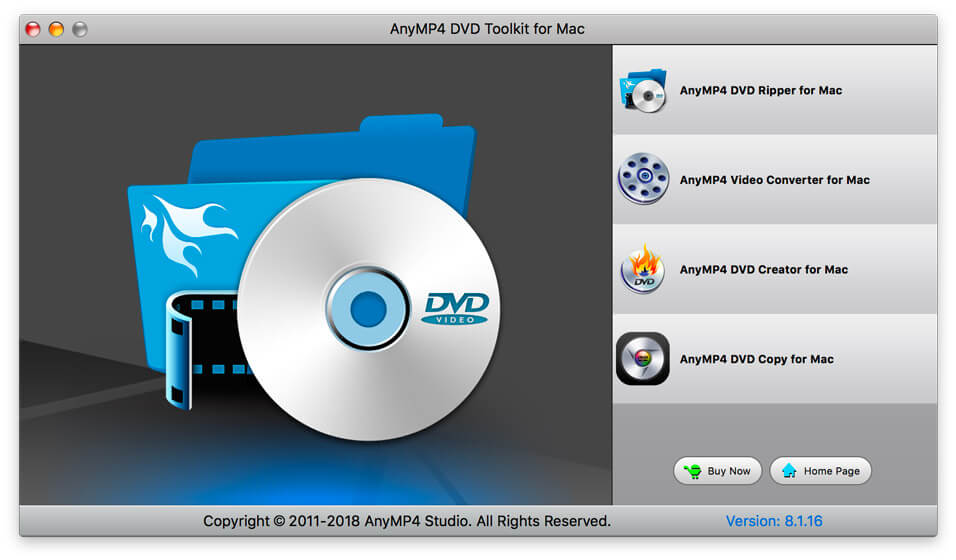
The Mac launcher: AnyMP4 DVD Ripper for Mac, Video Converter for Mac, DVD Creator for Mac and DVD Copy for Mac, version 8.1.16 at the bottom right.
What Each App Does on a Mac
DVD Ripper for Mac: discs into Apple-friendly files
AnyMP4 DVD Toolkit for Mac's DVD Ripper reads a homemade DVD, VIDEO_TS folder, IFO or ISO file and saves MP4, MOV, M4V, AVI, RMVB, WMV or FLV, or audio only, with presets for iPhone, iPad and Apple TV. MOV and M4V output drops straight into Photos, iMovie or the TV app.

DVD Ripper for Mac, as shown in AnyMP4's toolkit guide: the Getting Started steps, MPEG-4 profile, destination folder and Convert button.
Video Converter for Mac: editing on the way
AnyMP4 DVD Toolkit for Mac's Video Converter converts video and audio files to AVI, FLV, MP4, M4V, MKV, MP3, M4A, OGG, FLAC, WAV and device formats. It cuts clips, merges several into one file, crops black edges, adjusts video effects, adds a watermark and converts between 2D and 3D.
DVD Creator for Mac: burn with a menu
AnyMP4 DVD Toolkit for Mac's DVD Creator burns TS, MTS, AVI, MP4, MOV, M4V, WMV and other videos to a DVD disc, or saves a DVD folder or ISO. You can design the menu, add background music and a background image, edit the videos first, and set the number of copies to burn in one go.
DVD Copy for Mac: duplicate or shrink a disc
AnyMP4 DVD Toolkit for Mac's DVD Copy makes a 1:1 copy of a homemade DVD, or compresses a dual-layer DVD-9 to fit a single-layer DVD-5 blank. Full Copy keeps menus and extras, Main Movie keeps only the film, and Custom lets you untick titles, audio tracks and subtitles. It can also save the disc as a folder or ISO on your Mac.
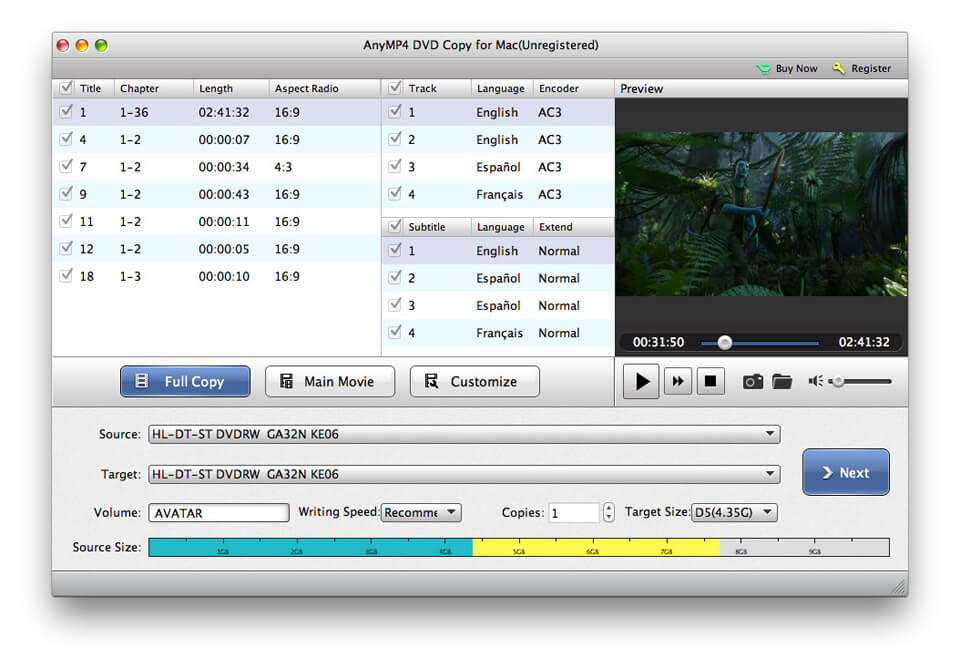
AnyMP4 DVD Copy for Mac (screenshot from its own product page): titles with chapters and lengths, English, Spanish and French tracks, the three copy modes, writing speed, copies and a D5 4.3 GB target size.
Benefits
Mac users have few choices for DVD work: Finder can burn data discs, but not video DVDs a player understands, and free rippers don't burn. Four apps under one license fill that gap, and the DVD-9 to DVD-5 option matters because single-layer blanks are cheaper and easier to find than dual-layer ones.
Real-World Uses
- Moving home movies into Photos. Rip family DVDs to MOV on a MacBook with a USB drive, then import them into the Photos library.
- A DVD for a parent's player. Turn an iPhone video of a birthday into a menu DVD with DVD Creator.
- Spare copies of a recital disc. Use DVD Copy to fit a dual-layer school-show DVD onto cheaper single-layer blanks for every family.
- Archiving without discs. Save each homemade DVD as an ISO on an external drive.
Who It's For, and Who Should Skip It
A good fit for Mac owners with a USB DVD writer and a mix of jobs: ripping old discs, burning new ones and making copies, all under one license.
Skip it if you only rip (the free HandBrake for Mac handles unprotected DVDs), if your Mac has no drive and you don't want to buy one, if you need Blu-ray (AnyMP4 sells a separate Blu-ray Toolkit for Mac), or if you'd rather not rely on a 2019 installer on a new Apple Silicon Mac. On Windows, the Windows toolkit is a separate purchase.
Usage Guide
- Download the disk image, open it and drag the toolkit to Applications. If macOS blocks it, allow it in System Settings > Privacy & Security.
- Connect your USB DVD drive and insert a disc.
- Start the toolkit and click the app you need, or open that app directly from Applications.
- Rip: click Load Disc in DVD Ripper, pick a profile such as MPEG-4 or MOV, choose a destination and click Convert.
- Burn or copy: add videos in DVD Creator, or pick a source, target and mode in DVD Copy, then click Next.
- Register each app from its Register button with the email address and code from your order.
Where it falls short
- Old build, new Macs. The 2019 disk image is the main risk on current macOS and M-series Macs, despite AnyMP4's compatibility claim.
- Four separate apps. Ripping, editing and burning happen in different windows, with no shared project.
- DVD only. No Blu-ray reading or burning.
- Homemade discs. It's sold for discs you made, not for every store-bought movie.
What Users Say
Reviews of the Mac bundle are scarce. These are all we could verify.
AnyMP4's product page
The Mac toolkit's page carries a single short testimonial, from Anna: "AnyMP4 DVD Toolkit for Mac has many excellent features. Using the software I have no more problems with the use of DVD."
Trustpilot, AnyMP4 as a company (4.2 out of 5, 237 reviews)
Several recent Trustpilot reviewers are Mac users, and most write about support after changing Macs. Karmenu Vella titled his review "AnyMP4 is a great app with superb support." after help moving from a MacBook Air to a MacBook Pro. Andrew wrote that support efficiently reset his license keys for a replacement MacBook. Trustpilot rates the company as a whole, and blocks automated reading, so we read these through a summarizing tool.
The pattern: we found no reviews describing this bundle on current macOS, positive or negative. That, plus the 2019 installer, is why the trial matters more here than for most products.
Comparisons
AnyMP4 DVD Toolkit for Mac vs buying the Mac apps one by one
AnyMP4's store listed DVD Ripper for Mac at $68.70 and Video Converter, DVD Creator and DVD Copy for Mac at $49.95 each on November 4, 2026, $218.55 before its offers. At $112.45 the toolkit is cheaper once you need three of the four.
AnyMP4 DVD Toolkit for Mac vs HandBrake plus Burn
HandBrake (ripping) and the open-source Burn app (basic video DVDs) are free on the Mac, but Burn's DVD menus are minimal and neither copies discs or shrinks DVD-9 to DVD-5. AnyMP4's bundle is the simpler choice if you need all three jobs and want menus.
Editions and Pricing
| License | Where | Price on November 4, 2026 | Term | Macs |
|---|
| Lifetime | Order page (Buy Now) | $112.45 | One-time, free updates | 1 |
| Lifetime | AnyMP4 store, with its offer | $89.96 | One-time, free updates | 1 |
| 1 Month | AnyMP4 store | $31.22 | Renews monthly | 1 |
System Requirements
- macOS 10.9 or later (AnyMP4 lists support up to macOS Tahoe 26)
- Intel or Apple M-series processor, 2 GHz or faster
- 2 GB of RAM or more
- A built-in or USB DVD drive to read discs, and a DVD writer to burn or copy
FAQs
Does AnyMP4 DVD Toolkit for Mac work with Apple's USB SuperDrive?
AnyMP4 DVD Toolkit for Mac works with discs in any drive macOS mounts, and the SuperDrive is Apple's own USB DVD writer. Insert a disc and load it in the trial to confirm before buying.
Does AnyMP4 DVD Toolkit for Mac run natively on Apple Silicon?
AnyMP4 lists M-series chips as supported, but the toolkit's disk image dates from October 2019, before Apple Silicon. Run the trial on your Mac to see how it performs.
Can AnyMP4 DVD Toolkit for Mac burn a DVD that plays in a TV's DVD player?
Yes, AnyMP4 DVD Toolkit for Mac's DVD Creator makes standard video DVDs with menus, the kind a DVD player reads, unlike the data discs Finder burns.
Can I use one AnyMP4 DVD Toolkit for Mac license on my Windows PC too?
No. The Mac and Windows toolkits are separate products, each with its own license.
Is AnyMP4 DVD Toolkit for Mac a subscription?
No. The license sold at checkout is a one-time lifetime license for one Mac with free updates. AnyMP4's store also has a 1-month plan that renews monthly.
What happens if AnyMP4 DVD Toolkit for Mac doesn't work on my macOS version after I buy it?
AnyMP4's 30-day guarantee covers technical problems its support can't fix within 30 days, so contact support first. It doesn't cover a change of mind, and AnyMP4 may keep 20% of the price on a refund.
Conclusion
AnyMP4 DVD Toolkit for Mac fills a real gap on the Mac, ripping, burning and copying homemade DVDs under one license, with the DVD-9 to DVD-5 copy that few Mac tools offer. With a USB drive and a mix of DVD jobs, it's good value against buying the apps singly.
The main reason to hesitate is age: the installer is from 2019, and there's little user feedback from current Macs. Install the trial, test the apps you need on your own Mac, and if they work, buy it, and compare our order page with the lower price on AnyMP4's store first.
Download Free TrialBuy Now