AnyMP4 DVD Toolkit for Windows: Four DVD Programs for the Price of Two
AnyMP4 DVD Toolkit is a Windows bundle, $112.45 for a one-PC lifetime license, that installs four AnyMP4 programs behind one launcher: DVD Ripper, Video Converter, DVD Creator and DVD Copy. Together they cover the whole homemade-DVD round trip: get video off a disc, convert it, burn new discs and make backup copies.
It makes sense for a household that still has a drawer of camcorder and event DVDs and also wants to burn new ones for relatives who only own a DVD player.
Quick facts
- Developer: AnyMP4 Studio
- Version: launcher 6.0.x (installer dated November 18, 2022)
- Platform: Windows 11, 10, 8 and 7. The Mac bundle is sold separately
- Included: AnyMP4 DVD Ripper, AnyMP4 Video Converter, AnyMP4 DVD Creator, AnyMP4 DVD Copy
- Discs: homemade DVD discs, DVD folders, IFO and ISO files in; DVD-5 and DVD-9 discs, folders and ISO files out
- Price at checkout: $112.45 one-time for 1 PC, free lifetime updates
- Trial: each program has its trial limits, such as 5 minutes per converted file
- What we checked: the installer (211 MB), downloaded from AnyMP4, and AnyMP4's own prices for the bundle ($89.96 with its current offer) and for each of the four programs bought separately, both on November 4, 2026, and the order page on November 4, 2026, which listed "AnyMP4 DVD Toolkit" at $112.45 as a lifetime license with no renewal. The installer has no version number, so the version comes from AnyMP4's launcher screenshot. We didn't install it or burn a disc.
Before you buy
- It's for homemade DVDs. AnyMP4 lists homemade discs as the input for the toolkit and asks buyers not to use it on rental discs or for commercial copying.
- Do the sum. Bought one at a time on AnyMP4's store, the four programs list at $218.55 ($174.84 with AnyMP4's offers). The toolkit is $112.45 on our order page and $89.96 on AnyMP4's store. If you need only one or two of them, buy those instead.
- You need a DVD burner for the Creator and Copy programs. Many new PCs have no optical drive at all, so budget for a USB DVD writer.
Download Free TrialBuy Now
Overview
AnyMP4 DVD Toolkit opens to a launcher with four buttons, one per program. Each program then runs in its own window with its own workflow, so the toolkit is really four tools sharing one license rather than one program with four tabs.

The Windows launcher: buttons for AnyMP4 DVD Ripper, Video Converter, DVD Creator and DVD Copy, with version 6.0.68 shown at the bottom right.
What's in the Bundle
DVD Ripper: discs to files
AnyMP4 DVD Toolkit's DVD Ripper converts a homemade DVD disc, DVD folder, IFO or ISO file into MP4, MOV, M4V, AVI, WMV, FLV, MKV, audio files such as MP3 and AAC, or presets for iPhone, iPad, Galaxy phones and tablets. It's the piece that rescues home movies from discs that are starting to fail.
Video Converter: files to other files
AnyMP4 DVD Toolkit's Video Converter changes 4K, HD and SD video and audio files between formats, for example MTS camcorder clips to MP4 or an FLV to AVI. One user on AnyMP4's page used it to upscale a 720 x 404 FLV to a 1280 x 720 AVI. It also trims, merges, crops and adds watermarks.
DVD Creator: files to a playable disc
AnyMP4 DVD Toolkit's DVD Creator burns MP4, WMV, AVI, 3GP, MTS, TS, M2TS and other videos to a blank DVD, or saves a DVD folder or ISO to burn later. You set the disc type (DVD-5 at 4.7 GB or DVD-9 at 8.5 GB), the aspect ratio and the video quality, and a capacity bar shows how full the disc will be.
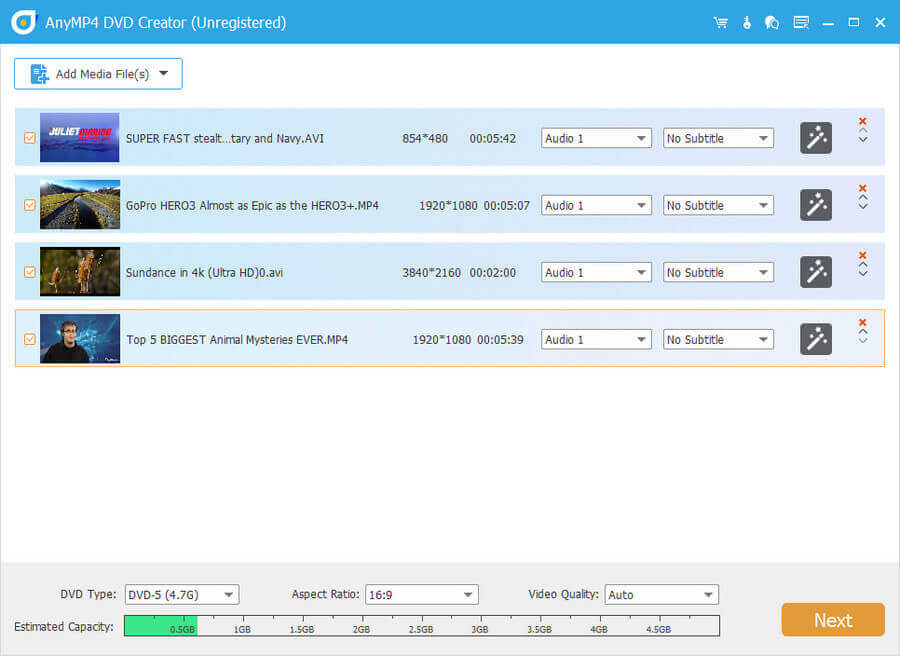
The DVD Creator program (screenshot from AnyMP4's DVD Creator page): four videos with audio and subtitle menus, DVD-5 disc type, 16:9 aspect ratio and the capacity bar.
DVD Copy: one disc to another
AnyMP4 DVD Toolkit's DVD Copy duplicates a homemade DVD 1:1 to a blank disc, or saves it as a DVD folder or ISO on your drive. Its three modes are Full Copy (everything, menus included), Main Movie (just the film) and Custom (the titles, audio tracks and subtitles you tick).
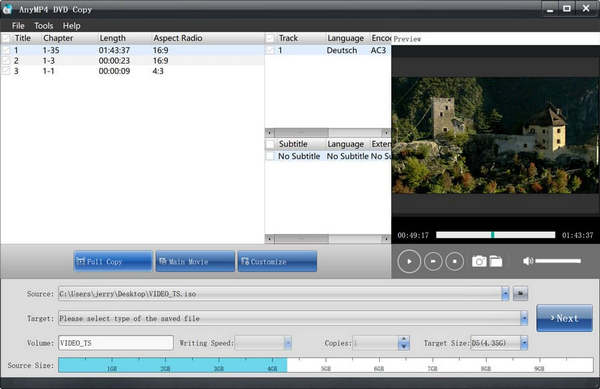
The DVD Copy program (screenshot from AnyMP4's DVD Copy page): titles, audio tracks and subtitles on top, the three copy modes, and source, target and copy settings below.
Benefits
The toolkit saves you from collecting four separate installers, licenses and registration codes for jobs that usually come together. A typical weekend project uses three of them: rip the old wedding DVD to MP4 for phones, trim it in the converter, and burn fresh copies for the grandparents. One payment covers all of it, permanently, on that PC.
Real-World Uses
- Rescuing camcorder DVDs. Rip a stack of MiniDVD and DVD-R discs to MP4 before they become unreadable.
- Making gift discs. Burn a slideshow video or a school concert to DVD with DVD Creator for relatives without streaming.
- Backing up a one-of-a-kind disc. Use DVD Copy to save a homemade DVD as an ISO, then burn a spare copy.
- Fixing format problems. Convert phone or camcorder clips with Video Converter before they go on a disc or a TV.
Who It's For, and Who Should Skip It
A good fit for Windows users who will use at least two of the four programs, have a DVD burner, and want everything under one lifetime license.
Skip it if you only need to rip discs (AnyMP4 DVD Ripper alone, or the free HandBrake for unprotected discs), if you never burn discs, or if you want one modern program instead of four older ones (AnyMP4 Video Converter Ultimate rips DVDs and converts video in one window). On a Mac, buy the Mac toolkit.
Usage Guide
- Run the installer from the trial download. It installs the four programs and the launcher.
- Start AnyMP4 DVD Toolkit and click the program you need.
- To rip: insert the disc in DVD Ripper, load it, pick an output format and click Rip All.
- To burn: add videos in DVD Creator, choose DVD-5 or DVD-9 and the aspect ratio, click Next to edit the menu, then burn to disc, folder or ISO.
- To copy: in DVD Copy, choose the source disc, the target (a blank disc, folder or ISO) and a mode, then click Next.
- To register, open each program's Register window and enter the email address and registration code from your order.
Where it falls short
- Four separate programs. Each looks and works differently, and the launcher just opens them. There's no shared project between ripping, editing and burning.
- An older bundle. The Windows installer dates from November 2022 and the launcher from AnyMP4's 2018 design, so some included programs may be older builds than the ones AnyMP4 sells separately.
- No Blu-ray. Everything here is DVD only. AnyMP4 sells a separate Blu-ray Toolkit.
- Homemade discs only. The product pages describe homemade DVDs, so don't expect it to handle every store-bought movie.
What Users Say
We found no independent review of the toolkit itself. Here is what we could gather.
AnyMP4's product page (311 reviews counted)
AnyMP4 shows three unattributed comments on the toolkit's page:
"AnyMP4 DVD Toolkit is a great software suite that allows me to convert video and burn to DVD. I use this toolkit to copy my homemade DVD. It helps me a lot."
"I just upconverted a FLV file (720×404) to AVI (1280×720) with excellent results. This program gets a thumbs up from me."
"When I convert an AVI or MP4 or anything to a DVD, the video and sound are perfectly aligned."
Trustpilot, AnyMP4 as a company (4.2 out of 5, 237 reviews)
Trustpilot rates the company. Owners of its DVD programs are mostly positive. Paul Meijer, on the DVD Ripper included here: "Recently I had purchased and registered AnyMP4 DVDRipper. A program that does exactly what I expect from it." Norman Bautista, who copies DVDs and Blu-rays to an external drive for travel, called it a "Great conversion program." The recurring complaint is registration codes that stop working after a PC change until support resets them. Trustpilot blocks automated reading, so we read these through a summarizing tool.
The pattern: people who use the DVD programs say they do what they promise; the thin, vendor-hosted feedback on the bundle itself means the trial is the real test.
Comparisons
AnyMP4 DVD Toolkit vs buying the programs separately
On November 4, 2026 AnyMP4's store listed DVD Ripper at $68.70, and Video Converter, DVD Creator and DVD Copy at $49.95 each, $218.55 in all before its offers. The toolkit costs $112.45 on our order page. If you'll use three or four of them, the bundle wins; for one or two, buy them singly.
AnyMP4 DVD Toolkit vs AnyMP4's 11-in-1 bundle
AnyMP4 also sells a larger bundle with Video Converter Ultimate, Blu-ray tools, a screen recorder and iPhone utilities. It's the better buy only if you want those extras; for DVD work alone, the toolkit is more focused.
Editions and Pricing
| License | Where | Price on November 4, 2026 | Term | PCs |
|---|
| Lifetime | Order page (Buy Now) | $112.45 | One-time, free updates | 1 |
| Lifetime | AnyMP4 store, with its offer | $89.96 | One-time, free updates | 1 |
| 1 Month | AnyMP4 store | $31.22 | Renews monthly | 1 |
System Requirements
- Windows 11, 10, 8 or 7
- Intel Core 2 Duo or AMD Athlon processor at 2 GHz or faster
- 2 GB of RAM or more
- A DVD drive to read discs and a DVD burner to create or copy them
FAQs
Does AnyMP4 DVD Toolkit include a Blu-ray burner?
No. AnyMP4 DVD Toolkit works with DVDs only. AnyMP4 sells Blu-ray Creator and a Blu-ray Toolkit separately.
Can AnyMP4 DVD Toolkit copy a dual-layer DVD to a single-layer disc?
AnyMP4 DVD Toolkit's DVD Copy writes to DVD-5 or DVD-9 targets, and its Main Movie and Custom modes leave out extras to save space. Check the target size it shows before burning.
Can I install AnyMP4 DVD Toolkit on two computers?
No. The license sold at checkout covers one PC for life. AnyMP4 support can move it to a new PC if you replace your computer.
Is the AnyMP4 DVD Toolkit for Windows license valid for the Mac version?
No. AnyMP4 DVD Toolkit for Windows and DVD Toolkit for Mac are separate products with separate licenses.
Will discs burned with AnyMP4 DVD Toolkit play in a normal DVD player?
DVD Creator in AnyMP4 DVD Toolkit makes standard video DVDs, which are meant for ordinary DVD players. Burn one disc and test it in the player before making a batch.
Can I get a refund on AnyMP4 DVD Toolkit?
AnyMP4's 30-day guarantee applies in specific cases, such as a technical fault its support can't fix within 30 days or a duplicate purchase. A change of mind isn't covered, and AnyMP4 may keep 20% of the price on a refund it grants.
Conclusion
AnyMP4 DVD Toolkit is good value for a Windows user who will use most of its four programs: ripping, converting, burning and copying homemade DVDs for $112.45 once, against $218.55 for the same programs at list price.
The reason to pass is if you need only one of them, or want a single modern program: the toolkit is four older tools under one launcher, its installer dates from 2022, and AnyMP4's store sells it for about 20% less. Try the program you'll use most in the trial first.
Download Free TrialBuy Now