AnyMP4 Android Data Recovery for Mac: Look for Deleted Phone Data from a Mac, With Big Caveats
AnyMP4 Android Data Recovery for Mac is a macOS app that connects to an Android phone over USB and scans it for deleted messages, contacts, call logs, WhatsApp chats, photos, videos and documents, then copies what it finds to the Mac. The license sold here costs $62.45 a year: AnyMP4 calls it a lifetime license, but the order renews every 12 months.
It's aimed at the moment after you've deleted a conversation or a folder of photos by mistake and have no backup. Be realistic, though: AnyMP4's own specifications still list Android 2.1 to 8.0, and recovering deleted data from modern Android phones is much harder than it was.
Quick facts
- Developer: AnyMP4 Studio
- Version: 2.1.22, released September 5, 2024
- Platform: macOS 10.7 or later, including Tahoe 26, on Intel and Apple M-series Macs. A Windows edition is sold separately
- Android versions listed: 2.1 to 8.0, according to AnyMP4's tech specs
- Data types: contacts, call history, messages and attachments, WhatsApp and attachments, photos, videos, audio, documents
- Price at checkout: $62.45, renewing every 12 months at $62.45
- Trial: scans and previews only. It can't recover files, shows no full-size photo preview and limits message previews
- What we checked: the installer (4 MB disk image, dated July 9, 2026) and AnyMP4's program information file for version 2.1.22, both on November 4, 2026, and the order page on November 4, 2026, which listed "AnyMP4 Android Data Recovery for Mac" at $62.45 with automatic renewal every 12 months at $62.45. AnyMP4's own buy page that day labeled the same product "Lifetime License" at $49.96. We didn't connect a phone or recover data.
Before you buy
- It's a yearly subscription, whatever the label says. The order behind AnyMP4's "Lifetime License" button renews every 12 months. AnyMP4's only true lifetime option for this app is the 5-Mac license ($99.96 on its store). Turn off auto-renewal after buying if you only need it once.
- Check your Android version. AnyMP4's specifications stop at Android 8.0, a 2017 release, and the examples on its page are phones like the Galaxy S7. Run the free scan on your phone before paying: if the trial preview doesn't show your deleted items, the paid version won't either.
- Stop using the phone. New photos and app updates overwrite deleted data. Scan as soon as you can.
- Refunds are narrow. AnyMP4's 30-day guarantee doesn't cover a change of mind and may deduct 20%, so let the trial decide.
Download Free TrialBuy Now
Overview
AnyMP4 Android Data Recovery for Mac works in three steps shown down the left side: connect the device, choose the file types, scan. When you connect a phone it installs a small helper app, FoneGo, which asks for permission to read contacts, call logs, messages and storage. After a standard scan, a results window lists everything by type, with a switch to show only deleted items and a preview pane. A Deep Scan button searches further when the first pass misses what you want.
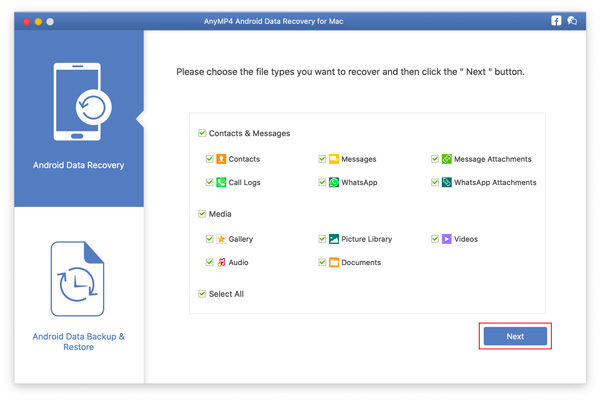
Choosing what to look for: contacts, messages, call logs, WhatsApp and attachments, gallery, picture library, videos, audio and documents.
Features
Messages, contacts and call logs
AnyMP4 Android Data Recovery for Mac lists contacts with their numbers and emails, SMS and MMS conversations with attachments, and call history, and recovers the items you select to a folder on the Mac.
WhatsApp, photos and documents
AnyMP4 Android Data Recovery for Mac also scans WhatsApp chats and attachments, the photo gallery and picture library, videos, audio and documents. The results window shows how many items of each type it found, with deleted ones marked.

Scan results for a Huawei phone: data types with counts on the left, the "Only display the deleted item(s)" switch at the top, and the Deep Scan and Recover buttons.
The FoneGo helper and permissions
AnyMP4 Android Data Recovery for Mac can't read a phone on its own: it installs FoneGo on the device and waits while you tap Allow for each permission. On Android 8.0 and later a single window asks for contacts, call logs, messages and storage access. If a permission is refused, that data type stays empty.

The authorization step: tap Allow in the FoneGo app on the phone for contacts, call logs, messages and storage.
Standard and Deep Scan
AnyMP4 Android Data Recovery for Mac runs a standard scan first and offers a Deep Scan at the end if you can't find what you need, so you can stop early when the first pass is enough.
Backup and restore included
AnyMP4 Android Data Recovery for Mac's window also has an Android Data Backup & Restore section for backing up the phone's data to the Mac and restoring it later, which is the better habit once you've recovered what you can.
Benefits
When a deleted item is still on the phone, a recovery scan is the only way to get it back without a backup, and doing it from a Mac keeps the recovered files on a computer where they're safe from the next accidental delete. The preview in the trial tells you whether a purchase is worth it before you pay.
Real-World Uses
- A deleted text thread. Scan for SMS, preview the conversation and save it to the Mac.
- Lost contacts after a reset. Look for contacts and call history on an older Android phone.
- WhatsApp photos removed by mistake. Scan WhatsApp attachments and the gallery for the missing images.
- Moving off an old phone. Use the backup section to copy an old Android phone's data to a Mac before retiring it.
Who It's For, and Who Should Skip It
A possible fit for Mac owners with an older Android phone (Android 8.0 or earlier is what AnyMP4 lists) who need deleted messages, contacts or photos back and have no backup.
Skip it if your phone runs a recent Android version and the trial preview doesn't show your deleted items, if your photos were synced to Google Photos (check its Trash first, where deleted items stay for 30 or 60 days), if you need a one-time purchase (this license renews yearly), or if you use Windows (the Windows edition is separate).
Usage Guide
- Install AnyMP4 Android Data Recovery for Mac from the disk image and start it.
- Connect the phone with a USB cable and follow the connection prompts on the Mac and the phone.
- Allow the FoneGo app to install, then tap Allow for each permission on the phone and click I Have Authorized.
- Tick the file types to look for and click Next to scan.
- Turn on Only display the deleted item(s), preview the results, and run Deep Scan if something is missing.
- Select what you want and click Recover (after registering with the email address and code from your order).
Where it falls short
- Old Android support on paper. The specs and device examples stop at Android 8.0 and the Galaxy S7 era. Newer phones may connect, but deleted-file recovery on modern Android is limited by its storage encryption.
- Subscription pricing. $62.45 a year at checkout is a lot for a tool most people need once.
- Permissions required. Without FoneGo's permissions it can't read messages, call logs or contacts at all.
- No guarantees. Overwritten data can't be recovered by any tool, so results depend on how much the phone was used after the deletion.
What Users Say
We found no independent review of AnyMP4 Android Data Recovery for Mac, and AnyMP4's product page for it shows no user testimonials.
Trustpilot, AnyMP4 as a company (4.2 out of 5, 237 reviews)
Trustpilot rates AnyMP4 as a whole, and none of the recent English reviews we read mention the Android recovery app. Mac owners there mostly praise support: Karmenu Vella titled his review "AnyMP4 is a great app with superb support." after help moving to a new MacBook, and Andrew wrote that support efficiently reset his license keys for a replacement MacBook. The 3-star exception, Tom Schoute, waited weeks before a blocked registration code was reset. Trustpilot blocks automated reading, so we read these through a summarizing tool.
The pattern: with no user reports on this app, the free scan on your own phone is the only real evidence of what it can do for you.
Comparisons
AnyMP4 Android Data Recovery for Mac vs Google's own backups
Google Photos keeps deleted photos in its Trash for a limited time, Google Contacts can undo changes from the last 30 days, and many phones back up SMS to Google. Check those free options first; recovery software is for when they come up empty.
AnyMP4 Android Data Recovery for Mac vs its Windows edition
AnyMP4 sells Android Data Recovery for Windows with the same scanning approach. Buy the edition for the computer you'll connect the phone to; the licenses aren't interchangeable.
Editions and Pricing
| License | Where | Price on November 4, 2026 | Term | Macs |
|---|
| Yearly (sold as "Lifetime") | Order page (Buy Now) | $62.45 | Renews every 12 months | 1 |
| "Lifetime License" | AnyMP4 store, with its offer | $49.96 | Same product, renews every 12 months | 1 |
| 1 Month | AnyMP4 store | $21.90 | Renews monthly | 1 |
| 5-User | AnyMP4 store | $99.96 | True lifetime, one-time | 5 |
System Requirements
- macOS 10.7 or later, including macOS Tahoe 26
- Intel processor or Apple M-series chip
- 1 GB of RAM or more
- A USB cable for the Android phone; Android 2.1 to 8.0 listed by AnyMP4
FAQs
Does AnyMP4 Android Data Recovery for Mac work with Android 14, 15 or 16?
AnyMP4's specifications for AnyMP4 Android Data Recovery for Mac list Android 2.1 to 8.0 and don't mention newer versions. Its guide covers phones above Android 8.0 for the permission step, so a newer phone may connect, but test what the scan finds in the free trial.
Is the AnyMP4 Android Data Recovery for Mac license really lifetime?
No. The license AnyMP4 labels "Lifetime" for AnyMP4 Android Data Recovery for Mac renews every 12 months at checkout. Only the 5-Mac license on AnyMP4's store is a one-time purchase.
Do I need to root my phone to use AnyMP4 Android Data Recovery for Mac?
AnyMP4 Android Data Recovery for Mac's guide describes installing the FoneGo app and granting permissions, not rooting. Without root, deleted-data recovery on newer phones is usually limited.
Will AnyMP4 Android Data Recovery for Mac recover data from a broken phone?
AnyMP4 Android Data Recovery for Mac needs a phone that turns on, connects by USB and lets you tap Allow. AnyMP4 sells a separate Broken Android Data Recovery tool for Windows.
Can I try AnyMP4 Android Data Recovery for Mac before buying?
Yes. The trial of AnyMP4 Android Data Recovery for Mac scans and previews, but can't recover files, so you can see what it finds before paying.
How do I stop AnyMP4 Android Data Recovery for Mac from renewing?
The license renews automatically every 12 months. Turn off automatic renewal in the order account linked from your purchase emails, or ask AnyMP4 support to cancel it.
Conclusion
AnyMP4 Android Data Recovery for Mac is only worth buying if its free scan finds your deleted data. It's a straightforward Mac app with a sensible preview-first workflow, and on older Android phones it may get back messages, contacts and photos you thought were gone.
The reasons for caution are strong: AnyMP4's own specs stop at Android 8.0, and the license marketed as lifetime renews every year at $62.45. Scan your phone in the trial, buy only if the preview shows what you need, and switch off auto-renewal afterwards.
Download Free TrialBuy Now