UFS Explorer RAID Recovery for Linux: Rebuild md, LVM, Btrfs and ZFS Arrays From a Linux Box
UFS Explorer RAID Recovery for Linux is a $145.27 data recovery tool from SysDev Laboratories that runs on an ordinary Linux desktop, reassembles a broken RAID or NAS volume from its bare member drives (or images of them) and copies the files off it. It reads Linux mdadm, LVM, Btrfs-RAID and ZFS RAID-Z layouts, plus the arrays inside Synology, QNAP, Buffalo, Drobo and many other NAS boxes.
The typical buyer already has the drives out of a dead NAS or server and a Linux machine on the bench. mdadm refuses to assemble, mount complains about a bad superblock, and the file system on top is XFS or Ext4 that Windows tools treat as foreign. This build lets you stay on Linux for the whole job, with root access to every block device and no driver juggling.
Quick facts
- Version: 10.23, released October 29, 2026 (the same version number as the Windows and macOS builds)
- Developer: SysDev Laboratories, the maker of the UFS Explorer and Recovery Explorer lines
- Runs on: Linux distributions from 2018 or later (built for glibc 2.27) with an X11 or Wayland desktop; x86 (32- and 64-bit) and ARM builds, .deb packages, and a legacy build for older systems
- Price: $145.27 on the order page for the Personal license; SysDev lists it at $149.95
- License: perpetual, for one operating system, with 360 days of free updates; the order is set up to renew the update period every 12 months
- Trial: no time limit; RAID assembly, scanning and preview all work, but each saved file is capped at 768 KB
- Needs: root rights (the program is started with
sudo), 30 MB of disk space, 8 GB of RAM recommended for RAID work
- What we checked: the 21.5 MB Linux installer archive (ufsxrci.tar.xz) on SysDev's download server, the version log showing 10.23 from October 29, 2026, and the $145.27 price for the Linux Personal license on the order page, all on November 4, 2026. We didn't install it or run a recovery on a failed array.
Before you buy: this license covers Linux only
SysDev sells the Classic UFS Explorer editions per operating system. A Linux key won't activate the Windows or macOS build, so pick the platform of the machine that will actually hold the drives. Refunds are narrow too: SysDev only refunds when you tested the trial first and the paid version then fails on a software fault it can't fix within 7 days. Buying the wrong platform or edition gets you a license exchange, not your money back. Run the trial against your own disks first; it shows the files and their folder tree before you pay.
Download Free TrialBuy Now
Overview
UFS Explorer RAID Recovery sits in the middle of SysDev's Classic family: above Standard Recovery, which handles single disks, and below Network RAID, which pulls member drives over a LAN. Its job is two-stage. First it rebuilds the virtual volume that the RAID controller, mdadm or the NAS firmware used to present. Then it treats that volume like any other disk: browse it if the file system is intact, or scan it for deleted and lost files if it isn't.
Nothing is written to the source drives. The program opens them read-only, and the recovered files go to a separate disk you choose. On Linux that matters more than it sounds, because a careless mdadm --create or an automatic resync can overwrite exactly the parity you need. Here you power the array down, attach the members to the Linux workstation, and let the software read them as plain block devices.
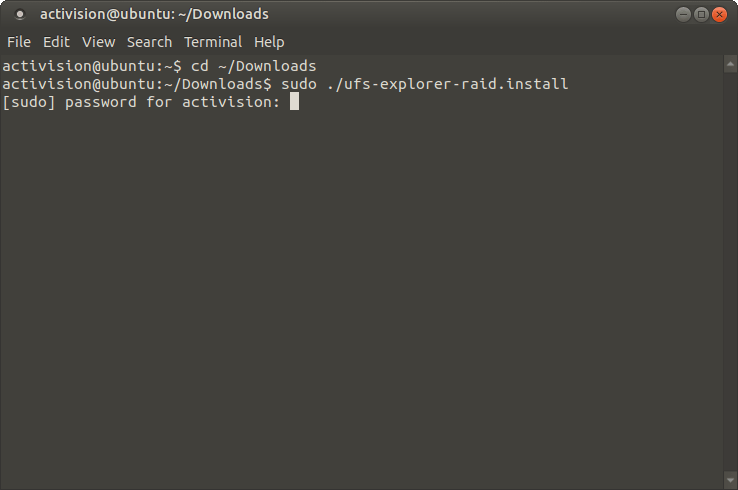
Installing on Ubuntu: the ufs-explorer-raid.install script is run from the Downloads folder with sudo, which asks for the user's password.
Features
Linux software RAID and volume managers read from their own metadata
UFS Explorer RAID Recovery for Linux detects mdadm arrays, LVM volumes and Btrfs-RAID from the metadata on the member drives and assembles them without you entering any parameters. It also handles Windows Storage Spaces and dynamic disks, Apple Software RAID and Fusion Drive, OpenBSD BIO, and hardware controller formats such as DDF1 (LSI, Dell, Intel), Intel Matrix, Silicon Image, JMicron and 3ware. One Linux-only extra: basic support for LVM thin-provisioned volumes through the Find LVM tool, which SysDev offers for Linux configurations only.
ZFS pools and NAS layouts without the original hardware
UFS Explorer RAID Recovery reads ZFS stripe volumes with RAID-Z, RAID-Z2 and RAID-Z3, which suits a dead TrueNAS or home-built ZFS box, and recognizes the layouts of more than 50 NAS vendors, including Synology Hybrid RAID (SHR), QNAP, Buffalo TeraStation and LinkStation, Asustor, TerraMaster, Netgear ReadyNAS, WD, Thecus and Iomega. Drobo's BeyondRAID doesn't follow a standard pattern, so it gets a separate assistant tool instead of automatic detection. Version 10.23 added OWC SoftRAID metadata, double-degraded rebuilds for its RAID6 modes, and older Oxford controllers used in LaCie boxes.
Manual RAID Builder for wiped or overwritten metadata
When the superblocks are gone, for example after someone re-created the array or swapped the controller, UFS Explorer RAID Recovery's RAID Builder lets you enter the level, member order, stripe size and start offset yourself, then check the result before scanning. It covers RAID 0, 1, 1E, 3, 5, 6 and 7, nested levels such as 10, 50, 51, 60, 61 and 50E, and custom patterns described in RDL or Runtime VIM files. RAID 5 can be built with one member missing and RAID 6 with two, using a placeholder in place of the absent disk. Configurations can be saved and loaded again later.
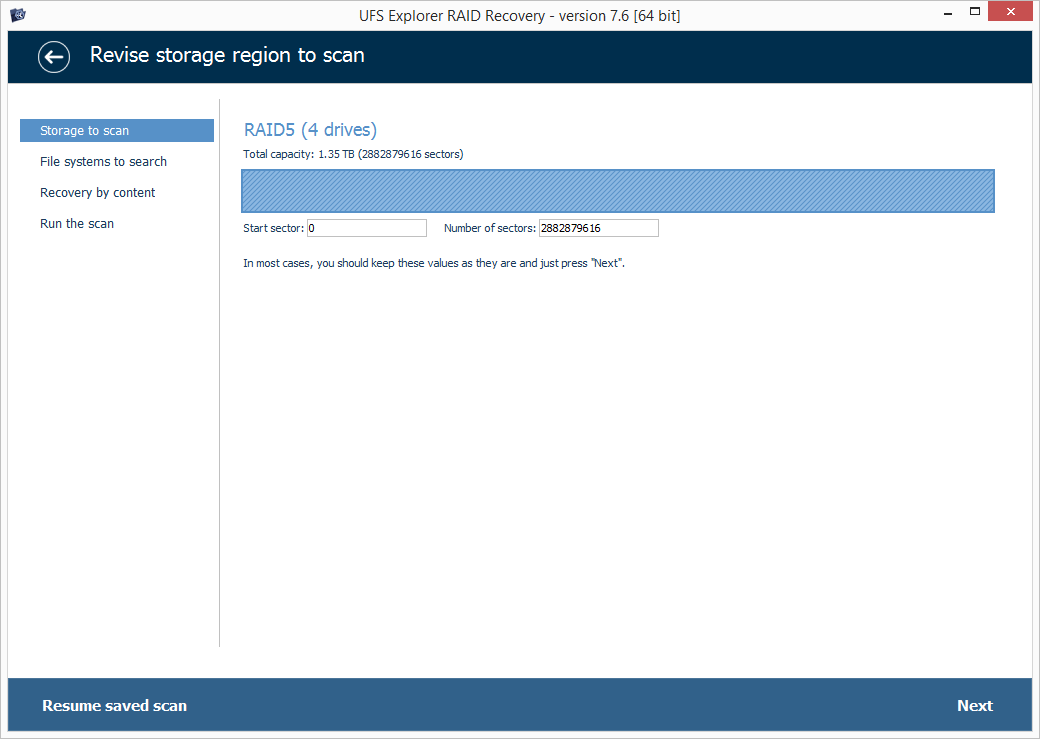
Scan setup for an assembled RAID5 of four drives (1.35 TB), with the storage range, file systems and content-based recovery steps on the left. This screenshot is from the Windows build in SysDev's manual; the Linux build uses the same interface.
Imaging and adaptive rebuilds for members with bad sectors
UFS Explorer RAID Recovery includes a multi-pass disk imager with per-drive read timeout, block size, direction and retry settings. Each pass records a map of unreadable blocks, and the adaptive reconstruction engine later fills those holes from parity or mirror copies on RAID 1, 5, 6, 5E, 10, 50, 51, 60 and 61. It can also import bad-sector maps from ACE Lab and DeepSpar tools and recognizes OpenText Tableau and CRU WiebeTech write blockers.
File recovery on the rebuilt volume
UFS Explorer RAID Recovery has the full file system coverage of Standard Recovery: Ext2/3/4, XFS, Btrfs, ZFS and UFS on the Unix side, NTFS, ReFS, FAT and exFAT, APFS and HFS+, plus ISO 9660 and UDF. It opens VMDK, VHD/VHDX, QCOW2, VDI and Parallels disks and can build an array straight from images. It decrypts BitLocker and APFS encryption, with the right key. Scans can be paused, saved and resumed, which helps on a multi-terabyte array that takes many hours.
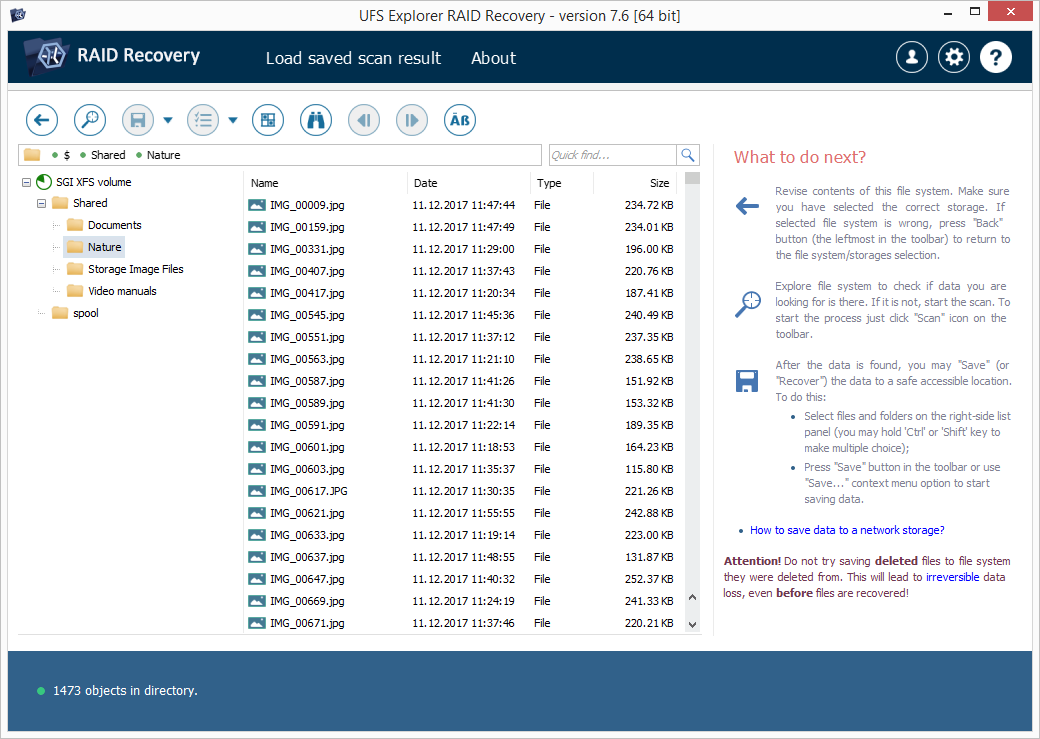
Browsing an SGI XFS volume's Shared folder, with the "What to do next?" panel explaining how to save files elsewhere (Windows build, version 7.6, from SysDev's manual).
Benefits
The main gain of the Linux build is that the operating system stays out of your way. Linux doesn't try to "initialize" a foreign disk the way Windows Disk Management can, it sees every SATA, SAS and USB-attached drive as a block device, and you can boot a spare PC from a live USB stick so nothing touches the original system disk. The software then gives you what mdadm and LVM tools can't: a read-only rebuild you can test with different parameters, without writing a single byte to the members.
It's also a cheaper route than a lab. The Personal license costs less than most RAID recovery quotes, and the trial tells you whether your data is there before you spend anything.
Real-World Uses
- A Synology with two dead drives in SHR: pull all members, image the failing ones with the bad-block maps, and let the program assemble SHR from the images.
- An Ubuntu file server whose md RAID 5 was re-created by mistake: the old superblocks are overwritten, so you enter level, order, chunk size and offset in RAID Builder and check whether the XFS or Ext4 tree appears.
- A TrueNAS or Proxmox ZFS pool that won't import: open the member disks and read the RAID-Z volume without the original system.
- An LVM volume group spanning several disks after one controller died: attach the remaining drives to a Linux workstation and let the program find the LVM metadata, including thin pools on Linux.
- A small business NAS with deleted shares: rebuild the array, scan the volume and copy the folders to an external disk.
Who It's For, and Who Should Skip It
It fits Linux administrators, homelab owners and small IT shops who are comfortable with a terminal and sudo, have the member drives in hand, and want to recover files themselves. It also suits recovery technicians who keep a Linux workstation for NAS jobs.
Skip it if:
- Your data is on a single disk or an SD card. UFS Explorer Standard Recovery does that from $69.95.
- The array is protected with LUKS, eCryptFS or VeraCrypt, or uses F2FS. SysDev lists those only in its Professional family, so look at UFS Explorer Professional Recovery or Recovery Explorer Professional instead.
- You can't attach all the members to one machine. That's what UFS Explorer Network RAID is for.
- You'd rather not touch RAID parameters at all. If automatic detection fails, the work becomes technical, and a recovery lab may be the better spend.
- You want to repair the array in place. This tool copies files off; it doesn't fix mdadm or the NAS so it boots again.
Usage Guide
- Prepare the machine. Use a Linux PC whose system disk is not part of the array. Download ufsxrci.tar.xz (or the .deb package on Debian and Ubuntu) to that system disk, never to the drives you want to recover.
- Install. Extract the archive and run the installer, or in a terminal run
sudo ./ufs-explorer-raid.install from the extracted folder.
- Launch with root rights. Start it from the menu, or type
sudo /usr/lib/ufs-explorer/ufs-explorer-raid. On GNOME, SysDev's manual suggests prefixing xhost +local: so the root process can open a window. If the install fails, check missing libraries with ldd, or run the binary straight from the "Universal Archive" (ufsxrci-other.tar.xz) without installing.
- Attach the members. Power off the NAS, take the drives out and connect them to the workstation. Don't let any tool resync or "repair" the array. Image any drive that shows read errors or S.M.A.R.T. warnings first.
- Check the automatic result. The rebuilt array appears under the connected storages if the metadata was readable. If not, open RAID Builder, add the drives or images, and try the level, order, stripe size and offset.
- Browse or scan. Open the volume; if folders are missing, run a scan, preview files and save them to a separate disk.
- Activate. To save files larger than 768 KB, enter the registration code you receive by email.
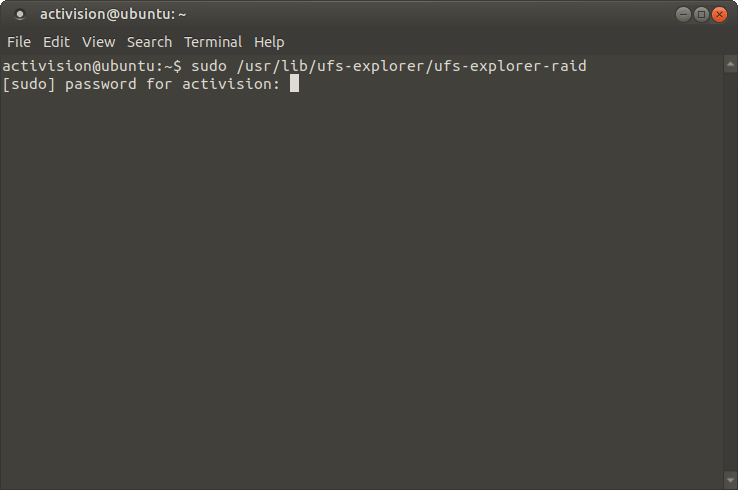
Starting the installed program as root: sudo /usr/lib/ufs-explorer/ufs-explorer-raid, waiting for the password.
Tips for a Linux bench
- Stop the system from auto-assembling the array: if your distribution's mdadm service grabs the drives on boot, stop it before you start, so the software reads the disks as they are.
- SysDev's own bootable "Backup and Emergency Recovery CD" is based on Ubuntu 16.04 and ships version 7 of its programs. For current releases, boot any up-to-date live Linux and run version 10.23 from the Universal Archive.
- Most NAS arrays use a 64 KB or 128 KB stripe, which is a good starting guess in RAID Builder.
- Have a destination disk at least as large as the data you want back, formatted with a file system your Linux machine can write.
Where it falls short
- Manual parameters are on you. When the metadata is gone, finding the right drive order and stripe size is guesswork plus testing, and the program can't do it for you on every layout.
- Long jobs. Users of the UFS Explorer family regularly mention scans that take many hours on large arrays.
- Classic-family limits. No LUKS or VeraCrypt decryption, no F2FS, no forensic E01/AFF4 images; those are in the Professional editions.
- A desktop is required. The program needs an X11 or Wayland graphical session, so a bare server console isn't enough; attach the drives to a machine with a desktop or boot a live Linux.
- Thin-provisioned LVM support is basic, through a separate Find LVM tool.
What Users Say
Hands-on reviews of the Linux build specifically are rare, and many "UFS Explorer review" pages online belong to companies selling rival recovery tools, so they aren't quoted here. What's left are stories on SysDev's own testimonials page about Linux file systems, and a technicians' forum thread that shows the hard part of a Linux md recovery.
Customers on SysDev's testimonials page
These are published by the vendor and cover UFS Explorer in general, not this edition only.
Issac Silva, after a NAS drive became unreadable: "I called the manufacturer and they said the only way to get data off the drive was to install Linux. I installed Linux Mint and Ubuntu and both OS's would not let me mount the drive." He then found UFS Explorer: "I downloaded the software and ran the trial. I decided to buy right away. I was able to restore a small file." His verdict: "This recovery software is amazing, would have saved me hours of work but glad I found it."
Klaus (from Germany): "I had an ext3 harddisk that my media player destroyed by writing a wrong journal. [...] I tried a lot of other recovery tools that all were not able to rebuild or recover the large media files recorded by the media player. But your software is great! It recovers all my recordings."
Rodrigo Eggea, COPEL Telecom: "I have a Iomega Home Media Network and all files disapeared suddenly, and Iomega support doesn't help! It uses XFS filesystem and UFS 4 Standard Edition recovered the lost filesystem and I could recover all my important data with path and filenames!"
Sverrir M Sverrisson, Netheimur ehf / Networld Iceland: "I can honestly say that this is the far most best filesystem recovery software I've ever used."
Chris D'Hondt, J.F. Taylor, Inc.: "Much thanks for the XFS support. It works nicely."
An mdadm RAID 10 case on the HDD Guru forums
This 2012 thread is about an older UFS Explorer version, but the problem is the same today. User del_jachim wrote: "I am trying to recover my data from raid10 (ext4 filesystem) with Ufs Explorer Standard Recovery." He had "three disk images (one missing disk is damaged)" and explained "it is mdadm software raid with default options (chunk-size=512)".
The technicians' replies went straight to the parameters. dmarques asked: "From the 3 drives, have you found out already which ones are belonging to the RAID0?" and "Also, are you sure about the stripe size?" hddguy pointed out: "All disks will have MBR because striping does not start at sector 0." He added: "This should be fairly simple case. If it is giving you so much problems then let someone else handle it for you."
The lesson for buyers: the software does the reading and rebuilding, but when the array isn't detected automatically, someone has to know the drive order and chunk size.
The recurring themes: people praise it for reading Linux file systems (XFS, Ext3/4, ReiserFS) and NAS volumes that their operating system or other tools couldn't mount, and for getting files back with their names and folders. The criticism is about effort, not results: long scans, and arrays without metadata that need RAID knowledge to set up. The unlimited trial is the honest way to find out which group you're in.
Comparisons
UFS Explorer RAID Recovery vs mdadm and fsck
The free route on Linux is mdadm --assemble (or a careful --create --assume-clean with the original parameters) followed by fsck or a carving tool. That works when you know the parameters and accept the risk of writing to the members. UFS Explorer RAID Recovery reads everything read-only, lets you try parameters until the volume looks right, covers NAS and ZFS layouts mdadm doesn't, and recovers files from a damaged file system without repairing it first.
UFS Explorer RAID Recovery vs Recovery Explorer RAID
Both come from SysDev Laboratories, both have a Linux build and both are licensed per platform. Recovery Explorer RAID is the lower-priced line ($94.95 for its Linux version on our site). If price matters, run both trials on the same drives and compare what each finds before you pay.
Editions and Pricing
| License (Linux) |
SysDev's price |
Computers |
Use |
| Personal | $149.95 ($145.27 on our order page) | 1 | One person, home or office, non-profit |
| Commercial | $259.95 | 1 | A company, for paid work |
| Corporate | $469.95 | Up to 10 | An organization's own machines |
All three are perpetual licenses for one operating system with 360 days of free updates. The Buy Now button below is the Personal license for Linux.
FAQs
Does UFS Explorer RAID Recovery for Linux stop working after the first year?
No. UFS Explorer RAID Recovery is licensed perpetually: the version you have keeps working. The 360 days only cover free updates. The order is set up to renew that update period every 12 months, so if you only want the one year, turn off the renewal after you buy.
Can I use my Linux license on Windows later?
No. UFS Explorer RAID Recovery's Classic licenses apply to one operating system, so running it on Windows or macOS means buying that platform's license.
Do I have to run UFS Explorer RAID Recovery as root?
Yes. UFS Explorer RAID Recovery needs root rights to read raw block devices, so it is launched with sudo or su root -c.
Will it run on a Raspberry Pi or another ARM board?
SysDev offers an ARM build of UFS Explorer RAID Recovery for Linux on its download page. An ARM board with enough RAM and USB ports can read the drives, though 8 GB of RAM is recommended for RAID work.
Can UFS Explorer RAID Recovery read a LUKS-encrypted md array?
No. UFS Explorer RAID Recovery decrypts BitLocker and APFS encryption only. LUKS decryption is part of SysDev's Professional family.
Can I run it on an old Linux distribution?
Usually, yes. The main UFS Explorer RAID Recovery build targets glibc 2.27, which covers most distributions from 2018 on. For older systems SysDev offers a separate build compiled for glibc 2.3, meant for distributions from 2006 or later, as an installer, an archive and .deb packages.
Is there a refund if it can't recover my files?
Only in narrow cases. SysDev refunds when you tested the trial before buying and the paid version fails because of a software error SysDev can't fix within 7 days; failures caused by damaged hardware don't count. That's why the trial, which shows your files before purchase, is the real test.
System Requirements
- Linux distributions from 2018 or later (glibc 2.27) with an X11 or Wayland graphical desktop; a legacy build covers glibc 2.3 and later
- x86 (32- and 64-bit) or ARM (32- and 64-bit); .deb packages for Debian, Ubuntu, Mint and other Debian-family systems
- Minimum 32 MB RAM and 30 MB free disk space; 8 GB RAM and 4 logical cores recommended for RAID
- Root rights; a separate destination disk for the recovered files
Conclusion
UFS Explorer RAID Recovery for Linux is worth $145.27 if you have a failed md, LVM, Btrfs, ZFS or NAS array, all the member drives in hand and a Linux machine to work on. The reason to buy it is the read-only rebuild: you can try parameters, see the folders appear and copy the files off without risking the disks. The reason not to is encryption or scale: LUKS volumes need the Professional family, and drives spread over several machines need Network RAID. Run the trial on your own drives first; if your files show up, the license is a small price next to a lab bill.
Download Free TrialBuy Now