dbForge Studio for SQL Server: An All-in-One SQL Server IDE from Free to $549.95 a Year
dbForge Studio for SQL Server is Devart's Windows IDE for writing, comparing, debugging and managing SQL Server and Azure SQL databases. The Express edition is free, and the Professional edition sold here costs $399.95 at checkout for one year, with the schema compare, data compare and test data tools most teams buy it for.
Think of it as SSMS with the extras built in. SQL Server Management Studio is free and does the core job, but it doesn't compare two databases or generate test data the way this does. If you spend your day in T-SQL and move changes between environments, that's the case for paying.
Quick facts
- Developer: Devart
- Version: 2026.2.82, released October 16, 2026
- Platform: Windows 7 to 11 and Windows Server 2008 to 2025. macOS and Linux only through CodeWeavers CrossOver
- Databases: SQL Server 2005 to 2025, limited support for 2000, Azure SQL Database, Azure SQL Managed Instance, Amazon RDS and Microsoft Fabric
- Price: Professional $399.95 at checkout for a year of support and upgrades, $399.95 to renew
- Trial: 30 days of the full product, then it drops to the free Express edition
- Guarantee: 30-day money-back guarantee on annual and perpetual purchases
- What we checked: Devart lists a 140.09 MB installer, and the download needs a Devart account. Version 2026.2.82 was the latest in the revision history, and the order page showed Professional at $399.95 with a $399.95 renewal after 12 months, on November 6, 2026. We went through Devart's 119-row edition matrix for the table below. We didn't install it or connect it to a server ourselves, so the feature details come from Devart's pages and the reviews quoted.
Before you buy
Check that Professional has what you need. Source Control, Unit Test, Documenter, the DevOps plugins, running a script on multiple databases and Find Invalid Objects are Enterprise only. A team that wants database version control inside the IDE needs the $549.95 Enterprise edition, not this one.
This is a subscription. Devart's terms say a subscription license stops working when the period ends unless you renew, and the checkout item is labeled Subscription with a full-price renewal. Budget for $399.95 every year.
Download Free TrialBuy Now
Overview
The Studio looks and works like Visual Studio: Database Explorer on the left, tabbed documents in the middle, and tool windows that dock around them. Open a server and you can browse objects, write queries, edit table designs and run comparisons without leaving that window. Devart ships updates often. The revision history shows releases in June, August, September and October 2026, so new SQL Server versions and fixes arrive quickly.
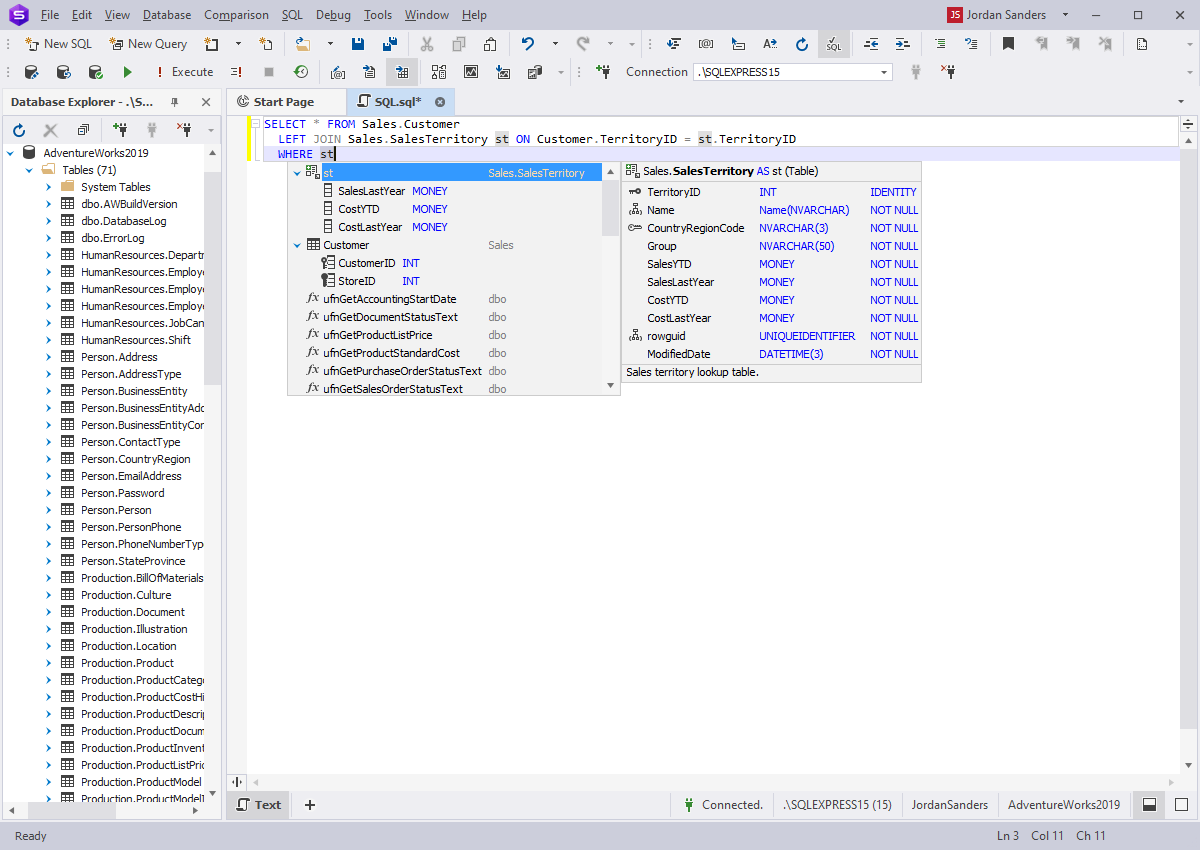
The SQL editor suggesting columns for a table alias, with the table's structure in a side panel.
Features
dbForge Studio for SQL Server speeds up everyday T-SQL
dbForge Studio's SQL editor offers context-aware code completion, formatting profiles, snippets, code folding, "go to definition" and object renaming that updates references. Completion and basic formatting come with every edition, while snippets and refactoring start at Standard. Professional adds the T-SQL Code Analyzer and a syntax check.
dbForge Studio for SQL Server compares and syncs schemas
dbForge Studio's Schema Compare, in Professional and Enterprise, shows every difference between two databases, then generates a deployment script for the ones you select. It handles object dependencies, and a command line version fits build pipelines. This is the feature reviewers praise most.
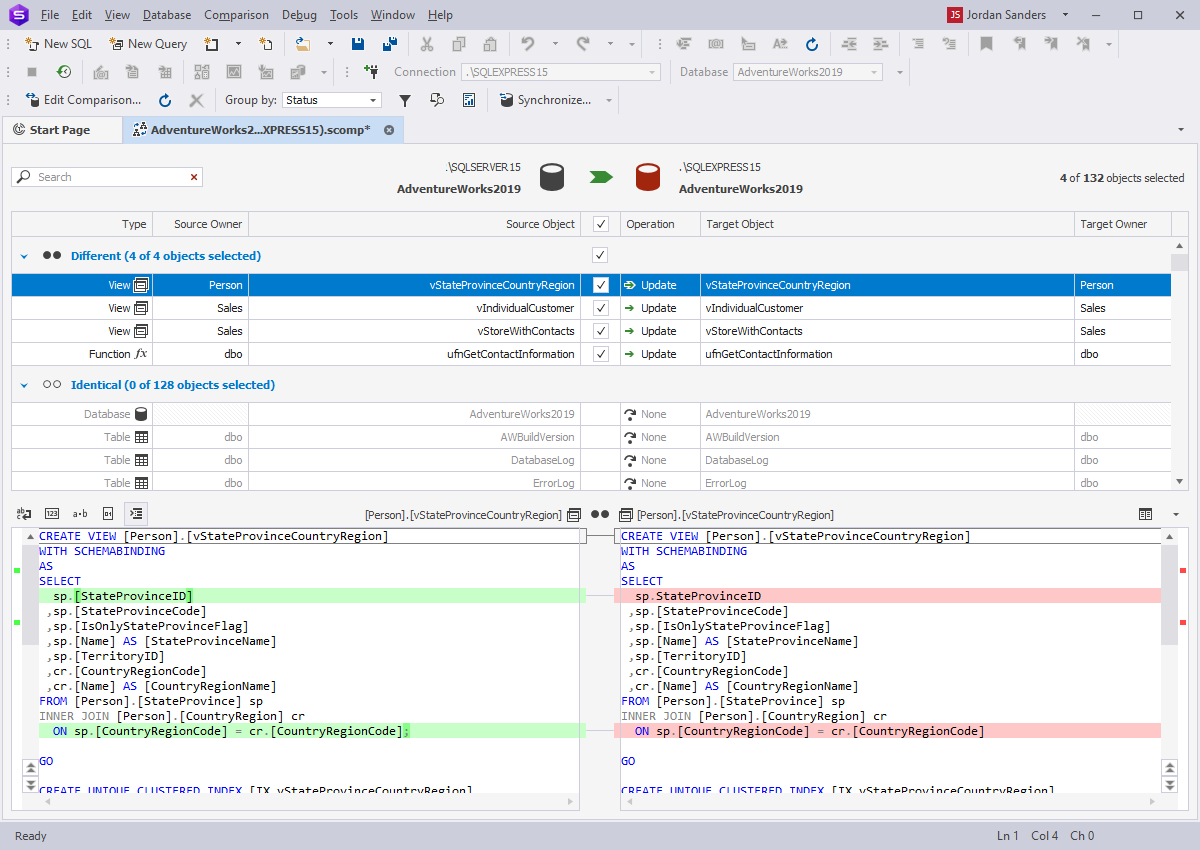
Schema Compare listing four changed objects out of 132, with the script differences underneath.
dbForge Studio for SQL Server compares table data too
dbForge Studio's Data Compare finds row-level differences between databases and synchronizes them, even when the structures differ. It generates reports and can run on a schedule, which suits keeping a staging copy in line with production reference data.
dbForge Studio for SQL Server builds queries visually
dbForge Studio's Query Builder lets you drag tables onto a diagram, tick columns and set joins, filters and grouping on tabs, then run the query and see the rows in the same window. It's in every edition, including Express, and helps with long joins, or with people who know the data better than the SQL.
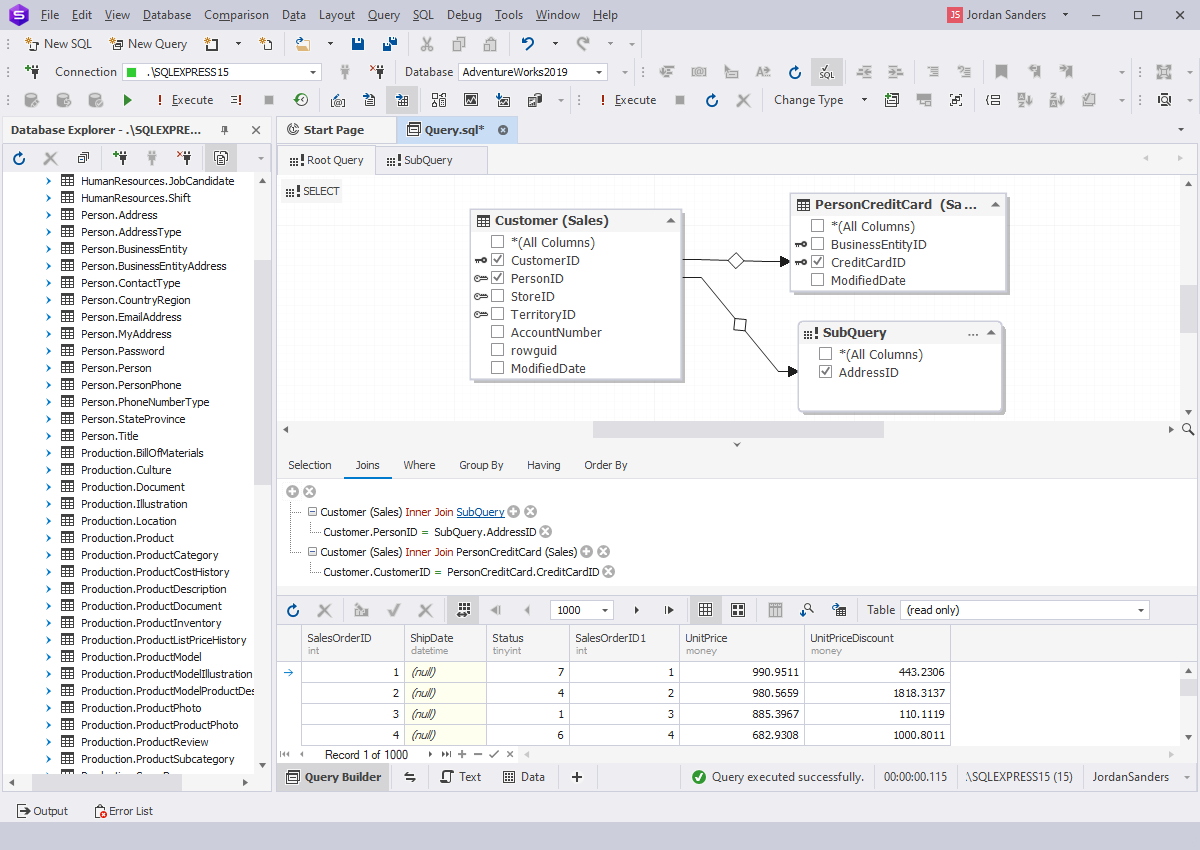
Query Builder with three joined objects, the join conditions and the result rows.
dbForge Studio for SQL Server debugs stored procedures
dbForge Studio's T-SQL Debugger, from Standard up, steps through procedures, functions and scripts with breakpoints, watches and a call stack.
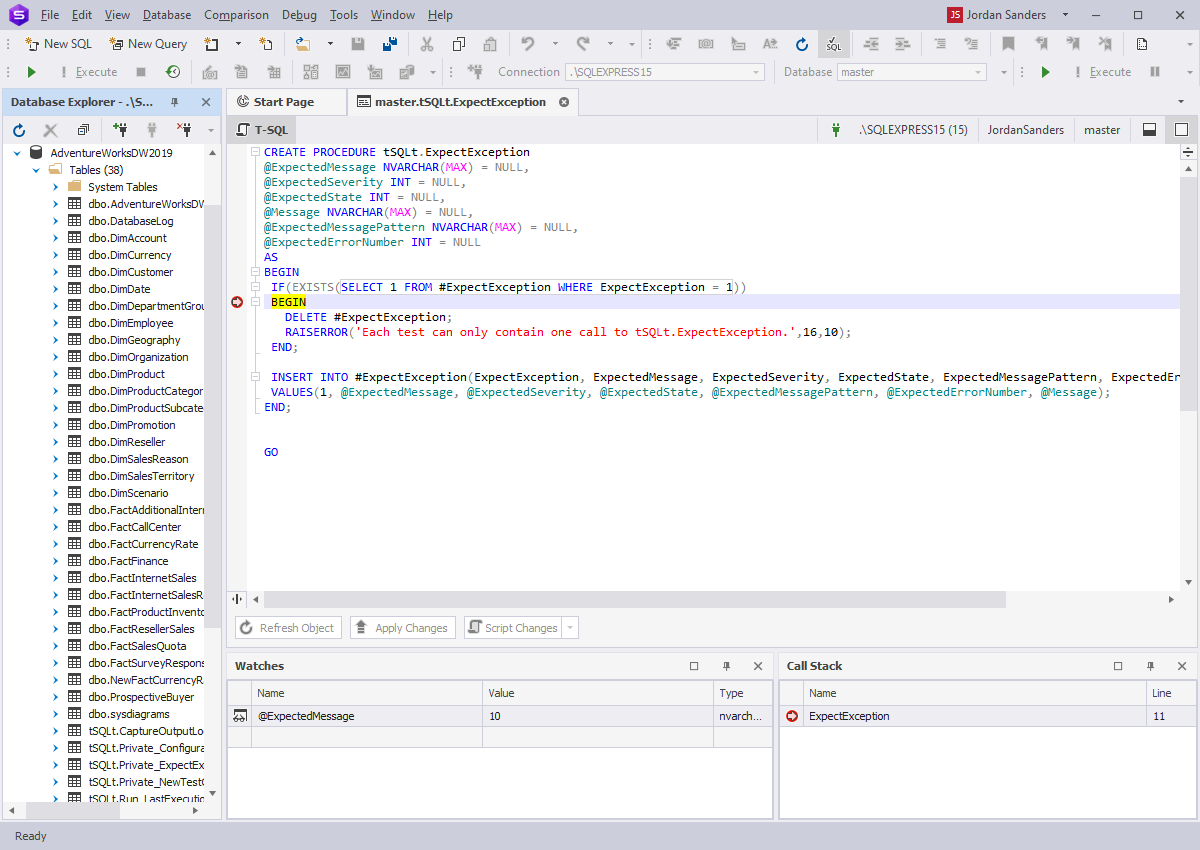
The debugger stopped at a breakpoint, with the Watches and Call Stack windows below.
dbForge Studio for SQL Server fills test databases
dbForge Studio's Data Generator, in Professional and Enterprise, creates realistic test data from more than 200 predefined generators, with dependencies between columns and options for regular expressions and Python. It means you don't have to copy production data onto a developer's laptop.
dbForge Studio for SQL Server designs and maintains tables
dbForge Studio's visual Table Designer shows columns, constraints, indexes and the DDL together, and you can edit the script directly in Professional. Index Manager finds fragmented indexes, Event Profiler traces server activity, and Monitor tracks server performance.
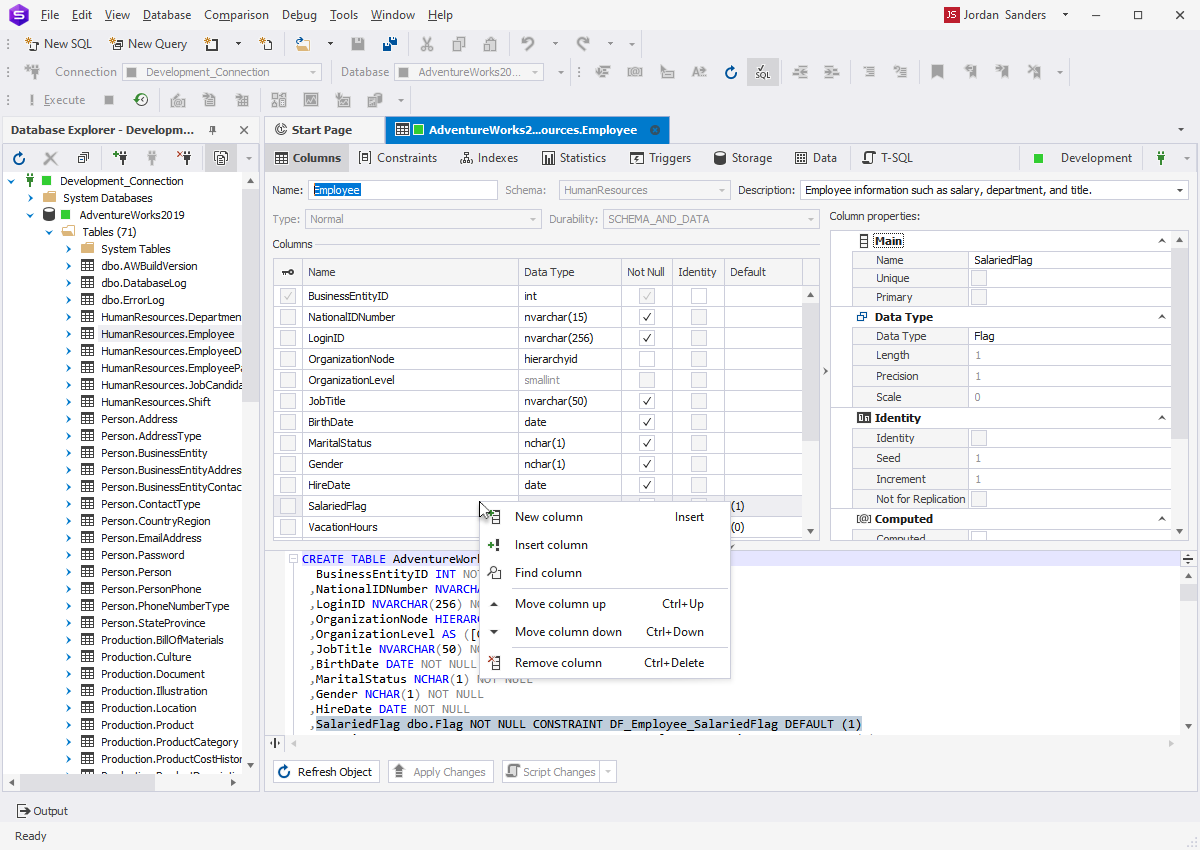
The Table Designer editing a column, with the CREATE TABLE script underneath.
dbForge Studio for SQL Server includes an AI Assistant
dbForge Studio's AI Assistant turns plain-language requests into SQL, explains and optimizes queries, and helps troubleshoot errors. Devart lists it in every edition, and added a free Express tier of the assistant in the September 2026 release. It uses your database context, so check your company's policy before you turn it on.
Benefits
- Fewer separate tools. Comparison, test data, reporting and index work live in one window with one license.
- Safer releases. You review a deployment script before anything touches the target database.
- Faster onboarding. Query Builder and code completion help people who don't yet know the schema.
- Steady updates. Devart has already added SQL Server 2025 and Microsoft Fabric support.
Real-World Uses
- Releasing a schema change: compare development with production, select the objects that changed, and save the script for review.
- Chasing a production-only bug: compare a lookup table between environments to find the row that differs, then step through the procedure in the debugger.
- Building a demo database: generate thousands of realistic customers and orders without any real personal data.
- Automating nightly checks: call the schema comparison from the command line in a scheduled job.
Who it's for, and who should skip it
Buy it if SQL Server is your main job and you regularly compare or deploy between environments. Skip it if you only run occasional queries: SSMS is enough, and the free Express edition covers the rest. If you use several database engines, a multi-database tool such as DataGrip or Devart's own dbForge Edge fits better. If you already like SSMS and only want better completion, Devart's SQL Complete add-in is a narrower route. And if you work on a Mac or Linux full time, you'll be running this through CrossOver rather than natively.
Usage Guide
- Sign in to a Devart account on the download page, then download and install the Studio.
- Make sure .NET Framework 4.7.2 or higher is present. It usually is on Windows desktops.
- Start the 30-day trial, or activate your key from the order email.
- Create a connection to your SQL Server or Azure SQL database in Database Explorer.
- Open a new SQL document, or start Schema Compare from the Comparison menu and pick a source and target.
- Review the differences, select what to deploy, and generate the script before you run it.
Where it falls short
- Heavy on hardware. It's a 140 MB install built on the .NET Framework, and one PeerSpot reviewer named resource use as the only setback.
- Slow comparisons on big databases. A SQL Server DBA on PeerSpot pointed to the performance of schema and data comparison on large databases, so try your largest database during the trial.
- The cost adds up. You pay full price each year here, and the main free alternative is already on your machine.
- A lot to learn. With this many tools, expect to spend time finding where things are and configuring them.
- Not native on Mac or Linux. Devart supports those platforms through CrossOver only, and its list of macOS versions stops at Monterey.
What Users Say
G2 and Capterra both block automated reading, so we could only see short excerpts there. PeerSpot was readable in full, and Devart's own pages carry vendor-chosen praise. Treat the picture as positive overall, with cost and heaviness as the steady complaints.
PeerSpot
On November 6, 2026 PeerSpot showed 4.4 out of 5 from 4 reviews, and all four reviewers would recommend it.
Lucas Dreyer, Data Engineer at BBD: "It's quite easy to install and use from a local machine or laptop, as well as on a server." His con: "The lock files and login are two features we've had issues with."
Ayodele-Makun, Head BI SBU at a tech services company: "I like the ease of use and quick data usage." The con: "it depends on hardware resources, it takes a lot, that is the only set back with the solution."
Shakti Gupta, SQL server database administrator at a large tech vendor, says it's good at "making routine database development and troubleshooting more efficient," and wants better "performance when using schema and data comparison for large databases."
A senior business intelligence consultant: "If you do SQL for a living you need a robust productivity tool." The con: "I once had a problem stopping a long running query, not sure whose fault was, mine, the server or something else."
G2 excerpts
Search excerpts of G2 reviews show one user valuing "the ability to create my own T-SQL templates and recall them instantly." Critics wrote that the "licensing cost may be high compared to free tools like SSMS," that it's "a little slow to startup," and that "some features take time to discover and configure." We couldn't open the full reviews or see reviewer names.
Capterra excerpts
In search excerpts of Capterra reviews, one user calls compare and sync "a lifesaver to find errors." Another review is titled "Buggy, but with potential" and reports recurring bugs, especially with Azure SQL Database. A third calls it "kind of not so cheap software tool for an employee." We couldn't open the full reviews.
The themes: users like how much sits in one tool, particularly schema and data comparison and code completion that beats SSMS. They complain about the price against free SSMS, startup speed and resource use, and some bugs. Review numbers are small on every site, so a 30-day trial on your own databases will tell you more.
Comparisons
dbForge Studio vs SQL Server Management Studio
SSMS is free, Microsoft's own, and the standard for administration. dbForge Studio adds what SSMS lacks: schema and data compare, a test data generator, and tools such as Index Manager and reports in one IDE. Many people keep both.
dbForge Studio vs dbForge SQL Complete
SQL Complete is an add-in that puts Devart's code completion and formatting inside SSMS. Choose it if you only want better typing. Choose the Studio if you also want the comparison and data tools.
dbForge Studio vs DataGrip
DataGrip covers many database engines and runs natively on Windows, Mac and Linux. dbForge Studio goes deeper on SQL Server alone, with more SQL Server admin tools, so it suits a dedicated SQL Server shop better.
Editions and Pricing
| Edition | Price | Adds |
|---|
| Express | Free | SQL editor basics, table and data editing, core wizards |
| Standard | $249.95 | Debugger, query profiler, snippets, refactoring, reports, pivot tables |
| Professional (this listing) | $399.95 at checkout | Schema and data compare, data generator, index manager, event profiler, code analyzer, command line tools |
| Enterprise | $549.95 | Source Control, Unit Test, Documenter, DevOps plugins, multi-database script runs, Find Invalid Objects |
FAQs
Does dbForge Studio for SQL Server replace SSMS?
dbForge Studio can replace SSMS for most development and many administration tasks, but plenty of DBAs keep SSMS installed too since it's free and Microsoft's own. There's no need to uninstall it.
Does dbForge Studio for SQL Server run on a Mac?
dbForge Studio is a Windows application, and on macOS or Linux it runs only through CodeWeavers CrossOver, which you must install separately. If that's your main machine, try the trial there first.
What happens when the dbForge Studio trial ends?
dbForge Studio switches to the free Express edition when the trial ends, so you keep the basic editor and lose the paid tools.
Does dbForge Studio for SQL Server work with Azure SQL?
Yes, dbForge Studio connects to Azure SQL Database and Managed Instance, Azure Synapse, Amazon RDS and Microsoft Fabric, and supports Microsoft Entra multi-factor sign-in.
Which SQL Server versions does dbForge Studio support?
dbForge Studio supports SQL Server 2005 through 2025, and SQL Server 2000 with limited support. It also works with SQL Server on Linux.
Can I get a refund on dbForge Studio for SQL Server?
Yes, Devart refunds an annual subscription or perpetual license within 30 days if you're not satisfied, and a monthly subscription within 7 days.
Can I use dbForge Studio for SQL Server from the command line?
Yes, the Professional and Enterprise editions of dbForge Studio have command line tools for schema and data comparison, data generation, import and export, and index work, so you can script them. The Enterprise edition adds DevOps plugins for Jenkins, TeamCity, Azure DevOps and Bamboo.
System Requirements
- Windows 7, 8, 8.1, 10 or 11, or Windows Server 2008, 2012, 2016, 2019, 2022 or 2025
- .NET Framework 4.7.2 or higher
- SQL Server 2000 to 2025, Azure SQL Database or another supported service
- macOS or Linux only with CodeWeavers CrossOver installed
- A Devart account to download
Conclusion
Worth it for full-time SQL Server developers, not for occasional users. At $399.95 a year, Professional pays for itself if schema and data comparison save you a few hours a month, and it bundles tools that would otherwise be separate purchases. The main reason not to buy is cost against free SSMS, and remember that source control sits in Enterprise. Run the 30-day trial on your largest database before you pay.
Download Free TrialBuy Now