Short answer: buy dbForge SQL Tools Professional ($699.95 a year) if your team works in SQL Server Management Studio (SSMS) or Visual Studio and wants comparison, source control, unit tests and CI/CD added to the tools it already uses. Buy dbForge Studio for SQL Server if you're happy to work in a separate IDE: its Professional edition ($399.95) and Enterprise edition ($549.95) cover the same jobs for less money. If all you need is to sync table data between databases, dbForge Data Compare for SQL Server ($299.95) costs less than either.
At a glance
| Fact |
dbForge SQL Tools |
dbForge Studio for SQL Server |
dbForge Data Compare |
| What it is |
15 tools, mostly SSMS and Visual Studio add-ins, a few as separate apps |
One standalone IDE that replaces SSMS |
One tool for comparing and syncing table data |
| 1-year subscription |
$469.95 / $699.95 / $749.95 |
Free / $249.95 / $399.95 / $549.95 |
$239.95 / $299.95 |
| Perpetual license |
$939.95 / $1,399.95 / $1,499.95 |
$499.95 / $799.95 / $1,099.95 |
$479.95 / $599.95 |
| Works inside SSMS |
✓ |
✗ (its own window) |
✓ (add-in and standalone app) |
| Free edition |
✗ |
✓ Express |
✗ |
| Free trial |
30 days |
30 days, then Express |
30 days |
| Platforms |
Windows only |
Windows; macOS and Linux through CrossOver |
Windows only |
| Installer |
813.39 MB |
140.09 MB |
149.68 MB (installs Data and Schema Compare) |
| Source control and unit tests |
Professional and Enterprise |
Enterprise only |
✗ |
| Standout feature |
SQL Complete inside SSMS |
Everything in one window, from design to deployment |
Row-level diff with sync script and Excel reports |
Prices are per user, in edition order (Standard / Professional / Enterprise; Studio also has the free Express edition first). All three are version 2026.2.82, released October 16, 2026.
How we compared them
- We put the three products' current versions and installer sizes side by side from Devart's download pages.
- We priced every edition and license term in Devart's ordering data, and opened the order page for the default edition of each product.
- We went through Devart's edition matrices feature by feature to see which edition of Studio does the same jobs as each edition of SQL Tools.
- We priced the tools inside SQL Tools Professional one by one, to see what the bundle saves.
- We read the requirements, platform notes, AI Assistant plans and license terms, and collected user ratings and comments.
What we checked: version 2026.2.82 (released October 16, 2026) on all three download pages, the order page showing dbForge SQL Tools Professional at $699.95, dbForge Studio for SQL Server Professional at $399.95 and dbForge Data Compare Professional at $299.95 for one year, each renewing at the same price, and the per-tool prices of ten SQL Tools components on November 2, 2026. We compared features, prices and license terms, and didn't install the tools or run them against our own databases.
The real difference: add-ins or a separate IDE
dbForge SQL Tools and dbForge Studio for SQL Server come from the same company, Devart, and share most of their engine: the same code completion, the same schema and data comparison, the same source control and the same test data generator. The difference is where you use them.
- dbForge SQL Tools plugs those features into the SSMS (and partly Visual Studio) you already open every morning. SQL Complete replaces SSMS's IntelliSense, Source Control and Unit Test appear as SSMS windows, and a few tools such as Schema Compare and Query Builder also run as their own apps.
- dbForge Studio for SQL Server puts everything in one standalone IDE with its own Database Explorer, editor and designers. You'd use it instead of SSMS, not alongside it.
So the first question isn't features or price. It's whether your team will leave SSMS. If the answer is no, Studio is the wrong buy however good the price looks.
dbForge SQL Tools
dbForge SQL Tools is Devart's bundle of 15 SQL Server tools, most of them SSMS add-ins. Price: $699.95 a year for Professional at checkout (Standard $469.95, Enterprise $749.95). Runs on: Windows 7 to 11 and Windows Server 2008 to 2025, with SSMS 2016 and v17 to v22 or Visual Studio 2015 to 2026. Best for: SQL Server teams that live in SSMS and want comparison, version control, testing and CI/CD without switching tools.
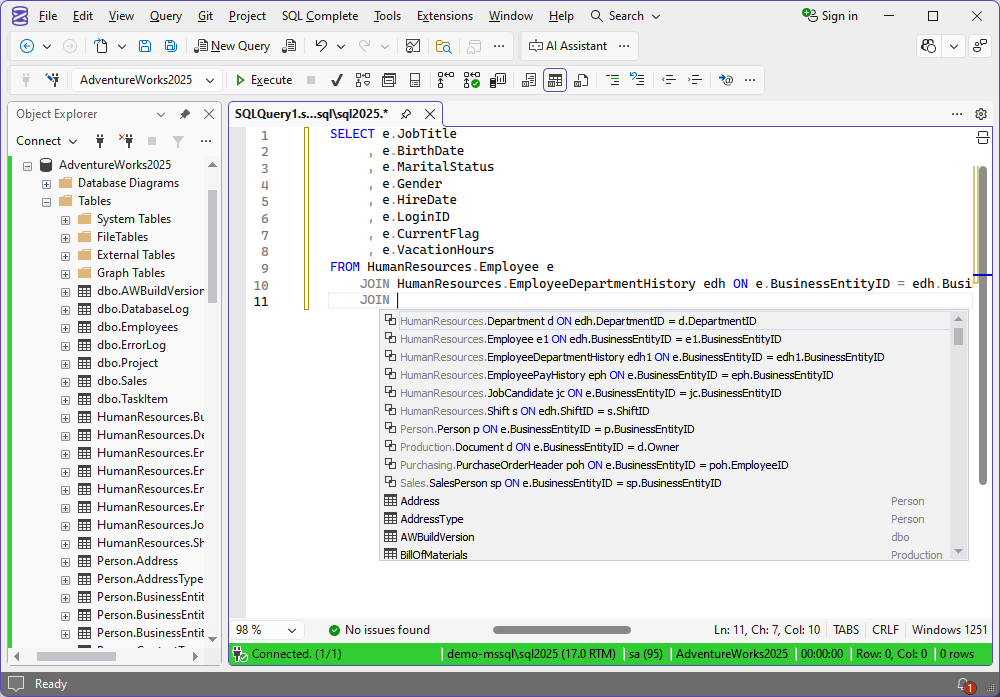
SQL Complete inside SSMS: after JOIN, the list offers related tables with their ON conditions already written, and the toolbar has an AI Assistant button.
dbForge SQL Tools groups its 15 tools into coding (SQL Complete, Query Builder, Search, Unit Test, SQL Decryptor), version control and documentation (Source Control, Documenter, Data Generator), data and schema work (Schema Compare, Data Compare, Data Pump), administration (Index Manager, Monitor, Event Profiler) and automation (DevOps Automation). The Professional edition is the one most teams should look at, because Standard leaves out most of what makes the bundle worth having.
Devart's edition matrix is blunt about it. Standard ($469.95) gives you SQL Complete's basic completion and formatting, Data Pump, Query Builder and the free tools, but its Schema and Data Compare skip comparison reports, Git/Azure DevOps/SVN sources, scripts folders, backups and the command line. Professional ($699.95) includes all of those and adds Source Control, Data Generator, Documenter, Unit Test, Index Manager and DevOps Automation, plus SQL Complete's T-SQL debugger and refactoring. Enterprise ($749.95) adds only SQL Complete's T-SQL Code Analyzer.
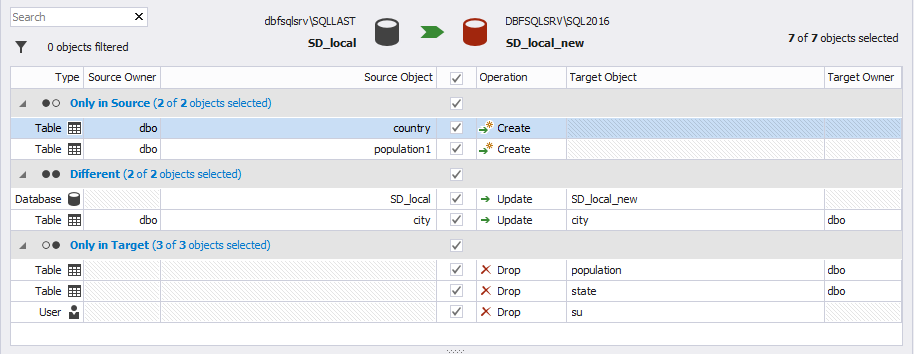
Schema Compare from the bundle: BikeStores_Source against BikeStores_Target, with 9 objects only in the source and 5 different, and the customers table's email column shown as varchar(255) on one side and varchar(100) on the other.
The bundle versus buying the tools one by one
dbForge SQL Tools Professional costs about a third of what its paid tools cost separately. We priced ten of them as 1-year subscriptions in their Professional or only edition: SQL Complete $149.95, Schema Compare $299.95, Data Compare $299.95, Source Control $199.95, Data Generator $199.95, Documenter $189.95, Unit Test $189.95, Data Pump $189.95, Query Builder $139.95 and Index Manager $129.95. Together that's $1,989.50, and DevOps Automation has no price of its own: its product page sends buyers to the SQL Tools order page.
dbForge SQL Tools Professional vs its tools bought separately (1 year, USD)
dbForge SQL Tools Professional$699.95
The same 10 paid tools bought one by one$1,989.50
Devart's prices for 1-year subscriptions, checked on November 2, 2026.
The catch is that the savings only count if you'd use the tools. A developer who wants better autocomplete and nothing else pays $149.95 for SQL Complete, not $699.95 for the bundle.
What we like
- You keep SSMS, so nobody has to learn a new IDE
- Professional includes Source Control, Unit Test and DevOps Automation
- About a third of the price of its tools bought separately
- Supports SSMS up to v22 and Visual Studio up to 2026
Watch out for
- $150 a year more than Studio Enterprise for much the same jobs
- Standard edition's comparison tools are cut down
- SSMS updates can unhook the add-ins until you reinstall them
- 813 MB installer, Windows only
What users say about dbForge SQL Tools
dbForge SQL Tools averages 4.3 out of 5 from 23 reviews on G2, and Capterra's regional pages show 4.9 from 8. G2 reviewers praise the ease of use and the comparison tools, while some call the price high compared with similar tools and one mentions a little lag when switching windows. Customers quoted on Devart's site:
Greg Rhind, Development Lead at Coyote Software Corporation: "We use SQL Complete every day, probably, every hour. From formatting to snippets that help build INSERT scripts for our complex reference table additions, to the simplest of snippets that speed up query writing."
Steve Palmer, Consultant at GoodSoftware.com, LLC: "Easy, repeatable. Just works. You've provided us with a reliable tool that we depend on daily."
Download dbForge SQL Tools Free TrialBuy dbForge SQL Tools
dbForge Studio for SQL Server
dbForge Studio for SQL Server is Devart's all-in-one SQL Server IDE. Price: $399.95 a year for Professional on the order page (Express free, Standard $249.95, Enterprise $549.95). Runs on: Windows 7 to 11 and Windows Server 2008 to 2025 with .NET Framework 4.7.2; macOS and Linux only through CodeWeavers CrossOver. Best for: developers and DBAs who'd rather work in one dedicated IDE than in SSMS with add-ins.
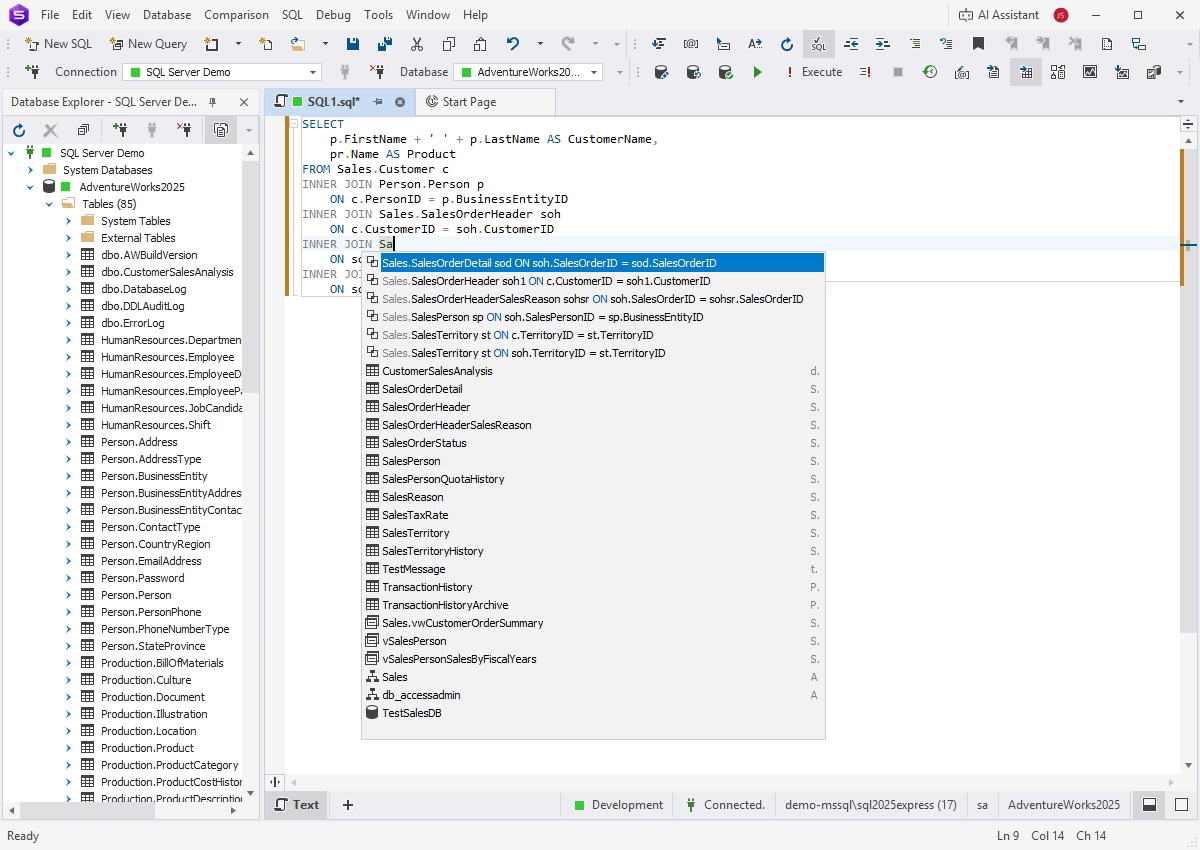
The same JOIN completion in Studio's own editor, with its Database Explorer on the left listing the AdventureWorks2025 tables and an AI Assistant button at the top right.
dbForge Studio for SQL Server covers writing and debugging T-SQL, visual table and database design, schema and data comparison, test data, documentation, backups, users and permissions, pivot tables and data reports, in one window. Its four editions climb in clear steps:
- Express (free): code completion and formatting, visual data and object editors, database diagrams, data import and export, backup and restore, and the Security Manager. It's also what the trial turns into after 30 days.
- Standard ($249.95): adds the T-SQL debugger, Query Profiler, Visual Query Builder, Copy Database, snippets and refactoring, pivot tables and data reports.
- Professional ($399.95): adds schema and data comparison with command-line automation and backup support, the T-SQL Code Analyzer, Index Manager, Event Profiler and Data Generator.
- Enterprise ($549.95): adds source control (Git, TFVC, SVN, Perforce, Vault, Mercurial and Azure DevOps), T-SQL unit tests, database documentation, scripts folder comparison and the PowerShell, Jenkins, TeamCity, Azure DevOps and Bamboo plugins.
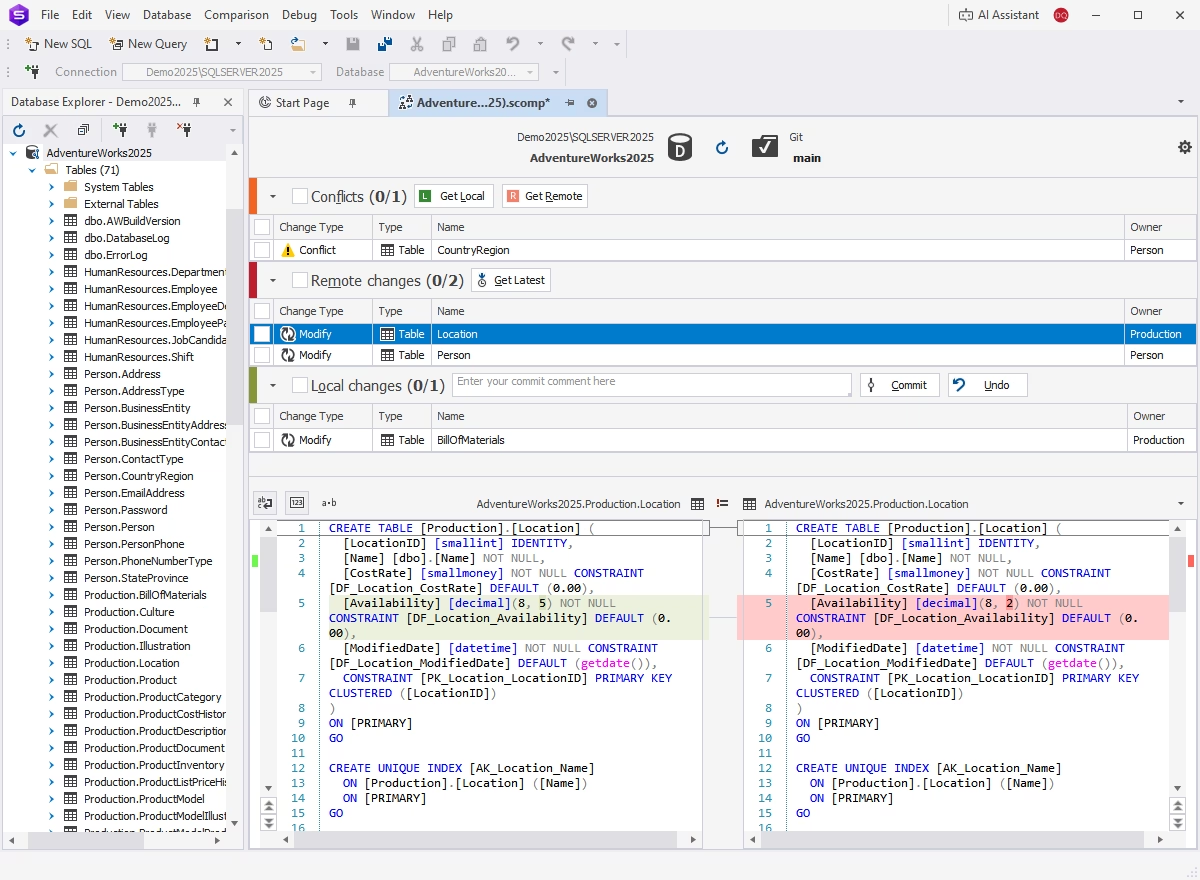
Studio's Source Control Manager linked to a Git main branch: one conflict, two remote changes and one local change, with the Production.Location table's decimal(8, 5) and decimal(8, 2) versions side by side.
On Mac and Linux, be clear about what you're buying. Devart's own FAQ calls Studio a Windows-native application that runs on macOS and Linux through CrossOver or Wine, and its compatibility page says CrossOver must be installed first. It works, but it isn't a native Mac app.
What we like
- A free Express edition, and the trial falls back to it instead of locking you out
- Professional at $399.95 already has full schema and data compare
- Enterprise covers the SQL Tools Professional toolchain for $150 a year less
- 140 MB installer, and it runs on Mac and Linux through CrossOver
Watch out for
- It replaces SSMS, so your team has to move to it
- Source control and unit tests need Enterprise
- Not native on macOS or Linux
- Devart lists the AI Assistant as paid separately
What users say about dbForge Studio for SQL Server
dbForge Studio for SQL Server has one of the larger review profiles among Devart's tools: Capterra shows 4.8 out of 5 from about 30 reviews, and G2 lists 4.6 out of 5 from 59. Reviewers mostly praise productivity and ease of use, and the complaints are about specific missing features rather than stability, such as not being able to keep database diagrams as part of a project. Customers quoted on Devart's site:
Catalin Gheorghiu, Founder, CTO and Lead Solution Architect: "It is a replacement on steroids for SQL Server Management Studio – more user-oriented, far more productive than any tool we have used before. We are still in awe."
Logan Laux, Software Development Manager: "I use dbForge Studio for everything, from one-off data edits to stored procedure or function creation, query profiling, report building, and source control. It really is my go-to platform on a day-to-day basis."
Download dbForge Studio for SQL Server Free Trial
dbForge Data Compare for SQL Server (if you only need one tool)
dbForge Data Compare for SQL Server is the one tool from the bundle that many buyers actually came for. Price: $299.95 a year for Professional at checkout (Standard $239.95). Runs on: Windows, as a standalone app and an SSMS add-in. Best for: DBAs and developers who need to find and sync row differences between databases and nothing else.
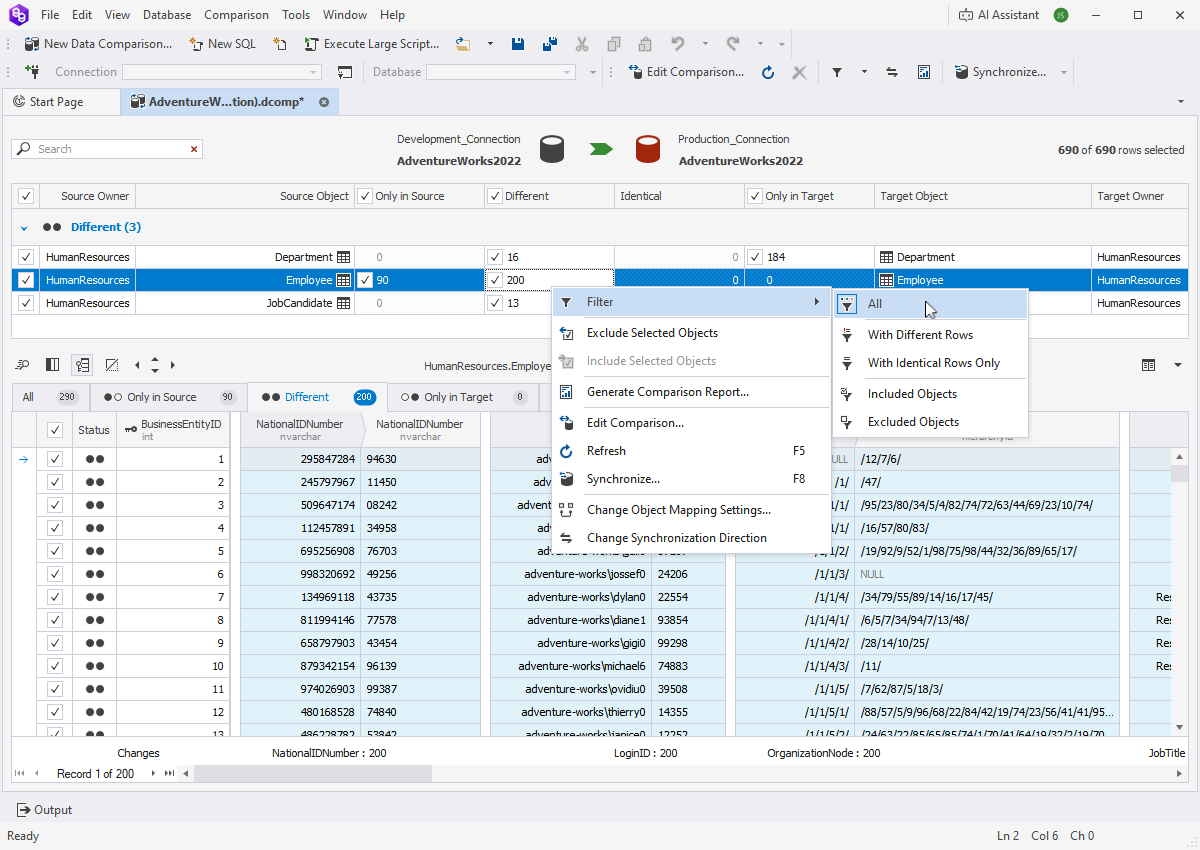
Data Compare between a development and a production AdventureWorks2022 database: the Employee table has 90 rows only in the source and 200 different rows, with the menu open on Filter, Generate Comparison Report and Synchronize.
dbForge Data Compare for SQL Server compares tables, views and custom query results row by row on SQL Server 2000 to 2025, Azure SQL and Amazon RDS, maps tables and columns with different names, compares tables without a primary key on a custom key, and writes a sync script that can back up the target first. Reports go to Excel, HTML or CSV. Professional adds native backup and scripts folder comparison and the command line. It's the same Data Compare you get in SQL Tools Professional, so if you later need more, the bundle is the upgrade path.
What we like
- Less than half the price of SQL Tools Professional
- Full-featured Professional edition, unlike the bundle's Standard
- Formatted Excel diff reports
Watch out for
- Rows only: comparing table structure is Schema Compare's job
- Very large comparisons cache data locally and can be slow
- Only a handful of reviews on the big review sites
What users say about dbForge Data Compare
Capterra and Software Advice rate dbForge Data Compare for SQL Server 4.8 out of 5, but from only 4 reviews. Sheldon Hull compared it with Redgate's tool on his blog in February 2017, on an older version:
"Having just completed some very large data comparisons on views, generating over 15GB of network traffic in last few days, I've been really impressed with the usability and output from Devart DbForge Data Compare. The performance seems great."
Download dbForge Data Compare Free TrialBuy dbForge Data Compare
Features: which edition matches which
dbForge Studio for SQL Server reaches each level of features one edition cheaper than you'd expect, because Devart prices the convenience of SSMS integration into SQL Tools. Here's how the editions line up on the jobs that matter, from Devart's two edition matrices:
| Job |
Cheapest SQL Tools edition |
Cheapest Studio edition |
| Code completion and formatting | Standard, $469.95 | Express, free |
| T-SQL debugger | Professional, $699.95 | Standard, $249.95 |
| Schema and data compare with backups and command line | Professional, $699.95 | Professional, $399.95 |
| Test data generator and Index Manager | Professional, $699.95 | Professional, $399.95 |
| T-SQL Code Analyzer | Enterprise, $749.95 | Professional, $399.95 |
| Source control and unit tests | Professional, $699.95 | Enterprise, $549.95 |
| Documentation and CI/CD plugins | Professional, $699.95 | Enterprise, $549.95 |
| Works inside SSMS and Visual Studio | Every edition | No edition |
Two things stand out. Studio is ahead on the debugger and the Code Analyzer, while SQL Tools puts source control and unit tests in a lower edition than Studio does. And the last row is the only one where Studio has no answer at any price.
Price and licensing
dbForge Studio for SQL Server is cheaper at every level, and dbForge Data Compare is cheapest if you only need one job done. All three use the same Devart license terms: a yearly subscription by default, a perpetual license at twice the yearly price that includes 12 months of updates, 2- and 3-year terms at a lower yearly rate, and volume discounts of 5% for 5 to 9 licenses, 10% for 10 to 19 and 15% for 20 or more.
1-year subscription for one user (USD)
dbForge Studio for SQL Server Standard$249.95
dbForge Data Compare for SQL Server Professional$299.95
dbForge Studio for SQL Server Professional$399.95
dbForge SQL Tools Standard$469.95
dbForge Studio for SQL Server Enterprise$549.95
dbForge SQL Tools Professional$699.95
dbForge SQL Tools Enterprise$749.95
Prices on the order page and in Devart's ordering data, checked on November 2, 2026. Studio Express is free.
The dbForge AI Assistant, which writes, explains and optimizes SQL from plain-language requests, appears in both products. It comes with a free Express plan of 200,000 tokens a month, and Devart sells a Professional plan with 20 million tokens a month for $9.95 a month or $99.95 a year. Light use is free; heavy daily use is an extra cost on top of either product.
Ease of use and setup
dbForge SQL Tools is the easier change for an SSMS team and the fussier install. Nothing about your daily routine moves: the add-ins appear as menus and windows in SSMS. But the download is 813 MB, and Devart's support notes say the add-ins only integrate with the SSMS versions present at setup, so you may need to reinstall them after each SSMS update.
dbForge Studio for SQL Server is the simpler install (140 MB, one program, no dependency on SSMS) and the bigger habit change. Everyone on the team learns a new Database Explorer, new shortcuts and new menus. Studio lets you customize every shortcut and import and export user settings, which helps, but expect a learning period.
Which should you choose?
| Your situation |
Pick |
Why |
| A team that lives in SSMS and wants version control, tests and CI/CD | dbForge SQL Tools Professional | The whole toolchain without leaving SSMS, at a third of the separate price |
| An SSMS user who also wants the T-SQL Code Analyzer | dbForge SQL Tools Enterprise | Only $50 a year more than Professional |
| A developer or DBA open to a new IDE, no source control needed | dbForge Studio for SQL Server Professional | Full compare, debugger, code analyzer and data generator for $399.95 |
| A team ready to leave SSMS that needs source control and tests | dbForge Studio for SQL Server Enterprise | Same jobs as SQL Tools Professional for $150 a year less |
| Only syncing data between dev, test and production | dbForge Data Compare for SQL Server | $299.95 for the full Professional tool, no unused extras |
| On a Mac or Linux desktop | dbForge Studio for SQL Server | The only one of the three Devart supports there, through CrossOver |
| No budget | dbForge Studio for SQL Server Express | Free completion, editors, diagrams, import/export and backups |
Who should skip each one
- Skip dbForge SQL Tools if you'd use only one or two of its 15 tools (buy those separately), if you're willing to leave SSMS (Studio does the same for less), or if the Standard edition is all your budget allows, since its comparison tools are cut down.
- Skip dbForge Studio for SQL Server if your team won't give up SSMS, or if your whole reason to buy is SSMS-integrated autocomplete.
- Skip dbForge Data Compare if you also need to compare table structures and procedures: then you need Schema Compare too, and SQL Tools or Studio Professional starts to make more sense.
What commonly goes wrong
- Buying SQL Tools Standard for comparison work. Its Schema and Data Compare lack reports, backups, scripts folders, version control sources and the command line. For real deployment work you need Professional, or Data Compare Professional on its own.
- Add-ins vanishing after an SSMS update. dbForge SQL Tools integrates with the SSMS installed at setup. After installing or upgrading SSMS, reinstall the latest SQL Tools.
- Letting a subscription lapse. A subscription license stops working when it ends, while a perpetual license keeps working and only its updates expire. Devart also charges 20% more to renew if you're 3 or more months late, and 60% more after 12 months.
- Counting on a refund. Devart refunds within 30 days only when a technical problem stops the product working and its support can't fix it. Test on your own databases during the 30-day trial instead.
- Expecting a native Mac app. Studio on macOS and Linux runs through CrossOver; SQL Tools and Data Compare are Windows-only.
- Running out of AI tokens. The free AI Assistant plan caps you at 200,000 tokens a month; heavy use costs extra in both products.
FAQs
Is dbForge SQL Tools the same as dbForge Studio for SQL Server?
No. dbForge SQL Tools is a set of SSMS and Visual Studio add-ins plus a few separate apps, while dbForge Studio for SQL Server is one standalone IDE. They share most features, but you use SQL Tools inside SSMS and Studio instead of it.
Can I use dbForge Studio for SQL Server and SSMS together?
Yes. dbForge Studio for SQL Server installs as its own program and doesn't change SSMS, so you can keep both. You just don't get Studio's features inside SSMS; for that you need dbForge SQL Tools.
Which is cheaper, dbForge SQL Tools or dbForge Studio?
dbForge Studio for SQL Server is cheaper. Its editions cost $249.95, $399.95 and $549.95 a year, against $469.95, $699.95 and $749.95 for dbForge SQL Tools, and Studio has a free Express edition.
Does dbForge SQL Tools include Data Compare?
Yes. dbForge SQL Tools includes dbForge Data Compare and Schema Compare in every edition, but only Professional and Enterprise get the full versions with backups, scripts folders, reports and the command line.
Does dbForge Studio for SQL Server run on a Mac?
Only through CodeWeavers CrossOver. dbForge Studio for SQL Server is a Windows application, and Devart supports running it on macOS and Linux with CrossOver installed. dbForge SQL Tools doesn't run on a Mac at all.
What happens when the dbForge Studio trial ends?
dbForge Studio for SQL Server switches to its free Express edition, so you keep code completion, the visual editors, diagrams, import/export and backups. The dbForge SQL Tools trial has no free edition to fall back to.
Do these tools work with Azure SQL Database?
Yes. dbForge SQL Tools, dbForge Studio for SQL Server and dbForge Data Compare all work with Azure SQL Database and Azure SQL Managed Instance as well as on-premises SQL Server, and Studio also lists Azure Synapse, Amazon RDS and Microsoft Fabric.
Should I buy a perpetual license or a subscription?
A perpetual license costs twice the yearly price and keeps working after its 12 months of updates end, so it pays off if you'll use the same version for more than two years. dbForge SQL Tools Professional perpetual costs $1,399.95, and dbForge Studio for SQL Server Professional perpetual costs $799.95.
Conclusion
dbForge SQL Tools Professional is the right buy for SQL Server teams that won't leave SSMS: $699.95 a year gets SQL Complete, full schema and data compare, Source Control, Unit Test, Data Generator, Documenter and DevOps Automation in the tool they already use, for about a third of the separate price. dbForge Studio for SQL Server is the better value for anyone willing to switch IDEs, with Professional at $399.95 and Enterprise at $549.95 covering the same jobs, and a free Express edition. And if you only need data sync, dbForge Data Compare at $299.95 is enough. Use the 30-day trials on your own databases before you pay.
Download dbForge SQL Tools Free TrialBuy dbForge SQL Tools