dbForge SQL Tools: 15 SQL Server Tools That Plug Into SSMS
dbForge SQL Tools is Devart's bundle of 15 apps and SSMS add-ins for Microsoft SQL Server and Azure SQL, covering code completion, schema and data comparison, source control, test data, unit tests, index maintenance and CI/CD. It runs on Windows and costs $699.95 a year for the Professional edition at checkout (Standard $469.95, Enterprise $749.95), with a free 30-day trial.
If you spend your day in SQL Server Management Studio, you know where it runs out: IntelliSense that misses half your tables, no way to see what changed between dev and production, and no clean path from a database to Git. SQL Tools fills those gaps inside SSMS itself, so you keep the environment you already know and add the missing pieces.
Quick facts
- Version: 2026.2.82, released October 16, 2026
- Developer: Devart
- Runs on: Windows 7 to 11 and Windows Server 2008 to 2025, with .NET Framework 4.7.2
- Works with: SSMS 2016 and v17 to v22, Visual Studio 2015 to 2026
- Databases: SQL Server 2000 to 2025 (2000 with limited support), SQL Server on Linux, Azure SQL Database, Azure SQL Managed Instance, Azure Synapse
- Editions: Standard, Professional, Enterprise, each as a yearly subscription or a perpetual license
- Price: $699.95 per year for Professional at checkout
- Free trial: 30 days, full bundle (download needs a free Devart account)
- Download size: 813.39 MB
What we checked: the download page listing version 2026.2.82 (813.39 MB) released October 16, 2026, Devart's edition and pricing data, and the order page showing the Professional edition with 1 year of support and upgrades at $699.95, renewing at the same price, on October 26, 2026. We didn't install the bundle or run its tools against a database.
Download Free TrialBuy Now
Overview
dbForge SQL Tools isn't one program. It's a set of separate tools, most of which install as add-ins to SSMS (and some to Visual Studio), plus a few standalone apps. The 15 tools fall into five groups:
- Development: SQL Complete, Query Builder, Search, Unit Test, SQL Decryptor
- Version control and documentation: Source Control, Documenter, Data Generator
- Data and schema operations: Schema Compare, Data Compare, Data Pump
- Administration: Index Manager, Monitor, Event Profiler
- Automation: DevOps Automation
Several of them (SQL Complete, Documenter, Data Generator, Query Builder, Data Compare and Schema Compare) include the dbForge AI Assistant, which generates SQL from a plain-language request, explains and fixes queries, and suggests optimizations. Buying the bundle costs far less than buying the tools one by one, which is its main selling point.
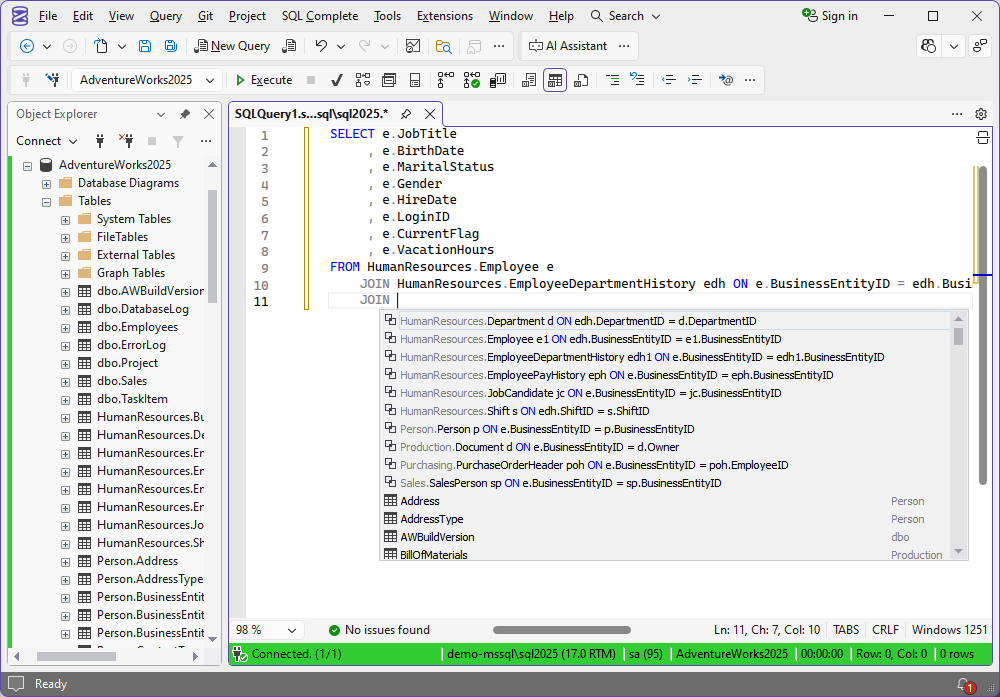
SQL Complete inside SSMS: while you type JOIN, it lists the matching tables with their ON conditions already written, next to the Object Explorer and an AI Assistant button in the toolbar.
Features
Faster T-SQL coding in SSMS with SQL Complete
SQL Complete replaces SSMS's basic IntelliSense with context-aware completion, JOIN clause auto-generation, SQL formatting (also from the command line), code snippets, T-SQL refactoring and a T-SQL debugger with breakpoints and watches. It adds conveniences people miss in plain SSMS: tab coloring by server, aggregates in the results grid, semicolon insertion and execution notifications. The Enterprise edition adds a T-SQL code analyzer.
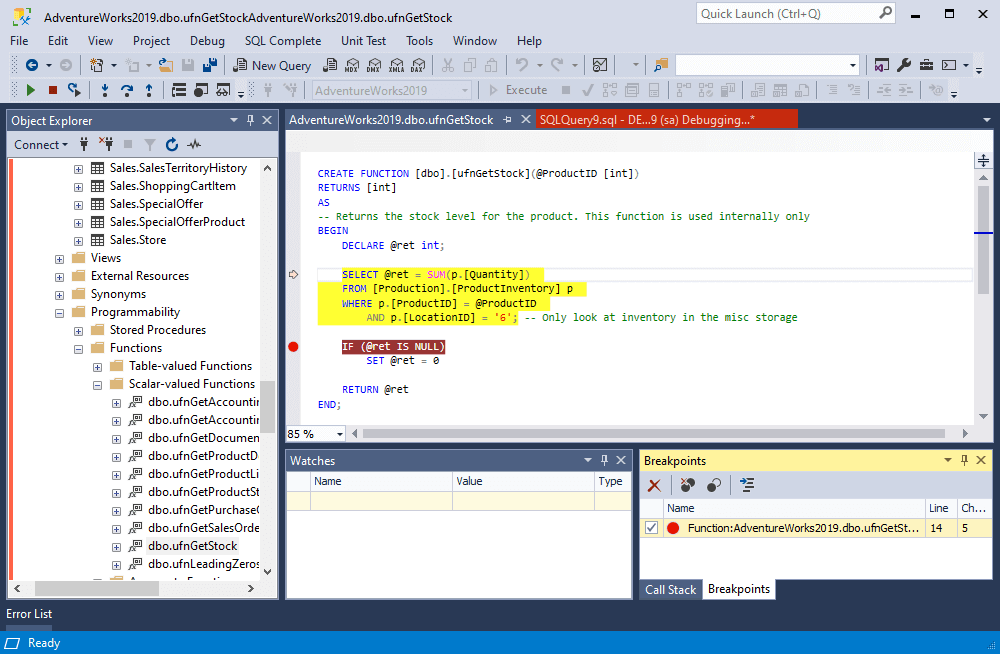
SQL Complete's T-SQL debugger stepping through a scalar function in SSMS, with a breakpoint set and the Watches and Breakpoints panes open.
See and sync differences with Schema Compare and Data Compare
Schema Compare shows every object that differs between two databases, scripts folders or backups, and generates a deployment script to sync them. Data Compare does the same for table rows. Both support custom mappings, comparison reports, Git, Azure DevOps and SVN as sources, and command-line runs for automation.
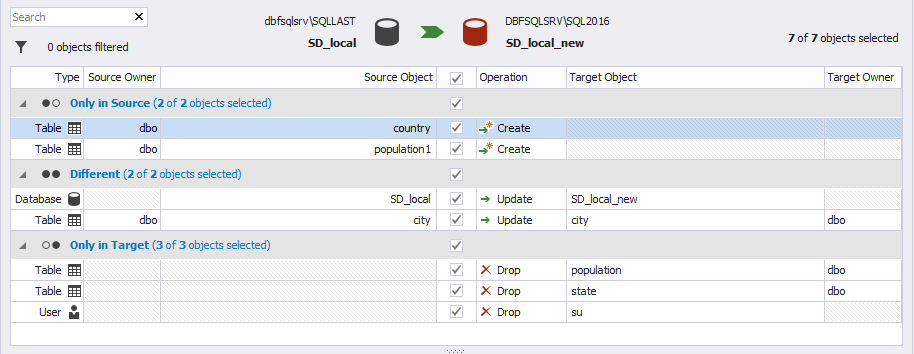
Schema Compare comparing two databases: objects grouped as Only in Source and Different, each with an Update operation, and the CREATE TABLE scripts side by side with the changed column highlighted.
Put your database under version control with Source Control
dbForge Source Control links schemas and static data to Git, Azure DevOps Server, SVN, TFVC, Mercurial, Perforce or SourceGear Vault from inside SSMS, with two development models, conflict resolution, change history and rollback (Professional and Enterprise).
Realistic test data and T-SQL unit tests
Data Generator fills tables with realistic data from more than 200 meaningful generators (names, addresses, emails and so on) while keeping keys and constraints intact. Unit Test lets you write tests in plain T-SQL, run them in isolation inside SSMS, and run them from the command line or PowerShell in a build (both Professional and Enterprise).
Import, export and documentation
Data Pump imports from 10 and exports to 14 file formats inside SSMS, with templates for repeat jobs. Documenter (Professional and Enterprise) generates searchable database documentation in HTML or PDF, including extended properties and the largest tables.
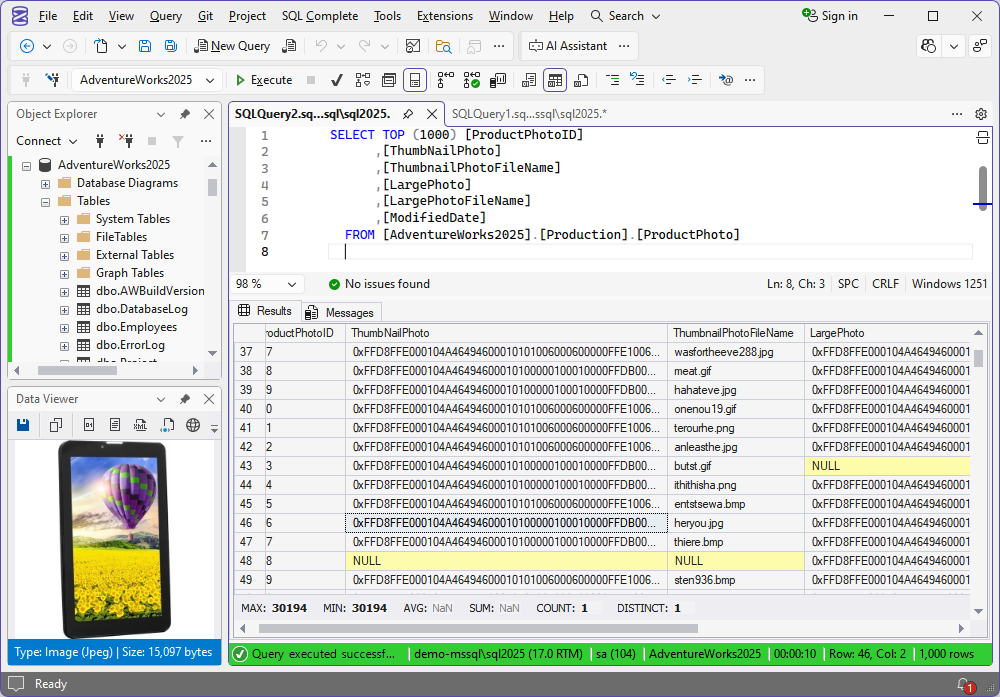
SQL Complete's Data Viewer showing a JPEG stored in a varbinary column, next to the results grid with MAX, MIN, COUNT and DISTINCT aggregates at the bottom.
Index maintenance, monitoring and DevOps
Index Manager scans databases for index fragmentation, recommends maintenance, and rebuilds indexes in a visual mode or with a generated script. Monitor tracks active sessions, waits, I/O and slow queries, and Event Profiler captures server events into trace files. DevOps Automation plugs the tools into PowerShell, Azure DevOps, Jenkins, TeamCity and Bamboo pipelines for continuous integration and delivery.
Benefits
The biggest win is staying in SSMS. You don't switch to a new IDE or retrain a team. The tools appear as menus and windows in the Management Studio everyone already uses, so adoption is gradual: one developer starts with SQL Complete, the release manager adds Schema Compare, and the DevOps engineer wires up the command-line versions.
The second is fewer deployment surprises. With schema comparison, source control and unit tests in one package, a database change can be versioned, tested and diffed against production before it ships, rather than pieced together from hand-written scripts.
The third is price per tool. Fifteen tools for one yearly fee works out cheaper than licensing the four or five you'd otherwise buy separately.
Real-World Uses
- Release day: run Schema Compare between staging and production, review the diff, and deploy the generated script instead of a hand-assembled one.
- A new developer on the team: Source Control pulls the database schema from Git into their local SQL Server, and Data Generator fills it with realistic test rows.
- Debugging a slow report: step through the stored procedure with SQL Complete's debugger, then check Index Manager for fragmented indexes on the tables it reads.
- Audit or handover: Documenter produces a searchable HTML document of the whole database in minutes.
- CI pipeline: DevOps Automation runs unit tests and schema sync in Azure DevOps or Jenkins on every commit.
Who It's For, and Who Should Skip It
dbForge SQL Tools suits SQL Server developers, DBAs and DevOps engineers who live in SSMS and want comparison, version control and testing without leaving it, and teams that want one vendor and one license for the whole toolchain.
Skip it if you work mainly with MySQL, PostgreSQL or Oracle (Devart's dbForge Edge or the database-specific Studios cover those), if you'd rather have one standalone IDE than SSMS add-ins (that's dbForge Studio for SQL Server), or if you only need better autocomplete, in which case SQL Complete on its own costs less. It's also Windows-only, so Mac and Linux users need another tool.
Usage Guide
- Install SSMS first. Install or update the SSMS version you'll use before installing SQL Tools, because the add-ins integrate with the SSMS present at setup time.
- Download the trial. Sign in with a free Devart account on the download page and run the 813 MB installer. Choose which tools to install.
- Open SSMS. The add-ins appear in SSMS menus (SQL Complete, Data Pump, Source Control, Unit Test and others), and the standalone apps such as Schema Compare and Query Builder appear in the Start menu.
- Activate. The 30-day trial starts on first use. After buying, enter your license key from Devart's Registered User's Area.
- Start with one workflow. For example, connect SQL Complete to a database and write queries, or open Schema Compare, pick a source and target, and compare.
Before you buy
- Subscription vs perpetual: the default order is a subscription, and when a subscription ends the software stops working. A perpetual license keeps working forever and includes 12 months of updates.
- Renew on time: Devart's renewal price for updates rises 20% if you're 3 or more months late and 60% if you're 12 or more months late.
- Refunds are conditional: Devart refunds within 30 days only when a technical problem can't be fixed by its support team, so use the 30-day trial to test on your own databases first.
Where it falls short
- SSMS updates can break the add-ins. Devart's own support article says the tools integrate only with the SSMS version installed at setup, so after installing or updating SSMS you may need to uninstall and reinstall them.
- Price for small teams. Reviewers on G2 say the price is high compared with similar tools, and a solo developer may only need one or two of the 15.
- Occasional lag. Reviews of SQL Complete mention IntelliSense lag and slow metadata loading on large databases, and that JOIN auto-generation isn't always right.
- A big install. At 813 MB the full bundle is heavy, though you can choose which tools to install.
What Users Say
Customer stories on Devart's site
Steve Palmer, Consultant at GoodSoftware.com, LLC: "Easy, repeatable. Just works. You've provided us with a reliable tool that we depend on daily."
Svend Dyhr Hansen, Software Developer at BookingStudio A/S: "Fewer spelling errors, correct JOINs, formatting as desired... It all makes my daily work easier."
Greg Rhind, Development Lead at Coyote Software Corporation: "We use SQL Complete every day, probably, every hour. From formatting to snippets that help build INSERT scripts for our complex reference table additions, to the simplest of snippets that speed up query writing."
Review sites
dbForge SQL Tools averages 4.3 out of 5 from 23 reviews on G2, and regional Capterra pages show 4.9 out of 5 from 8 reviews. G2 reviewers most often praise the ease of use and the schema and data comparison tools. One singled out Data Generator's interface for making test data easy, while others say the price is high compared with similar tools and one mentions a little lag when switching between windows.
Reviews of SQL Complete, the bundle's most-used tool, on Capterra, Software Advice and TrustRadius praise the autocomplete, the formatter, reopening all tabs after restarting SSMS, query history, and color-coding of Dev, Test and Production connections. The complaints are intermittent IntelliSense lag, slow metadata loading, JOIN suggestions that aren't always correct, and, from one reviewer, more bugs and crashes in recent versions. (These review sites block direct access, so we summarize what they show rather than quote it.)
The pattern: people who adopt SQL Tools use it daily and value the comparison tools and SQL Complete most. The recurring reservations are price and occasional sluggishness, not missing features.
Comparisons
dbForge SQL Tools vs dbForge Studio for SQL Server
Both come from Devart and overlap heavily. SQL Tools adds features to SSMS and Visual Studio as add-ins plus a few separate apps. dbForge Studio for SQL Server is a single standalone IDE that replaces SSMS. Choose SQL Tools if your team is committed to SSMS. Choose Studio if you want everything in one window.
Standard vs Professional vs Enterprise
Standard covers coding (SQL Complete Standard), Schema and Data Compare, Data Pump, Query Builder and the free tools, enough for an individual developer. Professional adds the team and DevOps tools: Source Control, Data Generator, Documenter, Unit Test, Index Manager and DevOps Automation. Enterprise adds SQL Complete Enterprise with T-SQL code analysis and the most advanced comparison features, for only $50 a year more than Professional.
Editions and Pricing
| Edition |
1-year subscription |
Perpetual license |
What it adds |
| Standard |
$469.95 |
$939.95 |
SQL Complete Standard, Schema Compare, Data Compare, Data Pump, Query Builder, free tools |
| Professional |
$699.95 |
$1,399.95 |
Source Control, Data Generator, Documenter, Unit Test, Index Manager, DevOps Automation |
| Enterprise |
$749.95 |
$1,499.95 |
SQL Complete Enterprise with T-SQL code analysis |
Prices are for one user. Devart also sells 2- and 3-year subscriptions at a lower yearly rate, optional priority support, and volume discounts of 5% for 5 to 9 licenses, 10% for 10 to 19 and 15% for 20 or more. The Buy Now button opens the Professional 1-year subscription, and you can switch edition and term in the cart.
FAQs
Does dbForge SQL Tools work with SSMS 21 and 22?
Yes. dbForge SQL Tools supports SSMS v22, v21, v20, v19, v18, v17 and SSMS 2016. SSMS 2012 and 2014 are only supported by older versions of the add-ins.
What happens when my dbForge SQL Tools subscription ends?
dbForge SQL Tools stops working when a subscription ends, unless you renew. A perpetual license works forever and only its 12 months of updates and support expire.
Can I use dbForge SQL Tools with Azure SQL Database?
Yes. dbForge SQL Tools works with Azure SQL Database, Azure SQL Managed Instance and Azure Synapse, including Microsoft Entra ID multi-factor authentication, as well as SQL Server on-premises and on Linux.
Why did the dbForge tools disappear from SSMS after an update?
dbForge SQL Tools integrates only with the SSMS version installed when you set it up. After installing or updating SSMS, uninstall the SQL Tools components and reinstall the latest version from Devart.
Does dbForge SQL Tools run on Mac or Linux?
No. dbForge SQL Tools is Windows-only, since it plugs into SSMS and Visual Studio on Windows. It can connect to SQL Server running on Linux.
Is the dbForge AI Assistant included in the price?
The dbForge AI Assistant is built into SQL Complete, Documenter, Data Generator, Query Builder, Data Compare and Schema Compare in the SQL Tools bundle. Devart's ordering data doesn't list it as a separate charge.
Can I get a refund for dbForge SQL Tools?
Only in limited cases. Devart offers a full refund within 30 days of purchase when a technical problem stops the product from working and its support team can't solve it, so test with the free 30-day trial first.
System Requirements
- Operating system: Windows 7, 8, 8.1, 10 or 11, or Windows Server 2008, 2012, 2016, 2019, 2022 or 2025
- Framework: .NET Framework 4.7.2 or higher
- SSMS: 2016, v17, v18, v19, v20, v21 or v22
- Visual Studio: 2015, 2017, 2019, 2022 or 2026
- Databases: SQL Server 2000 to 2025 (2000 with limited support), SQL Server on Linux, Azure SQL Database, Azure SQL Managed Instance, Azure Synapse
- Disk: about 813 MB for the full installer
Conclusion
dbForge SQL Tools is worth it for SQL Server teams that live in SSMS and want comparison, version control, testing and CI/CD without switching IDEs. The Professional edition at $699.95 a year is the sweet spot, since it adds Source Control, Unit Test and DevOps Automation, the tools that change how a team ships database changes. The main reason not to buy is if you only need one or two of the tools: then a single dbForge product, or the free tools in SSMS, will cost far less. Use the 30-day trial on a real project, and check that it survives your next SSMS update.
Download Free TrialBuy Now